Topic
Object Class
Reflection
System Class
String/StringBuffer/StringBuilder
Wrapper Class
Date-related Class
Number/Math/Random/UUID
What I Learned
Object 클래스
- 모든 클래스의 최상위 부모 클래스
- 11개의 메소드만 존재
protected Object clone() // (오버라이딩 필요) 객체 자신의 복사본을 반환한다.
public boolean equals(Object obj) // (오버라이딩 필요) 객체 자신과 객체 obj가 같은 객체인지 확인한다.
protected void finalize() // 객체가 소멸할 때 가비지 컬렉터에 의해 자동으로 호출된다. 이때 수행되어야 하는 코드가 있는 경우에만 오버라이딩한다.
public Class getClass() // 객체 자신의 클래스 정보를 담고 있는 Class 인스턴스를 반환한다.
public int hashCode() // (오버라이딩 필요) 객체 자신의 해시코드를 반환한다.
public String toString() // (오버라이딩 필요) 객체 자신의 정보를 문자열로 반환한다.
public void notify() // 객체 자신을 사용하려고 기다리는 스레드를 하나만 깨운다.
public void notifyAll() // 객체 자신을 사용하려고 기다리는 모든 스레드를 깨운다.
public void wait() // 다른 스레드가 notify()나 notifyAll()을 호출할 때까지 현재 스레드를 기다리게 한다.
public void wait(long timeout) // 스레드를 무한히 또는 지정된 시간(timeout) 동안 기다리게 한다. (timeout의 단위는 ms)
public void wait(long timeout, int nanos) // 스레드를 지정된 시간(timeout, nanos) 동안 기다리게 한다. (nanos의 단위는 ns)
Object 클래스의 메소드
equals(Object obj)
// Object.java
public boolean equals(Object obj) { return (this == obj); }- 객체 자신과 주어진 객체(obj)를 비교합니다. 같으면 true, 다르면 false를 반환합니다.
- Object class에 정의된
equals()는 참조 변수 값(객체의 주소)을 비교합니다. equals()를 오버라이딩해서 인스턴스 변수의 값을 비교하도록 바꿉니다.
hashCode()
// Object java
public native int hashCode();
// native 키워드: 실제 구현은 C/C++로 되어 있으며, 객체의 메모리 주소 기반 해시값을 반환합니다.- 객체의 해시코드를 반환합니다.
- Object class에 정의된
hashCode()는 객체의 메모리 주소 기반 해시값을 반환합니다.
toString()
// Object java
public String toString() {
	return getClass().getName() + "@" + Integer.toHexString(hashCode());
}- 객체의 정보를 문자열(String)로 제공할 목적으로 정의된 메소드
clone()
class Point implements Cloneable {
	int x;
    int y;
    Point(int x, int y) {
    	this.x = x;
        this.y = y;
    }

    public String toString() {
    	return "x=" + x + ", y=" + y;

    }

    public Object clone() {
    	Object obj = null;
        try {
        	obj = super.clone();
        } catch (CloneNotSupportedException e) {}
        return obj;
    }
}- 객체 자신을 복제해서 새로운 객체를 생성하는 메소드
Cloneable인터페이스를 구현한 클래스의 인스턴스만 복제할 수 있습니다.Object클래스에 정의된clone()은 인스턴스 변수의 값만 복제합니다.CloneNotSupportedException이 선언되어 있으므로 호출할 때 try-catch문을 사용해야 합니다.
getClass()
- 자신이 속한 클래스의
Class객체를 반환하는 메소드 Class객체는 클래스의 모든 정보를 담고 있으며 클래스당 1개만 존재합니다.- 클래스 파일(
*.class)이 메모리에 로드될 때 생성됩니다. - 리플렉션(reflection) 사용 시 클래스 정보에 접근할 수 있습니다.
// (리플렉션 활용법)
Card c = new Card();
Class cObj = c.getClass();

Class cObj = Card.class();
String className = cObj.getName();

Class cObj = Class.forName("Card");
리플렉션(reflection)
- 리플렉션(Reflection)은 런타임에 클래스, 메소드, 필드 등의 정보를 동적으로 조회, 조작할 수 있는 기능입니다.
- 코드가 실행 중일 때 클래스의 구조를 탐색하거나 객체에 직접 접근할 수 있는 기능입니다.
- 일반적인 프로그래밍에 사용되는 기법은 아니며 라이브러리, 프레임워크, ORM에서 주로 활용됩니다.
- 내부에서 동적으로 클래스를 로딩할 때, 어노테이션 분석, 객체 자동 생성, 테스트 자동화 등에 활용됩니다.
import java.lang.reflect.Method;

class MyClass {
	private void hello() {
    	System.out.println("Hello, reflection!");
    }
}

public class Main {
	public static void main(String[] args) throws Exception {
    	MyClass obj = new MyClass();
        Class<?> clazz = obj.getClass();

        Method method = clazz.getDeclaredMethod("hello");
        method.setAccessible(true); // private 접근 허용
        method.invoke(obj); // "Hello, reflection!" 출력
    }
}
리플렉션 메소드
- 클래스 조회
Class<?> Class.forName(String name)클래스 이름(문자열)으로 JVM에서 해당 클래스를 찾아 Class 객체로 반환합니다. 동적으로 로딩할 때 사용합니다.Class<?> obj.getClass()객체의 런타임 클래스를 반환합니다. 정적 타입이 아니라 실제 인스턴스의 클래스 정보를 얻을 수 있습니다.Class<Card> Card.class컴파일 타임에 클래스 참조를 가져올 때 사용합니다. 제네릭과 함께 자주 사용됩니다.
- 클래스 정보
String getName()클래스의 전체 이름 (예: java.lang.String) 반환String getSimpleName()클래스 이름만 (예: String) 반환Class<?> getSuperclass()상속받은 부모 클래스의 Class 객체 반환Class<?>[] getInterfaces()구현한 인터페이스들의 Class 배열 반환boolean isInterface()boolean isEnum()boolean isArray()
- 필드 조회
Field[] getDeclaredFields()클래스에 선언된 모든 필드 반환(private 포함, 상속 제외)Field[] getFields()public 필드만 반환(상속 포함)Field getDeclaredField(String name)해당 이름을 가진 필드를 반환(private 포함)
- 필드 조작
Object get(Object obj)지정한 인스턴스의 필드 값을 읽어옴void set(Object obj, Object value)지정한 인스턴스의 필드 값을 설정void setAccessible(true)private 필드나 메소드에 접근 가능하게 설정
- 메소드 조회
Method[] getDeclaredMethods()클래스에 선언된 모든 메소드 반환(private 포함, 상속 제외)Method[] getMethods()public 메소드만 반환(상속 포함)Method getDeclaredMethod(String name, Clas<?>...parameterTypes)특정 이름과 파라미터 타입을 가진 메소드 반환
- 메소드 실행
Object invoke(Object obj, Object...args)특정 객체의 해당 메소드를 실행(반환 값이 있다면 Object로 반환)
- 생성자 조회
Constructor<?>[] getDeclaredConstructors()클래스에 선언된 모든 생성자 반환(private 포함)Constructor<?>[] getConstructors()public 생성자만 반환Constructor<?> getDeclaredConstructor(Class<?>...parameterTypes)특정 파라미터 시그니처에 해당하는 생성자 반환
- 객체 생성
Object newInstance(Object...initargs)생성자를 통해 객체 생성. 리플렉션 기반으로 동적 객체 생성 가능
- 접근 제어
void setAccessible(true)보안 제약을 무시하고 private에도 접근 가능(JDK 9 이상에서는 모듈 접근 제어가 있음)
System 클래스
- System 클래스는 Java에서 표준 입출력, 시스템 속성, 시간 측정, 프로그램 종료 등을 제어하는 유틸리티 클래스입니다.
- 모든 메소드와 필드는 static으로 제공됩니다.
- 이 클래스는 java.lang 패키지에 포함되어 있어 import 없이 바로 사용 가능합니다.
System 클래스의 메소드
System.out.println() 콘솔에 출력 (표준 출력 스트림) System.err.println() 오류 메시지 출력 (표준 오류 스트림)
System.in 표준 입력 스트림 (키보드 입력)
System.currentTimeMillis() 현재 시간을 밀리초로 반환 (Unix Time 기준)
System.nanoTime() 고정밀 시간 측정 (성능 측정용)
System.exit(int status) 프로그램 강제 종료 (0은 정상 종료) System.arraycopy(src, srcPos, dest, destPos, length) 배열 복사
System.getProperty(String key) 시스템 속성 조회 (JVM 환경 정보) System.getenv(String name) 환경 변수 조회
System.gc() 명시적으로 가비지 컬렉션 요청 System.identityHashCode(Object obj) 객체의 원래 해시코드 반환 (hashCode() 오버라이드 무시);
String 관련 클래스
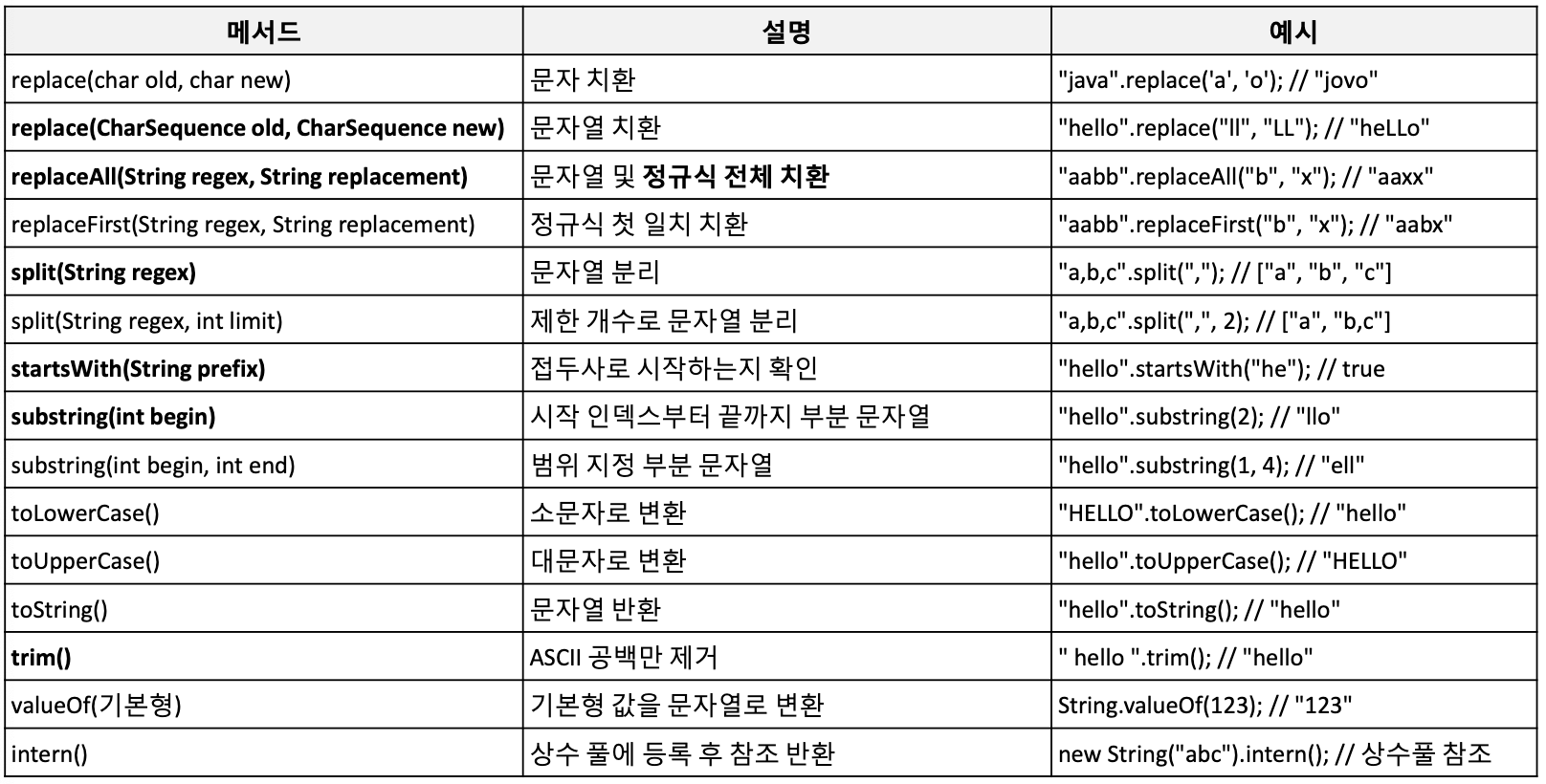
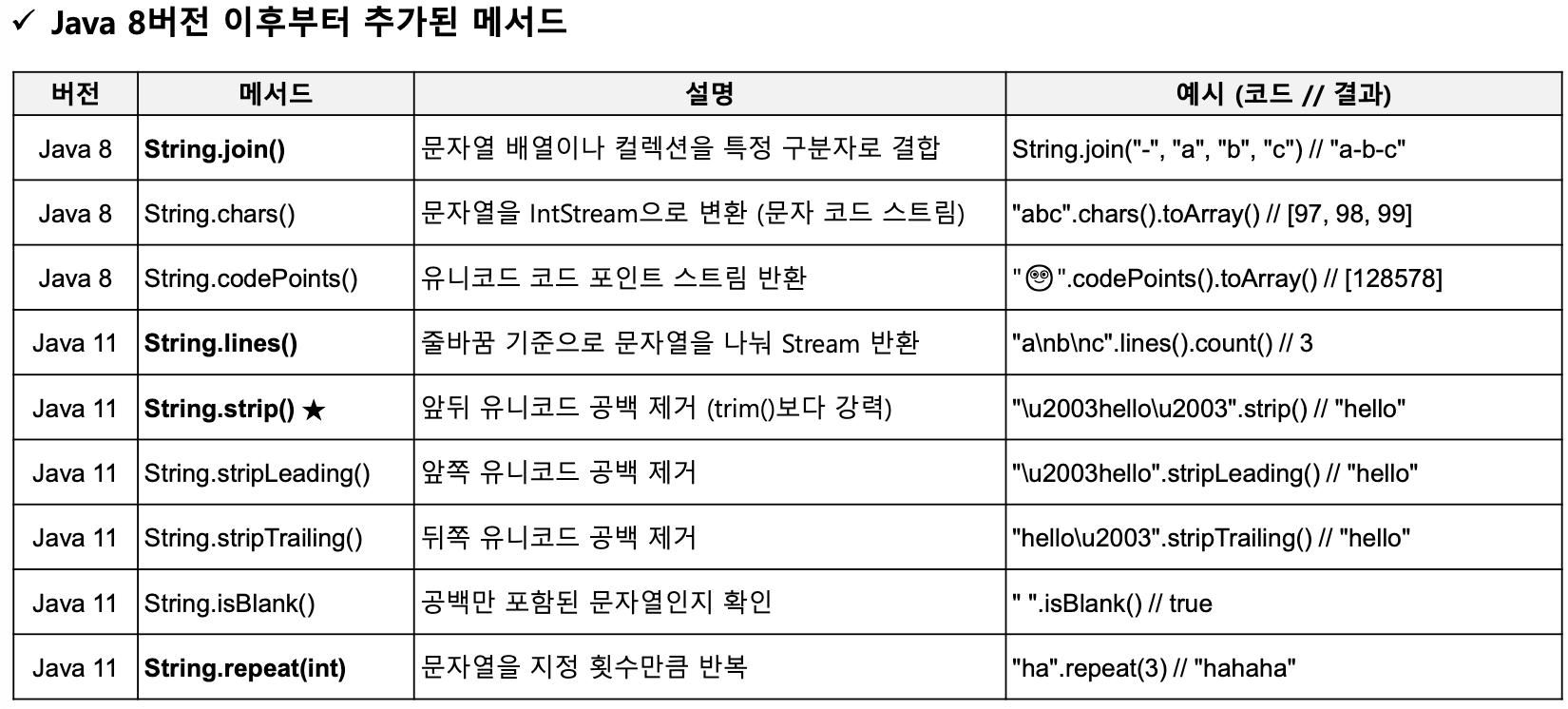
- Java에서 String, StringBuffer, StringBuilder는 문자열을 다룰 때 활용 가능한 클래스들입니다.
- String은 불변(immutable) 객체로, 한 번 생성되면 그 값을 변경할 수 없습니다.
- 문자열을 자주 수정해야 할 때에는 StringBuffer(동기화 지원)나 StringBuilder(비동기, 성능 우수)를 사용하는 것이 권장됩니다.

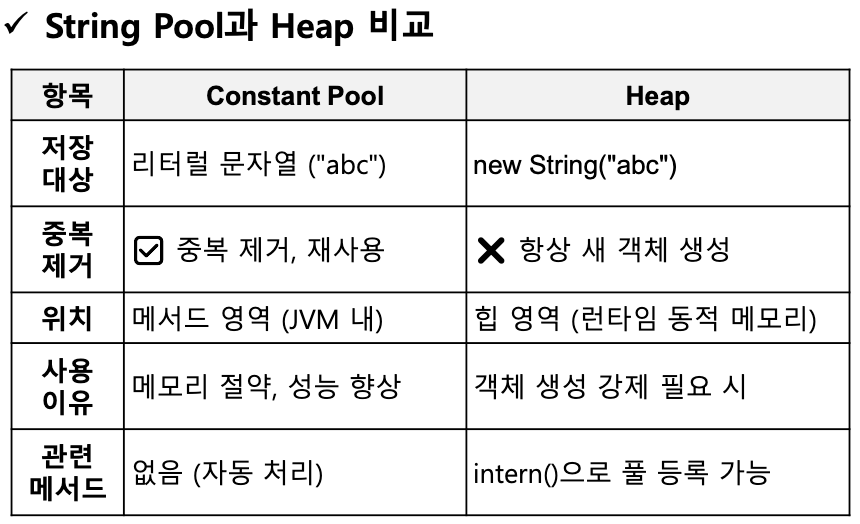
String Constant Pool
- String Constant Pool은 동일한 문자열 리터럴을 메모리에서 중복 없이 공유하기 위해 사용하는 문자열 상수 저장소입니다.
- 리터럴로 생성된 문자열은 자동으로 풀에 등록되며 동일한 값은 재사용되어 메모리 효율을 높입니다.
new String("Hello")와 같이 생성된 문자열은 무조건 힙 영역에 저장되어 서로 다른 객체로 간주됩니다.
String 메소드 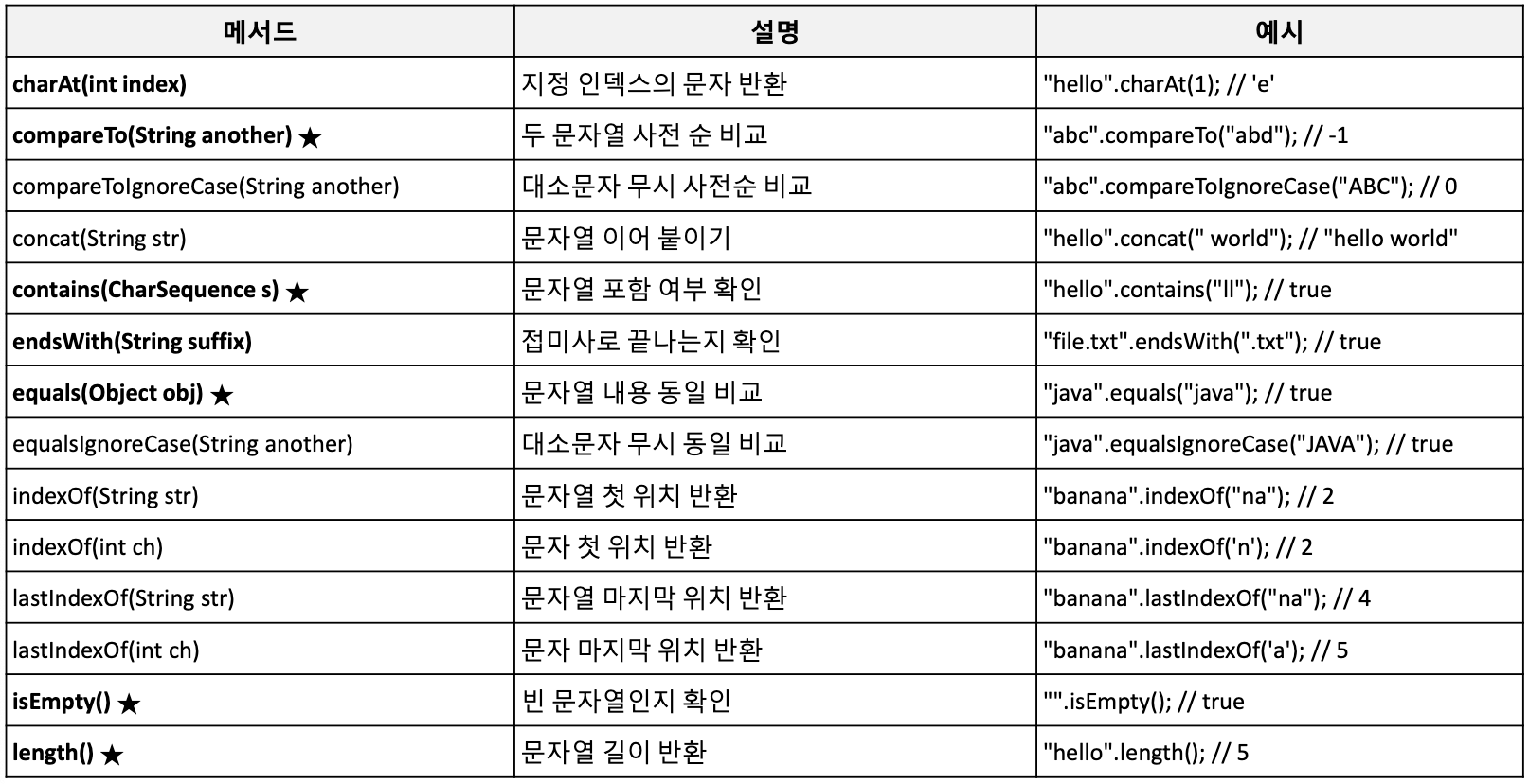
StringBuffer 메소드 (Builder 호환)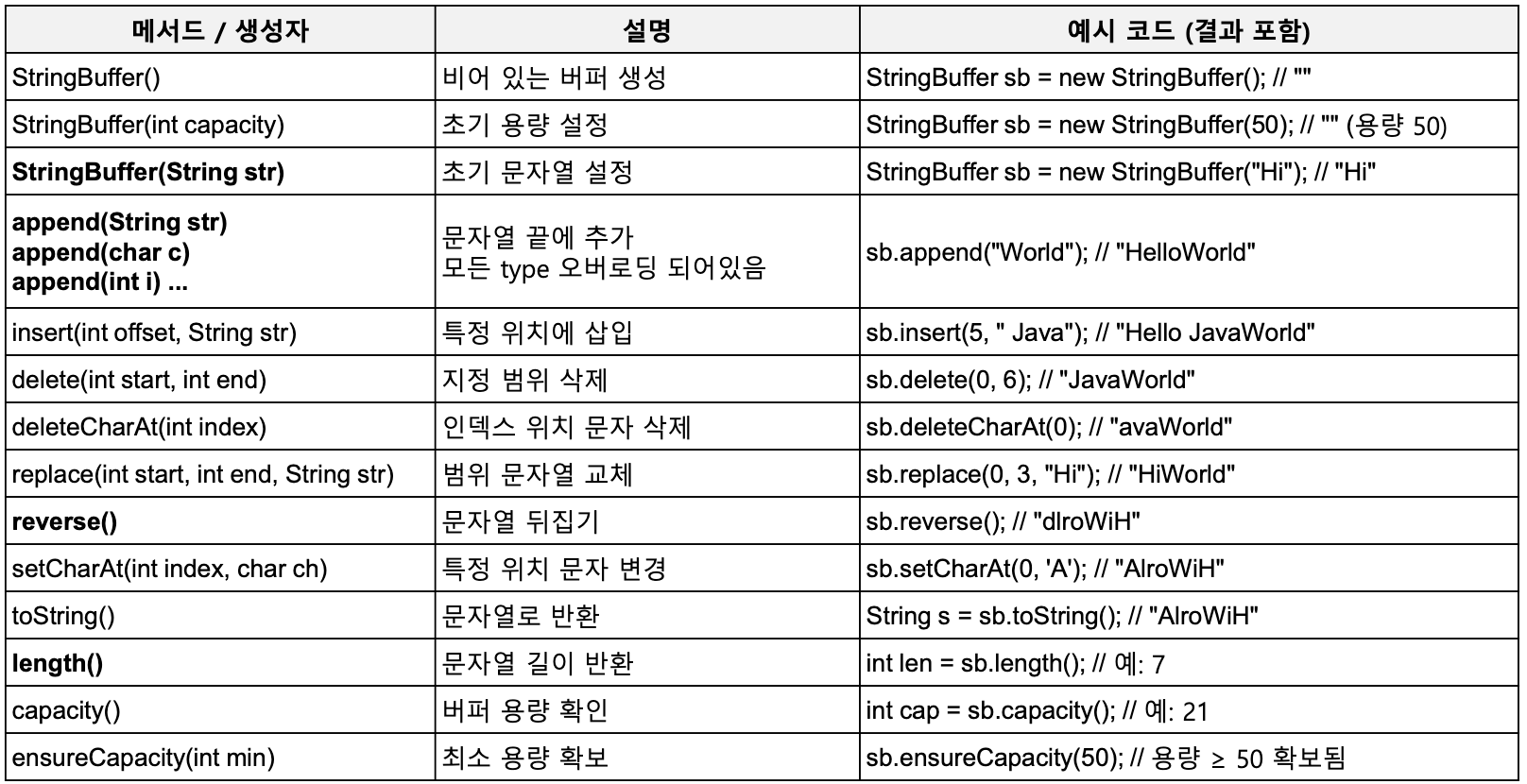
String Format 클래스
- 정해진 형식에 따라 문자열을 출력하거나 생성할 수 있도록 하는 기능
- C언어의 printf 스타일과 유사하며, 서식 지정자(Format Specifier)를 사용합니다.
String.format()포맷된 문자열 반환System.out.printf()포맷된 문자열을 출력Formatter 클래스출력 대상이 파일, 스트림일 때 유용
escape 문자 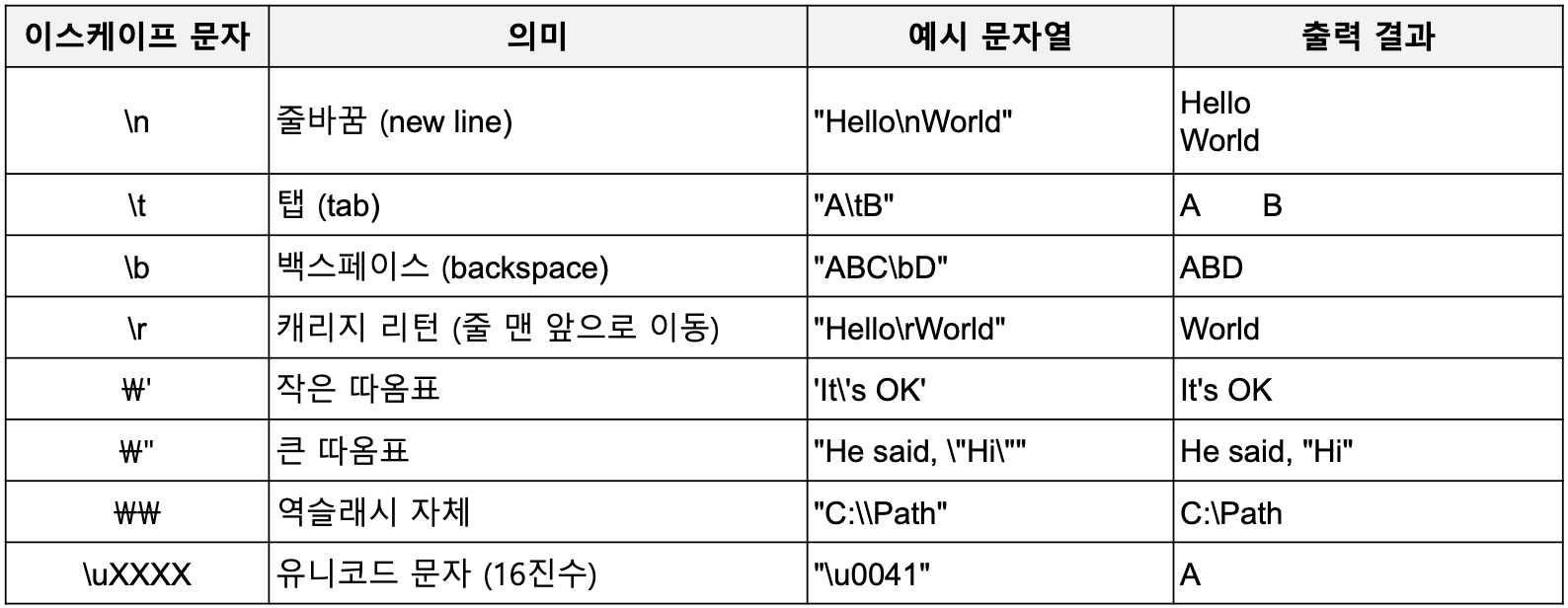
Format Specifier 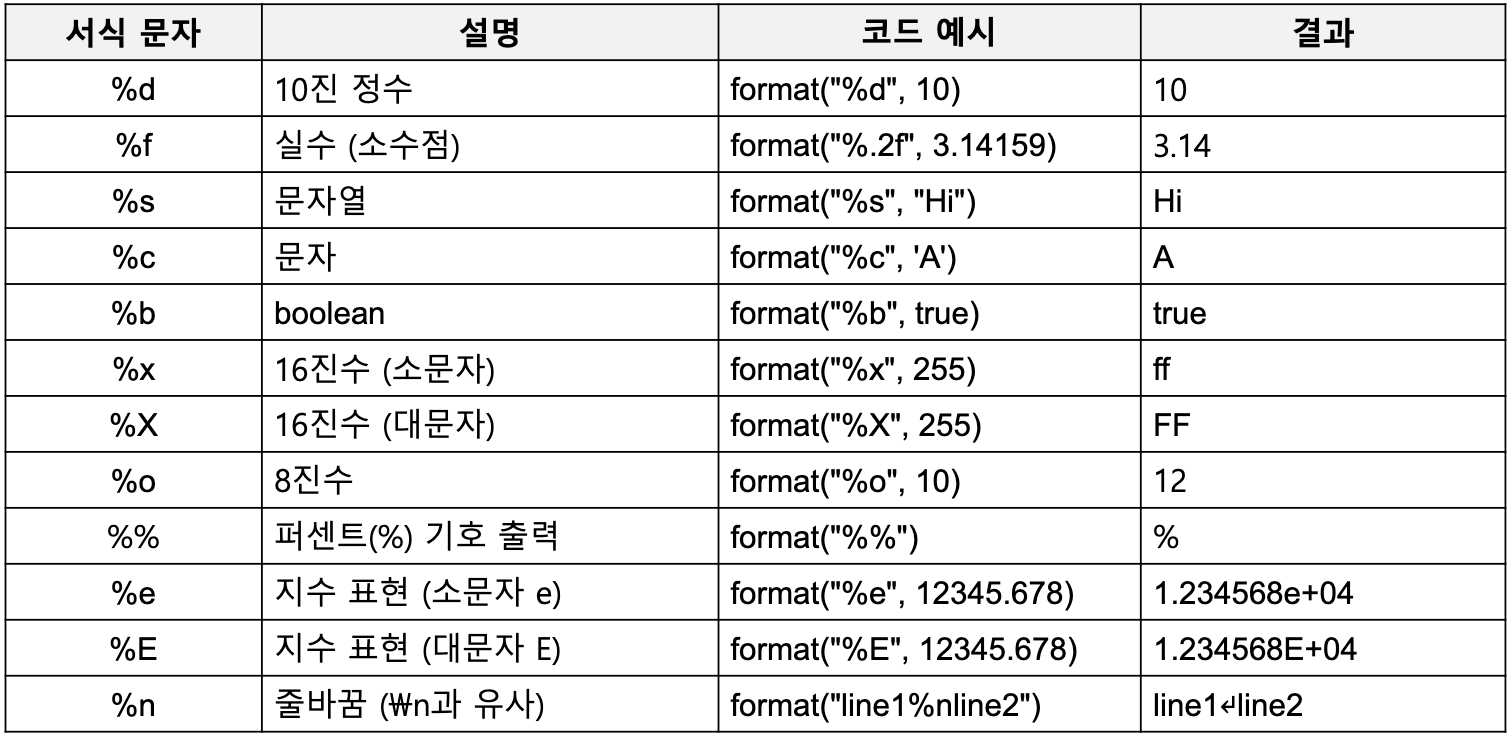
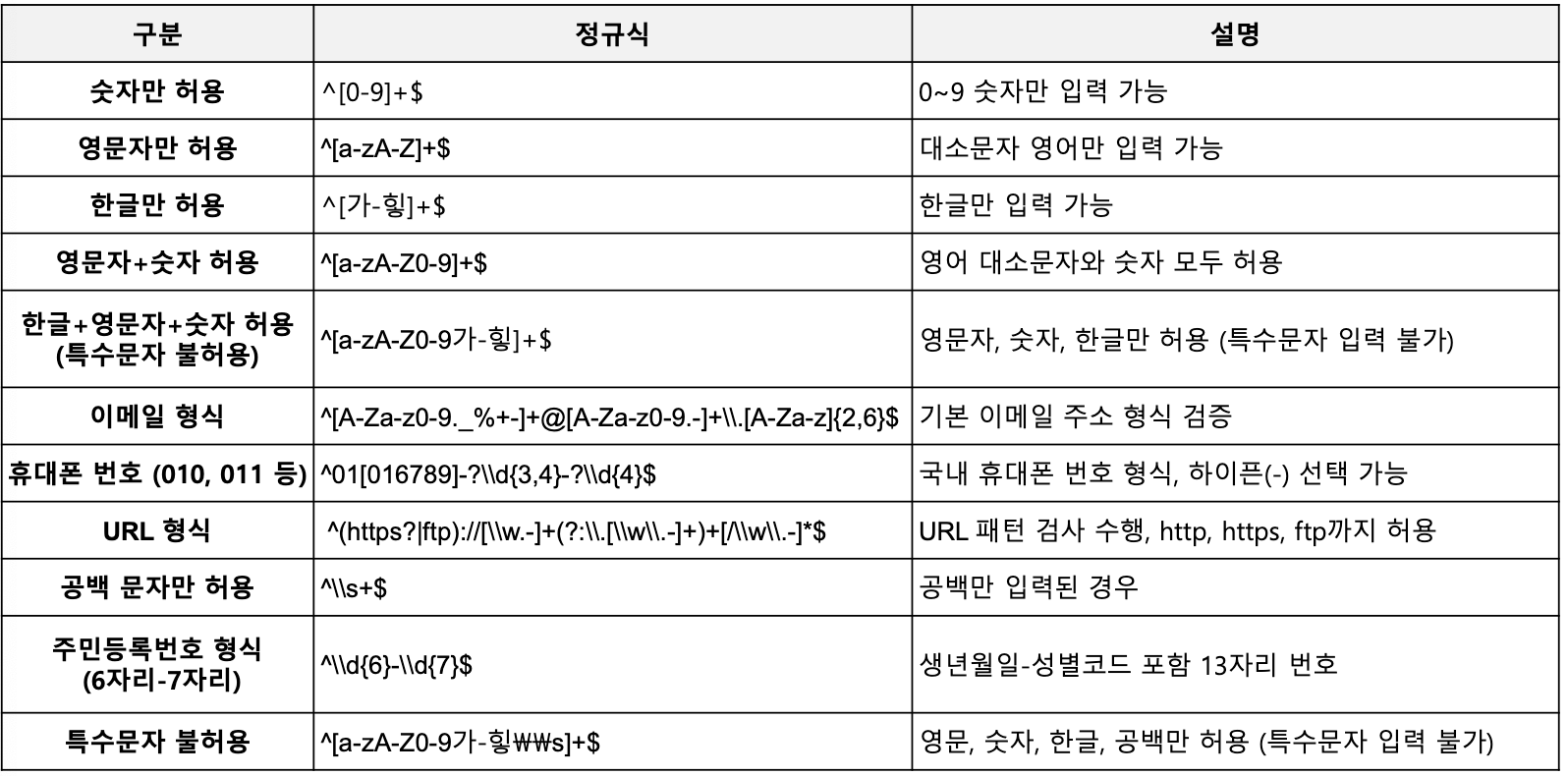
정규식(Regular Expression)
- 문자열에서 특정 패턴을 찾거나 조작하기 위한 표현법입니다.
- Java에서는
Pattern과Matcher클래스를 통해 정규 표현식을 활용할 수 있으며 다양한 내장 메소드를 제공하여 문자열 검증, 검색, 치환 등을 수행할 수 있습니다.
import java.util.regex.*;

String test1 = "12345";
String test2 = "abc123";

Pattern pattern = Pattern.compile("*-?\\d+$");

pattern.matcher(test1).matches() // true
pattern.matcher(test2).matches() // false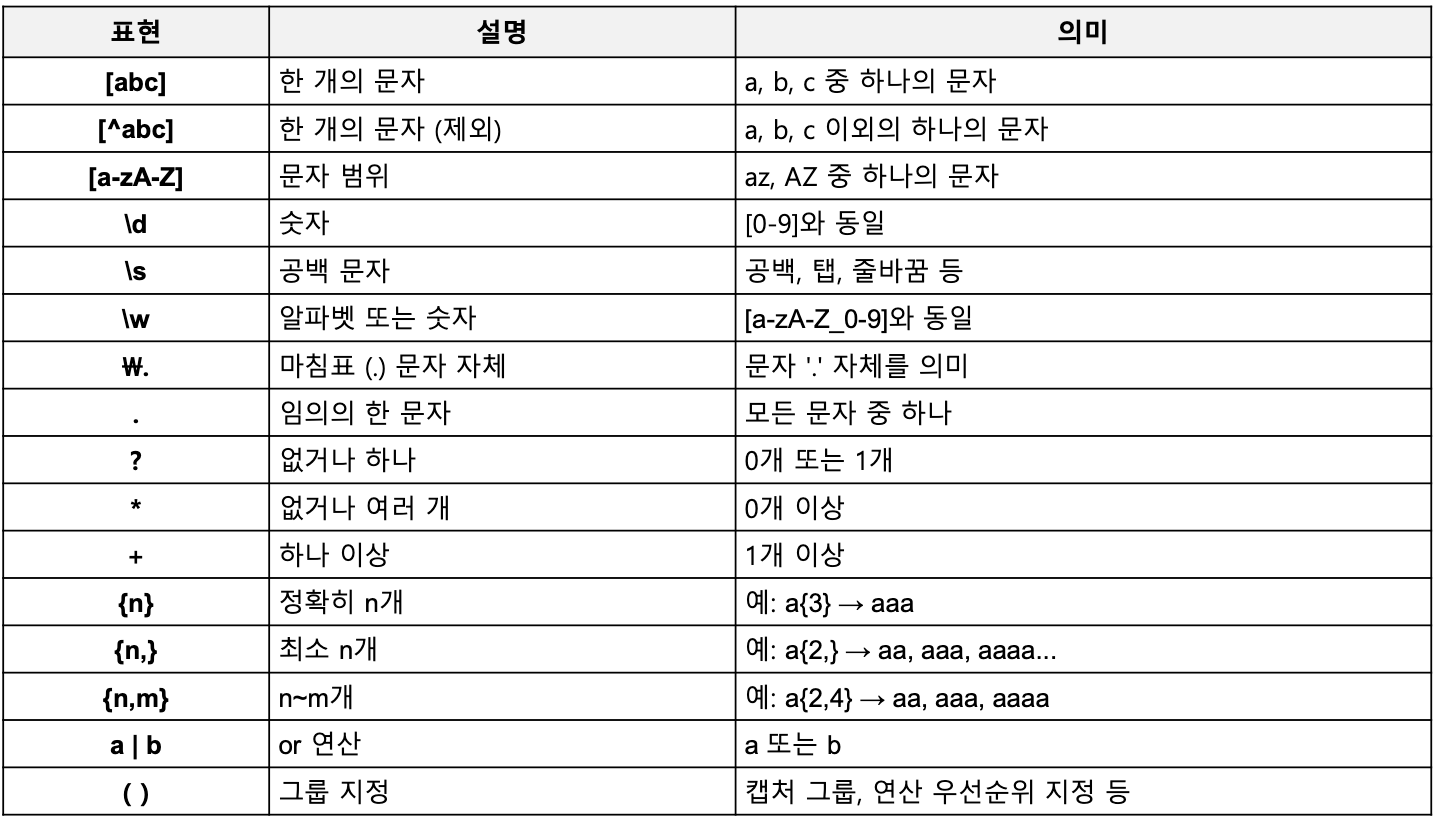
날짜 관련 클래스
구버전 API(Java 8 이전)
Date 클래스
- Java에서 날짜와 시간을 나타내는 기본 클래스이며, 시간 정보를 저장하고 다양한 날짜 관련 연산을 지원합니다.
Date today = new Date();
// 시스템으로부터 현재 날짜, 시간 정보를 가져와 기본값으로 사용

Date when = new Date(123456789L);
Date now = new Date(System.currentTimeMillis());
// long형 정수 값으로 날짜, 시간 계산
// 1970년 1월 1일 0시 0분 0초를 기준으로 함
Calendar / GregorianCalendar 클래스
- 날짜와 시간 정보를 계산하고 조작할 수 있도록 지원하는 추상 클래스이며, 직접 객체를 생성할 수 없습니다.
- 보통 GregorianCalendar와 같은 하위 클래스를 통해 인스턴스를 생성하여 사용합니다.
Calendar날짜와 시간을 계산하고 조작할 수 있도록 제공하는 추상 클래스GregorianCalendarCalendar의 하위 클래스이며, 현재 세계 표준력인 그레고리력을 구현한 구체 클래스
// Calendar 사용 (기본적으로 GregorianCalendar 인스턴스를 가짐)
Calendar calendar = Calendar.getInstance();
calendar.set(2025, Calendar.APRIL, 27);

System.out.println("[Calendar 사용]");
System.out.println(calendar.get(Calendar.YEAR) + "년 " +
		(calendar.get(Calendar.MONTH) + 1) + "월 " +
        calendar.get(Calendar.DAY_OF_MONTH) + "일");

// GregorianCalendar 사용 (명시적으로 생성)
GregorianCalendar gCalendar = new GregorianCalendar(2024, Calendar.FEBRUARY, 29);

System.out.println("\n[GregorianCalendar 사용]");
System.out.println(gCalendar.get(Calendar.YEAR) + "년 " +
		(gCalendar.get(Calendar.MONTH) + 1) + "월 " +
        gCalendar.get(Calendar.DAY_OF_MONTH) + "일");

// 윤년 확인
System.out.println("2024년은 윤년인가? " + gCalendar.isLeapYear(2024));
SimpleDateFormat 클래스
- 날짜(Date)를 원하는 문자열(String) 포맷으로 변환하거나, 문자열을 날짜로 변환하는 데 사용하는 클래스입니다.
- 패턴 문자열을 사용해 다양한 형식으로 포맷할 수 있습니다.
Date date = new Date();

SimpleDateFormat sdf1 = new SimpleDateFormat("yyyy-MM-dd");
SimpleDateFormat sdf2 = new SimpleDateFormat("yyyy-MM-dd HH:mm:ss");

String str1 = sdf.format(date);
String str2 = sdf.format(date);
// today에 포맷을 적용한 결과를 문자열로 리턴
java.time(Java 8+)
java.time은 Java 8에서 새롭게 도입된 날짜와 시간 처리를 위한 표준 패키지입니다.- 불변 객체 기반으로 설계되어 Thread-safe합니다.
- 시간대(UTC, TimeZone), 기간, 포맷팅 등 다양한 날짜/시간 작업을 편리하고 명확하게 지원합니다.
LocalDate날짜만 표현하는 클래스 (시간 정보 없음)LocalTime시간만 표현하는 클래스 (날짜 정보 없음)LocalDateTime날짜와 시간 정보를 모두 가지는 클래스
import java.time.*;

LocalDate date = LocalDate.now();
LocalTime time = LocalTime.now();
LocalDateTime dateTime = LocalDateTime.now();

System.out.println("Date: " + date); // Date: 2025-05-17
System.out.println("Time: " + time); // Time: 15:00:00
System.out.println("DateTime: " + dateTime); // 2025-05-17T15:00:00 (ISO 8691 포맷팅)
LocalDateTime 메소드 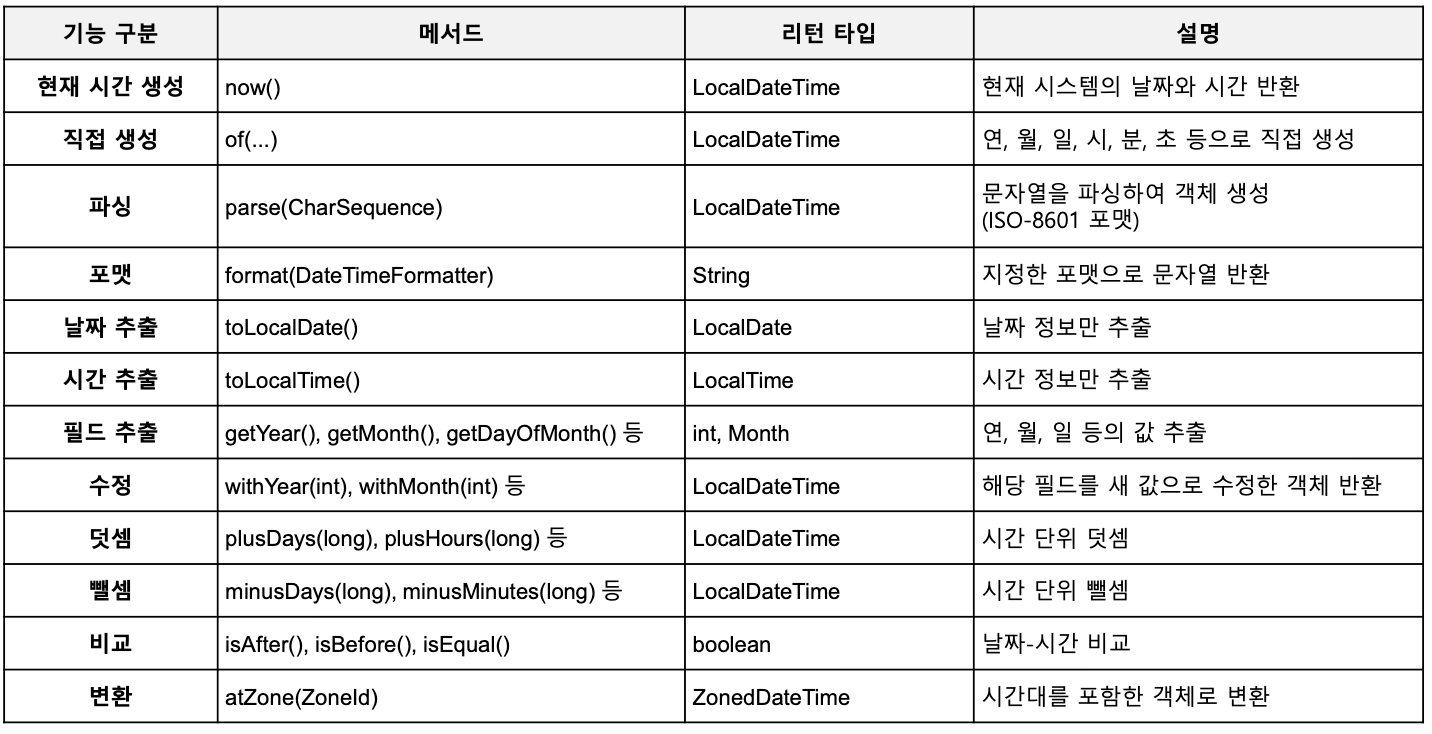
Instant 클래스
Instant는 UTC 기준의 타임스탬프를 나타내며, 1970-01-01T00:00:00Z(Unix epoch)부터의 나노초 단위 경과 시간 출력합니다.
import java.time.*;

// 현재 UTC 시각
Instantce now = Instance.now();
System.out.println(now); // 2025-05-07T22:10:26.048039900Z
System.out.println(now.getEpochSecond()); // 175162449

// 특정 epoch second 생성
Instant epoch = Instant.ofEpochSecond(0);
System.out.println(epoch); // 1970-01-01T00:00:00Z

// 10초 뒤 Instant
Instant later = now.plusSeconds(10);
System.out.println(later); 2025-05-07T22:10:36.048039900Z
Instant 메소드 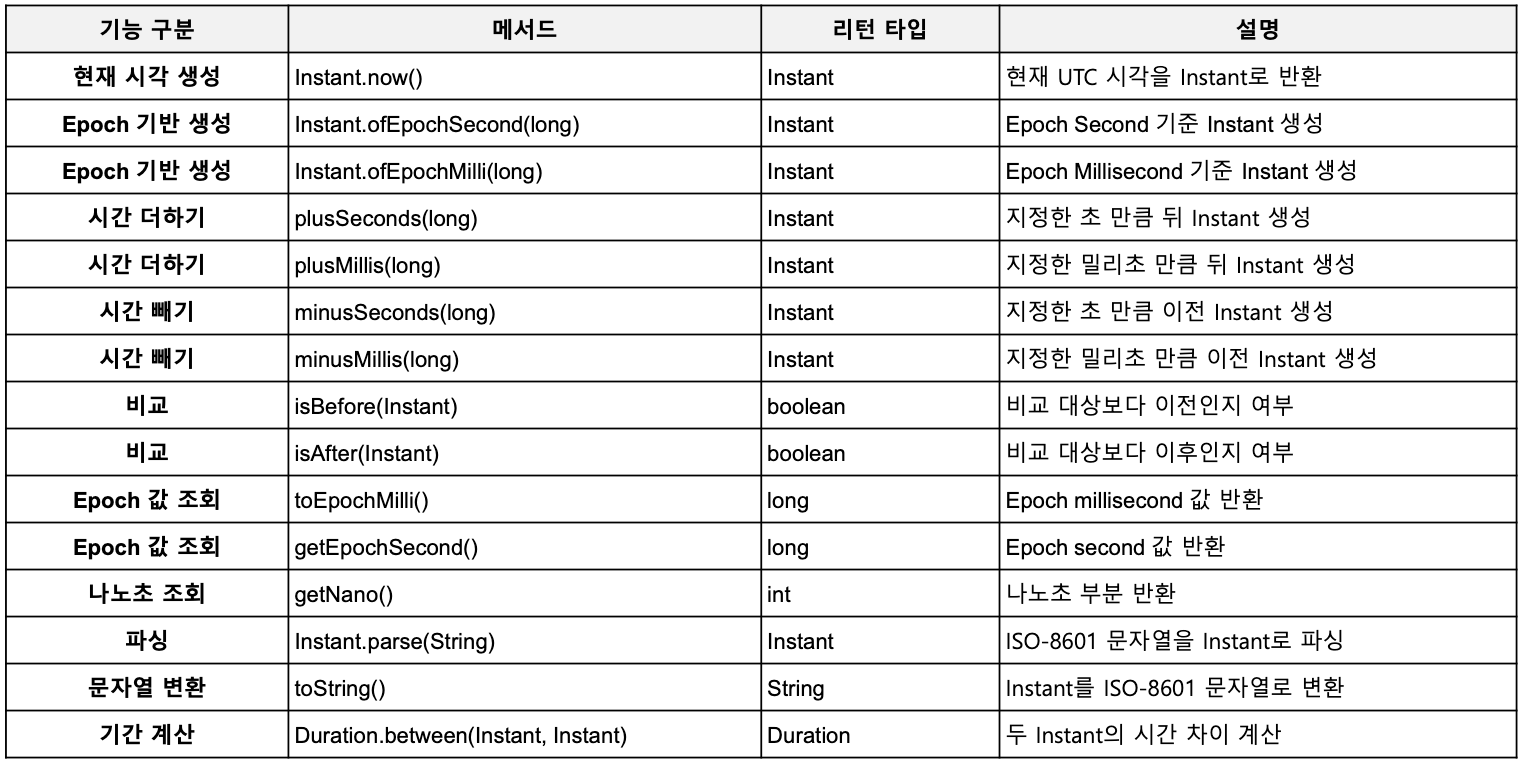
ZoneId / ZoneOffset
ZoneId지역 이름 기반(예: "Asia/Seoul")으로 타임존을 식별하는 클래스ZoneOffsetUTC 기준 시차(예: "+09:00")만 고정 값으로 표현하는 클래스
// ZoneId 사용 예
ZonedDateTime seoulTime = ZonedDateTime.now(ZoneId.of("Asia/Seoul"));
System.out.println("seoulTime); // 2025-05-17T15:00+09:00[Asia/Seoul]

// ZoneOffset 사용 예
ZonedDateTime offsetTime = ZonedDateTime.now(ZoneOffset.ofHours(9));
System.out.println(offsetTime); // 2025-05-17T15:00+09:00
DateTimeFormatter
- 날짜와 시간 객체(LocalDate, LocalDateTime 등)를 문자열로 포맷하거나, 문자열을 날짜/시간으로 파싱하는 클래스입니다.
- 날짜를 "yyyy-MM-dd"같은 포맷으로 변환하거나, 반대로 문자열을 날짜로 변환할 때 활용합니다.
import java.time.LocalDateTime;
import java.time.format.DateTimeFormatter;

LocalDateTime dateTime = LocalDateTime.now();
DateTimeFormatter formatter = DateTimeFormatter.ofPattern("yyyy-MM-dd HH:mm:ss");

String formatted = dateTime.format(formatter);
System.out.println(formatted); // 2025-05-17 15:00:00
Wrapper 클래스
- 기본형 타입을 객체로 포장해주는 클래스입니다.
- 기본형의 객체 타입이 필요한 상황이나 기본형에서 null이 필요한 경우 해당 type을 대체해서 사용합니다.
- auto boxing: 기본형 값을 자동으로 래퍼 객체로 변환해줌
- auto unboxing: 래퍼 객체를 자동으로 기본형으로 변환해줌
Number/Math/Random/UUID
Number 클래스
- Integer, Double같은 숫자 관련 Wrapper 클래스들의 부모 추상 클래스입니다.
- 숫자를 다양한 기본형 타입으로 변환할 수 있는 메소드를 제공합니다.(래퍼 객체 간의 타입 캐스팅은 불가능)
DecimalFormat
- 숫자를 원하는 패턴으로 문자열로 포맷팅하거나, 문자열을 숫자로 파싱하게 해주는 클래스입니다.
double number = 1234567.89;
DecimalFormat df = new DecimalFormat("#,###.00");
String result = df.format(number);
System.out.println(result) // 1,234,567.89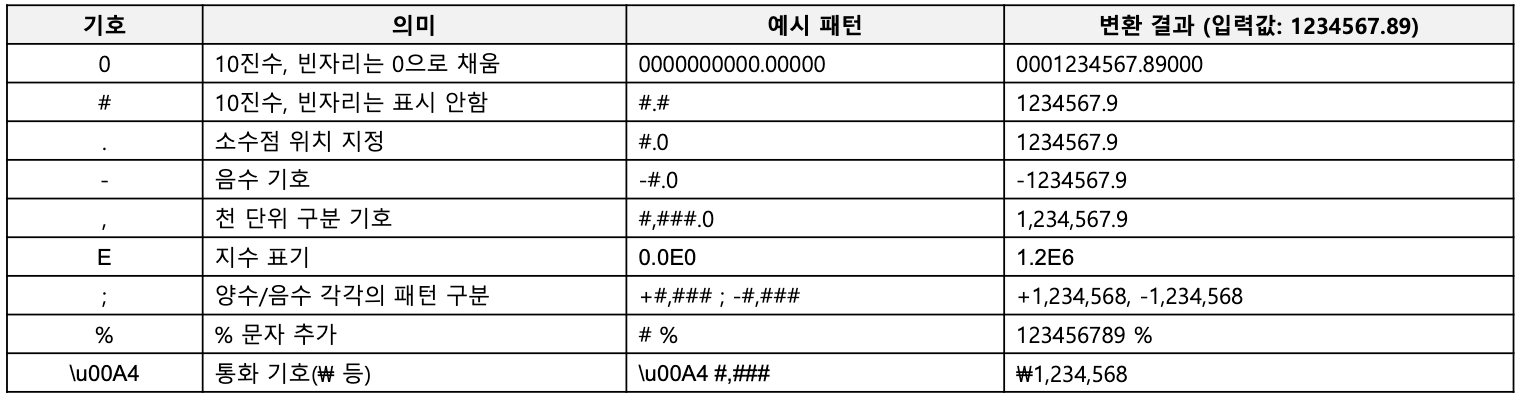
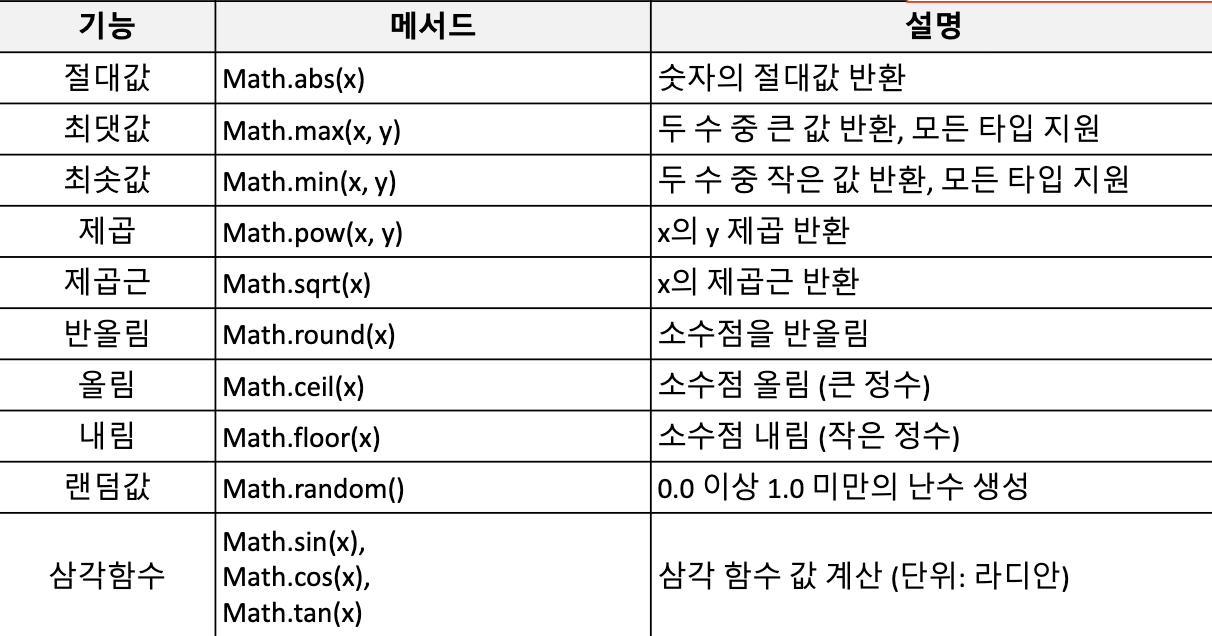
Math 클래스
- 수학 관련 함수를 제공하는 static 유틸리티 클래스입니다.
Random 클래스
- 난수를 생성할 수 있도록 지원하는 클래스입니다.
import java.util.Random();

Random random = new Random();

int randomInt = random.nextInt(100); // 0~99
double randomDouble = random.nextDouble(); // 0.0~1.0
boolean randomBoolean = random.nextBoolean();
UUID(Universally Unique Identifier) 클래스
- 128비트(16바이트) 고유 식별자(UUID)를 생성하고 표현하는 클래스입니다. (RCF 4122 표준에 따름)
- 랜덤(UUID v4) 또는 이름 기반(UUID v3/v5)으로 UUID를 만들어 사실상 중복 없는 ID를 제공할 수 있습니다.
- 가능한 조합 개수 = 2122 (약 5경)

Backend engineer