사용자 데이터 편집
EC2는 사용자 데이터 편집 기능으로 인스턴스 시작 시 실행될 스크립트를 지정할 수 있다.
이에 관한 내용은 https://docs.aws.amazon.com/ko_kr/AWSEC2/latest/UserGuide/user-data.html#user-data-cloud-init 여기에 있다. 그리고 검색하면 많이 나온당.ㅎㅎ
내가 사용한 사용자 데이터는 다음과 같다.
Content-Type: multipart/mixed; boundary="//"
MIME-Version: 1.0

--//
Content-Type: text/cloud-config; charset="us-ascii"
MIME-Version: 1.0
Content-Transfer-Encoding: 7bit
Content-Disposition: attachment; filename="cloud-config.txt"

#cloud-config
cloud_final_modules:
- [scripts-user, always]             # 부팅 시마다 실행

--//
Content-Type: text/x-shellscript; charset="us-ascii"
MIME-Version: 1.0
Content-Transfer-Encoding: 7bit
Content-Disposition: attachment; filename="userdata.txt"

#!/bin/bash
python myapp.py
uvicorn main:app --reload
--//
인스턴스를 중단했다가 다시 시작할 때마다 실행되도록 [script-user, always]를 붙여 두었다. 이거 실행하고 싶은 명령어는 #!/bin/bash 밑에 작성하면 된다.
결과 확인
인스턴스 내에서
cloud-init status --long 명령어
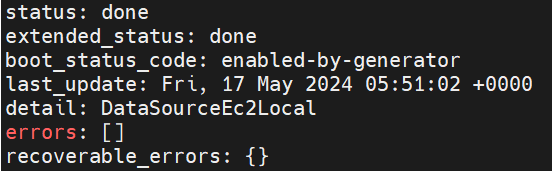
또는 /var/log/cloud-init-output.log를 확인하여 결과 또는 오류를 파악할 수 있다.
나의 역경
Traceback (most recent call last):
  File "/home/ubuntu/myapp.py", line 3, in <module>
    import gradio as gr
ModuleNotFoundError: No module named 'gradio'
uvicorn: command not found
그런데 파이썬 라이브러리를 못 찾는 오류가 계속 나왔다.
ubuntu@ip-172-31-26-156:~$ pip list
Package                  Version
------------------------ ----------------
fastapi                  0.110.1
gradio                   4.31.0
분명히 깔려 있는데..
검색해보니 사용자 데이터에 라이브러리를 설치하는 명령어를 추가하라고 나왔는데, 맨 처음 인스턴스 생성&시작 시에만 실행되는 것이 아닌 중단 후 시작할 때마다 명령어가 실행되어야 하는데 라이브러리를 설치해야 한다는 것이 말이 안됐다.
반만 해결
그런데.. 사용자 데이터는 root 사용자 권한으로 실행된다고 한다.
나의 파이썬 라이브러리들은 ubuntu 사용자에 깔려 있으므로 당연한 거였다.
#!/bin/bash
sudo -u ubuntu bash << EOF
python myapp.py
uvicorn main:app --reload
EOF
!/bin/bash shell 아래에서 ubuntu 사용자로부터 시작되는 하위 쉘을 실행하고, EOF가 다시 나올 때까지 히어 도큐먼트를 작성하면 정상적으로 ubuntu의 파이썬 라이브러리들을 이용할 수 있다.
- 가이드에 "사용자 데이터로 입력된 스크립트는 루트 사용자 권한으로 실행되므로 스크립트에 sudo 명령을 사용하지 마세요." 이런 말이 써있었다.
- uvicorn은 여전히 command not found 가 나왔다.
찐 해결
#!/bin/bash
su - ubuntu -c "python myapp.py; uvicorn main:app --reload"
ubuntu 계정에 아예 로그인하여 환경변수까지 불러와야 uvicorn도 정상적으로 실행이 된다.
기타
-
crontab도 써봤는데 첨엔 되다가 나중엔 안된다 (정확한 이유 파악 못함)
-
.bash_profile, .bashrc를 수정하면 로그인 시 실행되기 때문에 인스턴스 시작 후 ubuntu 계정으로 로그인해야만(터미널 연결) 실행된다.