오늘부터는 개인프로젝트의 도전과제를 진행하게 되었습니다.
그에 따라 구현을 완료한 기능은 아래와 같습니다.
1. 리더보드 시스템

- 위와 같이 미니게임으로 들어가는 입구 옆에 현재 최고점수를 띄워주는 UI를 추가 했습니다.
2. Npc와의 상호작용 및 대화창

- zep의 찌르기 처럼 상호작용을 시도하면 대화창이 뜨도록 설정했습니다.
3. 커스텀 캐릭터

- 대기중인 플레이어블 캐릭터에 상호작용 하면 해당 캐릭터로 변하도록 설정했습니다.
- 또한 이 기록을 Json과 Addressables을 이용하여 세이브, 로드 기능을 구현했습니다.
( 트러블 슈팅 )
문제 1. 탑다운 형식에서의 점프 구현 문제
배경 :
- 때는 커스텀 캐릭터 기능을 완성하고, 간단하게 해당 변환을 저장하는 것만 구현 해보려고 할 때 발생했습니다.
문제점 :
- 단순하게 playerprefs 를 이용 할까 하다가, 최근 알게 된 ScriptableObject 를 이용해보자는 생각이 들었습니다. 또한 이미 다이얼로그 관련으로 작업에 성공하여서 큰 문제없이 적용했습니다.
- 하지만 ScriptableObject는 읽기 전용이라 데이터를 기록하는 것은 불가능했고, 이에 따라 문제가 발생했습니다.
시도해 본 것:
- 먼저 ScriptableObject를 강제로 덮어 씌우는 방법을 사용해 보았습니다. 하지만 이것은 에디터 단에서는 잘 작동했지만 빌드 시에는 동작하지 않았습니다.
- 두번째로 ScriptableObject와 Addressables를 사용해서 이를 보완해보고자 했습니다. ScriptableObject에서는 해당 Animator의 주소만 가지고 있고, 이를 Addressables 에서 불러와서 사용하는 방법으로 변경했습니다. 또한 여기에 Json을 통해서 파일을 저장하고, 불러오는 방식을 사용하고자 했습니다.
- 하지만 위의 방법에서는 3가지 방식이 합쳐지면서 결국에 코드가 터져버리는 문제가 발생했고, 커밋을 되돌려야하는 지경에 이르렀습니다.
해결 방법 :
- 결국 최종적인 해결방법은 굳이 읽기 전용인 ScriptableObject를 가지고 저장을 하려 하지 말고, Json + Addressables 방식을 사용하는 것이었습니다.
- 그래서 Dailogue 처럼 값이 변동되지 않는 것은ScriptableObject를, 값이 변동되는 것은 Json + Addressables로 최종적으로 구현하게 되었습니다.
using System.Collections;
using System.Collections.Generic;
using System.IO;
using UnityEngine;
using UnityEngine.AddressableAssets;
using UnityEngine.ResourceManagement.AsyncOperations;

public class DataManager : MonoBehaviour
{
    public static DataManager instance;

    private void Awake()
    {
        if (instance == null)
            instance = this;
    }

    public void Save(List<string> animatorAddresses, string savePath)
    {
        Debug.Log(savePath);
        var dataList = new AnimatorSaveDataList();

        foreach (var addr in animatorAddresses)
            dataList.animators.Add(new AnimatorSaveData { animatorAddress = addr });

        string json = JsonUtility.ToJson(dataList, true);
        File.WriteAllText(savePath, json);
    }

    public void Load( List<Animator> targetAnimators, string savePath)
    {
        if (!File.Exists(savePath))
        {
            Debug.LogWarning("저장 파일이 없습니다.");
            return;
        }

        string json = File.ReadAllText(savePath);
        var dataList = JsonUtility.FromJson<AnimatorSaveDataList>(json);

        if (dataList.animators.Count != targetAnimators.Count)
        {
            Debug.LogError("Animator 개수 불일치");
            return;
        }

        for (int i = 0; i < dataList.animators.Count; i++)
        {
            int index = i;
            string addr = dataList.animators[i].animatorAddress;

            Addressables.LoadAssetAsync<RuntimeAnimatorController>(addr).Completed += handle =>
            {
                if (handle.Status == AsyncOperationStatus.Succeeded)
                {
                    targetAnimators[index].runtimeAnimatorController = handle.Result;
                }
                else
                {
                    Debug.LogError($"Animator {index} 로드 실패: {addr}");
                }
            };
        }
    }
}
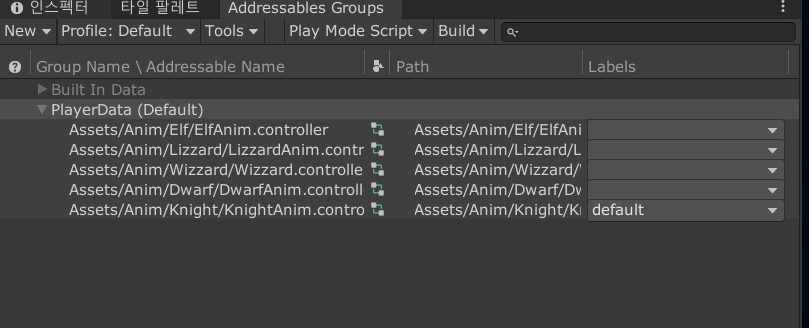
- 위의 코드가 Json + Addressables 방식으로 구현된 Animator 저장 입니다.(정확히는 런타임 애니메이터 컨트롤러)
using System.Collections.Generic;
using UnityEngine;

[System.Serializable]
public class DialogueEntry
{
    public string key;
    [TextArea]
    public string text;
}

[CreateAssetMenu(menuName = "Data/NPCDialogue")]
public class DialogueData : ScriptableObject
{
    public string npcId;
    public List<DialogueEntry> data;
}
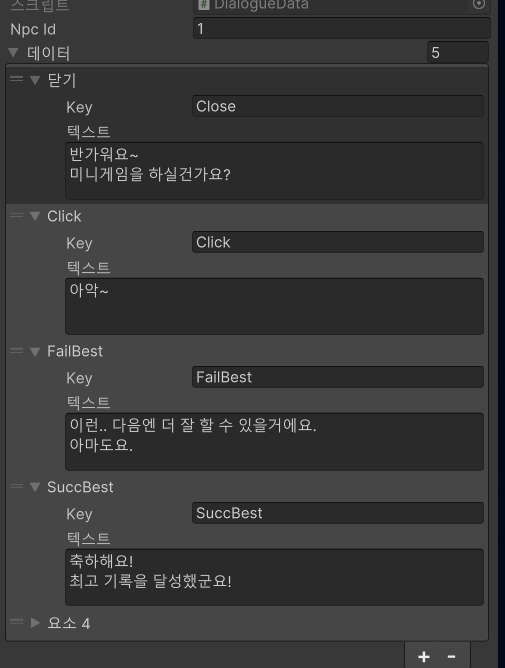
- 그리고 위의 방식이 ScriptableObject를 이용한 대화 저장 입니다.
알게 된 것 :
- 유니티 저장에서 자주 사용되는, CSV 파싱을 제외한 3가지에 대해서 정확하게 알게 되었습니다.
- 이를 간단하게 정리해보면 아래와 같습니다
Unity 데이터 저장 방식 비교
Unity에서 자주 사용되는 데이터 저장 및 관리 방식에는 ScriptableObject, JSON, Addressables가 있습니다. 이 문서에서는 각 방식에 대한 설명과 장단점을 간단하게 정리합니다.
1. ScriptableObject
설명
ScriptableObject는 Unity의 에디터 자산(Asset)으로, 데이터를 직렬화된 형태로 저장할 수 있는 클래스입니다. 에디터에서 인스펙터를 통해 쉽게 데이터를 편집할 수 있으며, 런타임에서도 불러와 사용할 수 있습니다.
장점
- 에디터에서 직관적으로 데이터 편집 가능
- 여러 오브젝트에서 공유 가능한 데이터
- 메모리 상에서 효율적 (싱글 인스턴스 공유)
- 직렬화 가능하며 버전 관리에 유리함 (텍스트 형태 저장 가능)
단점
- 빌드된 후 데이터 변경이 어려움 (런타임 저장 불가)
- 런타임에서 수정하려면 별도 로직이 필요
- 복잡한 구조나 대량 데이터에 부적합
2. JSON
설명
JSON(JavaScript Object Notation)은 경량의 데이터 교환 형식으로, Unity에서는 JsonUtility 또는 Newtonsoft.Json 등을 통해 데이터를 직렬화/역직렬화 하여 저장하거나 불러올 수 있습니다.
장점
- 가볍고 사람이 읽기 쉬움
- 텍스트 기반이기 때문에 저장/로드/백업 용이
- 저장 경로를 지정하면 사용자 디바이스에 저장 가능 (e.g.
Application.persistentDataPath) - 다양한 플랫폼 간 호환성 우수
단점
- 구조가 복잡해지면 수동 처리 많아짐
- JSON 구조에 맞지 않으면 역직렬화 실패
- 바이너리 포맷에 비해 느릴 수 있음
- 런타임 편집은 가능하지만, 실시간 반영이 어려울 수 있음
3. Addressables
설명
Addressables 시스템은 Unity에서 에셋을 주소 기반으로 로드하고 관리할 수 있는 모듈입니다. 리소스를 빌드 외부에 저장하고, 필요할 때만 불러와서 메모리 사용을 최적화할 수 있습니다.
장점
- 동적 리소스 로딩/언로딩 가능 (메모리 관리 효율적)
- 리소스를 외부 CDN이나 로컬에서 관리 가능
- 빌드 크기 최소화에 유리함
- 패치 및 Hotfix 관리에 유리
단점
- 설정이 복잡할 수 있음 (주소 지정, 그룹 구성 등)
- 빌드/로딩 시간 이슈 존재
- 초기 학습 비용이 큼
- 문자열 주소 기반이므로 오타에 취약
요약 비교표
| 항목 | ScriptableObject | JSON | Addressables |
|---|---|---|---|
| 편집 용이성 | 에디터에서 우수 | 직접 편집 가능 (텍스트) | 에디터 내 설정 필요 |
| 런타임 저장 | 제한적 | 가능 | 불가 (주소 데이터만 관리됨) |
| 데이터 크기 관리 | 제한적 (메모리 상 상주) | 우수 (텍스트 저장) | 우수 (필요 시 로딩/언로딩) |
| 동적 리소스 관리 | 불가 | 가능 (수동 구현) | 매우 우수 |
| 학습 난이도 | 낮음 | 낮음 | 높음 |
| 사용 예시 | 설정값, 정적 데이터 | 세이브 파일, 유저 설정 | 스킨, 캐릭터 리소스, 사운드 등 |
결론
- ScriptableObject: 에디터 내 고정 설정값이나 공유 가능한 정적 데이터에 적합.
- JSON: 유저 저장 데이터, 설정값 등의 런타임 저장/로드에 적합.
- Addressables: 런타임에서 리소스를 효율적으로 로드하고 관리해야 하는 경우에 적합.
상황에 따라 이들을 병행해서 사용하는 것이 가장 효과적입니다.

클라이언트 개발자를 지망하고 있습니다.
아니 민우님 너무 잘하시는거아니에요?? 진짜 자괴감들어서 서럽고 괴롭습니다