파이썬 숫자,문자형 자료형
숫자형 자료형
- 기본적인 숫자 연산이 가능(덧셈, 뺄셈, 곱셈, 나눈셈, 몫, 나머지)
- 지수표현 가능 3.14E10, 3.14E-10
문자형 자료형
- 문자를 표현하는 자료형
- 문자열끼리 덧셈은 붙여주는 역할을 함
- 문자열 자료형은 꼭 처음과 끝에 작은 따옴표 or 큰 따옴표를 붙여줘야함
- 엔터나 탭키도 모두 문자이므로 유의하기
지수표현
a = 5.15E + 10  = 5.15 x 10의 10승
a = 5.15E - 10 = 5.15 x 10의 -10승
나눈 후 나머지 값 구하기
a = 3
b= 5
print(a % b)
= 3
나눈 후 몫 값 구하기
a = 3
b= 5
print(a//5)
= 0
이스케이프 코드 : 미리 정의 둔 문자조합
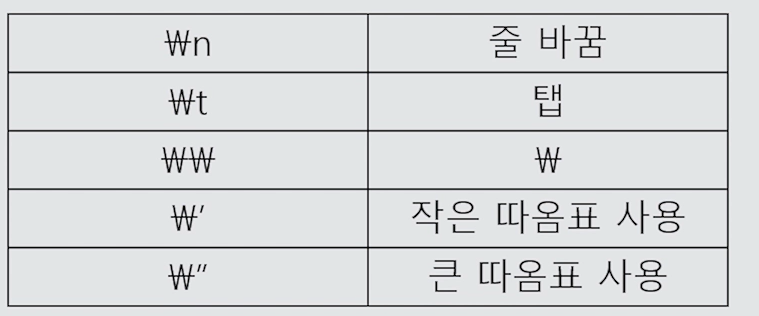
문자형 자료형
문자열 슬라이싱
print(a[2:9]) = 2 ~ 9전까지
print(a[:9]) = 0번째 부터 9전까지
print(a[3:]) = 3번째부터 끝까지
문자열 전용함수
format( )
문자열뒤에 . 찍고 함수이름 적어준다.
text = " I eat { } apples.format(3)
text = " I eat {0} apples and {0} oranges".format(3,5)
text = "[:>10]".format("Hi")
print(text)   =>  "(빈공간10칸)Hi"
:>10  = 열개의 공간정렬
:<10 = 뒤로 열개의 공간정렬
:^10 = 양쪽공간 5개씩
:=^10  = 반공간을 ===문자로 채움
:.2ㄹ = 소수점 2자리까지만 표현
count( ) = 문자열 갯수 찾기
text = "Python:is:too:fun!"
print(text.count('o'))
=> 3
find( ) = 문자열 안에 몇번째에 있는지 찾는 함수
text = "Python is too fun!"
print(text.find("o"))
=> 4
print(text.find("z"))
=> -1 (없으면 -1로 나옴)
join( ) = 문자사이에 껴넣기
text = ','.join("abcde")
print(text)
=> a,b,c,d,e
upper( ) = 대문자로 바꿔주는 함수
text = "Python"
print(text.upper())
=> "PYTHON"
lower( ) = 소문자로 바꿔주는 함수
text = "PYTHON"
print(text.lower())
=> "python"
lstrip() = 왼쪽 공백 날리기
text = " (공백)     Hello(공백)     "
print(text.lstrip())
=> "Hello (공백)"
rstrip() = 오른쪽 공백 날리기
text = "(공백) Hello (공백)"
print(text.rstrip())
=> "(공백)Hello"
strip() = 양쪽 공백 날리기
text = "(공백) Hello (공백)"
print(text.strip())
=> "Hello"
replace() = 특정한 값 바꿀때/자주 쓰임
text = "Python is too fun!"
print(text.replace("Python", "Java")
=> "Java is too fun!"
split() = 빈 공간 기준으로 자르기
text = "Python is too fun!"
print(text.split())
=> ['Python','is','too','fun!']
(리스트로 나온다)<br>
text = "Python:is:too:fun!"
print(text.split(':'))
=> ['Python', 'is', 'too', 'fun!']
(':' 콜론을 넣으면 콜론 기준으로 잘라준다)
startswith() = 앞 문장 같은지 확인
text = "Python is too fun!"
text.startswith("Python")
=> True
<br>
text.startswith("is")
=> False
endswith() = 뒷 문장 같은지 확인
text = "Python is too fun!"
text.endswith("fun!")
=> True
text.endswith("is")
=> False
isalpha() = 글자들로 구성되어 있나?
text="Hello"
print(text.isalpha())
=> True
text="Hello World99!"
print(text.isalpha())
=> False (공백이나 숫자가 있으면 False)
isdigit() = 숫자로만 구성되어 있나?
text = "300"
print(text.isdigit())
=> True
isalnum() = 알파벳 + 숫자 구성?
text = 'hello300'
print(text.isalnum())
=> True
isspace() = 공백으로만 구성되어 있나?
text = '    '
print(isspace())
=> True
swapcase() = 대소문자 바꿔주기
text = "Hello"
print('Hello'.swapcase())
=> "hELLO"

Backend Delveloper