라이브러리는 커스텀하기가 어려워서, 달력을 직접 만들었다.
1️⃣ 현재 날짜 상태 관리
const today = new Date();
const [currentDate, setCurrentDate] = useState(
  new Date(today.getFullYear(), today.getMonth(), 1)
);
오늘 날짜 = today
currentDate를 useState로 관리해서, 현재 선택된 달의 첫번째 날을 useState로 저장했다.
2️⃣ 연도, 월 정보 가져오기
const year = currentDate.getFullYear();
const month = currentDate.getMonth();
year: 현재 선택된 연도
month: 현재 선택된 월
이때 주의할 점! month는 index가 0~11까지이다.
3️⃣ 해당 달의 날짜 정보 계산
const firstDayOfMonth = new Date(year, month, 1);
const lastDayOfMonth = new Date(year, month + 1, 0);
const lastDayOfPrevMonth = new Date(year, month, 0).getDate();
const daysInMonth = lastDayOfMonth.getDate();
const startDay = firstDayOfMonth.getDay();
firstDayofMonth : 현재 달의 첫번째 날짜
LastDayofMonth : 현재 달의 마지막 날짜
LastDayofPrevMonth : 지난달의 마지막 날짜
daysInMonth : 이번 달의 총 일수
startDay : 이번 달의 첫번째 요일 -> 0: 일요일 1: 월요일 이렇게 시작됨!
하지만, 내가 구현해야하는 달력은 월요일부터 시작해야하므로
AdjustedStartDay를 정의해 시작 요일이 월요일부터 나타나게 했다.
const adjustedStartDay = startDay === 0 ? 6 : startDay - 1;
const totalCells = Math.ceil((adjustedStartDay + daysInMonth) / 7) * 7;totalCells는 한 달에 5줄일수도 있고 6줄일수도 있고, 달마다 달라자기 때문에 필요한 셀 개수를 계산할 수 있는 Math.ceil를 사용하였다.
4️⃣ 날짜 배열 생성
달력에 표시할 날짜 배열이 필요하기 때문에, 조건별로 날짜를 설정해주었다.
const daysArray = Array.from({ length: totalCells }, (_, i) => {
  if (i < adjustedStartDay)
    return {
      day: lastDayOfPrevMonth - (adjustedStartDay - 1) + i,
      isCurrentMonth: false
    };
  if (i >= adjustedStartDay + daysInMonth)
    return { day: null, isCurrentMonth: false };
  return { day: i - adjustedStartDay + 1, isCurrentMonth: true };
});
이전 달의 날짜 는 false로 두어서 이전 달의 날짜가 나타나지 않게 하였다. true로 둔다면, 이런식으로 나타나서 달력이 예쁘지 않을 뿐더러 헷갈리게 된다.
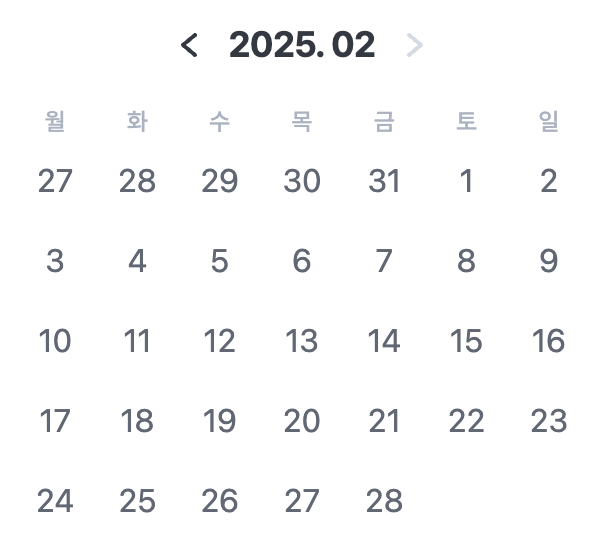 true일때 ✅ true일때 ✅ | 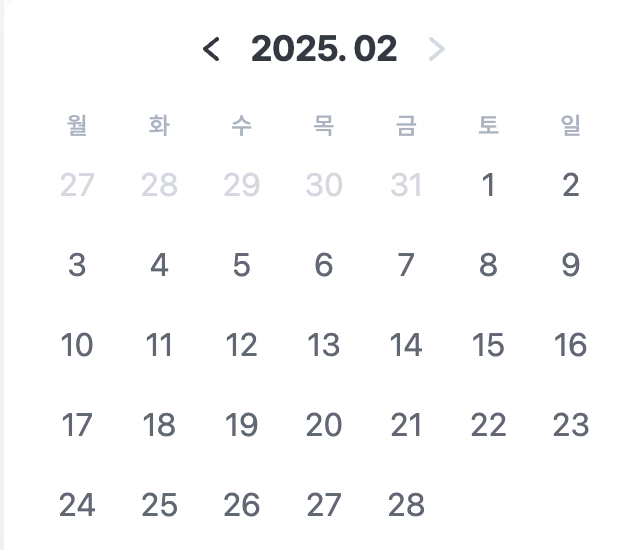 false일때 ✅ false일때 ✅ |
|---|
이렇게 구분이 가능하게 해주었다..!
5️⃣ 달 이동
달력을 만들었으면 달 이동은 필수이다!
const handlePrevMonth = () => {
  setCurrentDate(new Date(year, month - 1, 1));
};

const handleNextMonth = () => {
  setCurrentDate(new Date(year, month + 1, 1));
};
이렇게 -1 +1 로 해당 날짜의 1일이 기본이 되고 한 달씩 이동할 수 있게 하였다.
❗️이때 포인트❗️
내가 구현해야하는 달력은 날짜 맨위에 날짜 형식이 년도.0날짜 이런식으로 구현이 되어야한다.
이때 padStart 라는 메서드를 사용하였다.
padStart mdn문서
{year}. {(month + 1).toString().padStart(2, '0')}이렇게 구현해주면 원하는 대로 2025.02 이렇게 나오고 10월달이 되면 알아서 2025.10으로 바꿔져서 나온다!