[학원 테스트] 3계층 아키텍처
1. 개요
학원에서 실력 측정을 위한 테스트를 진행했다.
강사님이 제시한 ERD, 아키텍처, 문제는 다음과 같다.
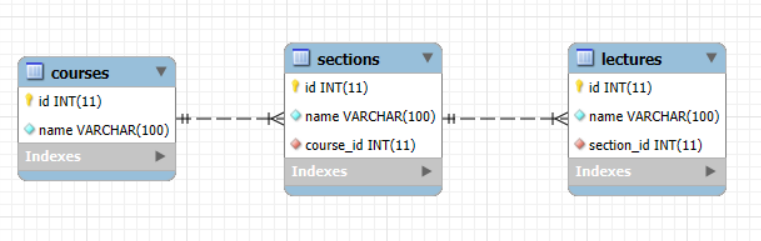
1. ERD
2. 아키텍처
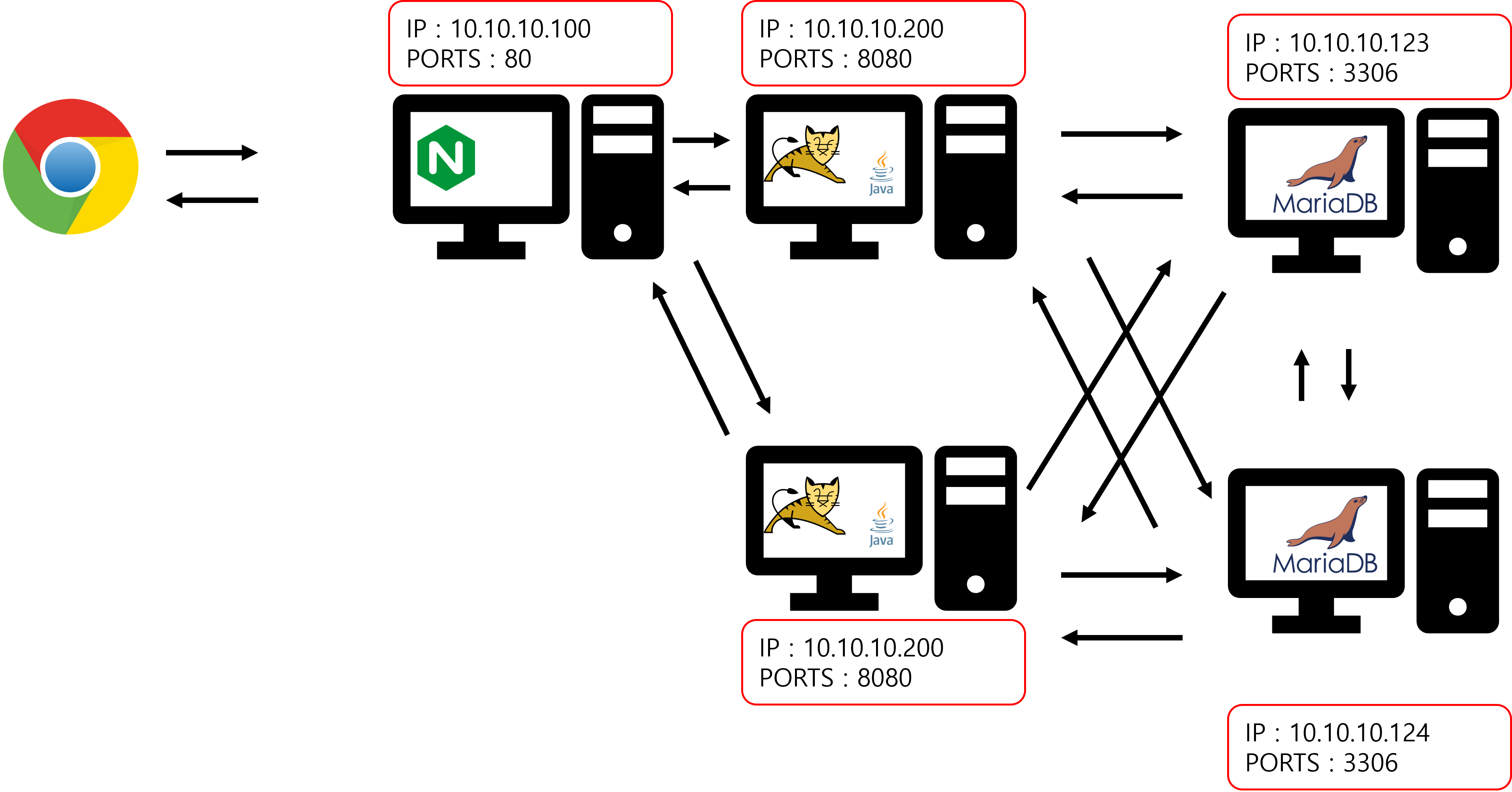
(그림의 IP주소는 문제와 무관하다.)
3. 문제
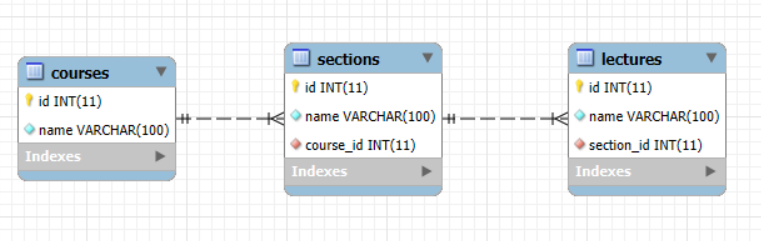
1. ERD를 보고 CREATE 문을 이용해서 테이블을 생성하시오

2. front.html로 접속하면 '이니셜 front server'라고 나와야 함(파일 직접 생성)

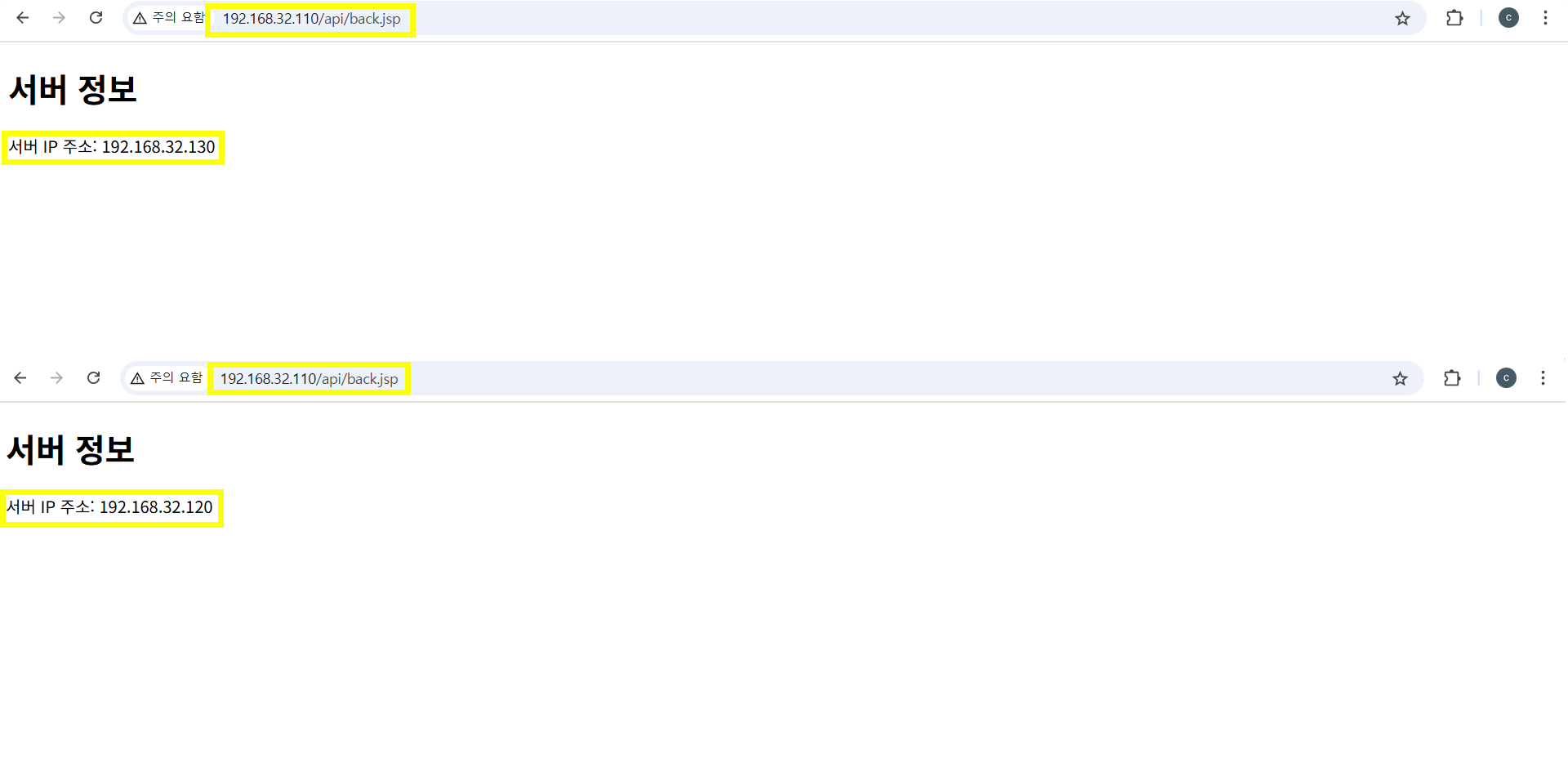
3. /api/back.jsp로 접속하면 새로고침 눌렀을 때 서버 IP가 번갈아가면서 나와야 함 nginx 서버에 설정 추가
톰캣 서버에 /usr/local/tomcat10/webapps/ROOT 에  back.jsp 파일 생성

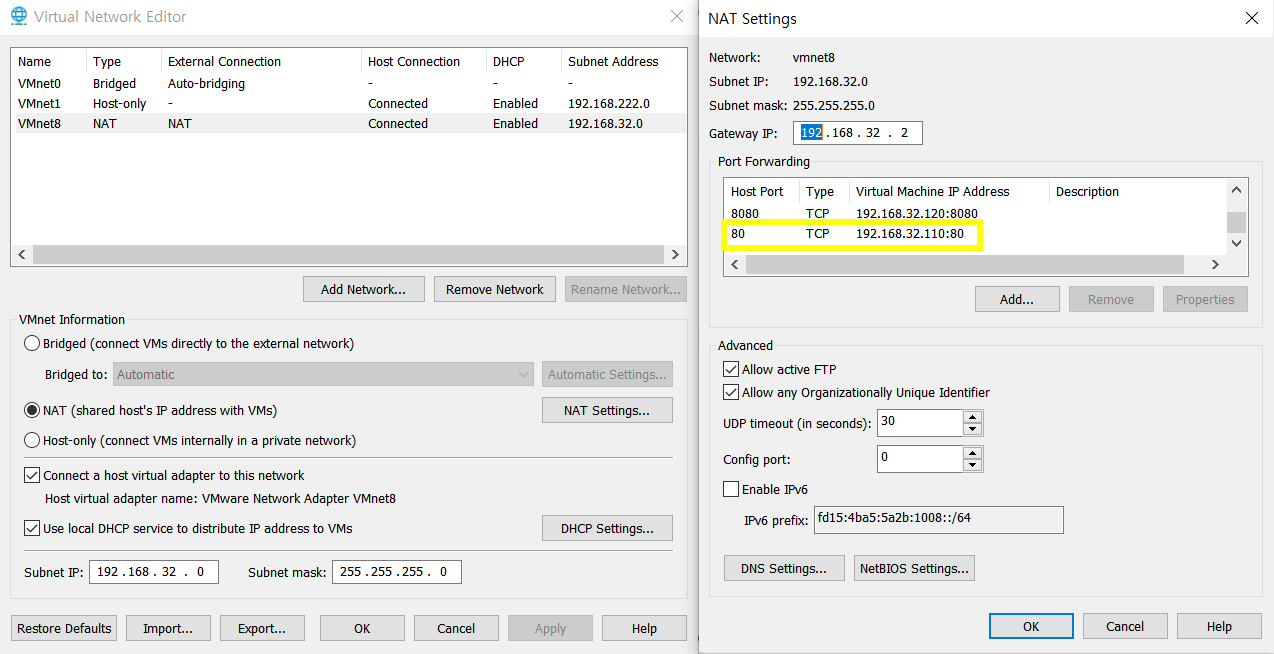
4. 강사 컴퓨터에서 접속할 수 있도록 설정하시오

5. /api/insert.jsp 파일에 알맞은 SQL을 작성하하고 nginx 서버의 /insert.html로 접속해서 테스트

6. /api/select.jsp 파일에 알맞은 SQL을 작성하시오 nginx 서버의 /api/select.jsp로 접속해서 테스트
단, 05~06. insert.jsp는 master 서버로 연결되게 하고 select.jsp는 slave 서버로 연결되게 설정하시오

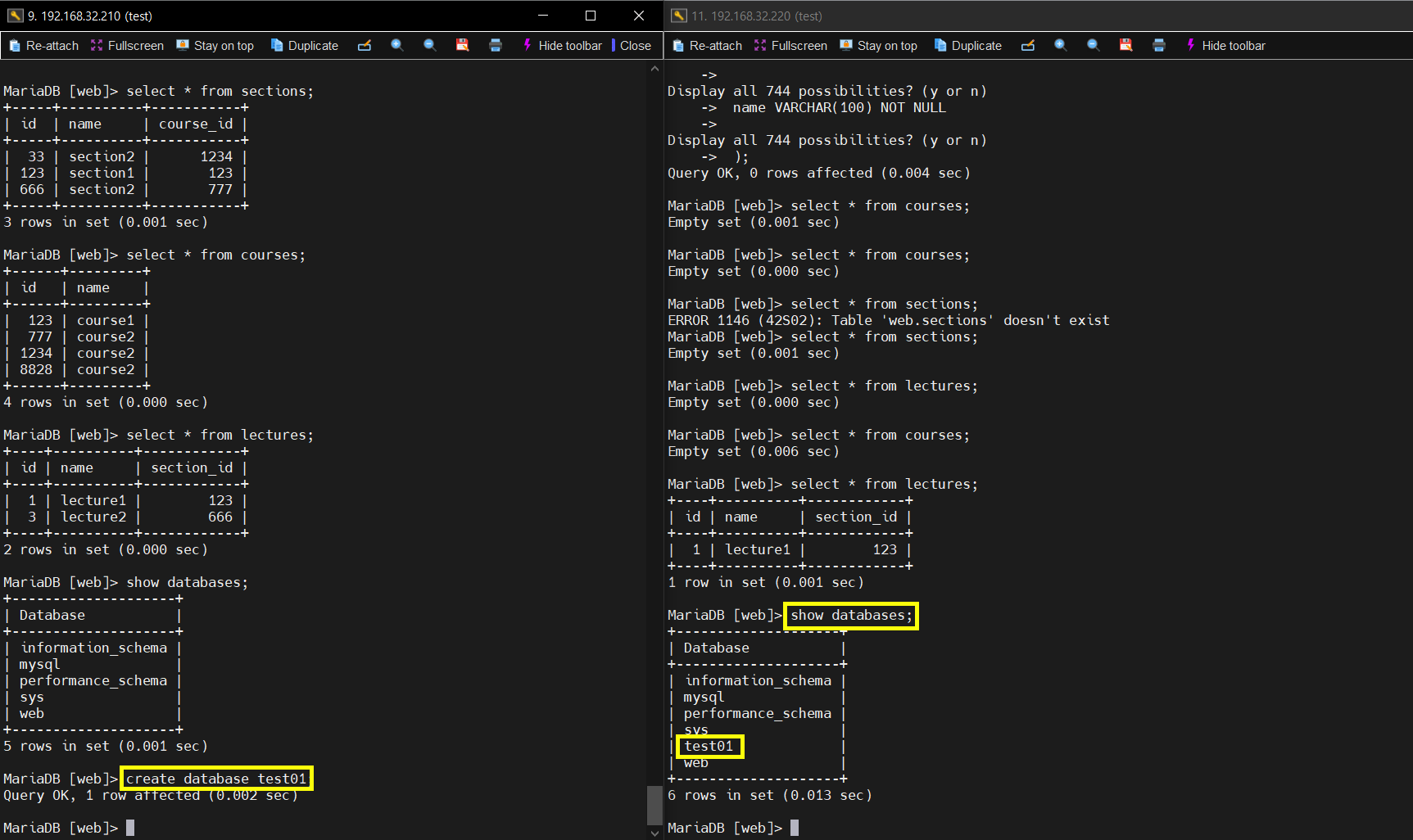
7. DB 서버에 데이터가 동기화 되는지 확인
2. 서버 환경 및 구성
- 가상화 환경: VMware
- 네트워크 방식: NAT (내부망 192.168.32.xxx, 외부와 통신 가능)
- 내부 통신: 192.168.32.xxx 대역을 공유하여 모든 서버 간 직접 통신 가능
| 서버 | OS | 호스트네임 | 서비스 | IP 주소 |
|---|---|---|---|---|
| WEB | Ubuntu 22.04 | web | nginx/1.18.0 | 192.168.32.110 |
| WAS1 | Ubuntu 22.04 | was1 | openjdk-17-jdk Apache Tomcat/10.1.42 | 192.168.32.120 |
| WAS2 | Ubuntu 22.04 | was1 | openjdk-17-jdk Apache Tomcat/10.1.42 | 192.168.32.130 |
| DB1 | Ubuntu 22.04 | db1 | MariaDB 10.6.22 | 192.168.32.210 |
| DB2 | Ubuntu 22.04 | db1 | MariaDB 10.6.22 | 192.168.32.220 |
3. 웹 서버(WEB - Nginx)
0. 서버 세팅
-- hostname 변경
vi /etc/hostname
init 6

-- IP주소 변경
vi /etc/netplan/00-installer-config.yaml
systemctl restart nginx.service

-- apt 업데이트 및 툴 설치
apt update
apt install -y net-tools
1. nginx 설치
apt install nginx2. Tomcat 연동 설정 (proxy_pass 등)
upstream tomcat_backend {
        server 192.168.32.120:8080; // [WAS1 IP주소]:[톰캣 포트]
        server 192.168.32.130:8080; // [WAS2 IP주소]:[톰캣 포트]
}

server {
        listen 80 default_server;
        listen [::]:80 default_server;

        root /var/www/web;

        index insert.html index.html index.htm index.nginx-debian.html; // 이 과제에서는 insert.html이 메인 페이지이므로 추가함

        server_name _;

        location / {
                try_files $uri $uri/ =404;
        }


        location /api {
            rewrite ^/api(/.*)$ $1 break;
            proxy_pass http://tomcat_backend;  # 업스트림 그룹으로 프록시
            proxy_set_header Host $host;
            proxy_set_header X-Real-IP $remote_addr;
            proxy_set_header X-Forwarded-For $proxy_add_x_forwarded_for;
            proxy_set_header X-Forwarded-Proto $scheme;
        }
}
3. 정적 HTML 배포
/var/www/web/insert.html 파일 생성
<html lang="en">
<head>
    <meta charset="UTF-8">
    <meta name="viewport" content="width=device-width, initial-scale=1.0">
    <title>Save Course, Section, Lecture</title>
</head>
<body>
    <h1>Save Data</h1>

    <!-- 코스 저장 폼 -->
    <h2>Save Course</h2>
    <form action="/api/insert.jsp" method="post">
		<label for="course_id">Course ID:</label>
        <input type="number" id="course_id" name="course_id" required>
        <input type="hidden" name="action" value="course">
        <label for="course_name">Course Name:</label>
        <input type="text" id="course_name" name="course_name" required>
        <button type="submit">Save Course</button>
    </form>

    <hr>

    <!-- 섹션 저장 폼 -->
    <h2>Save Section</h2>
    <form action="/api/insert.jsp" method="post">
		<label for="section_id">Section ID:</label>
		<input type="number" id="section_id" name="section_id" required>
        <input type="hidden" name="action" value="section">
        <label for="section_name">Section Name:</label>
        <input type="text" id="section_name" name="section_name" required>
        <br>
        <label for="course_id">Course ID:</label>
        <input type="number" id="course_id" name="course_id" required>
        <button type="submit">Save Section</button>
    </form>

    <hr>

    <!-- 강의 저장 폼 -->
    <h2>Save Lecture</h2>
    <form action="/api/insert.jsp" method="post">
        <input type="hidden" name="action" value="lecture">
        <label for="lecture_name">Lecture Name:</label>
        <input type="text" id="lecture_name" name="lecture_name" required>
        <br>
        <label for="section_id">Section ID:</label>
        <input type="number" id="section_id" name="section_id" required>
        <button type="submit">Save Lecture</button>
    </form>
</body>
</html>
4. 애플리케이션 서버 (WAS - Tomcat)
WAS1, WAS2 동일하게 설정했다.
0. 서버 세팅
-- hostname 변경
vi /etc/hostname
init 6

-- IP주소 변경
vi /etc/netplan/00-installer-config.yaml
systemctl restart nginx.service

-- apt 업데이트 및 툴 설치
apt update
apt install -y net-tools
1. Java 설치
apt install -y openjdk-17-jdk2. Tomcat 설치 및 JDBC 드라이버 추가
wget https://dlcdn.apache.org/tomcat/tomcat-10/v10.1.42/bin/apache-tomcat-10.1.42.tar.gz

tar -xvf apache-tomcat-10.1.42.tar.gz
MariaDB를 사용하는 문제였기때문에 tomcat설치 경로/lib 에 mariadb-java-client-3.3.3.jar 파일을 업로드함
3. JSP 업로드 및 DB 연결
vi /usr/local/tomcat10/webapps/ROOT/back.jsp
<%@ page language="java" contentType="text/html; charset=UTF-8" pageEncoding="UTF-8"%>
<!DOCTYPE html>
<html>
<head>
    <meta charset="UTF-8">
    <title>서버 IP 출력</title>
</head>
<body>
    <h1>서버 정보</h1>
    <p>서버 IP 주소:
        <%
            // HttpServletRequest 객체를 통해 서버의 IP를 가져옴
            String serverIP = request.getLocalAddr();
            out.print(serverIP);
        %>
    </p>
</body>
</html>
vi /usr/local/tomcat10/webapps/ROOT/select.jsp
<%@ page import="java.sql.*" %>
<%
    String dbURL = "jdbc:mariadb://192.168.32.220:3306/web"; // [slave DB IP주소]:[DB 포트]/[데이터베이스명]
    String dbUser = "ysm"; // DB 접속 계정
    String dbPassword = "ysm"; // DB 접속 계정 비밀번호
    Connection conn = null;

    try {
        Class.forName("org.mariadb.jdbc.Driver");
        conn = DriverManager.getConnection(dbURL, dbUser, dbPassword);

        // 밑에 "" 안에 SQL을 한 줄로 작성
        String sql = "SELECT course.id AS course_id, course.name AS course_name, section.id AS section_id, section.name AS section_name, lecture.name AS lecture_name FROM courses AS course JOIN sections AS section ON course.id = section.course_id JOIN lectures AS lecture ON section.id = lecture.section_id";
        PreparedStatement stmt = conn.prepareStatement(sql);
        ResultSet rs = stmt.executeQuery();

        int currentCourseId = -1;
        int currentSectionId = -1;

        while (rs.next()) {
            int courseId = rs.getInt("course_id");
            String courseName = rs.getString("course_name");
            int sectionId = rs.getInt("section_id");
            String sectionName = rs.getString("section_name");
            String lectureName = rs.getString("lecture_name");

            // 코스 변경 시 출력
            if (courseId != currentCourseId) {
                if (currentCourseId != -1) out.println("</ul></ul>"); // 이전 코스 닫기
                currentCourseId = courseId;
                out.println("<h2>Course: " + courseName + "</h2>");
                out.println("<ul>");
                currentSectionId = -1; // 섹션 초기화
            }

            // 섹션 변경 시 출력
            if (sectionId != currentSectionId) {
                if (currentSectionId != -1) out.println("</ul>"); // 이전 섹션 닫기
                currentSectionId = sectionId;
                if (sectionName != null) {
                    out.println("<li><strong>Section: " + sectionName + "</strong>");
                    out.println("<ul>");
                }
            }

            // 강의 출력
            if (lectureName != null) {
                out.println("<li>" + lectureName + "</li>");
            }
        }

        // 마지막 코스 및 섹션 닫기
        if (currentCourseId != -1) out.println("</ul></ul>");

        rs.close();
        stmt.close();
    } catch (Exception e) {
        out.println("Error: " + e.getMessage());
    } finally {
        if (conn != null) try { conn.close(); } catch (SQLException e) {}
    }
%>
vi /usr/local/tomcat10/webapps/ROOT/insert.jsp
<%
    // 데이터베이스 연결 정보
    String dbURL = "jdbc:mariadb://192.168.32.220:3306/web"; // [slave DB IP주소]:[DB 포트]/[데이터베이스명]
    String dbUser = "ysm"; // DB 접속 계정
    String dbPassword = "ysm"; // DB 접속 계정 비밀번호

    Connection conn = null;

    try {
        Class.forName("org.mariadb.jdbc.Driver");
        conn = DriverManager.getConnection(dbURL, dbUser, dbPassword);

        // 요청에서 파라미터 추출
        String action = request.getParameter("action"); // "course", "section", "lecture"

        if ("course".equals(action)) {
            // 코스 저장
            int courseId = Integer.parseInt(request.getParameter("course_id"));
            String courseName = request.getParameter("course_name");

            String query = "INSERT INTO courses (id, name) values (?, ?)";

            try (PreparedStatement stmt = conn.prepareStatement(query)) {
                                stmt.setInt(1, courseId);
                stmt.setString(2, courseName);
                stmt.executeUpdate();
                out.println("<p>Course saved successfully!</p>");
            }
        } else if ("section".equals(action)) {
            // 섹션 저장
            int sectionId = Integer.parseInt(request.getParameter("section_id"));
            String sectionName = request.getParameter("section_name");
            int courseId = Integer.parseInt(request.getParameter("course_id"));

            String query = "INSERT INTO sections (id, name, course_id) values (?, ?, ?)";

            try (PreparedStatement stmt = conn.prepareStatement(query)) {
                stmt.setInt(1, sectionId);
                stmt.setString(2, sectionName);
                stmt.setInt(3, courseId);
                stmt.executeUpdate();
                out.println("<p>Section saved successfully!</p>");
            }
        } else if ("lecture".equals(action)) {
            // 강의 저장
            String lectureName = request.getParameter("lecture_name");
            int sectionId = Integer.parseInt(request.getParameter("section_id"));

            String query = "INSERT INTO lectures (name, section_id) values (?, ?)";

            try (PreparedStatement stmt = conn.prepareStatement(query)) {
                stmt.setString(1, lectureName);
                stmt.setInt(2, sectionId);
                stmt.executeUpdate();
                out.println("<p>Lecture saved successfully!</p>");
            }
        } else {
            out.println("<p>Invalid action!</p>");
        }
    } catch (Exception e) {
        out.println("Error: " + e.getMessage());
    } finally {
        if (conn != null) try { conn.close(); } catch (SQLException e) {}
    }
%>
<a href="/insert.html">Back to Form</a>
5. 데이터베이스 서버 (DB - MariaDB)
DB1(master) - DB2(slave) 설정
1) DB1(master) 세팅
0. 서버 세팅
-- hostname 변경
vi /etc/hostname
init 6

-- IP주소 변경
vi /etc/netplan/00-installer-config.yaml
systemctl restart nginx.service

-- apt 업데이트 및 툴 설치
apt update
apt install -y net-tools
1. mariadb-server 설치
apt install -y mariadb-server2. DB 설정 변경
vi /etc/mysql/mariadb.conf.d/50-server.cnf
bind-address = 0.0.0.0 // 외부에서 디비에 접근할 수 있게 허용3. mariadb 초기 설정
    mysql_secure_installation
		엔터
		n
		Y
		qwer1234
		qwer1234
		Y
		Y
		Y
		Y
4. master 설정
vi /etc/mysql/mariadb.conf.d/50-server.cnf
[mariadb]
log-bin
server_id=1
log-basename=master1
binlog-format=mixed
5. slave DB에서 접속할 계정 생성
CREATE USER 'slave_user'@'%' IDENTIFIED BY 'qwer1234';
GRANT REPLICATION SLAVE ON *.* TO 'slave_user'@'%';
FLUSH PRIVILEGES;
6. master 확인
show master status; // slave 설정 시 필요한 정보2) DB2(slave) 세팅
0. 서버 세팅
-- hostname 변경
vi /etc/hostname
init 6

-- IP주소 변경
vi /etc/netplan/00-installer-config.yaml
systemctl restart nginx.service

-- apt 업데이트 및 툴 설치
apt update
apt install -y net-tools
1. mariadb-server 설치
apt install -y mariadb-server2. DB 설정 변경
vi /etc/mysql/mariadb.conf.d/50-server.cnf
bind-address = 0.0.0.0 // 외부에서 디비에 접근할 수 있게 허용3. mariadb 초기 설정
    mysql_secure_installation
		엔터
		n
		Y
		qwer1234
		qwer1234
		Y
		Y
		Y
		Y
4. slave 설정
vi /etc/mysql/mariadb.conf.d/50-server.cnf
[mariadb]
server_id=2
5. master 지정
CHANGE MASTER TO
		  MASTER_HOST='192.168.32.210', // 마스터 DB IP주소
		  MASTER_USER='slave_user', // 마스터 DB에 REPLICATION SLAVE 권한이 부여된 계정
		  MASTER_PASSWORD='qwer1234', // 계정의 비밀번호
		  MASTER_PORT=3306, // DB 서비스 포트
		  MASTER_LOG_FILE='master1-bin.000001', //[마스터에서 show master status 했을 때 File 이름]
		  MASTER_LOG_POS=780, // [마스터에서 show master status 했을 때 position 번호]
		  MASTER_CONNECT_RETRY=10;
6. slave 시작 및 확인
START SLAVE;

SHOW SLAVE STATUS\G
		Slave_IO_Running: Yes // 정상: YES, 비정상: NO
		Slave_SQL_Running: Yes // 정상: YES, 비정상: NO
DB2(master) - DB1(slave) 설정
1) DB2(master) 세팅
1. master 설정
vi /etc/mysql/mariadb.conf.d/50-server.cnf
[mariadb]
log-bin
server_id=2
log-basename=master1
binlog-format=mixed
2. slave DB에서 접속할 계정 생성
CREATE USER 'slave_user'@'%' IDENTIFIED BY 'qwer1234';
GRANT REPLICATION SLAVE ON *.* TO 'slave_user'@'%';
FLUSH PRIVILEGES;
3. master 확인
show master status; // slave 설정 시 필요한 정보2) DB1(slave) 세팅
1. slave 설정
vi /etc/mysql/mariadb.conf.d/50-server.cnf
[mariadb]
log-bin
server_id=1 // 이미 설정되어있음
log-basename=master1
binlog-format=mixed
2. master 지정
CHANGE MASTER TO
		  MASTER_HOST='192.168.32.220', // 마스터 DB IP주소
		  MASTER_USER='slave_user', // 마스터 DB에 REPLICATION SLAVE 권한이 부여된 계정
		  MASTER_PASSWORD='qwer1234', // 계정의 비밀번호
		  MASTER_PORT=3306, // DB 서비스 포트
		  MASTER_LOG_FILE='master1-bin.000001', //[마스터에서 show master status 했을 때 File 이름]
		  MASTER_LOG_POS=780, // [마스터에서 show master status 했을 때 position 번호]
		  MASTER_CONNECT_RETRY=10;
3. slave 시작 및 확인
START SLAVE;

SHOW SLAVE STATUS\G
		Slave_IO_Running: Yes // 정상: YES, 비정상: NO
		Slave_SQL_Running: Yes // 정상: YES, 비정상: NO
6. 문제풀이
문제 1. erd를 보고 create문을 이용해서 테이블을 생성하라
-- web 데이터 베이스 생성
create database web;

-- web 접속
use web;

-- courses 테이블 생성
create table courses (
		 id INT PRIMARY KEY,
		 name VARCHAR(100) NOT NULL
		 );

-- sections 테이블 생성
create table sections (
		 id INT PRIMARY KEY,
		 name VARCHAR(100) NOT NULL,
		 course_id INT,
		 FOREIGN KEY (course_id) REFERENCES courses(id)
		 );

-- lectures 테이블 생성
create table lectures (
		 id INT AUTO_INCREMENT PRIMARY KEY,
		 name VARCHAR(100) NOT NULL,
		 section_id INT,
		 FOREIGN KEY (section_id) REFERENCES sections(id)
		 );
문제 2. http://web서버ip주소/front.html 로 접속하면 '이니셜 front server' 나오게 설정 (직접 파일 만들기)
vi /var/www/web/front.html
<h2 style="text-align: left;">ysm front server</h2>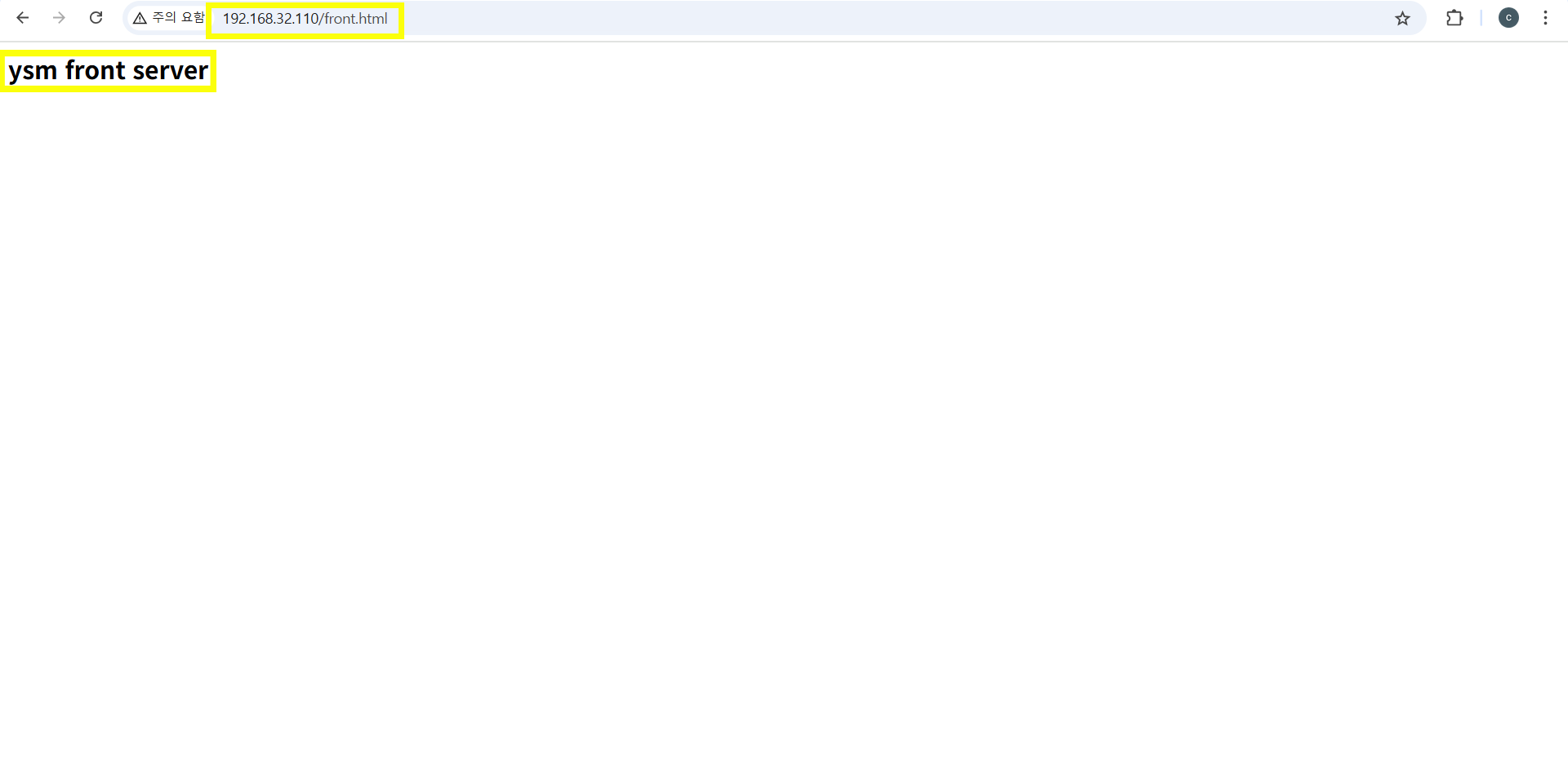
문제 3. /api/back.jsp 로 접속하면 새로고침 눌렀을때 서버 ip 번갈아 나오기
문제4. 강사 컴퓨터에서 접속할수있게 설정
버츄얼 네트워크 에디터에서 내 노트북에 들어오는 80번 포트를 WEB서버로 가게 설정
문제5. /api/insert.jsp 파일에 알맞는 sql 작성하고 /insert.html 접속해서 테스트
-- 코스 저장
String query = "INSERT INTO courses (id, name) values (?, ?)";

-- 섹션 저장
String query = "INSERT INTO sections (id, name, course_id) values (?, ?, ?)";

-- 강의 저장
String query = "INSERT INTO lectures (name, section_id) values (?, ?)";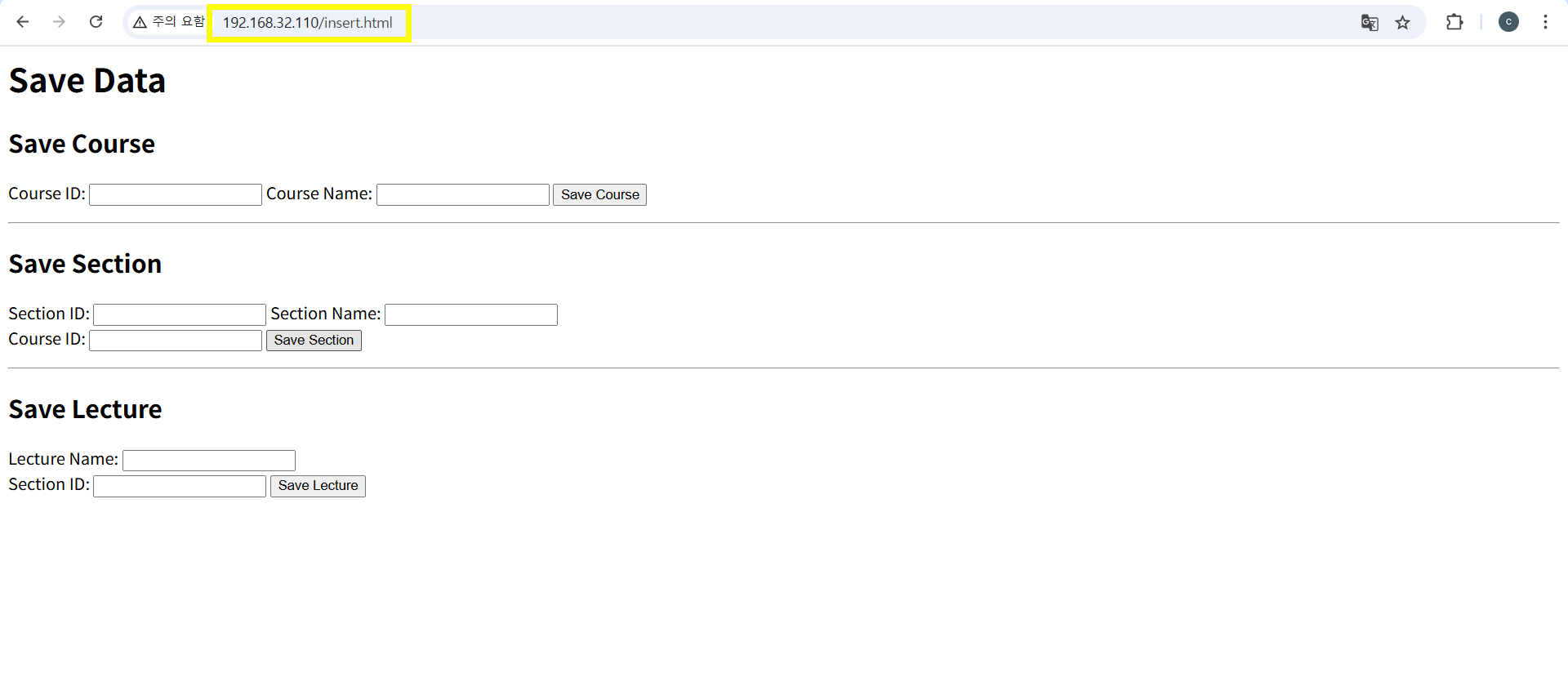
문제6. /api/select.jsp 파일에 알맞는 sql 작성하고 api/select.html 접속해서 테스트
String sql = "SELECT course.id AS course_id, course.name AS course_name, section.id AS section_id, section.name AS section_name, lecture.name AS lecture_name FROM courses AS course JOIN sections AS section ON course.id = section.course_id JOIN lectures AS lecture ON section.id = lecture.section_id";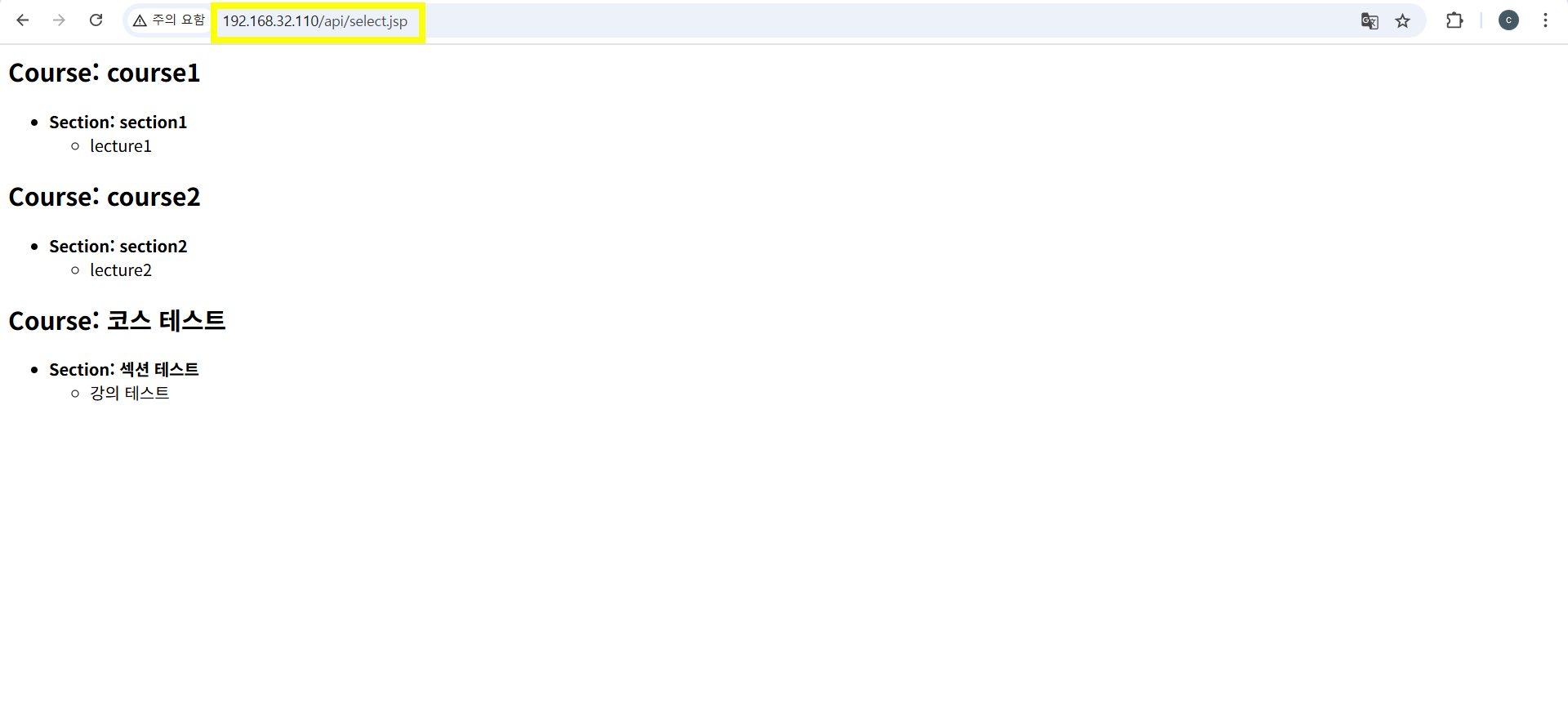
문제 6~7. insert.jsp 는 마스터 디비로, select.jsp는 슬레이브 디비로 연결되게 설정
insert.jsp
// 데이터베이스 연결 정보
    String dbURL = "jdbc:mariadb://192.168.32.210:3306/web"; // [slave DB IP주소]:[DB 포트]/[데이터베이스명]
    String dbUser = "ysm"; // DB 접속 계정
    String dbPassword = "ysm"; // DB 접속 계정 비밀번호
select.jsp
// 데이터베이스 연결 정보
    String dbURL = "jdbc:mariadb://192.168.32.220:3306/web"; // [slave DB IP주소]:[DB 포트]/[데이터베이스명]
    String dbUser = "ysm"; // DB 접속 계정
    String dbPassword = "ysm"; // DB 접속 계정 비밀번호
문제8. 디비 동기화 테스트

문제 유출!