프로그램이 만들어지는 과정

컴파일러 (Compiler)
사람이 이해할 수 있는 프로그래밍 언어로 작성된 Source Code를 컴퓨터(CPU)가 이해할 수 있는 기계어로 표현된 Object 파일로 변환
- Object files for x86
- ARM
- RISC-V
Source Code (ex. C file)
프로그램이 수행하고자 하는 작업이 프로그래밍 언어로 표현 됨
Object (ex. o file)
컴퓨터(CPU)가 이해할 수 있는 기계어로 구성된 파일
- 자체로는 수행이 이루어지지 못함
- 프로세스로 변환되기 위한 정보가 삽입되어야 함
Relocatable Addresses(Relative Address)로 표현
- 심볼들의 주소가 상대적인 값으로 표현됨(ex.시작 주소로 부터 26-byte 지점)
Cross-compiler for different platforms 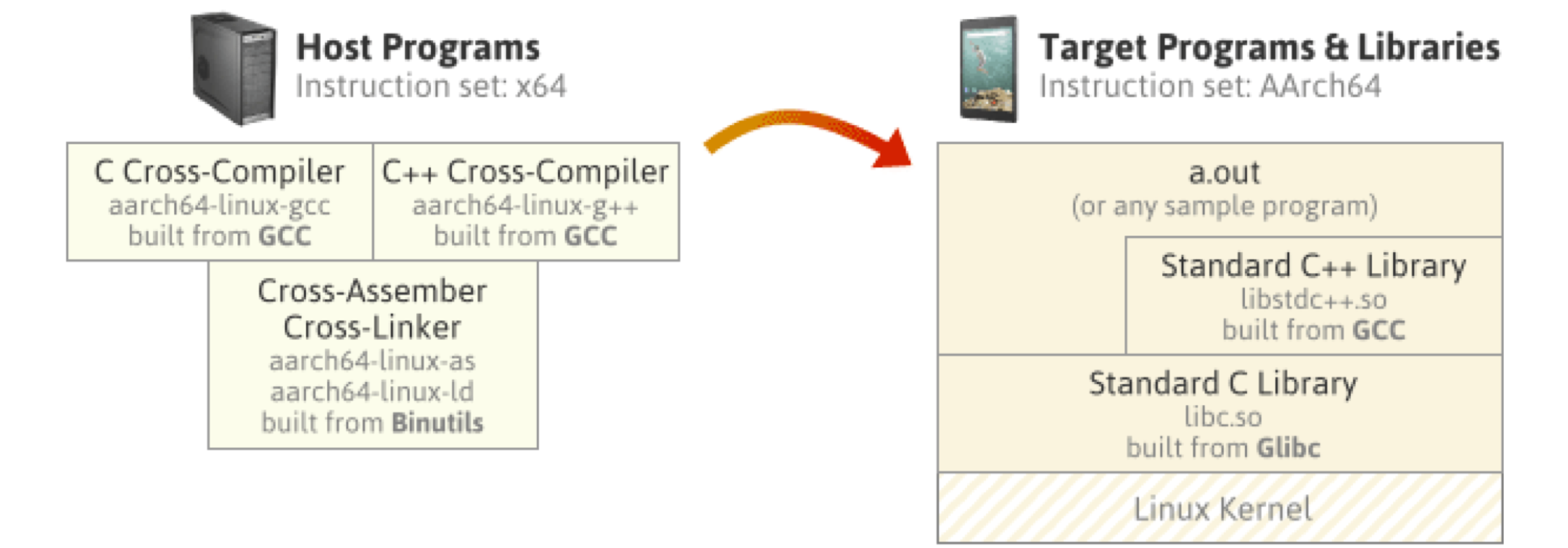
What Can't Be Translated?
Rosetta can translate most Intel-based apps, including apps that contain just-in-time (JIT) compilers. However, Rosetta doesn't translate the following executables:
- Kernel extensions
- Virtual Machine apps that virtualize x86_64 computer platforms
Rosetta translates all x86_64 instructions, but it doesn't support the execution of some newer instruction sets and processor features, such as AVX, AVX2, and AVX512 vector instructions. If you include these newer instructions in your code, execute them only after verifying that they are available. For example, to determine if AVX512 vector instructions are available, use the sysctlbyname function to check the hw. optional.avx512f attribute.
번역할 수 없는 것은 무엇인가요?
Rosetta는 적시 컴파일러(JIT)가 포함된 앱을 포함하여 대부분의 인텔 기반 앱을 번역할 수 있습니다. 그러나 다음과 같은 실행 파일은 번역되지 않습니다.:
- Kernel 확장
- x86_64 컴퓨터 플랫폼을 가상화하는 가상 머신 앱
Rosetta는 모든 x86_64 명령어를 번역하지만 AVX, AVX2 및 AVX512 벡터 명령어와 같은 일부 최신 명령어 세트 및 프로세서 기능의 실행은 지원하지 않습니다. 이러한 최신 명령어를 코드에 포함할 경우 사용 가능한지 확인한 후에만 실행하세요. 예를 들어 AVX512 벡터 명령어를 사용할 수 있는지 확인하려면 sysctlbyname 함수를 사용하여 hw. optional.avx512f 속성을 확인합니다.
링커 (Linker)
관련된 여러 Object 파일들과 라이브러리들을 연결하여, 메모리로 로드 될 수 있는 하나의 Executable로 변환
Executable (ex. exe file)
특정한 환경(OS)에서 수행될 수 있는 파일
프로세스로의 변환을 위한 Header, 작업 내용인 Text, 필요한 데이터인 Data를 포함
Absolute Addresses로 표현하여 심볼들의 주소가 절대값으로 표현됨
컴파일러와 링커는 결과물이 수행될 OS와 CPU에 따라 다른 형태의 파일을 만듦
로더 (Loader)
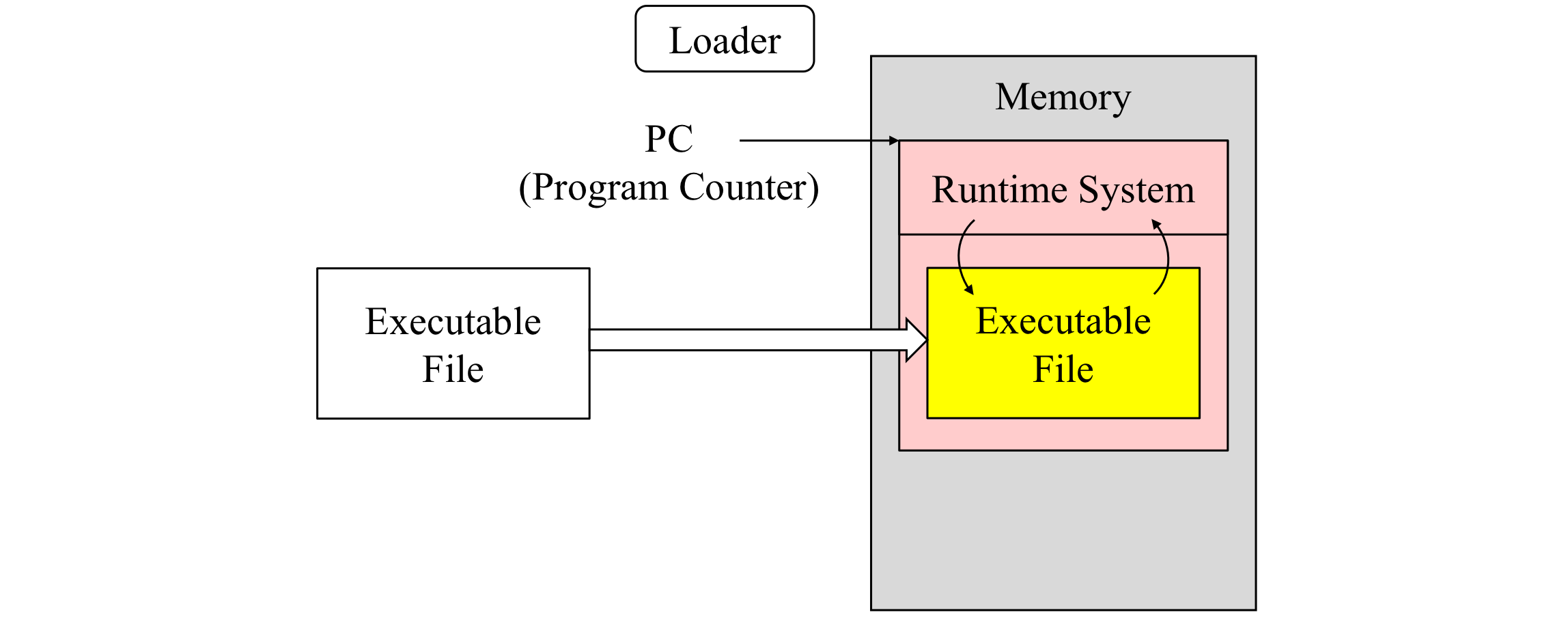
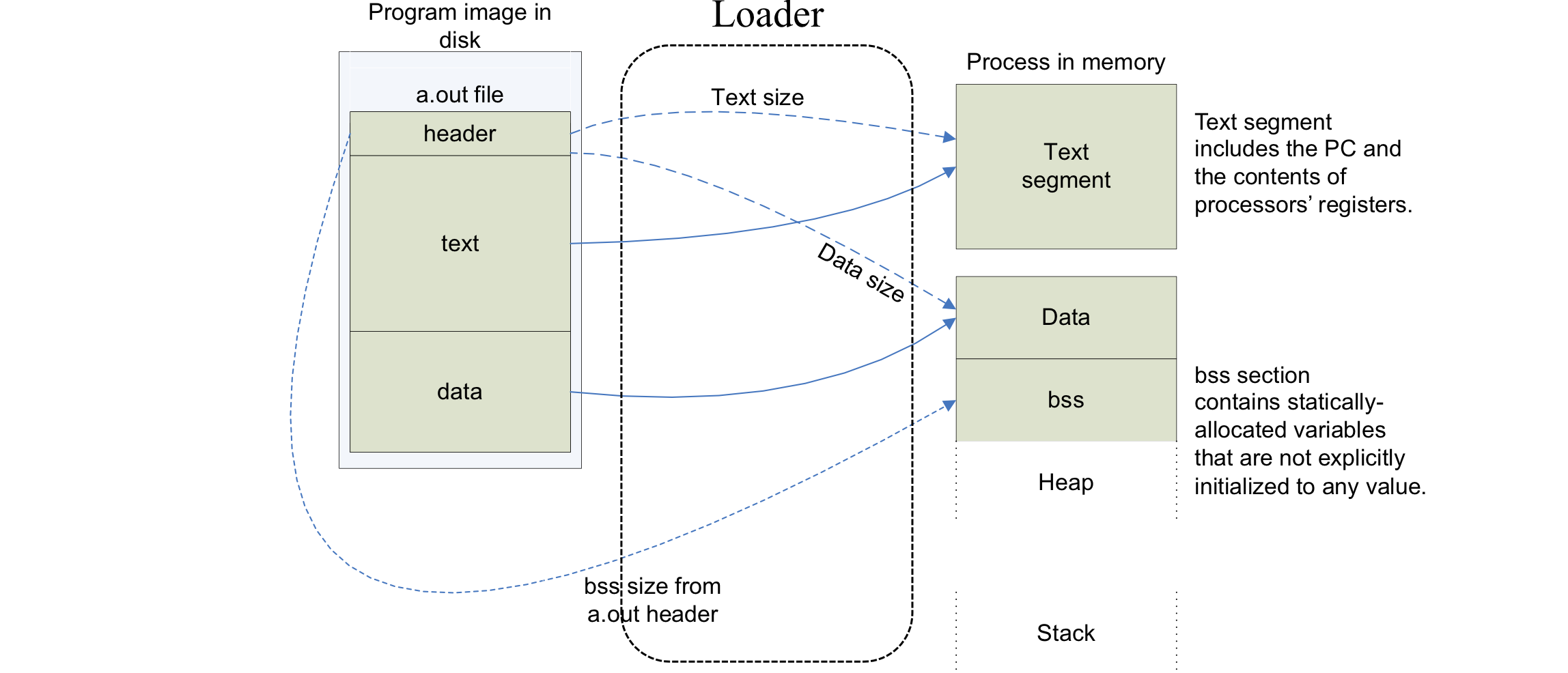
Executable을 실제 메모리에 올려주는 역할을 담당하는 운영체제의 일부
동작과정
- Executable의 Header를 읽어, Text와 Data의 크기를 결정
- 프로그램을 위한 Address Space를 생성
- 실행 명령어와 Data들을 Executable로부터 생성한 Address Space로 복사
- 프로그램의 Argument들을 Stack으로 복사
- CPU내 Register를 초기화하고, Start-up Routine으로 Jump
Runtime System
Runtime System은 응용 프로그램의 효율적인 실행을 지원하기 위해, 프로그램과 연결하여 상호 작용함
C Runtime System Program Execution
- GCC는 Start-up Code Object파일을 추가하여 프로그램을 컴파일, 이 때 기본 라이브러리들도 동적으로 링크
- Process를 시작하기 위해 커널은 프로그램 카운터를 _start함수의 주소로 지정
- _start 함수는 동적으로 링크된 C 라이브러리 및 쓰레드 환경을 초기화 하기 위해 _libc_start_main 함수를 호출
- 라이브러리 초기화를 진행 후 프로그램의 main 함수가 호출
Process Concept
Process - Abstraction for
- Execution Unit: 스케줄링의 단위
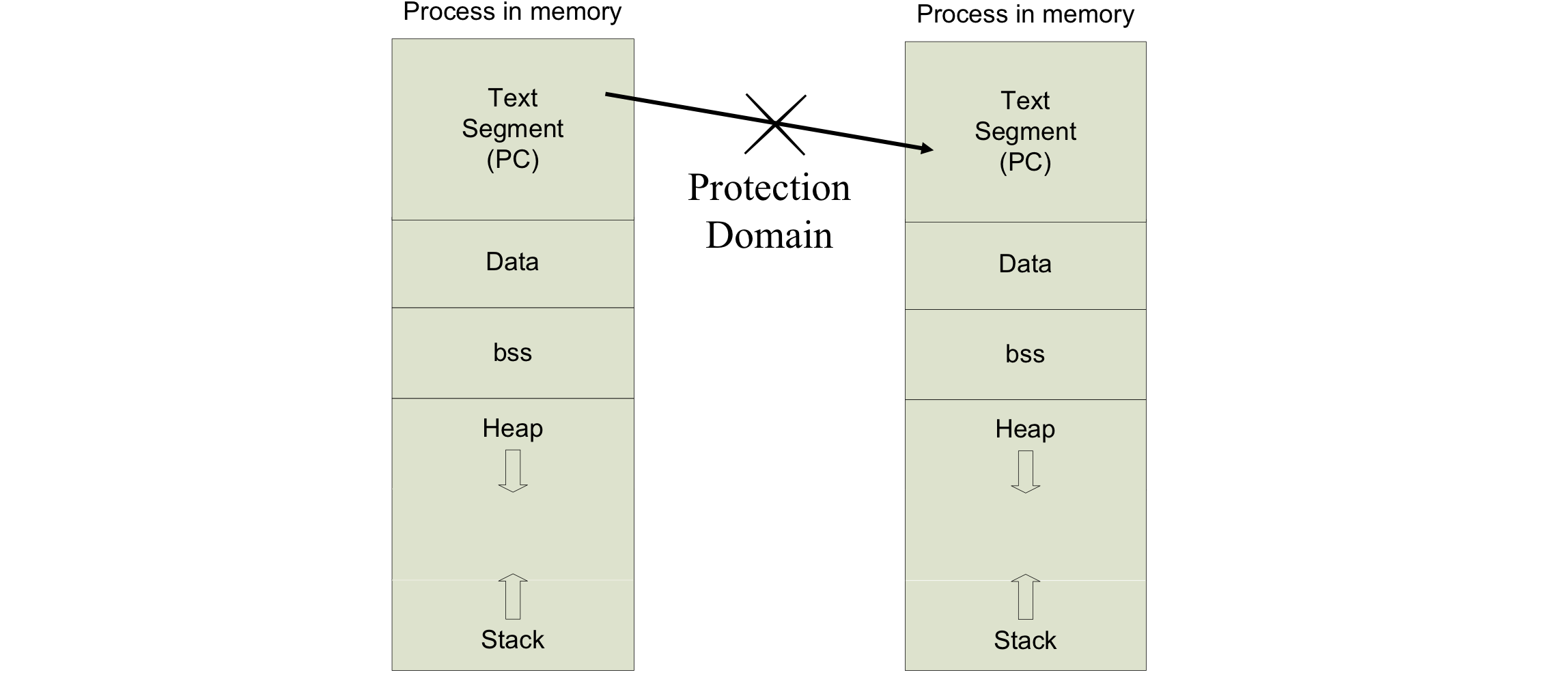
- Protection Domain: 서로 침범하지 못함
Process - Implemented with
- Program Counter
- Stack
- Data Section
프로세스는 디스크에 저장된 프로그램으로부터 변환되어 로딩됨
Process Image
Process from Program
Process Execution in Xv6
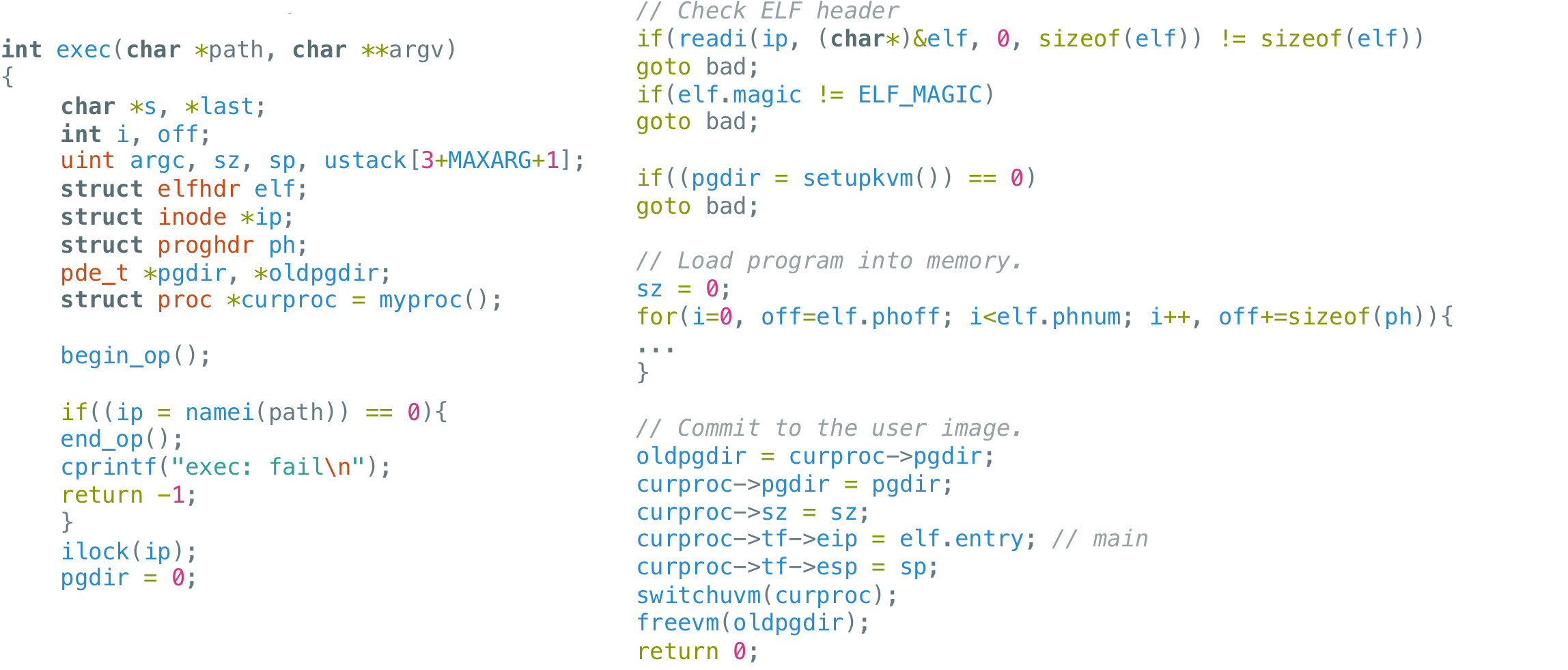
Code: exec
Exec is the system call that creates the user part of an address space. It initializes the user part of an address space from a file stored in the file system. Exec (6610) opens the named binary path using namei (6623), which is explained in Chapter 6. Then, it reads the ELF header. Xv6 applications are described in the widely-used ELF format, defined in elf.h. An ELF binary consists of an ELF header, struct elfhdr (0905), followed by a sequence of program section headers, struct proghdr (0924). Each progh-dr describes a section of the application that must be loaded into memory; xv6 programs have only one program section header, but other systems might have separate sections for instructions and data.
Process State
-
New: 새 프로세스 생성
-
Running: 프로세스 실행중
-
Waiting: 프로세스가 특정 이벤트에 의해 대기중
(e.g., an I/O completion or reception of a signal) -
Ready: 프로세스가 다시 프로세서 신호에 할당되기를 대기중
-
Terminated: 프로세스가 실행을 완료
커널 내에 Ready Queue, Waiting Queue, Running Queue를 두고 프로세스들을 상태에 따라 관리한다. 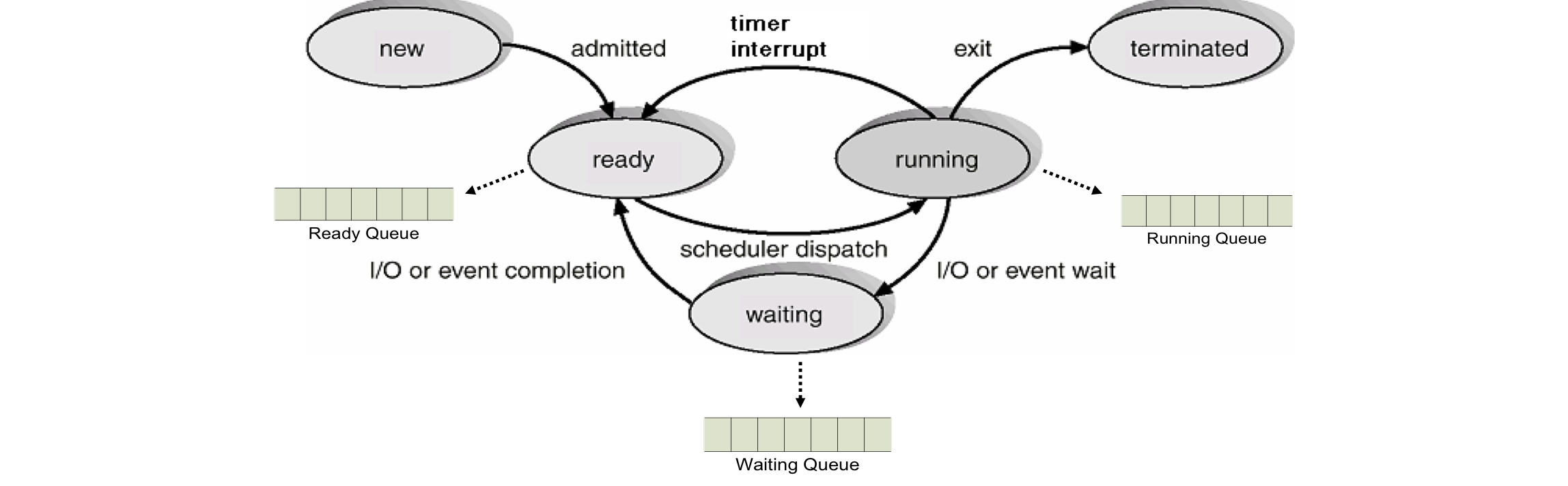
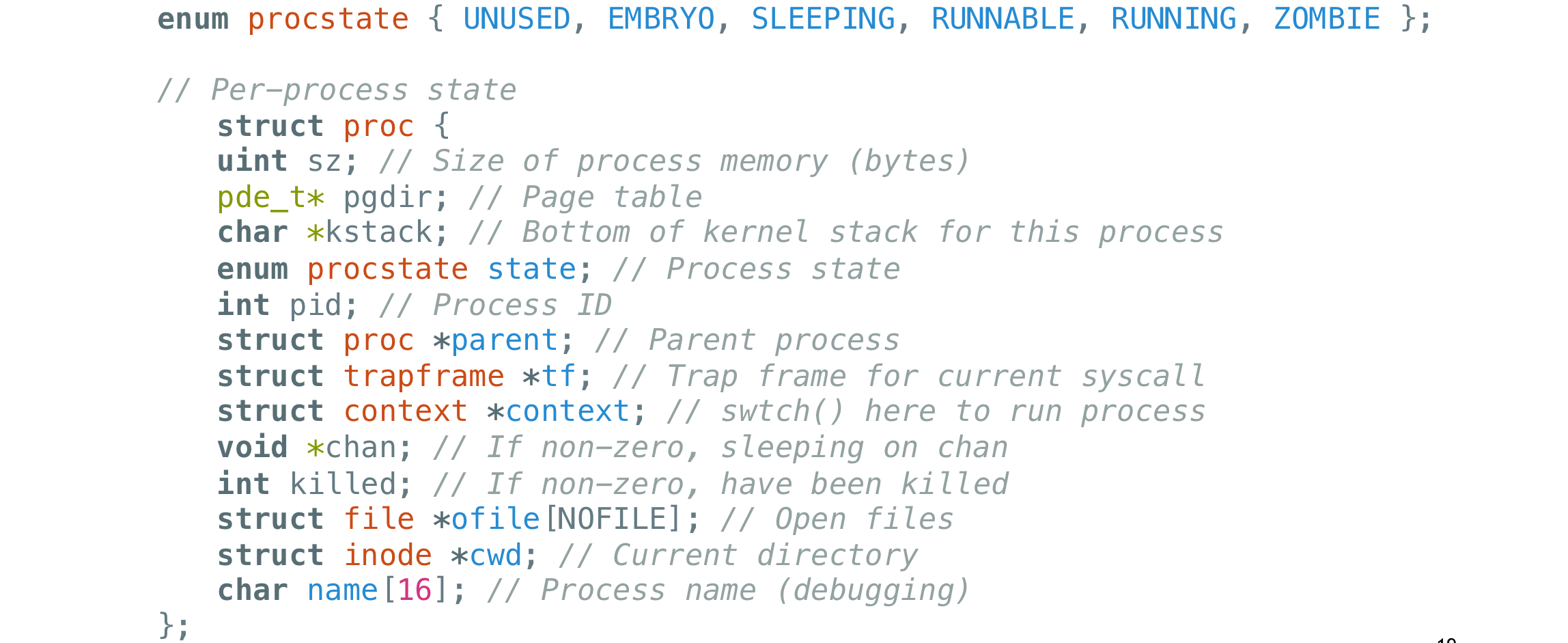
Process State in Xv6
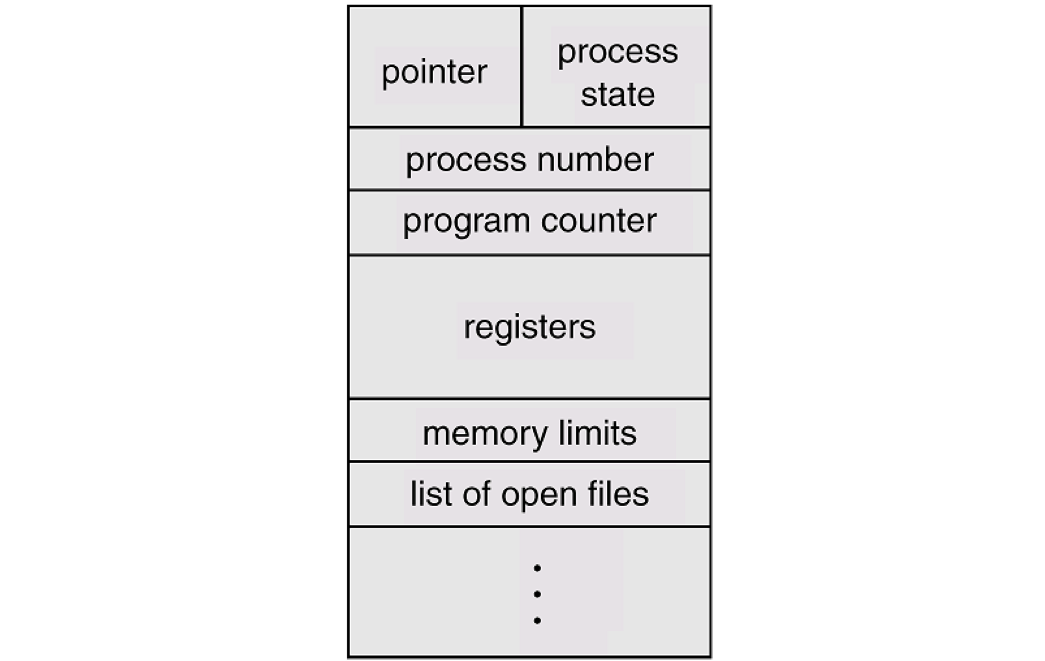
Process Control Block
각 프로세스는 OS에서 PCB로 표시
각 프로세스에 관련한 정보들
- Process State
- Program Counter
- CPU Registers
- CPU Scheduling Information
- Memory Management Information ‒ Accounting Information
- I/O Status Information
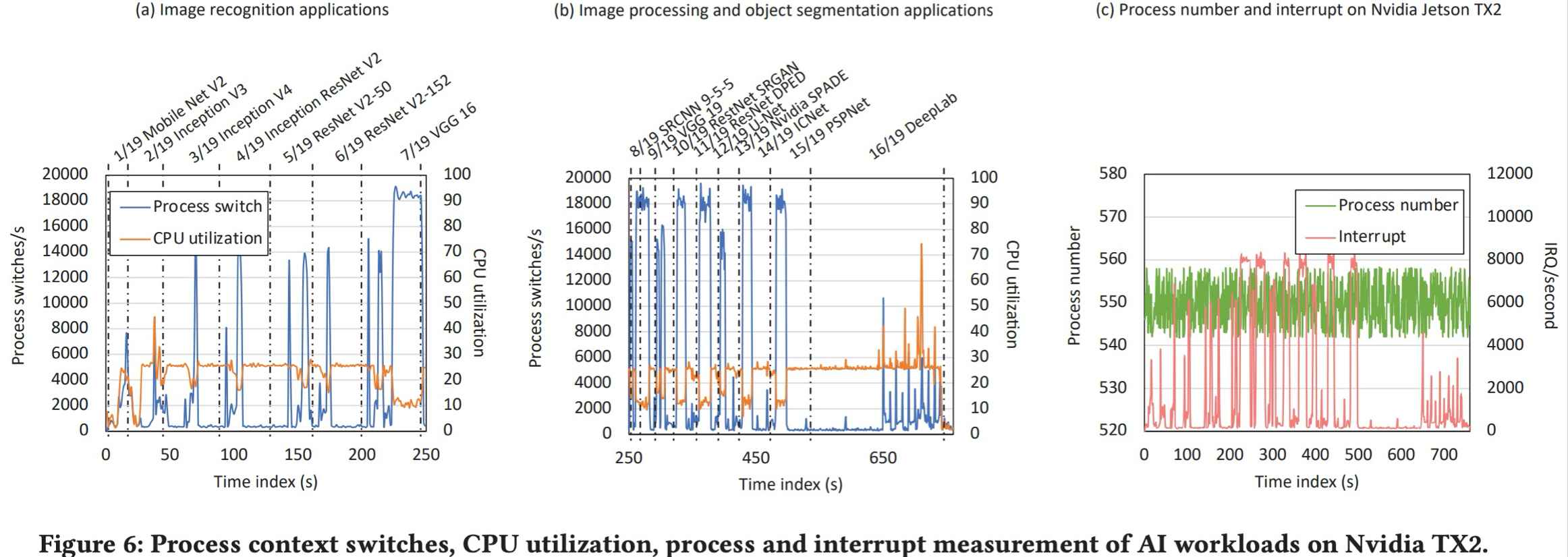
Context Switch (문맥 전환)
CPU가 새로운 프로세스로의 전환을 할때, Kernel은 반드시
기존 프로세스 상태 저장(Save)한 후
새로운 프로세스 로드(Load)해야 함
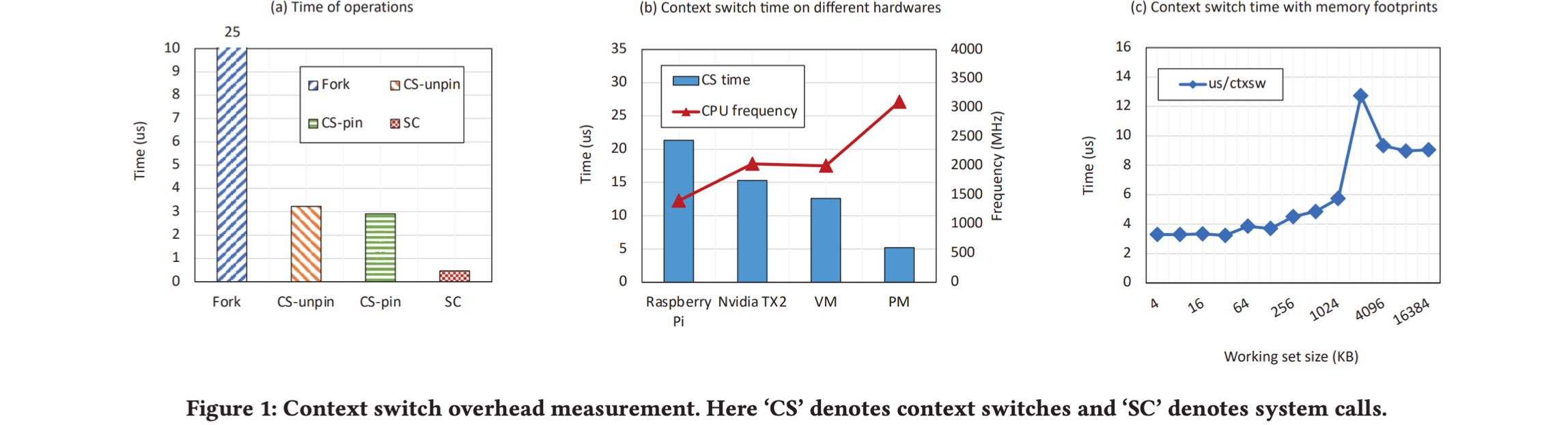
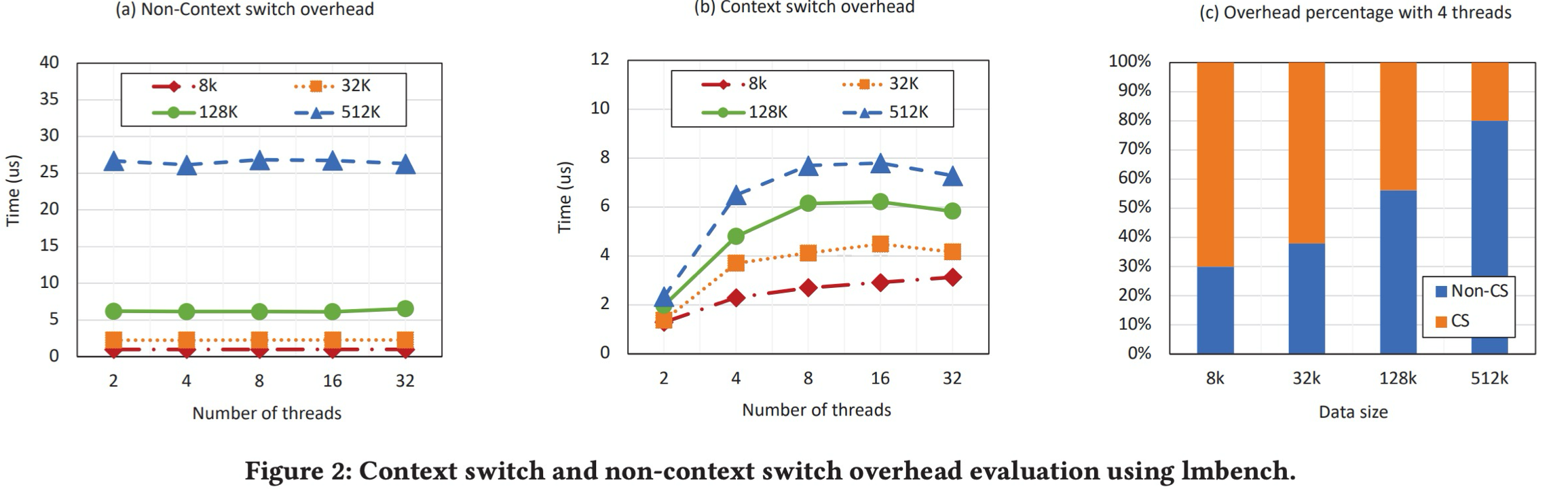
Context Switching의 시간은 overhead임
Context Switching은 하드웨어의 지원에 의지
CISC
- 복잡한 명령어 셋 구성 -> 효율 높임, 클럭 속도 저하
- 복잡한 회로 -> 물리적인 공간 차지 -> 레지스터 용량 저하
(ex. Intel Pentium Processor)
RISC
- 간단한 명령어 셋 구성 -> 클럭 속도 높임 -> 빠른 수행 속도
- 절약된 물리적 공간에 보다 많은 레지스터 장착
Context Switch 시 레지스터 내용 변경에 보다 큰 오버헤드가 발생함
(ex. ARM Processor)
Register Window (Berkeley RISC Desigm) 
Context Switch 도식화 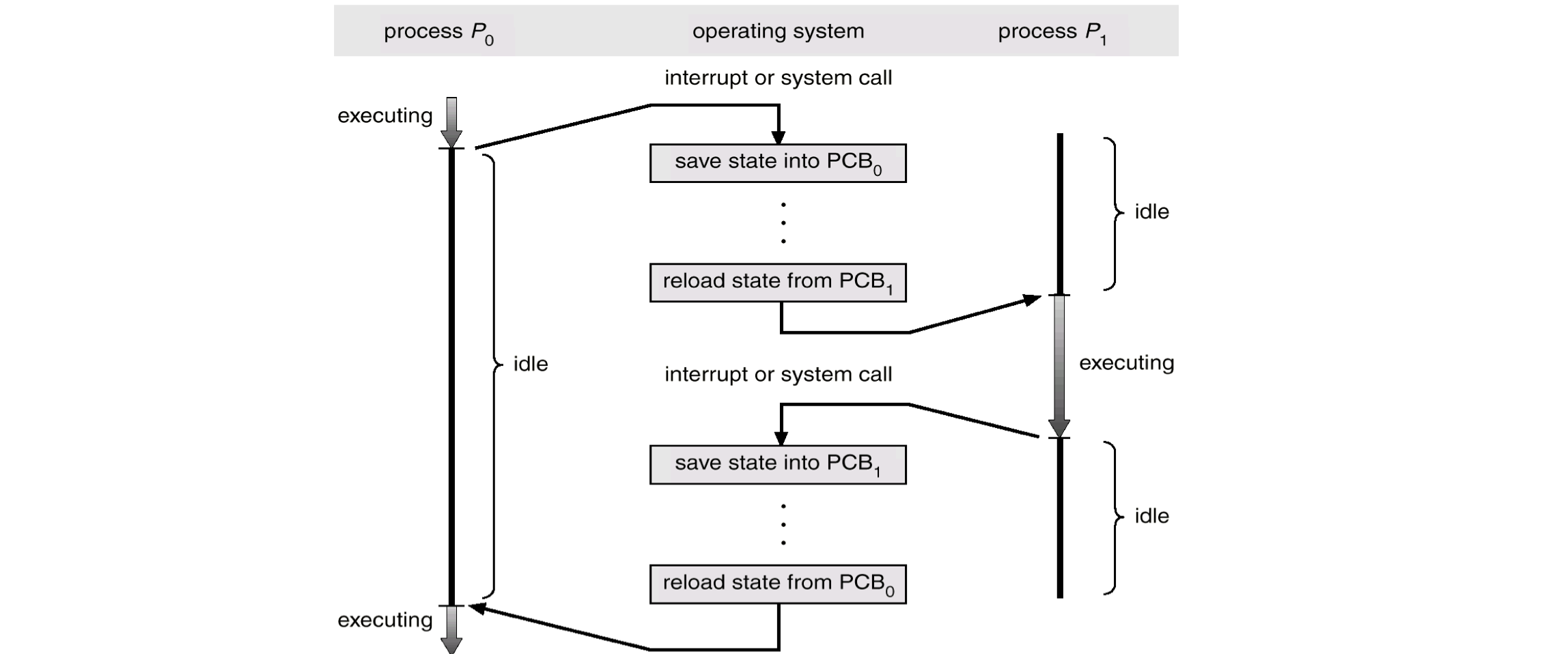
Context Switching의 Overhead 정량화
Process Creation
프로세스들은 Concurrently 하게 실행될 수 있으며, 동적으로 생성/종료 됨
OS provides process creation and process termination mechanisms
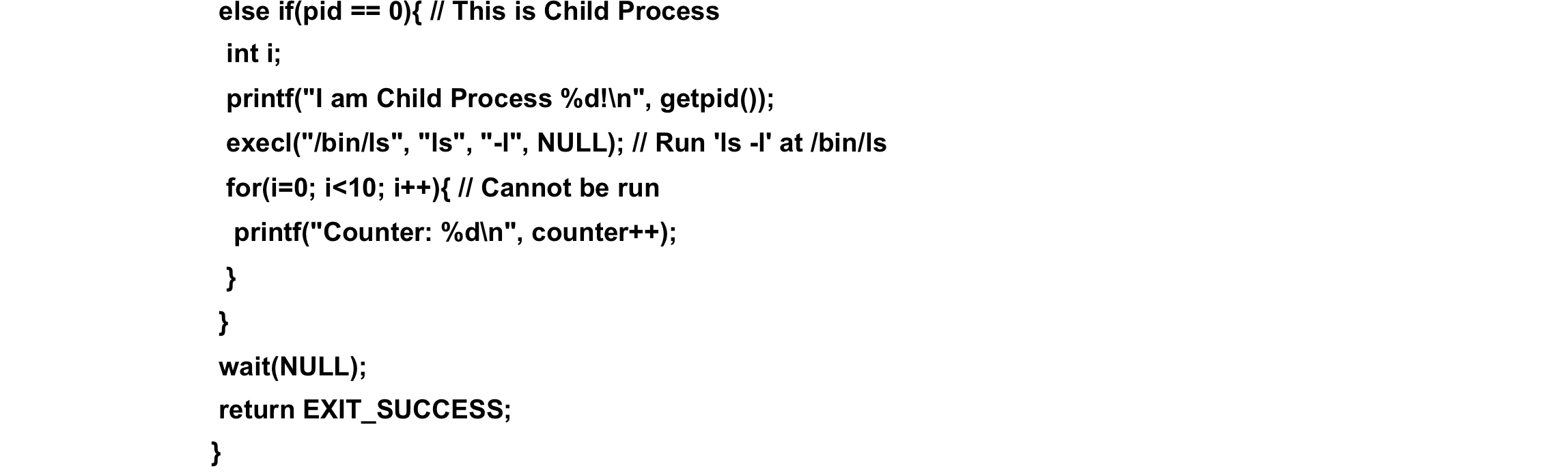
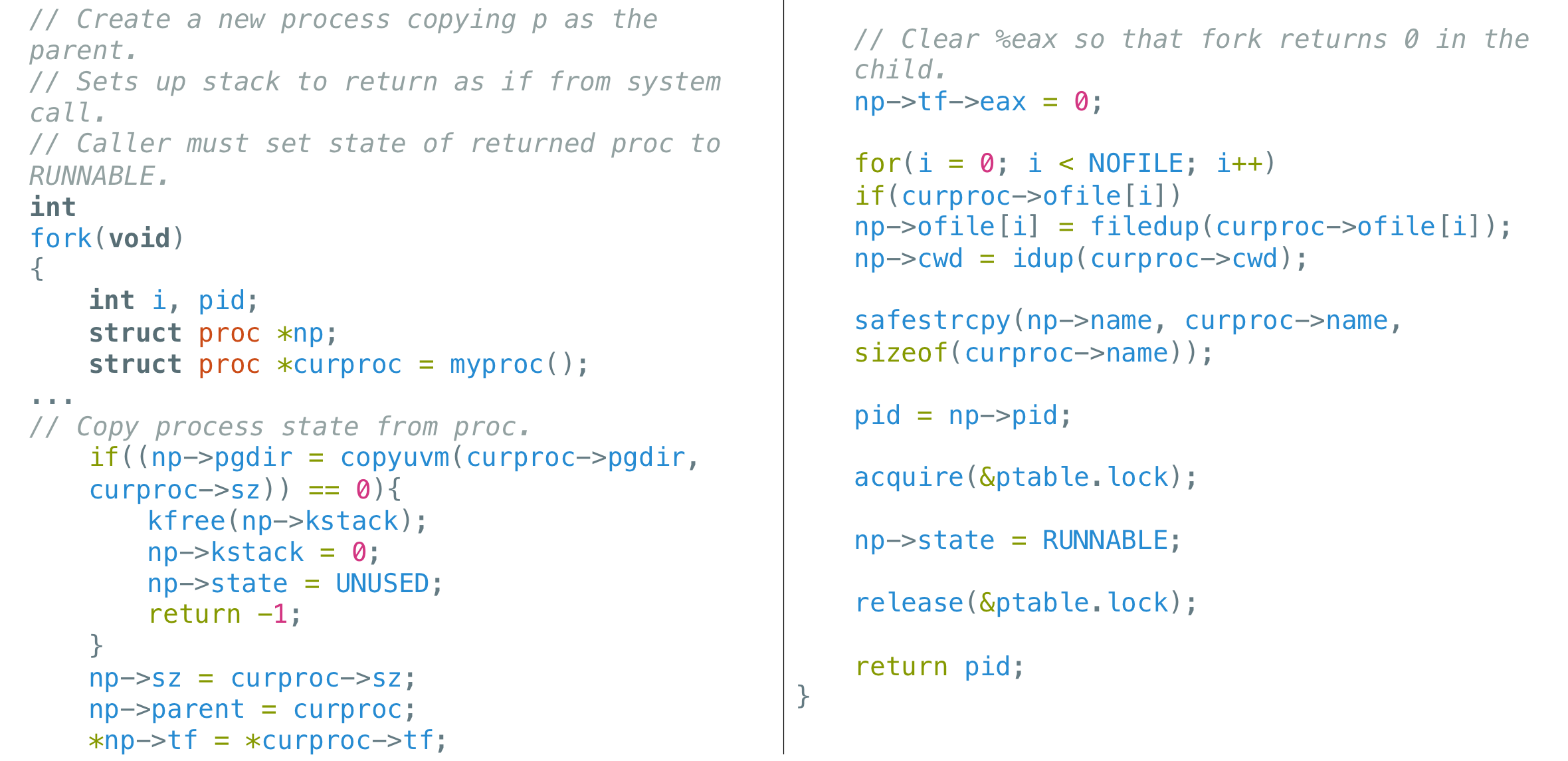
Process Creation (ex. fork( ))
- Parent process vs. Child process
- Resource Sharing
Parent and children share all resources.
Children share subset of parent’s resource.
Parent and child share no resource.
- Execution
Parent and children execute concurrently. ‒ Parent waits until children terminate.
Memory View 에서의 Process Creation
Memory (Text and Data Section)
자식 프로세스는 부모 프로세스의 복제본
자식 프로세스에는 프로그램이 Load되어 있음
ex) Unix
- fork System call로 생성된 새 프로세스.
- 새 프로세스(자식 프로세스)는 원래 프로세스(부모 프로세스)의 메모리 복사본
- Exec(2): 메모리를 새 프로그램으로 교체합니다.
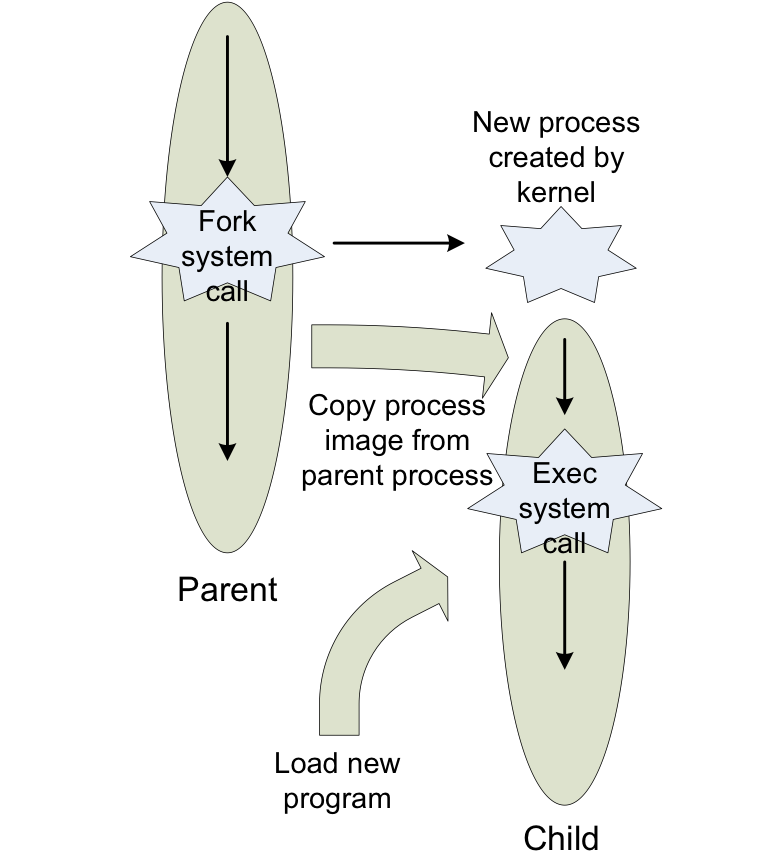
Process Creation in Unix 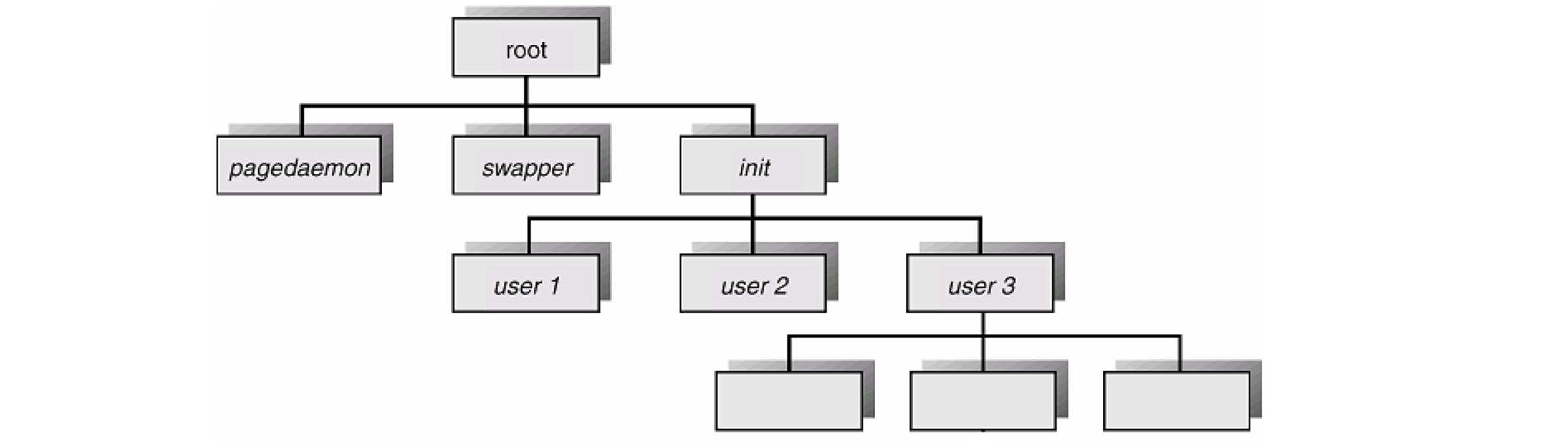
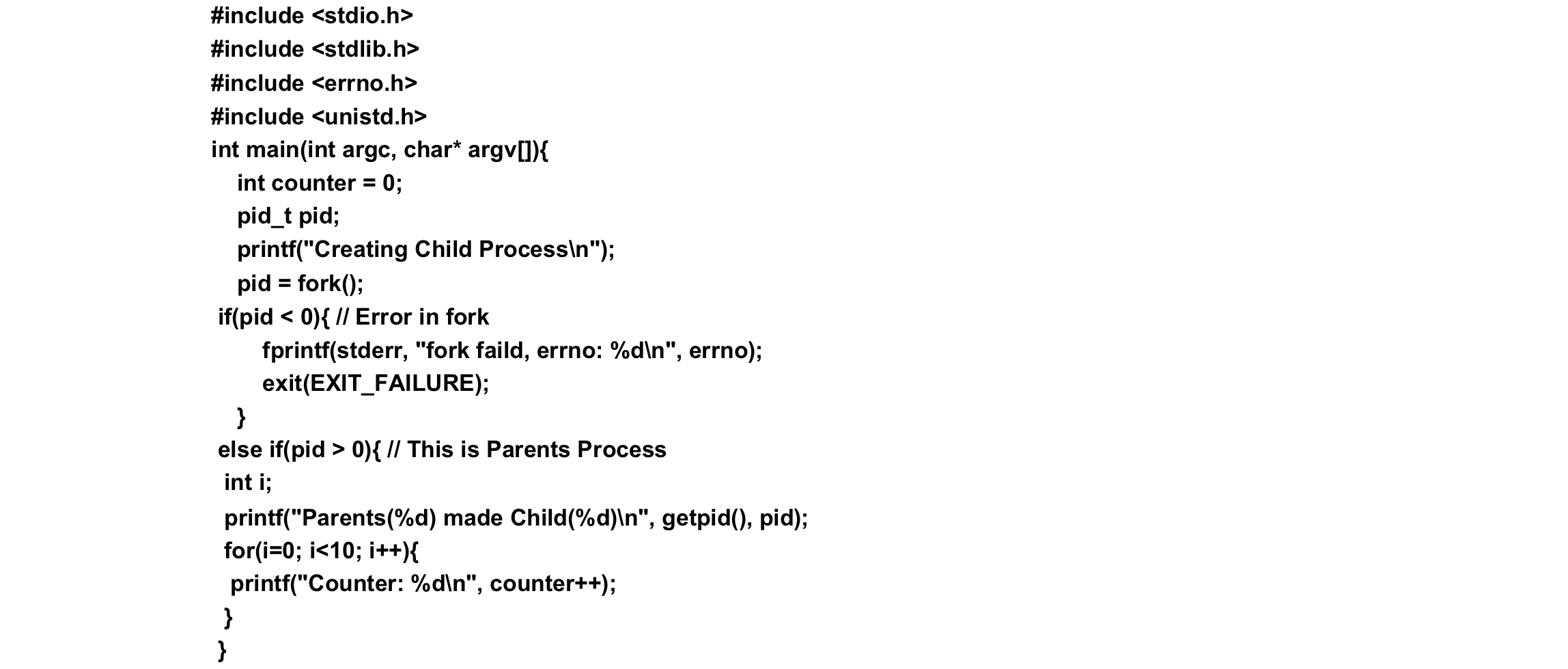
Process Creation in Xv6
Process Termination
프로세스는 최종문 실행이 끝나면 종료되며 exit System Call을 사용하여 운영체제에 삭제를 요청
- 자식에서 부모로 데이터 output(via wait)
- 프로세스 리소스가 운영체제에 의해 할당 해제
abort function은 비정상적인 프로세스 종료를 일으킴
- 호출 프로세스에 SIGABRT 신호가 전송
- Core dump 생성
Cooperating Process
독립 프로세스는 다른 프로세스의 실행에 영향을 주거나 영향을 받을 수 없습니다.
장점
- 정보 공유
- 계산 속도 향상
- 모듈화
- 편의성