서비스 · 프로세스 관리 22 / 50 · Part 3. systemd와 서비스
실습 환경: Rocky Linux 9.8 · Ubuntu 24.04.5 (systemd로 부팅한 Docker 격리 컨테이너, 테스트 계정analyst)
1. 들어가며
21편에서 systemd가 관리하는 대상을 unit이라고 했다. 그런데 unit 파일은 한곳에 있지 않다. 패키지가 설치한 원본은 /usr/lib에, 관리자가 만든 것은 /etc에, 실행 중 만들어진 임시 unit은 /run에 있다. 같은 이름의 unit이 여러 곳에 있으면 어느 것이 적용되는지 를 알아야 서비스를 제대로 수정하고, 공격자가 심어 둔 unit도 찾을 수 있다.
이번 글에서는 unit의 종류와 파일 탐색 경로·우선순위, unit 파일의 기본 구조, 그리고 enabled·static·alias 같은 설치 상태 의 의미를 정리한다.
2. 핵심 개념
2-1. unit 종류 (11가지)
| 종류 | 확장자 | 관리 대상 | 예 |
|---|---|---|---|
| service | .service | 프로세스(데몬, 일회성 작업) | sshd.service |
| socket | .socket | 소켓 → 연결 시 서비스 시작 | ssh.socket (37편) |
| timer | .timer | 시간 기반 실행 (cron 대체) | logrotate.timer (35편) |
| target | .target | unit 묶음, 동기화 지점 | multi-user.target (27편) |
| mount / automount | .mount | 파일 시스템 마운트 | tmp.mount |
| path | .path | 파일 변경 감시 → 서비스 시작 | — |
| slice / scope | .slice / .scope | cgroup 계층 (18편) | user.slice |
| device / swap | .device / .swap | 장치, 스왑 | — |
2-2. unit 파일 구조
[Unit]          ← 모든 unit 공통: 설명, 의존성, 순서
Description=OpenSSH server daemon
After=network.target

[Service]       ← 종류별 섹션: 실행 방법 (.socket 이면 [Socket], .timer 면 [Timer])
ExecStart=/usr/sbin/sshd -D $OPTIONS
Restart=on-failure

[Install]       ← enable 할 때만 사용: 어느 target 에 연결할지
WantedBy=multi-user.target
2-3. 설치 상태 (UnitFileState)
| 상태 | 의미 |
|---|---|
enabled | [Install]에 따라 target에 연결됨 → 부팅 시 시작 |
disabled | 연결 안 됨 |
static | [Install] 섹션이 없음. 다른 unit이 필요로 할 때만 시작 |
masked | /dev/null로 링크되어 시작 자체가 불가 |
alias | 다른 unit의 별칭 |
indirect | 직접은 disabled지만 다른 unit(Also=)을 통해 활성 |
enabled-runtime | /run에 링크 → 재부팅 시 사라지는 활성화 |
transient | systemd-run이 만든 임시 unit |
3. 동작 원리
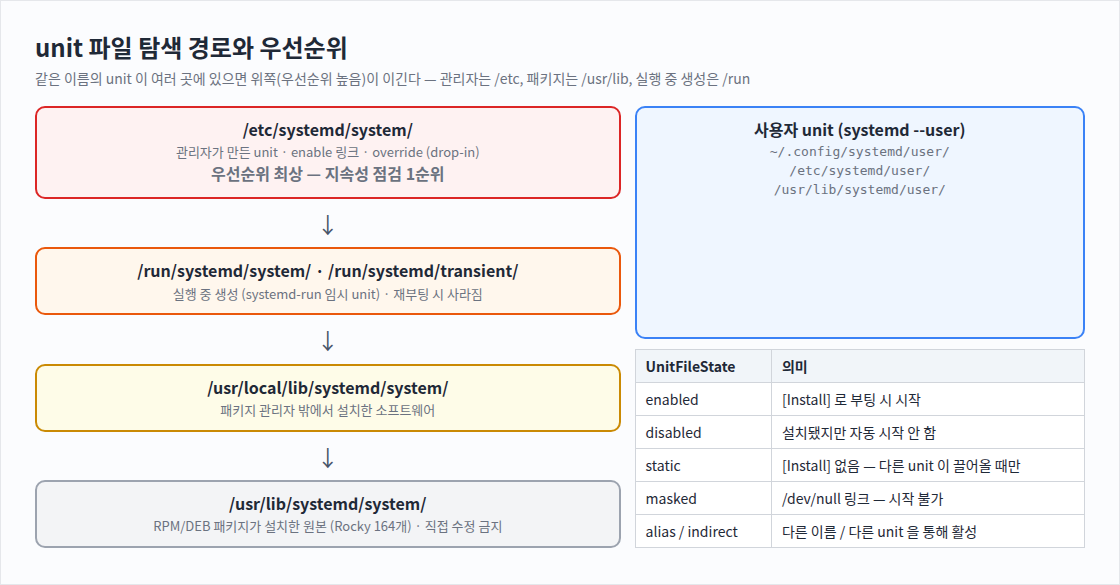
systemctl start sshd
  → systemd 가 unit 탐색 경로를 우선순위 순서로 검색
     /etc/systemd/system/sshd.service           있으면 이것을 사용 (관리자 우선)
     /run/systemd/system/sshd.service
     /usr/lib/systemd/system/sshd.service       ← 패키지 원본
→ 선택된 파일 + drop-in(sshd.service.d/*.conf)을 합쳐 최종 설정 (28편)enable은 서비스를 시작하는 것이 아니라 심볼릭 링크를 만드는 것 이다. WantedBy=multi-user.target이면 /etc/systemd/system/multi-user.target.wants/sshd.service 링크가 생기고, 부팅 중 multi-user.target이 활성화될 때 함께 시작된다.
4. 명령어 실습
# 1) unit 종류와 탐색 경로
systemctl -t help
systemd-analyze unit-paths | head -12
ls /usr/lib/systemd/system | wc -l; ls /etc/systemd/system
systemctl show sshd -p FragmentPath,DropInPaths,UnitFileState,UnitFilePreset

# 2) unit 파일 읽기와 상태 분포
systemctl cat sshd --no-pager
systemctl list-unit-files --type=service --no-pager | head -8
systemctl list-unit-files --no-pager | awk 'NR>1 && $2!="" {print $2}' | sort | uniq -c | sort -rn | head -8

# 3) (Ubuntu) ssh 는 service + socket 두 unit
systemctl show ssh.service ssh.socket -p Id,FragmentPath,UnitFileState
ls -l /etc/systemd/system/multi-user.target.wants/ | head -8
systemctl cat ssh.socket --no-pager
unit 파일을 볼 때는
cat /usr/lib/.../x.service대신systemctl cat을 쓴다. 실제로 적용되는 파일과 drop-in까지 경로와 함께 보여 준다.
5. 실행 결과
텍스트 원본(실제 출력):
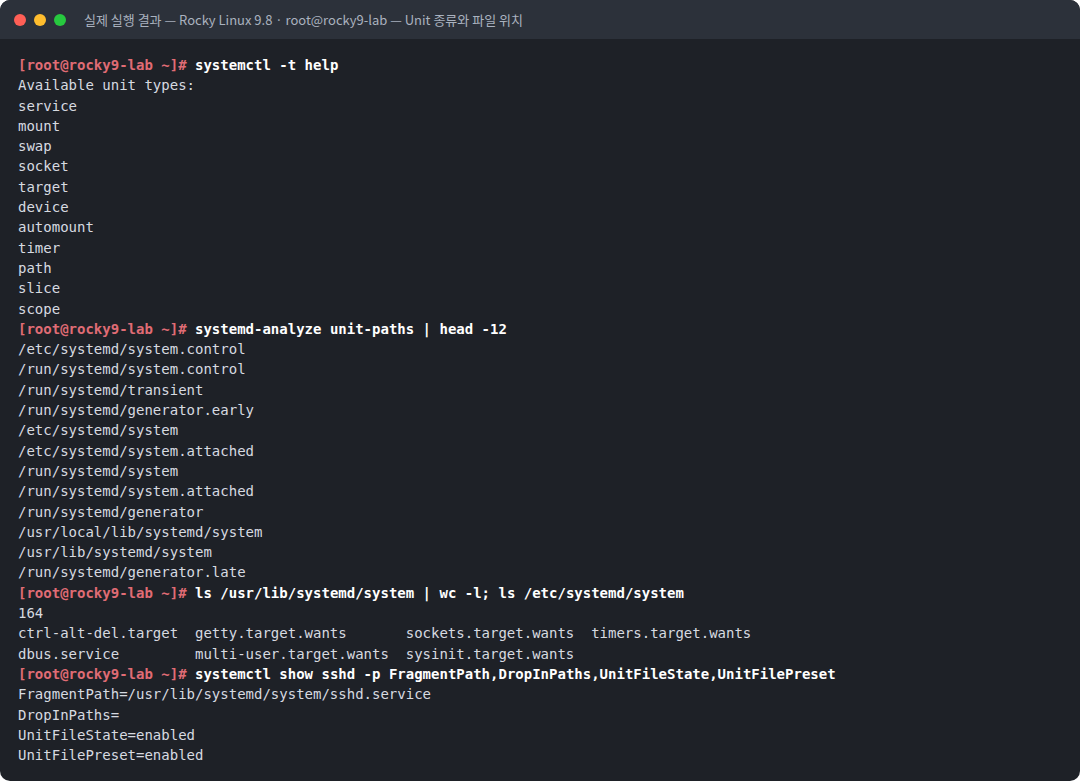
[root@rocky9-lab ~]# systemctl -t help
Available unit types:
service
mount
swap
socket
target
device
automount
timer
path
slice
scope
[root@rocky9-lab ~]# systemd-analyze unit-paths | head -12
/etc/systemd/system.control
/run/systemd/system.control
/run/systemd/transient
/run/systemd/generator.early
/etc/systemd/system
/etc/systemd/system.attached
/run/systemd/system
/run/systemd/system.attached
/run/systemd/generator
/usr/local/lib/systemd/system
/usr/lib/systemd/system
/run/systemd/generator.late
[root@rocky9-lab ~]# ls /usr/lib/systemd/system | wc -l; ls /etc/systemd/system
164
ctrl-alt-del.target  getty.target.wants       sockets.target.wants  timers.target.wants
dbus.service	     multi-user.target.wants  sysinit.target.wants
[root@rocky9-lab ~]# systemctl show sshd -p FragmentPath,DropInPaths,UnitFileState,UnitFilePreset
FragmentPath=/usr/lib/systemd/system/sshd.service
DropInPaths=
UnitFileState=enabled
UnitFilePreset=enabled
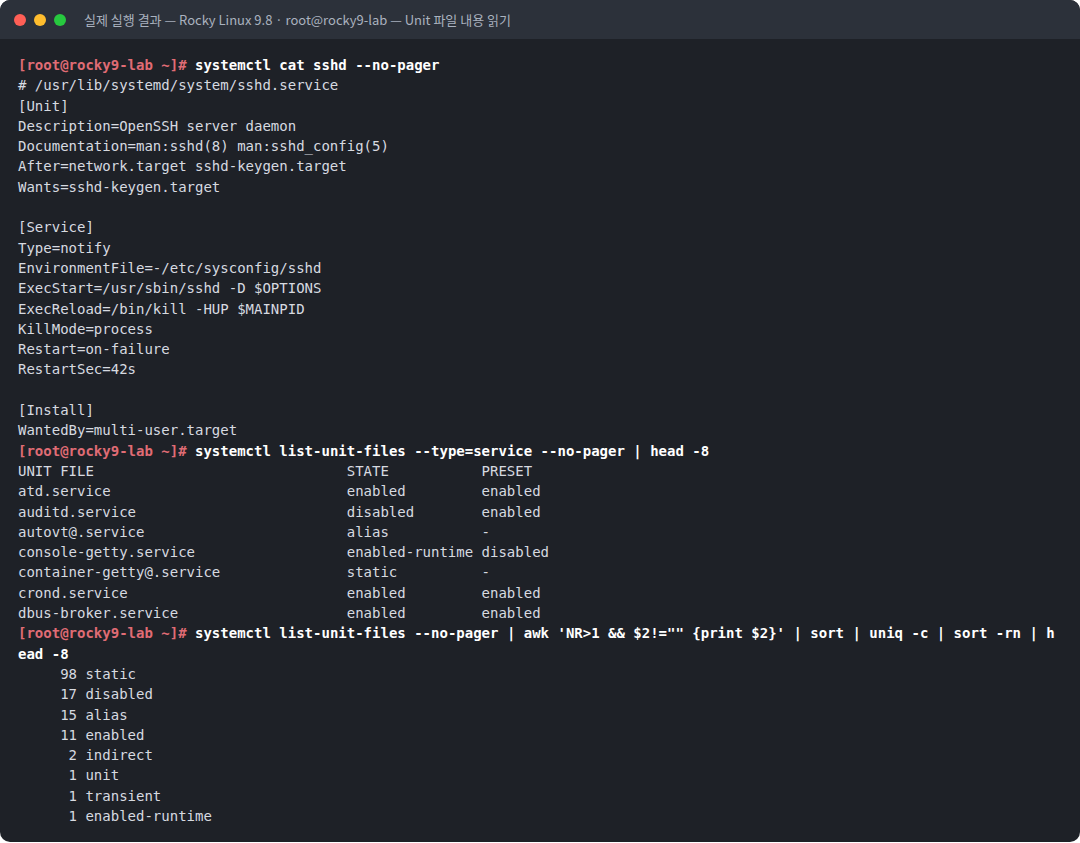
[root@rocky9-lab ~]# systemctl cat sshd --no-pager
# /usr/lib/systemd/system/sshd.service
[Unit]
Description=OpenSSH server daemon
Documentation=man:sshd(8) man:sshd_config(5)
After=network.target sshd-keygen.target
Wants=sshd-keygen.target
[Service]
Type=notify
EnvironmentFile=-/etc/sysconfig/sshd
ExecStart=/usr/sbin/sshd -D $OPTIONS
ExecReload=/bin/kill -HUP $MAINPID
KillMode=process
Restart=on-failure
RestartSec=42s
[Install]
WantedBy=multi-user.target
[root@rocky9-lab ~]# systemctl list-unit-files --type=service --no-pager | head -8
UNIT FILE STATE PRESET
atd.service enabled enabled
auditd.service disabled enabled
autovt@.service alias -
console-getty.service enabled-runtime disabled
container-getty@.service static -
crond.service enabled enabled
dbus-broker.service enabled enabled
[root@rocky9-lab ~]# systemctl list-unit-files --no-pager | awk 'NR>1 && $2!="" {print $2}' | sort | uniq -c | sort -rn | head -8
98 static
17 disabled
15 alias
11 enabled
2 indirect
1 unit
1 transient
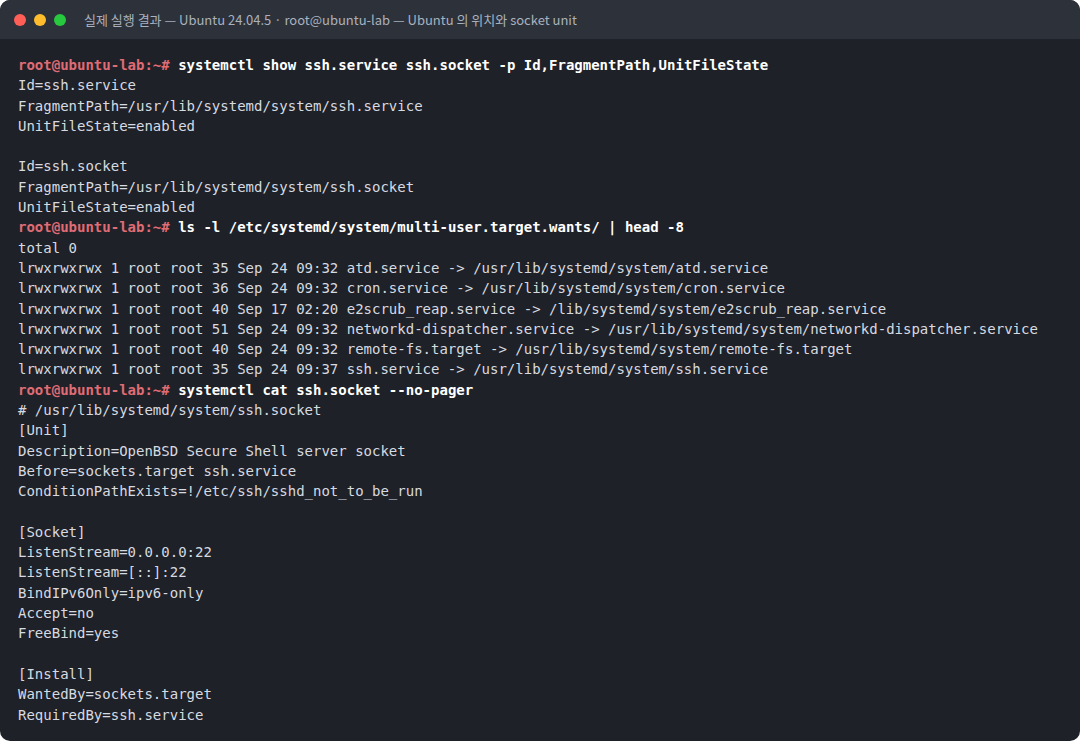
1 enabled-runtimeroot@ubuntu-lab:~# systemctl show ssh.service ssh.socket -p Id,FragmentPath,UnitFileState
Id=ssh.service
FragmentPath=/usr/lib/systemd/system/ssh.service
UnitFileState=enabled
Id=ssh.socket
FragmentPath=/usr/lib/systemd/system/ssh.socket
UnitFileState=enabled
root@ubuntu-lab:~# ls -l /etc/systemd/system/multi-user.target.wants/ | head -8
total 0
lrwxrwxrwx 1 root root 35 Sep 24 09:32 atd.service -> /usr/lib/systemd/system/atd.service
lrwxrwxrwx 1 root root 36 Sep 24 09:32 cron.service -> /usr/lib/systemd/system/cron.service
lrwxrwxrwx 1 root root 40 Sep 17 02:20 e2scrub_reap.service -> /lib/systemd/system/e2scrub_reap.service
lrwxrwxrwx 1 root root 51 Sep 24 09:32 networkd-dispatcher.service -> /usr/lib/systemd/system/networkd-dispatcher.service
lrwxrwxrwx 1 root root 40 Sep 24 09:32 remote-fs.target -> /usr/lib/systemd/system/remote-fs.target
lrwxrwxrwx 1 root root 35 Sep 24 09:37 ssh.service -> /usr/lib/systemd/system/ssh.service
root@ubuntu-lab:~# systemctl cat ssh.socket --no-pager
# /usr/lib/systemd/system/ssh.socket
[Unit]
Description=OpenBSD Secure Shell server socket
Before=sockets.target ssh.service
ConditionPathExists=!/etc/ssh/sshd_not_to_be_run
[Socket]
ListenStream=0.0.0.0:22
ListenStream=[::]:22
BindIPv6Only=ipv6-only
Accept=no
FreeBind=yes
[Install]
WantedBy=sockets.target
RequiredBy=ssh.service6. 결과 해석
| 관찰 | 의미 |
|---|---|
systemctl -t help → 11종 | service, socket, target, timer 등 관리 대상 종류 |
unit-paths 첫 줄 /etc/systemd/system.control | 위에 있을수록 우선순위가 높다. /usr/lib/systemd/system은 거의 마지막이다 |
/usr/lib/systemd/system 164개 | 패키지가 설치한 원본 unit 수. 직접 수정하면 패키지 업데이트 때 덮어써진다 |
/etc/systemd/system에는 *.wants 디렉터리 위주 | 관리자 영역은 대부분 enable 링크 로 채워진다. 여기에 일반 .service 파일이 있으면 관리자가 직접 만든 것이다 |
FragmentPath=/usr/lib/.../sshd.service, DropInPaths= 비어 있음 | 원본 그대로 사용 중 |
UnitFilePreset=enabled | 배포판 정책상 기본 활성 대상 |
sshd unit의 Type=notify, ExecReload=/bin/kill -HUP $MAINPID | sshd는 준비 완료를 systemd에 알리고, reload는 11편의 HUP 시그널로 구현된다 |
KillMode=process | 중지 시 메인 sshd만 종료한다. 접속 중인 SSH 세션은 끊기지 않게 하려는 설정이다 (13편의 기본값과 다른 예) |
RestartSec=42s | 실패 시 42초 후 재시작 |
| 상태 분포: static 98, disabled 17, alias 15, enabled 11 | 대부분의 unit은 static이다. enabled는 11개뿐 — 부팅 시 자동 시작 목록은 생각보다 짧다 |
Ubuntu: ssh.service와 ssh.socket 모두 enabled | 22번 포트는 socket unit이 열고 연결이 오면 service가 처리한다 (37편) |
ssh.socket의 ListenStream=0.0.0.0:22, RequiredBy=ssh.service | 16편에서 PID 1이 22번 소켓을 가지고 있던 이유다 |
7. 보안 관점
| 주제 | 내용 |
|---|---|
| 우선순위 악용 | /etc/systemd/system/sshd.service를 만들면 패키지 원본을 조용히 대체 할 수 있다. 서비스 이름은 그대로라 눈에 띄지 않는다 |
| enable 링크 | 악성 unit은 multi-user.target.wants/에 링크가 걸려 부팅마다 실행된다. 이 디렉터리의 링크 대상을 모두 확인한다 |
| /usr/lib 위장 | 패키지가 설치하지 않은 파일을 /usr/lib/systemd/system/에 넣어 원본처럼 보이게 할 수 있다. rpm -qf / dpkg -S로 소유 패키지를 확인한다 |
| transient unit | systemd-run으로 만든 unit은 /run에만 있어 재부팅하면 사라진다. 휘발성 증거 이므로 조사 초기에 수집한다 |
8. 보안관제 관점
[점검 1]  관리자 영역의 실제 unit 파일
          find /etc/systemd/system -type f -name '*.service' -printf '%TY-%Tm-%Td %TH:%TM %p\n'
[점검 2]  enable 링크와 대상
          find /etc/systemd/system -type l -printf '%p -> %l\n' | grep -v /dev/null
[점검 3]  /usr/lib 파일이 패키지 소유인가
          for f in /usr/lib/systemd/system/*.service; do rpm -qf "$f" >/dev/null || echo "미소유: $f"; done
[점검 4]  사용자 unit
          ls -la /home/*/.config/systemd/user/ /root/.config/systemd/user/ 2>/dev/null
     ↓
[판단]    최근 생성 · 패키지 미소유 · 실행 경로가 /tmp /dev/shm /var/tmp → 조사
9. 실무에서 자주 발생하는 실수
| 실수 | 결과 | 예방 |
|---|---|---|
/usr/lib/systemd/system/ 파일 직접 수정 | 패키지 업데이트 시 변경 소실 | drop-in(28편) 또는 /etc에 복사 |
unit 파일 수정 후 daemon-reload 누락 | 옛 설정으로 동작, 경고 메시지 | 수정 후 항상 systemctl daemon-reload |
cat으로 unit 파일 확인 | drop-in 누락, 다른 경로의 파일을 봄 | systemctl cat |
| static unit을 enable하려 함 | "no installation config" 메시지 | static은 다른 unit이 끌어오는 구조 |
| enable = start로 오해 | 지금 당장은 실행 안 됨 | enable --now 또는 start 별도 |
10. 실습 체크리스트
[ ] systemctl -t help 로 unit 종류를 확인했다
[ ] systemd-analyze unit-paths 로 탐색 경로 우선순위를 확인했다
[ ] FragmentPath 로 실제 적용 파일 경로를 확인했다
[ ] systemctl cat 으로 unit 파일의 세 섹션을 읽었다
[ ] enabled / static / alias 등 UnitFileState 분포를 집계했다
[ ] enable 이 *.wants 디렉터리의 심볼릭 링크라는 것을 확인했다
11. 핵심 정리
- unit은 service·socket·timer·target 등 11종이며, 파일은
[Unit]·종류별 섹션·[Install]로 구성된다. - 탐색 우선순위는
/etc>/run>/usr/local/lib>/usr/lib다. - enable은
[Install]에 따라*.wants/에 심볼릭 링크를 만드는 것이다. - static·masked·alias 등 설치 상태를 구분해야 자동 시작 여부를 정확히 판단한다.
/etc/systemd/system의 실제 파일, 패키지 미소유 unit, 사용자 unit이 지속성 점검 대상이다.
12. 다음 편 예고
다음 글 「23. systemctl 핵심 명령어」 에서는 start·stop·restart·reload·enable·disable·mask를 실제로 실행하면서 각 명령이 파일 시스템과 프로세스에 무엇을 바꾸는지 확인한다. restart 전후 PID 변화, mask가 /dev/null 링크라는 사실을 눈으로 본다.
참고 자료
- systemd.unit(5) — 탐색 경로, [Unit]/[Install] — https://www.freedesktop.org/software/systemd/man/latest/systemd.unit.html
- systemd-analyze(1) — unit-paths — https://www.freedesktop.org/software/systemd/man/latest/systemd-analyze.html
- systemctl(1) — list-unit-files, is-enabled 출력값 — https://www.freedesktop.org/software/systemd/man/latest/systemctl.html
시리즈 이동
- [이전 글] 21. systemd와 PID 1
- [현재 글] 22. Unit 종류와 Unit 파일 위치
- [다음 글] 23. systemctl 핵심 명령어