오늘의 목표 : Event 목록 조회 API 구현
오늘의 목차 :
1. Event 목록 조회 API 구현
1. Event 목록 조회 API 구현
queryEvents 테스트 작성
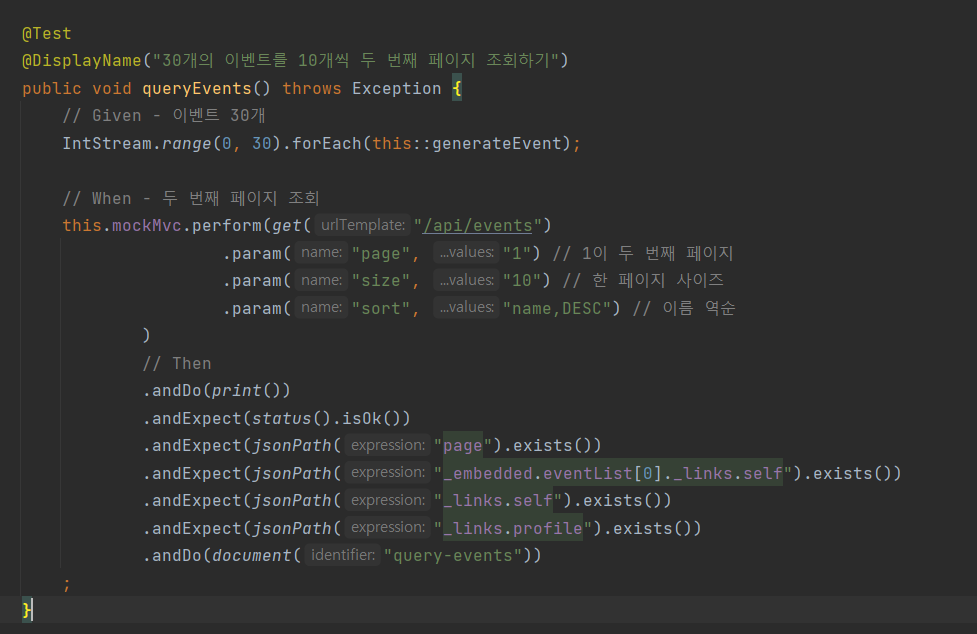
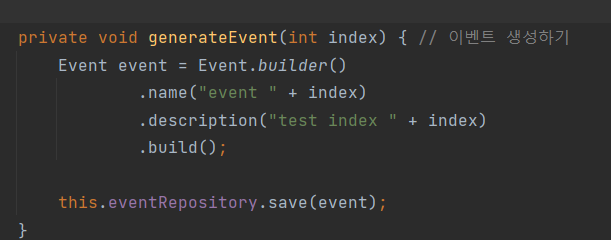
테스트로 이벤트를 30개 생성하고, 각 페이지의 크기를 이벤트 10개씩 하여 두 번째 페이지를 조회하도록 코드를 작성
EventController 수정
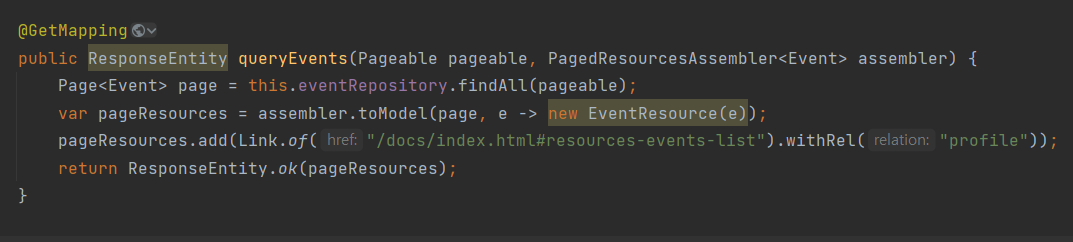
스프링 데이터 JPA가 제공하는 Pageable 를 사용하여 페이징과 정렬을 구현하였다.
파라메터에 page, size, sort 값을 받아 페이징을 처리할 수 있다. 자세한 것은 SpringDataJpa 정리한 것을 참고하자.
PagedResourcesAssembler 를 사용해서 findAll(pageable) 결과로 나온 page 를 리소스로 바꾸어서 링크 정보를 추가
queryEvents 테스트 성공

응답결과를 다음과 같이 확인할 수 있다.
{
	"_embedded": {
		"eventList": [
			{
				"id": 27,
				"name": "event 26",
				"description": "test index 26",
				"beginEnrollmentDateTime": null,
				"closeEnrollmentDateTime": null,
				"beginEventDateTime": null,
				"endEventDateTime": null,
				"location": null,
				"basePrice": 0,
				"maxPrice": 0,
				"limitOfEnrollment": 0,
				"offline": false,
				"free": false,
				"eventStatus": null,
				"_links": {
					"self": {
						"href": "http://localhost:8080/api/events/27"
					}
				}
			},
			{
				"id": 26,
				"name": "event 25",
				"description": "test index 25",
				"beginEnrollmentDateTime": null,
				"closeEnrollmentDateTime": null,
				"beginEventDateTime": null,
				"endEventDateTime": null,
				"location": null,
				"basePrice": 0,
				"maxPrice": 0,
				"limitOfEnrollment": 0,
				"offline": false,
				"free": false,
				"eventStatus": null,
				"_links": {
					"self": {
						"href": "http://localhost:8080/api/events/26"
					}
				}
			},
			{
				"id": 25,
				"name": "event 24",
				"description": "test index 24",
				"beginEnrollmentDateTime": null,
				"closeEnrollmentDateTime": null,
				"beginEventDateTime": null,
				"endEventDateTime": null,
				"location": null,
				"basePrice": 0,
				"maxPrice": 0,
				"limitOfEnrollment": 0,
				"offline": false,
				"free": false,
				"eventStatus": null,
				"_links": {
					"self": {
						"href": "http://localhost:8080/api/events/25"
					}
				}
			},

           ...

	"_links": {
		"first": {
			"href": "http://localhost:8080/api/events?page=0&size=10&sort=name,desc"
		},
		"prev": {
			"href": "http://localhost:8080/api/events?page=0&size=10&sort=name,desc"
		},
		"self": {
			"href": "http://localhost:8080/api/events?page=1&size=10&sort=name,desc"
		},
		"next": {
			"href": "http://localhost:8080/api/events?page=2&size=10&sort=name,desc"
		},
		"last": {
			"href": "http://localhost:8080/api/events?page=2&size=10&sort=name,desc"
		},
		"profile": {
			"href": "/docs/index.html#resources-events-list"
		}
	},
	"page": {
		"size": 10,
		"totalElements": 30,
		"totalPages": 3,
		"number": 1
	}
}
응답결과를 확인하면 eventList 들의 정보들과, 현재 페이지 정보, 이동할 수 있는 페이지 정보(처음, 이전, 자신, 다음, 마지막), profile 정보 를 확인할 수 있다.
여기서 각각의 event로 갈 수 있는 링크를 추가하면 완전한 HATEOAS 를 충족할 수 있다. 다음 포스팅에서 Event 조회 API 를 구현하여 추가하도록 하겠다.