💻 CSS
(2021.09.05 ~ 2021.09.06) 두 번째 웹 공부 시작!
생활코딩의 CSS 강의 내용을 총 정리했습니다.
1. CSS의 장점
- 웹 페이지와 관련된 코드에서 디자인과 관련된 코드를 따로 빼주면서,
웹 페이지를 해석하는 기계들이 디자인 부분을 무시하고 정보를 가지고 있는 코드만을 읽을 수 있도록 해줍니다.
즉, html이 정보에 전념할 수 있도록 해주는 것입니다.
- CSS를 통해 디자인을 하는 것이 html으로 디자인하는 것보다 훨씬 더 효율적입니다.
2. 태그
🖤 CSS의 주석
/**/🖤 CSS임을 명시해주는 코드
웹 브라우저는 기본적으로 코드를 html으로 인식합니다.
그러나 CSS는 html과 완전히 다른 언어입니다.
따라서 웹 브라우저에게 CSS로 작성하고 있다는 것을 html의 문법으로 명시해주어야 합니다.
<style>CSS코드</style>🖤 폰트 색상을 변경해주는 코드
태그명 {
    color : 색상명;
}
⌨️ 코드 작성
<!doctype html>
<html>
<head>
  <title>WEB1 - CSS</title>
  <meta charset="utf-8">
  <style>
  <!-- a 태그가 있는 단어의 색상을 gray로 변경하겠다 -->
  a {
    color : gray;
  }
  </style>
</head>

<body>
  <h1><a href="index.html">WEB</a></h1>
  <ol>
    <li><a href="1.html">HTML</a></li>
    <li><a href="2.html">CSS</a></li>
    <li><a href="3.html">JavaScript</a></li>
  </ol>

  <h2>CSS</h2>
  <p>Cascading Style Sheets (CSS) is a style sheet language used for
    describing the presentation of a document written in a markup language
    such as HTML. CSS is a cornerstone technology of the World Wide Web,
    alongside HTML and JavaScript.</p>
</body>
</html>- a에게 효과를 부여한다고 선택한다는 점에서 a를 선택자(Selector)라고 부릅니다.
- color:red 부분은 효과를 부여해주는 선언(Declaration) 또는 효과라고 부릅니다.
- color는 속성(Property)라고 부릅니다.
- red는 속성의 값(Value)라고 부릅니다.
- html의 태그와 달리 코드가 중복되지 않습니다.
CSS는 단 하나의 코드를 통해 중복을 제거해줍니다.
👉🏻 결과
https://images.velog.io/images/cse_pebb/post/4262cac9-866d-487e-9612-8d77bff4f3f9/image.png

속성 이용하기
태그 대신, 속성을 이용할 수도 있습니다.
WEB이라는 글자만 색상을 따로 변경하고 싶을 때,
WEB이라는 글자를 감싸고 있는 a 태그 안에 직접 CSS 코드를 작성해주면 됩니다.
그러나 웹 브라우저 입장에서는 style 밖에 작성한 코드는 CSS인지 알 수 없으므로, 해당 코드 앞에 style이라는 속성을 부여해줍니다.
그렇게 되면 웹 브라우저는 해당 코드를 CSS 문법으로 해석합니다.
⌨️ 코드 작성
<!doctype html>
<html>
<head>
  <title>WEB1 - CSS</title>
  <meta charset="utf-8">
  <style>
  a {
    color : gray;
  }
  </style>
</head>

<body>
  <!-- a 태그 안에 작성하여 속성 부여하기 -->
  <h1><a href="index.html" style="color:black">WEB</a></h1>
  <ol>
    <li><a href="1.html">HTML</a></li>
    <li><a href="2.html">CSS</a></li>
    <li><a href="3.html">JavaScript</a></li>
  </ol>

  <h2>CSS</h2>
  <p>Cascading Style Sheets (CSS) is a style sheet language used for
    describing the presentation of a document written in a markup language
    such as HTML. CSS is a cornerstone technology of the World Wide Web,
    alongside HTML and JavaScript.</p>
</body>
</html>- style=" " 자체는 CSS가 아니라 html의 속성입니다.
- 이 경우 style 태그를 직접 사용했기 때문에 선택자가 필요하지 않습니다.
👉🏻 결과
https://images.velog.io/images/cse_pebb/post/e1ea63b1-df9d-482b-973a-adc98c45917f/image.png

🖤 링크에 있는 밑줄을 없애주는 코드
text-decoration: none;⌨️ 코드 작성
<!doctype html>
<html>
<head>
  <title>WEB1 - CSS</title>
  <meta charset="utf-8">
  <style>
  a {
    color : gray;
    text-decoration: none;
  }
  </style>
</head>

<body>
  <h1><a href="index.html" style="color:black">WEB</a></h1>
  <ol>
    <li><a href="1.html">HTML</a></li>
    <li><a href="2.html">CSS</a></li>
    <li><a href="3.html">JavaScript</a></li>
  </ol>

  <h2>CSS</h2>
  <p>Cascading Style Sheets (CSS) is a style sheet language used for
    describing the presentation of a document written in a markup language
    such as HTML. CSS is a cornerstone technology of the World Wide Web,
    alongside HTML and JavaScript.</p>
</body>
</html>
👉🏻 결과
https://images.velog.io/images/cse_pebb/post/498f5621-4901-4d99-b859-36a91b248706/image.png

모두 밑줄을 없앴는데, 특정 하나만 밑줄을 긋고 싶다면?
color:red와 마찬가지로
a 태그 안에 style=""을 써서 작성해줍니다.
style="text-decoration:underline"- 만약 style 안에 다른 속성이 있다면 ; 로 반드시 구분해줍니다.
⌨️ 코드 작성
<!doctype html>
<html>
<head>
  <title>WEB1 - CSS</title>
  <meta charset="utf-8">
  <style>
  a {
    color : gray;
    text-decoration: none;
  }
  </style>
</head>

<body>
  <h1><a href="index.html" style="color:black; text-decoration:underline">WEB</a></h1>
  <ol>
    <li><a href="1.html">HTML</a></li>
    <li><a href="2.html">CSS</a></li>
    <li><a href="3.html">JavaScript</a></li>
  </ol>

  <h2>CSS</h2>
  <p>Cascading Style Sheets (CSS) is a style sheet language used for
    describing the presentation of a document written in a markup language
    such as HTML. CSS is a cornerstone technology of the World Wide Web,
    alongside HTML and JavaScript.</p>
</body>
</html>
👉🏻 결과
https://images.velog.io/images/cse_pebb/post/08604e37-f706-4561-a468-53dd11a0b4a6/image.png

🖤 텍스트 사이즈 조절
  태그명 {
    font-size:크기px;
  }
⌨️ 코드 작성
<!doctype html>
<html>
<head>
  <title>WEB1 - CSS</title>
  <meta charset="utf-8">
  <style>
  a {
    color : gray;
    text-decoration: none;
  }
  h1 {
    font-size:45px;
  }
  </style>
</head>

<body>
  <h1><a href="index.html" style="color:black; text-decoration:underline">WEB</a></h1>
  <ol>
    <li><a href="1.html">HTML</a></li>
    <li><a href="2.html">CSS</a></li>
    <li><a href="3.html">JavaScript</a></li>
  </ol>

  <h2>CSS</h2>
  <p>Cascading Style Sheets (CSS) is a style sheet language used for
    describing the presentation of a document written in a markup language
    such as HTML. CSS is a cornerstone technology of the World Wide Web,
    alongside HTML and JavaScript.</p>
</body>
</html>
👉🏻 결과
https://images.velog.io/images/cse_pebb/post/7cc2db54-16ef-4be9-a542-293a344f256e/image.png

🖤 텍스트 정렬
  태그명 {
    text-align: 정렬위치;
  }
⌨️ 코드 작성
<!doctype html>
<html>
<head>
  <title>WEB1 - CSS</title>
  <meta charset="utf-8">
  <style>
  a {
    color : gray;
    text-decoration: none;
  }
  h1 {
    font-size:45px;
    text-align: center; <!-- 가운데 정렬-->
  }
  </style>
</head>

<body>
  <h1><a href="index.html" style="color:black; text-decoration:underline">WEB</a></h1>
  <ol>
    <li><a href="1.html">HTML</a></li>
    <li><a href="2.html">CSS</a></li>
    <li><a href="3.html">JavaScript</a></li>
  </ol>

  <h2>CSS</h2>
  <p>Cascading Style Sheets (CSS) is a style sheet language used for
    describing the presentation of a document written in a markup language
    such as HTML. CSS is a cornerstone technology of the World Wide Web,
    alongside HTML and JavaScript.</p>
</body>
</html>
👉🏻 결과
https://images.velog.io/images/cse_pebb/post/f7babe71-0ccc-486e-b06a-13fa03f46e83/image.png

3. 예제와 함께 보는 선택자(selector)
실습문제
- 모든 a 태그(WEB, HTML, CSS, JavaScript)를 검정색으로 바꾸기
- 사용자가 방문한 페이지는 회색으로 표시되도록 하기
(사용자가 HTML과 CSS를 방문했다고 했다고 가정)- 현재 사용자가 머물고 있는 페이지는 빨간색으로 표시되도록 하기
(현재 사용자가 머물고 있는 링크는 CSS라고 가정)
⌨️ 코드 작성
<!doctype html>
<html>
<head>
  <title>WEB1 - CSS</title>
  <meta charset="utf-8">
  <style>
  #active {
    color : red;
  }
  .saw {
    color : gray;
  }
  a {
    color : black;
    text-decoration: none;
  }
  h1 {
    font-size:45px;
    text-align: center;
  }
  </style>
</head>

<body>
  <h1><a href="index.html">WEB</a></h1>
  <ol>
    <li><a href="1.html" class="saw">HTML</a></li>
    <li><a href="2.html" class="saw" id="active">CSS</a></li>
    <li><a href="3.html">JavaScript</a></li>
  </ol>

  <h2>CSS</h2>
  <p>Cascading Style Sheets (CSS) is a style sheet language used for
    describing the presentation of a document written in a markup language
    such as HTML. CSS is a cornerstone technology of the World Wide Web,
    alongside HTML and JavaScript.</p>
</body>
</html>
- 모든 a 태그(WEB, HTML, CSS, JavaScript)를 검정색으로 바꾸기
특별한 내용 없습니다. 앞에서 한 것과 동일합니다.
- 사용자가 방문한 페이지는 회색으로 표시되도록 하기
(사용자가 HTML과 CSS를 방문했다고 했다고 가정)- HTML과 CSS에 각각 style="color:gray;"를 해주어도 되지만, 중복이 발생하므로 효율적인 코드는 아닙니다.
- 그렇기 때문에, HTML과 CSS라는 2개의 태그에 대해 class(그룹)라는 HTML의 속성을 주고 그 값을 saw라고 설정합니다.
- 그 다음 saw라는 클래스를 style 안에 작성해줍니다.
- 선택자 앞에 .을 붙이면 해당 선택자는 class 값이 saw인 선택자를 가리키게 됩니다.
- 점을 붙이지 않고 그냥 saw만 쓰게 됐을 때의 의미는 "웹 페이지에 있는 모든 saw라는 이름을 가진 태그를 선택하는 선택자"가 됩니다.
- 하지만 우리가 원하는 것은 "class 값이 saw인 태그"이므로 .을 붙여줍니다.
- 현재 사용자가 머물고 있는 페이지는 빨간색으로 표시되도록 하기
(현재 사용자가 머물고 있는 링크는 CSS라고 가정)- .active 클래스를 만들어서 색상 값을 작성해주고, saw를 쓴 곳 옆에 "active" 라고 써주면 됩니다.
- 하지만 이것 또한 그다지 좋은 방법은 아닙니다.
2, 3번의 결과로 a 태그는 .saw와 .active라는 2가지 클래스에 영향을 받고 있습니다. 그런데 왜 a 태그가 왜 회색과 빨간색 중 빨간색이 되었을까요?
- .active 클래스가 .saw 클래스보다 뒤에 나왔기 때문입니다.
- 만약 순서를 바꾼다면, CSS 글자는 빨간색이 아닌 회색이 됩니다.
- 이럴 때는 active 자리 대신에 id = "active"를 작성해줘야 합니다.
- 또한 .active 클래스의 경우 #active 으로 써주어야 합니다.
이것이 의미하는 것은 .saw가 뒤에 등장해도 .active 선택자가 우선순위로 한다는 것이라는 뜻입니다.- 즉, id 선택자와 class 선택자가 붙으면 id 선택자가 이깁니다.
- 추가로, class 선택자와 태그 선택자를 비교하면, 둘 중 class 선택자가 이깁니다.
- 선택자 우선순위 : id > class > 태그
- id의 값은 단 한번만 등장해야 합니다.
즉 id의 값에 active를 넣어주면, 다른 값을 넣을 수는 없습니다.
4. 화면 사용에 관련된 태그 종류, 그리고 추가 태그들
🖤 화면 사용, 줄 바꿈에 관련한 이야기
⌨️ 코드 작성
<!doctype html>
  <html>
    <head>
      <meta charset = "utf-8">
      <title></title>
    </head>
    <body>
         <h1>CSS</h1> Cascading Style Sheets (<a href = "https://ko.wikipedia.org/wiki/CSS">CSS</a>)
      is a style sheet language used for describing the
      presentation of a document written in a markup language.
    </body>
  </html>
👉🏻 결과
-
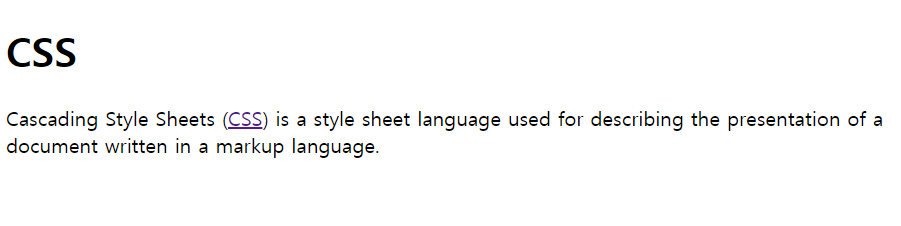
h1은 제목 태그인데, h1은 화면 전체를 쓰고 있습니다. 즉, 줄바꿈이 됩니다.
- 화면 전체를 쓰다 : 앞뒤로 줄바꿈이 되다
-
반면 링크 태그는 똑같은 태그임에도 불구하고 줄바꿈이 일어나지 않습니다.
이유
제목 태그는 화면 전체를 사용하는 것이 기본적으로 더 편리하고,
링크가 화면 전체를 쓴다면 불편합니다.
그래서 링크 태그는 기본적으로 자기의 content 크기 만큼의 화면을 씁니다.
🖤 block level element와 inline element
- h1와 같이 화면 전체를 쓰는 태그들을 block level element 라고 합니다.
- a와 같이 자기자신의 content의 크기, 부피만큼을 갖는 태그들을 inline element라고 합니다.
- 어떤 태그가 화면 전체를 쓰고, 어떤 태그가 자기자신의 부피만큼의 화면을 쓰는지 알아두어야 합니다.
명시적으로 화면에서 차지하는 범위를 확인하기 위해 몇 가지 코드를 작성해보겠습니다.
⌨️ 코드 작성
<!doctype html>
<html>
<head>
  <meta charset = "utf-8">
  <title></title>
  <style>
    /* block level element */
    h1 {
      border-width:5px;
      border-color:red;
      border-style:solid;
    }
    /* inline element */
    a {
      border-width:5px;
      border-color:red;
      border-style:solid;
    }
    </style>
    </head>
    <body>
      <h1>CSS</h1> Cascading Style Sheets (<a href = "https://ko.wikipedia.org/wiki/CSS">CSS</a>)
      is a style sheet language used for describing the presentation of a document
      written in a markup language.
      </body>
</html>- border : 테두리
- width : 두께
- style : 단선, 점선, 실선 등 테두리 선의 종류
- solid : 일반적인 선
👉🏻 결과
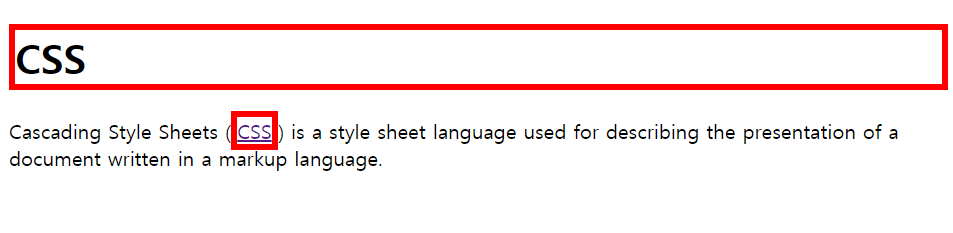
- 결과를 보면 알 수 있듯 h1 태그인 "제목 CSS"는 화면 전체를 사용하고 있고,
a 태그인 "링크 CSS"는 자신의 content 만큼의 화면을 사용하고 있습니다.
위 코드를 좀 더 간단하게 만들어 볼 수 있습니다.
- 현재 h1과 a의 속성은 중복됩니다.
- 이럴 때는 h1, a 라고 적어주면 됩니다.
- 또한 각 태그 안에 있는 "border"가 중복됩니다.
이것은
border : 5px solid red;
이와 같이 순서와 상관없이 일렬로 작성해주면 됩니다.
⌨️ 코드 작성
<!doctype html>
<html>
<head>
  <meta charset = "utf-8">
  <title></title>
  <style>
    h1, a {
      border:5px solid red;
    }
    </style>
    </head>
    <body>
      <h1>CSS</h1> Cascading Style Sheets (<a href = "https://ko.wikipedia.org/wiki/CSS">CSS</a>)
      is a style sheet language used for describing the presentation of a document
      written in a markup language.
      </body>
    </html>
👉🏻 결과

- 결과는 동일하게 나옵니다.
block level element이라고 하더라도 inline element처럼 쓸 수 있고, inline element도 마찬가지로 block level element처럼 쓸 수도 있습니다.
/* inline element처럼 쓰기 */
display:inline;

/* block level element처럼 쓰기 */
display:bloack;
⌨️ 코드 작성
<!doctype html>
<html>
<head>
<meta charset = "utf-8">
<title></title>
<style>
  /* block level element */
  h1 {
    border-width:5px;
    border-color:red;
    border-style:solid;
    display:inline; /* inline element 처럼 바꾸기 */
  }
  /* inline element */
  a {
    border-width:5px;
    border-color:red;
    border-style:solid;
    display:block; /* block level element 처럼 바꾸기 */
  }
  </style>
  </head>
  <body>
    <h1>CSS</h1> Cascading Style Sheets (<a href = "https://ko.wikipedia.org/wiki/CSS">CSS</a>)
    is a style sheet language used for describing the presentation of a document
    written in a markup language.
    </body>
  </html>
👉🏻 결과

🖤 추가 태그
태그를 보이지 않게 할 수도 있습니다.
display:none;⌨️ 코드 작성
<!doctype html>
<html>
<head>
 <meta charset = "utf-8">
 <title></title>
 <style>
   /* block level element */
   h1 {
     border-width:5px;
     border-color:red;
     border-style:solid;
     display:none; /* 제목 태그인 CSS 없애기 */
   }
   /* inline element */
   a {
     border-width:5px;
     border-color:red;
     border-style:solid;
   }
   </style>
   </head>
   <body>
     <h1>CSS</h1> Cascading Style Sheets (<a href = "https://ko.wikipedia.org/wiki/CSS">CSS</a>)
     is a style sheet language used for describing the presentation of a document
     written in a markup language.
     </body>
   </html>
👉🏻 결과

- 제목 태그 CSS가 사라져 있는 것을 확인할 수 있습니다.
5. 박스 모델과 박스 모델의 각종 태그
🖤 박스 모델이란?
html 태그 하나하나를 일종의 박스로 취급해서, 그것의 부피감을 결정하는 것입니다.
부피감을 결정하는 것은 디자인에 있어서 핵심적인 요소이기 때문에, 박스 모델은 아주 중요합니다.
🖤 박스 모델과 관련된 각종 태그
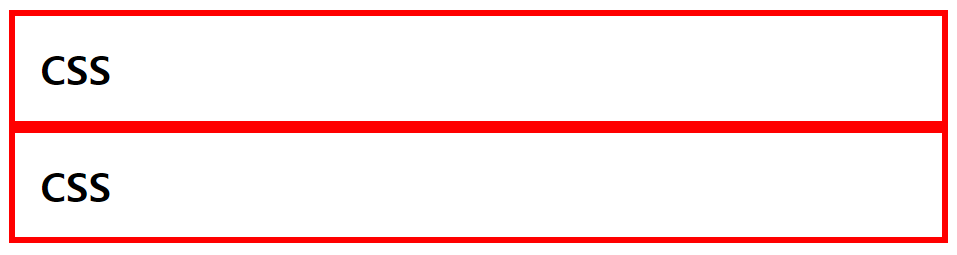
content와 테두리 사이의 여백을 주기
padding:몇px; 테두리와 테두리 사이의 간격
margin:몇px;⌨️ 코드 작성
<!doctype html>
<html>
<head>
  <meta charset = "utf-8">
  <title></title>
  <style>
    h1 {
      border:5px solid red;
      padding:20px;
      margin:0px;
    }
    </style>
    </head>
    <body>
      <h1>CSS</h1>
      <h1>CSS</h1>
      </body>
    </html>
👉🏻 결과
화면 전체를 쓰고 있는 h1 태그의 특징(block level element의 특징) 바꾸기
/* 태그의 크기 변경 */
width:몇px;

/* 태그의 높이 변경 */
height:몇px;
참고 사항 (중요!)
웹 페이지에서 우클릭을 하면 "검사"라는 항목이 뜹니다.
이것을 눌러보면 해당 웹 페이지가 어떤 CSS로 구성되어 있는지 등의 웹 페이지 분석 정보를 알 수 있습니다.
다른 웹 페이지를 보고 적극 활용해봅시다.
6. 그리드
🖤 그리드란?
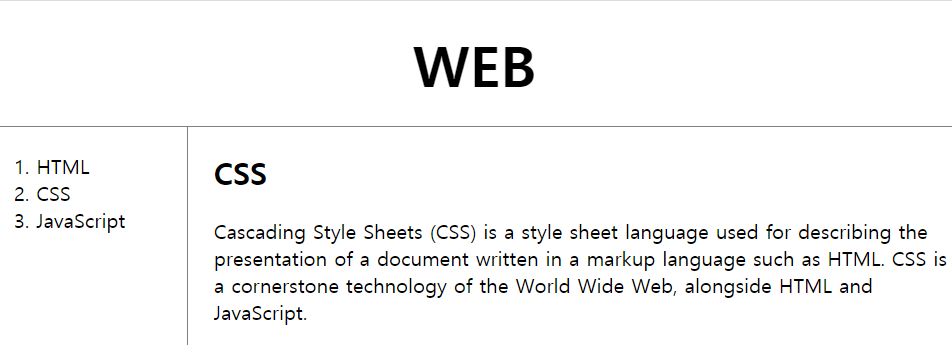
행과 열을 모두 다루는 2차원 시스템입니다.
페이지를 나누거나, 웹 홈페이지에 요소들을 배치하는 등에 사용합니다.
- 사용 방법은 아래 실습 부분에서 설명하겠습니다.
🖤 cf) 어떠한 의미도 존재하지 않는 태그
1. div 태그
<div>문장</div>- 단순 글자 출력 등 디자인의 용도로 많이 사용합니다.
- 기본적으로 block level element이기 때문에 화면 전체를 사용합니다.
2. span 태그
<span>문장</span>- 단순 글자 출력 등 디자인의 용도로 많이 사용합니다.
- 기본적으로 inline element이기 때문에 content 크기만큼의 화면을 사용합니다.
🖤 그리드를 이용하여 2.html 웹 페이지 꾸미기 실습
- 해당 동영상 강의 다시 보면서 공부하기
- 해당 웹 페이지의 "검사"항목 확인해볼 것(가능하면 웹 페이지 업로드)
grid 사용 방법
/* 1. 원하는 태그에 id = "grid"값 주기 */

/* 2 */
#grid {
  display:grid;
  grid-template-colums: 첫번째column부피 두번째column부피
}
- fr : 화면 전체를 나눠주는 비율
- 부피를 나타낼 때 단순히 비율로 나타내고자 한다면
2:1의 경우 2fr 1fr ; 과 같이 사용할 수 있습니다.
- 부피를 나타낼 때 단순히 비율로 나타내고자 한다면
grid는 매우 최신 기술입니다.
최신 기술을 사용하기 위해서는 해당 기술을 현재 사용해도 되는지 데이터에 근거하여 확인을 해야 합니다.여러 HTML, CSS, JavaScript의 기술들 중에서 현재 웹 브라우저들이 얼마나 기술을 채택하고 있는가에 대한 통계를 보여주는 서비스
- 초록색 : 쓸 수 있다는 의미
- 녹색 : 부분적으로 사용 가능하다는 의미
- 빨간색 : 사용할 수 없다는 의미
⌨️ 코드 작성
<!doctype html>
<html>
<head>
  <title>WEB1 - CSS</title>
  <meta charset="utf-8">
  <style>
  body {
    margin:0;
  }
  a {
    color : black;
    text-decoration: none;
  }
  h1 {
    font-size:45px;
    text-align: center;
    border-bottom:1px solid gray;
    margin:0;
    padding:20px;
  }
  ol {
    border-right:1px solid gray;
    width:100px;
    margin:0;
    padding:20px;
  }
  #grid{
    display:grid;
    grid-template-columns: 150px 1fr;
    /* 첫 번쨰 column 크기 150px, 두 번째 column은 남은 부분 전체 */
  }
  #grid ol { /* ol 중에 조상이 grid인 ol을 선택 */
    padding-left:33px;
  }
  #article{
    padding-left:25px;
  }
  </style>
</head>
<body>
  <h1><a href="index.html">WEB</a></h1>
<div id="grid">
    <ol>
      <li><a href="1.html">HTML</a></li>
      <li><a href="2.html">CSS</a></li>
      <li><a href="3.html">JavaScript</a></li>
    </ol>
  <div id="article">
    <h2>CSS</h2>
    <p>
      Cascading Style Sheets (CSS) is a style sheet language used for
      describing the presentation of a document written in a markup language
      such as HTML. CSS is a cornerstone technology of the World Wide Web,
      alongside HTML and JavaScript.
    </p>
  </div>
</div>
</body>
</html>
👉🏻 결과
7. 미디어 쿼리
화면의 크기에 따라 웹 페이지의 각 요소들이 반응해서
최적화된 모양으로 바뀌게 하는 것은 웹 디자인에 있어서 매우 필수적인 요소입니다.
이것을 반응형 웹, 반응형 디자인, responsive web 이라고 부릅니다.
🖤 미디어 쿼리란?
미디어 쿼리란, CSS를 통해서 구현할 수 있는 핵심적인 반응형 디자인 중 하나입니다.
⌨️ 코드 작성
<!<!DOCTYPE html>
<html>
 <head>
  <meta charset="utf-8">
  <title></title>
  <style>
    div {
      border:10px solid green;
      font-size:60px;
    }
    @media (min-width:800px) { /* screen width > 800px의 의미.*/
      div {
      display:none; /* 800px 이상 화면을 키우면 div가 사라진다.*/
    }
  }
  </style>
 </head>
 <body>
   <div>
     Responsive
   </div>
 </body>
</html>
- min-width 대신에 max-width:몇px 를 작성하면, 반대의 의미가 됩니다.
800px 이하로 화면을 줄이면 div가 사라집니다.
👉🏻 결과
(웹 페이지 링크 첨부하기... - mediaquery)
🖤 실습 - 2.html
⌨️ 코드 작성
<!doctype html>
<html>
<head>
  <title>WEB1 - CSS</title>
  <meta charset="utf-8">
  <style>
  body {
    margin:0;
  }
  a {
    color : black;
    text-decoration: none;
  }
  h1 {
    font-size:45px;
    text-align: center;
    border-bottom:1px solid gray;
    margin:0;
    padding:20px;
  }
  ol {
    border-right:1px solid gray;
    width:100px;
    margin:0;
    padding:20px;
  }
  #grid{
    display:grid;
    grid-template-columns: 150px 1fr;
  }
  #grid ol {
    padding-left:33px;
  }
  #article{
    padding-left:25px;
  }
  @media(max-width:800px) {
    #grid {
      display: block;
    }
    ol {
      border-right:none;
    }
    h1 {
      border-bottom:none;
    }
  }
  </style>
</head>
<body>
  <h1><a href="index.html">WEB</a></h1>
<div id="grid">
    <ol>
      <li><a href="1.html">HTML</a></li>
      <li><a href="2.html">CSS</a></li>
      <li><a href="3.html">JavaScript</a></li>
    </ol>
  <div id="article">
    <h2>CSS</h2>
    <p>
      Cascading Style Sheets (CSS) is a style sheet language used for
      describing the presentation of a document written in a markup language
      such as HTML. CSS is a cornerstone technology of the World Wide Web,
      alongside HTML and JavaScript.
    </p>
  </div>
</div>
</body>
</html>
👉🏻 결과
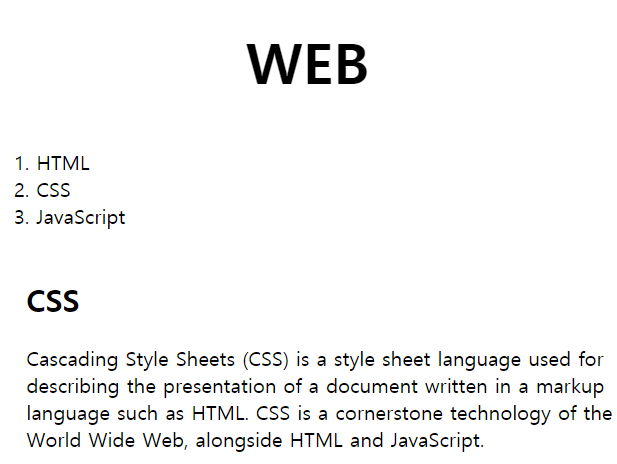
- 화면을 800px 이하로 줄이면 이렇게 나오고,
800px 보다 크게 화면을 늘리면 기존에 나오던 화면이 보입니다.
8. CSS 코드 따로 작성하기
중복되는 CSS 코드 부분을
style 태그를 제외하고 순수한 CSS 코드만 따로
새로운 CSS 파일에 빼줄 수 있습니다.
<head>
  <title></title>
  <meta charset="utf-8">
  <link rel="stylesheet" href="style.css"> /* 이 부분 */
</head>- 이렇게 하면 모든 웹 페이지에 동일한 style을 간편하게 적용할 수 있습니다.
⌨️ 코드 작성 - CSS 코드
body {
  margin:0;
}
a {
  color : black;
  text-decoration: none;
}
h1 {
  font-size:45px;
  text-align: center;
  border-bottom:1px solid gray;
  margin:0;
  padding:20px;
}
ol {
  border-right:1px solid gray;
  width:100px;
  margin:0;
  padding:20px;
}
#grid{
  display:grid;
  grid-template-columns: 150px 1fr;
}
#grid ol {
  padding-left:33px;
}
#article{
  padding-left:25px;
}
@media(max-width:800px) {
  #grid {
    display: block;
  }
  ol {
    border-right:none;
  }
  h1 {
    border-bottom:none;
  }
}
⌨️ 코드 작성 - CSS 코드를 뺀 html 코드
<!doctype html>
<html>
<head>
  <title>WEB1 - HTML</title>
  <meta charset="utf-8">
  <link rel="stylesheet" href="style.css">
</head>

<body>
  <h1><a href="index.html">WEB</a></h1>
  <div id="grid">
<ol>
  <li><a href="1.html">HTML</a></li>
  <li><a href="2.html">CSS</a></li>
  <li><a href="3.html">JavaScript</a></li>
</ol>
<div id="article">
<h2>HTML</h2>
  <p>
    HyperText Markup Language (HTML) is the standard markup language for
    creating web pages and web applications. Web browsers receive HTML documents
    from a web server or from local storage and render them into multimedia web pages.
    HTML describes the structure of a web page semantically and originally included cues
    for th appearance of the document.
  </p>
</div>
  </div>
  </body>
</html>
👉🏻 결과
결과는 기존과 동일합니다.