Java - Selenium 출근/퇴근 체크
이슈
- 재택 시작한 이후로 출퇴근 체크를 가끔 까먹는다.
- 출퇴근 스케줄링 돌려서 자동으로 처리해야겠다 !
필요한 도구
- 버전에 맞는 chrome driver
https://chromedriver.chromium.org/downloads - selenium 도구
https://www.selenium.dev/downloads/ - JUnit 5 (테스트로 돌리려면 - 옵션)
설정
- 자바 프로젝트를 만든다
- 크롬 드라이버하고 selenium-server-*.jar는 호환되는 크롬 버전에 맞는 걸 classpath에 올려두자.
Selenium 사용 방법
- 가장 쉬운 default 방법은 cssSelector를 써서 크롬에서 복사해서 넣으면된다. selector = cssSelect, XPath를 써도 무난 !
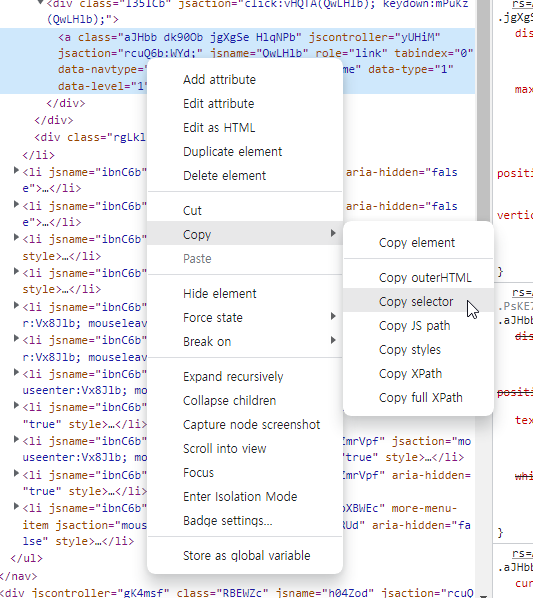
- WebElement attendOut = driver.findElement(By.cssSelector("여기에 넣기 "));
- 그리고 사이트 로딩이 느린 경우에는 element가 나올 때 까지 일정 시간 동안 대기하라고 명령하면 된다.
static WebDriverWait wait = new WebDriverWait(driver, "몇 초 간 대기");
wait.until(ExpectedConditions.visibilityOfElementLocated(By.cssSelector("#inBtn")));
스케줄링 방법
- 자바 jar로 export해서 sh 파일에 java -jar Run.jar 실행하는 명령어를 넣고 해당 파일을 원도우 스케줄러로 실행해도 되고 그외 방법은 다양하기 때문에 선호하는 방식 사용하기 !
소스 코드
package auto_attend;

import org.openqa.selenium.By;
import org.openqa.selenium.WebDriver;
import org.openqa.selenium.WebElement;
import org.openqa.selenium.chrome.ChromeDriver;
import org.openqa.selenium.support.ui.ExpectedConditions;
import org.openqa.selenium.support.ui.WebDriverWait;

public class Run {
	static {
		System.setProperty("webdriver.chrome.driver",
		"PATH\\auto_attend\\webdriver\\chromedriver_win32\\chromedriver.exe");

	}
	static WebDriver driver = new ChromeDriver();
	static WebDriverWait wait = new WebDriverWait(driver, 3);
	static String loginSiteURL = "https://gw.company.com/*.do";

	public static void main(String[] args) {
		login(args);
		enterWork();
		//exitWork();
	}

	public static void login(String[] args) {
		driver.manage().window().maximize();
		driver.get(loginSiteURL);

		WebElement username = driver.findElement(By.id("userId"));
		WebElement password = driver.findElement(By.id("userPw"));
		WebElement login = driver.findElement(By.className("login_submit"));

        if(args.length > 1) {
			username.sendKeys(args[0]);
			password.sendKeys(args[1]);
		}else {
			username.sendKeys("username");
			password.sendKeys("password");
		}

		login.click();
	}

	public static void enterWork() {
		wait.until(ExpectedConditions.visibilityOfElementLocated(By.cssSelector("#container > ul > li.active")));
		WebElement attendOut = driver.findElement(By.cssSelector("#container > ul > li.active"));
		attendOut.click();
		wait.until(ExpectedConditions.visibilityOfElementLocated(By.cssSelector("#inBtn")));
		WebElement attendOut2 = driver.findElement(By.cssSelector("#inBtn"));
		attendOut2.click();
		wait.until(ExpectedConditions.visibilityOfElementLocated(By.cssSelector("#btnConfirm")));
		WebElement attendOut3 = driver.findElement(By.cssSelector("#btnConfirm"));
		attendOut3.click();
	}

	public static void exitWork() {
		wait.until(ExpectedConditions.visibilityOfElementLocated(By.cssSelector("#container > ul > li:nth-child(2)")));
		WebElement attendOut = driver.findElement(By.cssSelector("#container > ul > li:nth-child(2)"));
		attendOut.click();
		wait.until(ExpectedConditions.visibilityOfElementLocated(By.cssSelector("#outBtn")));
		WebElement attendOut2 = driver.findElement(By.cssSelector("#outBtn"));
		attendOut2.click();
		wait.until(ExpectedConditions.visibilityOfElementLocated(By.cssSelector("#btnConfirm")));
		WebElement attendOut3 = driver.findElement(By.cssSelector("#btnConfirm"));
		attendOut3.click();
	}
}
sh/bat script
java -jar enterWork.jar "username" "password"
기술블로거입니다