compose internals ch4. compose ui (2/2)
고유 크기 측정
- 고유 크기 측정은 측정(measure) 단계 이전에 자식의 추정 크기를 알아야 할 때 유용.
ex. 자식의 높이를 가장 키가 큰 형제의 높이와 일치시키고 싶은 경우
만들었던 컴포넌트 예제
@Composable
private fun HeaderLsTxt(
    modifier: Modifier = Modifier,
    param: HeaderTxtParams
) {
    Row(
        modifier = modifier
            .height(IntrinsicSize.Min),
        verticalAlignment = Alignment.CenterVertically,
        horizontalArrangement = Arrangement.spacedBy(4.dp)
    ) {
        Text(
            text = param.title.text,
            style = param.title.style,
            color = OverdareTheme.colors.Element.IcnTxt.Normal.Strong_W,
            overflow = TextOverflow.Ellipsis,
            maxLines = 1
        )

        if (param.subTitle.text.isNotEmpty()) {
            Text(
                text = param.subTitle.text,
                style = param.subTitle.style,
                color = OverdareTheme.colors.Element.IcnTxt.Normal.Medium,
                overflow = TextOverflow.Ellipsis,
                maxLines = 1
            )
        }
    }
}
공식문서 예제 및 설명
https://developer.android.com/develop/ui/compose/layouts/intrinsic-measurements?hl=ko
레이아웃 제약 조건 (Layout Constraints)
- Subcomposition은 사용 가능한 크기에 기반하여 아이템을 지연하여 구성해야 할 때 유용
- Infinity Constraints -> 어떤 크기를 취할지 자식에게 위임?
코드 예제
@Preview
@Composable
fun LazyColumnExample() {
    LazyColumn {
        item {
            Box(Modifier.fillMaxHeight()) {
                Text("test")
            }
        }
    }
}
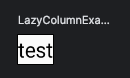
결과는 아래처럼 자식(Text) 를 감싸는 높이를 취하게 된다.
LookaheadLayout
내용이 변경됨
Modifier 체인 모델링 (Modeling modifier chains)
- Modifier의 연결은 then을 통해 이루어짐
- CombinedModifier -> modifer 체인 모델링
Modifier.Node 방식으로 재작성 된 이유는 아래 문제를 해결하기 위함

1. materialize
  -> Layout 을 돌면서 새롭게 Modifier를 새롭게 생성
2. remember / state
  -> Too many State
3. deep depth & big tree
  -> Too many Modifiers
LayoutNode에 modifier 설정 (Setting modifiers to the LayoutNode)
-
Layout 선언 시
- factory 람다 -> 초기화
- update 람다 -> 초기값 세팅 (factory 직후)
-
Composed modifier -> 상태를 가짐
-
생성 시 modifier를 설정하는 경우
- AndroidComposeView 의 root LayoutNode
LayoutNode가 새로운 modifier를 받아 들이는 방법 (How LayoutNode ingests new modifiers)
- 캐시 및 전처리 시에는 foldIn
- 새 Modifier 체인을 구성하기 위해서는 foldOut
- 이후 캐시 제거, 재측정 등
노드 트리 그리기 (Drawing the node tree)
-
재측정 요청(dirty) -> owner가 dirty 노드를 모두 [재측정 -> 재배치 -> 그리기]
그리기는 outerLayoutNodeWrapper에 위임- RenderNodeLayer -> 컴포즈 기본
- ViewLayer -> 안드로이드 뷰 기반, RenderNodeLayer를 사용할 수 없을 때만.
-
Owner가 layer 종류를 결정
Jetpack Compose에서의 Semantics (Semantics in Jetpack Compose)
-
Owner는 semantics와 Android SDK 접근성 API와의 연결을 처리하는 일을 위임받은 delegate.
-
이하 내용이 변경됨
semantics 변화에 대한 알림 (Notifying about semantic changes)
- 구조적 변화 탐색
- semantics 속성 변화 탐색
- 업데이트
병합된/병합되지 않은 semantic 트리 (Merged and unmerged semantic trees)

기본 그리고 간결함