참고 영상 링크
AAA 게임 UI 최적화 및 빌드하기 | 언리얼 페스트 온라인 2020
이런 분들에게 추천드려요
- 언리얼 엔진 UI를 다루면서 최적화를 신경써야 할 때
- UI 만들 때 계층 구조를 복잡하게 만드는 분
- 엔진 프로그래머인데
SlatePrepass가 무슨 함수인지 모르겠는 경우 - Invalidation Box 사용하다가 오류가 났을 때
- UI 위젯을 직접 만들어야 하는 정확한 이유가 궁금할 때
영상을 해석하면서, 이론적인 이해를 돕기 위해 필요한 배경지식을 첨가했습니다.
엔진 코드 등을 첨부하여 내용이 길기 때문에, 필요한 내용만 소제목을 클릭하여 보시면 됩니다.
UI 프레임 당 소모량
UI는 프레임 당 8ms 소모한다.
UI 프레임워크 사용 시 문제점
- UI에는 Tick이 실행되는 타임라인이 존재함
- 상호의존적인 레이아웃 규칙이 많고, 위젯마다 수많은 레이어를 사용하게 된다면 더욱 복잡성 증가 → 오버헤드가 커질 수밖에 없음
- Dynamic Text → 레이아웃 규칙이 더 복잡해질 가능성 농후
- 각 레이어는 Geometry rule 이 존재함
- 게임 기획자와 UI 디자이너의 요구사항이 높아지거나, 전달이 늦어질 수 있음
- 프로그래머는 이를 모두 예측하는, 버그 없는 코드를 작성할 수 없음
UI 최적화 목표
- 다양한 customization 옵션을 갖춘 대형 위젯 툴을 제공해야한다.
사전 배경
- 일반적인 프로파일링 캡쳐
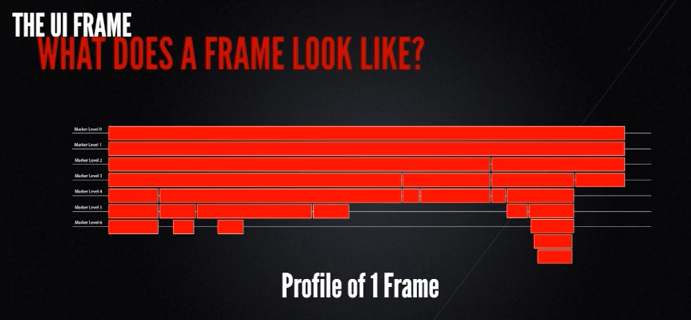
- UI 에 해당하는 부분
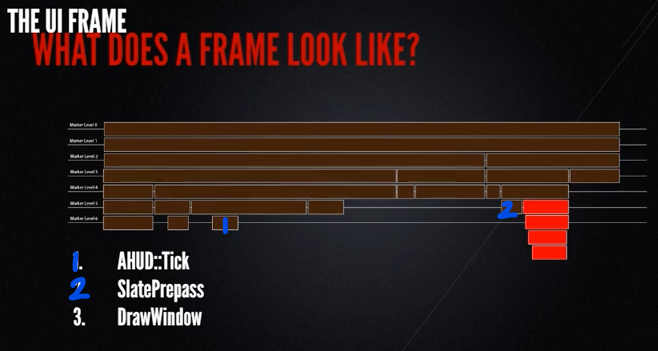
요소 별 최적화
AHUD::Tick
-
AHUD::Tick
- 설명: HUD 액터로, Tick은 일반 액터와 동일
- HUD 작업 수행
- 게임 코드와 통신
- 위젯 생성/제거
- Geometry와 위젯이 함께 움직이도록 하는 작업
- Geometry란?
"Geometry와 위젯이 함께 움직이도록 한다"는 의미
이 문장에서 말하는 작업은 UI 요소의 위치와 크기(Geometry)가 위젯의 변화에 따라 동기화되거나 움직임이 함께 적용된다는 뜻입니다. 예를 들어, 어떤 UI 위젯이 애니메이션으로 크기가 변경되거나 화면에서 이동할 때, 그 위젯의 Geometry도 동일하게 업데이트되어야 하므로 위젯과 Geometry가 함께 움직이도록 작업을 조정하는 것입니다.
언리얼 엔진에서 HUD나 UI 시스템(특히 UMG, Unreal Motion Graphics)은 2D 화면 상의 위젯들이 어떻게 배치되고 그 위치가 어떻게 변화하는지를 정밀하게 관리합니다. 여기서 Geometry는 UI 배치의 중요한 요소이며, 이를 통해 UI가 화면에 정확하게 그려지고 사용자의 상호작용이 정확히 이루어지도록 합니다.
- Geometry란?
-
비용이 많이 드는 작업 :
CreateWidgets
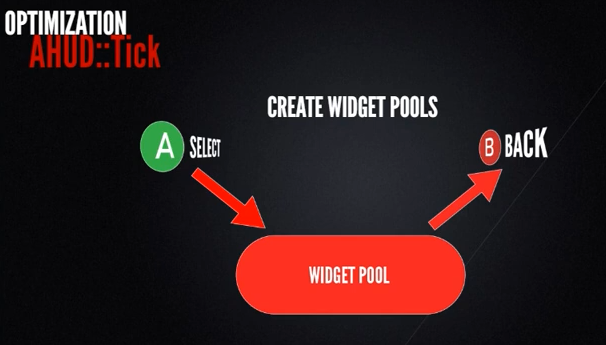
- 최적화 방법: 위젯 풀링
DrawWindow
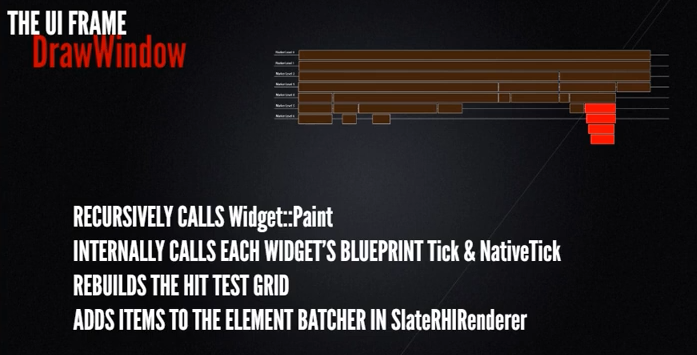
- DrawWindow
-
설명:
재귀 호출됨 → 각각Widget::Paint()실행 → 내부적으로 위젯의 Tick (BP, Native 둘 다) 실행 -
작업 수행:
- Hit Test Grid 을 리빌드함
- Hit Test Grid → Hit Test 와 위젯 탐색을 하는 쿼드 트리
Widget::Paint()마지막 작업: 렌더러 정보를 SlateRHIRenderer의 element batcher로 추가함
- Hit Test Grid 을 리빌드함
-
최적화 방법
- 위젯 트리를 Flat 하게 만들기. ⇒ 위젯 트리 깊이를 낮추기
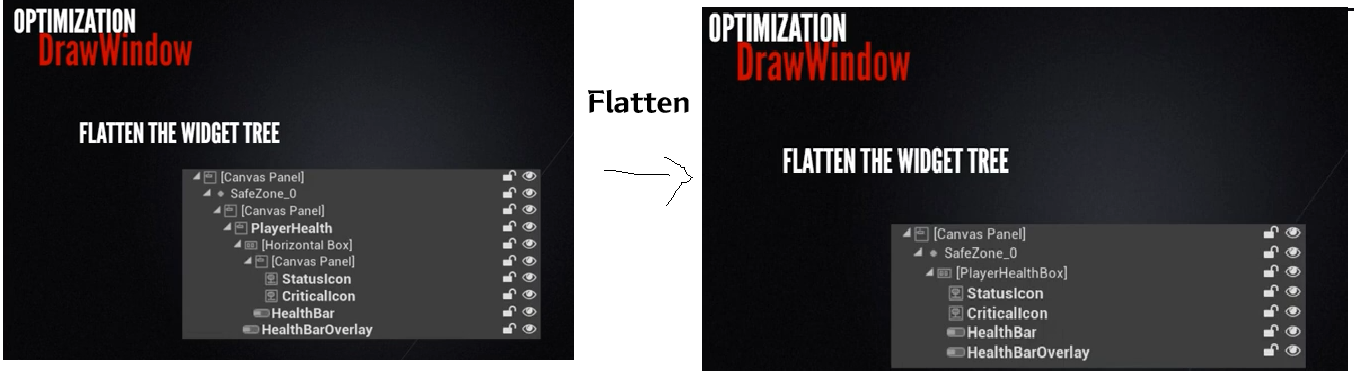
사진 크게 보면(원본 보기) 바로 이해가 되실 겁니다.
이유: 컨테이너 안에 컨테이너를 계속 넣는 재귀 호출을 반복하게 되기 때문- 결과 (전제: 최적화 X) → 컴파일 시 코드 길어짐 → 가상 함수를 많이 사용하게 되어, 런타임 함수 호출 시 실제 함수를 메모리에서 찾는 과정이 늘어남 → 런타임 비용 증가, CPU 캐시 누락 가능성 증가
10/04 Update
- 위젯 트리 깊이에 따른 재귀 호출:
위젯 트리의 깊이에 따라 컨테이너 안에 컨테이너를 넣는 구조는 맞습니다. UI를 구성할 때 부모-자식 관계로 위젯들이 중첩되면서 트리 형태를 이룹니다.
그러나 재귀 호출이 직접적으로 발생하지는 않습니다. Slate와 UMG는 위젯 트리를 순회하며 각 위젯을 처리하는 과정에서 트리 구조를 활용하지만, 직접적인 재귀 함수 호출은 하지 않습니다.- 위젯 트리 깊이와 컴파일 시 코드 길이 증가:
컴파일 시 코드 길이는 위젯 트리의 깊이와는 직접적으로 상관이 없습니다. 위젯 트리는 런타임에 만들어지고 관리되며, 이를 그리는 로직이 컴파일 타임에 UI 트리의 깊이와 연관되어 길어지지는 않습니다.- 가상 함수 사용과 런타임 비용 증가:
가상 함수는 UI 위젯들이 다양한 행동을 할 수 있도록 설계된 객체 지향적인 시스템에서 많이 사용됩니다.
가상 함수의 사용은 런타임에 실제 함수 주소를 찾아 호출하는 vtable(가상 함수 테이블) 방식을 이용하기 때문에 런타임 오버헤드가 발생할 수는 있지만, 그 영향은 상대적으로 작습니다. UI 트리 깊이와 직접적으로 연관된 설명은 아닙니다.- 런타임 비용과 CPU 캐시 누락 가능성:
위젯 트리가 깊어질수록, 여러 위젯의 상태를 관리하고 그리는 과정에서 런타임 비용은 증가할 수 있습니다. 다만, 이 증가가 가상 함수 호출 때문에 발생하는 것은 아니며, 위젯의 개수나 상태 업데이트, 렌더링 비용이 주 원인입니다.
CPU 캐시 누락 가능성은 많은 객체가 할당되거나 메모리 접근 패턴이 복잡할 때 발생할 수 있습니다. 트리가 깊어질수록 위젯 간의 데이터 접근 패턴이 복잡해져 CPU 캐시 효율이 떨어질 가능성은 있지만, 이것도 가상 함수 호출과는 크게 연관이 없습니다.- 수정된 설명:
위젯 트리가 깊어질수록 UI 시스템이 더 많은 위젯을 관리하고 그릴 때 런타임 비용이 증가할 수 있습니다. 이는 위젯의 상태를 업데이트하고 렌더링하는 비용 때문이며, 가상 함수의 사용으로 인한 오버헤드가 발생할 수 있지만, 주된 성능 이슈는 트리 깊이와 위젯의 개수에 따라 발생하는 메모리 관리와 렌더링 비용입니다. CPU 캐시 누락 가능성도 있을 수 있지만, 트리 깊이 자체보다 위젯 간의 데이터 접근 패턴이 복잡해지는 것이 더 큰 원인입니다.
-
위젯 트리 관리법
- 위젯의 코드를 처리하는 태스크 그래프를 직접적으로 표현하기
- 위젯 트리 크기가 작을 수록 → 함수 호출이 적고
- 위젯 트리 깊이가 작을 수록 → 재귀 호출 수가 적다
-
또 다른 최적화 방법
-
Visible대신HitTestInvisible이나SelfHitTestInvisible사용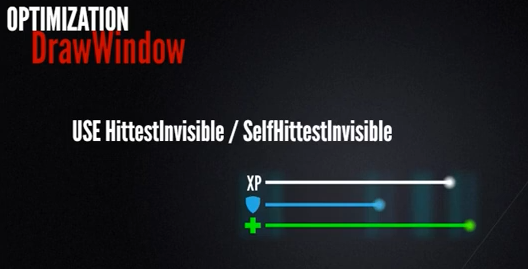
-
HitTestInvisible이나SelfHitTestInvisible은 Hit Test Grid에 해당 위젯을 추가하지 않는다. (리빌드 작업 없애줌) -
HitTestInvisible: Hit Test Grid에 모든 위젯의 하위 자손을 추가하는 걸 막는다.- Hit Test가 필요없는 위젯에 사용해라.
- 위 사진과 같이, 유저와 Hit으로 상호작용할 필요 없는 위젯의 경우 적합.
-
언리얼 5 기준 설명
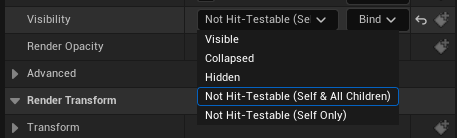
HitTestInvisible이 에디터의 Not Hit-Testable (Self & All Children) 옵션이고,SelfHitTestInvisible이 에디터의 Not Hit-Testable (Self Only) 옵션이다.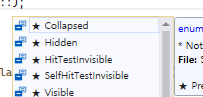
HitTestInvisibleSelfHitTestInvisible→ Native C++
두 옵션 모두 Visible 인데 HitTestGrid에서 빼는 것임. 가리는 것은 그냥 Hidden
-
-
Tick 삭제

- Tick 삭제 =/= 성능 개선
- TIck 을 삭제하는 진짜 이유:
쉽다는 이유만으로 프레임마다 작업을 추가하는 것을 방지 - 예를 들어, HP Bar 의 구현을 Tick에서 하면 쉽지만, 이를 막음으로써
event 기반 방식으로 Update 하게끔 하여 성능을 개선한다.
-
SlatePrepass
Slate란 무엇인가?

출처: https://dev.epicgames.com/documentation/ko-kr/unreal-engine/slate-overview-for-unreal-engine
10/02 수정
Slate와 UMG와 HUD가 각각 무엇이고, 어떤 역할을 하는 지에 대해 자세한 설명이 아래 참고 링크에 나와있다.
https://minusi.tistory.com/entry/Unreal-UMG%EC%99%80-HUD-%EA%B7%B8%EB%A6%AC%EA%B3%A0-SlateUnreal-UMG-HUD-and-Slate
//SWidget 설명
/**
 * Abstract base class for Slate widgets.
 *
 * STOP. DO NOT INHERIT DIRECTLY FROM WIDGET!
 *
 * Inheritance:
 *   Widget is not meant to be directly inherited. Instead consider inheriting from LeafWidget or Panel,
 *   which represent intended use cases and provide a succinct set of methods which to override.
 *
 *   SWidget is the base class for all interactive Slate entities. SWidget's public interface describes
 *   everything that a Widget can do and is fairly complex as a result.
 *
 * Events:
 *   Events in Slate are implemented as virtual functions that the Slate system will call
 *   on a Widget in order to notify the Widget about an important occurrence (e.g. a key press)
 *   or querying the Widget regarding some information (e.g. what mouse cursor should be displayed).
 *
 *   Widget provides a default implementation for most events; the default implementation does nothing
 *   and does not handle the event.
 *
 *   Some events are able to reply to the system by returning an FReply, FCursorReply, or similar
 *   object.
 */

//SLeafWidget 설명 -> **Slate Widget 만들 때 상속받아야하는 부모 클래스**
/**
 * Overwritten from SWidget.
 *
 * LeafWidgets provide a visual representation of themselves. They do so by adding DrawElement(s)
 * to the OutDrawElements. DrawElements should have their positions set to absolute coordinates in
 * Window space; for this purpose the Slate system provides the AllottedGeometry parameter.
 * AllottedGeometry describes the space allocated for the visualization of this widget.
 *
 * Whenever possible, LeafWidgets should avoid dealing with layout properties. See TextBlock for an example.
 */
virtual int32 OnPaint( const FPaintArgs& Args, const FGeometry& AllottedGeometry, const FSlateRect& MyCullingRect, FSlateWindowElementList& OutDrawElements, int32 LayerId, const FWidgetStyle& InWidgetStyle, bool bParentEnabled ) const override = 0;

/**
 * Overwritten from SWidget.
 *
 * LeafWidgets should compute their DesiredSize based solely on their visual representation. There is no need to
 * take child widgets into account as LeafWidgets have none by definition. For example, the TextBlock widget simply
 * measures the area necessary to display its text with the given font and font size.
 */
-> 요약하자면, Slate Widget 역시 Slate 시스템에서 호출 될 이벤트 가상함수를 구현하면 된다. SLeafWidget 을 상속받아야 하고, Draw할 Elements 들을 넘기며, Geometry는 공간으로 사용된다.
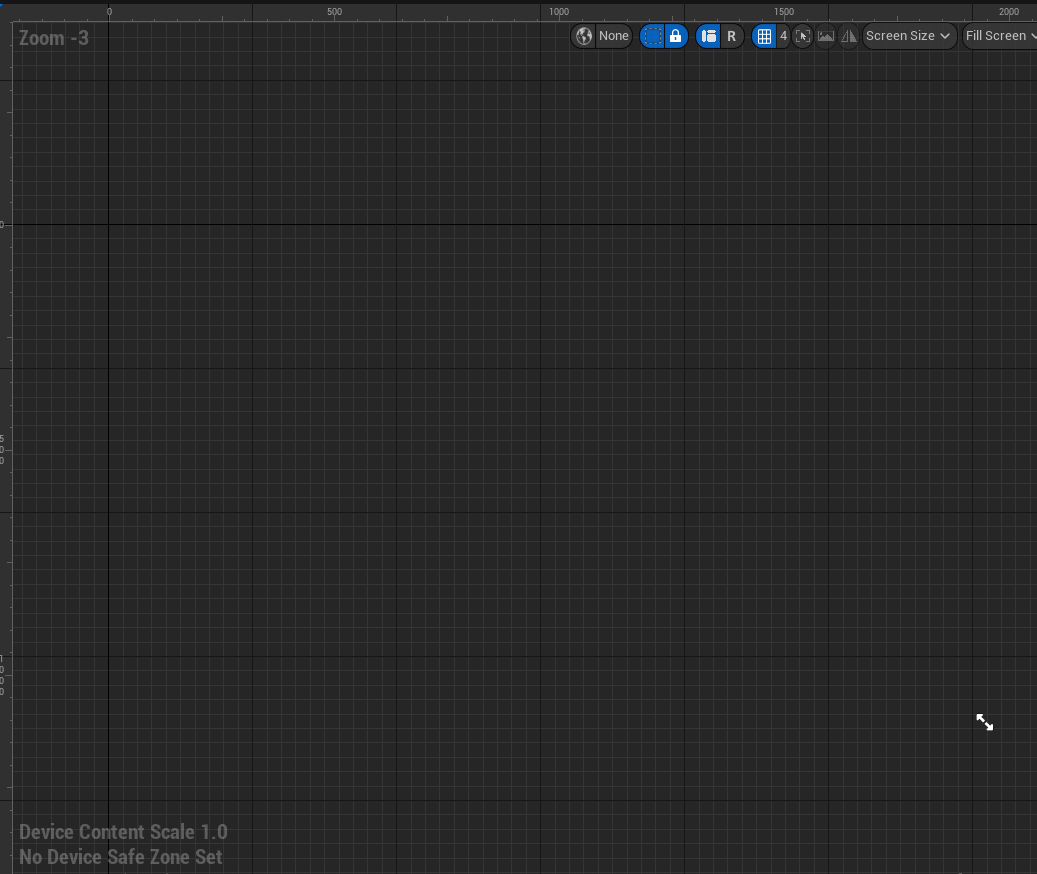
위의 캡처는 위젯 BP의 UMG 이고, UMG 역시 Slate를 기반으로 한다.
UI를 직접 그릴 수 있는 기능이나, 보통 위처럼 언리얼 에디터의 UI를 구성하는 데 사용된다.
-
SlatePrepass
-
특징
: 프로파일러 장치가 매우 적다. → 다른 작업 블록에 비해 발견 어려움
-
역할
: 각 위젯의 모든 캐시 geometry 엔트리를 리빌드한다.
→ 각 위젯의 leaf node 까지 내려갔다가 root 까지 다시 올라온다.
ex) 열과 행의 크기에 따라 셀의 크기 제한 → 각 프레임마다 위젯 트리 전체 재계산 필요
-
최적화 방법
-
Hidden대신Collapsed사용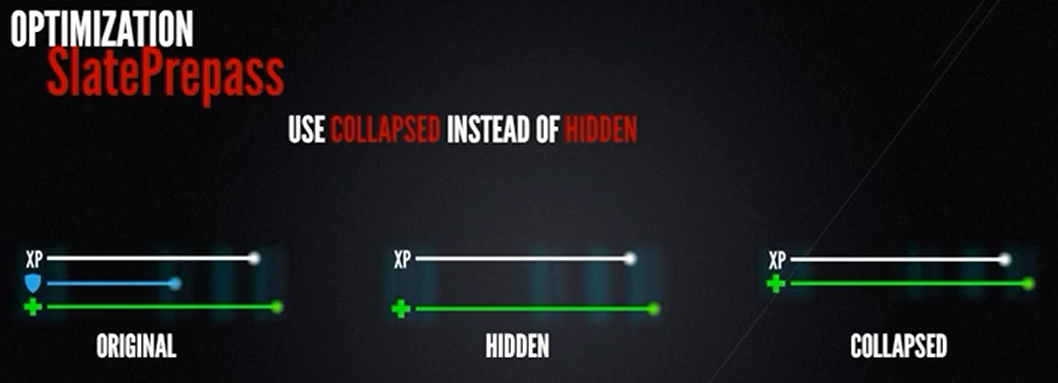
-
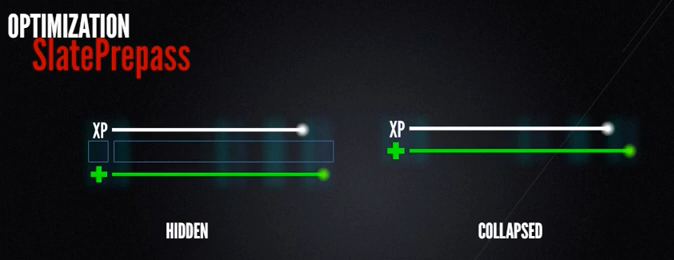
숨겨진 위젯은 여전히 화면 Geometry를 갖게 되므로, 계속해서 주변 위젯의 Geometry에 영향을 주기 때문
-
전부 렌더링 되지 않았더라도,
Hidden은 자손들 전부 Geometry 계산에 포함되기 때문 -
Collapsed- SlatePrepass는 항상 leaf-most node 로 내려간다 → 이 때의 재귀 작업 중단
-
-
-
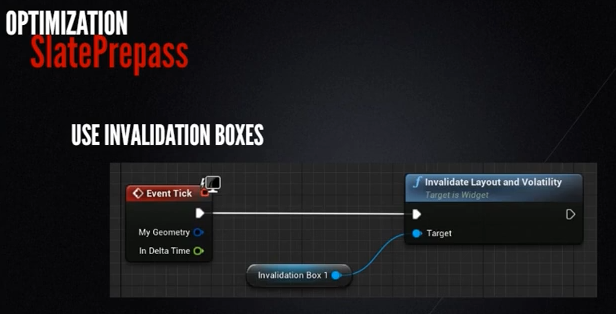
Invalidation Box 관련 오류
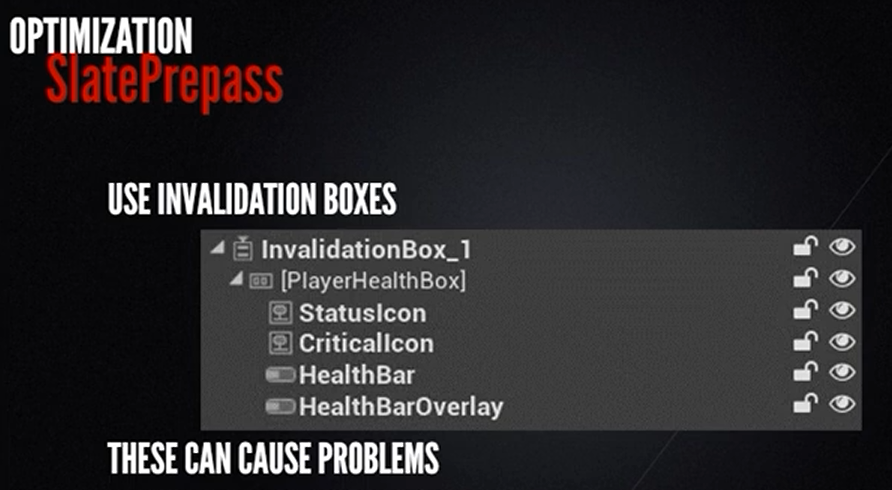
- Invalidation Box 위젯: 하위 트리의 레이아웃과 변동성을 캐싱함.
→ 성능 개선할 것 같지만, Ivalidation을 자동으로 수행하지 않는 문제 발생
→ 보통 이런 이유로 Invalidation Box를 그냥 없애면, 아래와 같은 함수 호출을 남겨, 모든 프레임을 무효화하는 문제도 발생
SMeshWidget
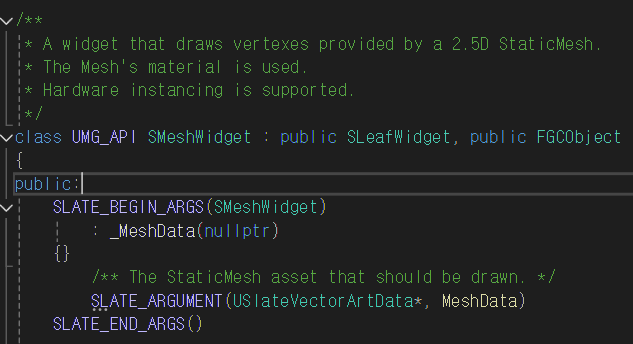
Slate UI Widget 중 하나. UMG 구현에는 없음.
SMeshWidget을 사용하면, 원하는 2D 메시를 대응하는 Material로 직접 그리는 인터페이스 제공
→ vertex와 index 버퍼와 레퍼런스와 함께 전달되는 버퍼를 Slate Element Batcher에 직접 생성
- SMeshWidget.h
// Copyright Epic Games, Inc. All Rights Reserved.

#pragma once

#include "CoreMinimal.h"
#include "UObject/GCObject.h"
#include "Textures/SlateShaderResource.h"
#include "Rendering/RenderingCommon.h"
#include "Widgets/DeclarativeSyntaxSupport.h"
#include "Widgets/SLeafWidget.h"

class FPaintArgs;
class FSlateWindowElementList;
class UMaterialInstanceDynamic;
class USlateVectorArtData;
struct FSlateBrush;

/**
 * A widget that draws vertexes provided by a 2.5D StaticMesh.
 * The Mesh's material is used.
 * Hardware instancing is supported.
 */
class UMG_API SMeshWidget : public SLeafWidget, public FGCObject
{
public:
	SLATE_BEGIN_ARGS(SMeshWidget)
		: _MeshData(nullptr)
	{}
		/** The StaticMesh asset that should be drawn. */
		SLATE_ARGUMENT(USlateVectorArtData*, MeshData)
	SLATE_END_ARGS()

	void Construct(const FArguments& Args);

	/**
	 * Draw the InStaticMesh when this widget paints.
	 *
	 * @return the Index of the mesh data that was added; cache this value for use with @see FRenderRun.
	 */
	uint32 AddMesh(USlateVectorArtData& InMeshData);

	/** Much like AddMesh, but also enables instancing support for this MeshId. */
	uint32 AddMeshWithInstancing(USlateVectorArtData& InMeshData, int32 InitialBufferSize = 1);

	/**
	 * Switch from static material to material instance dynamic.
	 *
	 * @param MeshId    The index of the mesh; returned from AddMesh.
	 *
	 * @return The MID for this Asset on which parameters can be set.
	 */
	UMaterialInstanceDynamic* ConvertToMID( uint32 MeshId );

	/** Discard any previous runs and reserve space for new render runs if needed. */
	void ClearRuns(int32 NumRuns);

	/**
	 * Tell the widget to draw instances of a mesh a given number of times starting at
	 * a given offset.
	 *
	 * @param InMeshIndex        Which mesh to draw; returned by @see AddMesh
	 * @param InInstanceOffset   Start drawing with this instance
	 * @param InNumInstances     Draw this many instances
	 */
	FORCEINLINE void AddRenderRun(uint32 InMeshIndex, uint32 InInstanceOffset, uint32 InNumInstances)
	{
		RenderRuns.Add(FRenderRun(InMeshIndex, InInstanceOffset, InNumInstances));
	}

	/** Enable hardware instancing */
	void EnableInstancing(uint32 MeshId, int32 InitialSize);

	/** Updates the per instance buffer. Automatically enables hardware instancing. */
	void UpdatePerInstanceBuffer(uint32 MeshId, FSlateInstanceBufferData& Data);

protected:
	// BEGIN SLeafWidget interface
	virtual int32 OnPaint(const FPaintArgs& Args, const FGeometry& AllottedGeometry, const FSlateRect& MyCullingRect, FSlateWindowElementList& OutDrawElements, int32 LayerId, const FWidgetStyle& InWidgetStyle, bool bParentEnabled) const override;
	virtual FVector2D ComputeDesiredSize(float) const override;
	// END SLeafWidget interface

	// ~ FGCObject
	virtual void AddReferencedObjects(FReferenceCollector& Collector) override;
	virtual FString GetReferencerName() const override;
	// ~ FGCObject

protected:
	static void PushUpdate(uint32 VectorArtId, SMeshWidget& Widget, const FVector2D& Position, float Scale, uint32 BaseAddress);
	static void PushUpdate(uint32 VectorArtId, SMeshWidget& Widget, const FVector2D& Position, float Scale, float OptionalFloat = 0);

	struct FRenderData
	{
		/** Holds a copy of the Static Mesh's data converted to a format that Slate understands. */
		TArray<FSlateVertex> VertexData;
		/** Connectivity data: Order in which the vertexes occur to make up a series of triangles. */
		TArray<SlateIndex> IndexData;
		/** Holds on to the material that is found on the StaticMesh. */
		TSharedPtr<FSlateBrush> Brush;
		/** A rendering handle used to quickly access the rendering data for the slate element*/
		FSlateResourceHandle RenderingResourceHandle;
		/** Per instance data that can be passed to */
		TSharedPtr<ISlateUpdatableInstanceBuffer> PerInstanceBuffer;
	};
	TArray<FRenderData, TInlineAllocator<3>> RenderData;

private:
	/** Which mesh to draw, starting with which instance offset and how many instances to draw in this run/batch. */
	class FRenderRun
	{
	public:
		FRenderRun(uint32 InMeshIndex, uint32 InInstanceOffset, uint32 InNumInstances)
			: MeshIndex(InMeshIndex)
			, InstanceOffset(InInstanceOffset)
			, NumInstances(InNumInstances)
		{
		}

		uint32 GetMeshIndex() const { return MeshIndex; }
		uint32 GetInstanceOffset() const { return InstanceOffset; }
		uint32 GetNumInstances() const { return NumInstances; }

	private:
		uint32 MeshIndex;
		uint32 InstanceOffset;
		uint32 NumInstances;
	};
	TArray<FRenderRun> RenderRuns;
};
→ 렌더 Batch 에서 렌더링 가능한 인스턴스 수의 버퍼 사용해, 메시의 수많은 인스턴스 렌더링
→ 해당 버퍼를 Material Shader에 전달
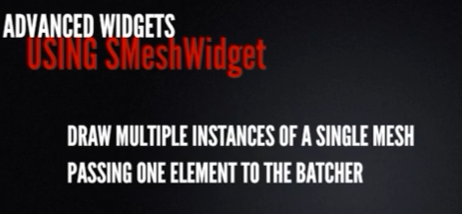
결론: 버퍼 하나로 수많은 메시 인스턴스 렌더링 가능 ⇒ 파티클 이미터 등을 사용할 때 유리함
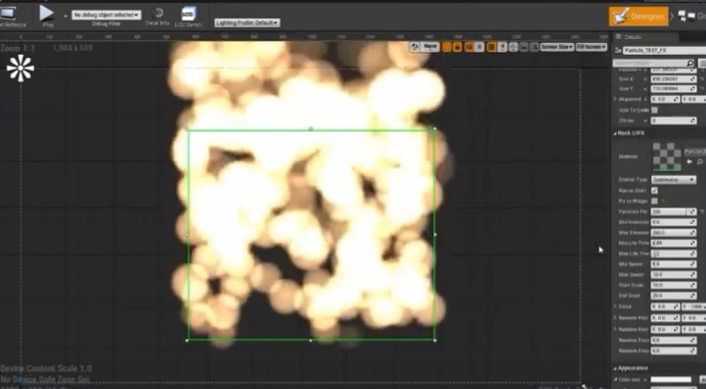
수백개의 파티클을 렌더링 해야함 → 기존 Slate Drawing 프로세스를 거치지 않고, GP view에 매터리얼 놓여짐.
GP view는 이 Graphics Pipeline 상에서 직접적으로 GPU에 접근하여, 매터리얼을 배치하고 렌더링하는 것을 의미
실제 사용
이렇게 만든 Mesh Widget을 UMG에 추가하여, 디자이너가 파티클 이미터를 컨트롤 할 수 있게끔 한다.
→ 제작한 이 위젯을 UMG Slate Widget으로 취급
→ 다른 위젯과 함께 레이어링 됨. 일반 위젯 사용하듯이 사용 가능.
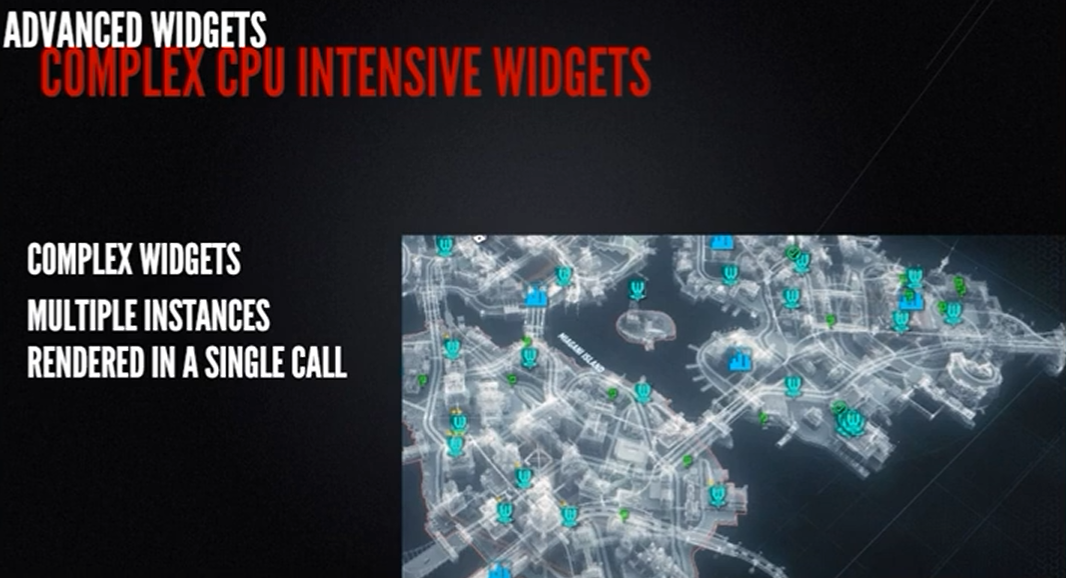
인스턴스 버퍼에서 각 아이콘의 엔트리마다 다른 parameter가 전송되어, 하나의 Material Instance로도 그릴 수 있다. → 한 번의 Paint 호출로 모든 아이콘을 그릴 수 있다.
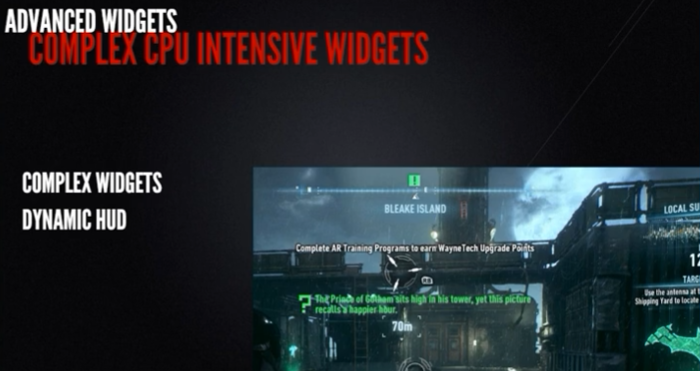
동적으로 움직이거나 레이아웃 반복도 가능하다.
→ Prepass를 무효화할 수 있는 카메라 (혹은 월드) 움직임 등에서도 살아남을 수 있다. (Dynamic HUD)
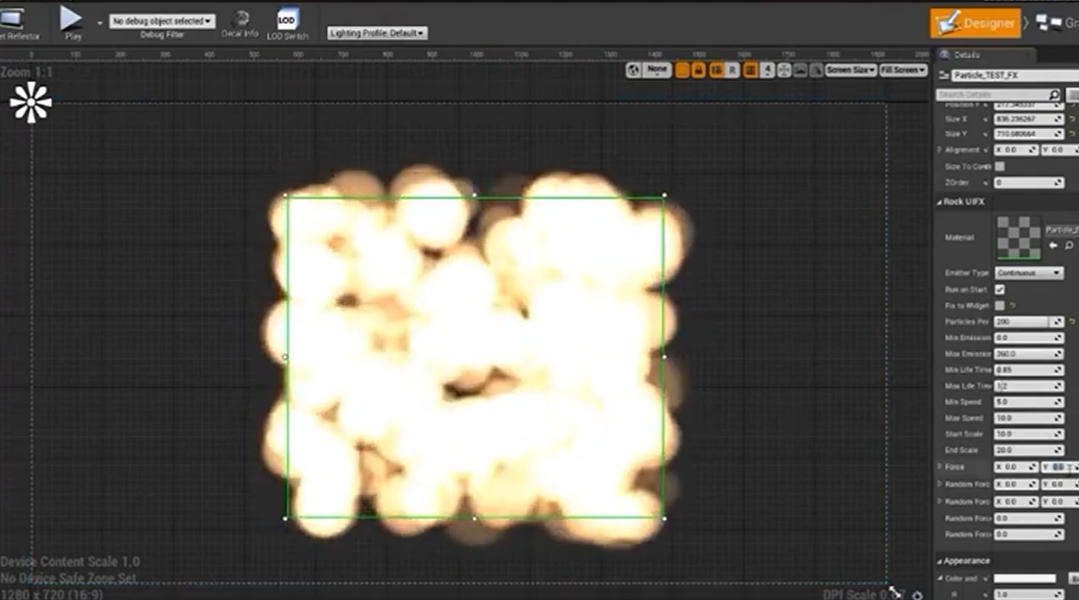
이렇게 만든 Mesh Widget의 Geometry는 위의 초록색 박스
파티클 렌더 Geometry는 전부 GPU가 처리
만약 UMG로 파티클 위젯을 구현하려면 어떻게 해야할까?
UMG 위젯과 CPU 작업을 옮겨야 하고,
각 파티클마다 Element Batcher에서 렌더 데이터를 재귀적(트리 구조에 따라)으로 빌드
→ 별도의 RHI 렌더 명령을 하나씩 전송해야한다.
하지만 Slate 기반으로 구현한 것은 1개의 박스 (트리 구조 X), 직접 렌더 버퍼를 생성하고 GPU에서 파티클을 옮길 수 있다.
비교 분석
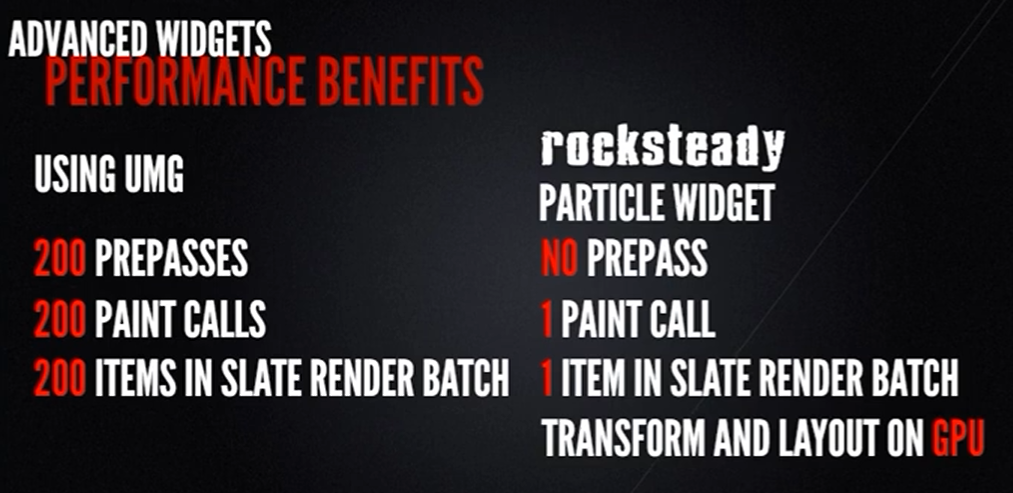
중요 사항
파티클 위젯만 이러한 것이 아니라, 그 어떤 복잡한 UI 위젯을 필요로 할 때 이와 같은 방식을 이용하면 된다.
복잡한 위젯의 기준
- 같은 것을 복수의 인스턴스를 렌더링 하는지
- 계속해서 움직이는 모든 위젯
문제점
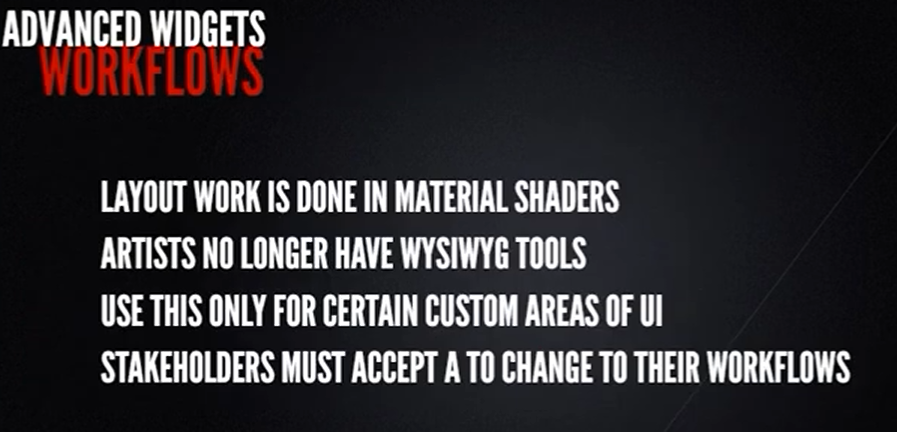
커스터마이징 하게 되면 자신의 어떤 아이템이 이 솔루션으로부터 큰 이득을 얻는지를 미리 생각해야 한다. → 디자이너의 작업흐름에 영향을 끼치므로.
ex) 디자이너가 애니메이션과 이펙트를 Material Shader에서 작업해야하므로.
→ 개발 프로세스에 병목을 야기할 수 있고, 반복 작업이 딜레이될 수 있음
그러나, 유용한 툴 제작도 가능
요약

- UI는 생각보다 느린 작업이다.
- UMG는 일반적으로 많이 사용하는 UI 솔루션이다.
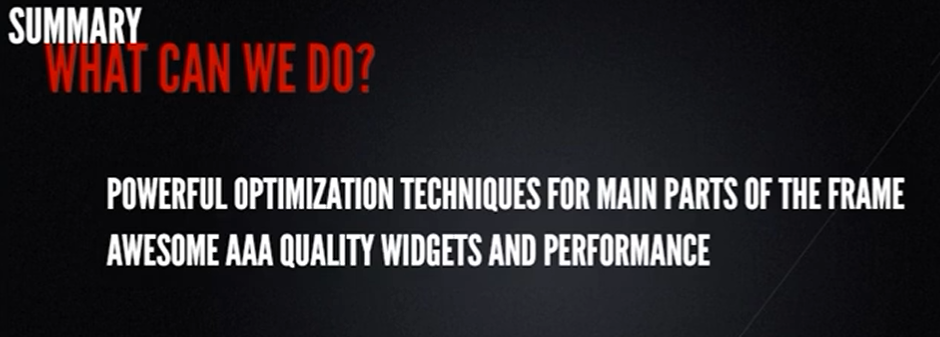
성능이 중요한 전문 UI 새로운 위젯 제작 가능 (SMeshWidget 원리와 유사하게)
→ UI 관련 성능을 크게 개선할 수 있다.