📌 1. 개요
💡 기술 스택
- Back :
- Front :
💡 기능
1) 게시판 기능
- 사용자에게 부위 별 운동 영상 정보를 제공
- 사용자는 각 운동 영상에 대한 리뷰 조회 및 작성 가능.
- 사용자는 본인이 쓴 리뷰에 한해 수정 및 삭제 가능
2) 회원 별 기능
- 마음에 드는 영상 찜하기 가능
- 다른 사용자 팔로우 가능
📌 2. DB 설계
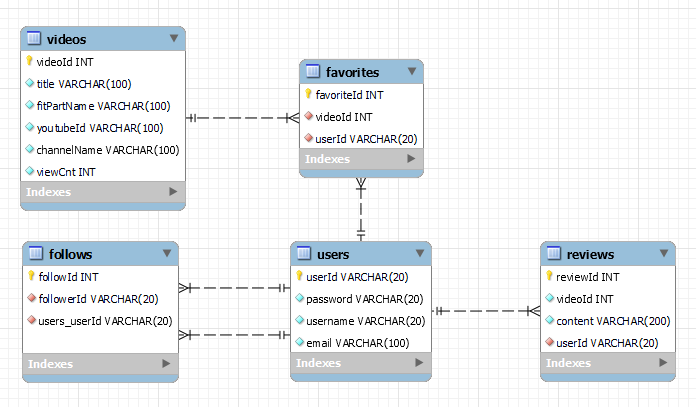
🔑 : PK, 🔒 : FK
💡 Users
- 🔑userId : 사용자 ID
- password : 사용자 비밀번호
- username : 사용자 이름
- email : 사용자 E-mail
💡 Reviews
- 🔑reviewId : review 테이블 ID
- 🔒videoId : 어떤 영상에 대한 리뷰인지
- content : 리뷰 내용
- 🔒 userId : 리뷰 작성자 ID
💡 Videos
- 🔑videoId : videos 테이블 ID
- title : 영상 제목
- fitPartName : 어떤 운동 부위의 영상인지
- youtubeId : youtube ID
- channelName : youtube 채널명
- viewCnt : 조회수
💡 Follows
- 🔑 followId : Follows 테이블 ID
- 🔒 followingId : follow 하는 사용자의 ID
- 🔒 followerId : follow 받는 사용자의 ID
💡 Favorites
- 🔑 favoriteId : Favorites 테이블 ID
- 🔒 videoId : 찜한 영상의 videoId
- 🔒 userId : 영상을 찜한 사용자의 userId
CREATE TABLE IF NOT EXISTS users (
    userId VARCHAR(20) PRIMARY KEY,
    password VARCHAR(20) NOT NULL,
    username VARCHAR(20) NOT NULL,
    email VARCHAR(100) NOT NULL
);

CREATE TABLE IF NOT EXISTS reviews (
    reviewId INT PRIMARY KEY NOT NULL AUTO_INCREMENT,
    videoId INT NOT NULL,
    content VARCHAR(200) NOT NULL,
    userId VARCHAR(20) NOT NULL,
    FOREIGN KEY (userId) REFERENCES users(userId) ON DELETE CASCADE
);

CREATE TABLE IF NOT EXISTS videos (
    videoId INT PRIMARY KEY NOT NULL,
    title VARCHAR(100) NOT NULL,
    fitPartName VARCHAR(100) NOT NULL,
    youtubeId VARCHAR(100) NOT NULL,
    channelName VARCHAR(100) NOT NULL,
    viewCnt INT NOT NULL
);

CREATE TABLE IF NOT EXISTS follows (
    followId INT PRIMARY KEY NOT NULL,
    followingId VARCHAR(20) NOT NULL,
    followerId VARCHAR(20) NOT NULL,
    FOREIGN KEY (followingId) REFERENCES users(userId),
    FOREIGN KEY (followerId) REFERENCES users(userId)
);

CREATE TABLE IF NOT EXISTS favorites (
    favoriteId INT PRIMARY KEY NOT NULL,
    videoId INT NOT NULL,
    userId VARCHAR(20) NOT NULL,
    FOREIGN KEY (videoId) REFERENCES videos(videoId) ON DELETE CASCADE,
    FOREIGN KEY (userId) REFERENCES users(userId) ON DELETE CASCADE
);
📌 3. Model (DTO)
💬 주의 : AUTO_INCREMENT field 라고 하더라도 DTO에서 constructor 생성 시 포함시킨다.
💡 User
public class User {
	private String userId;
	private String password;
	private String username;
	private String email;
    // constructor, getter, setter 생략
💡 Video
public class Video {
	private int videoId;
	private String youtubeId;
	private String channelName;
	private int viewCnt;
	private String fitPartName;
	private String title;
    // constructor, getter, setter 생략
💡 Review
public class Review {
	private int reviewId;
	private int videoId;
	private String content;
	private String userId;
    // constructor, getter, setter 생략
💡 Favorite
public class Favorite {
	private int favoriteId;
	private int videoId;
	private String userId;
    // constructor, getter, setter 생략
💡 Follow
public class Follow {
	private int followId;
    private String followingId;
    private String followerId;
    // constructor, getter, setter 생략
📌 4. Service (DAO)
💡 User Service
boolean registUser(User user)
- 이미 존재하는 ID 인지 확인
- 이미 존재하는 사용자 이름 인지 확인
- 이미 존재하는 이메일인지 확인
- 위의 조건을 모두 만족했다면 User 테이블에 INSERT
User getUserById(String id)
- WHERE 절의 조건으로 userId를 이용해 원하는 사용자 정보를 조회
public class UserDaoImpl implements UserDao {

	private static UserDaoImpl instance;
	private final DBUtil util = DBUtil.getInstance();

    private UserDaoImpl() {}

    public static UserDaoImpl getInstance() {
    	if (instance == null) {
            instance = new UserDaoImpl();
        }
        return instance;
    }

    @Override
    public boolean registUser(User user) throws SQLException {
        Connection conn = null;
        PreparedStatement pstmt = null;
        ResultSet rs = null;
        boolean success = false;

        try {
            conn = util.getConnection();

            // 이미 존재하는 ID인지 확인하는 쿼리
            String checkIdSql = "SELECT userId FROM users WHERE userId = ?";
            pstmt = conn.prepareStatement(checkIdSql);
            pstmt.setString(1, user.getUserId());
            rs = pstmt.executeQuery();

            // 이미 존재하는 ID라면 가입 실패
            if (rs.next()) {
                throw new SQLException("이미 사용 중인 아이디입니다.");
            }

            // 이미 존재하는 사용자명인지 확인하는 쿼리
            String checkUsernameSql = "SELECT username FROM users WHERE username = ?";
            pstmt = conn.prepareStatement(checkUsernameSql);
            pstmt.setString(1, user.getUsername());
            rs = pstmt.executeQuery();

            // 이미 존재하는 사용자명이라면 가입 실패
            if (rs.next()) {
                throw new SQLException("이미 사용 중인 사용자명입니다.");
            }

            // 이미 존재하는 이메일인지 확인하는 쿼리
            String checkEmailSql = "SELECT email FROM users WHERE email = ?";
            pstmt = conn.prepareStatement(checkEmailSql);
            pstmt.setString(1, user.getEmail());
            rs = pstmt.executeQuery();

            // 이미 존재하는 이메일이라면 가입 실패
            if (rs.next()) {
                throw new SQLException("이미 사용 중인 이메일 주소입니다.");
            }

            String sql = "INSERT INTO users (userId, password, username, email) VALUES (?, ?, ?, ?)";
            pstmt = conn.prepareStatement(sql);
            pstmt.setString(1, user.getUserId());
            pstmt.setString(2, user.getPassword());
            pstmt.setString(3, user.getUsername());
            pstmt.setString(4, user.getEmail());


            int rowsAffected = pstmt.executeUpdate();
            if (rowsAffected > 0) {
                success = true;
            }
        } catch (SQLException e) {
            throw e;
        } finally {
            DBUtil.close(conn, pstmt, rs);
        }

        return success;
    }

    @Override
    public User getUserById(String id) throws SQLException {
        Connection conn = null;
        PreparedStatement pstmt = null;
        ResultSet rs = null;
        User user = null;

        try {
            conn = util.getConnection();
            String sql = "SELECT * FROM users WHERE userId = ?";
            pstmt = conn.prepareStatement(sql);
            pstmt.setString(1, id);
            rs = pstmt.executeQuery();

            if (rs.next()) {
                user = new User();
                user.setUserId(rs.getString("userId"));
                user.setPassword(rs.getString("password"));
                user.setUsername(rs.getString("username"));
                user.setEmail(rs.getString("email"));
            }
            else {
                throw new SQLException("존재하지 않는 아이디입니다.");
            }
        } catch (SQLException e) {
            throw e;
        } finally {
            DBUtil.close(conn, pstmt, rs);
        }

        return user;
    }
}
💡 Review Service
List<Review> selectAllReviewsByVideoId(int videoId)
특정 영상에 대한 모든 리뷰 조회
Review selectReviewById(int id)
reviewId를 WHERE절 조건으로 사용해 특정 리뷰 조회
void insertReview(Review review)
새로운 리뷰 작성 시 호출
void updateReview(Review review)
review content 수정 시 호출
void deleteReview(int id)
reviewID를 WHERE 절 조건으로 사용해 특정 리뷰 삭제
public class ReviewDaoImpl implements ReviewDao {

    private static ReviewDaoImpl instance;
    private final DBUtil util = DBUtil.getInstance();

    private ReviewDaoImpl() {
    }

    public static ReviewDaoImpl getInstance() {
        if (instance == null) {
            instance = new ReviewDaoImpl();
        }
        return instance;
    }

    @Override
    public List<Review> selectAllReviewsByVideoId(int videoId) {
        List<Review> reviews = new ArrayList<>();
        try (Connection conn = util.getConnection();
             PreparedStatement pstmt = conn.prepareStatement("SELECT * FROM reviews WHERE videoId = ?")) {
            pstmt.setInt(1, videoId);
            try (ResultSet rs = pstmt.executeQuery()) {
                while (rs.next()) {
                    Review review = new Review();
                    review.setReviewId(rs.getInt("reviewId"));
                    review.setVideoId(rs.getInt("videoId"));
                    review.setContent(rs.getString("content"));
                    review.setUserId(rs.getString("userId"));
                    reviews.add(review);
                }
            }
        } catch (SQLException e) {
            e.printStackTrace();
        }
        return reviews;
    }

    @Override
    public Review selectReviewById(int id) {
        Review review = null;
        try (Connection conn = util.getConnection();
             PreparedStatement pstmt = conn.prepareStatement("SELECT * FROM reviews WHERE reviewId = ?")) {
            pstmt.setInt(1, id);
            try (ResultSet rs = pstmt.executeQuery()) {
                if (rs.next()) {
                    review = new Review();
                    review.setReviewId(rs.getInt("reviewId"));
                    review.setVideoId(rs.getInt("videoId"));
                    review.setContent(rs.getString("content"));
                    review.setUserId(rs.getString("userId"));
                }
            }
        } catch (SQLException e) {
            e.printStackTrace();
        }
        return review;
    }

    @Override
    public void insertReview(Review review) {
        try (Connection conn = util.getConnection();
             PreparedStatement pstmt = conn.prepareStatement("INSERT INTO reviews (reviewId, videoId, content, userId) VALUES (?, ?, ?, ?)")) {
            pstmt.setInt(1, review.getReviewId());
            pstmt.setInt(2, review.getVideoId());
            pstmt.setString(3, review.getContent());
            pstmt.setString(4, review.getUserId());
            pstmt.executeUpdate();
        } catch (SQLException e) {
            e.printStackTrace();
        }
    }


    @Override
    public void updateReview(Review review) {
        try (Connection conn = util.getConnection();
             PreparedStatement pstmt = conn.prepareStatement("UPDATE reviews SET content = ? WHERE reviewId = ?")) {
            pstmt.setString(1, review.getContent());
            pstmt.setInt(2, review.getReviewId());
            pstmt.executeUpdate();
        } catch (SQLException e) {
            e.printStackTrace();
        }
    }

    @Override
    public void deleteReview(int id) {
        try (Connection conn = util.getConnection();
             PreparedStatement pstmt = conn.prepareStatement("DELETE FROM reviews WHERE reviewId = ?")) {
            pstmt.setInt(1, id);
            pstmt.executeUpdate();
        } catch (SQLException e) {
            e.printStackTrace();
        }
    }
}
💡 Video Service
void addVideoList(List<Video> videoList)
새로운 video 삽입 시 호출 ( 사용자가 하는 게 아니고 서버 내에서)
List<Video> selectInterestViewFitVideo()
조회수가 높은 순으로 영상 조회 시 호출
List<Video> selectPartFitVideo(String part) 부위 별 운동 영상 조회시 호출
WHERE 절 조건으로 fitPartName 사용
List<Video> getAllVideos()
모든 영상 조회
public class MainDaoImpl implements MainDao {

	private static final DBUtil util = DBUtil.getInstance();
	private static MainDaoImpl instance;
	private static List<Video> list;
	private static UserDao userDao = UserDaoImpl.getInstance();

	private MainDaoImpl() {
		System.out.println("created.");

	    list = new ArrayList<Video>();
		list.add(new Video(1, "gMaB-fG4u4g", "ThankyouBUBU", 10, "전신", "전신 다이어트 최고의 운동 [칼소폭 찐 핵핵매운맛]"));
		list.add(new Video(2, "swRNeYw1JkY", "ThankyouBUBU", 12, "전신", "하루 15분! 전신 칼로리 불태우는 다이어트 운동"));
		list.add(new Video(3, "54tTYO-vU2E", "ThankyouBUBU", 20, "상체", "상체 다이어트 최고의 운동 BEST [팔뚝살/겨드랑이살/등살/가슴어깨라인]"));
		list.add(new Video(4, "QqqZH3j_vH0", "ThankyouBUBU", 2, "상체", "상체비만 다이어트 최고의 운동 [상체 핵매운맛]"));
		list.add(new Video(5, "tzN6ypk6Sps", "김강민", 17, "하체", "하체운동이 중요한 이유? 이것만 보고 따라하자 ! [하체운동 교과서]"));
		list.add(new Video(6, "u5OgcZdNbMo", "GYM종국", 120, "하체", "저는 하체 식주의자 입니다"));
		list.add(new Video(7, "PjGcOP-TQPE", "ThankyouBUBU", 1, "복부", "11자복근 복부 최고의 운동 [복근 핵매운맛]"));
		list.add(new Video(8, "7TLk7pscICk", "SomiFit", 0, "복부", "(Sub)누워서하는 5분 복부운동!! 효과보장! (매일 2주만 해보세요!)"));

	    addVideoList(list);
	}

	public static MainDao getInstance() {
        if (instance == null)
            instance = new MainDaoImpl();
        return instance;
    }


	public void addVideoList(List<Video> videoList) {
		System.out.println("add video list");
	    try (Connection conn = util.getConnection();
	         PreparedStatement pstmt = conn.prepareStatement(
	             "INSERT INTO videos (videoId, youtubeId, channelName, viewCnt, fitPartName, title) VALUES (?, ?, ?, ?, ?, ?)")) {

	        for (Video video : videoList) {
	            pstmt.setInt(1, video.getVideoId());
	            pstmt.setString(2, video.getYoutubeId());
	            pstmt.setString(3, video.getChannelName());
	            pstmt.setInt(4, video.getViewCnt());
	            pstmt.setString(5, video.getFitPartName());
	            pstmt.setString(6, video.getTitle());
	            pstmt.executeUpdate();
	        }

	    } catch (SQLException e) {
	        e.printStackTrace();
	    }
	}


	@Override
    public List<Video> selectInterestViewFitVideo() {
        List<Video> videoList = new ArrayList<>();
        try (Connection conn = util.getConnection();
             PreparedStatement pstmt = conn.prepareStatement(
                     "SELECT * FROM videos ORDER BY viewCnt DESC")) {
            try (ResultSet rs = pstmt.executeQuery()) {
                while (rs.next()) {
                    Video video = new Video();
                    video.setVideoId(rs.getInt("videoId"));
                    video.setYoutubeId(rs.getString("youtubeId"));
                    video.setChannelName(rs.getString("channelName"));
                    video.setViewCnt(rs.getInt("viewCnt"));
                    video.setFitPartName(rs.getString("fitPartName"));
                    video.setTitle(rs.getString("title"));
                    videoList.add(video);
                }
            }
        } catch (SQLException e) {
            e.printStackTrace();
        }
        return videoList;
    }

    @Override
    public List<Video> selectPartFitVideo(String part) {
        List<Video> videoList = new ArrayList<>();
        try (Connection conn = util.getConnection();
             PreparedStatement pstmt = conn.prepareStatement(
                     "SELECT * FROM videos WHERE fitPartName = ?")) {
            pstmt.setString(1, part);
            try (ResultSet rs = pstmt.executeQuery()) {
                while (rs.next()) {
                    Video video = new Video();
                    video.setVideoId(rs.getInt("videoId"));
                    video.setYoutubeId(rs.getString("youtubeId"));
                    video.setChannelName(rs.getString("channelName"));
                    video.setViewCnt(rs.getInt("viewCnt"));
                    video.setFitPartName(rs.getString("fitPartName"));
                    video.setTitle(rs.getString("title"));
                    videoList.add(video);
                }
            }
        } catch (SQLException e) {
            e.printStackTrace();
        }
        return videoList;
    }

    @Override
    public List<Video> getAllVideos() {
        List<Video> videoList = new ArrayList<>();
        try (Connection conn = util.getConnection();
             Statement stmt = conn.createStatement();
             ResultSet rs = stmt.executeQuery("SELECT * FROM videos")) {
            while (rs.next()) {
                Video video = new Video();
                video.setVideoId(rs.getInt("videoId"));
                video.setYoutubeId(rs.getString("youtubeId"));
                video.setChannelName(rs.getString("channelName"));
                video.setViewCnt(rs.getInt("viewCnt"));
                video.setFitPartName(rs.getString("fitPartName"));
                video.setTitle(rs.getString("title"));
                videoList.add(video);
            }
        } catch (SQLException e) {
            e.printStackTrace();
        }
        return videoList;
    }
💡 Follow Service
void follow(String followingId, String followerId)
- 팔로우 행위 발생 시 호출
- 팔로우 테이블에 새로운 레코드 생성
void void unfollow(String followingId, String followerId)
- 찜 취소 행위 수행 시 호출
- 찜 테이블에서 해당 사용자-영상에 대한 레코드 삭제
boolean isFollowing(String followingId, String followerId)
- followingId 사용자가 followerId 사용자를 팔로우하고 있는지 여부를 반환
List<User> getFollowers(String userId)
- 특정 사용자를 follow 하는 모든 사용자를 반환
- 마이 페이지에서 활용
List<User> getFollowings(String userId)
- 특정 사용자가 follow 하는 모든 사용자를 반환
- 마이 페이지에서 활용
public class FollowDaoImpl implements FollowDao {

    private static FollowDaoImpl instance;
    private UserDao userDao = UserDaoImpl.getInstance();
    private final DBUtil util = DBUtil.getInstance();

    private FollowDaoImpl() {}

    public static FollowDaoImpl getInstance() {
        if (instance == null) {
            instance = new FollowDaoImpl();
        }
        return instance;
    }

    @Override
    public void follow(String followingId, String followerId) {
        try (Connection conn = util.getConnection();
             PreparedStatement pstmt = conn.prepareStatement(
                     "INSERT INTO follows (followingId, followerId) VALUES (?, ?)")) {
            pstmt.setString(1, followingId);
            pstmt.setString(2, followerId);
            pstmt.executeUpdate();
        } catch (SQLException e) {
            e.printStackTrace();
        }
    }

    @Override
    public void unfollow(String followingId, String followerId) {
        try (Connection conn = util.getConnection();
             PreparedStatement pstmt = conn.prepareStatement(
                     "DELETE FROM follows WHERE followingId = ? AND followerId = ?")) {
            pstmt.setString(1, followingId);
            pstmt.setString(2, followerId);
            pstmt.executeUpdate();
        } catch (SQLException e) {
            e.printStackTrace();
        }
    }

    @Override
    public boolean isFollowing(String followingId, String followerId) {
        boolean followingFlag = false;
        try (Connection conn = util.getConnection();
             PreparedStatement pstmt = conn.prepareStatement(
                     "SELECT * FROM follows WHERE followingId = ? AND followerId = ?")) {
            pstmt.setString(1, followingId);
            pstmt.setString(2, followerId);
            try (ResultSet rs = pstmt.executeQuery()) {
                if (rs.next()) {
                	followingFlag = true; // 팔로우 중인 경우 true로 설정
                }
            }
        } catch (SQLException e) {
            e.printStackTrace();
        }
        return followingFlag;
    }

    @Override
    public List<User> getFollowers(String userId) { // 해당 id'를' '팔로우하는' 사람 목록
        List<User> followers = new ArrayList<>();
        try (Connection conn = util.getConnection();
             PreparedStatement pstmt = conn.prepareStatement(
            		 "SELECT * FROM users WHERE userId IN (SELECT followingId FROM follows WHERE followerId = ?)")) {
            pstmt.setString(1, userId);
            try (ResultSet rs = pstmt.executeQuery()) {
                while (rs.next()) {
                    User follower = new User();
                    follower.setUserId(rs.getString("userId"));
                    follower.setPassword(rs.getString("password"));
                    follower.setUsername(rs.getString("username"));
                    follower.setEmail(rs.getString("email"));
                    followers.add(follower);
                }
            }
        } catch (SQLException e) {
			e.printStackTrace();
		}
        return followers;
    }

    @Override
    public List<User> getFollowings(String userId) { // 해당 id'가' '팔로우하는' 사람 목록
        List<User> followings = new ArrayList<>();
        try (Connection conn = util.getConnection();
             PreparedStatement pstmt = conn.prepareStatement(
            		 "SELECT * FROM users WHERE userId IN (SELECT followerId FROM follows WHERE followingId = ?)")) {
            pstmt.setString(1, userId);
            try (ResultSet rs = pstmt.executeQuery()) {
                while (rs.next()) {
                    User following = new User();
                    following.setUserId(rs.getString("userId"));
                    following.setPassword(rs.getString("password"));
                    following.setUsername(rs.getString("username"));
                    following.setEmail(rs.getString("email"));
                    followings.add(following);
                }
            }
        } catch (SQLException e) {
			e.printStackTrace();
		}
        return followings;
    }
💡 Favorite Service
void favorite(String userId, int videoId)
- 찜 행위 발생 시 호출
- 찜 테이블에 새로운 레코드 생성
void unfavorite(String userId, int videoId)
- 찜 취소 행위 수행 시 호출
- 찜 테이블에서 해당 사용자-영상에 대한 레코드 삭제
public class FavoriteDaoImpl implements FavoriteDao {

	private static FavoriteDaoImpl instance;
	private final DBUtil util = DBUtil.getInstance();

	private FavoriteDaoImpl() {
	}

	public static FavoriteDaoImpl getInstance() {
		if (instance == null) {
			System.out.println("favoriteDao created.");
			instance = new FavoriteDaoImpl();
		}
		return instance;
	}

	@Override
	public void favorite(String userId, int videoId) {
		try (Connection conn = util.getConnection();
				PreparedStatement pstmt = conn
						.prepareStatement("INSERT INTO favorites (videoId, userId) VALUES (?,?)")) {
			pstmt.setInt(1, videoId);
			pstmt.setString(2, userId);
			pstmt.executeUpdate();
		} catch (SQLException e) {
			e.printStackTrace();
		}
	}

	@Override
	public void unfavorite(String userId, int videoId) {
		try (Connection conn = util.getConnection();
				PreparedStatement pstmt = conn
						.prepareStatement("DELETE FROM favorites WHERE userId= ? AND videoId=?")) {
			pstmt.setString(1, userId);
			pstmt.setInt(2, videoId);
			pstmt.executeUpdate();
		} catch (SQLException e) {
			e.printStackTrace();
		}
	}

	@Override
	public boolean isFavorite(String userId, int videoId) {
		boolean favoriteFlag = false;

		try (Connection conn = util.getConnection();
				PreparedStatement pstmt = conn
						.prepareStatement("SELECT * FROM favorites WHERE userId=? AND videoId=?")) {
			pstmt.setString(1, userId);
			pstmt.setInt(2, videoId);

			try(ResultSet rs = pstmt.executeQuery()) {
				if(rs.next()) favoriteFlag = true;
			}
		} catch (SQLException e) {
			e.printStackTrace();
		}
		return favoriteFlag;
	}


	public Map<Integer, Boolean> getFavoritesStatus(String userId, List<Video> videos) {
        Map<Integer, Boolean> favoriteStatusMap = new HashMap<>();
        try (Connection conn = util.getConnection();
             PreparedStatement pstmt = conn.prepareStatement("SELECT videoId FROM favorites WHERE userId=? AND videoId=?")) {
            for (Video video : videos) {
                pstmt.setString(1, userId);
                pstmt.setInt(2, video.getVideoId());
                try (ResultSet rs = pstmt.executeQuery()) {
                    favoriteStatusMap.put(video.getVideoId(), rs.next()); // 찜 여부를 Map에 저장
                }
            }
        } catch (SQLException e) {
            e.printStackTrace();
        }
        return favoriteStatusMap;
    }
}
📌 5. Controller
@Override
	protected void service(HttpServletRequest request, HttpServletResponse response)
			throws ServletException, IOException {
		String action = request.getParameter("action");

		switch (action) {
			case "home": // 홈으로
				showHome(request, response);
				break;
			case "list": // 영상 목록
				doList(request, response);
				break;
			case "reviewList": // 각 영상 당 리뷰 목록
				doReviewList(request, response);
				break;
			case "addReviewForm": // 리뷰 작성 요청
				showAddReviewForm(request, response);
				break;
			case "addReview": // 리뷰 추가 요청
				addReview(request, response);
				break;
			case "updateReviewForm": // 리뷰 수정 작성 요청
				showUpdateReviewForm(request, response);
				break;
			case "updateReview": // 리뷰 수정 반영 요청
				updateReview(request, response);
				break;
			case "deleteReview": // 리뷰 삭제 요청
				deleteReview(request, response);
				break;
			case "registForm": // 회원가입 폼 요청 시
				showRegistForm(request, response);
				break;
			case "regist": // 회원가입 요청 시
				doRegist(request, response);
				break;
			case "loginForm": // 로그인 폼 요청 시
				showLoginForm(request, response);
				break;
			case "login": // 로그인 요청 시
				doLogin(request, response);
				break;
			case "logout": // 로그아웃 요청 시
				doLogout(request, response);
				break;
			case "mypage":
				showMyPage(request, response);
				break;
			case "follow":
				followUser(request, response);
				break;
			case "unfollow":
				unfollowUser(request, response);
				break;

 // 이하 구현 코드 생략
📌 6. DB 설정
추후 myBatis 로 대체 예정
💡 DBUtil
package com.ssafy.util;

import java.sql.Connection;
import java.sql.DriverManager;
import java.sql.PreparedStatement;
import java.sql.ResultSet;
import java.sql.SQLException;
/**
 * Mysql DB 연결 객체를 제공해주고, 사용했던 자원을 해제하는 기능을 제공하는 클래스입니다.
 *
 */
public class DBUtil {
	// DB와 연결하기위해 필요한 DB의 URL
	private final String url = "jdbc:mysql://127.0.0.1:3306/mydb?serverTimezone=UTC";
	// DB의 USER 이름
	private final String username = "사용자ID";
	// 위 USER의 PASSWORD
	private final String password = "사용자PW";
	// Mysql 드라이버 클래스 이름
	private final String drivername = "com.mysql.cj.jdbc.Driver";
	private static DBUtil instance = new DBUtil();
	private DBUtil() {
		System.out.println("db util created");
		try {
			Class.forName(drivername);
		} catch (ClassNotFoundException e) {
			e.printStackTrace();
		}
	}
	public static DBUtil getInstance() {
		return instance;
	}
	public Connection getConnection() throws SQLException {
		return DriverManager.getConnection(url, username, password);
	}
	// 자원 해제
	public static void close(Connection conn, PreparedStatement pstmt) {
		try {
			if (pstmt != null)
				pstmt.close();
		} catch (SQLException e) {
			// TODO Auto-generated catch block
			e.printStackTrace();
		}
		try {
			if (conn != null)
				conn.close();
		} catch (SQLException e) {
			// TODO Auto-generated catch block
			e.printStackTrace();
		}
	}

	public static void close(Connection conn, PreparedStatement pstmt, ResultSet rs) {
		try {
			if (rs != null)
				rs.close();
		} catch (SQLException e) {
			// TODO Auto-generated catch block
			e.printStackTrace();
		}
		try {
			if (pstmt != null)
				pstmt.close();
		} catch (SQLException e) {
			// TODO Auto-generated catch block
			e.printStackTrace();
		}
		try {
			if (conn != null)
				conn.close();
		} catch (SQLException e) {
			// TODO Auto-generated catch block
			e.printStackTrace();
		}
	}
}
💡 DBListener
Q. DBListener를 이 프로젝트에서 왜 사용했나요?
A.
package com.ssafy.listener;

import com.ssafy.dao.FavoriteDao;
import com.ssafy.dao.FavoriteDaoImpl;
import com.ssafy.dao.FollowDao;
import com.ssafy.dao.FollowDaoImpl;
import com.ssafy.dao.MainDao;
import com.ssafy.dao.MainDaoImpl;
import com.ssafy.dao.ReviewDao;
import com.ssafy.dao.ReviewDaoImpl;
import com.ssafy.dao.UserDao;
import com.ssafy.dao.UserDaoImpl;
import com.ssafy.util.DBUtil;

import jakarta.servlet.ServletContextEvent;
import jakarta.servlet.ServletContextListener;
import jakarta.servlet.annotation.WebListener;

@WebListener
public class DBListener implements ServletContextListener {

	@Override
	public void contextInitialized(ServletContextEvent sce) {
	    // DAO 인스턴스 생성
	    MainDao mainDao = MainDaoImpl.getInstance();
	    ReviewDao reviewDao = ReviewDaoImpl.getInstance();
	    UserDao userDao = UserDaoImpl.getInstance();
	    FollowDao followDao = FollowDaoImpl.getInstance();
	    FavoriteDao favoriteDao = FavoriteDaoImpl.getInstance();

	    // 서블릿 컨텍스트에 DAO 인스턴스 저장
	    sce.getServletContext().setAttribute("mainDao", mainDao);
	    sce.getServletContext().setAttribute("reviewDao", reviewDao);
	    sce.getServletContext().setAttribute("userDao", userDao);
	    sce.getServletContext().setAttribute("followDao", followDao);
	    sce.getServletContext().setAttribute("favoriteDao", favoriteDao);
	}
}
📌 7. View (jsp)
💡 mypage.jsp 中 팔로잉 목록 모달 내부 코드
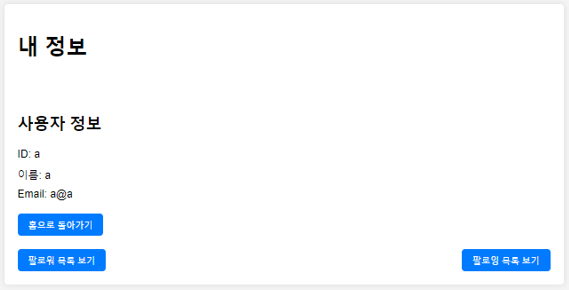
- 현재 mypage.jsp는 단순히 내 정보 뿐만 아니라 request 로 요청 받은 Id 에 맞는 user의 info를 보여주는 페이지
<ul>
					<%
					List<User> followings = (List<User>) request.getAttribute("followings");
					if (followings != null && !followings.isEmpty()) {
						for (User following : followings) {
					%>
					<li>팔로잉 ID: <%=following.getUserId()%> / NAME: <%=following.getUsername()%></li>
					<%
					}
					} else {
					%>
					<li>팔로우한 사람이 없습니다.</li>
					<%
					}
					%>
				</ul>
💡 mypage 中 팔로우 버튼 구현
- 이미 팔로우 중이라면 팔로우 취소 버튼으로 구현
- 아직 팔로우하지 않고 있다면 팔로우 버튼으로 구현
<%
			if (loginUser != null && !loginUser.getUserId().equals(user.getUserId())) {
				if ((Boolean) request.getAttribute("isFollowing")) {
			%>
			<form action="main" method="post">
				<input type="hidden" name="action" value="unfollow"> <input
					type="hidden" name="userIdToUnfollow" value="<%=user.getUserId()%>">
				<button class="button" type="submit">팔로우 취소</button>
			</form>
			<%
			} else {
			%>
			<form action="main" method="post">
				<input type="hidden" name="action" value="follow"> <input
					type="hidden" name="userIdToFollow" value="<%=user.getUserId()%>">
				<button class="button" type="submit">팔로우</button>
			</form>
			<%
			}
			}
			%>
💡 reviewdetail.jsp 中 리뷰 목록 - 수정/삭제 버튼 관리
<c:forEach items="${reviews}" var="review">
                <tr>
                    <td>${review.reviewId}</td>
                    <td>${review.content}</td>
                    <td>
                        <!-- 작성자 정보로 이동하는 링크 -->
                        <c:choose>
                            <c:when test="${sessionScope.user.userId eq review.userId}">
                                <a href="main?action=mypage&userId=${review.userId}" class="btn">내 정보</a>
                            </c:when>
                            <c:otherwise>
                                <a href="main?action=mypage&userId=${review.userId}" class="btn">작성자 정보</a>
                            </c:otherwise>
                        </c:choose>
                    </td>
                    <td>
                        <!-- 작성자와 현재 로그인한 사용자가 같은 경우에만 수정 버튼을 표시 -->
                        <c:if test="${sessionScope.user.userId eq review.userId}">
                            <a href="main?action=updateReviewForm&reviewId=${review.reviewId}" class="btn">수정</a>
                        </c:if>
                    </td>
                    <td>
                        <!-- 작성자와 현재 로그인한 사용자가 같은 경우에만 삭제 버튼을 표시 -->
                        <c:if test="${sessionScope.user.userId eq review.userId}">
                            <a href="main?action=deleteReview&reviewId=${review.reviewId}" class="btn">삭제</a>
                        </c:if>
                    </td>
                </tr>
            </c:forEach>
📌 8. 개선 방향
- 영상 삽입을 하드코딩이 아니라 자동화된 방식으로 발전
- myBatis 이용해서 DB 접근 코드 효율성 개선
- 리뷰를 작성하지 않은 사용자이더라도 다른 사용자가 이를 조회하고 팔로우할 수 있도록 개선
- 친구 추천 기능 추가 (내가 팔로우하고 있는 유저가 팔로우하고 있는 다른 유저를 나에게 추천)
- 영상 추천 기능 추가 (내가 찜한 영상을 찜한 유저가 찜하고 있는 다른 영상을 나에게 추천)
- 디자인 개선 ^^;;;;