1. 동적 쿼리
#{ } vs ${ } (추가 예정)
#{ } : ‘ ‘ 문자열 형식 → 이걸 더 권장
${ } : 문자열 형태로 들어가지 않고 다이렉트로 변수 그대로 → 보안 위험
@RequestParam vs ModelAttribute
1) DTO가 없을 땐
public String search(@RequestParam(”key”) String key, … )2) DTO가 있을 땐
public String search(@ModelAttribute SearchCondition searchCondition, Model moidel){
	//model.addAttribute("list", model)
	model.addAttribute("list", boardService.search(searchCondition));
	return "/board/list";

}
public interface BoardService{
// ... 생략
public List<Board> search(SearchCondition searchCondition);
}public class BoardServiceImpl implemnets BoardService{
// 생략
@Override
public List<Board> search(SearchCondition searchCondition){
return boardDao.search(searchCondition);
}
}public interface BoardDao{
//생략
// 검색 기능
public List<Board> search(SearchCondition searchCondition);
}<!-- BoardMapper.xml 에 검색 기능 추가 -->
<select id="search" resultMap="boardMap" parameterType="SearchCondition">
SELECT id, content, writer, title, view_cnt, date_format(reg_date, '%y-%m-%d') AS reg_date
FROM board
<!-- 동적 쿼리 (검색 조건) -->
<if test="key != 'none'">
WHERE ${key} LIKE concat('%', #{word}, '%')
</if>
<!-- 동적 쿼리 (정렬 조건) -->
<if test="orderBy != 'none'">
ORDER BY ${orderBy} ${orderByDir}
</if>
</select>
<!-- type 과 map 은 엄연히 다르다! -->
<select id="search" resultType="board"></select>BoardController.java
// 생략

@PostMapping("/write")
public String write(@ModelAttribute Board board){
	boardService.writeBoard(board);

	//목록으로 가겠다!
	//return "redirect:list";
	//상세 게시글 조회
	return "redirect:detail?id=" + board.getId();

}

// 생략
BoardMapper.xml
<!-- 게시글 등록 -->
<insert id="insertBoard" parameterType="Board" keyProperty="id" userGenerateKeys="true">
	INSERT INTO board (title, writer, content)
	VALUES (#{title}, #{writer}, #{content});
</insert>
resultMap vs resultType (추후 수정 예정)
[MyBatis/마이바티스] - resultMap, resultType
2. Spring TX
2.1 개념
2.1.1 Transaction
데이터 베이스의 상태를 변화시키기 위해 수행하는 논리적인 작업의 단위
원자성 / 일관성 / 격리성 / 지속성
2.1.2 Spring TX (Spring Transaction)
spring 프레임워크의 일부. 선언적인 방식을 통해 DB 트랜잭션을 관리하도록 설계됨
- @Transactional 어노테이션을 사용해 트랜잭션을 적용할 메서드를 선언. 이 어노테이션이 붙은 메서드가 호출되면, Spring TX는 자동으로 트랜잭션을 시작하고, 해당 메소드가 정상적으로 종료되면 트랜잭션을 commit 하거나, 도중에 오류가 발생한 경우 rollback을 진행
- Spring TX 는 트랜잭션 관리자를 통해 이러한 트랜잭션 관리를 수행
- @Transactional 어노테이션을 사용하면 스프링 AOP를 사용해 AOP 프록시 객체를 생성하고, 이 프록시 객체가 트랜잭션 관리자에게 트랜잭션 처리를 위임

- 이 트랜잭션 관리자가 트랜잭션의 생명주기를 제어. 메서드가 정상적으로 종료되면, Spring은 트랜잭션을 커밋하고, 실행 도중 예외가 발생하면 spring은 트랜잭션을 rollback 한다.
- spring TX를 사용하면 코드에서 트랜잭션의 시작과 종료, 롤백 등을 직접 관리할 필요 없이, 선언적으로 트랜잭션을 관리 → 코드 복잡성 감소, 데이터의 일관성과 신뢰성 보장
mybatis DynamicSQL
- 실행 중 SQL 변경과 조건 별 다른 쿼리 실행
- 데이터베이스의 작업 효율성을 높이고 코드 중복 감소
- 다양한 동적 쿼리 문법 제공
2.2 구현
2.2.1 설정
- pom.xml 의존성 추가
<!-- https://mvnrepository.com/artifact/org.springframework/spring-tx -->
		<!-- Spring의 트랜잭션 관리 모듈 -->
		<dependency>
		    <groupId>org.springframework</groupId>
		    <artifactId>spring-tx</artifactId>
		    <version>${org.springframework-version}</version>
</dependency>- 트랜잭션 관리자 설정
데이터 소스와 트랜잭션 관리자 Bean을 선언
	<!-- Q2. Transaction 처리를 위한 transactionManager를 등록한다. (아이디는 언제나 고정적으로 transactionManager로 짓는다.) -->
	<bean id="transactionManager" class="org.springframework.jdbc.datasource.DataSourceTransactionManager">
		<constructor-arg ref="dataSource"></constructor-arg>
</bean>- 어노테이션 기반 트랜잭션 설정
bean으로 등록된 상태에 있는 선언적 트랜잭션을 사용할 대상을 스캔할 수 있도록 tx:annotation-driven 설정을 추가
선언적 트랜잭션을 사용하는 대상은 이미 Bean으로 등록된 상태여야 가능
<!-- Q3. 트랜잭션 기능을 사용하기 위해 트랜잭션 매니저 등록 -->
<tx:annotation-driven transaction-manager="transactionManager"/>- 메서드나 클래스에 @Transactional 선언
트랜잭션을 적용할 메서드를 선언. 클래스 또는 메서드 수준에서 사용 가능
@Transactional
public int insert(Movie movie){
	return movieDao.insert(movie);
}- root-context.xml header 찾는 경로
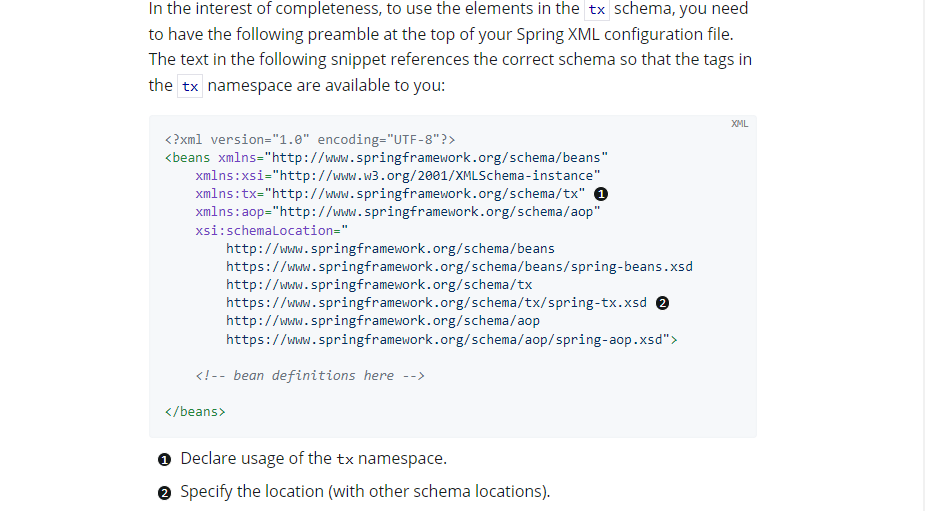
spring.io > spring Framework > Learn > current version Reference Doc > search > ‘tx’ 검색
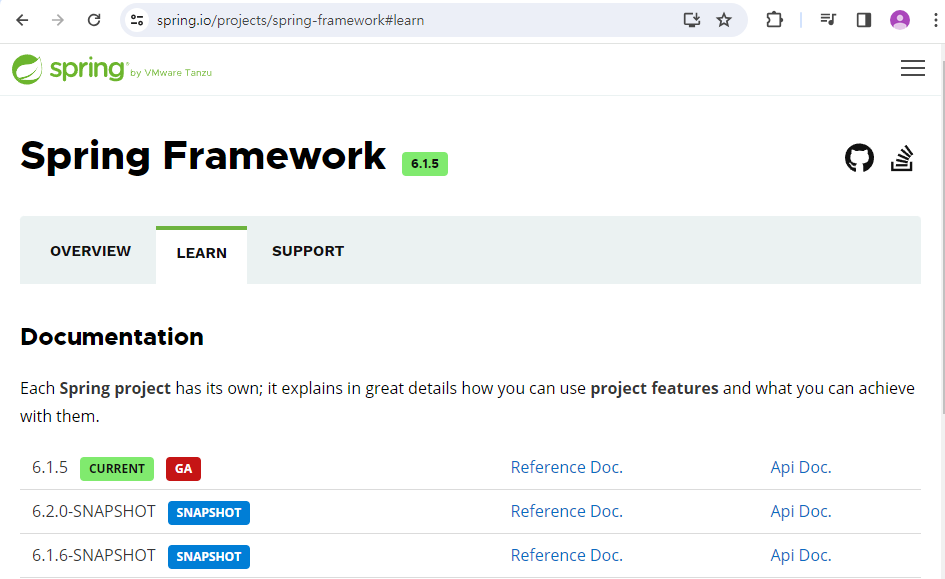
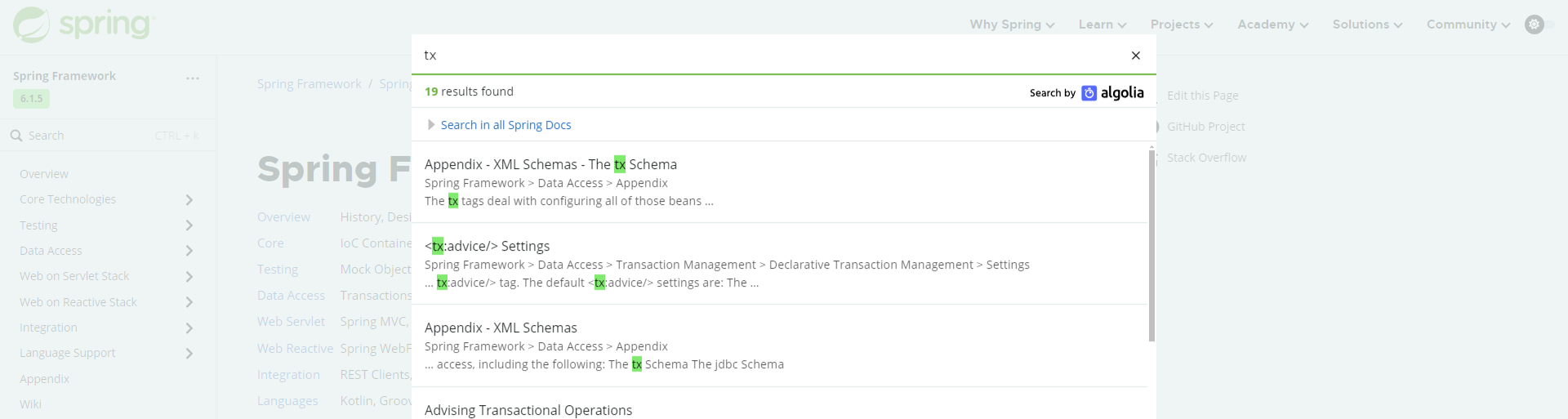
root-context.xml 헤더 xsi:schemaLocation= 이하에 추가해야 할 2가지 설정을 찾을 수 있다.
2.2.2 dynamic SQL(mapper.xml에서 활용)
- if & test
<if test = "condition">
	-- condition이 참일 때만 SQL쿼리에만 포함되는 부분
</if>- choose
- 여러 개의 when(case) & 하나의 otherwise(default)
- when : 해당 태그의 test 속성이 참일 경우 해당 SQL문을 포함 시킨다.
- otherwise: 별도의 속성 X, 조건이 모두 맞지 않는 경우 기본적으로 포함할 SQL문을 정의하는데 사용
	<!-- case문을 사용하여 order by를 동적으로 처리하는 SQL문 -->
	<!-- Q2. order가 name이면 name으로 정렬, position이면 position으로 정렬, 그 외에는 id로 정렬 -->
	<select id="selectByCase" resultType="Employee" parameterType="java.lang.String">
	    SELECT * FROM employee
	    ORDER BY
	        <choose>
	            <when test="order == 'name'">
                    name
                </when>
                <when test="order == 'position'">
                    position
                </when>
	            <otherwise>
                    id
	            </otherwise>
	       </choose>
	       desc
</select>- time
- where, set 키워드를 포함한 쿼리 앞뒤를 다듬어준다.
- prefix 속성 : 결과 문자열 앞에 추가될 문자열 지정
- prefixOverrides 속성 : 제거될 접두사 지정
- suffix 속성: 결과 문자열 뒤에 추가될 문자열 지정
- suffixOverrides 속성: 제거될 접미사를 지정
	<!-- Q1. name이나 position 중 하나 또는 둘 다 전달받아 해당 조건을 만족하는 사원을 조회하는 SQL문 -->
	<select id="selectByCondition" resultType="Employee" parameterType="Employee">
	    SELECT * FROM employee
	    <trim prefix="WHERE" prefixOverrides="AND |OR ">
	        <if test="name != null">
	            AND name = #{name}
	        </if>
	        <if test="position != null">
	            AND position = #{position}
	        </if>
	    </trim>
</select>- foreach
- collection속성: 반복할 컬렉션 지정
- item 속성: 반복되는 각 항목을 참조하는 변수명 지정
- index 속성: 반복 인덱스를 참조하는 변수명 지정
- open 속성: 반복되는 부분의 시작을 감싸는 문자열 지정
- close 속성: 반복되는 부분의 끝을 감싸는 문자열을 지정
- separator속성: 각 반복 부분 사이에 삽입될 문자열 지정
<foreach collection="list" item="item" index="index" open="(" close=")" separator=",">
	#{item}
</foreach>
list 컬렉션의 각 item을 반복하며 각 항목을 ()로 감싸고, 항목 사이에 쉼표를 삽입해 SQL 쿼리를 생성하는 코드
3. 새로 학습한 내용
selected 속성 활용
HTML <select> 요소 내에서 selected 속성은 특정 <option>이 기본적으로 선택되어 있어야 함을 나타냅니다. 이 속성을 동적으로 처리함으로써, 폼이 로드될 때 사용자의 이전 선택이나 특정 기본값을 선택 상태로 표시할 수 있습니다.
사용자가 선택한 정렬 기준과 방향을 서버로 전달하기 위해 select 태그를 사용합니다.
list.jsp
	<!-- 검색 조건을 입력할 수 있는 form -->
	<form action="${root}/board/search" method="get">
		<label for="title">제목: </label>
		<input type="text" id="title" name="title" value="${condition.title}">
		<label for="content">내용: </label>
		<input type="text" id="content" name="content" value="${condition.content}">
		<!--  정렬 순서와 정렬 방향 -->
	    <!--
	      - order의 값이 created인 경우 '생성일', viewCnt인 경우 '조회수'를 표시
	      - direction의 값이 asc인 경우 '오름차순', desc인 경우 '내림차순'을 표시
	    -->
		<select name="order" id="order">
		    <c:forEach var="order" items="created,viewCnt">
			    <option value="${orderOption}" ${orderOption == condition.order ? 'selected' : ''}>${orderOption == 'created' ? '생성일': '조회수'}</option>
            </c:forEach>
		</select>
		<select name="direction">
			<option value="asc" ${condition.direction == 'asc' ? 'selected' : ''}>오름차순</option>
			<option value="desc" ${condition.direction == 'desc' ? 'selected' : ''}>내림차순</option>
		</select>
		<input type="submit" value="검색">
	</form>
아무 조건이 없을 때도 검색이 유효하도록 하기
[요구 조건]
검색 조건에 따라 게시글을 검색하는 쿼리문 검색 조건:
제목, 내용, 정렬, 정렬방향 제목, 내용은 like 연산자를 사용하여
검색 정렬은 order by를 사용하여 정렬 정렬방향은 asc, desc로 설정
(**검색 조건이 없을 경우 전체 게시글을 검색**)
수정 전
<trim>태그와prefixOverrides="AND"사용:<trim>태그는 조건식의 시작 부분에 있는AND를 제거하는 데 사용됩니다. 하지만, 이 경우에는<where>태그를 사용하는 첫 번째 쿼리와 달리 조건이 전혀 없을 때WHERE절 자체를 제거하지 않습니다. 따라서, 모든 조건이 없을 경우에도WHERE절이 남아있게 되어 SQL 문법 오류가 발생할 수 있습니다.- 정렬 조건에
${}사용:ORDER BY절에서${order}와${direction}을 직접 변수 치환으로 사용합니다. 이 방식은 변수의 값이 직접 쿼리 문자열로 삽입되기 때문에 SQL 인젝션 공격에 취약할 수 있습니다. 또한,order또는direction변수가 비어있거나 잘못된 값일 경우 문법적으로 유효하지 않은 SQL 쿼리가 생성되어 오류가 발생할 수 있습니다.
<select id="searchBoard" parameterType="SearchCondition" resultType="Board">
      SELECT *
      FROM board
      WHERE
          <trim prefixOverrides="AND">
        	<if test= "title!=null">
        		AND title LIKE concat('%', #{title}, '%')
        	</if>
        	<if test="content!=null">
      			AND content LIKE concat('%', #{content}, '%')
       		</if>
     		</trim>
     	<if test="order != null">
     	ORDER BY ${order} ${direction}
     	</if>
  </select>
수정 후
<where>태그 사용: 이 태그는 자동으로 조건이 있을 경우에만WHERE절을 추가합니다. 또한, 내부 조건 앞의AND나OR같은 접두사를 자동으로 처리합니다. 즉, 조건이 하나도 없을 경우WHERE절 자체가 생략되며, 첫 번째 조건 앞에 있는 불필요한AND를 제거해줍니다.- 정렬 조건에
<choose>사용:ORDER BY절에서order변수의 값에 따라 다른 컬럼으로 정렬을 수행합니다. 이는 유연하게 여러 정렬 기준을 적용할 수 있게 해 줍니다. 또한,${}대신#{}를 사용하지 않음으로써 SQL 인젝션 공격에 대한 잠재적 위험을 감소시킵니다. - 정렬 방향의 기본값 설정: 정렬 방향에 대해서도
asc와desc를 선택할 수 있게 하며, 사용자가 입력하지 않았을 경우 기본적으로desc로 설정합니다.
<select id="searchBoard" parameterType="SearchCondition" resultType="Board">
	SELECT *
	FROM board
	<where>
		<if test="title != null and title != ''">
			AND title LIKE concat('%', #{title}, '%')
		</if>
		<if test="content != null and content != ''">
			AND content LIKE concat('%', #{content}, '%')
		</if>
	</where>
	<if test="order != null and order != ''">
		ORDER BY
		<choose>
			<when test="order == 'created'">created</when>
			<when test="order == 'viewCnt'">viewCnt</when>
			<otherwise>id</otherwise>
		</choose>
		<choose>
			<when test="direction == 'asc'">ASC</when>
			<otherwise>DESC</otherwise>
		</choose>
	</if>
</select>
두 번째 쿼리에서 오류가 발생하는 주된 이유는 ${order}와 ${direction} 변수 사용과 관련된 문제 때문입니다. 만약 이 변수들 중 하나라도 적절한 값을 갖지 않는 경우(예: 빈 문자열, 예상치 못한 값), ORDER BY 절이 문법적으로 유효하지 않게 됩니다. 예를 들어, ORDER BY 뒤에 적절한 컬럼 이름이 오지 않거나, direction이 asc나 desc가 아닌 값으로 설정될 경우 SQL 문법 오류가 발생합니다.
첫 번째 쿼리 방식을 사용하면 이러한 문제를 방지할 수 있습니다. order와 direction에 대해 명시적으로 처리를 하고, 유효하지 않은 값이 들어왔을 때 기본적으로 안전한 동작을 할 수 있도록 해 줍니다. 또한, <where> 태그의 사용은 조건이 없을 때 WHERE 절 자체를 생략하여 불필요한 오류를 방지합니다.
사용자 검색하기
header.jsp
<!-- 생략 -->
<div id="nav-header">
	<%-- session에서 loginUser를 가져와서 존재 여부에 따라 로그인 폼 또는 사용자 정보를 출력한다. --%>
	<div class="nav-search">
		**<form action="search" method="get">
			<select name="key">
				<option value="none">선택</option>
				<option value="id">ID</option>
				<option value="name">이름</option>
				<option value="email">이메일</option>
			</select>
			<input type="text" name="word" placeholder="검색어">
			<input type="submit" value="검색">
		</form>**
	</div>
	<div class="nav-login">
<!--이하 생략 -->
userMapper.xml
<!-- 생략 -->
	<select id="searchByCondition" parameterType="SearchCondition"
		resultType="User">
		SELECT * FROM users
		<!-- 동적쿼리 작성 -->
		<where>
			<choose>
				<when test="key=='id'">
					AND id LIKE CONCAT('%', #{word}, '%')
				</when>
				<when test="key=='name'">
					AND name LIKE CONCAT('%', #{word}, '%')
				</when>
				<when test="key=='email'">
					AND email LIKE CONCAT('%', #{word}, '%')
				</when>
			</choose>
		</where>
		<if test="orderBy != 'none'">
			ORDER BY
			<choose>
				<when test="orderBy=='id'">
					id
				</when>
				<when test="orderBy=='name'">
					name
				</when>
				<when test="orderBy=='email'">
					email
				</when>
				<otherwise>
					id
				</otherwise>
			</choose>
			<choose>
				<when test="orderByDir == 'asc'">
					ASC
				</when>
				<otherwise>
					DESC
				</otherwise>
			</choose>
		</if>
	</select>**
</mapper>
@Transactional annoation 있/없 차이
int err = 1/0; 는 고의로 ArithmeticException (0으로 나누기)을 발생시키는 예시 코드
1) @Transactional annoation 존재
	**@Override
	@Transactional  // 무결성을 위한 애노테이션
	public void insert(User user) {
		userDao.insert(user);
		int err = 1/0;
	}**
insert 수행 시 @Transactional annoation이 존재하므로 regist.jsp에서 유저 가입 정보 입력 시 DB에 반영되지 않는다.
2) @Transactional annoation 생략
	**@Override
	public void insert(User user) {
		userDao.insert(user);
		int err = 1/0;
	}**
insert 수행 시 @Transactional annoation이 존재하지 않으므로 regist.jsp에서 유저 가입 정보 입력 시 DB에 반영된다. == 무결성이 보장되지 않는다.