DOM = Document Object Model
Object{} that represents the page you see in the web browser and provides you with an API to interact with it.
What is an API?
An application programming interface (API) is a connection between computers or between computer programs.
The Web browser constructs the DOM when it loads an HTML document, and structures all the elements in a tree-like representation.
JavaScript can access the DOM to dynamically change the content, structure, and style of a web page.
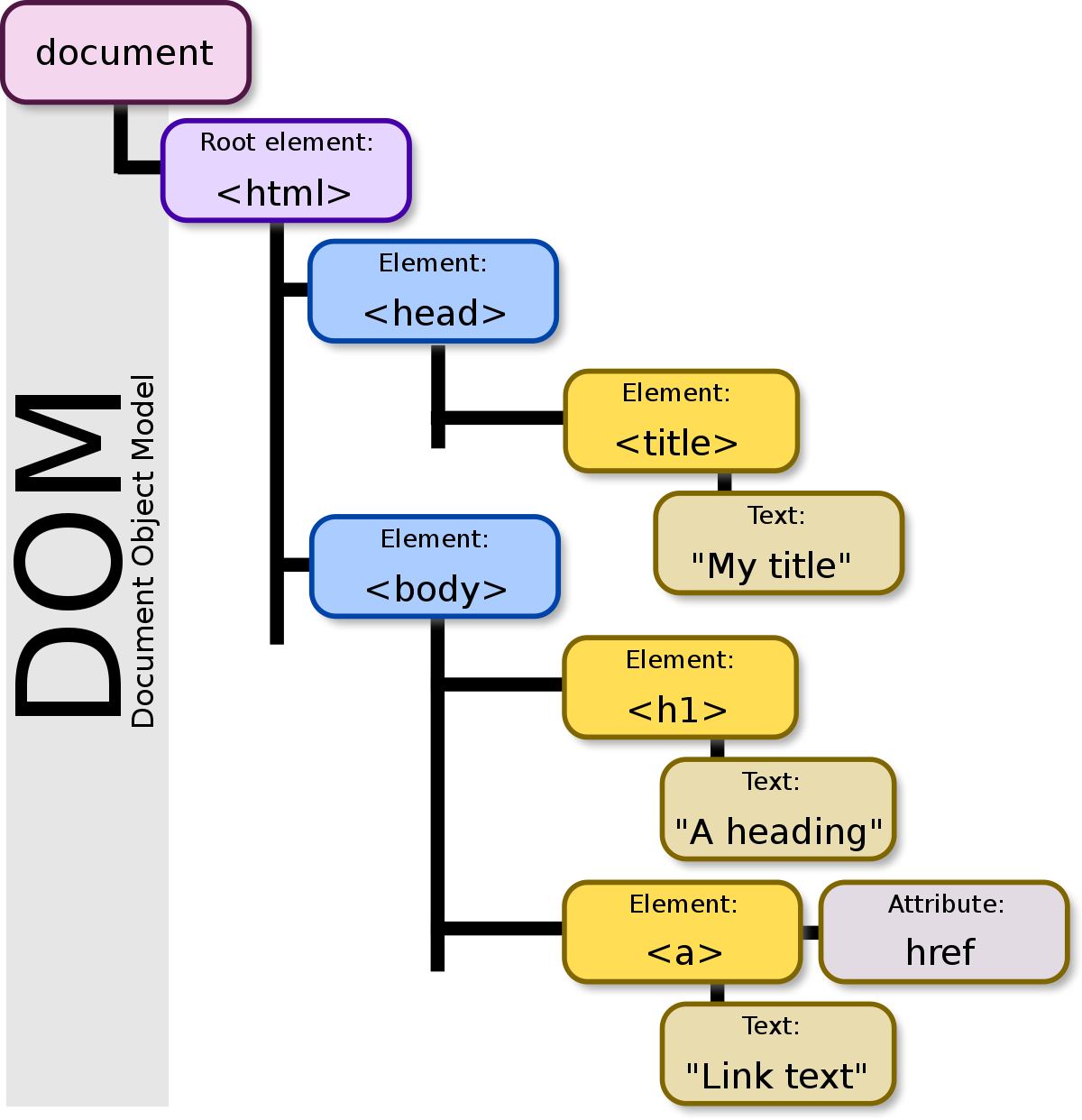
Creating an example webpage to manipulate the h1 header
<!DOCTYPE html>
<html lang="en">
<head>
    <meta charset="UTF-8">
    <meta name="viewport" content="width=device-width, initial-scale=1.0">
    <title>Document</title>
    <link rel="stylesheet" href="style.css">
</head>
<body>
    <h1 id="welcome-msg">Welcome </h1>
    <script src="script.js"></script>
</body>
</html>
const username = ""
const welcomeMSG = document.getElementById("welcome-msg");
welcomeMSG.textContent += username === "" ? `Guest` : username;
const username = "Chanyang"
const welcomeMSG = document.getElementById("welcome-msg");

welcomeMSG.textContent += username === "" ? `Guest` : username;
Getting User Input - displaying it on webpage
<!DOCTYPE html>
<html lang="en">
<head>
    <meta charset="UTF-8">
    <meta name="viewport" content="width=device-width, initial-scale=1.0">
    <title>Document</title>
</head>
<body>
    <script src="script.js"></script>
</body>
</html>
let name = window.prompt("Enter your name");
let age = window.prompt("Enter your age");
document.write("Hello " + name, " how are you today?" + " , do you like being " + age + ' years old?');JS DOM Manipulation continued...
How to access DOM elements
// Accessing an element by its ID
const headerElement = document.getElementById('header');

// Accessing elements by class name
const paragraphs = document.getElementsByClassName('paragraph');

// Accessing elements by tag name
const images = document.getElementsByTagName('img');
How to modify element content
// Modifying the content of an element
headerElement.innerHTML = "New Header Text";
code above changed the content of the headerElement to New Header Text
Events and Event Handling
Events are actions or occurrences that happen in the browser, such as user clicking a button or resizing the window. JavaScript allows us to handle these events and execude code in response. Event handling is crucial in creating interactive web pages.
How to add event listeners
To respond to events, we can use event listeners.
These are functions that "listen" for a specific event on a particular element.
Let's consider a button click event as an example:
// Accessing a button element
const myButton = document.getElementById('myButton');

// Adding a click event listener
myButton.addEventListener('click', function() {
	alert('Button Clicked!');
});
This example, when the button with the ID myButton is clicked, an alert saying Button Clicked! will pop up.
How to Manipulate Styles
We can also modify the styles of elements, which allows us to create visually appealing and dynamic web pages.
How to change styles dynamically
Use the style property of an element to change its appearance.
Example:
// Accessing a paragraph element
const myParagraph = document.getElementById("myParagraph");

// Accessing a button element
const colorButton = document.getElementById("colorButton");

// Adding a click event listener to the button
colorButton.addEventListener('click', function() {
//Changing the color style of the paragraph
	myParagraph.style.color = 'blue';
});
when the button with the ID colorButton is clicked, the text color of the paragraph with the ID myParagraph is changed to blue
How to create new elements
createElement method is used to create a new HTML element.
// Creating a new paragraph element
const newParagraph = document.createElement('p');

// Setting the text content of the new paragraph
newParagraph.textContent = 'This is a new paragraph.';

// Appending the new paragraph to the body of the document
document.body.appendChild(newParagraph);
we create a new p (paragraph) element, set its text content, and then append it to the body of the document
How to modify attributes
We can also modify attributes of existing elements.
// Accessing an image element
const myImage = document.getElementById('myImage');

// Changing the source attribute of the image
myImage.src = 'new-image.jpg';
here, we access an image element with the ID myImage and change its src attribute to new-image.jpg
How to update form input values
Let's consider a scenario where you want to update the value of a text input based on user interaction:
// Accessing a text input element
const myInput = document.getElementById('myInput');

// Adding an input event listener
myInput.addEventListener('input', function() {
	// Updating a paragraph with the input value
    document.getElementById('inputValue').textContent = myInput.value;
});
in this example, as the user types in the text input with the ID myInput, a paragraph with the ID inputValue is dynamically updated to reflect the input value
How to toggle visibility
You can toggle the visibility of an element by using the display style property.
// Accessing a button element
const toggleButton = document.getElementById('toggleButton');

// Accessing a paragraph element
const toggleParagraph = document.getElementById('toggleParagraph);

// Adding a click event listener
toggleButton.addEventListener('click', function() {
	// Toggling the visibility of the paragraph
    toggleParagraph.style.display = toggleParagraph.style.display === 'none' ? 'block' : 'none';
});
the paragraph with the ID toggleParagraph is initially visible. Clicking the button with the ID toggleButton toggles its visibility
Common Pitfalls in DOM Manipulation
Beginners, like myself can encounter common pitalls. Let's explore some of these...
Manipulating the DOM before it's ready
I might attempt to manipulate the DOM before it's fully loaded. This can lead to JavaScript trying to access elements that haven't been rendered yet. It's crucial to wait for the DOM to be fully loaded before executing any JavaScript code:
document.addEventListener('DOMContentLoaded', function() {
	// DOM manipulation code goes here
});
by wrapping your DOM manipulation code inside the DOMContentLoaded event listener, I am ensuring that it runs only when the DOM is ready
Not checking if an element exists
When attempting to access an element using methods like getElementById, I might assume the element exists and proceed with manipulation. If the element is not present on the page, it can lead to errors.
Let's always check if an element exists before manipulating it:
const myElement = document.getElementById('myElement');

if (myElement) {
	// Manipulate the element here
} else {
	console.error('Element not found!');
}
this simple check prevents errors when working with elements that may or may not be present
Forgetting to prevent default actions
When handling events, forgetting to prevent the default action can result in unexpected page behavior. For instance, if a form is submitted without preventing the default action, the page might reload, causing loss of data:
const myForm = document.getElementById('myForm');

myForm.addEventListener('submit', function(event) {
	// Prevent the default form submission
    event.preventDefault();

    // Your form handling code goes here
});
by calling event.preventDefault(), I am stopping the default behavior associated with the event, giving me full control over how the event is handled
Performing inefficient DOM queries
This can degrade performance. Each query involves traversing the DOM, and unnecessary queries can slow down my webpage.
Instead of repeatedly querying the DOM, cache references to elements:
// Inefficient query within a loop
for (let i = 0; i < 10; i++) {
	const myElement = document.getElementById('myElement');
    // Manipulate myElement
}

// Efficient query outside the loop
const myElement = document.getElementById('myElement');
for (let i = 0; i < 10; i++) {
	// Manipulate myElement
}
by querying the DOM once and reusing the reference, I am optimizing my code
Not handling cross-browser compatibility
Different browsers may interpret JavaScript and DOM manipulation slightly differently. Failing to account for cross-browser compatibility can lead to inconsistent behavior.
Use feature detection and consider using libraries like jQuery or modern frameworks to handle cross-browser inconsistencies:
// Feature detection for addEventListener
if (document.addEventListener) {
	// Use addEventListener
} else {
	// Fall bacdk to alternative method
}
By checking for features before using them, I am ensuring my code works across various browsers
How to Use Frameworks for DOM Manipulation
While JavaScript allows for direct DOM manipulation, modern web development often involves using frameworks like React or Vue.js These frameworks provide a more structured way to build and manage user interfaces.
React Example
// React component rendering a button and handling its click event
class MyButton extends React.Component {
	handleClick() {
    	alert('React Button Clicked!');
    }

    render() {
    	return (
        	<button onClick={() => this.handleClick()}>Click me</button>
        );
    }
 }

 // Rendering the React component to the DOM
 ReactDOM.render(<MyButton />, document.getElementById('reactRoot'));
a component is created to handle a button click event, demonstrating a more declarative approach to UI development
Vue.js Example
// Vue.js instance with a data property and a method
new Vue({
	el: '#vueRoot',
    data: {
    	message: 'Vue.js Message'
    },
    methods: {
    	showMessage: function () {
        	alert(this.message);
        }
	}
});
a Vue.js instance is created to manage data and methods, showcasing the reactivity and component-based structure of Vue.js
Conclusion
Through learning the DOM manipulation guide freecodecamp
I was able to document and test out various code which ranges from accessing elements to handling events, as well as modifying styles to creating new elements.
I have to continue to practice and experiment using these concepts, which will pave the way in becoming a better web developer than I was yesterday. 🙂