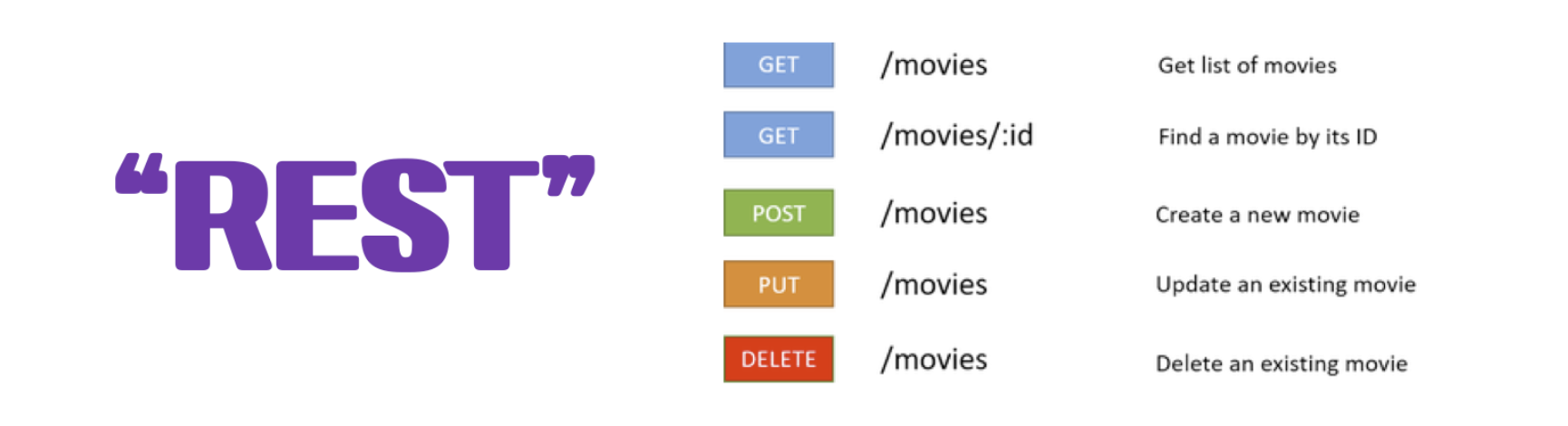
Retrofit은 안드로이드 및 자바를 위한 안전한 REST 클라이언트라고 말 할 수 있다.
여기서 REST란
Representational State Transfer
어떤 자원을 식별자로 구분해, 자원의 정보(상태)를 주고받는 것을 말한다.
retrofit2란 서버와 클라이언트 간에 http 통신을 위한 라이브러리이다.
요 retrofit을 이용해서 우리는 서버와 연결을 할 것이다.
Retofit 구현 과정
retrofit을 이용해서 githubapi를 이용해서 사용자들의 repositories 리스트를 보여줄 것이다.
- Retofit dependency를 추가한다.
- interface를 만들어준다.
1.Retofit dependency를 추가한다.
// 서버 연결을 위한 Retrofit2
implementation "com.squareup.retrofit2:retrofit:2.9.0”


// Retrofit2에서 gson 사용을 위한 컨버터
implementation "com.squareup.retrofit2:converter-gson:2.9.0"


//gson
implementation "com.google.code.gson:gson:2.8.6"
인터넷을 사용하기 위해서 manifest에 아래 코드를 추가해 준다.
<uses-permission android:name="android.permission.INTERNET"/>2.Endpoint를 알려준다.
사용자들의 repositories의 리스트를 보여줄 것이기 때문에 사용자의 레포리스트를 가져올 메소드가 필요하다.
https://api.github.com/repos/square/retrofit/contributors 에 들어가면 아래와 같이 JSON 형식으로 된 정보들이 나온다.
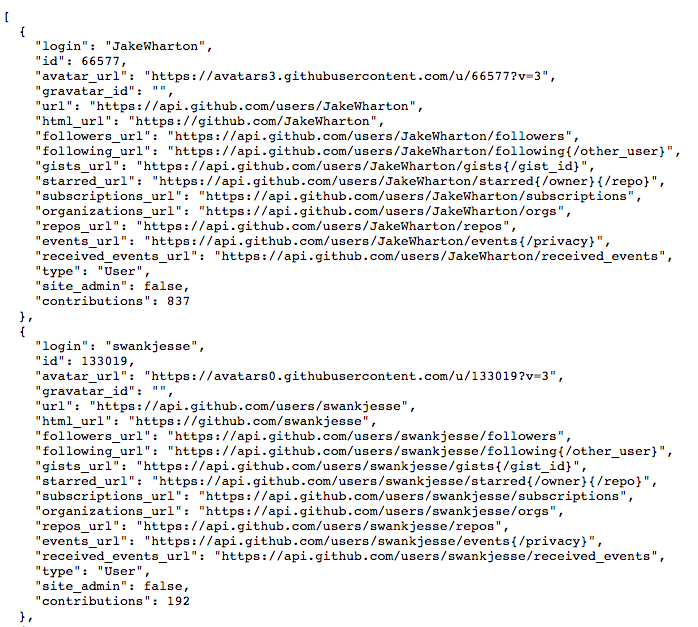
나는 Github의 팔로워 api를 이용해서 통신 후 받은 리스트 값을 넣고싶기 때문에
"repos_url" : "https://api.github.com/users/JakeWharton/starred{/owner}{/repo}"를 이용해주면 된다.
이제 이거를 Retrofit Interface에 적어주면 된다. 서번에 어떠한 요청을 보내면 그 요청에 대한게 어떻게 온다는 일종의 상호작용 방법을 정의 해 주는거다.
서비스를 생성해 주는 부분
 private fun signupNetwork() {
        val requestSignUp = RequestSignUp(
            id = binding.edtId.text.toString(),
            name = binding.edtName.text.toString(),
            password = binding.edtPassword.text.toString()
        )

        val call: Call<ResponseSignUp> = ServiceCreator.soptService.postSignUp(requestSignUp)
//call은 ResponseSignUp을 받아오는 객체
        call.enqueue(object : Callback<ResponseSignUp> {
            override fun onResponse(
                call: Call<ResponseSignUp>,
                response: Response<ResponseSignUp>
            ) {
                if (response.isSuccessful) {
                    val data = response.body()?.data
                    Toast.makeText(this@SignUpActivity,"${data?.id}회원가입에 성공했습니다.",Toast.LENGTH_SHORT).show()
                    passingIntent(requestSignUp.id, requestSignUp.password)
                    finish()
                } else {
                    Toast.makeText(this@SignUpActivity, "회원가입에 실패하였습니다.", Toast.LENGTH_SHORT)
                    .show()
                }
            }

            override fun onFailure(call: Call<ResponseSignUp>, t: Throwable) {
                Log.e("NetworkTest", "error:$t")
            }
        })
    }
Call : type을 받아오는 객체
CallBack : type 객체를 받아왔을 때 프로그래머의 행동
val call: Call<ResponseSignUp> = ServiceCreator.soptService.postSignUp(requestSignUp)이 부분을 한번 해석을 해보쟙! ResponseSignUp을 받아오는 Call 객체
그니까 responsesignup에 대해서 내가 서버로 이것저것 할거다! 라고 알려주는거라고 생각하면 편할 듯
결국 이거는 서버에서 id, name, password를 불러오기 위해서 만들어 준거다
 private fun signupNetwork() {
        val requestSignUp = RequestSignUp(
            id = binding.edtId.text.toString(),
            name = binding.edtName.text.toString(),
            password = binding.edtPassword.text.toString()
        )

        val call: Call<ResponseSignUp> = ServiceCreator.soptService.postSignUp(requestSignUp)
        //  Call : type을 받아오는 객체
코드를 뜯어보면 serviceCreator.kt
package com.example.num1

import com.example.num1.api.GithubService
import com.example.num1.api.SoptService
import retrofit2.Retrofit
import retrofit2.converter.gson.GsonConverterFactory

object ServiceCreator { //서비스를 생성해주는 구현체 부분
    private const val BASE_URL_SOPT = "http://13.124.62.236/"
    private const val BASE_URL_GIT = "https://api.github.com/"  //바뀌지 않는 부분을 baseurl로 넣어준다

    private val soptRetrofit:Retrofit = Retrofit.Builder()
        .baseUrl(BASE_URL_SOPT)
        .addConverterFactory(GsonConverterFactory.create())
        .build()

    private val githubRetrofit:Retrofit = Retrofit.Builder()    //객체 초기화
        .baseUrl(BASE_URL_GIT)      //서버에 메인 url전달
        .addConverterFactory(GsonConverterFactory.create()) //gson을 우리가 쓰는 언어로 바꿔주는 거
        .build()

    val soptService: SoptService = soptRetrofit.create(SoptService::class.java)
    //interface 객체를 create에 넘겨 실제 구현체 생성
    val githubService: GithubService = githubRetrofit.create(GithubService::class.java)

}
회원의 정보를 받아오기 위해서 모든 유저들이 공통적으로 사용하는 baseurl을 만들어주고 이게 무슨 소리냐 아이디가 a인 사람은 http://13.124.62.236/a
아이디가 b인 사람은 http://13.124.62.236/b이런식으로 사용되기 때문에 공통적으로 사용되는 걸 baseurl로 만들어준다고 한거다
서버에서 정보를 gson으로 보내주기 때문에 gsonconvert를 사용해서 우리가 쓰는 언어로 바꿔주고
.addConverterFactory(GsonConverterFactory.create())
이렇게 객체를 만들어 준다음에 soptRetrofit.create()를 사용해서 자바로 바꿔줘서 넣는거임!
그 이유는 두구두구
retrofit2는 HTTP API를 자바 인터페이스 형태로 사용하는 라이브러리이기에 .create를 해주는 것임