document란?
웹에서 document는 페이지 그 자체를 의미한다.
document는 객체로 되어있으며 자바스크립트에서 접근가능하다.
또 document객체는 HTML 요소와 관련된 작업을 도와주는 다양한 메소드를 제공하고 있다.
document 객체 확인
document는 객체로 되어있어 아래 코드로 확인가능하다.
console.dir(document)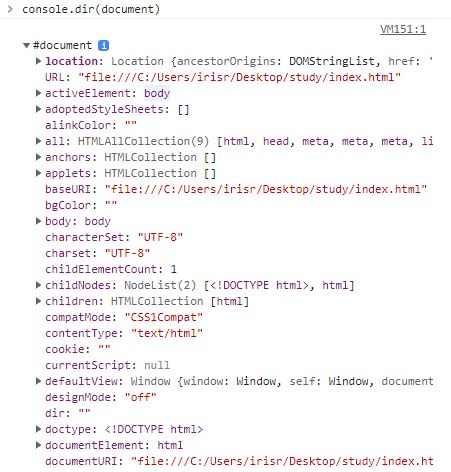
getElementById
document에는 getElementBy~ 라는 html의 특정 태그의 정보를 가져올수 있는 매서드가 존재한다.
대표로 getElementById는 매개변수에 가져오고 싶은 태그의 아이디를 String으로 넣으면
해당하는 태그의 객체를 반환한다.
<div id="title">제목</div>

let title = document.getElementById("title");
console.dir(title); // title의 div객체
querySelector/querySelectorAll
querySelector는 css의 선택자처럼 원하는 요소를 가져올때 사용한다.
getElementBy~는 id,class,name이 없으면 못가져오지만
querySelector는 상위 태그 기반으로 태그를 가져올 수 있다.
<div id="title">
  <h1>제목</h1>
</div>

let title = document.querySelector("#title h1");
console.dir(title); // title의 div객체
활용
위 방법으로 태그의 객체를 가져오고 객체의 특정 프로퍼티의 값을 변경하여 내용을 변경할 수 있다.
그리고 이렇게 변경된 내용은 즉시 반영된다.
<div id="title">제목</div>

let title = document.getElementById("title");

title.InnerText = "제목 변경됨";