1. 함수
동작해야 할 목적대로 묶은 명령을 함수(function)라고 한다.
2. 이벤트
2.1. 이벤트(Event)
대부분의 함수는 사용자가 화면에서 버튼을 클릭하거나 항목을 선택했을 때 실행된다. 이처럼 버튼을 클릭하거나 항목을 선택하는 것을 "이벤트"라고 한다.
이벤트 핸들러(Event Handler)
이벤트가 발생했을 때 실행하는 함수를 "이벤트 처리기(event handler)"라고 한다.
- <태그 on이벤트명 = "함수명">
- 웹요소.onclick = 함수;
HTML의 input 태그

<input type="button" value="inline event 속성" onclick="test1();">
<input type="button" value="속성 지정" id="btn2">
자바스크립트 function test1() { console.log('event 발생'); } document.querySelector('#btn2').onclick = function() {//onclick 이벤트 속성에 접근하여 함수로 값 설정 console.log('btn2에 click이벤트 발생'); // 여기서 익명함수가 event handler 함수가 됨 }
버튼 클릭 시 console

2.2.addEventListner() 메서드
한 요소에 여러 이벤트 처리기를 연결하고 싶을 때 사용한다.
HTML의 input 태그

<input type="button" value="addEventListner" id="btn3">
한 요소에 두 개의 이벤트 처리기 연결
document.querySelector('#btn3').addEventListener("click", function() {
console.log('btn3 click');
});
document.querySelector('#btn3').addEventListener("click", function() {
console.log('console에 출력');
});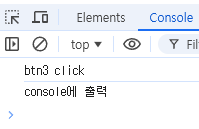 |
|---|
| 한 개의 input 태그에 두 개의 이벤트 핸들러가 연결됨 |
2.3. Event 객체
발생한 이벤트와 관련된 모든 정보를 가지고 있는 객체
- 이벤트가 발생한 요소, 이벤트 유형, 이벤트가 발생한 위치정보 등
- 이벤트 발생 시 JS에서 이벤트 핸들러 함수의 인자로 자동으로 전달된다. (e)
2.4. Event Target 객체
이벤트가 발생한 객체로 Event 객체의 target 속성값에 저장된다.
ex) div 태그에서 이벤트가 발생하면 div 태그가 event target 객체
box 클래스인 div태그 클릭 시 함수 실행
<div class="box" onclick="test2(event)"></div>

function test2(e) {
            console.log(e);
            console.log(e.target, this);
}| console |
|---|
 |
| box의 onclick 속성에서는 보이진 않지만 function() {test2(event)}로 작성되어 있는 것임 |
| 일반함수에서 this는 항상 window를 가리킨다. |
2.5. 기본 이벤트 제거 및 유효성 검사
기본 이벤트란 각 태그마다 내장되어 있는 이벤트 핸들러를 말한다.
- form 태그-submit / a태그-click / button:submit-submit
기본 이벤트 제거 방법
- onsubmit이벤트 속성에 이벤트 핸들러 연결할 때 return false;
- event객체.preventDefault() : HTML 요소가 가지고 있는 '기본 이벤트' 호출을 방지하는 속성
유효성 검사 : 사용자가 입력한 값을 데이터의 형식에 맞는지 검사하는 것이다.
- ID, 비밀번호를 특정 형식(몇 글자 이상, 특수문자 포함 등)에 일치하게 작성하였는지 정규표현식을 통해 검사
form 태그에서 간단하게 ID, PW를 입력받아 submit 이벤트가 발생했을 때 글자 수를 검사해보자
<form action="">
        아이디 : <input type="text" name="userId" id="userId"><br>
        비밀번호 : <input type="password" name="pwd" id="pwd"><br>
        <input type="submit" value="로그인">
</form><script>
document.querySelector('form').onsubmit = function(e) {
var userId = document.querySelector('#userId');
if(!(userId.value.length >= 4 && userId.value.length <= 8)) {
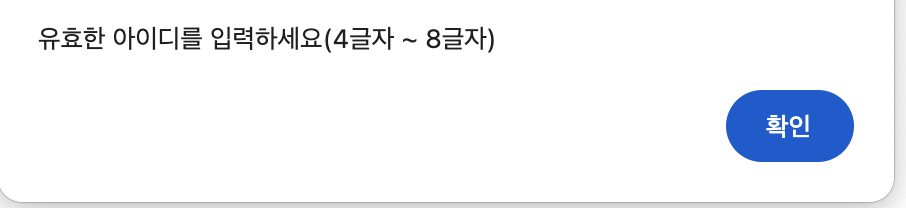
alert('유효한 아이디를 입력하세요(4글자 ~ 8글자)');
userId.select();
console.log(userId.select());
e.preventDefault();
// return false; // 잘못된 아이디 입력이 submit이 되면 안되므로 return false;
}
var userPwd = document.querySelector('#pwd');
if(!(userPwd.value.length >= 4 && userPwd.value.length <=8)) {
alert('유효한 비번을 입력하세요(4글자 ~ 8이상)');
userPwd.value = '';
userPwd.select();
e.preventDefault();
// return false;
}
return true;
}| 잘못된 ID, PW입력 시 alert창으로 알림 |
|---|
 |
2.6. 이벤트 전달 및 차단
- 버블링 방식 : 자식노드에서 부모노드로 올라가면서 이벤트 실행
- 캡쳐링 방식 : 부모노드에서 자식노드로 내려가면서 이벤트 실행
- 이벤트 차단 방법 : 이벤트객체.stopPropagation()
<div class="boxx box1" data-text="box1" onclick="displayMsg(event , this);">
    <div class="boxx box2" data-text="box2" onclick="displayMsg(event , this);">
        <div class="boxx box3" data-text="box3" onclick="displayMsg(event , this);"></div>
    </div>
</div><script>
function displayMsg(e, box){
console.log(box.dataset.text); // data-text를 꺼내는 방법
// e.stopPropagation(); // 이벤트 전파를 막는 함수
}
</script>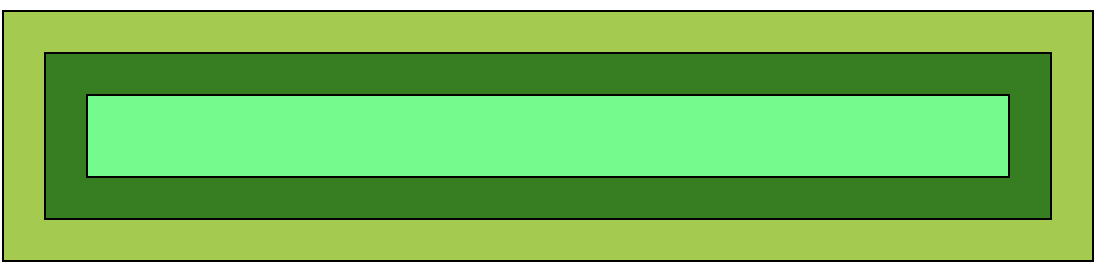
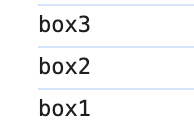
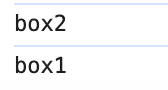
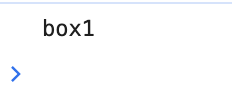
위 HTML의 div태그(css 생략)로 자식요소(가장 안쪽 박스)를 선택했을 때 이어서 부모요소의 핸들러도 작동하며 이벤트가 전파되는 것이 이벤트 버블링이다.
주석처리 한 e.stopPropagation() 메서드를 적용 시 이벤트 전파가 중단되어 각 요소의 이벤트만 발생하게 된다.
| 가장 안쪽 박스 이벤트 발생 | 중간 박스 이벤트 발생 | 가장 바깥 박스 이벤트 발생 |
|---|---|---|
 |  |  |