스타일시트 언어
- CSS(Cascading Style Sheets)는 HTML이나 XML 같은 마크업 언어
- 작성된 문서의 스타일을 꾸미기 위한 스타일 시트 언어
- HTML이 문서의 구조와 콘텐츠를 정의한다면, CSS는 그 문서를 시각적으로 꾸미고 스타일을 지정하여 에리아웃을 제어.
기본구조
- CSS는 주로 HTML 문서의
<head>요소 안어서<style>태그를 사용하여 정의 - 또는 외부 CSS 파일을 연결하여 사용
인라인 스타일
<style>요소 내부에 CSS 속성을 직접 입력
HTML
<!DOCTYPE html>
<html lang="en">
<head>
    <meta charset="UTF-8">
    <meta name="viewport" content="width=device-width, initial-scale=1.0">
    <title>My Website</title>
    <style>
        /* 전체 문서의 배경색과 글꼴 지정 */
        body {
	          background-color: #f4f4f4;
	          font-family: Arial, sans-serif;
        }
        /* 제목의 글자색 지정 */
        h1 {
	          color: #333;
        }
        /* 문단의 글자 크기 지정 */
        p {
            font-size: 16px;
        }
    </style>
</head>
<body>
    <h1>Welcome to My Website</h1>
    <p>This is a sample paragraph with some text.</p>
</body>
</html>
외부 CSS파일
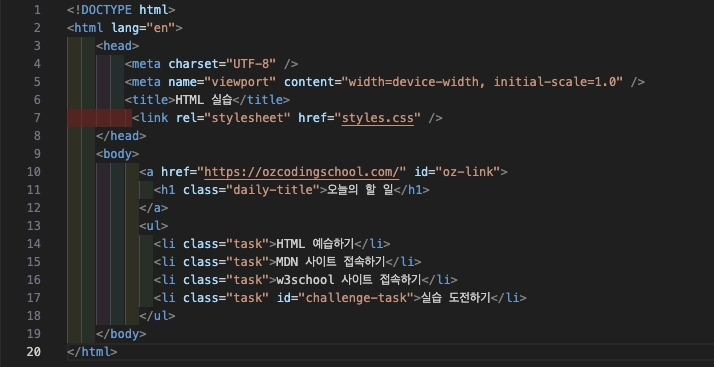
<link>요소에 href 속성으로 css파일명을 입력하면 HTML 문서와 외부에 있는 CSS 파일이 연결
HTML
<link rel="stylesheet" href="styles.css"><link>
- 외부 파일을 HTML에 연결할 때 쓰는 태그
- 닫는 태그가 필요 없는 빈 태그(self-closing tag)- rel="stylesheet"
- rel은 "relationship"(관계)의미
- 여기서는 HTML 문서와 연결된 파일의 관계가 '스타일시트' 임을 지정
- 즉, "이 파일은 HTML에 적용할 CSS 라는 뜻 - href="styles.css"
- href="hypertext reference"
- 연결할 외부 CSS파일 경로 지정
- 같은 폴더에 있으면 그냥 파일명, 다른 폴더면css/styles.css처럼 경로를 적음 - 즉 HTML 문서에 외부 CSS파일(styles.css)을 불러와서 스타일을 적용하라는 뜻
HTML
<!-- index.html -->
<!DOCTYPE html>
<html lang="en">
<head>
    <meta charset="UTF-8">
    <meta name="viewport" content="width=device-width, initial-scale=1.0">
    <title>My Website</title>
    <link rel="stylesheet" href="styles.css">
</head>
<body>
    <h1>Welcome to My Website</h1>
    <p>This is a sample paragraph with some text.</p>
</body>
</html>
CSS
/* style.css */
/* 전체 문서의 배경색과 글꼴 지정 */
body {
  background-color: #f4f4f4;
  font-family: Arial, sans-serif;
}
/* 제목의 글자색 지정 */
h1 {
    color: #333;
}

/* 문단의 글자 크기 지정 */
p {
    font-size: 16px;
}
외부 CSS파일을 권장하는 이유
- 스타일 속성이 많지 않다면 인라인 스타일로 작성할 수 있으나 일반적으로는 외부 CSS파일을 사용하는 것을 권장
- 유지 보수 편리성
- 만약 여러 HTML 페이지가 있다면 외부 CSS는 한 파일만 수정하면 전체 페이지에서 자동 적용.
- 재사용성
- 외부 CSS는 여러 HTML 문서가 공통으로 불러올 수 있어서, 웹사이트 전체 디자인을 통일하기 쉬움.
- 코드 분리 (구조와 디자인의 분리)
- 외부 CSS는 HTML(구조)과 CSS(디자인)를 분리해서 관리하므로 가독성이 좋아지고 협업에도 유리.
- 성능 최적화 (캐싱 효과)
- 브라우저는 외부 CSS 파일을 한 번 다운로드하면 캐시에 저장.
- 이후 다른 페이지를 열 때 다시 다운로드 하지 않고 캐시된 파일을 사용해서 로딩 속도가 빨라짐.
- 확장성과 유지 관리
- 쉡사이트 규모가 커질수록 스타일이 많아지고 복잡해짐.
- 내부 스타일만으로는 관리하기 힘들지만, 외부 CSS는 모듈화하고 정리하기 쉬움.
선택자(Selectors)
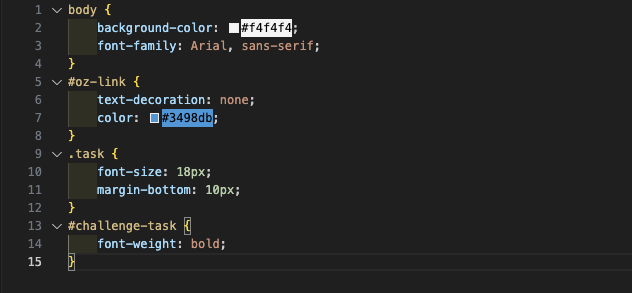
- CSS는 HTML 요소를 선택하기 위해 선택자를 사용.
- 선택자는 스타일을 적용할 대성을 지정.
CSS
/* 선택자 예제 */
body {
    background-color: #f4f4f4;
    font-family: Arial, sans-serif;
}

h1 {
    color: #333;
}

p {
    font-size: 16px;
}
- 위의 코드에서 body, h1, p는 각각
<body>요소,<h1>요소,<p>요소를 선택하는 선택자입니다. 같은 요소가 두 개 이상 있어서 각각의 스타일을 지정하고 싶을 때는 id, class 선택자를 사용합니다.
Class 선택자
- 사용법:
.클래스이름 - class 선택자는 여러 요수를 그룹화하고, 해당 그룹에 스타일을 적용.
- 하나의 요소가 여러 클래스를 가질 수 있으며 여러 요소가 동일한 클래스를 가질 수 있음.
HTML
<p class="highlight paragraph">이 문장은 강조되고 특별한 스타일이 적용됩니다.</p>CSS
.highlight {
    background-color: yellow;
}

.paragraph {
    font-size: 16px;
}
id 선택자
- 사용법: #아이디이름
- ID 선택자는 문서 내에서 유일한 식별자를 가진 요소를 선택.
- HTML 문서 전체에서 동일한 ID를 가지는 두개 이상의 요소가 있으면 안됨. ID는 유일성을 보장하기 위해 사용.
HTML
<div id="header">
    <!-- 내용 -->
</div>
CSS
#header {
    background-color: #333;
    color: #fff;
    font-size: 24px;
}
속성과 값
- 스타일을 지정하기 위해 속성과 값의 쌍을 사용
- 속성(property) = 바꾸고 싶은 성질
- 값(value) = 그 성질을 어떤 상태로 바꿀지 정한 것
CSS
/* 속성과 값 예제 */
body {
    background-color: #f4f4f4; /* 배경색 지정 */
    font-family: Arial, sans-serif; /* 글꼴 지정 */
}

h1 {
    color: #333; /* 글자색 지정 */
}

p {
    font-size: 16px; /* 글자 크기 지정 */
}
- background-color, color, font-size -> 속성
- #f4f4f4;, arial, sans-serif;, #333;, 16px; -> 값
실습

사랑합니다.