Level 0 → 1
Level Goal
The password for the next level is stored in a file called readme located in the home directory. Use this password to log into bandit1 using SSH. Whenever you find a password for a level, use SSH (on port 2220) to log into that level and continue the game.
Commands you may need to solve this level
ls , cd , cat , file , du , find
TIP: Create a file for notes and passwords on your local machine!
Passwords for levels are not saved automatically. If you do not save them yourself, you will need to start over from bandit0.
Passwords also occasionally change. It is recommended to take notes on how to solve each challenge. As levels get more challenging, detailed notes are useful to return to where you left off, reference for later problems, or help others after you’ve completed the challenge.
bandit0@bandit:~$ ls -alrt
total 24
-rw-r--r--  1 root    root     807 Mar 31  2024 .profile
-rw-r--r--  1 root    root    3771 Mar 31  2024 .bashrc
-rw-r--r--  1 root    root     220 Mar 31  2024 .bash_logout
-rw-r-----  1 bandit1 bandit0  438 Sep 19 07:08 readme
drwxr-xr-x  2 root    root    4096 Sep 19 07:08 .
drwxr-xr-x 70 root    root    4096 Sep 19 07:09 ..
bandit0@bandit:~$ cat readme
Congratulations on your first steps into the bandit game!!
Please make sure you have read the rules at https://overthewire.org/rules/
If you are following a course, workshop, walkthrough or other educational activity,
please inform the instructor about the rules as well and encourage them to
contribute to the OverTheWire community so we can keep these games free!

The password you are looking for is: ZjLjTmM6FvvyRnrb2rfNWOZOTa6ip5If

bandit0@bandit:~$
Level 1 → 2
Level Goal
The password for the next level is stored in a file called - located in the home directory
Commands you may need to solve this level
ls , cd , cat , file , du , find
Helpful Reading Material
bandit1@bandit:~$ ls -alrt
total 24
-rw-r--r--  1 root    root     807 Mar 31  2024 .profile
-rw-r--r--  1 root    root    3771 Mar 31  2024 .bashrc
-rw-r--r--  1 root    root     220 Mar 31  2024 .bash_logout
drwxr-xr-x  2 root    root    4096 Sep 19 07:08 .
-rw-r-----  1 bandit2 bandit1   33 Sep 19 07:08 -
drwxr-xr-x 70 root    root    4096 Sep 19 07:09 ..
bandit1@bandit:~$ cat ./*
263JGJPfgU6LtdEvgfWU1XP5yac29mFx
bandit1@bandit:~$
Level 2 → 3
Level Goal
The password for the next level is stored in a file called spaces in this filename located in the home directory
Commands you may need to solve this level
ls , cd , cat , file , du , find
Helpful Reading Material
bandit2@bandit:~$ ls -alrt
total 24
-rw-r--r--  1 root    root     807 Mar 31  2024 .profile
-rw-r--r--  1 root    root    3771 Mar 31  2024 .bashrc
-rw-r--r--  1 root    root     220 Mar 31  2024 .bash_logout
-rw-r-----  1 bandit3 bandit2   33 Sep 19 07:08 spaces in this filename
drwxr-xr-x  2 root    root    4096 Sep 19 07:08 .
drwxr-xr-x 70 root    root    4096 Sep 19 07:09 ..
bandit2@bandit:~$ cat spaces\ in\ this\ filename
MNk8KNH3Usiio41PRUEoDFPqfxLPlSmx
bandit2@bandit:~$
Level 3 → 4
Level Goal
The password for the next level is stored in a hidden file in the inhere directory.
Commands you may need to solve this level
ls , cd , cat , file , du , find
bandit3@bandit:~$ ls
inhere
bandit3@bandit:~$ cd inhere/
bandit3@bandit:~/inhere$ ls
bandit3@bandit:~/inhere$ ls -alrt
total 12
drwxr-xr-x 3 root    root    4096 Sep 19 07:08 ..
-rw-r----- 1 bandit4 bandit3   33 Sep 19 07:08 ...Hiding-From-You
drwxr-xr-x 2 root    root    4096 Sep 19 07:08 .
bandit3@bandit:~/inhere$ cat ...Hiding-From-You
2WmrDFRmJIq3IPxneAaMGhap0pFhF3NJ
bandit3@bandit:~/inhere$
Level 4 → 5
Level Goal
The password for the next level is stored in the only human-readable file in the inhere directory. Tip: if your terminal is messed up, try the “reset” command.
Commands you may need to solve this level
ls , cd , cat , file , du , find
bandit4@bandit:~/inhere$ ls -alrt
total 48
drwxr-xr-x 3 root    root    4096 Sep 19 07:08 ..
-rw-r----- 1 bandit5 bandit4   33 Sep 19 07:08 -file00
-rw-r----- 1 bandit5 bandit4   33 Sep 19 07:08 -file01
-rw-r----- 1 bandit5 bandit4   33 Sep 19 07:08 -file02
-rw-r----- 1 bandit5 bandit4   33 Sep 19 07:08 -file03
-rw-r----- 1 bandit5 bandit4   33 Sep 19 07:08 -file04
-rw-r----- 1 bandit5 bandit4   33 Sep 19 07:08 -file05
-rw-r----- 1 bandit5 bandit4   33 Sep 19 07:08 -file06
-rw-r----- 1 bandit5 bandit4   33 Sep 19 07:08 -file07
-rw-r----- 1 bandit5 bandit4   33 Sep 19 07:08 -file08
-rw-r----- 1 bandit5 bandit4   33 Sep 19 07:08 -file09
drwxr-xr-x 2 root    root    4096 Sep 19 07:08 .
bandit4@bandit:~/inhere$ strings ./*
h0~ey
4oQYVPkxZOOEOO5pTW81FB8j8lxXGUQw
`>5HYA
bandit4@bandit:~/inhere$
Level 5 → 6
Level Goal
The password for the next level is stored in a file somewhere under the inhere directory and has all of the following properties:
- human-readable
- 1033 bytes in size
- not executable
Commands you may need to solve this level
ls , cd , cat , file , du , find
bandit5@bandit:~/inhere$ ls -al * |grep 1033
-rw-r-----  1 root bandit5 1033 Sep 19 07:08 .file2
bandit5@bandit:~/inhere$ ls -al `find ./ -name .file2` |grep 1033
-rw-r----- 1 root bandit5 1033 Sep 19 07:08 ./maybehere07/.file2
bandit5@bandit:~/inhere$ cat ./maybehere07/.file2
HWasnPhtq9AVKe0dmk45nxy20cvUa6EG
Level 6 → 7
Level Goal
The password for the next level is stored somewhere on the server and has all of the following properties:
- owned by user bandit7
- owned by group bandit6
- 33 bytes in size
Commands you may need to solve this level
ls , cd , cat , file , du , find , grep
bandit6@bandit:~$ find / -group bandit6 -user bandit7 2>/dev/null
/var/lib/dpkg/info/bandit7.password
bandit6@bandit:~$ ls -al /var/lib/dpkg/info/bandit7.password
-rw-r----- 1 bandit7 bandit6 33 Sep 19 07:08 /var/lib/dpkg/info/bandit7.password
bandit6@bandit:~$ cat /var/lib/dpkg/info/bandit7.password
morbNTDkSW6jIlUc0ymOdMaLnOlFVAaj
bandit6@bandit:~$
Level 7 → 8
Level Goal
The password for the next level is stored in the file data.txt next to the word millionth
Commands you may need to solve this level
man, grep, sort, uniq, strings, base64, tr, tar, gzip, bzip2, xxd
bandit7@bandit:~$ cat data.txt |grep millionth
millionth       dfwvzFQi4mU0wfNbFOe9RoWskMLg7eEc
bandit7@bandit:~$
Level 8 → 9
Level Goal
The password for the next level is stored in the file data.txt and is the only line of text that occurs only once
Commands you may need to solve this level
grep, sort, uniq, strings, base64, tr, tar, gzip, bzip2, xxd
Helpful Reading Material
bandit8@bandit:~$ sort data.txt
#...
Z6SdYkOf5loRVj4uRk6cNiz10RfPnwNy
Z6SdYkOf5loRVj4uRk6cNiz10RfPnwNy
Z6SdYkOf5loRVj4uRk6cNiz10RfPnwNy
Z6SdYkOf5loRVj4uRk6cNiz10RfPnwNy
Z6SdYkOf5loRVj4uRk6cNiz10RfPnwNy
Z6SdYkOf5loRVj4uRk6cNiz10RfPnwNy
Z6SdYkOf5loRVj4uRk6cNiz10RfPnwNy
Z6SdYkOf5loRVj4uRk6cNiz10RfPnwNy
Z6SdYkOf5loRVj4uRk6cNiz10RfPnwNy
Z6SdYkOf5loRVj4uRk6cNiz10RfPnwNy
zokSjnkcDj1hdGEBE4feukfCtFmv82ZZ
zokSjnkcDj1hdGEBE4feukfCtFmv82ZZ
zokSjnkcDj1hdGEBE4feukfCtFmv82ZZ
zokSjnkcDj1hdGEBE4feukfCtFmv82ZZ
zokSjnkcDj1hdGEBE4feukfCtFmv82ZZ
zokSjnkcDj1hdGEBE4feukfCtFmv82ZZ
zokSjnkcDj1hdGEBE4feukfCtFmv82ZZ
zokSjnkcDj1hdGEBE4feukfCtFmv82ZZ
zokSjnkcDj1hdGEBE4feukfCtFmv82ZZ
zokSjnkcDj1hdGEBE4feukfCtFmv82ZZ
bandit8@bandit:~$ sort data.txt |wc -l
1001
bandit8@bandit:~$
1 개의 unique 데이터가 있는듯.
bandit8@bandit:~$ sort data.txt |uniq -u
4CKMh1JI91bUIZZPXDqGanal4xvAg0JM
bandit8@bandit:~$
Level 9 → Level 10
Level Goal
The password for the next level is stored in the file data.txt in one of the few human-readable strings, preceded by several ‘=’ characters.
Commands you may need to solve this level
grep, sort, uniq, strings, base64, tr, tar, gzip, bzip2, xxd
bandit9@bandit:~$ xxd data.txt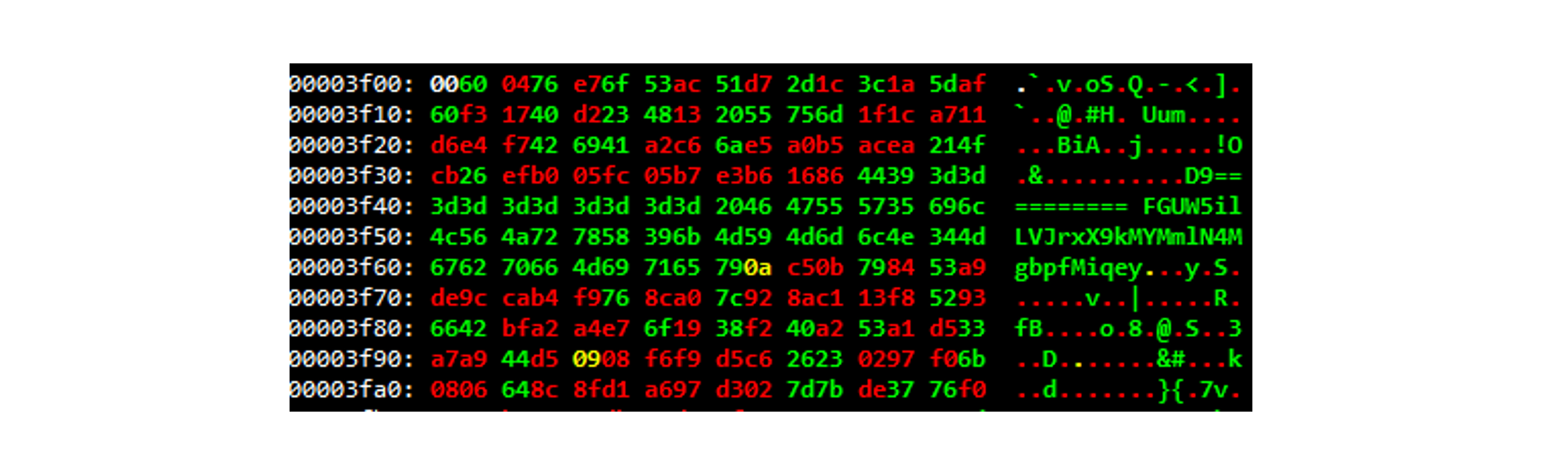
D9========== FGUW5ilLVJrxX9kMYMmlN4MgbpfMiqey