Java에서 날짜를 구해 출력하는 방식은 여러가지다.
1. Date 클래스
첫 번째는 java.util.Date를 import 하여 사용하는 Date 클래스이다.
import 후 객체를 생성하기만 하면 간편하게 오늘 날짜 등을 구할 수 있다는 장점이 있는 반면, 기본이 영문 포맷이라 단독 사용이 어렵다는 단점이 존재한다.
Date now = new Date();
System.out.println(now);
System.out.println("=================");
System.out.println(now.toLocaleString());

출력)
Wed Feb 28 21:42:30 KST 2024
=================
2024. 2. 28. 오후 9:42:30
게다가 한국어로 날짜를 반환해 주는 toLocalString()은 Deprecated 되어 사실상 사용을 금지하고 있다.
이에 우리는 다음과 같은 2가지 방법을 Date 클래스와 함께 사용해 날짜를 표기한다.
2. DateFormat
DateFormat 클래스는 java.text.DateFormat를 import 한 뒤 사용할 수 있으며 아래 4가지 대표 메서드를 가지고 있다.
메서드를 통해 DateFormat 객체를 생성한 뒤, format() 메서드를 통해 해당 포맷에 맞게 포맷팅을 하는 방식이다.
DateFormat df = DateFormat.getInstance();
String today = df.format(now);
System.out.println(today);
System.out.println("==================");

df = DateFormat.getDateTimeInstance();
today = df.format(now);
System.out.println(today);
System.out.println("====================");

df = DateFormat.getDateInstance();
today = df.format(now);
System.out.println(today);
System.out.println("==================");

df = DateFormat.getTimeInstance();
today = df.format(now);
System.out.println(today);
System.out.println("=====================");-
getInstance(): 연도 2자리 표기, 연월일/시분까지 명시
→ 출력) 24. 2. 28. 오후 9:42 -
getDateTimeInstance(): 연도 4자리 표기, 연월일/시분초까지 명시
→ 출력) 2024. 2. 28. 오후 9:42:30 -
getDateInstance(): 연도 4자리 표기, 연월일만 명시
→ 출력) 2024. 2. 28. -
getTimeInstance(): 시분초만 명시
→ 출력) 오후 9:42:30
단, 이렇게 사용할 경우 정해진 표기 방법만을 사용해야 한다.
3. SimpleDateFormat
따라서 직접 표기 방법을 제어하고 싶을 경우 사용하는 것이 세 번째, SimpleDateFormat 클래스이다.
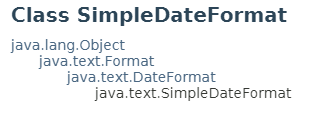
SimpleDateFormat은 DateFormat을 상속 받기 때문에 java.text.SimpleDateFormat를 import 하면 사용할 수 있다.
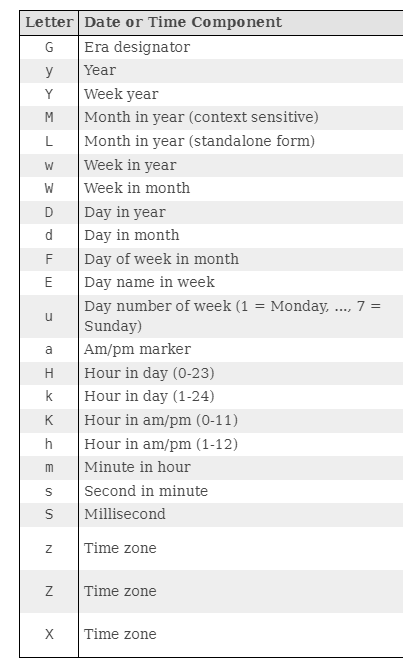
SimpleDateFormat sf = new SimpleDateFormat("yyyy년MM월dd일 (E) a hh:mm:ss");
today = sf.format(now);
System.out.println(today);

출력)
2024년02월28일 (수) 오후 09:42:30-
제어하기 위해 사용하는 문자는 Letter라고 부르며 종류는 아래와 같다.
-
DateFormat 클래스와 마찬가지로 Date 객체를 생성해 구한 날짜 데이터를
format()메서드를 통해 포맷팅하면 된다.