📅 2024-09-13 개인프로젝트 14일차 - 로그아웃 해결, Selenium
TODO
- 로그아웃 안되는거 해결
- Selenium(크롤링)
1. 로그아웃 안되는거 해결
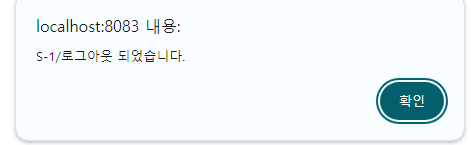
- 로그아웃 a태그 href에 login경로를 넣어놨다...
(3시간이나 허비했네.. 진짜 뇌가 녹아버린게 분명하다..) - 로그아웃 하면 잘 된다 이제..
2. Selenium(크롤링)
import org.openqa.selenium.By;
import org.openqa.selenium.NoSuchElementException;
import org.openqa.selenium.WebDriver;
import org.openqa.selenium.WebElement;
import org.openqa.selenium.chrome.ChromeDriver;
import org.openqa.selenium.chrome.ChromeOptions;
import org.openqa.selenium.support.ui.ExpectedConditions;
import org.openqa.selenium.support.ui.WebDriverWait;

public class crawlTest {
	public static void crawl() {
		// 크롬 드라이버 경로 설정 (크롬 드라이버 설치 필요)
		System.setProperty("webdriver.chrome.driver",
				"C:/work_YGC/sts-4.24.0.RELEASE-workspace/baseball_ygc/chromedriver.exe");

		// 크롬 옵션 설정
		ChromeOptions options = new ChromeOptions();
		options.addArguments("--headless"); // 브라우저를 표시하지 않고 실행할 경우

		// 웹 드라이버 초기화
		WebDriver driver = new ChromeDriver(options);

		try {
			// 크롤링할 웹 페이지 URL
			String url = "https://www.koreabaseball.com/Record/Player/HitterDetail/Basic.aspx?playerId=69737";
			// 웹 페이지 열기
			driver.get(url);

			// WebDriverWait을 사용하여 요소가 로드될 때까지 대기
			WebDriverWait wait = new WebDriverWait(driver, Duration.ofSeconds(10)); // 10초 대기
			List<WebElement> elements = wait
					.until(ExpectedConditions.presenceOfAllElementsLocatedBy(By.cssSelector(".player_basic > ul > li > span")));

			for (WebElement element : elements) {
				String title = element.getText();
				System.out.println(title);
			}

		} catch (Exception e) {
			e.printStackTrace();
		} finally {
			// 웹 드라이버 종료
			driver.quit();
		}
	}
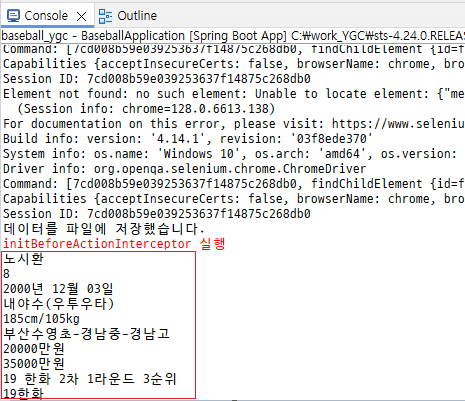
- 크롤링 잘된다! 선수 프로필 정보를 잘 가져오네..
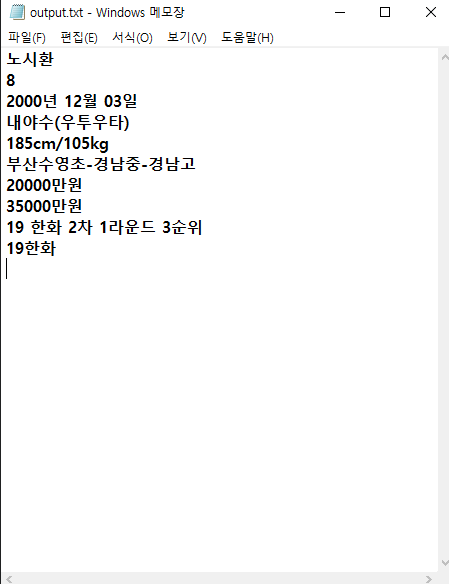
- 콘솔에만 뜨고 output.txt 파일에 저장이 안됐었는데 STS 껐다 키니까 된다...
- 이제 알맞게 가공해야지...
(언제하냐...)
public class crawlTest {
public static void crawl() {
// 크롬 드라이버 경로 설정 (크롬 드라이버 설치 필요)
System.setProperty("webdriver.chrome.driver",
"C:/work_YGC/sts-4.24.0.RELEASE-workspace/baseball_ygc/chromedriver.exe");
	// 크롬 옵션 설정
	ChromeOptions options = new ChromeOptions();
	options.addArguments("--headless"); // 브라우저를 표시하지 않고 실행할 경우

	// 웹 드라이버 초기화
	WebDriver driver = new ChromeDriver(options);

	try {
		// 크롤링할 웹 페이지 URL
		String url = "https://www.koreabaseball.com/Player/Search.aspx";
		// 웹 페이지 열기
		driver.get(url);

		// WebDriverWait을 사용하여 요소가 로드될 때까지 대기
		WebDriverWait wait = new WebDriverWait(driver, Duration.ofSeconds(20)); // 20초 대기
		// cssSelector 안에는 뽑아올 요소를 선택자를 사용해서 올바르게 넣어야한다.
		List<WebElement> elements = wait
				.until(ExpectedConditions.presenceOfAllElementsLocatedBy(By.cssSelector("tbody > tr > td")));

		for (WebElement element : elements) {
			String title = element.getText();
			System.out.println(title);
		}

		// 결과를 파일에 저장
		saveToFile(elements, "output.txt");

	} catch (Exception e) {
		e.printStackTrace();
	} finally {
		// 웹 드라이버 종료
		driver.quit();
	}
}

private static void saveToFile(List<WebElement> elements, String fileName) throws IOException {
	try (FileWriter writer = new FileWriter(fileName)) {
		for (WebElement element : elements) {
			try {
				String title = element.getText();
				writer.write(title + "\n");
			} catch (Exception e) {
				System.out.println("Error processing element: " + e.getMessage());
			}
		}
		System.out.println("데이터를 파일에 저장했습니다.");
	}
}
우당탕탕....