user_header.jsp에 있는 user_category_list.go를 활용하여

mapping.properties에 작성!

com.user.action 패키지에 UserCategoryListAction 클래스 생성
=============================코드=============================
package com.user.action;

import java.io.IOException;

import javax.servlet.http.HttpServletRequest;
import javax.servlet.http.HttpServletResponse;

import com.shop.controller.Action;
import com.shop.controller.ActionForward;
import com.shop.model.ProductDAO;

public class UserCategoryListAction implements Action {

	@Override
	public ActionForward execute(HttpServletRequest request, HttpServletResponse response) throws IOException {
		// get 방식으로 넘어온 카테고리에 해당하는 제품 리스트를
		// shop_proudcts 테이블에서 조회하여 view page로 이동시키는 비지니스 로직
		String product_code = request.getParameter("code").trim();

		ProductDAO dao = ProductDAO.getInstance();
		dao.getProductList(product_code);


		return null;
	}

}
ProductDAO에서 getProductList() 메서드 생성
=============================코드=============================
// 카테고리 코드에 해당하는 제품의 전체 리스트를 조회하는 메서드
	public List<ProductDTO> getProductList(String code) {
		List<ProductDTO> list = new ArrayList<ProductDTO>();

		try {
			openConn();

			sql = "select * from shop_products where pcategory_fk = ?";
			pstmt = con.prepareStatement(sql);
            pstmt.setString(1, code);
			rs = pstmt.executeQuery();

			while(rs.next()) {
				ProductDTO dto = new ProductDTO();
				dto.setPnum(rs.getInt("pnum"));
				dto.setPname(rs.getString("pname"));
				dto.setPcategory_fk(rs.getString("pcategory_fk"));
				dto.setPcompany(rs.getString("pcompany"));
				dto.setPimage(rs.getString("pimage"));
				dto.setPqty(rs.getInt("pqty"));
				dto.setPrice(rs.getInt("price"));
				dto.setPspec(rs.getString("pspec"));
				dto.setPcontents(rs.getString("pcontents"));
				dto.setPoint(rs.getInt("point"));
				dto.setPinputdate(rs.getString("pinputdate"));

				list.add(dto);
			}

		} catch (SQLException e) {
			e.printStackTrace();
		} finally {
			closeConn(rs, pstmt, con);
		}
		return list;
	}
UserCategoryListAction 클래스로 가자
view 페이지를 새로 생성하지 않고 ProductList 이엘 언어를 그대로 사용해야 함!
=> 따라서 user_main.jsp의 틀 그대로 사용하기 위해 setpath("user/user_main.jsp") 를 적어야 함

=============================코드=============================
package com.user.action;

import java.io.IOException;
import java.util.List;

import javax.servlet.http.HttpServletRequest;
import javax.servlet.http.HttpServletResponse;

import com.shop.controller.Action;
import com.shop.controller.ActionForward;
import com.shop.model.ProductDAO;
import com.shop.model.ProductDTO;

public class UserCategoryListAction implements Action {

	@Override
	public ActionForward execute(HttpServletRequest request, HttpServletResponse response) throws IOException {
		// get 방식으로 넘어온 카테고리에 해당하는 제품 리스트를
		// shop_proudcts 테이블에서 조회하여 view page로 이동시키는 비지니스 로직
		String product_code = request.getParameter("code").trim();

		ProductDAO dao = ProductDAO.getInstance();
		List<ProductDTO> list = dao.getProductList(product_code);

		request.setAttribute("ProductList", list);

		ActionForward forward = new ActionForward();
		forward.setRedirect(false);
		forward.setPath("user/user_main.jsp");

		return forward;
	}

}
=============================실행=============================
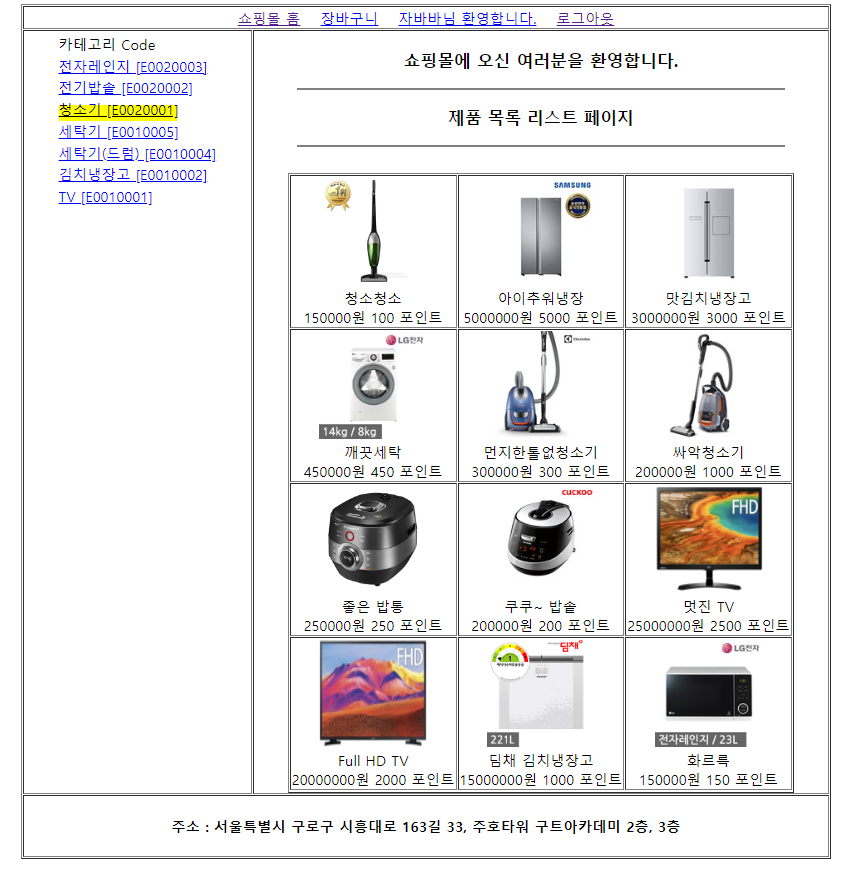
청소기 카테고리 클릭
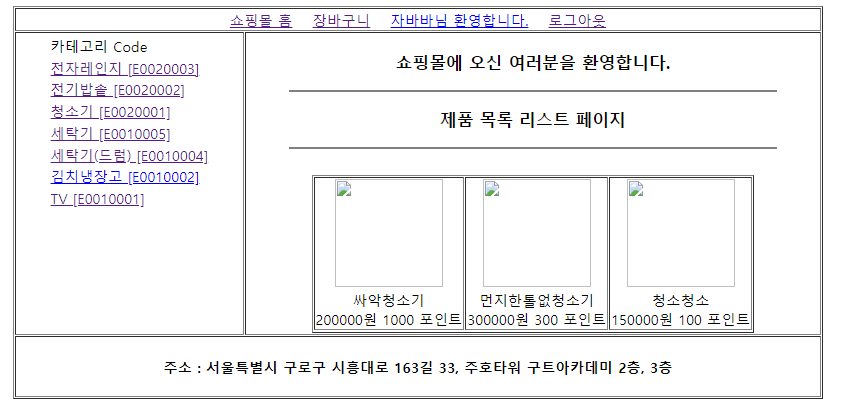
청소기 카테고리만 해당되어져서 나옴!
이제 상품의 이미지를 클릭했을 때 띄울 상품 상세내역 및 장바구니 페이지 틀을 만들어보자
user_main.jsp내의 user_product_view.go를

mapping.properties에 작성

com.user.action 패키지에 UserProductViewAction 클래스 생성
getProductContent() 메서드는 이전에 ProductDTO에서 만들었던 메서드를 활용!
=============================코드=============================
package com.user.action;

import java.io.IOException;

import javax.servlet.http.HttpServletRequest;
import javax.servlet.http.HttpServletResponse;

import com.shop.controller.Action;
import com.shop.controller.ActionForward;
import com.shop.model.ProductDAO;
import com.shop.model.ProductDTO;

public class UserProductViewAction implements Action {

	@Override
	public ActionForward execute(HttpServletRequest request, HttpServletResponse response) throws IOException {
		// get 방식으로 넘어온 제품번호에 해당하는 제품의
		// 상세 정보를 조회하여 view page로 이동시키는 비지니스 로직
		int product_no = Integer.parseInt(request.getParameter("pnum").trim());

		ProductDAO dao = ProductDAO.getInstance();
		ProductDTO cont = dao.getProductContent(product_no);

		request.setAttribute("ProductCont", cont);

		ActionForward forward = new ActionForward();
		forward.setRedirect(false);
		forward.setPath("user/user_product_detail.jsp");

		return forward;
	}

}
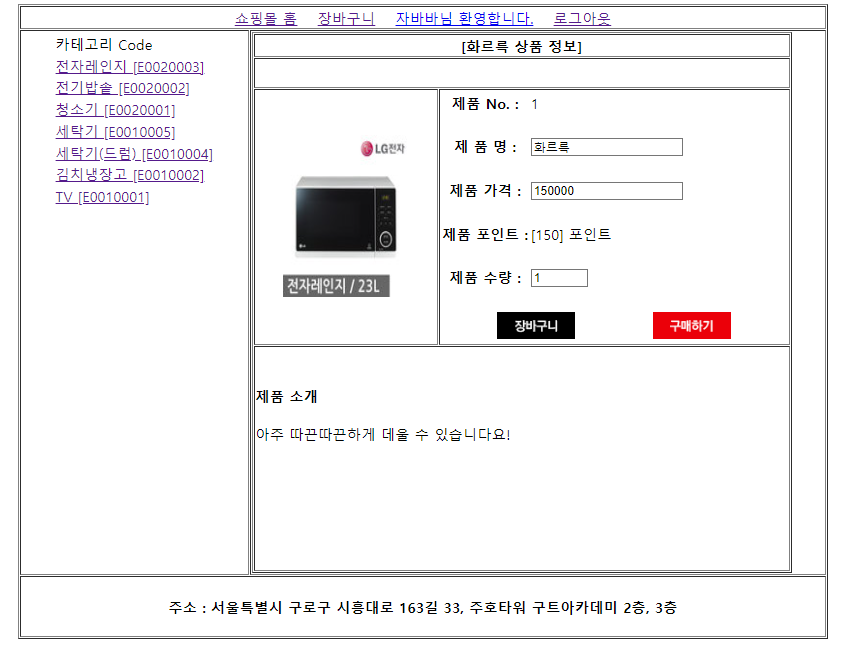
user 폴더에 user_product_detail.jsp 생성
=============================코드=============================
<%@ page language="java" contentType="text/html; charset=UTF-8"
    pageEncoding="UTF-8"%>

 <%@ taglib prefix="c" uri="http://java.sun.com/jsp/jstl/core" %>
 <%@ taglib prefix="fmt" uri="http://java.sun.com/jsp/jstl/fmt" %>

<!DOCTYPE html>
<html>
<head>
<meta charset="UTF-8">
<title>Insert title here</title>
<script type="text/javascript">

	function goCart() {
		document.frm.action = "<%=request.getContextPath() %>/user_cart_add.go";
		document.frm.submit();
	}

</script>
</head>
<body>

	<jsp:include page="../include/user_header.jsp" />

		<table border = "1" width = "600">
			<c:set var = "dto" value = "${ProductCont }" />
			<c:if test="${!empty dto }">
				<tr>
					<td colspan = "2" align = "center">
						<b>[${dto.getPname() } 상품 정보]</b>
					</td>
				</tr>

				<tr>
					<td colspan = "2" align = "center" height = "30"> </td>
				</tr>

				<tr>
					<td align = "center">
						<img src = "<%=request.getContextPath() %>/upload/${dto.getPimage() }" width = "140" height = "180">
					</td>

					<td>
						<form method = "post" name = "frm">  <%-- 자바스크립트를 쓰겠다는 의미 --%>
							<input type = "hidden" name = "p_num" value = "${dto.getPnum() }">
							<input type = "hidden" name = "p_spec" value = "${dto.getPspec() }">
							<input type = "hidden" name = "p_image" value = "${dto.getPimage() }">
							<input type = "hidden" name = "userId" value = "${UserId }">

							<table border = "0">
								<tr>
									<th>제품 No. : </th>
									<td>${dto.getPnum() }</td>
								</tr>

								<tr>
									<td colspan = "2" align = "center" height = "20"></td>
								</tr>

								<tr>
									<th>제 품 명 : </th>
									<td>
										<input name = "p_name" readonly value = "${dto.getPname() }">
									</td>
								</tr>

								<tr>
									<td colspan = "2" align = "center" height = "20"></td>
								</tr>

								<tr>
									<th>제품 가격 : </th>
									<td>
										<input name = "p_price" readonly value = "${dto.getPrice() }">
									</td>
								</tr>

								<tr>
									<td colspan = "2" align = "center" height = "20"></td>
								</tr>

								<tr>
									<th>제품 포인트 : </th>
										<fmt:formatNumber value = "${dto.getPoint() }" var = "commaPoint" />
										<td> [${commaPoint }] 포인트 </td>
								</tr>

								<tr>
									<td colspan = "2" align = "center" height = "20"></td>
								</tr>

								<tr>
									<th>제품 수량 : </th>
									<td>
										<input type = "number" name = "p_qty" min = "1" max = "99" value = "1" >
									</td>
								</tr>

								<tr>
									<td colspan = "2" align = "center" height = "20"></td>
								</tr>
							</table>

							<table border = "0" width = "90%" align = "center">
								<tr>
									<td align = "center">
										<a href = "javascript:goCart()">
											<img src = "<%=request.getContextPath() %>/uploadFile/btn_cart.png" border = "0">
										</a>
									</td>

									<td align = "center">
										<a href = "#">
											<img src = "<%=request.getContextPath() %>/uploadFile/btn_buy.png" border = "0">
										</a>
									</td>
								</tr>

							</table>
						</form>
					</td>
				</tr>

				<tr height = "250" valign = "top">
					<td colspan = "2">
						<br/><br/>
						<b>제품 소개</b>
						<br/><br/>
						${dto.getPcontents() }
					</td>
				</tr>

			</c:if>

			<c:if test="${empty dto }">
				<tr>
					<td colspan = "2" align = "center">
						<h3>제품의 상세정보가 없습니다...</h3>
					</td>
				</tr>
			</c:if>

		</table>

	<jsp:include page="../include/user_footer.jsp" />

</body>
</html>
장바구니 버튼을 클릭했을 때 shop_cart 테이블에 저장하는 로직을 작성해보자!
CartDTO와 CartDAO는 완성된 상태!

mapping.properties에 user_cart_add.go 작성
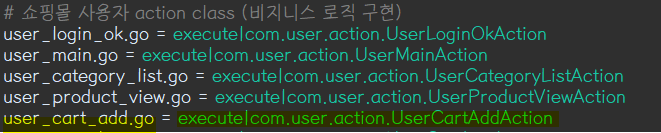
com.user.action 패키지에 UserCartAddAction 클래스 생성
=============================코드=============================
package com.user.action;

import java.io.IOException;
import java.io.PrintWriter;

import javax.servlet.http.HttpServletRequest;
import javax.servlet.http.HttpServletResponse;

import com.shop.controller.Action;
import com.shop.controller.ActionForward;
import com.shop.model.CartDAO;
import com.shop.model.CartDTO;

public class UserCartAddAction implements Action {

	@Override
	public ActionForward execute(HttpServletRequest request, HttpServletResponse response) throws IOException {
		// 제품 상세 내역에서 장바구니 버튼을 클릭하면 폼 태그 안에 있는
		// 데이터들을 shop_cart 테이블에 저장하는 비지니스 로직
		String product_name = request.getParameter("p_name").trim();
		int product_price = Integer.parseInt(request.getParameter("p_price").trim());
		int product_pqty = Integer.parseInt(request.getParameter("p_qty").trim());

		// type = "hidden"으로 넘어온 정보들도 받아 주어야 함
		int product_num = Integer.parseInt(request.getParameter("p_num").trim());
		String product_spec = request.getParameter("p_spec").trim();
		String product_image = request.getParameter("p_image").trim();
		String user_id = request.getParameter("userId").trim();

		CartDTO dto = new CartDTO();
		dto.setCart_pnum(product_num);
		dto.setCart_userid(user_id);
		dto.setCart_pname(product_name);
		dto.setCart_pqty(product_pqty);
		dto.setCart_price(product_price);
		dto.setCart_pspec(product_spec);
		dto.setCart_pimage(product_image);

		CartDAO dao = CartDAO.getInstance();
		int check = dao.insertCart(dto);
CartDAO에 insertCart() 메서드 생성
=============================코드=============================
// shop_cart 테이블에 제품을 저장하는 메서드
	public int insertCart(CartDTO dto) {
		int result = 0, count = 0;

		try {
			openConn();

			sql = "select max(cart_num) from shop_cart";
			pstmt = con.prepareStatement(sql);
			rs = pstmt.executeQuery();

			if(rs.next()) {
				count = rs.getInt(1) + 1;
			}

			sql = "insert into shop_cart values(?, ?, ?, ?, ?, ?, ?, ?)";
			pstmt = con.prepareStatement(sql);
			pstmt.setInt(1, count);
			pstmt.setInt(2, dto.getCart_pnum());
			pstmt.setString(3, dto.getCart_userid());
			pstmt.setString(4, dto.getCart_pname());
			pstmt.setInt(5, dto.getCart_pqty());
			pstmt.setInt(6, dto.getCart_price());
			pstmt.setString(7, dto.getCart_pspec());
			pstmt.setString(8, dto.getCart_pimage());

			result = pstmt.executeUpdate();

		} catch (SQLException e) {
			e.printStackTrace();
		} finally {
			closeConn(rs, pstmt, con);
		}
		return result;
	}
다시 UserCartAddAction 클래스로 가자
=============================코드=============================
package com.user.action;

import java.io.IOException;
import java.io.PrintWriter;

import javax.servlet.http.HttpServletRequest;
import javax.servlet.http.HttpServletResponse;

import com.shop.controller.Action;
import com.shop.controller.ActionForward;
import com.shop.model.CartDAO;
import com.shop.model.CartDTO;

public class UserCartAddAction implements Action {

	@Override
	public ActionForward execute(HttpServletRequest request, HttpServletResponse response) throws IOException {
		// 제품 상세 내역에서 장바구니 버튼을 클릭하면 폼 태그 안에 있는
		// 데이터들을 shop_cart 테이블에 저장하는 비지니스 로직
		String product_name = request.getParameter("p_name").trim();
		int product_price = Integer.parseInt(request.getParameter("p_price").trim());
		int product_pqty = Integer.parseInt(request.getParameter("p_qty").trim());

		// type = "hidden"으로 넘어온 정보들도 받아 주어야 함
		int product_num = Integer.parseInt(request.getParameter("p_num").trim());
		String product_spec = request.getParameter("p_spec").trim();
		String product_image = request.getParameter("p_image").trim();
		String user_id = request.getParameter("userId").trim();

		CartDTO dto = new CartDTO();
		dto.setCart_pnum(product_num);
		dto.setCart_userid(user_id);
		dto.setCart_pname(product_name);
		dto.setCart_pqty(product_pqty);
		dto.setCart_price(product_price);
		dto.setCart_pspec(product_spec);
		dto.setCart_pimage(product_image);

		CartDAO dao = CartDAO.getInstance();
		int check = dao.insertCart(dto);

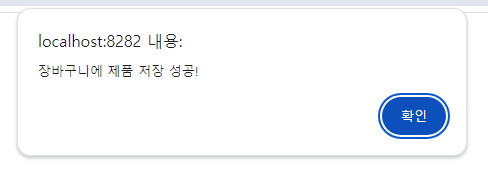
		PrintWriter out = response.getWriter();

		if(check > 0) {
			out.println("<script>");
			out.println("alert('장바구니에 제품 저장 성공!')");
			out.println("location.href='user_cart_list.go'");
			out.println("</script>");
		}else {
			out.println("<script>");
			out.println("alert('장바구니에 제품 저장 실패.....!')");
			out.println("history.back()");
			out.println("</script>");
		}

		return null;
	}

}
=============================실행=============================
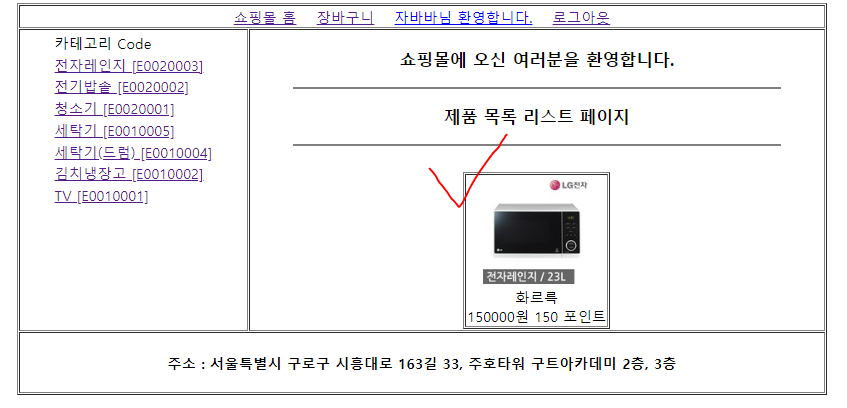
클릭!
장바구니 클릭!
해당 아이디의 장바구니에 담겨있는 상품 리스트들을 보여주는 로직을 작성해보자!
mapping.properties에서 UserCarListAction
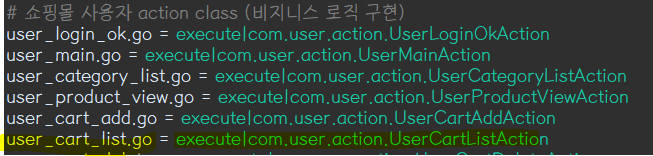
com.user.action 패키지에서 UserCarListAction 클래스 생성
=============================코드=============================
package com.user.action;

import java.io.IOException;
import java.util.List;

import javax.servlet.http.HttpServletRequest;
import javax.servlet.http.HttpServletResponse;
import javax.servlet.http.HttpSession;

import com.shop.controller.Action;
import com.shop.controller.ActionForward;
import com.shop.model.CartDAO;
import com.shop.model.CartDTO;

public class UserCartListAction implements Action {

	@Override
	public ActionForward execute(HttpServletRequest request, HttpServletResponse response) throws IOException {
		// shop_cart 테이블에서 세션에 저장된 사용자 아이디에
		// 해당하는 장바구니 목록을 조회하여 view page로 이동시키는 비지니스 로직
		HttpSession session = request.getSession();

		String user_id = (String)session.getAttribute("UserId");

		CartDAO dao = CartDAO.getInstance();
		List<CartDTO> cartList = dao.getCartList(user_id);   // 아이디에 해당하는 장바구니 목록을 가져와야 함
		request.setAttribute("CartList", cartList);

		ActionForward forward = new ActionForward();
		forward.setRedirect(false);
		forward.setPath("user/user_cart_list.jsp");

		return forward;
	}

}
CartDAO에서 getCarList() 메서드 생성
=============================코드=============================
// shop_cart 테이블의 사용자 아이디에 해당하는 장바구니 목록을 조회하는 메서드
	public List<CartDTO> getCartList(String user_id) {
		List<CartDTO> list = new ArrayList<CartDTO>();

		try {
			openConn();

			sql = "select * from shop_cart where cart_userid = ? order by cart_num desc";
			pstmt = con.prepareStatement(sql);
			pstmt.setString(1, user_id);
			rs = pstmt.executeQuery();

			while(rs.next()) {
				CartDTO dto = new CartDTO();
				dto.setCart_num(rs.getInt("cart_num"));
				dto.setCart_pnum(rs.getInt("cart_pnum"));
				dto.setCart_userid(rs.getString("cart_userid"));
				dto.setCart_pname(rs.getString("cart_pname"));
				dto.setCart_pqty(rs.getInt("cart_pqty"));
				dto.setCart_price(rs.getInt("cart_price"));
				dto.setCart_pspec(rs.getString("cart_pspec"));
				dto.setCart_pimage(rs.getString("cart_pimage"));

				list.add(dto);
			}

		} catch (SQLException e) {
			e.printStackTrace();
		} finally {
			closeConn(rs, pstmt, con);
		}
		return list;
	}
user 폴더에서 user_cart_list.jsp 생성
=============================코드=============================
<%@ page language="java" contentType="text/html; charset=UTF-8"
pageEncoding="UTF-8"%>
<%@ taglib prefix="c" uri="http://java.sun.com/jsp/jstl/core" %>
<%@ taglib prefix="fmt" uri="http://java.sun.com/jsp/jstl/fmt" %>
<!DOCTYPE html>
<html>
<head>
<meta charset="UTF-8">
<title>Insert title here</title>
<style type="text/css">
.center {
text-align: center;
}
</style>
</head>
<body>
<jsp:include page="../include/user_header.jsp" />
<table border = "1" width = "700" align = "center">
<tr>
<td colspan = "7" align = "center">
<h3>장바구니 내역</h3>
</td>
</tr>
<tr>
<th width = "8%">주문No.</th>
<th width = "8%">상품No.</th>
<th width = "13%">상품명</th>
<th width = "15%">수 량</th>
<th width = "15%">단 가</th>
<th width = "15%">합계액</th>
<th width = "10%">삭 제</th>
</tr>
<c:set var = "list" value = "${CartList }" />
<c:if test="${!empty list }">
<c:forEach items = "${list }" var = "dto">
<tr>
<td class = "center">${dto.getCart_num() }</td>
<td class = "center">${dto.getCart_pnum() }</td>
<td class = "center">
<img src = "<%=request.getContextPath() %>/upload/${dto.getCart_pimage() }" width = "50" height = "50">
<br/>
${dto.getCart_pname() }
</td>
<td class = "center">
<input type = "number" min = "1" max = "99" value = "${dto.getCart_pqty() }">
</td>
<td>
<fmt:formatNumber value = "${dto.getCart_price() }" />원
</td>
<td class = "center">
<c:set var = "price" value = "${dto.getCart_price() }" />
<c:set var = "amount" value = "${dto.getCart_pqty() }" />
<fmt:formatNumber value = "${price * amount }" />원
</td>
<td class = "center">
<a href = "<%=request.getContextPath() %>/user_cart_delete.go?num=${dto.getCart_num() }">
[삭 제]
</a>
</td>
</tr>
<c:set var = "total" value = "${total + (price * amount) }" />
</c:forEach>
<tr>
<td colspan = "5" align = "right">
<b> <font color = "red">장바구니 총액 : <fmt:formatNumber value = "${total }" />원</font> </b>
</td>
<td colspan = "2" align = "center">
<a href = "#">[결제하기]</a>
<a href = "javascript:history.go(-2);">[계속 쇼핑]</a>
</td>
</tr>
</c:if>
<c:if test="${empty list }">
<tr>
<td colspan = "7" align = "center">
<h3>장바구니가 비어 있습니다...</h3>
</td>
</tr>
</c:if>
</table>
<jsp:include page="../include/user_footer.jsp" />
</body>
</html>=============================실행=============================
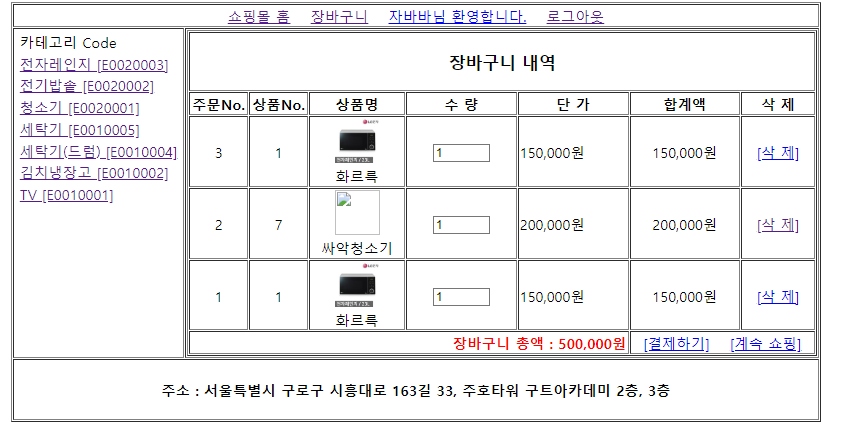
장바구니에 담긴 것을 확인할 수 있음!
장바구니를 삭제하는 로직을 만들어보자!!

mapping.properties에 user_cart_delete.go 작성
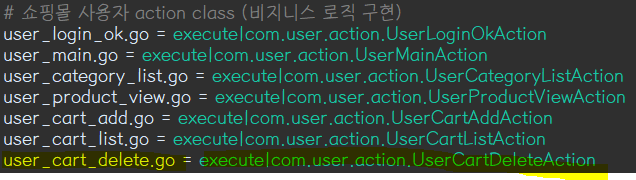
UserCartDeleteAction 클래스 생성
=============================코드=============================
package com.user.action;

import java.io.IOException;
import java.io.PrintWriter;

import javax.servlet.http.HttpServletRequest;
import javax.servlet.http.HttpServletResponse;

import com.shop.controller.Action;
import com.shop.controller.ActionForward;
import com.shop.model.CartDAO;

public class UserCartDeleteAction implements Action {

	@Override
	public ActionForward execute(HttpServletRequest request, HttpServletResponse response) throws IOException {
		// get 방식으로 넘어온 장바구니 번호에 해당하는 장바구니 내역을 shop_cart 테이블에서 삭제하는 비지니스 로직
		int cart_no = Integer.parseInt(request.getParameter("num").trim());

		CartDAO dao = CartDAO.getInstance();
		int check = dao.deleteCart(cart_no);

		PrintWriter out = response.getWriter();
=============================코드=============================
// 장바구니 번호에 해당하는 장바구니 목록을 shop_cart 테이블에서 삭제하는 메서드
	public int deleteCart(int cart_no) {
		int result = 0;

		try {
			openConn();

			sql = "delete from shop_cart where cart_num = ?";
			pstmt = con.prepareStatement(sql);
			pstmt.setInt(1, cart_no);
			result = pstmt.executeUpdate();

		} catch (SQLException e) {
			e.printStackTrace();
		} finally {
			closeConn(pstmt, con);
		}
		return result;
	}
다시 UserCartDeleteAction 클래스로 가자
=============================코드=============================
package com.user.action;

import java.io.IOException;
import java.io.PrintWriter;

import javax.servlet.http.HttpServletRequest;
import javax.servlet.http.HttpServletResponse;

import com.shop.controller.Action;
import com.shop.controller.ActionForward;
import com.shop.model.CartDAO;

public class UserCartDeleteAction implements Action {

	@Override
	public ActionForward execute(HttpServletRequest request, HttpServletResponse response) throws IOException {
		// get 방식으로 넘어온 장바구니 번호에 해당하는 장바구니 내역을 shop_cart 테이블에서 삭제하는 비지니스 로직
		int cart_no = Integer.parseInt(request.getParameter("num").trim());

		CartDAO dao = CartDAO.getInstance();
		int check = dao.deleteCart(cart_no);

		PrintWriter out = response.getWriter();

		if(check > 0) {
			dao.updateSequence(cart_no);
CartDAO에 udateSequence() 메서드 생성
=============================코드=============================
// 장바구니 목록 삭제 시 장바구니 번호를 새작업하는 메서드
	public void updateSequence(int cart_no) {

		try {
			openConn();

			sql = "update shop_cart set cart_num = cart_num -1 where cart_num > ?";
			pstmt = con.prepareStatement(sql);
			pstmt.setInt(1, cart_no);
			pstmt.executeUpdate();

		} catch (SQLException e) {
			e.printStackTrace();
		} finally {
			closeConn(pstmt, con);
		}
	}
다시 클래스로 돌아가자
=============================코드=============================
package com.user.action;

import java.io.IOException;
import java.io.PrintWriter;

import javax.servlet.http.HttpServletRequest;
import javax.servlet.http.HttpServletResponse;

import com.shop.controller.Action;
import com.shop.controller.ActionForward;
import com.shop.model.CartDAO;

public class UserCartDeleteAction implements Action {

	@Override
	public ActionForward execute(HttpServletRequest request, HttpServletResponse response) throws IOException {
		// get 방식으로 넘어온 장바구니 번호에 해당하는 장바구니 내역을 shop_cart 테이블에서 삭제하는 비지니스 로직
		int cart_no = Integer.parseInt(request.getParameter("num").trim());

		CartDAO dao = CartDAO.getInstance();
		int check = dao.deleteCart(cart_no);

		PrintWriter out = response.getWriter();

		if(check > 0) {
			dao.updateSequence(cart_no);
			out.println("<script>");
			out.println("alert('장바구니 삭제 성공!')");
			out.println("location.href='user_cart_list.go'");
			out.println("</script>");
		} else {
			out.println("<script>");
			out.println("alert('장바구니 삭제 실패....')");
			out.println("history.back()");
			out.println("</script>");
		}

		return null;
	}

}
=============================실행=============================
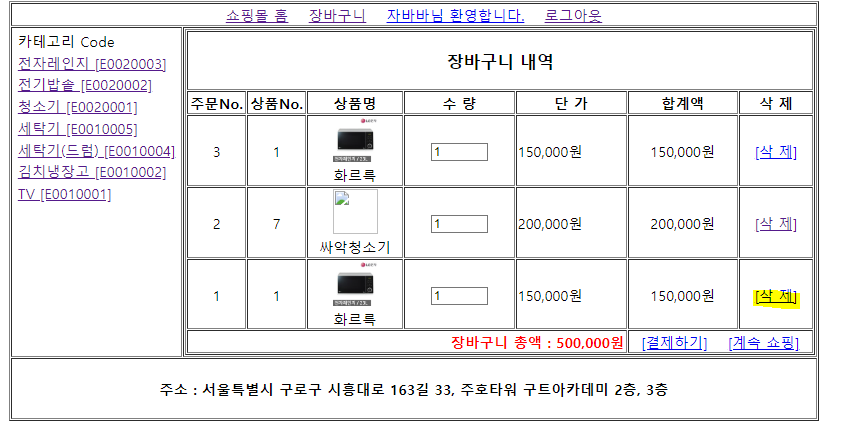
삭제 클릭
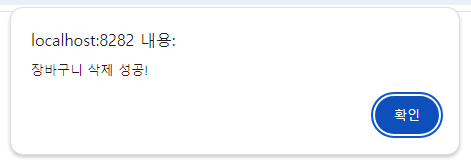
확인 클릭
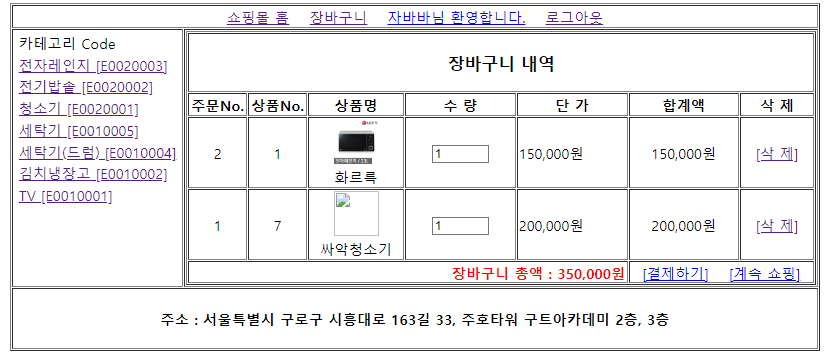
삭제된 것을 확인할 수 있음
이제 사용자 아이디를 로그아웃 했을 때 로직을 작성해보자
include 폴더에 user_header.jsp 파일 내의 로그아웃을 mapping.properties로 작성

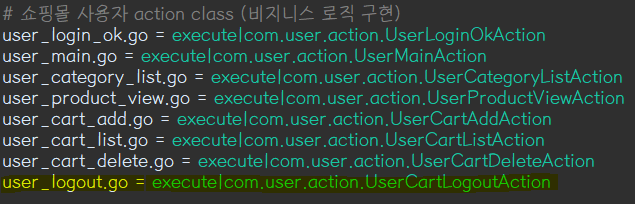
com.user.action 패키지에 UserCartLogoutAction 클래스 생성
=============================코드=============================
package com.user.action;

import java.io.IOException;

import javax.servlet.http.HttpServletRequest;
import javax.servlet.http.HttpServletResponse;
import javax.servlet.http.HttpSession;

import com.shop.controller.Action;
import com.shop.controller.ActionForward;

public class UserCartLogoutAction implements Action {

	@Override
	public ActionForward execute(HttpServletRequest request, HttpServletResponse response) throws IOException {

		HttpSession session = request.getSession();
		session.invalidate();

		ActionForward forward = new ActionForward();
		forward.setRedirect(false);
		forward.setPath("main.jsp");

		return forward;
	}

}
=============================실행=============================
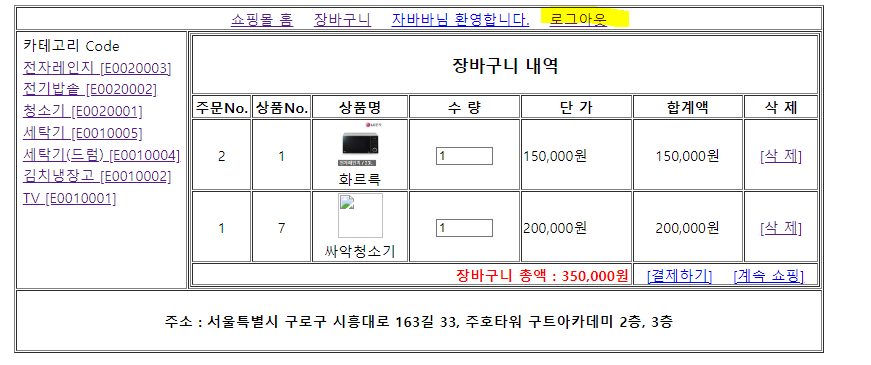
로그아웃 클릭!
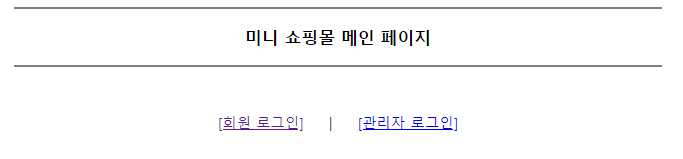
아이디 세션이 종료되며 메인화면으로 돌아온 것을 확인할 수 있음!