웹 브라우저에서 서블릿으로 데이터를 전송하는 전송 방식(2가지)
1. get 방식
2. post 방식
- 서블릿에 데이터를 전송할 때는 TCP/IP 프로토콜 데이터의 head 영역에 숨겨진 채 전송이 됨.
- 보안에 유리함.
- 전송 데이터의 용량이 무제한임.
- 처리 속도가 get 방식보다 느림.
- 서블릿에서는 doPost() 메서드에서 전송된 데이터를 처리함.
- post 방식 사용 시 꼭 request.setCharacterEncoding("UTF-8"); 을 dopost() 메서등 안에 적어야 함! (한글 깨짐 오류 방지)
Ex04.jsp 생성
=============================코드=============================
<%@ page language="java" contentType="text/html; charset=UTF-8"
pageEncoding="UTF-8"%>
<!DOCTYPE html>
<html>
<head>
<meta charset="UTF-8">
<title>Insert title here</title>
</head>
<body>
<div align = "center">
<hr width = "30%" color = "red">
<h2>회원 정보 입력 폼 페이지</h2>
<hr width = "30%" color = "red">
<br/> <br/>
<form method = "post" action = "join">
<table border = "1">
<tr>
<th>회원 아이디</th>
<td>
<input type = "text" name = "id">
</td>
</tr>
<tr>
<th>회원 비밀번호</th>
<td>
<input type = "password" name = "pwd">
</td>
</tr>
<tr>
<th>회원 이름</th>
<td>
<input type = "text" name = "name">
</td>
</tr>
<tr>
<th>회원 연락처</th>
<td>
<input type = "text" name = "phone">
</td>
</tr>
<tr>
<th>회원 주소</th>
<td>
<input type = "text" name = "addr">
</td>
</tr>
<tr>
<th>회원 취미</th>
<td>
<%-- type = "checkbox" 인 경우에는 name 속성에 들어있는
hobby 라는 이름이 변수명이 아니라 배열명이 된다.
==> 데이터가 여러 개 선택되어 들어가기 때문에 --%>
<input type = "checkbox" name = "hobby" value = "여행">여행
<input type = "checkbox" name = "hobby" value = "독서">독서
<input type = "checkbox" name = "hobby" value = "운동">운동 <br/>
<input type = "checkbox" name = "hobby" value = "게임">게임
<input type = "checkbox" name = "hobby" value = "잠자기">잠자기
</td>
</tr>
<tr>
<td colspan = "2" align = "center">
<input type = "submit" value = "회원가입">
<input type = "reset" value = "다시 작성">
</td>
</tr>
</table>
</form>
</div>
</body>
</html>=============================실행=============================
join만 뜸!
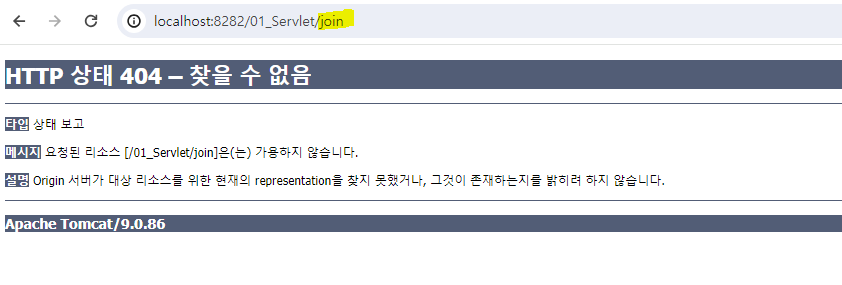
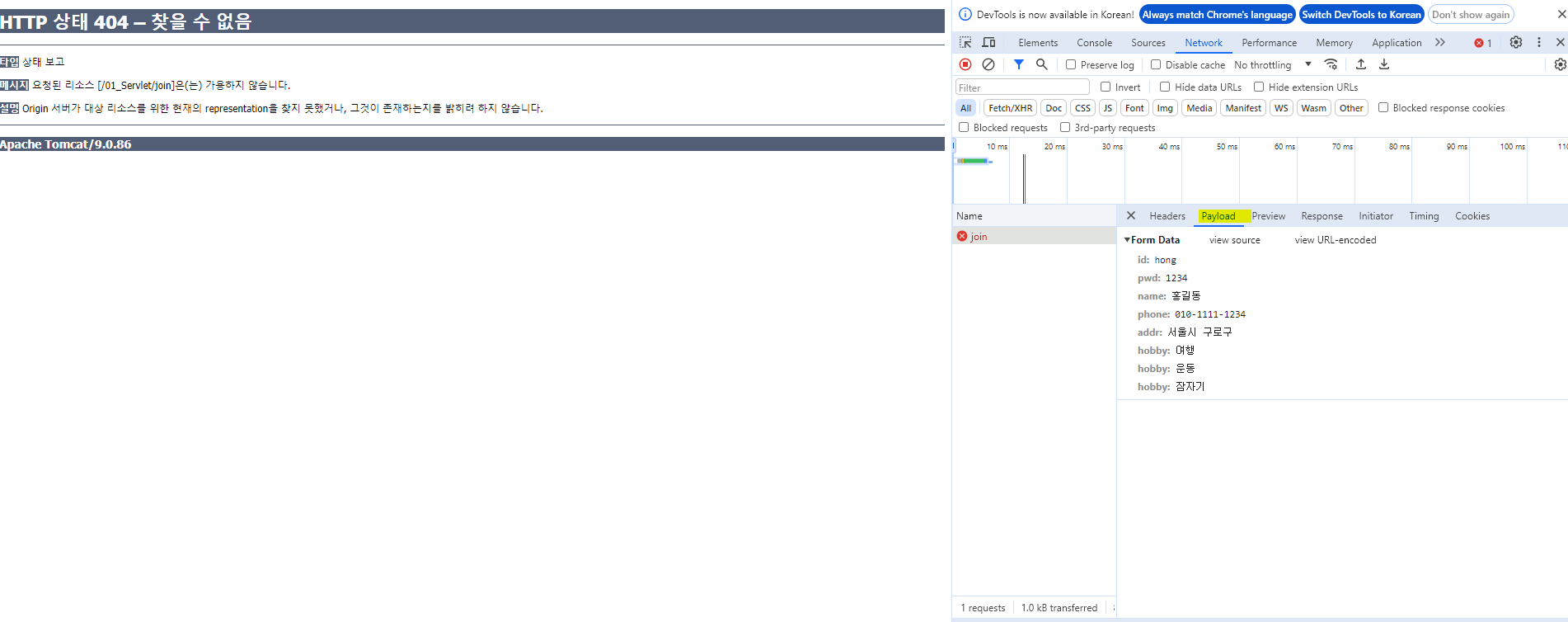
url 창에 보이지 않고 Network -> Payload창에 뜨게 됨!!
이전 예제1과 예제2는 url에 떴음
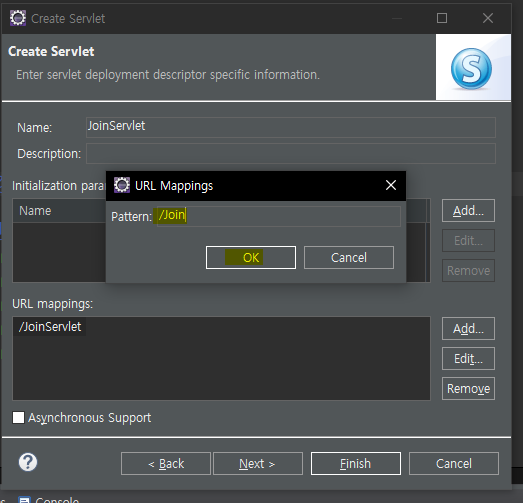
servlet을 생성!
method = "post"이기 때문에 doget이 아닌 dopost에 코드 작성!
=============================코드=============================
package goott;
import java.io.IOException;
import java.io.PrintWriter;
import javax.servlet.ServletException;
import javax.servlet.annotation.WebServlet;
import javax.servlet.http.HttpServlet;
import javax.servlet.http.HttpServletRequest;
import javax.servlet.http.HttpServletResponse;
@WebServlet("/join")
public class JoinServlet extends HttpServlet {
private static final long serialVersionUID = 1L;
public JoinServlet() {
super();
}
protected void doGet(HttpServletRequest request, HttpServletResponse response) throws ServletException, IOException {
}
protected void doPost(HttpServletRequest request, HttpServletResponse response) throws ServletException, IOException {
// 입력 폼 페이지에서 method = "post" 인 경우 데이터를 처리하는 메서드
request.setCharacterEncoding("UTF-8");
response.setContentType("text/html; charset = UTF-8");
// 1단계 : Ex04.jsp 페이지에서 넘어온 데이터들을 받아 주자
String member_id = request.getParameter("id");
String member_pwd = request.getParameter("pwd");
String member_name = request.getParameter("name");
String member_phone = request.getParameter("phone");
String member_addr = request.getParameter("addr");
// 여러 개의 데이터가 저장되어 배열로 넘어오는 경우
String[] hobbies = request.getParameterValues("hobby");
// 2단계 : 웹 브라우저에 요청한 결과를 보여주자
PrintWriter out = response.getWriter();
out.println("<html>");
out.println("<head></head>");
out.println("<bodyl>");
out.println("<div align = 'center'>");
out.println("<h2>회원 정보</h2>");
out.println("<table border = '1'>");
out.println("<tr>");
out.println("<th>회원 아이디</th>");
out.println("<td>" + member_id + "</td>");
out.println("</tr>");
out.println("<tr>");
out.println("<th>회원 비밀번호</th>");
out.println("<td>" + member_pwd + "</td>");
out.println("</tr>");
out.println("<tr>");
out.println("<th>회원 이름</th>");
out.println("<td>" + member_name + "</td>");
out.println("</tr>");
out.println("<tr>");
out.println("<th>회원 연락처</th>");
out.println("<td>" + member_phone + "</td>");
out.println("</tr>");
out.println("<tr>");
out.println("<th>회원 주소</th>");
out.println("<td>" + member_addr + "</td>");
out.println("</tr>");
out.println("<tr>");
out.println("<th>회원 취미</th>");
out.println("<td>");
for(int i = 0; i < hobbies.length; i++) {
out.println(hobbies[i] + " ");
}
out.println("</td>");
out.println("</tr>");
out.println("</table>");
out.println("</div>");
out.println("</body>");
out.println("</html>");
}
}
=============================실행=============================
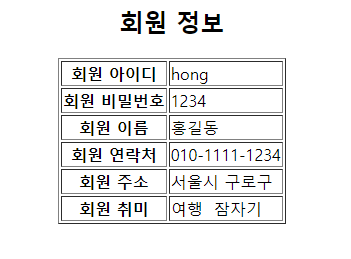
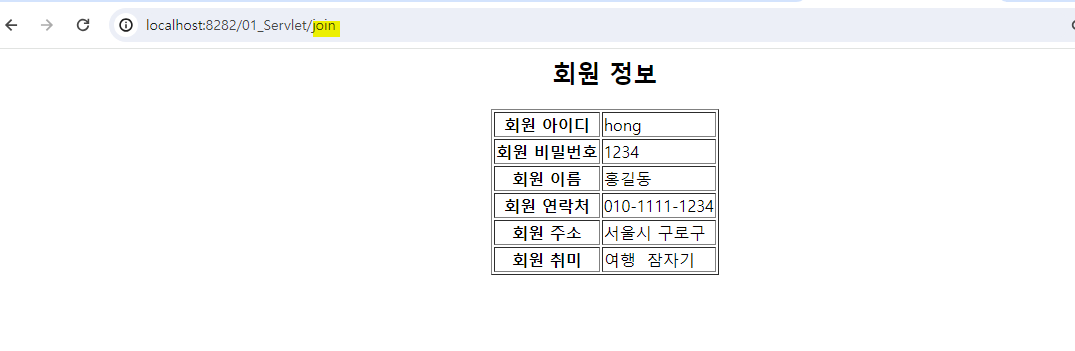
join 다음 값이 보이지 않음!