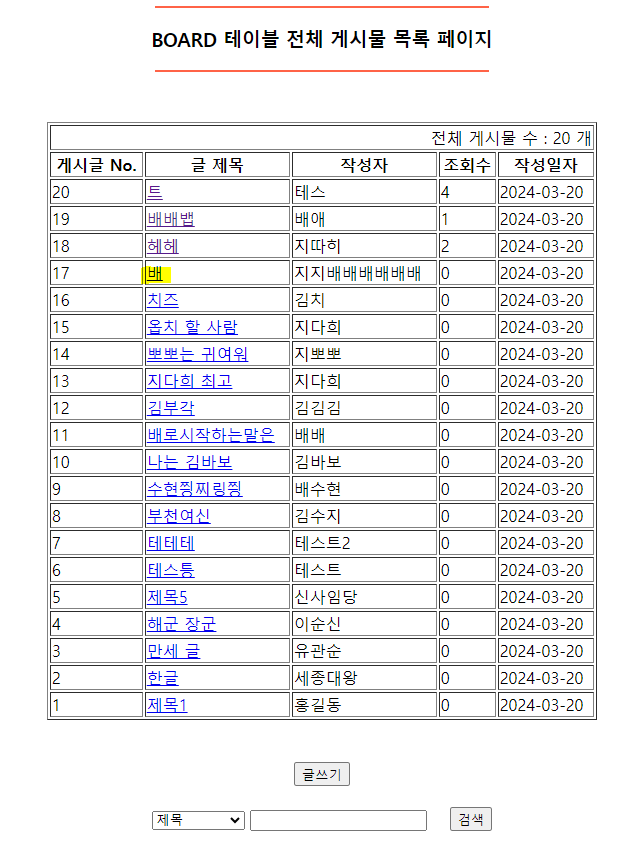
board_list.jsp에서 글제목에 a태그를 생성하여 제목 클릭 시 상세정보를 조회할 수 있도록 만들어보자!
=============================코드=============================
<%@page import="com.board.model.BoardDTO"%>
<%@page import="java.util.List"%>
<%@ page language="java" contentType="text/html; charset=UTF-8"
pageEncoding="UTF-8"%>
<%
List<BoardDTO> boards = (List<BoardDTO>)request.getAttribute("List");
int listCount =(int)request.getAttribute("Count");
%>
<!DOCTYPE html>
<html>
<head>
<meta charset="UTF-8">
<title>Insert title here</title>
</head>
<body>
<div align = "center">
<hr width = "30%" color = "tomato">
<h3>BOARD 테이블 전체 게시물 목록 페이지</h3>
<hr width = "30%" color = "tomato">
<br/> <br/>
<table border = "1" width = "450">
<tr>
<td colspan = "5" align = "right">
전체 게시물 수 : <%=listCount %> 개
</td>
</tr>
<tr>
<th>게시글 No.</th> <th>글 제목</th> <th>작성자</th> <th>조회수</th> <th>작성일자</th>
</tr>
<%
if(boards.size() != 0) {
for(BoardDTO dto : boards) {
%>
<tr>
<td><%=dto.getBoard_no() %></td>
<td>
<a href = "<%=request.getContextPath() %>/content.go?no=<%=dto.getBoard_no() %>">
<%=dto.getBoard_title() %></a>
</td>
<td><%=dto.getBoard_writer() %></td>
<td><%=dto.getBoard_hit() %></td>
<td><%=dto.getBoard_date().substring(0,10) %></td>
</tr>
<% } // for문 end
}else {
// 게시물 전체 목록이 없는 경우
%>
<tr>
<td colspan = "5" align = "center">
<h3>전체 게시물 목록이 없습니다...</h3>
</td>
</tr>
<% } %>
</table>
<br/><br/>
<input type = "button" value = "글쓰기" onclick = "location.href = 'view/board_write.jsp'">
<br/><br/>
<%-- 검색 관련 처리 부분 --%>
<form method = "post" action = "<%=request.getContextPath() %>/search.go">
<select name = "field">
<option value = "title">제목</option>
<option value = "cont">내용</option>
<option value = "title_cont">제목 + 내용</option>
<option value = "writer">작성자</option>
</select>
<input type = "text" name = "keyword">
<input type = "submit" value = "검색">
</form>
</div>
</body>
</html>content.go 서블릿을 만들자!
=============================코드=============================
package com.board.controller;

import java.io.IOException;
import javax.servlet.ServletException;
import javax.servlet.annotation.WebServlet;
import javax.servlet.http.HttpServlet;
import javax.servlet.http.HttpServletRequest;
import javax.servlet.http.HttpServletResponse;

import com.board.model.BoardDAO;


@WebServlet("/content.go")
public class ContentServlet extends HttpServlet {
	private static final long serialVersionUID = 1L;


    public ContentServlet() {
        super();

    }


	protected void service(HttpServletRequest request, HttpServletResponse response) throws ServletException, IOException {
		// get방식으로 넘어온 글번호에 해당하는 게시글을 board 테이블에서 조회하여
		// 게시글 상세정보를 view page로 이동시키는 비즈니스 로직

		int board_no = Integer.parseInt(request.getParameter("no").trim());

	    BoardDAO dao = BoardDAO.getInstance();

	   // 조회수를 증가시켜주는 메서드 호출
	    dao.readCount(board_no);

       // 글번호에 해당하는 게시글의 상세내역을 조회하는 메서드 호출
	   dao.contentBoard(board_no);
	}

}
BoardDAO에서
readCount() 메서드, contentBoard() 메서드를 만들자
=============================코드=============================
// board 테이블의 게시글 번호에 해당하는 게시글의 조회수를 증가시켜주는 메서드
	public void readCount(int num) {

		try {
			openConn();

			sql = "update board set board_hit = board_hit + 1 where board_no = ?";
			pstmt = con.prepareStatement(sql);
			pstmt.setInt(1, num);

			pstmt.executeUpdate();

		} catch (SQLException e) {
			e.printStackTrace();

		} finally {
			closeConn(pstmt, con);
		}
	}

 // 글번호에 해당하는 게시글을 조회하는 메서드
	public BoardDTO contentBoard(int no) {
		BoardDTO dto = null;

		try {
			openConn();

			sql = "select * from board where board_no = ?";
			pstmt = con.prepareStatement(sql);
			pstmt.setInt(1, no);

			rs = pstmt.executeQuery();

			if(rs.next()) {
				dto = new BoardDTO();

				dto.setBoard_no(rs.getInt("board_no"));
				dto.setBoard_writer(rs.getString("board_writer"));
				dto.setBoard_title(rs.getString("board_title"));
				dto.setBoard_cont(rs.getString("board_cont"));
				dto.setBoard_pwd(rs.getString("board_pwd"));
				dto.setBoard_hit(rs.getInt("board_hit"));
				dto.setBoard_date(rs.getString("board_date"));
				dto.setBoard_update(rs.getString("board_update"));

			}

		} catch (SQLException e) {
			e.printStackTrace();

		} finally {
			closeConn(rs, pstmt, con);
		}
		return dto;
	}
다시 서블릿으로 가자
=============================코드=============================
package com.board.controller;

import java.io.IOException;
import javax.servlet.ServletException;
import javax.servlet.annotation.WebServlet;
import javax.servlet.http.HttpServlet;
import javax.servlet.http.HttpServletRequest;
import javax.servlet.http.HttpServletResponse;

import com.board.model.BoardDAO;
import com.board.model.BoardDTO;


@WebServlet("/content.go")
public class ContentServlet extends HttpServlet {
	private static final long serialVersionUID = 1L;


    public ContentServlet() {
        super();

    }


	protected void service(HttpServletRequest request, HttpServletResponse response) throws ServletException, IOException {
		// get방식으로 넘어온 글번호에 해당하는 게시글을 board 테이블에서 조회하여
		// 게시글 상세정보를 view page로 이동시키는 비즈니스 로직

		int board_no = Integer.parseInt(request.getParameter("no").trim());

	    BoardDAO dao = BoardDAO.getInstance();
// -----------------여기서부터 작성--------------------
	   // 조회수를 증가시켜주는 메서드 호출
	   dao.readCount(board_no);

	   // 글번호에 해당하는 게시글의 상세내역을 조회하는 메서드 호출
	   BoardDTO content = dao.contentBoard(board_no);

	   request.setAttribute("Content", content);

	   request.getRequestDispatcher("view/board_content.jsp").forward(request, response);
	}

}
글 제목 클릭 시 보이는 화면을 만들자!
view -> board_content.jsp 생성
=============================코드=============================
<%@page import="com.board.model.BoardDTO"%>
<%@ page language="java" contentType="text/html; charset=UTF-8"
    pageEncoding="UTF-8"%>
<%
	BoardDTO cont = (BoardDTO)request.getAttribute("Content");
%>
<!DOCTYPE html>
<html>
<head>
<meta charset="UTF-8">
<title>Insert title here</title>
</head>
<body>

	<div align = "center">
		<hr width = "30%" color = "green">
			<h3>BOARD 테이블 상세 정보</h3>
		<hr width = "30%" color = "green">
		<br/> <br/>

		<table border = "1"  width = "350">
			<tr>
				<th>작성자 No.</th>
				<td>
					<%=cont.getBoard_no() %>
				</td>
			</tr>

			<tr>
				<th>작성자</th>
				<td>
					<%=cont.getBoard_writer() %>
				</td>
			</tr>

			<tr>
				<th>제목</th>
				<td>
					<%=cont.getBoard_title() %>
				</td>
			</tr>

			<tr>
				<th>글 내용</th>
				<td>
					<%=cont.getBoard_cont() %>
				</td>
			</tr>

			<tr>
				<th>비밀번호</th>
				<td>
					<%
                  if(cont.getBoard_pwd().length() != 0){
                     for(int i=1; i<cont.getBoard_pwd().length(); i++){
               %>
                           *
               <%      }
                  } %>
				</td>
			</tr>

			<tr>
				<th>조회수</th>
				<td>
					<%=cont.getBoard_hit() %>
				</td>
			</tr>

			<tr>
				<th>작성일</th>
				<td>
					<%=cont.getBoard_date() %>
				</td>
			</tr>

			<tr>
				<th>수정사항</th>
				<td>
					<%=cont.getBoard_update() %>
				</td>
			</tr>
		</table>
	</div>

</body>
</html>
main.jsp 에서 실행
=============================실행=============================
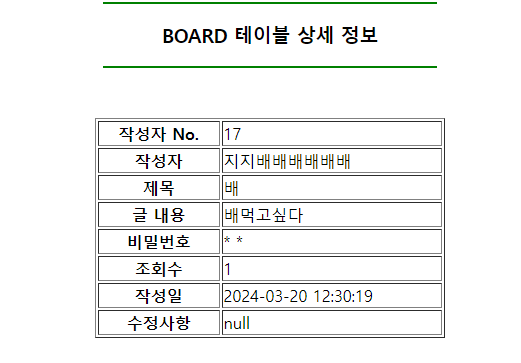
글 제목 '배' 클릭