기본적인 JSTL 태그 ==> 출력을 할 때는 EL 언어를 사용함.
- 변수 선언 태그(set)
==> 변수를 생성하거나, 기존 변수의 값을 덮어쓸 때 사용하는 태그.
형식)<c:set var="변수명" value="값"> </c:set>
예) <c:set var="su" value="20" />
==> int su = 20;
<c:set var="str" value="Hello" />
==> String str = "Hello";
- 출력 태그(out)
형식)<c:out value="변수명" />
예) <c:out value="str" />
- 삭제 태그(remove)
==> 변수에 저장된 값을 제거할 때 사용하는 태그.
형식)<c:remove var="변수명" />
예) <c:remove var="str" />
- 조건 처리 태그(if)
==> 조건식이 참인 경우 실행하는 태그.
==> 주의) else문은 없음.
형식)<c:if test="조건식" var="변수명" />
- 다중 처리 태그(choose)
==> 여러 가지 조건에 따라 다른 작업을 해야 할 필요가 있는 경우에 사용하는 태그.
==> 자바에서의 switch~case문과 유사함.
형식)
	     <c:choose>
	       	<c:when test="조건식1">
	       		조건식1이 참인 경우 실행 문장 </c:when>
	       	<c:when test="조건식2">
	       		조건식2이 참인 경우 실행 문장 </c:when>
	       	<c:when test="조건식3">
	       		조건식3이 참인 경우 실행 문장 </c:when>
	       	<c:otherwise>
	       		  상기의 조건식 이외의 경우 실행 문장 </c:otherwise>
</c:choose>- 반복 태그(forEach)
==> 반복적인 작업을 해야 하는 경우에 사용하는 태그.
==> 자바에서의 for문과 유사함.
형식)
	<c:forEach begin="시작값" end="마지막값" step="증감값" var="변수명">
	       			반복 실행 문장
	</c:forEach>
형식) <c:forEach items="객체명" var="변수명">
예시1
=============================코드=============================
<%@ page language="java" contentType="text/html; charset=UTF-8"
pageEncoding="UTF-8"%>
<%@ taglib prefix="c" uri="http://java.sun.com/jsp/jstl/core" %>
<!DOCTYPE html>
<html>
<head>
<meta charset="UTF-8">
<title>Insert title here</title>
</head>
<body>
<h2>JSTL의 기본적인 태그들</h2>
<%-- 1. 변수 선언 태그(set) --%>
<c:set var = "str" value = "Hello JSTL!!" />
<%-- 2. 출력 태그(out) --%>
JSTL 값 출력 >>> <c:out value="str" /> <br/>
JSTL 값 출력 >>> <c:out value="${str }" /> <br/>
<%-- 3. 삭제 태그(remove) --%>
<c:remove var="str" />
삭제 후 값 출력 >>> <c:out value="${str }" /> <br/>
<hr>
<%-- 4. 조건 처리 태그(if) --%>
<c:if test="${10 > 5 }" var = "k" />
조건식 결과 >>> <c:out value="${k }" /> <br/>
<hr>
<%-- 5. 다중 처리 태그(choose) --%>
<c:set var = "grade" value = "88" />
<c:choose>
<c:when test="${grade >= 90 }">
결과 : A학점입니다.
</c:when>
<c:when test="${grade >= 80 }">
결과 : B학점입니다.
</c:when>
<c:when test="${grade >= 70 }">
결과 : C학점입니다.
</c:when>
<c:when test="${grade >= 60 }">
결과 : D학점입니다.
</c:when>
<c:otherwise>
결과 : F학점입니다.
</c:otherwise>
</c:choose>
<hr>
<%-- 6. 반복 태그(forEach) --%>
<c:forEach begin = "1" end = "10" var = "i">
${i }
</c:forEach>
<hr>
<%-- <c:forEach items="객체명" var="변수명"> --%>
<%
String[] str = {"홍길동", "세종대왕", "유관순", "이순신", "신사임당"};
pageContext.setAttribute("List", str);
%>
결과 >>> <c:forEach items="${List }" var = "s">
${s }
</c:forEach>
</body>
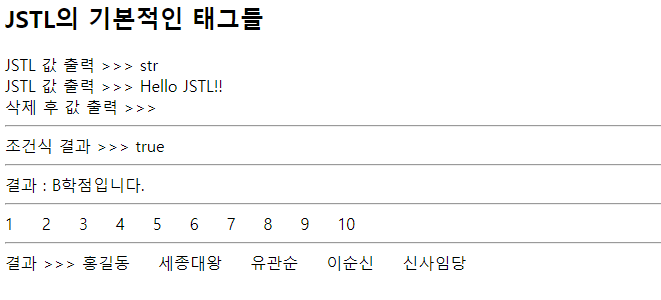
</html>=============================실행=============================