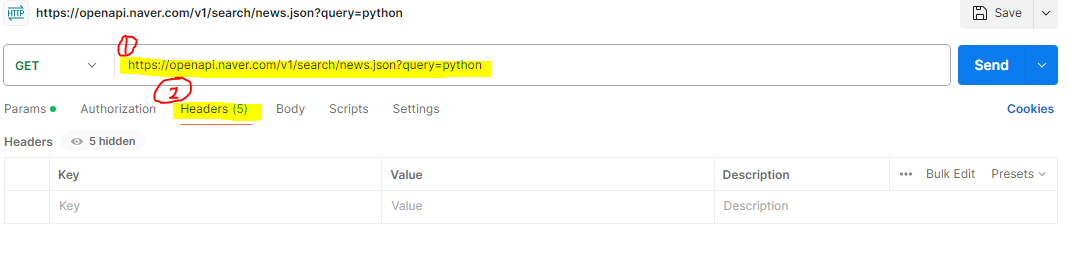
네이버 오픈 API
https://developers.naver.com/main/
위 홈페이지에서 내 아이디와 비번 메모해놓기
디자인하고 빌드하고 테스트하고 반복하기 위한 API 플랫폼
https://www.postman.com/
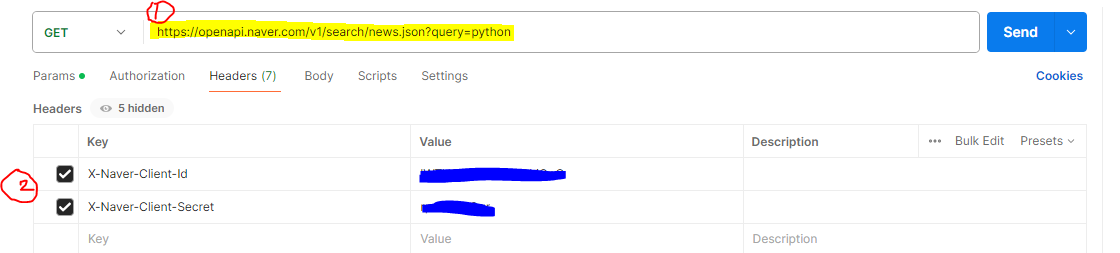
1번 : 네이버 오픈 API 주소 넣기
2번 : 네이버 오픈 API의 아이디와 비번 넣기!
파란색 버튼의 Send 누르기!
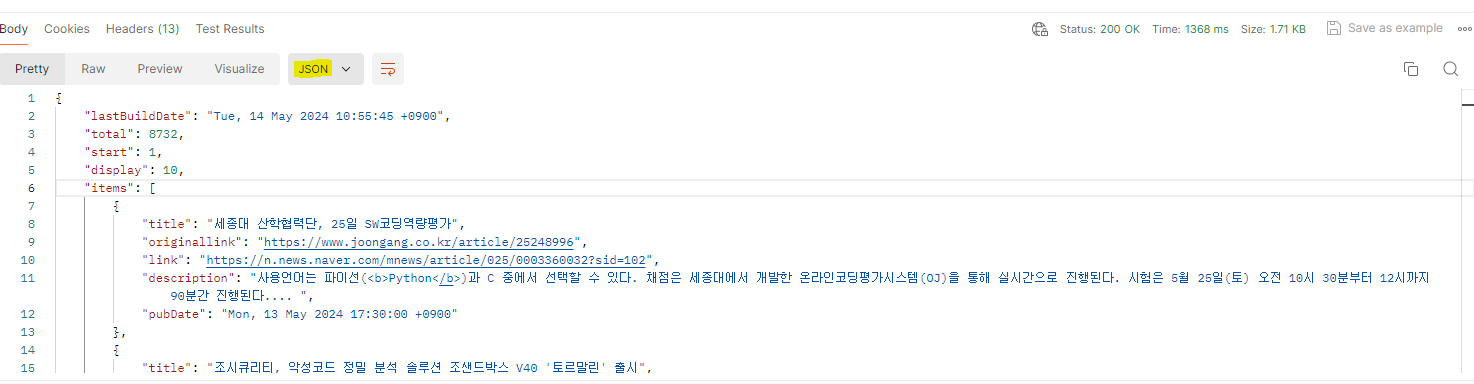
JSON 형태로 딕셔너리가 보여짐
=============================코드=============================
import json

data = """

    {
        "id":"01", "language":"java", "edition":"third", "author":"다히",
        "history":
            [{
                "date":"2024-05-14",
                "item":"iPhone"
            },
            {
                "date":"2024-05-14",
                "item":"Android"
            }]


    }

"""

json_data = json.loads(data)
print(json_data)
=============================실행=============================

각 key에 해당되는 value값이 출력됨
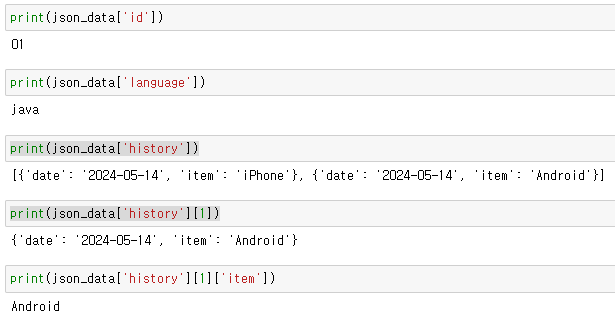
맨 위에서 가져온 API를 저장해보자
=============================코드=============================
import json

# 네이버 API를 이용하여 검색한 뉴스 리스트
data = """

    {
    "lastBuildDate": "Tue, 14 May 2024 10:55:45 +0900",
    "total": 8732,
    "start": 1,
    "display": 10,
    "items": [
        {
            "title": "세종대 산학협력단, 25일 SW코딩역량평가",
            "originallink": "https://www.joongang.co.kr/article/25248996",
            "link": "https://n.news.naver.com/mnews/article/025/0003360032?sid=102",
            "description": "사용언어는 파이선(<b>Python</b>)과 C 중에서 선택할 수 있다. 채점은 세종대에서 개발한 온라인코딩평가시스템(OJ)을 통해 실시간으로 진행된다. 시험은 5월 25일(토) 오전 10시 30분부터 12시까지 90분간 진행된다.... ",
            "pubDate": "Mon, 13 May 2024 17:30:00 +0900"
        },
        {
            "title": "조시큐리티, 악성코드 정밀 분석 솔루션 조샌드박스 V40 '토르말린' 출시",
            "originallink": "https://www.dailysecu.com/news/articleView.html?idxno=155917",
            "link": "https://www.dailysecu.com/news/articleView.html?idxno=155917",
            "description": "파이썬(<b>Python</b>)은 빠른 프로토타이핑을 가능하게 하며, 파이인스톨러를 사용하면 파이썬 사전 설치 없이도 윈도에서 파이썬을 실행할 수 있으므로, 탈취를 노리는 공격자들에게 매우 인기있는 타깃이다.... ",
            "pubDate": "Mon, 13 May 2024 16:46:00 +0900"
        },
        {
            "title": "조시큐리티, 악성코드 정밀 분석 솔루션 조샌드박스 V40 ‘토르말린’ 출시",
            "originallink": "http://www.boannews.com/media/view.asp?idx=129723&kind=",
            "link": "http://www.boannews.com/media/view.asp?idx=129723&kind=",
            "description": "파이썬(<b>Python</b>)은 빠른 프로토타이핑을 가능하게 하며 파이인스톨러를 사용하면 파이썬 사전 설치 없이도 윈도에서 파이썬을 실행할 수 있다. 따라서 탈취를 노리는 공격자들에게 매우 인기 있는 타깃이... ",
            "pubDate": "Mon, 13 May 2024 11:44:00 +0900"
        },
        {
            "title": "조시큐리티, 악성코드 정밀 분석 솔루션 ‘조샌드박스 V40’ 공개",
            "originallink": "https://www.hellot.net/news/article.html?no=89742",
            "link": "https://www.hellot.net/news/article.html?no=89742",
            "description": "파이썬(<b>Python</b>)은 빠른 프로토타이핑을 가능하게 하며 파이인스톨러를 사용하면 파이썬 사전 설치 없이도 윈도에서 파이썬을 실행할 수 있으므로 탈취를 노리는 공격자들에게 인기있는 타깃이다. 조샌드박스... ",
            "pubDate": "Mon, 13 May 2024 11:20:00 +0900"
        },
        {
            "title": "세종대, 제8회 SW코딩역량평가 '토스크' 개최",
            "originallink": "https://www.newsis.com/view/?id=NISX20240513_0002732454&cID=10201&pID=10200",
            "link": "https://n.news.naver.com/mnews/article/003/0012542126?sid=102",
            "description": "사용언어는 파이선(<b>Python</b>)과 C 중에서 선택할 수 있다. 채점은 세종대에서 개발한 온라인코딩평가시스템(OJ)을 통해 실시간으로 진행된다. 시험은 오는 25일 오전 10시30분부터 12시까지 90분간 진행된다. 응시자는... ",
            "pubDate": "Mon, 13 May 2024 10:04:00 +0900"
        },
        {
            "title": "조시큐리티, 악성코드 정밀 분석 솔루션 '조샌드박스 V40 토르말린' 출시",
            "originallink": "http://www.itdaily.kr/news/articleView.html?idxno=223052",
            "link": "http://www.itdaily.kr/news/articleView.html?idxno=223052",
            "description": "파이썬(<b>Python</b>)은 빠른 프로토타이핑을 가능하게 하며, 파이인스톨러를 사용하면 파이썬 사전 설치 없이도 윈도에서 파이썬을 실행할 수 있으므로 탈취를 노리는 공격자들에게 매우 인기있는 타깃이다.... ",
            "pubDate": "Mon, 13 May 2024 09:38:00 +0900"
        },
        {
            "title": "조시큐리티, 악성코드 정밀 분석 솔루션 조샌드박스 V40 '토르말린' 출시",
            "originallink": "https://www.cctvnews.co.kr/news/articleView.html?idxno=237344",
            "link": "https://www.cctvnews.co.kr/news/articleView.html?idxno=237344",
            "description": "파이썬(<b>Python</b>)은 빠른 프로토타이핑을 가능하게 하며, 파이인스톨러를 사용하면 파이썬 사전 설치 없이도 윈도에서 파이썬을 실행할 수 있으므로, 탈취를 노리는 공격자들에게 매우 인기있는 타깃이다.... ",
            "pubDate": "Mon, 13 May 2024 09:02:00 +0900"
        },
        {
            "title": "세종대, 제8회 SW코딩역량평가(TOSC) 개최",
            "originallink": "http://www.wsobi.com/news/articleView.html?idxno=240284",
            "link": "http://www.wsobi.com/news/articleView.html?idxno=240284",
            "description": "사용언어는 파이선(<b>Python</b>)과 C 중에서 선택할 수 있다. 채점은 세종대에서 개발한 온라인코딩평가시스템(OJ)을 통해 실시간으로 진행된다. 시험은 5월 25일 오전 10시 30분부터 12시까지 90분간 진행된다. 응시자는... ",
            "pubDate": "Mon, 13 May 2024 08:16:00 +0900"
        },
        {
            "title": "세종대, 제8회 SW코딩역량평가(TOSC) 개최",
            "originallink": "https://www.naeil.com/news/read/510121?ref=naver",
            "link": "https://www.naeil.com/news/read/510121?ref=naver",
            "description": "사용언어는 파이선(<b>Python</b>)과 C 중에서 선택할 수 있다. 채점은 세종대에서 개발한 온라인코딩평가시스템(OJ)을 통해 실시간으로 진행된다. 시험은 25일 오전 10시 30분부터 12시까지 90분간 진행된다. 응시자는 오전... ",
            "pubDate": "Sun, 12 May 2024 22:00:00 +0900"
        },
        {
            "title": "세종대, 'SW코딩역량평가'(TOSC) 개최",
            "originallink": "http://www.m-i.kr/news/articleView.html?idxno=1119563",
            "link": "http://www.m-i.kr/news/articleView.html?idxno=1119563",
            "description": "사용언어는 파이선(<b>Python</b>)과 C 중에서 선택할 수 있다. 채점은 세종대에서 개발한 온라인코딩평가시스템(OJ)을 통해 실시간으로 진행된다. 초·중·고는 물론 대학생과 일반인 등 누구나 응시할 수 있다. 신청은... ",
            "pubDate": "Sun, 12 May 2024 10:44:00 +0900"
        }
    ]
}

"""

json_data = json.loads(data)

print(json_data['lastBuildDate'])
=============================실행=============================\

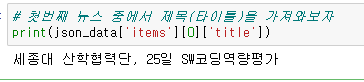
첫번째 뉴스 중에서 제목을 가져와보자!
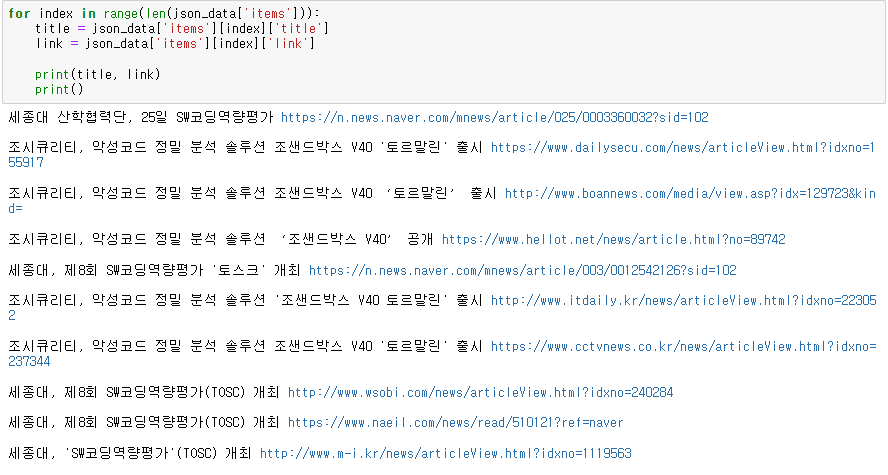
반복문을 이용해서 출력해보자!
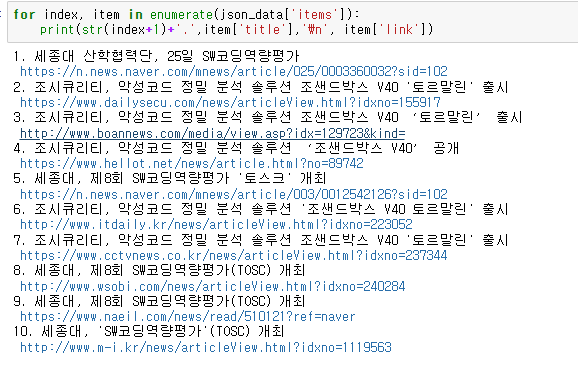
예시1
예시2
네이버 API를 출력해보자!
=============================코드=============================
import requests
import pprint    # 출력할 때 보기 쉽게 도와주는 모듈

client_key = "lWTYObYqIRLuXH6hjQpO"
client_secret = "rpc7D3qQgr"

naver_open_api = "https://openapi.naver.com/v1/search/book.json?query=python"
header_params = {"X-Naver-Client-Id":client_key, "X-Naver-Client-Secret":client_secret}

res = requests.get(naver_open_api, headers=header_params)  # headers라는 속성에 id, pwd가 들어감

if res.status_code == 200:   # 응답을 받은 경우

    data = res.json()
    pprint.pprint(data['items'])

else:
    print("Error Code :", res.status_code)
=============================실행=============================
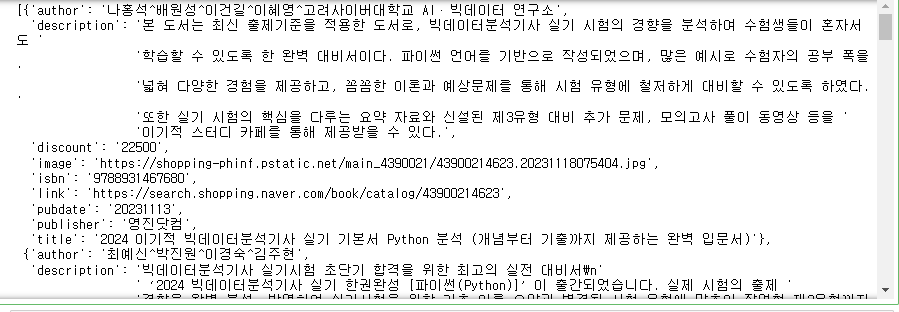
네이버 API의 값을 엑셀 파일 생성 후 값을 파일 안에 넣어보자
=============================코드=============================
import openpyxl

def write_excel_template(filename, sheetname, listdata):

    # 엑셀 파일 생성
    excel_file = openpyxl.Workbook()
    # 시트 생성
    excel_sheet = excel_file.active

    # 2-1. 엑셀 시트에 첫번째 행에 타이틀을 만들어주자
    excel_sheet.append(['번호', '책 제목', '책 저자', '책 가격'])

    # 2-2. 시트 컬럼 폭 늘려주기
    excel_sheet.column_dimensions['B'].width = 150
    excel_sheet.column_dimensions['C'].width = 100

    if(sheetname != ''):
        excel_sheet.title = sheetname

    for item in listdata:
        excel_sheet.append(item)

    excel_file.save(filename)

    excel_file.close()
=============================코드=============================
import requests
import pprint    # 출력할 때 보기 쉽게 도와주는 모듈

book_list = list()  # 비어있는 리스트 선언

client_key = "000"   	 # 네이버 API ID
client_secret = "0000"   # 네이버 API PWD

naver_open_api = "https://openapi.naver.com/v1/search/book.json?query=python"
header_params = {"X-Naver-Client-Id":client_key, "X-Naver-Client-Secret":client_secret}

res = requests.get(naver_open_api, headers=header_params)  # headers라는 속성에 id, pwd가 들어감

if res.status_code == 200:   # 응답을 받은 경우

    data = res.json()

    for index, item in enumerate(data['items']):
        book_info = [str(index + 1), item['title'], item['author'], item['discount']]
        book_list.append(book_info)


else:
    print("Error Code :", res.status_code)
=============================코드=============================
write_excel_template('book.xlsx', 'Python 책', book_list)
=============================실행=============================
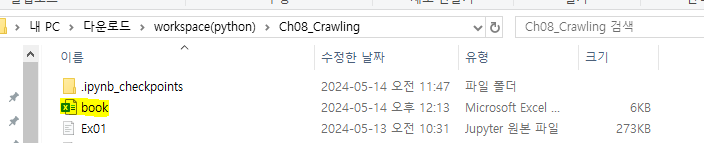
엑셀 파일에 값이 들어간 것을 확인할 수 있음!
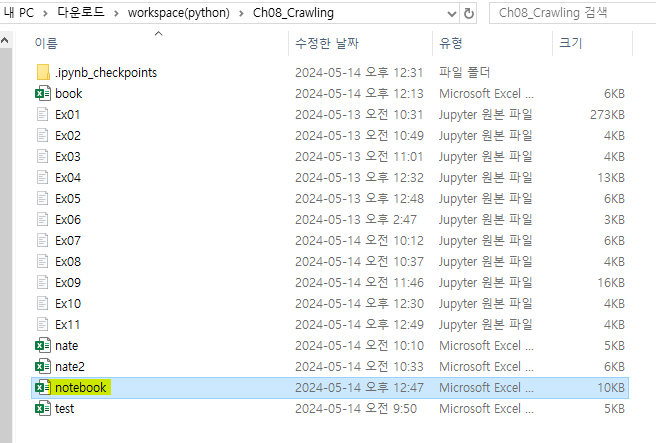
[문제]
네이버 API를 이용하여 "쇼핑" 검색 시 query에 노트북으로 검색을 하여
검색 결과를 확인하고 상위 10개의 데이터만 받아서
엑셀파일(번호, 노트북명, 제조사, 가격)을 만들어 보세요
=============================코드=============================
import openpyxl

def write_excel_template(filename, sheetname, listdata):

    # 엑셀 파일 생성
    excel_file = openpyxl.Workbook()
    # 시트 생성
    excel_sheet = excel_file.active

    # 2-1. 엑셀 시트에 첫번째 행에 타이틀을 만들어주자
    excel_sheet.append(['번호', '노트북명', '제조사', '가격'])

    # 2-2. 시트 컬럼 폭 늘려주기
    excel_sheet.column_dimensions['B'].width = 60

    if(sheetname != ''):
        excel_sheet.title = sheetname

    for item in listdata:
        excel_sheet.append(item)

    excel_file.save(filename)

    excel_file.close()
=============================코드=============================
import requests

notebook_list = list()

client_key = "0000"
client_secret = "0000"

naver_open_api = "https://openapi.naver.com/v1/search/shop.json?query=notebook"
header_params = {"X-Naver-Client-Id":client_key, "X-Naver-Client-Secret":client_secret}

res = requests.get(naver_open_api, headers=header_params)  # headers라는 속성에 id, pwd가 들어감

if res.status_code == 200:
    data = res.json()

    for index, item in enumerate(data['items']):
        notebook_info = [str(index+1), item['title'], item['maker'], item['lprice']]
        notebook_list.append(notebook_info)

else:
    print("Error Code :", res.status_code)
=============================코드=============================
write_excel_template('notebook.xlsx', '노트북', notebook_list)=============================실행=============================
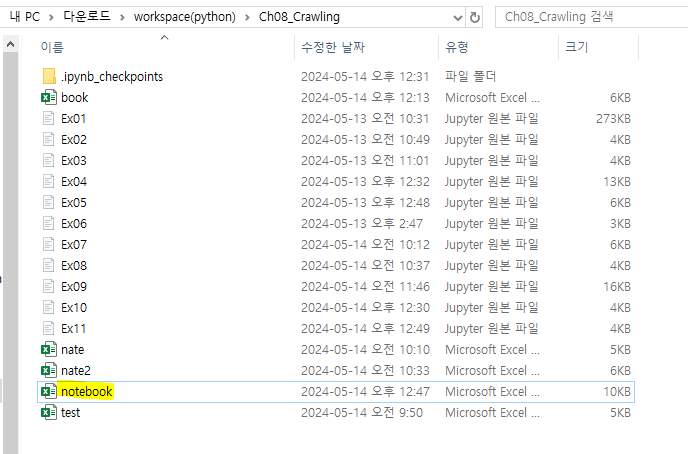
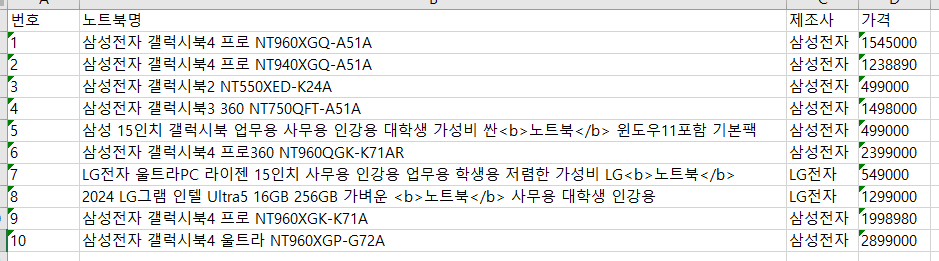
더블 클릭 시 값이 들어가 있는 것을 볼 수 있음