Css 개요 및 속성
- 선택자 { 속성:값; } 스타일(CSS_의 값(Value)
HTML
<div>HELLO World!</div>CSS
div {
font-size: 50px
color: blue;
text-decoration: underline;
}
😘 margin : 여백
📌 CSS 선언 방식
- 내장방식
- style 요소의 내용(contents)으로 스타일을 작성하는 방식
- CSS없이 HTML 내에 스타일작성
<style>
    div {
         color: red;
         margin: 20px;
         }
</style>- 인라인방식
- 요소의 style 속성에 직접 스타일을 작성하는 방식(선택자 없음)
- CSS없이 HTML 내에 스타일작성
<div style="color: red; margin: 20px;"></div>- 링크방식
- 로 외부 CSS 문서를 가져와서 연결하는 방식
- css를 사용해서 만듦!
HTML
<link rel="stylesheet" href="./css/main.css"> CSS
CSS
div {
     color: red;
     margin: 20px;
}- @import 방식
- css의 @import 규칙으로 css문서 안에서 또 다른 css문서를 가져와 연결하는 방식(=직렬방식 연결)
HTML
<link rel="stylesheet" href="./css/main.css">CSS(main)
@import url("./box.css")
	div {
         color: red;
         margin: 20px;
        }

`CSS(box)`
	.box {
          background-color: red;
          padding: 20px;
}- ( * )
전체 선택자/ 모든 요소 선택/기본 선택자
* {
   color: red;
}- ABC
기본 선택자/ 태그선택자 / 태그 이름이 ABC인 요소 선택
li {
   color: red;
}- .ABC
기본선택자 / 클래스 선택자 / HTML class 속성의 값이 ABC인 요소 선택
HTML
<li class="orange">오렌지</li>CSS
.orange {
    	color: red;
}- #ABC
기본선택자 / 아이디선택자자 / HTML id 속성의 값이 ABC인 요소 선택
HTML
<li id="orange" class="orange">오렌지</li>CSS
#orange {
    	color: red;
}- ABCXYZ
복합일치선택자선택자 ABC
위와 XYZ를 동시에 만족하는 요소 선택
span.orange { }
- ABC > XYZ
복합자식선택자선택자 ABC
위와 자식 요소 XYZ 선택
ul > .orange { }
- ABC XYZ
복합하위(후손)선택자선택자 ABC
하위요소 XYZ 선택. '띄어쓰기'가 선택자의 기호(공백문자)
div .orange { }
- ABC + XYZ
복합인접형제선택자선택자 ABC
위 형제 요소 XYZ 하나를 선택
.orange + li { }
- ABC ~ XYZ
복합일반형제선택자선택자 ABC
위 형제 요소 XYZ 모두를 선택
.orange ~ li { }
📌 같이 문제 풀어봅시다!
<div class="fruits">
     <span>딸기</span>
     <span>수박</span>
     <div>오렌지</div>
     <p>망고</p>
     <h3>사과</h3>
</div>-
ABC:first-child
가상클래스선택자first child선택자 ABC가 형제 요소 중 첫째라면 선택
fruits span:first-child { } -
Error fruits div:first-child { }
-
ABC:last-child
가상클래스선택자last child선택자 ABC가 형제 요소 중 막내라면 선택
fruits h3:last-child { } -
ABC:nth-child(n)
가상클래스선택자NTH CHILD선택자 ABC가 형제 요소 중 (n)번째라면 선택
fruits *:nth-child(2) { } /형제요소상관업음- fruits *:nth-child(2n) { }
- n은 0부터 시작 (0, 1, 2 ...)
- 0x2 1x2 2x2
- 짝수번째의 요소가 선택됨
- fruits *:nth-child(2n+1) { }
- 홀수번째 요소 선택
- fruits *:nth-child(n+2) { }
- 2번째 요소부터 시작됨
- fruits *:nth-child(2n) { }
-
ABC:not(XYZ)
부정 선택자NOT선택자 XYZ가 아닌 ABC 요소 선택- .fruits *:not(span) { ]
- span 태그가 아닌 요소 전부
- .fruits *:not(span) { ]
ABC::before
가상요소선택자 BEFORE 선택자 ABC 요소의 내부 앞에 내용(content)을 삽입
- /after도 있음
HTML
<div class="box">
   Content!
</div>
CSS
.box::before {
    		 content: "앞!";
 			 }
⚡결과
앞! Content!
animal 이라는 클래스를 가지고 있는 요소에, CSS를 적용했을 때 그 적용된 내용이 그 해당하는 요소의 자식요소(하위요소)을 포함시킴(상속요소)
HTML
<div class="ecosystem">생태계
      <div class="animal">동물
            <div class="tiger">호랑이</div>
            <div class="lion">사자</div>
            <div class="elephant">코끼리</div>
      </div>
      <div class="plant">식물</div>
</div>
CSS
.animal {
    	color: red;
 		}
⚡결과
동물, 호랑이, 사자, 코끼리 만 빨간색
📌 상속되는 CSS 속성들
모두 글자/문자 관련 속상들을 의미함(모든건 아님 주의!)
- font-style : 글자 기울기
- font-weight : 글자 두께
- font-size : 글자 크기
- line-height : 줄 높이
- font-family : 폰트(서체)
- color : 글자 색상
- text-align : 정렬
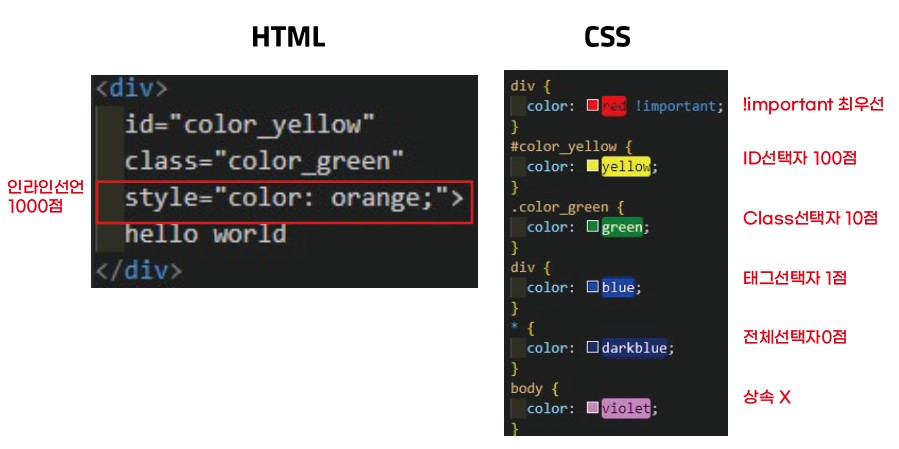
📌 선택자 우선순위
- 같은 요소가 여러 선언의 대상의 된 경우, 어떤 선언의 CSS 속성을 우선 적용할지 결정하는 방법, 점수가 높은 선언이 우선적
- 점수가 같다면, 가장 마지막 해석된 선언이 우선적, 마지막으로 코드 작성한거
⚡결과
hello world 만 빨간색으로 변함
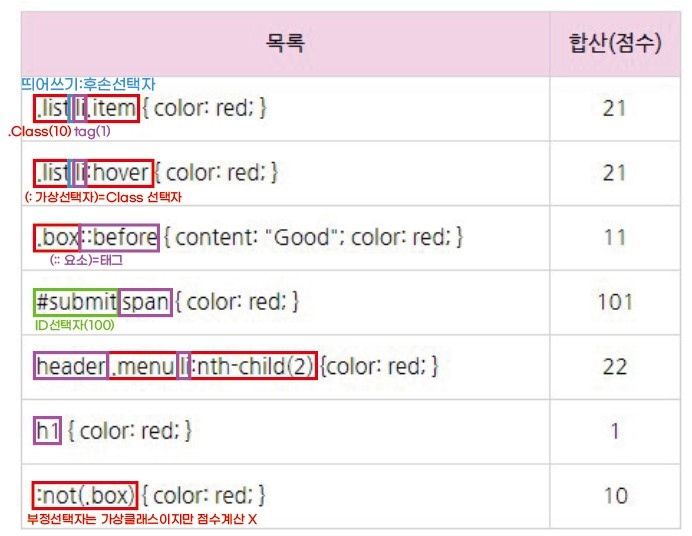
점수 계산해보기

나이들어서 공부함