액션태그
- 서버나 클라이언트에게 어떤 행동을 하도록 명령하는 태그
- jsp 페이지에서 페이지와 페이지 사이 제어
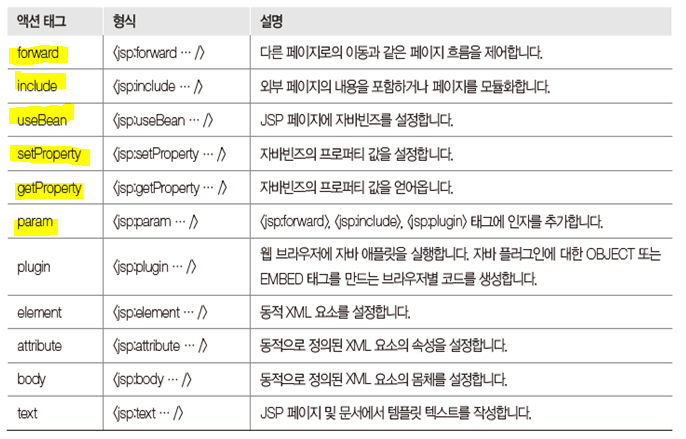
※ 액션태그의 종류
1. include 액션태그
- 외부 페이지의 내용을 포함하거나 페이지를 모듈화함
실습01)
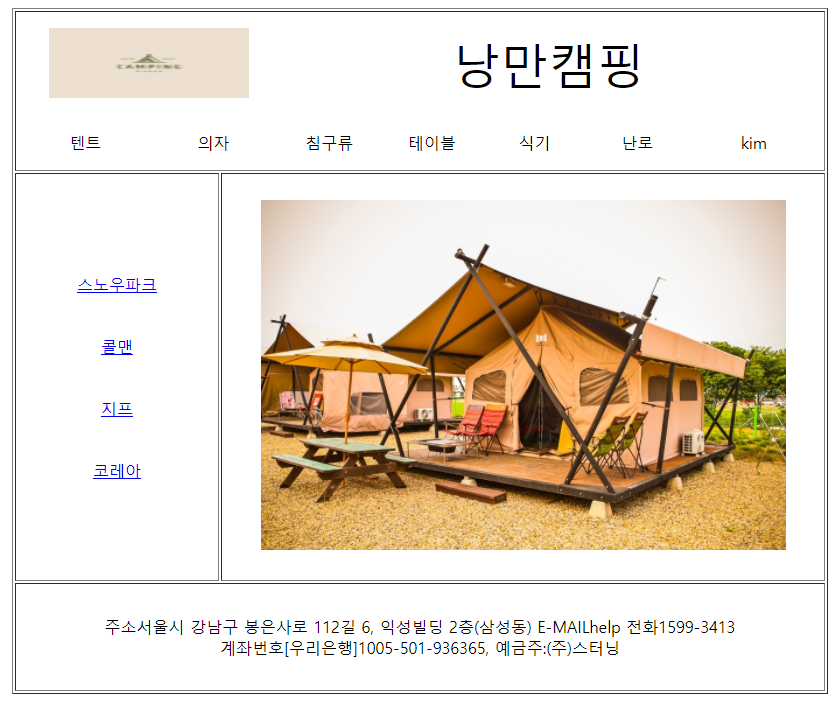
==> 결과
<Top.jsp><%@ page language="java" contentType="text/html; charset=EUC-KR" pageEncoding="EUC-KR"%> <!DOCTYPE html> <html> <head> <meta charset="EUC-KR"> <title>Insert title here</title> </head> <body> <!-- Top --> <table width="800"> <tr height="100"> <!-- 로로이미지 --> <td colspan="2" align="center" width="260"> <img alt="" src="img/logo.jpg" width="200" height="70"> </td> <td colspan="5" align="center"> <font size="10">낭만캠핑</font> </td> </tr> <tr height="50"> <td width="110" align="center">텐트</td> <td width="110" align="center">의자</td> <td width="110" align="center">침구류</td> <td width="110" align="center">테이블</td> <td width="110" align="center">식기</td> <td width="110" align="center">난로</td> <td width="140" align="center"><%=request.getParameter("id") %></td> </tr> </table> </body> </html><Bottom.jsp>
<%@ page language="java" contentType="text/html; charset=EUC-KR"
    pageEncoding="EUC-KR"%>
<!DOCTYPE html>
<html>
<head>
<meta charset="EUC-KR">
<title>Insert title here</title>
</head>
<body>
	<table width="800">
		<tr height="100">
			<td align="center">
				주소서울시 강남구 봉은사로 112길 6, 익성빌딩 2층(삼성동) E-MAILhelp 전화1599-3413 <br>
				계좌번호[우리은행]1005-501-936365, 예금주:(주)스터닝
			</td>
		</tr>
	</table>
</body>
</html>
<Left.jsp>
<%@ page language="java" contentType="text/html; charset=EUC-KR"
    pageEncoding="EUC-KR"%>
<!DOCTYPE html>
<html>
<head>
<meta charset="EUC-KR">
<title>Insert title here</title>
</head>
<body>
	<table width="200">
		<tr height="60">
			<td width="200" align="center">
				<a href="#">스노우파크</a>
			</td>
		</tr>
		<tr height="60">
			<td width="200" align="center">
				<a href="#">콜맨</a>
			</td>
		</tr>
		<tr height="60">
			<td width="200" align="center">
				<a href="#">지프</a>
			</td>
		</tr>
		<tr height="60">
			<td width="200" align="center">
				<a href="#">코레아</a>
			</td>
		</tr>
	</table>
</body>
</html>
<Center.jsp>
<%@ page language="java" contentType="text/html; charset=EUC-KR"
    pageEncoding="EUC-KR"%>
<!DOCTYPE html>
<html>
<head>
<meta charset="EUC-KR">
<title>Insert title here</title>
</head>
<body>
	<table width="600">
		<tr height="400">
			<td align="center">
				<img alt="" src="img/auto.jpg" height="350">
			</td>
		</tr>
	</table>
</body>
</html>
<Main.jsp>
<%@ page language="java" contentType="text/html; charset=EUC-KR"
    pageEncoding="EUC-KR"%>
<!DOCTYPE html>
<html>
<head>
<meta charset="EUC-KR">
<title>Insert title here</title>
</head>
<body>
<center>
	<table border="1" width="800">
		<!-- Top -->
		<tr height="150">
			<td align="center" colspan="2">
				<!--방법1 include 액션태그 사용-->
				<!--include 액션태그 값을 넘겨주는 것이 가능(동적으로 사용가능)  -->
				<!--컴파일 방법은 include 액션태그의 경우 jsp파일이 컴파일 후 결과가 나타남  -->
				<jsp:include page="Top.jsp">
					<jsp:param value="kim" name="id"/>
				</jsp:include>
				<!--방법2 include 디렉티브 사용  -->
				<!--include 디렉티브는 값을 넘겨줄 수 없다(동적으로 사용불가, 주로 정적으로 사용)   -->
				<!--include 디렉티브는 컴파일 방법은 모든 jsp파일을 모아서 한번에 컴파일 함 -->
				<%-- <%@include file="Top.jsp?id=bbb" %> --%>
			</td>
		</tr>
		<!-- Left -->
		<tr height="400">
			<td align="center" width="200">
			<jsp:include page="Left.jsp"/>
			</td>
		<!-- Center -->
			<td align="center" width="600">
			<jsp:include page="Center.jsp"/>
			</td>
		</tr>
		<!-- Bottom -->
		<tr height="100">
			<td align="center" colspan="2">
				<jsp:include page="Bottom.jsp"/>
			</td>
		</tr>
	</table>
</center>
</body>
</html>
2. forward 액션태그
- 다른 페이지로의 이동과 같은 페이지 흐름을 제어
실습01)
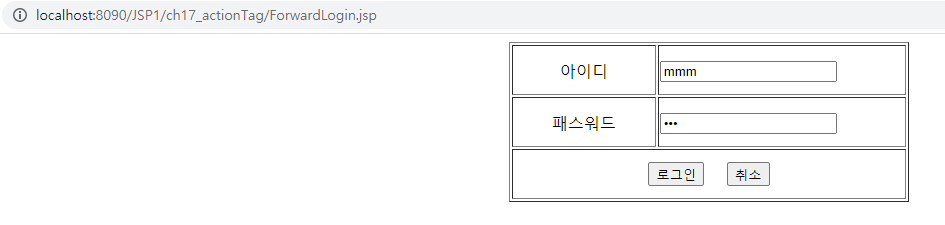
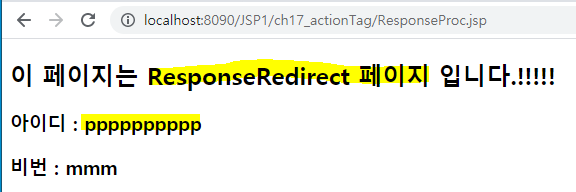
==> 결과
<ForwardLogin.jsp><%@ page language="java" contentType="text/html; charset=EUC-KR" pageEncoding="EUC-KR"%> <!DOCTYPE html> <html> <head> <meta charset="EUC-KR"> <title>Insert title here</title> </head> <body> <center> <form action="ResponseProc.jsp" method="post"> <table width="400" border="1"> <tr height="50"> <td align="center" width="150">아이디</td> <td width="250"> <input type="text" name="id"> </td> </tr> <tr height="50"> <td align="center" width="150">패스워드</td> <td width="250"> <input type="password" name="pass"> </td> </tr> <tr height="50"> <td align="center" colspan="2"> <input type="submit" value="로그인"> <input type="reset" value="취소"> </td> </tr> </table> </form> </center> </body> </html><ResponseProc.jsp>
<%@ page language="java" contentType="text/html; charset=EUC-KR"
   pageEncoding="EUC-KR"%>
<!DOCTYPE html>
<html>
<body>
	<h2>이 페이지는 로그인 정보가 넘어오는 페이지 입니다.</h2>
	<%
		request.setCharacterEncoding("euc-kr"); //post 방식 한글처리
		String id = request.getParameter("id"); // request 객체에 담겨진 사용자 정보중 id만 추출
		String pass = request.getParameter("pass");
		//response.sendRedirect 메서드로는 getParameter로 값을 넘겨줄 때는 페이지마다 매번 넘겨주어야 한다.
		//response.sendRedirect("ResponseRedirect.jsp?id="+id); // 흐름제어
	%>
		<!--forward액션 태그를 사용하면 request 클래스의 정보 그대로 다음페이지로 넘겨 줄 수 있다  -->
		 <jsp:forward page="ResponseRedirect.jsp">
		 	<jsp:param value="pppppppppp" name="id"/>
		 </jsp:forward>
	<h3>아이디 : <%=id %></h3>
	<h3>비번 : <%=pass %></h3>
</body>
</html>
<ResponseRedirect.jsp>
<%@ page language="java" contentType="text/html; charset=EUC-KR"
    pageEncoding="EUC-KR"%>
<!DOCTYPE html>
<html>
<head>
<meta charset="EUC-KR">
<title>Insert title here</title>
</head>
<body>
	<h2>이 페이지는 ResponseRedirect 페이지 입니다.!!!!!</h2>
	<%
		request.setCharacterEncoding("euc-kr");
		String id = request.getParameter("id");
		String pass = request.getParameter("pass");
	%>
	<h3>아이디 : <%=id %></h3>
	<h3>비번 : <%=pass %></h3>
</body>
</html>
3. useBean 액션태그
- jsp 페이지에 자바빈즈를 설정
실습01)
==> 결과
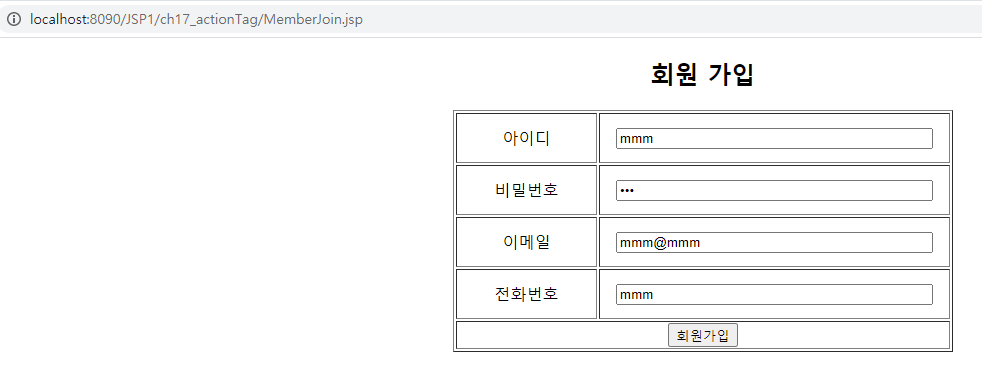
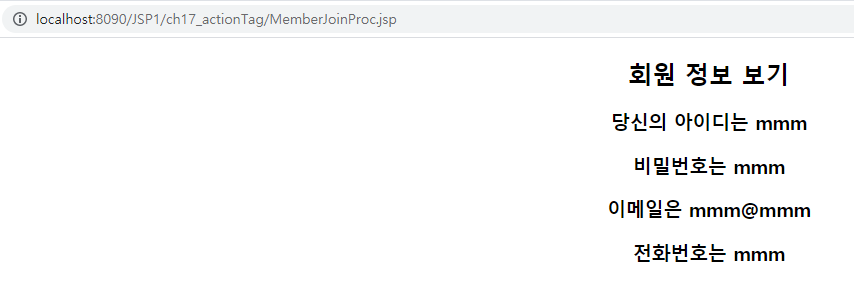
<MemberJoin.jsp><%@ page language="java" contentType="text/html; charset=EUC-KR" pageEncoding="EUC-KR"%> <!DOCTYPE html> <html> <head> <meta charset="EUC-KR"> <title>Insert title here</title> </head> <body> <center> <h2>회원 가입</h2> <form action="MemberJoinProc.jsp" method="post"> <table width="500" border="1"> <tr height="50"> <td width="150" align="center">아이디</td> <td width="350" align="center"> <input type="text" name="id" size="40" placeholder="id를 넣으세요"> </td> </tr> <tr height="50"> <td width="150" align="center">비밀번호</td> <td width="350" align="center"> <input type="password" name="pass" size="40"> </td> </tr> <tr height="50"> <td width="150" align="center">이메일</td> <td width="350" align="center"> <input type="email" name="email" size="40"> </td> </tr> <tr height="50"> <td width="150" align="center">전화번호</td> <td width="350" align="center"> <input type="tel" name="tel" size="40"> </td> </tr> <tr> <td align="center" colspan="2"> <input type="submit" value="회원가입"> </td> </tr> </table> </form> </center> </body> </html><MemberBean.java>
package ch20;
public class MemberBean {
	private String id;
	private String pass;
	private String email;
	private String tel;
	public String getId() {
		return id;
	}
	public void setId(String id) {
		this.id = id;
	}
	public String getPass() {
		return pass;
	}
	public void setPass(String pass) {
		this.pass = pass;
	}
	public String getEmail() {
		return email;
	}
	public void setEmail(String email) {
		this.email = email;
	}
	public String getTel() {
		return tel;
	}
	public void setTel(String tel) {
		this.tel = tel;
	}
}
<ResponseRedirect.jsp>
<%@ page language="java" contentType="text/html; charset=EUC-KR"
    pageEncoding="EUC-KR"%>
<!DOCTYPE html>
<html>
<head>
<meta charset="EUC-KR">
<title>Insert title here</title>
</head>
<body>
	<h2>이 페이지는 ResponseRedirect 페이지 입니다.!!!!!</h2>
	<%
		request.setCharacterEncoding("euc-kr");
		String id = request.getParameter("id");
		String pass = request.getParameter("pass");
	%>
	<h3>아이디 : <%=id %></h3>
	<h3>비번 : <%=pass %></h3>
</body>
</html>