13. 쿠키(cookie)
- 클라이언트와 웹 서버 간의 상태를 지속적으로 유지하는 방법
- 쿠키는 세션과 달리 상태 정보를 웹 서버가 아닌 클라이언트에 저장
- 클라이언트의 일정 폴더에 정보를 저장하기 때문에 웹 서버의 부하를 줄일 수 있다는 것이 장점
- 반면에 웹 브라우저가 접속했던 웹 사이트에 관한 정보와 개인 정보가 기록되기
때문에 보안에 문제가 있음
13-1 쿠키의 동작 과정
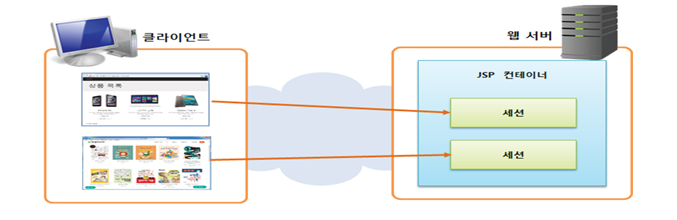
(1) 쿠키 생성 단계
: 주로 웹 서버 측에서 생성, 생성된 쿠키는 응답 데이터에 함께 저장되어 웹 브라우저에 전송됨
(2) 쿠키 저장 단계
: 웹 브라우저는 응답 데이터에 포함된 쿠키를 쿠키 저장소에 보관, 쿠키는 종류에 따라 메모리나 파일로 저장
(3) 쿠키 전송 단계
: 웹 브라우저는 한 번 저장된 쿠키를 요청이 있을 때마다 웹 서버에 전송, 웹 서버는 웹 브라우저가 전송한 쿠키를 사용하여 필요한 작업을 수행할 수 있음
13-2 쿠키와 세션의 차이
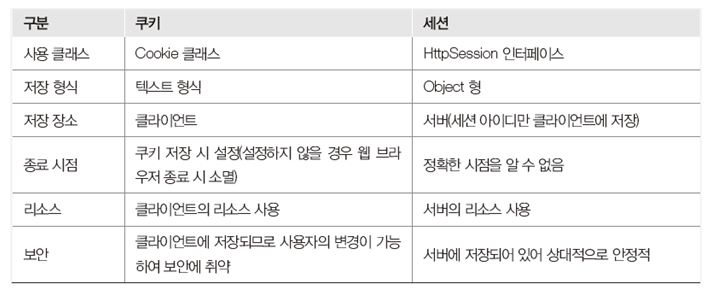
실습01)
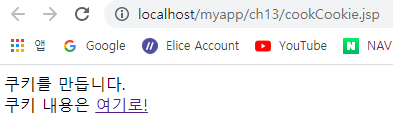
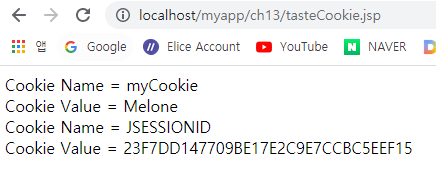
==> 결과
<cookCookie.jsp><%@ page contentType="text/html; charset=EUC-KR"%> <% request.setCharacterEncoding("EUC-KR"); String cookieName = "myCookie"; //쿠키 객체 생성 Cookie cookie = new Cookie(cookieName,"Apple"); cookie.setMaxAge(60); // 1분 //쿠키의 값을 수정 cookie.setValue("Melone"); response.addCookie(cookie); //기본적으로 쿠키에 저장되는 값은 sessionId값 %> 쿠키를 만듭니다. <br> 쿠키 내용은 <a href="tasteCookie.jsp">여기로!</a><tasteCookie.jsp>
<%@ page contentType="text/html; charset=EUC-KR"%>
<%
	request.setCharacterEncoding("EUC-KR");
	//응답된 쿠키의 정보는 다시 서버로 요청이 된다.(HTML 헤더값)
	Cookie cookies[] = request.getCookies();
	if(cookies!=null){
		for(int i=0; i<cookies.length; i++){
	%>
		Cookie Name = <%=cookies[i].getName() %> <br>
		Cookie Value = <%=cookies[i].getValue() %> <br>
	<%
		}//End for
	}
%>
14. 세션
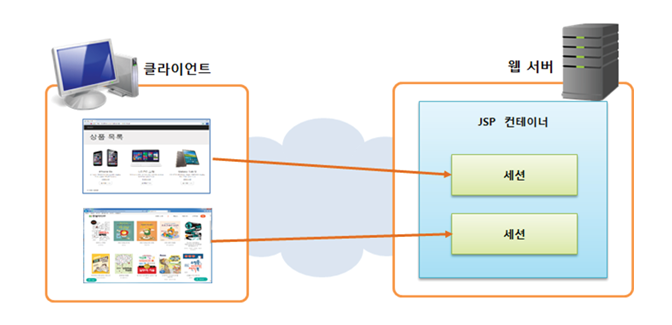
- 클라이언트와 웹 서버 간의 상태를 지속적으로 유지하는 방법
- 웹 서버에서만 접근이 가능하므로 보안 유지에 유리하며 데이터를 저장하는데 한계가 없음
- 오직 웹 서버에 존재하는 객체로 웹 브라우저마다 하나씩 존재하므로 웹 서버의 서비스를 제공받는 사용자를 구분하는 단위가 됨
- 웹 브라우저를 닫기 전까지 웹 페이즈를 이동하더라도 사용자의 정보가 웹서버에 보관되어 있어 사용자 정보를 잃지 않음
실습01)
==> 결과
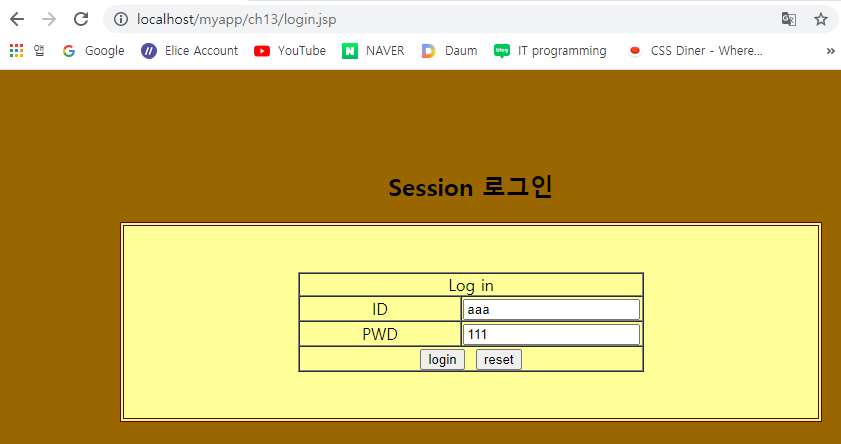
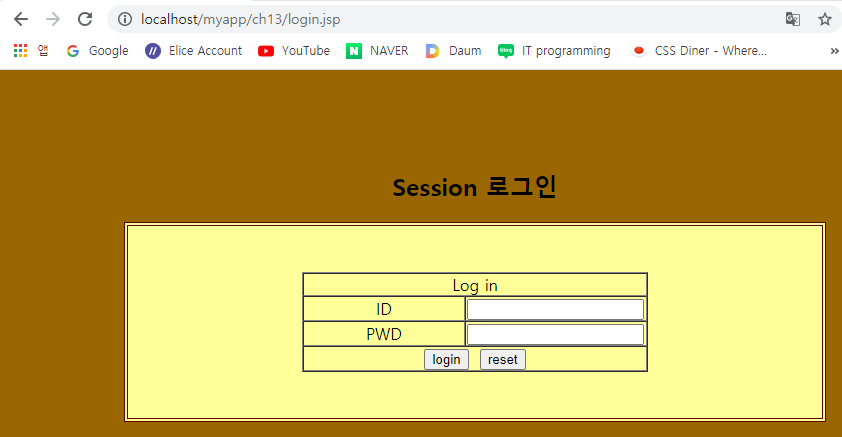
1) <login.jsp><!--login.jsp --> <%@ page contentType="text/html; charset=EUC-KR"%> <% request.setCharacterEncoding("EUC-KR"); String id = (String)session.getAttribute("idKey"); if(id!=null){ %> <script> alert("로그인 되었습니다."); location.href = "loginOk.jsp"; </script> <% }// End if %> <!DOCTYPE html> <html> <head> <title>Simple LogIn</title> <link href="style.css" rel="stylesheet" type="text/css"> </head> <body bgcolor="#996600" topmargin="100"> <h2 align="center">Session 로그인</h2> <table width="75%" border="1" align="center" bordercolor="#660000" bgcolor="#FFFF99"> <tr bordercolor="#FFFF99"> <td height="190" colspan="7"> <form method="post" action="loginPro.jsp"> <table width="50%" border="1" align="center" cellspacing="0" cellpadding="0"> <tr bordercolor="#FFFF66"> <td colspan="2"><div align="center">Log in</div></td> </tr> <tr > <td width="47%"><div align="center">ID</div></td> <td width="53%"><div align="center"><input name="id"></div></td> </tr> <tr> <td><div align="center">PWD</div></td> <td><div align="center"><input name="pwd"></div></td> </tr> <tr> <td colspan="2"> <div align="center"> <input type="submit" value="login"> <input type="reset" value="reset"> </div> </td> </tr> </table> </form></td> </tr> </table> </body> </html>2) <DBConnectionMgr.java>
3) <RefisterMgr.java>package ch13; import java.sql.Connection; import java.sql.PreparedStatement; import java.sql.ResultSet; public class RegisterMgr { private DBConnectionMgr pool; public RegisterMgr() { pool = DBConnectionMgr.getInstance(); } //회원로그인 public boolean loginRegister(String id,String pwd) { Connection con = null; PreparedStatement pstmt = null; ResultSet rs = null; String sql = null; boolean flag = false; try { con = pool.getConnection(); sql = "select id from tblRegister where id=? and pwd=?"; pstmt = con.prepareStatement(sql); pstmt.setString(1, id); pstmt.setString(2, pwd); rs = pstmt.executeQuery(); flag=rs.next(); //결과값이 있으면 true 리턴 없으면 false } catch (Exception e) { e.printStackTrace(); } finally { pool.freeConnection(con, pstmt, rs); } return flag; } }4) <loginPro.jsp>
<%@ page contentType="text/html; charset=EUC-KR"%>
<jsp:useBean id="mgr" class="ch13.RegisterMgr"/>
<%
	request.setCharacterEncoding("EUC-KR");
	String id = request.getParameter("id");
	String pwd = request.getParameter("pwd");
	boolean result = mgr.loginRegister(id, pwd);
	String msg = "로그인 실패 하였습니다.";
	String url = "login.jsp";
	if(result){
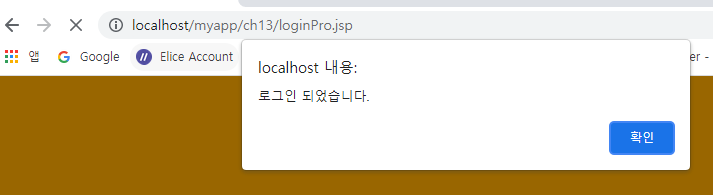
		msg = "로그인 되었습니다.";
		url = "loginOk.jsp";
		session.setAttribute("idKey", id);
	}
%>
<script>
	alert("<%=msg%>");
	location.href = "<%=url%>";
</script>
5) <loginOk.jsp>
<%@ page contentType="text/html; charset=EUC-KR"%>
<%request.setCharacterEncoding("EUC-KR");
	String id = (String)session.getAttribute("idKey");
	if(id==null){
		response.sendRedirect("login.jsp");
		return; // if문 종료
	}
%>
<html>
<head>
<title>Simple LogIn</title>
<link href="style.css" rel="stylesheet" type="text/css">
</head>
<body bgcolor="#996600" topmargin="100">
<table width="75%" border="1" align="center" cellpadding="1" cellspacing="1" bordercolor="#660000" bgcolor="#FFFF99">
 <tr bordercolor="#FFFF99">
   <td height="190" colspan="7">
     <table width="50%" border="1" align="center" cellspacing="0" cellpadding="0">
       <tr bordercolor="#FFFF66">
         <td colspan="2"><div align="center">Log On Page</div></td>
       </tr>
       <tr >
         <td><div align="center">
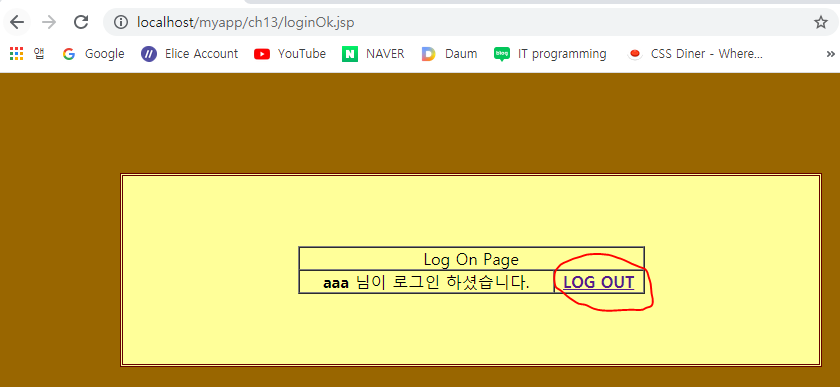
          <strong><%=id%></strong>
			님이 로그인 하셨습니다.
           </div></td>
         <td><div align="center">
          <a href="logout.jsp"><strong>LOG OUT</strong></a>
           </div></td>
       </tr>
     </table>
    </td>
 </tr>
</table>
</body>
</html>
6) <logout.jsp>
<%@ page contentType="text/html; charset=EUC-KR"%>
<%request.setCharacterEncoding("EUC-KR");
	//application > session > request > page : setAttribute getAttribute removeAttribute
	session.removeAttribute("idKey"); // 세선에 저장한 키값만 제거
	session.invalidate(); //세션 서버에서 제서(무효화)
	response.sendRedirect("login.jsp");
%>
