🖥️ 마우스 오버 시 나타나는 모달창 만들기
개인과제를 진행하면서 개인적으로 추가해보고 싶은 게 있어서 만들어 본 아주 간단한 모달창
작동 원리
- 모달창 열기와 닫기를 담당하는 state를 만든다.
- 마우스 오버와 관련된 이벤트 (onMouseEnter, onMouseOver 등)을 사용하여 state를 set한다.
- 설정된 state에 맞게 모달창에 조건을 넣어 출력해준다.
- 끝!
우선 나는 롤 챔피언의 상세정보에서 개별의 스킬마다 설명을 모달로 띄우고 싶었기 때문에 각 스킬의 정보를 갖고 있어야 해서 state를 문자열로 설정해주었다.
예를 들어 w 스킬에 마우스를 올리면 isHoverd 라는 state에 w 스킬의 이름을 저장하고, 스킬 이름과 isHoverd가 일치하는 경우에만 div가 출력되도록 설정했다.
모달 코드
  const [isHoverd, setIsHoverd] = useState<string | null>(null);
  const handleHover = (spell: string | null) => {
    setIsHoverd(spell);
};- isHoverd : 스킬 이름을 저장하는 state
- handleHover : 스킬 위에 마우스가 올라가면 실행되는 함수
 		<div
          className="text-center"
          onMouseEnter={() => handleHover("passive")}
          onMouseLeave={() => handleHover(null)}
        >
          {/* 패시브 이미지 */}
          <Image
            src={detailChampion.passive.image}
            alt={detailChampion.passive.name}
            width={40}
            height={40}
            className="spellImage"
          />
          <p className="spellName relative">
            P
            {isHoverd === "passive" && (
              <div className="absolute flex flex-col items-center left-1/2 -translate-x-1/2 font-normal text-xs top-4">
                <TopArrow />
                <div className="w-max bg-deepBlue text-white px-4 py-2 rounded-lg">
                  {detailChampion.passive.name}
                </div>
              </div>
            )}
          </p>
</div>- 마우스가 패시브 스킬 위에 올라가면
onMouseEnter={() => handleHover("passive")}를 통해 isHoverd가 passive라는 문자열로 set된다 - 마우스가 벗어나면 null로 변경된다.
isHoverd === "passive" &&조건을 통해 isHoverd 가 passive 일때만 패시브 스킬의 이름을 보여준다.
{detailChampion.spells.map((spell, idx) => (
          <div
            key={spell.name}
            className="text-center"
            onMouseEnter={() => handleHover(spell.id)}
            onMouseLeave={() => handleHover(null)}
          >
            <Image
              src={spell.image}
              alt={`${spell.id}`}
              width={40}
              height={40}
              className="spellImage"
            />
            <p className="spellName relative">
              {idx === 0 ? "Q" : idx === 1 ? "W" : idx === 2 ? "E" : "R"}
              {/* 모달창 부분 */}
              {spell.id === isHoverd && (
                <div className="absolute flex flex-col items-center left-1/2 -translate-x-1/2 font-normal text-xs top-4">
                  <TopArrow />
                  <div className="w-72 bg-deepBlue text-white px-4 py-2 rounded-lg">
                    {spell.description}
                  </div>
                </div>
              )}
            </p>
          </div>
))}- 마찬가지로 onMouseEnter 이벤트를 사용하여
handleHover(spell.id)를 실행한다. spell.id === isHoverd &&여러 스킬이 들어있는 배열을 map으로 순회하고 있기 때문에, 해당 스킬의 id와 isHoverd가 일치하는 경우 해당 스킬의 설명을 띄운다.
적용한 모습!
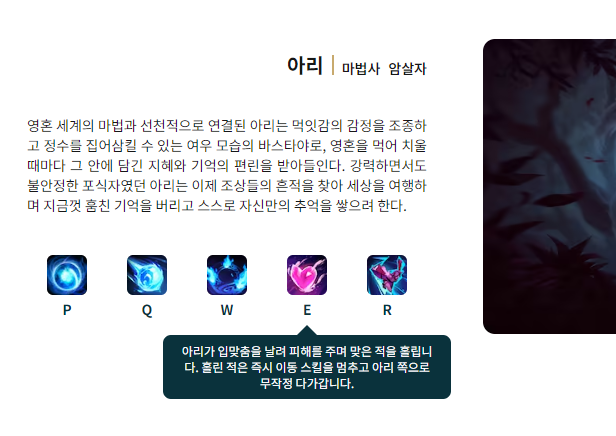
마우스를 올리면 스킬에 대한 설명이 보인다
MouseOver와 MouseEnter 차이
해당 모달을 위해 검색을 하는데 호버와 관련된 이벤트가 두가지 있었다. over, enter 무슨 차이인가 싶어서 검색해봤더니 전파와 취소에 대한 이야기가 나왔다. 시간이 늦어서 과제 빨리 마무리하고 자고 싶은 마음에 자세히 읽어보지는 못했지만 enter를 쓰는 게 더 나을 것 같다는 생각이 들어서 enter를 사용했다. 참고한 블로그는 이곳이다