이번에는 javascript의 배열(array)를 조작할 수 있는 여러 방법에 대해 알아보겠음.
1. forEach()
array.forEach(function(currentValue, index, array) {
  // 실행할 코드
});-
배열의 각 요소에 대해, 함수를 한 번씩 실행함.
-
콜백 함수는 총 세 개의 파라미터를 가질 수 있는데...
- currentValue: 해당 배열에서 현재 단계의 실제 값.
- index: 해당 배열에서 현재 단계의 인덱스.
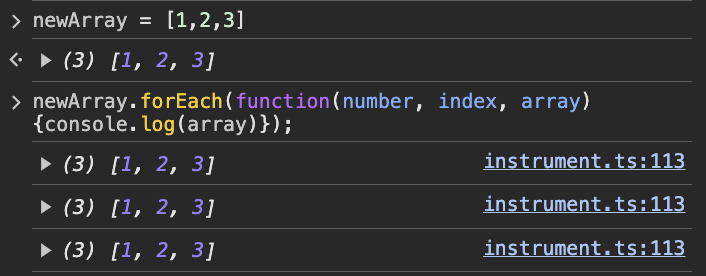
- array: 현재 사용하고 있는 어레이 그 자체. array를 출력하면 그 어레이를 그대로 뱉음.
-
새 배열을 만들거나 값을 반환하지 않음.
- 반환하려 하면 undefined를 내뱉음.
-
forEach 자체가 원본 배열을 변화시키지는 않으나, forEach 안의 콜백 함수는 그렇게 할 수 있음...이라고 이야기하지만, 사실상 결과적으로는 원본 배열을 건드릴 수 있는 거나 다름이 없음. 가급적 그렇게 안 하는게 좋음.
2. map()
const newArray = array.map(function(currentValue, index, array) {
  // 변환 로직
  return transformedValue;
});- map()은 근본적으로는 forEach()와 동일하고, 대신 새 배열을 반환할 수 있음.
// map 사용
const numbers = [1, 2, 3, 4, 5];
const squaredNumbers = numbers.map(num => num ** 2);
console.log(squaredNumbers); // [1, 4, 9, 16, 25]

// forEach 사용
const results = [];
numbers.forEach(num => {
  results.push(num ** 2);
});
console.log(results); // [1, 4, 9, 16, 25]
3. reduce()
const numbers = [1, 2, 3, 4, 5];
const sum = numbers.reduce((acc, cur) => acc + cur, 0);
console.log(sum); // 출력: 15- reduce()는 배열의 각 요소마다 함수를 실행한 후, 결과를 누적하여 하나의 결과값을 반환함.
- 구문:
array.reduce(callback[, initialValue])- callback 함수 구조:
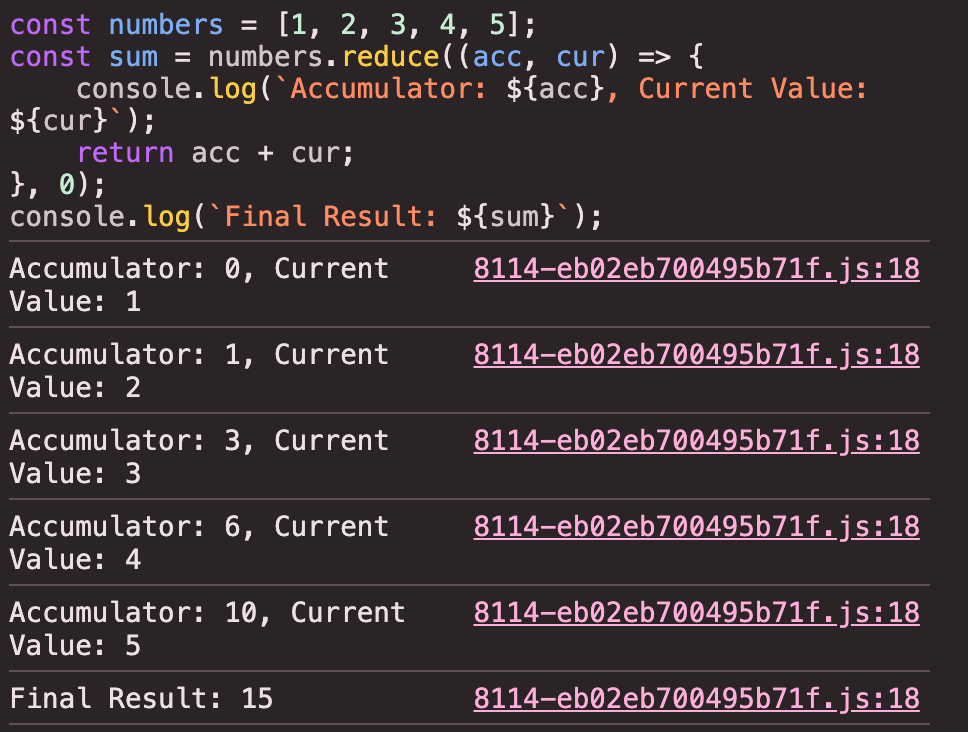
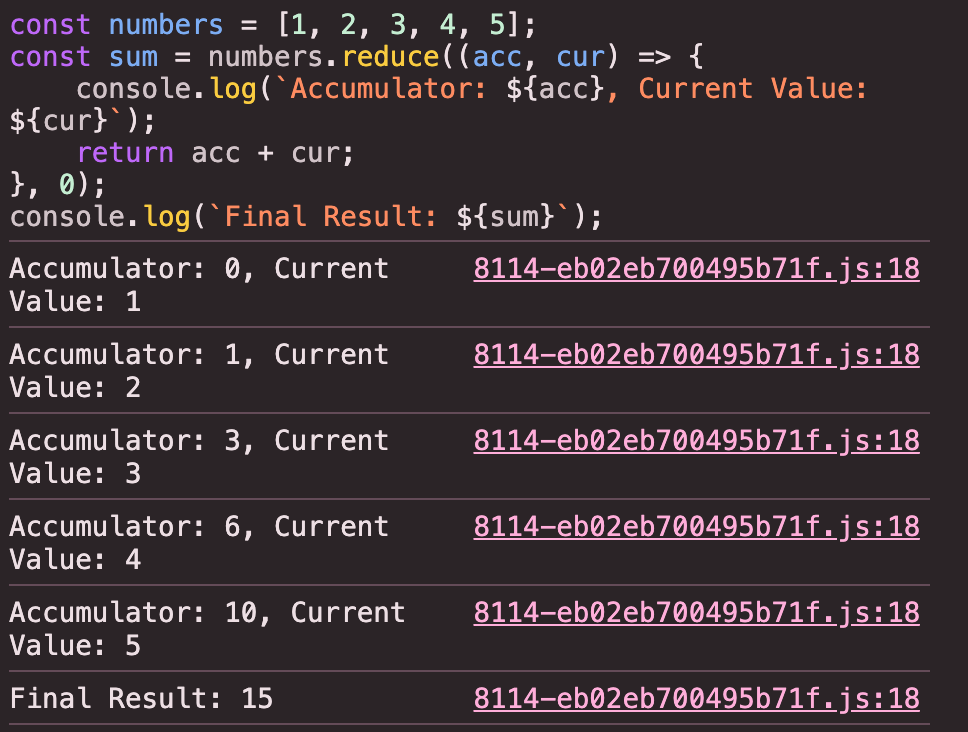
callback: (accumulator, currentValue, currentIndex, array) => {}- 나머지는 다 동일하고, accumulator만 이해하면 되는데, 이전 콜백 호출 단계에서의 결과를 저장하여 누적(accumulate)하는 것임.
- 나머지는 다 동일하고, accumulator만 이해하면 되는데, 이전 콜백 호출 단계에서의 결과를 저장하여 누적(accumulate)하는 것임.
- initialValue는 최초값으로 사용할 값을 의미함.
- callback 함수 구조:
4. sort()
let fruits = ['banana', 'apple', 'orange', 'kiwi'];
fruits.sort();
console.log(fruits);
// Output: ['apple', 'banana', 'kiwi', 'orange']
-
배열 요소를 정렬하는 데에 사용됨.
- 중요한 것은 배열 요소를 무조건 문자열로 변환하고, 유니코드 코드 포인트 순서에 따라서 정렬한다는 것임.
-
위 예시처럼 기본적으로는 매개변수 없이 사용할 수 있음.
let numbers = [10, 5, 2, 35, 0];
numbers.sort((a, b) => a - b);
console.log(numbers);
// Output: [0, 2, 5, 10, 35]- 매개변수를 사용하려면 다음과 같이 두 개의 매개변수를 받는 콜백 함수를 사용할 수 있는데, 내부적으로는 compareFunction()이라는 것이 작동함.
(a, b) => a - b는 오름차순 정렬을 수행(a, b) => b - a는 내림차순 정렬을 수행
let fruits = ['banana', 'apple', 'orange', 'kiwi'];
fruits.sort((a, b) => a.length - b.length);
console.log(fruits);
// Output: ['kiwi', 'apple', 'banana', 'orange']
- 문자열의 길이에 따라 배열을 정렬할 수 있음.
let students = [
    { name: 'John', age: 21 },
    { name: 'Alice', age: 20 },
    { name: 'Bob', age: 22 }
];

students.sort((a, b) => a.age - b.age);
console.log(students);
// Output:
// [
//   { name: 'Alice', age: 20 },
//   { name: 'John', age: 21 },
//   { name: 'Bob', age: 22 }
// ]
- Object를 정렬할 수도 있는데, key값을 .key 형식으로 사용하면 됨.
5. filter()
let newArray = array.filter(callback(element[, index[, array]])[, thisArg]);- 배열의 요소를 필터링해서 새로운 배열을 반환함.
- element: 배열의 현재 처리 중인 요소.
- index (선택사항): 현재 요소의 인덱스.
- array (선택사항): filter()를 호출한 배열 자체.
- thisArg (선택사항): callback 함수 내에서 this로 사용할 값.
예시 1. arrow 함수와 element만 써서 쉽게 필터링하기
let numbers = [1, 2, 3, 4, 5, 6, 7, 8, 9, 10];

let evenNumbers = numbers.filter(number => number % 2 === 0);

console.log(evenNumbers);
// Output: [2, 4, 6, 8, 10]
예시 2. element와 index를 다 쓰기
인덱스가 홀수이고 요소가 짝수인 경우만 필터링
let numbers = [10, 15, 20, 25, 30, 35, 40, 45, 50];

// 인덱스가 홀수이고 요소가 짝수인 경우만 필터링
let filteredNumbers = numbers.filter((element, index) => {
    return index % 2 === 1 && element % 2 === 0;
});

console.log(filteredNumbers);
// Output: [20, 40]
예시 3. element, index, array를 다 쓰기
배열에서 중복되지 않는 값 찾는 법
let numbers = [1, 2, 3, 2, 4, 5, 6, 5, 7, 8, 9, 9];

let uniqueNumbers = numbers.filter((element, index, array) => {
    // 요소의 첫 번째 인덱스와 현재 인덱스가 같다면, 요소가 배열에서 한 번만 나타남
    return array.indexOf(element) === index && array.lastIndexOf(element) === index;
});

console.log(uniqueNumbers);
// Output: [1, 3, 4, 6, 7, 8]
// Output: [20, 40]
**예시 4. thisArg 사용하기** 배열에서 중복되지 않는 값 찾는 법
let threshold = { limit: 90 };

let topStudents = students.filter(function(student) {
    return student.score >= this.limit;
}, threshold);

console.log(topStudents);
// Output:
// [
//   { name: 'Alice', score: 92 },
//   { name: 'Eve', score: 95 }
// ]
출처 1) https://seokzin.tistory.com/entry/JavaScript-%EB%B0%B0%EC%97%B4-%EB%A9%94%EC%84%9C%EB%93%9C-%EC%A2%85%EB%A5%98-filter-forEach-map-reduce-sort#--%--Array-prototype-reduce--
출처 2) https://hongong.hanbit.co.kr/javascript-%EC%9E%90%EB%B0%94%EC%8A%A4%ED%81%AC%EB%A6%BD%ED%8A%B8-%EC%BD%9C%EB%B0%B1%ED%95%A8%EC%88%98foreach-map-filter/
출처 3) https://growing-jiwoo.tistory.com/73
출처 4) https://velog.io/@nayeon/Array%EC%9D%98-map-filter-reduce-forEach-%EB%A9%94%EC%86%8C%EB%93%9C