생활코딩 - 웹브라우저 Javascript (자바스크립트)
위 강의를 듣고 정리한 글입니다.
2. DOM
Document Object Model로 웹페이지를 자바스크립트로 제어하기 위한 객체 모델을 의미한다.
window 객체의 document 프로퍼티를 통해서 사용할 수 있다.
Window 객체가 창을 의미한다면 Document 객체는 윈도우에 로드된 문서를 의미한다고 할 수 있다.
2.1 제어의 대상 찾기
문서를 자바스크립트로 제어하려면 제어의 대상에 해당되는 객체를 찾아야한다.
문서 내에서 객체를 찾는 방법은 document 객체의 메소드를 이용한다.
document.getElementsByTagName
getElementsByTagName은 인자로 전달된 태그명에 해당하는 객체들을 HTMLCollection를 반환한다.
참고: 최신 W3C 명세에서는 elements 가 HTMLCollection 라고 하지만, WebKit 브라우저에서는 NodeList 를 반환합니다. 자세한 내용은 Firefox bug 14869 버그를 확인하시기 바랍니다.
NodeList는 배열은 아니지만 length와 배열접근연산자를 사용해서 엘리먼트를 조회한다.
<!DOCTYPE html>
<html>
<body>
<ul>
    <li>HTML</li>
    <li>CSS</li>
    <li>JavaScript</li>
</ul>
<script>
    var lis = document.getElementsByTagName('li');
    for(var i=0; i < lis.length; i++){
        lis[i].style.color='red';
    }
</script>
</body>
</html>
만약 조회의 대상을 좁히려면 특정 객체를 지정하면 되고 다른 메소드에도 적용된다.
<!DOCTYPE html>
<html>
<body>
<ul>
    <li>HTML</li>
    <li>CSS</li>
    <li>JavaScript</li>
</ul>
<ol>
    <li>HTML</li>
    <li>CSS</li>
    <li>JavaScript</li>
</ol>
<script>
    var ul = document.getElementsByTagName('ul')[0];
    var lis = ul.getElementsByTagName('li');
    for(var i=0; lis.length; i++){
        lis[i].style.color='red';
    }
</script>
</body>
</html>
document.getElementsByClassName
class 속성의 값 기준으로 객체를 조회
<!DOCTYPE html>
<html>
<body>
<ul>
    <li>HTML</li>
    <li class="active">CSS</li>
    <li class="active">JavaScript</li>
</ul>
<script>
    var lis = document.getElementsByClassName('active'); //class 값으로 객체 조회
    for(var i=0; i < lis.length; i++){
        lis[i].style.color='red';
    }
</script>
</body>
</html>
document.getElementById
id 값을 기준으로 객체를 조회한다.
성능면에서 가장 우수하다.
<!DOCTYPE html>
<html>
<body>
<ul>
    <li>HTML</li>
    <li id="active">CSS</li>
    <li>JavaScript</li>
</ul>
<script>
    var li = document.getElementById('active'); //id값을 통해 조회 한다.
    li.style.color='red';
</script>
</body>
</html>
document.querySelector
css 선택자의 문법을 이용해서 객체를 조회할수도 있다.
<!DOCTYPE html>
<html>
<body>
<ul>
    <li>HTML</li>
    <li>CSS</li>
    <li>JavaScript</li>
</ul>
<ol>
    <li>HTML</li>
    <li class="active">CSS</li>
    <li>JavaScript</li>
</ol>

<script>
    var li = document.querySelector('li');
    li.style.color='red';
    var li = document.querySelector('.active'); //선택자를 조회
    li.style.color='blue';
</script>
</body>
</html>
document.querySelectorAll
querySelector과 기본적인 동작방법은 같지만 모든 객체를 조회한다는 차이점이 있다.
<!DOCTYPE html>
<html>
<body>
<ul>
    <li>HTML</li>
    <li>CSS</li>
    <li>JavaScript</li>
</ul>
<ol>
    <li>HTML</li>
    <li class="active">CSS</li>
    <li>JavaScript</li>
</ol>

<script>
    var lis = document.querySelectorAll('li');
    for(var name in lis){
        lis[name].style.color = 'blue';
    }
</script>
</body>
</html>
2.2 jQuery
라이브러리
자주 사용하는 로직을 재사용할 수 있도록 고안된 소프트웨어를 라이브러리라고 한다.
jQuery
jQuery는 DOM을 내부에 감추고 보다 쉽게 웹페이지를 조작할 수 있도록 돕는 도구이다.
jQuery의 사용
jQuery를 사용하기 위해서는 jQuery를 HTML로 로드해야 한다.
<!DOCTYPE html>
<html>
<body>
<script src="//code.jquery.com/jquery-1.11.0.min.js"></script> //JQuery 로드
    <script>
    jQuery( document ).ready(function( $ ) {
      $('body').prepend('<h1>Hello world</h1>');
    });
    </script>
</body>
</html>
Body 태그 아래에 <h1>Hello world</h1> 코드가 만들어진다.
아래와 같이 jQuery( document ).ready(function( $ ) {}로 감싸는 것이 이상적이다.
jQuery( document ).ready(function( $ ) {
  $('body').prepend('<h1>Hello world</h1>');
});$('body').prepend('<h1>Hello world</h1>');2.3 제어의 대상 찾기 (jQuery)
jQuery를 이용하면 DOM을 사용하는 것 보다 훨씬 효율적으로 필요한 객체를 조회할 수 있다.
jQuery는 객체를 조회할 때 CSS 선택자를 이용한다.
jQuery의 기본문법
jQuery의 기본 문법은 단순하고 강력하다.

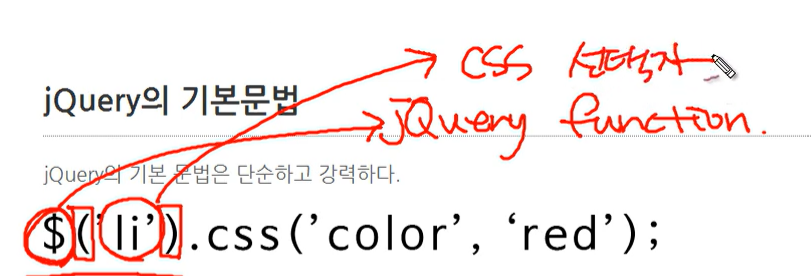
$()는 jQuery의 함수이다.
이 함수의 인자로 CSS 선택자(li)를 전달하면 jQuery 객체라는 것을 리턴한다.
(* jQuery함수와 객체는 다르다.)
이 객체는 선택자에 해당하는 엘리먼트를 제어하는 다양한 메소드를 가지고 있다.
위의 그림에서 css는 선택자에 해당하는 객체들의 style에 color:red로 변경한다.
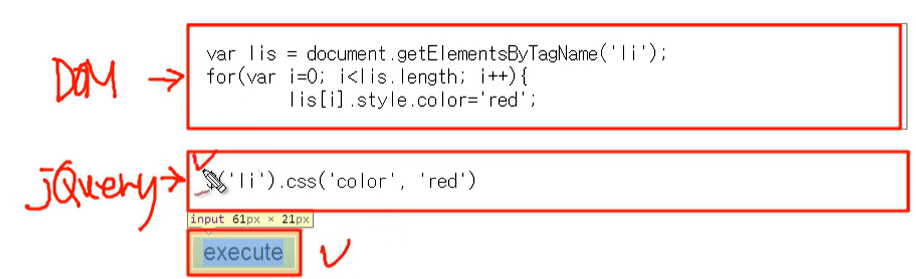
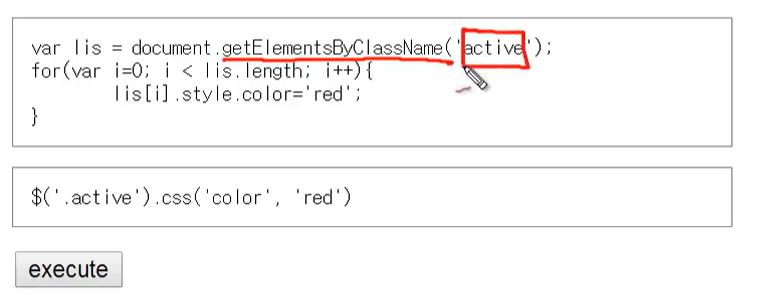
아래는 DOM을 이용했을 때와 jQuery를 이용했을 때를 비교한 것이다
jQuery를 사용하면 코드가 간단하게 한줄로 끝난다.
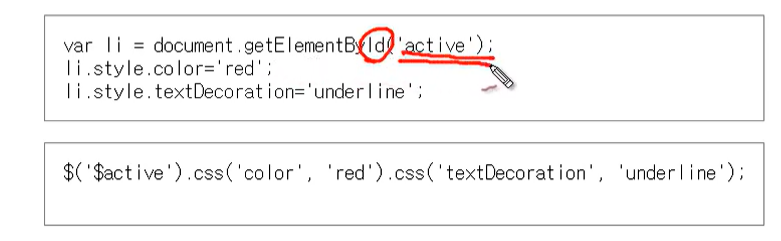
(*chainng: 연속적으로 메소드를 호출해서 작업하는 것)
<!DOCTYPE html>
<html>
<head>
<style>
#demo{width:200px;float: left; margin-top:120px;}
#execute{float: left; margin:0; font-size:0.9em;}
#execute{padding-left: 5px}
#execute li{list-style: none}
#execute pre{border:1px solid gray; padding:10px;}
</style>
</head>
<body>
<ul id="demo">
<li class="active">HTML</li>
<li id="active">CSS</li>
<li class="active">JavaScript</li>
</ul>
<ul id="execute">
<li>
<pre>
var lis = document.getElementsByTagName('li');
for(var i=0; i<lis.length; i++){
lis[i].style.color='red';
</pre>
<pre>
$('li').css('color', 'red') </pre>
<input type="button" value="execute" onclick="$('li').css('color', 'red')" />
</li>
<li>
<pre>
var lis = document.getElementsByClassName('active');
for(var i=0; i < lis.length; i++){
lis[i].style.color='red';
}</pre>
<pre>
$('.active').css('color', 'red')</pre>
<input type="button" value="execute" onclick="$('.active').css('color', 'red')" />
</li>
<li>
<pre>
var li = document.getElementById('active');
li.style.color='red';
li.style.textDecoration='underline';</pre>
<pre>
$('$active').css('color', 'red').css('textDecoration', 'underline');
</pre>
<input type="button" value="execute" onclick="$('#active').css('color', 'red').css('textDecoration', 'underline')" />
</li>
</ul>
<script src="//code.jquery.com/jquery-1.11.0.min.js"></script>
</body>
</html>2.4 HTML Element
2.4.1 단수와 복수 & HTMLElement
getElement* 메소드를 통해서 원하는 객체를 조회했다면 이 객체들을 대상으로 구체적인 작업을 처리해야 한다.
이를 위해서는 획득한 객체가 무엇인지 알아야 적절한 메소드나 프로퍼티를 사용할 수 있다.
getElement*의 리턴 값을 보여준다.
<ul>
    <li>HTML</li>
    <li>CSS</li>
    <li id="active">JavaScript</li>
</ul>
<script>
    var li = document.getElementById('active');
    console.log(li.constructor.name); //HTMLLIElement  (1개)
    var lis = document.getElementsByTagName('li');
    console.log(lis.constructor.name); //HTMLCollection (복수개의 엘리먼트 리턴시 컬렉션/유사배열)
</script>
실행결과
HTMLLIElement
HTMLCollection
document.getElementById : 리턴 데이터 타입은 HTMLLIELement
document.getElementsByTagName : 리턴 데이터 타입은 HTMLCollection
즉 실행결과가 하나인 경우 HTMLLIELement, 복수인 경우 HTMLCollection을 리턴하고 있다.
<a id="anchor" href="http://opentutorials.org">opentutorials</a>
<ul>
    <li>HTML</li>
    <li>CSS</li>
    <li id="list">JavaScript</li>
</ul>
<input type="button" id="button" value="button" />
<script>
    var target = document.getElementById('list');
    console.log(target.constructor.name); //HTMLLIElement

    var target = document.getElementById('anchor');
    console.log(target.constructor.name); //HTMLAnchorElement

    var target = document.getElementById('button');
    console.log(target.constructor.name); //HTMLInputElement

</script>
결과
HTMLLIElement
HTMLAnchorElement
HTMLInputElement
엘리먼트의 종류에 따라서 리턴되는 객체가 조금씩 다르다.
HTMLLIElement
HTMLAnchroElement
HTMLInputElement
HTMLLIElement
interface HTMLLIElement : **HTMLElement** {
           attribute DOMString       type;
           attribute long            value;
};
HTMLAnchroElement
interface HTMLAnchorElement : **HTMLElement** {
           attribute DOMString       accessKey;
           attribute DOMString       charset;
           attribute DOMString       coords;
           attribute DOMString       href;
           attribute DOMString       hreflang;
           attribute DOMString       name;
           attribute DOMString       rel;
           attribute DOMString       rev;
           attribute DOMString       shape;
           attribute long            tabIndex;
           attribute DOMString       target;
           attribute DOMString       type;
  void               blur();
  void               focus();
};
엘리먼트 객체에 따라서 프로퍼티가 다르지만 모든 엘리먼트들은 HTMLElement를 상속 받고 있다.
interface HTMLLIElement : HTMLElement {
interface HTMLAnchorElement : HTMLElement {
HTMLElement는 아래와 같다.
interface HTMLElement : Element {
           attribute DOMString       id;
           attribute DOMString       title;
           attribute DOMString       lang;
           attribute DOMString       dir;
           attribute DOMString       className;
};
2.4.2 DOM Tree
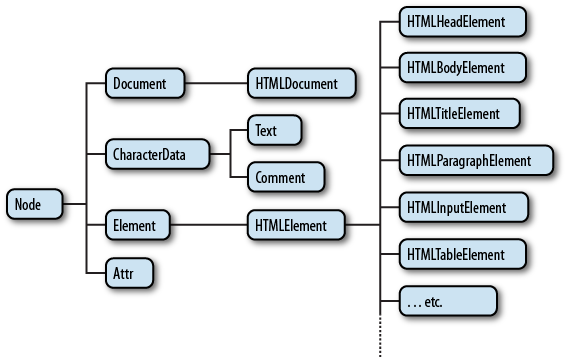
모든 엘리먼트는 HTMLElement의 자식이다.
따라서 HTMLElement의 프로퍼티를 똑같이 가지고 있다.
동시에 엘리먼트의 성격에 따라서 자신만의 프로퍼티를 가지고 있는데 이것은 엘리먼트의 성격에 따라서 달라진다.
HTMLElement는 Element의 자식이고 Element는 Node의 자식이다.
Node는 Object의 자식이다.
이러한 관계를 DOM Tree라고 한다.
이 관계를 그림으로 나타내면 아래와 같다.
2.5 HTML Collection
HTMLCollection은 리턴 결과가 복수인 경우에 사용하게 되는 객체다.
유사배열로 배열과 비슷한 사용방법을 가지고 있지만 배열은 아니다.
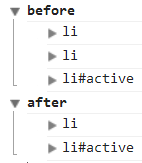
HTMLCollection의 목록은 실시간으로 변경된다.
<!DOCTYPE html>
<html>
<body>
<ul>
    <li>HTML</li>
    <li>CSS</li>
    <li id="active">JavaScript</li>
</ul>
<script>
console.group('before');
var lis = document.getElementsByTagName('li');
for(var i = 0; i < lis.length; i++){
    console.log(lis[i]);
}
console.groupEnd();
console.group('after');
lis[1].parentNode.removeChild(lis[1]);
for(var i = 0; i < lis.length; i++){
    console.log(lis[i]);
}
console.groupEnd();
</script>
</body>
</html>
결과
2.6 jQuery 객체
jQuery 객체는 jQuery 함수의 리턴값으로, jQuery 함수를 이용해서 선택한 엘리먼트들에 대해서 처리할 작업을 프로퍼티로 가지고 있는 객체다.
암시적 반복
jQuery 객체의 특성은 암시적인 반복을 수행하는 것이다.
눈에는 보이지 않지만 반복적인 실행을 한다.
DOM과 다르게 jQuery 객체의 메소드를 실행하면 선택된 엘리먼트 전체에 대해서 동시에 작업이 처리된다.
암시적 반복은 값을 설정할 때만 동작한다.
값을 가져올 때는 선택된 엘리먼트 중 첫번째에 대한 값만을 반환한다.
체이닝(chainig)
체이닝(chainig)이란 선택된 엘리먼트에 대해서 연속적으로 작업을 처리할 수 있는 방법이다.
조회 결과
jQuery 객체에는 조회된 엘리먼트가 담겨 있다.
jQuery 객체는 일종의 유사배열의 형태로 조회된 엘리먼트를 가지고 있기 때문에 배열처럼 사용해서 엘리먼트를 가져올 수 있다.
<ul>
    <li>html</li>
    <li>css</li>
    <li>JavaScript</li>
</ul>
<script src="http://code.jquery.com/jquery-1.11.0.min.js"></script>
<script>
    console.log($('li').length);
    console.log($('li')[0]);
    var li = $('li');
    for(var i=0; i<li.length; i++){
        console.log(li[i]);
    }
</script>
한가지 주의할 것은 li[i]의 값은 해당 엘리먼트에 대한 jQuery 객체가 아니라 DOM 객체이다.
jQuery의 기능을 이용해서 이 객체를 제어하려면 jQuery 함수를 이용해야 한다.
for(var i=0; i<li.length; i++){
    $(li[i]).css('color', 'red'); //$를통해서 jQuery 함수처리
}
DOM 객체를 jQuery함수의 인자로 전달하면 dom객체에 해당하는 jQuery 객체가 해당된다.
.map()
<ul>
    <li>html</li> //0
    <li>css</li> // 1
    <li>JavaScript</li> //2
</ul>
<script src="http://code.jquery.com/jquery-1.11.0.min.js"></script>
<script>
    var li = $('li');
    li.map(function(index, elem){ //엘리먼트를 조회할때마다 map함수를 계속 호출 //0
        console.log(index, elem);
        $(elem).css('color', 'red');
    })
</script>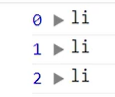
(index, elem)
map은 jQuery 객체의 엘리먼트를 하나씩 순회한다.
이 때 첫번째 인자로 전달된 함수가 호출되는데 첫번째 인자로 엘리먼트의 인덱스, 두번째 인자로 엘리먼트 객체(DOM)이 전달된다.
jQuery 객체 API
제어할 대상을 선택한 후에는 대상에 대한 연산을 해야한다.
.css와 .attr은 jQuery 객체가 가지고 있는 메소드 중의 하나인데, jQuery는 그 외에도 많은 API를 제공하고 있다.
-
.css() : Get the computed style properties for the first element in the set of matched elements.
-
.attr() : Get the value of an attribute for the first element in the set of matched elements.