1. 코드 개선 퀴즈 - @Transactional의 이해
- 할 일 저장 (saveTodo → INSERT)
📚
@Transactional(readOnly = true)옵션은 Spring 에서 트랜잭션을 관리할 때 읽기 전용으로 설정하는 옵션으로 조회(SELECT) 성능이 최적화된다.
→ 영속성 컨텍스트가 변경 감지를 하지 않음으로써 불필요한 스냅샷이 줄어든다.
readOnly = true옵션을 적용하여 쓰기 연산(INSERT/UPDATE/DELETE)을 수행하는 경우 예외가 발생한다.- EntityManager가 쓰기 연산을 무시하거나 예외를 던질 수 있다.
- DML 실행 시 오류 발생 가능성이 있다.
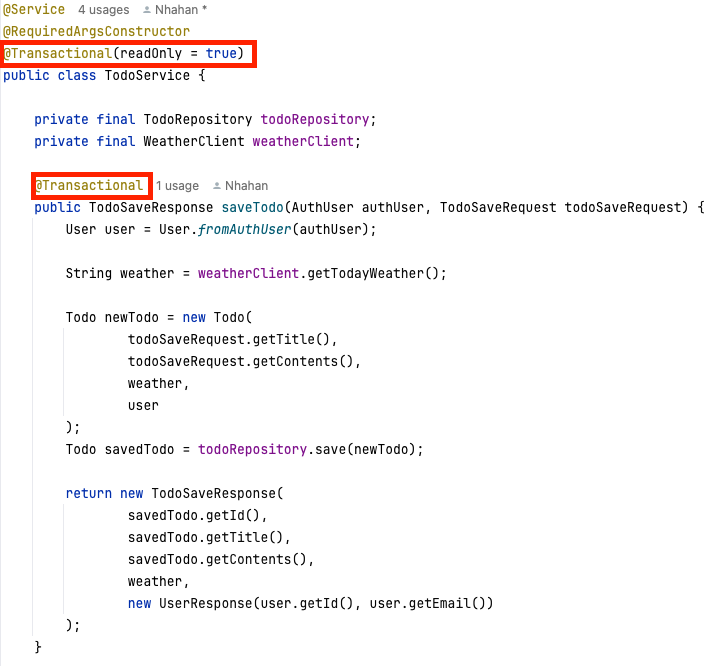
🤓 코드 해석
✏️ @Transactional 우선 순위
-
@Transactional어노테이션의 Target은 Type(타입, 클래스), Method 이다.
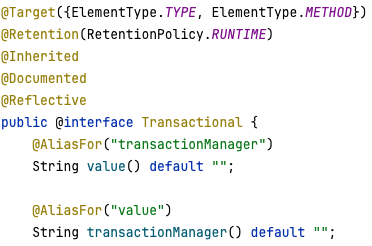
-
Type(클래스)에 선언하면 클래스 내 모든 메서드에 적용된다.
-
Method에 선언하면 해당 메서드의 설정이 우선 적용된다.
- Method의
@Transactional이 부모 클래스의@Transactional보다 우선 적용된다.
- Method의
2. 코드 추가 퀴즈 - JWT의 이해
- User의 정보에 nickname 추가
- nickname은 중복 허용
- jwt → 유저의 닉네임 저장
✏️ 코드 추가
- User
package org.example.expert.domain.user.entity; import jakarta.persistence.*; import lombok.Getter; import lombok.NoArgsConstructor; import org.example.expert.domain.common.dto.AuthUser; import org.example.expert.domain.common.entity.Timestamped; import org.example.expert.domain.user.enums.UserRole; @Getter @Entity @NoArgsConstructor @Table(name = "users") public class User extends Timestamped { @Id @GeneratedValue(strategy = GenerationType.IDENTITY) private Long id; @Column(unique = true) private String email; private String password; @Enumerated(EnumType.STRING) private UserRole userRole; private String nickname; public User(String email, String password, UserRole userRole, String nickname) { this.email = email; this.password = password; this.userRole = userRole; this.nickname = nickname; } private User(Long id, String email, UserRole userRole, String nickname) { this.id = id; this.email = email; this.userRole = userRole; this.nickname = nickname; } public static User fromAuthUser(AuthUser authUser) { return new User(authUser.getId(), authUser.getEmail(), authUser.getUserRole(), authUser.getNickname()); } public void changePassword(String password) { this.password = password; } public void updateRole(UserRole userRole) { this.userRole = userRole; } } - AuthUser
package org.example.expert.domain.common.dto; import lombok.Getter; import org.example.expert.domain.user.enums.UserRole; @Getter public class AuthUser { private final Long id; private final String email; private final UserRole userRole; private final String nickname; public AuthUser(Long id, String email, UserRole userRole, String nickname) { this.id = id; this.email = email; this.userRole = userRole; this.nickname = nickname; } } - JwtUtil → createToken 수정
public String createToken(Long userId, String email, UserRole userRole, String nickname) { Date date = new Date(); return BEARER_PREFIX + Jwts.builder() .setSubject(String.valueOf(userId)) .claim("email", email) .claim("userRole", userRole) .claim("nickname", nickname) .setExpiration(new Date(date.getTime() + TOKEN_TIME)) .setIssuedAt(date) // 발급일 .signWith(key, signatureAlgorithm) // 암호화 알고리즘 .compact(); } - JwtFilter → doFilter 수정
httpRequest.setAttribute("userId", Long.parseLong(claims.getSubject())); httpRequest.setAttribute("email", claims.get("email")); httpRequest.setAttribute("userRole", claims.get("userRole")); httpRequest.setAttribute("nickname", claims.get("nickname")); - AuthUserArgumentResolver
@Override
    public Object resolveArgument(
            @Nullable MethodParameter parameter,
            @Nullable ModelAndViewContainer mavContainer,
            NativeWebRequest webRequest,
            @Nullable WebDataBinderFactory binderFactory
    ) {
        HttpServletRequest request = (HttpServletRequest) webRequest.getNativeRequest();

        // JwtFilter 에서 set 한 userId, email, userRole 값을 가져옴
        Long userId = (Long) request.getAttribute("userId");
        String email = (String) request.getAttribute("email");
        UserRole userRole = UserRole.of((String) request.getAttribute("userRole"));
        // level1 - 2: User nickname 추가
        String nickname = (String) request.getAttribute("nickname");

        return new AuthUser(userId, email, userRole, nickname);
    }
👀 결과
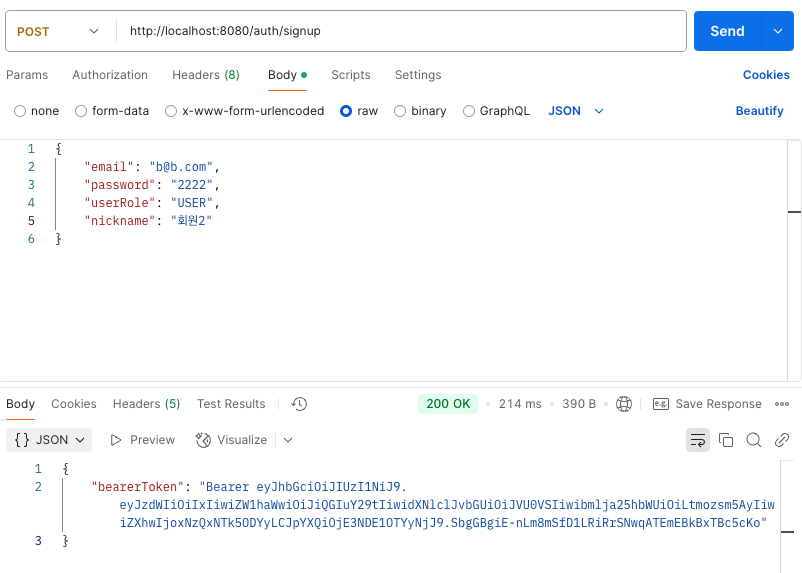
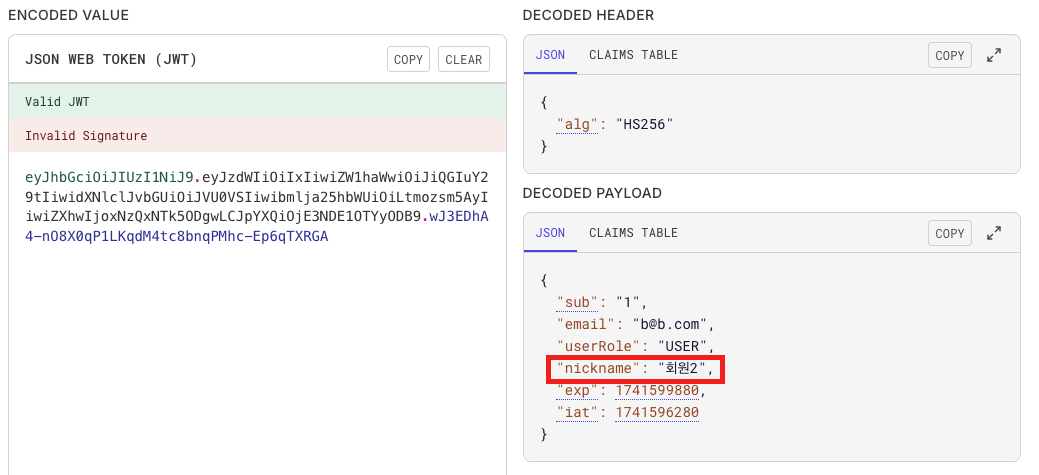
3. 코드 개선 퀴즈 - JPA의 이해
- 할 일 검색 시
weather조건 검색 - 할 일 검색 시
수정일기준으로 기간 검색 - JPQL을 사용하고 쿼리 메소드명을 자유롭게 지정
✏️ 코드 수정
- TodoController
@GetMapping("/todos") public ResponseEntity<Page<TodoResponse>> getTodos( @RequestParam(defaultValue = "1") int page, @RequestParam(defaultValue = "10") int size, @RequestParam(required = false) String weather, @RequestParam(required = false) @DateTimeFormat(pattern = "yyyy-MM-dd") String startDate, @RequestParam(required = false) @DateTimeFormat(pattern = "yyyy-MM-dd") String endDate ) { return ResponseEntity.ok(todoService.getTodos(page, size, weather, startDate, endDate)); }@RequestParam으로 검색 조건weather,startDate(기간시작),endDate(기간끝)요청 데이터를 받는다.- 클라이언트는 해당 검색 조건을 입력하지 않을 수도 있다. (required = false)
- TodoService
public Page<TodoResponse> getTodos(int page, int size, String weather, String startDate, String endDate) { Pageable pageable = PageRequest.of(page - 1, size); LocalDateTime startDateTime = StringUtils.isEmpty(startDate) ? null : LocalDate.parse(startDate).atStartOfDay(); LocalDateTime endDateTime = StringUtils.isEmpty(endDate) ? null : LocalDate.parse(endDate).atStartOfDay().plusDays(1); Page<Todo> todos = todoRepository.findAllByOrderByModifiedAtDesc(pageable, weather, startDateTime, endDateTime); return todos.map(todo -> new TodoResponse( todo.getId(), todo.getTitle(), todo.getContents(), todo.getWeather(), new UserResponse(todo.getUser().getId(), todo.getUser().getEmail()), todo.getCreatedAt(), todo.getModifiedAt() )); }- String으로 입력받은 startDate, endDate를 LocalDateTime 으로 형변환
- TodoRepository
@Query(""" SELECT t FROM Todo t LEFT JOIN FETCH t.user u WHERE 1=1 AND (:weather IS NULL OR t.weather LIKE CONCAT('%', :weather, '%')) AND (:startDateTime IS NULL OR t.modifiedAt >= :startDateTime) AND (:endDateTime IS NULL OR t.modifiedAt < :endDateTime) ORDER BY t.modifiedAt DESC """) Page<Todo> findAllByOrderByModifiedAtDesc(Pageable pageable, @Param(value = "weather") String weather, @Param(value = "startDateTime") LocalDateTime startDateTime, @Param(value = "endDateTime") LocalDateTime endDateTime);- FETCH JOIN 으로 N + 1 문제 방지
- JPQL을 사용하여 검색 조건을 WHERE 절에 추가 (동적 쿼리)
- 값이 NULL 인 경우,
:param IS NULL로 OR 뒤 쿼리 무시 개선 필요: OR 연산은 성능 저하를 유발하여 지양한다.- 인덱스가 제대로 활용되지 않아 Full Table Scan 발생 가능
- 쿼리 최적화가 어려움
- 병렬 처리에 불리 → CPU 사용량 증가
- 조건이 많아질수록 성능 저하 가속화
- 값이 NULL 인 경우,
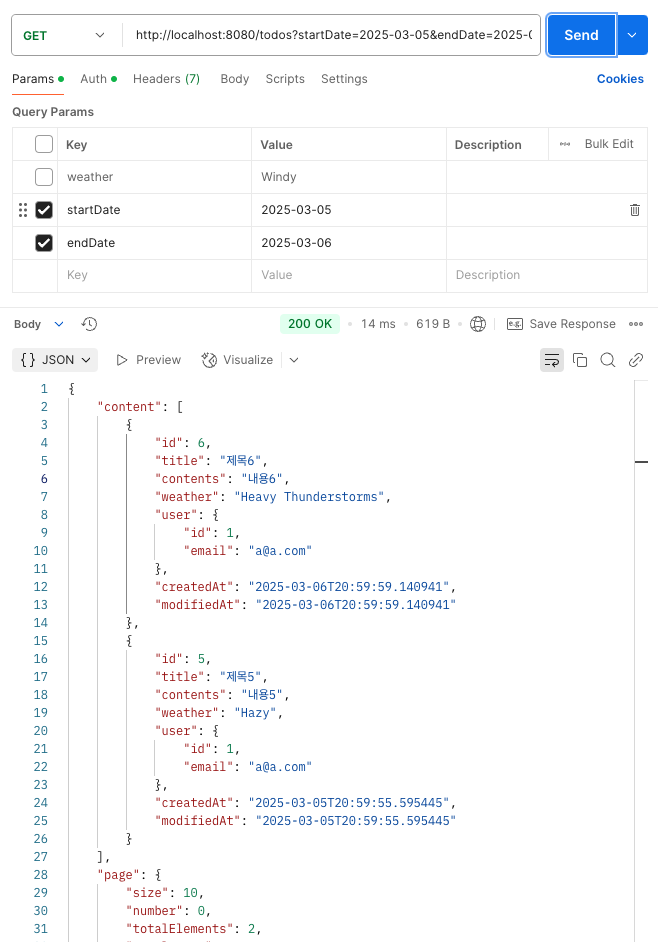
👀 결과
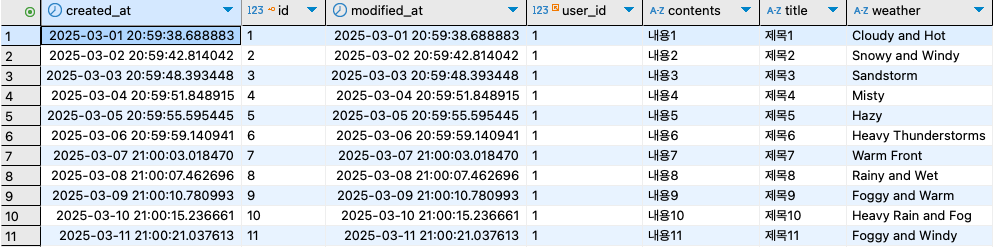
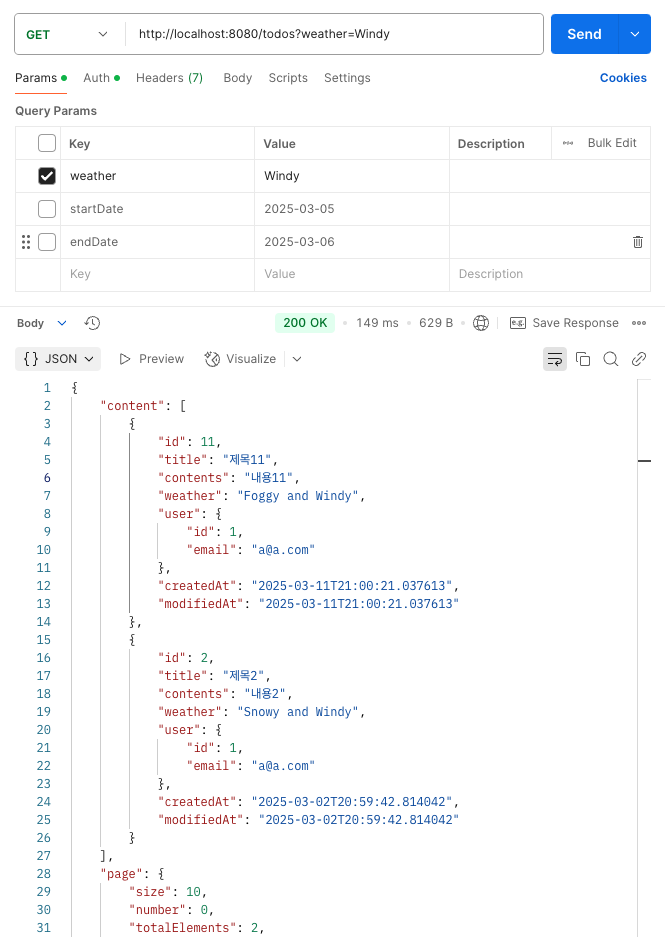
-
날씨(
weather) 검색
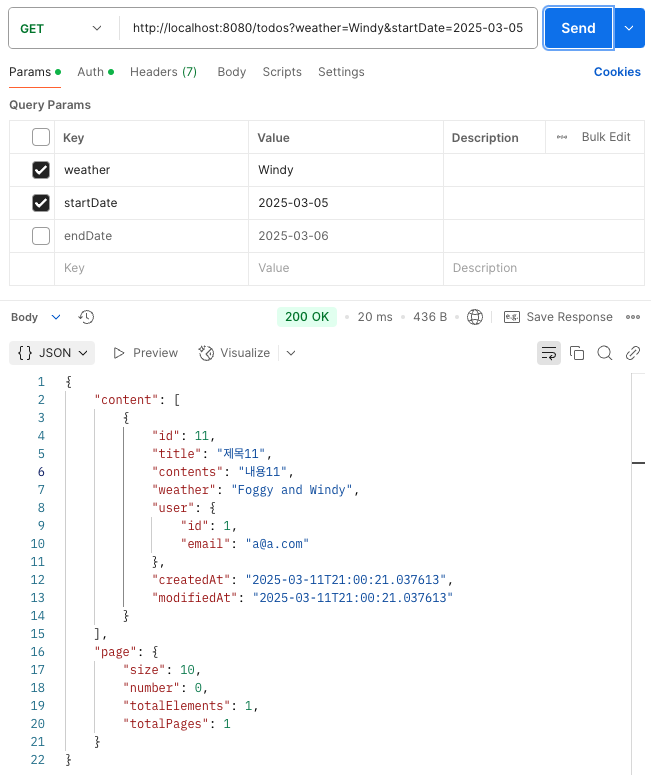
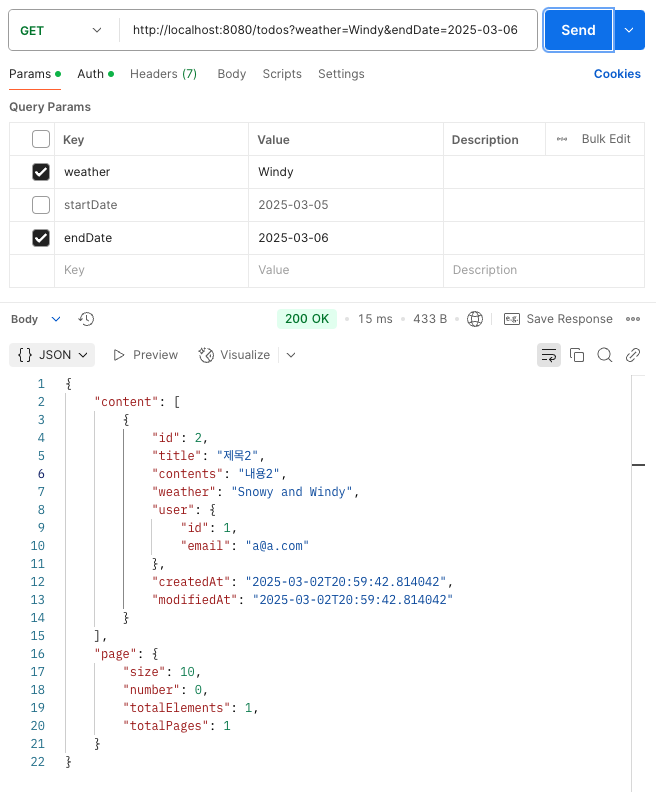
-
기간(
startDate,endDate) 검색
4. 테스트 코드 퀴즈 - 컨트롤러 테스트의 이해
- 테스트가 정상적으로 수행되어 통과할 수 있도록 테스트 코드 수정
🤓 코드 해석
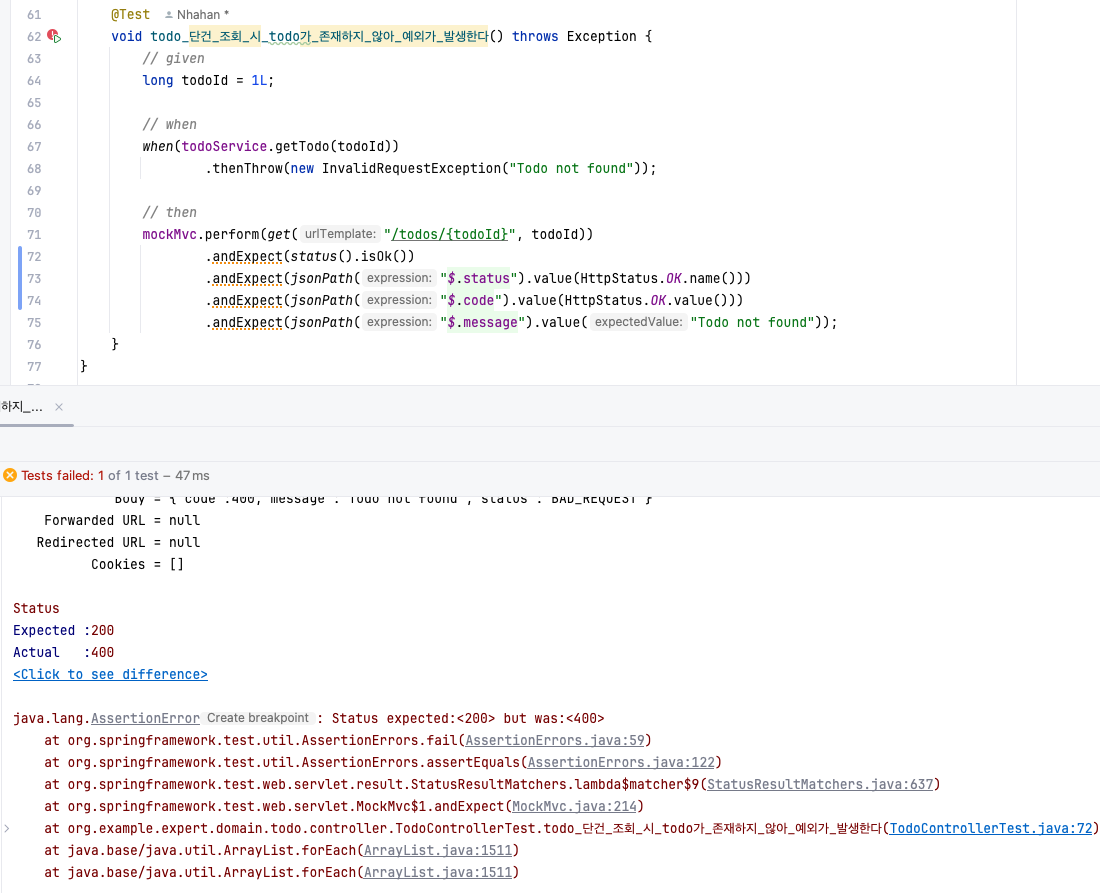
🚨 Expected : 200(Ok) ≠ Actual: 400 → ****기대값과 결과값이 일치하지 않음
해당 테스트 코드는 todo 데이터가 존재하지 않는 경우 예외가 발생하는지 확인하는 코드로 결과가 예외(400번대)인지 확인해야 한다.
✏️ 코드 수정
- TodoControllerTest
 		@Test
    void todo_단건_조회_시_todo가_존재하지_않아_예외가_발생한다() throws Exception {
        // given
        long todoId = 1L;

        // when
        when(todoService.getTodo(todoId))
                .thenThrow(new InvalidRequestException("Todo not found"));

        // then
        mockMvc.perform(get("/todos/{todoId}", todoId))
                .andExpect(status().isBadRequest())
                .andExpect(jsonPath("$.status").value(HttpStatus.BAD_REQUEST.name()))
                .andExpect(jsonPath("$.code").value(HttpStatus.BAD_REQUEST.value()))
                .andExpect(jsonPath("$.message").value("Todo not found"));
    }
5. 코드 개선 퀴즈 - AOP의 이해
- AOP 코드 수정
changeUserRole()메소드 실행 전 동작
🤓 코드 해석
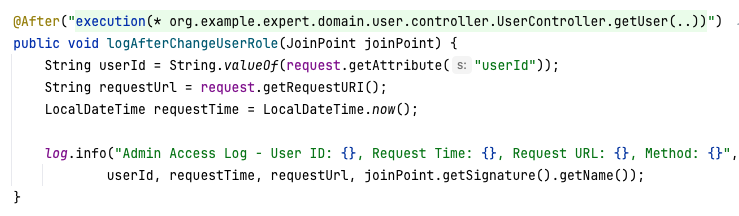

- 기존 코드
- getUser(유저 조회) 메소드 실행 후 동작 → changeUserRole() 메소드 실행 전 동작하도록 수정
- getUser(유저 조회) 메소드 실행 후 동작 → changeUserRole() 메소드 실행 전 동작하도록 수정
✏️ 코드 수정
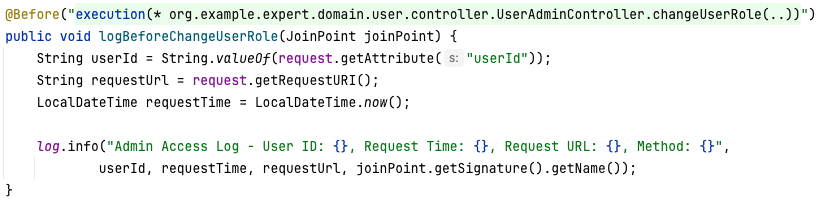
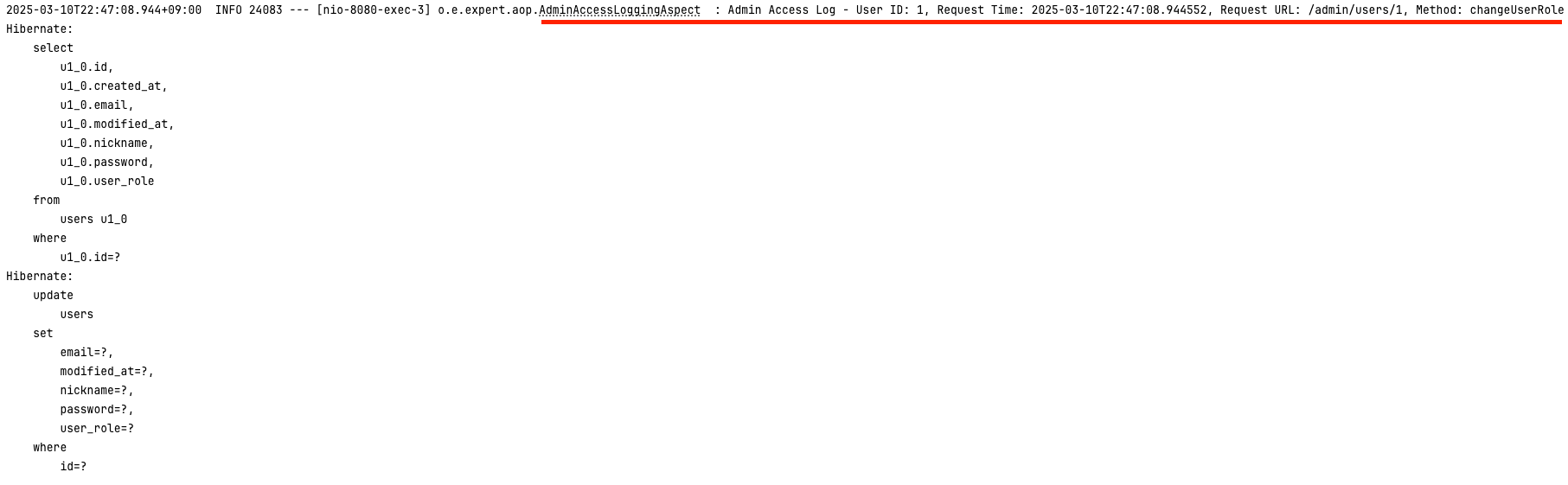
- 대상 메서드:
execution(* org.example.expert.domain.user.controller.UserAdminController.changeUserRole(..) - 실행 시점:
@After→@Before

안녕하세요 :)