백엔드와 통신
API 명세서
프론트엔드와 백엔드가 통신할 때 지켜야 할 약속을 정리해 놓은 문서
API
어떤 주소(URL)로 요청을 받고
어떤 방식(HTTP 메소드)으로 통신하며
요청 시 어떤 데이터를 보내야 하고, 응답으로 어떤 데이터를 받을 수 있는지 알수 있음
API 구성 요소
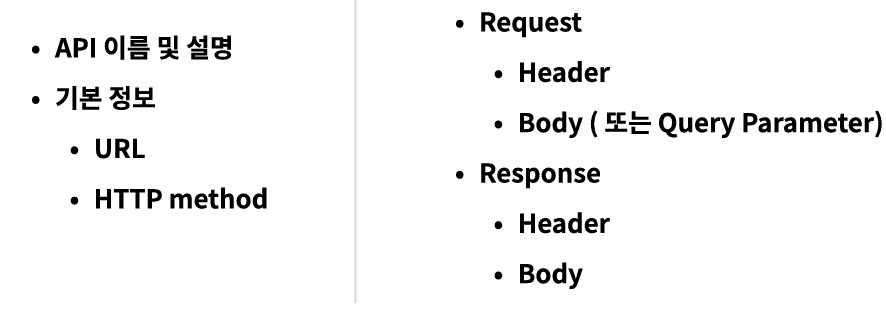
API 명세서 목록의 예
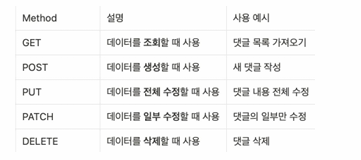
API 명세서 상세
-
url
API의 주소를 의미, 특정 데이터에 접근하거나 조작할 수 있는 경로(path)

-
HTTP Method
클라이언트(프론트엔드)가 서버에 어떤 작업을 요청할지 정하는 방식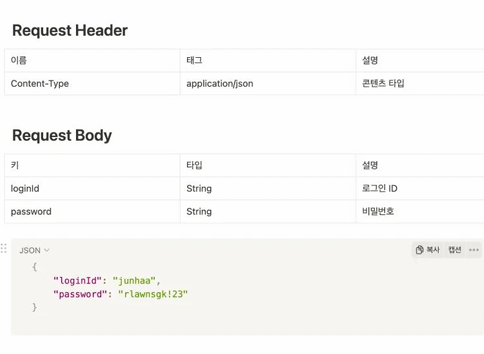
-
Request Header
요청 헤더는 서버에 요청을 보낼 때 함께 전달되는 추가 정보
키-값 쌍으로 구성되어 있음
다음과 같은 정보가 포함- 요청 데이터의 타입
- 인증 정보(예: JWT 토큰)
- 언어, 인코딩 등 기타 설정
-
Request Body
주로 POST, PUT, PATCH 요청에서 사용되며, 서버로 보내는 실제 데이터(내용물)를 담음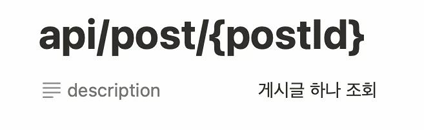
-
Path Variable(경로 변수)
- URL 경로 자체에 포함된 값, 특정 리소스를 식별할 때 사용
- 필수값, RESTful API에서 자주사용
-
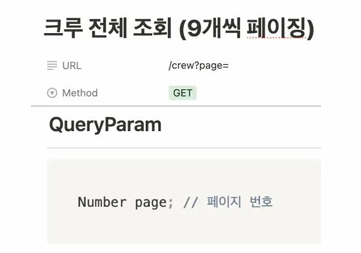
Query Parameter
- URL 끝에 ?와 함께 key=value 형식으로 전달되는 값
- 검색, 필터링, 정렬 등 선택적인 정보를 전달할 때 사용
-
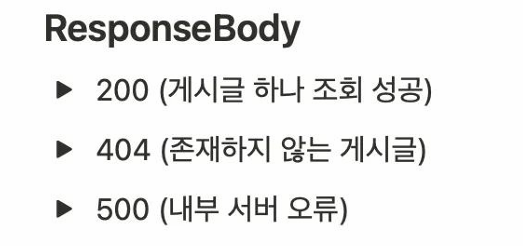
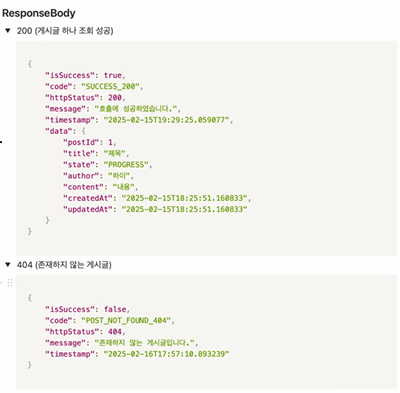
Response Body
- HTTP 요청에 대한 서버의 응답이 실려 있는 데이터 부분
- 서버가 클라이언트의 요청을 처리한 뒤, 결과 데이터를 담아 돌려주는 부분
- 클라이언트(프론트엔드)가 요청을 보내면 -> 서버는 그 요청에 대한 처리 결과(성공/실패, 데이터 등)를 본문에 담아 응답
fetch & axios
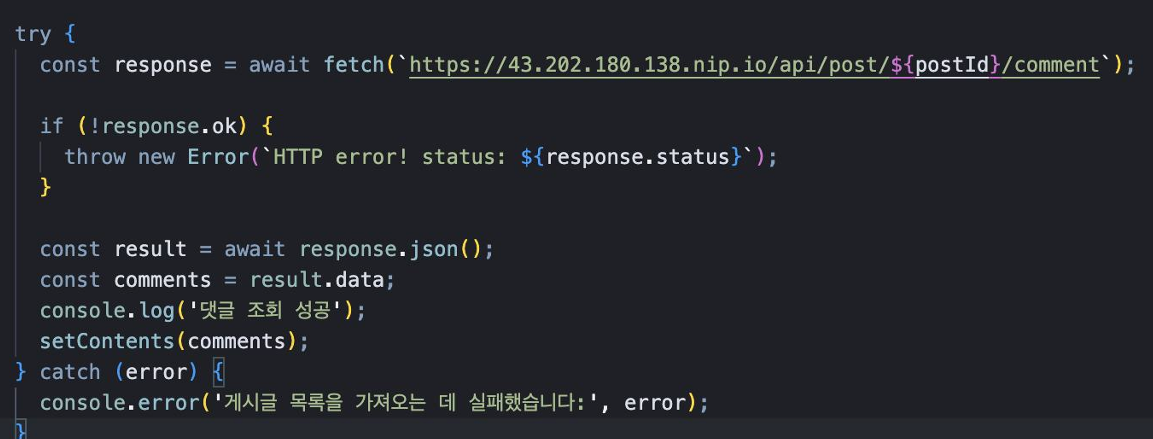
프론트엔드에서 서버와 통신(HTTP 요청)을 할 때 가장 많이 쓰는 도구
- fetch
브라우저에 기본 내장되어 있는 HTTP 요청 함수
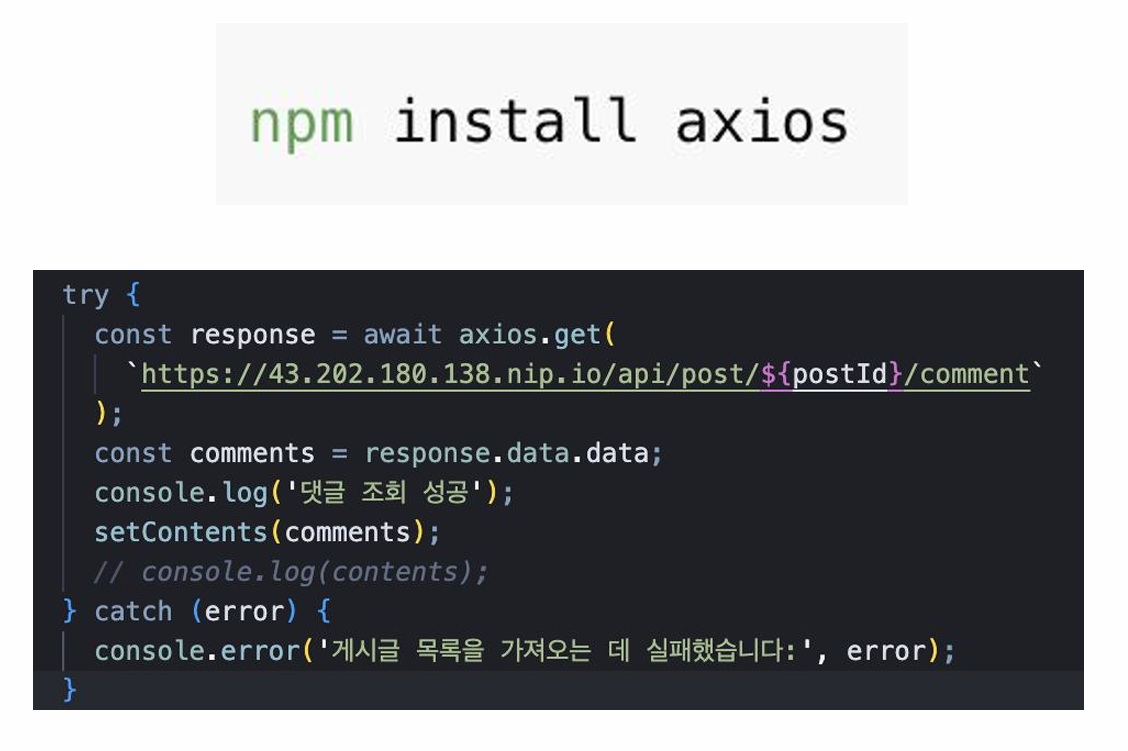
- axios
fetch보다 사용하기 더 편리하도록 만들어진 외부 라이브러리
Get method 사용법
- 리소스를 조회할 때 사용
- 서버에서 어떤 데이터를 가져올 때 사용하며, 요청을 여러 번 해도 동일한 결과가 조회됨
// get 사용법

const fetchPostDetails = async () => {
    try {
      const response = await axios.get(
        `https://43.202.180.138.nip.io/api/post/${postId}`
      );
      setPosts(response.data.data);
      console.log(response.data);
      setStatus(response.data.data.state === 'DONE' ? '답변 완료' : '답변 중');
    } catch (error) {
      console.error('게시글 상세 정보를 가져오는 데 실패했습니다:', error);
    }
  };
Post method 사용법
- 새로운 리소스를 생성할 때 사용
- 서버에 데이터를 제출하여 새로운 리소스를 만들 때 사용됨
// post 사용법

const updatePostStatus = async (postId, status) => {
    console.log(postId);
    try {
      const response = await axios.post(
        `https://43.202.180.138.nip.io/api/post/${postId}/state`,
        status
      );

      if (response.status === 200) {
        console.log('게시글 상태 업데이트 성공');
        const updatedStatus = response.data.data.status; // 업데이트된 상태
        onStatusUpdate(updatedStatus);
      } else {
        console.log('게시글 상태 업데이트 실패', response.data);
      }
    } catch (error) {
      console.error('게시글 상태 업데이트 중 오류 발생:', error);
    }
  };
Put method 사용법
- 리소스를 수정할 때 사용
- 기존 데이터를 새로운 데이터로 완전히 대체
// put 사용법

const handleModify = async (selectedContent) => {
    // e.preventDefault();
    console.log(selectedContent);
    try {
      const response = await axios.put(
        `https://www.hsu-like-lion.com/api/comments/${selectedContent.commentsId}`,
        {
          id: executiveId,
          content: reply,
        }
      );
      if (response.status === 200) {
        console.log('수정 완료');
        fetchPostId();
        setEditMode(false);
        setReply('');
      } else {
        console.log('수정 실패');
      }
    } catch (error) {
      console.log('오류', error);
    }
  };
Delete 사용법
리소스를 삭제할 때 사용
// delete 사용법

const handleDelete = async (selectedContent) => {
    console.log(selectedContent);
    console.log(executiveId);

    try {
      const response = await axios.delete(
        `https://www.hsu-like-lion.com/api/comments/${selectedContent.commentsId}`,
        {
          data: {
            id: executiveId,
          },
        }
      );
      if (response.status === 200) {
        console.log('삭제 완료');
        fetchPostId();
      } else {
        console.log('실패');
      }
    } catch (error) {
      console.error('오류', error);
      alert('접근 권한이 없습니다.');
    }

    if (contents.length - 1 === 0) {
      // 마지막 댓글이 삭제된 경우
      updatePostStatus(postId, 'PROGRESS'); // 상태를 '답변 중'으로 변경
    }
  };
노력하는 개발자 입니다