⚙️ 설계
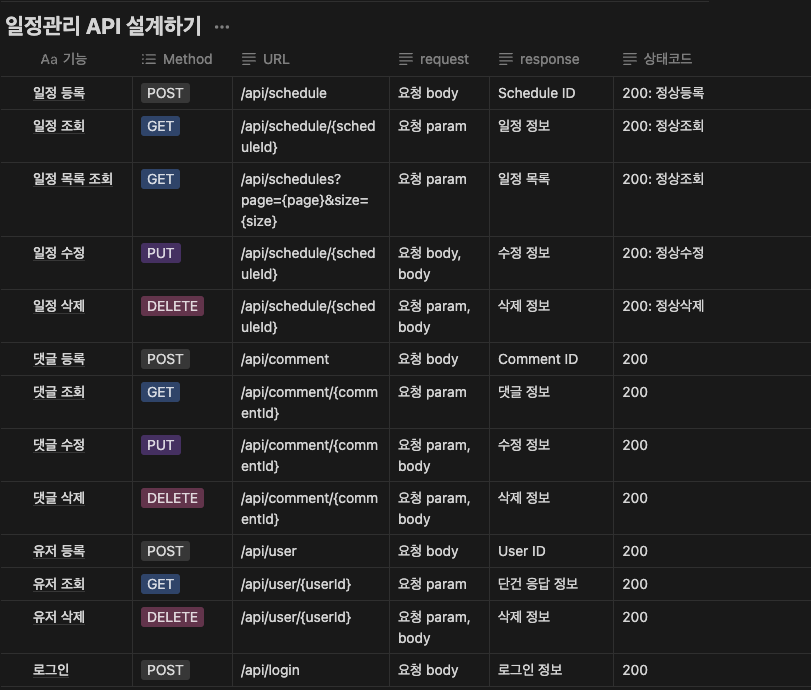
📌 ERD
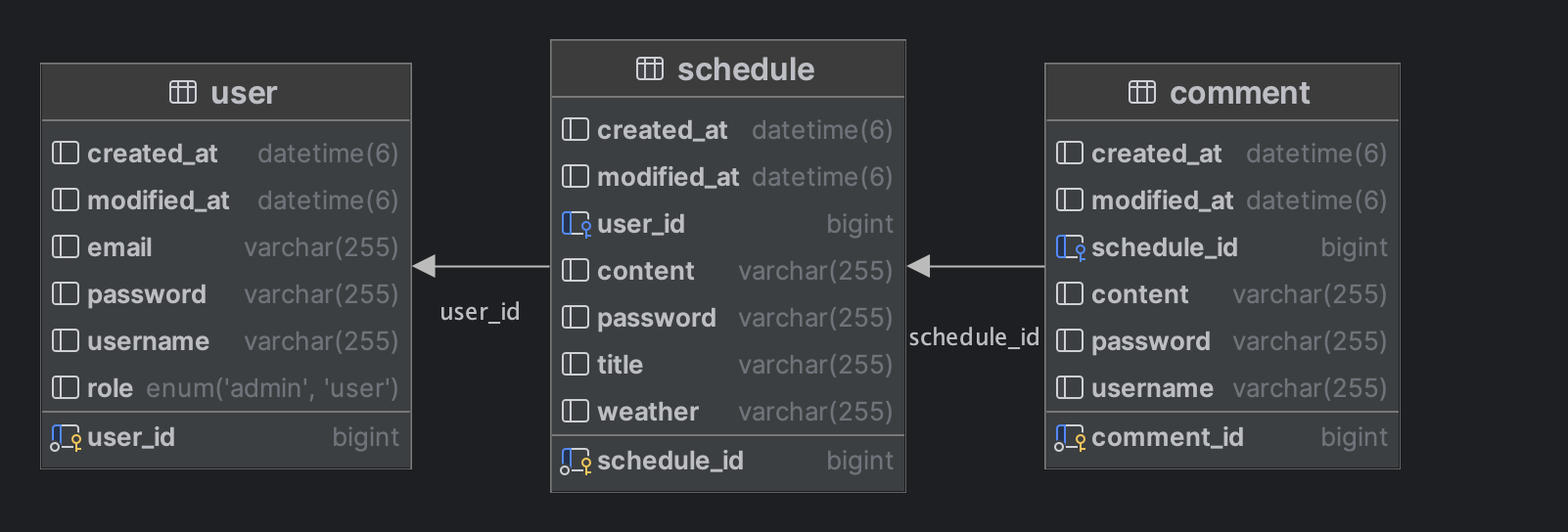
USER
userIdusernameemailpasswordroleschedules
Schedule
scheduleIdtitlecontentweatherusercomments
Comment
commentIdusernamecontentschedule
Request / Response DTO
댓글 조회 Response
usernamecontent
댓글 수정 Request
commentIdcontentpassword
댓글 삭제 Request
commentIdpassword
댓글 등록 Request
contentpassword
유저 조회 Response
userIdusernameemailroleschedules
유저 등록 Request
usernameemailpassword
유저 삭제
userIdpassword
일정 조회 Response
scheduleIdtitlecontentweatherusernamecommnets
일정 등록 Request
titlecontentpassword
일정 수정 Request
scheduleIdupdate contentpasswordrole
일정 삭제 Request
scheduleIdpasswordrole
페이징 Response
titlecontentcount(coment)createAtupdateAtusername
로그인 Request
emailpassword
테스트 데이터
유저 등록 Request
{
    "username" : "user1",
    "email" : "asdf@naver.com",
    "password" : "1234"
}
유저 삭제 Request
{
    "userId" : "1",
    "password" : "1234"
}
로그인 Request
{
    "email" : "asdf@naver.com",
    "password" : "1234"
}
일정 등록 Request
{
    "title" : "TIL",
    "content" : "Today Study Spring!!",
    "password" : "1234"
}
일정 수정 Request
{
    "scheduleId" : "1",
    "content" : "Today Study Spring!!",
    "password" : "1234"
}
일정 삭제 Request
{
    "scheduleId" : "1",
    "password" : "1234"
}
댓글 등록 Request
{
    "content" : "Good",
    "password" : "1234"
}
댓글 수정 Request
{
		"commentId" : "1",
    "content" : "LGTM",
    "password" : "1234"
}
댓글 삭제 Request
{
		"commentId" : "1",
		"password" : "1234"
}
💡요구사항 분석
예외 처리
- 로그인 시 이메일과 비밀번호가 일치하지 않을 경우
401을 반환합니다. - 토큰이 없는 경우
400을 반환합니다. - 유효 기간이 만료된 토큰의 경우
401을 반환합니다. - 권한이 없는 유저의 경우
403을 반환합니다. —> 권한이 없는 유저가 일정수정및삭제를 요청했을 때
검증
Email검증username글자 수 검증title글자 수 검증
외부 API 통신
- 외부
API를 사용하여JSON데이터 받아오기 Feign Client를 활용하여JSON가져오기JSON데이터 파싱해서 원하는 데이터 가져오기
JWT
- 로그인 시
JWT발급 - 인증 / 인가 필터 구현
- 유효성 검증 구현
연관관계 매핑
1 : N,N : 1, 양방향 매핑- 순환참조 주의
- 지연로딩 사용 (
N + 1문제 발생)
페이징 처리
@Query쿼리 파라미터 사용countQuery사용Pagaable객체 사용
🧑💻 코드
예외처리
@RestControllerAdvice
public class GlobalExceptionHandler {

    @ExceptionHandler(AuthorizationException.class)
    public ResponseEntity<String> authorizationHandler(AuthorizationException ex) {
        return new ResponseEntity<>(ex.getMessage(), HttpStatus.FORBIDDEN);
    }

    @ExceptionHandler(NoResultDataException.class)
    public ResponseEntity<String> getExceptionHandler(NoResultDataException ex) {
        return ResponseEntity.status(HttpStatus.BAD_REQUEST).body(ex.getMessage());
    }

    @ExceptionHandler(MissMatchPasswordException.class)
    public ResponseEntity<String> passwordHandler(MissMatchPasswordException ex) {
        return ResponseEntity.status(HttpStatus.UNAUTHORIZED).body(ex.getMessage());
    }

    @ExceptionHandler(TokenNotFoundException.class)
    public ResponseEntity<String> tokenInfoHandler(TokenNotFoundException ex) {
        return ResponseEntity.status(HttpStatus.BAD_REQUEST).body(ex.getMessage());
    }

    @ExceptionHandler(TokenExpiredException.class)
    public ResponseEntity<String> expiredHandler(TokenExpiredException ex) {
        return new ResponseEntity<>(ex.getMessage(), HttpStatus.UNAUTHORIZED);
    }

    @ExceptionHandler(ConstraintViolationException.class)
    public ResponseEntity<String> validHandler(ConstraintViolationException  ex){
        Set<ConstraintViolation<?>> constraintViolations = ex.getConstraintViolations();
        String e = "";
        for (ConstraintViolation<?> constraintViolation : constraintViolations) {
            e = constraintViolation.getMessage();
        }
        return new ResponseEntity<>(e, HttpStatus.BAD_REQUEST);
    }
}- 애플리케이션 전역 예외처리 코드입니다.
AuthorizationException- 권한관련 예외처리입니다.
NoRequestDataException- 데이터베이스에서 값이 없을 경우 예외처리입니다.
MissMatchPasswordException- 비밀번호가 맞지 않을때 발생하는 예외입니다.
TokenNotFoundException- JWT 토큰이 없을경우 발생하는 예외입니다.
TokenExpiredException- JWT 토큰이 유효하지 않을때 발생하는 예외입니다.
ConstraintViolationException- @Validdate 를 통해 발생한 예외를 처리합니다.
외부 API 통신
WeatherClient
@FeignClient(name = "weatherInfo", url = "https://f-api.github.io")
public interface WeatherClient {

    @GetMapping("/f-api/weather.json")
    List<Weather> getWeather();
}FeignClient를 활용합니다.getWeather()메소드는 설정된URI를 통해 데이터를 받아옵니다.
WeatherService
@Service
@RequiredArgsConstructor
public class WeatherService {

    private final WeatherClient weatherClient;

    public String findWeatherByDate() {
        Date today = new Date();
        SimpleDateFormat simpleDateFormat = new SimpleDateFormat("MM-dd");
        String formatDate = simpleDateFormat.format(today);

        List<Weather> weathers = weatherClient.getWeather();

        return weathers.stream().filter(weather -> weather.getDate().equals(formatDate))
                .map(Weather::getWeather).findFirst().orElse(null);
    }
}- 오늘 날짜 데이터를
파싱합니다. - 원하는 형태의 날짜 데이터를 파싱하였다면 람다를 통해 해당 날짜의 날씨를 가져오게됩니다.
JWT
JWTProvider
@Slf4j
@Component
public class JwtProvider {

    public static final String AUTHORIZATION_HEADER = "Authorization";
    public static final String AUTHORIZATION_KEY = "auth";
    public static final String BEARER_PREFIX = "Bearer ";

    private final long TOKEN_TIME = 60 * 60 * 1000L;

    @Value("${jwt.secret.key}")
    private String secretKey;

    private Key key;

    private final SignatureAlgorithm signatureAlgorithm = SignatureAlgorithm.HS256;

    @PostConstruct
    public void init() {
        byte[] decode = Base64.getDecoder().decode(secretKey);
        key = Keys.hmacShaKeyFor(decode);
    }

    public String createToken(String username, Role role) {
        Date date = new Date();

        return BEARER_PREFIX + Jwts.builder()
                .setSubject(username)
                .claim(AUTHORIZATION_KEY, role)
                .setExpiration(new Date(date.getTime() + TOKEN_TIME))
                .setIssuedAt(date)
                .signWith(key, signatureAlgorithm)
                .compact();
    }

    public void addJwtToCookie(String token, HttpServletResponse response) {
        try {
            token = URLEncoder.encode(token, "utf-8").replaceAll("\\+", "%20");
            Cookie cookie = new Cookie(AUTHORIZATION_HEADER, token);
            cookie.setPath("/");
            response.addCookie(cookie);
        } catch (UnsupportedEncodingException e) {
            log.error(e.getMessage());
        }
    }

    public String substringToken(String tokenValue) {
        if (StringUtils.hasText(tokenValue) && tokenValue.startsWith(BEARER_PREFIX)) {
            return tokenValue.substring(7);
        }
        log.error("Not Found Token");
        throw new NullPointerException("Not Found Token");
    }

    public boolean validateToken(String token) {
        try {
            Jwts.parserBuilder().setSigningKey(key).build().parseClaimsJws(token);
            return true;
        } catch (SecurityException | MalformedJwtException e) {
            log.error("Invalid JWT signature, 유효하지 않는 JWT 서명입니다. ");
        } catch (ExpiredJwtException e) {
            log.error("Expired JWT token, 만료된 JWT token 입니다.");
        } catch (UnsupportedJwtException e) {
            log.error("Unsupported JWT token, 지원되지 않는 JWT 토큰입니다.");
        } catch (IllegalArgumentException e) {
            log.error("JWT claims is empty, 잘못된 JWT 토큰입니다. ");
        }
        return false;
    }

    public Claims getUserInfoFromToken(String token) {
        return Jwts.parserBuilder().setSigningKey(key).build().parseClaimsJws(token).getBody();
    }

    public String getTokenFromRequest(HttpServletRequest request) {
        Cookie[] cookies = request.getCookies();
        if (cookies != null) {
            for (Cookie cookie : cookies) {
                if (cookie.getName().equals(AUTHORIZATION_HEADER)) {
                    try {
                        return URLDecoder.decode(cookie.getValue(), "UTF-8");
                    } catch (UnsupportedEncodingException e) {
                        return null;
                    }

                }
            }
        }
        return null;
    }
}
createTokenJWT토큰을 생성합니다.- 페이로드부분을 정의하고 알고리즘을 정의합니다.
addJwtToCookie- 만든
JWT토큰을 쿠키에 저장합니다.
- 만든
substringToken- 쿠키에서 가져온 토큰 정보를 파싱합니다.
validateToken- 파싱한 토큰에 대한 유효성 검증을 수행합니다.
getUserInfoFromToken- 파싱된 토큰을 복호화합니다.
JWT Filter
@RequiredArgsConstructor
@Order(1)
public class JwtFilter implements Filter {

    private final UserRepository userRepository;
    private final JwtProvider jwtProvider;

    @Override
    public void doFilter(ServletRequest servletRequest, ServletResponse servletResponse, FilterChain filterChain) throws IOException, ServletException {
        HttpServletRequest request = (HttpServletRequest) servletRequest;
        String requestURI = request.getRequestURI();
        if(StringUtils.hasText(requestURI) && (requestURI.startsWith("/api/login") || requestURI.startsWith("/api/user"))){
            filterChain.doFilter(servletRequest, servletResponse);
        } else{
            String tokenFromRequest = jwtProvider.getTokenFromRequest(request);

            if(StringUtils.hasText(tokenFromRequest)){
                String token = jwtProvider.substringToken(tokenFromRequest);

                if(!jwtProvider.validateToken(token)){
                    throw new TokenExpiredException();
                }

                Claims info = jwtProvider.getUserInfoFromToken(token);

                userRepository.findByUsername(info.getSubject())
                        .orElseThrow(NoResultDataException::new);

                filterChain.doFilter(servletRequest, servletResponse);
            }else{
                throw new TokenNotFoundException();
            }
        }
    }
}
- 경로를 검증하여 접근 권한을 확인하는 코드입니다.
/api/login,/api/user로그인과 회원가입은 토큰검증을 진행하지 않습니다.- 나머지
URI는 토큰 유효성 검증을 진행합니다.
페이징 처리
@Query(value = "select " +
            "new org.example.todolistproject.dto.page.PageResponseDto(" +
            "s.title, " +
            "s.content, " +
            "count (c), " +
            "s.createdAt," +
            "s.modifiedAt, " +
            "s.user.username) " +
            "from Schedule s left join s.comments c " +
            "group by s.title, s.content, s.createdAt, s.modifiedAt, s.user.username " +
            "order by s.modifiedAt desc ",
    countQuery = "select count (s) from Schedule s")
Page<PageResponseDto> findAllWithComment(Pageable pageable);- Schedule 엔티티와 연관된
Comment엔티티의 수를 각Schedule별로 집계하기 위해GROUP BY를 사용합니다. countQuery- 전체 데이터 수를 가져오게됩니다.
엔티티 매핑
User
@Entity
@Getter
@NoArgsConstructor
public class User extends TimeStamped{

    @Id
    @GeneratedValue(strategy = GenerationType.IDENTITY)
    @Column(name = "user_id")
    private Long userId;

    @Size(max = 10, message = "10글자 이내로 작성해주세요.")
    private String username;

    @Email(message = "이메일 형식으로 입력해주세요.")
    private String email;
    private String password;

    @Enumerated(EnumType.STRING)
    private Role role;

    @OneToMany(mappedBy = "user")
    private final List<Schedule> schedules = new ArrayList<>();

    public User(String username, String email, String password, Role role) {
        this.username = username;
        this.email = email;
        this.password = password;
        this.role = role;
    }
}
Schecule
@Entity
@Getter
@NoArgsConstructor
public class Schedule extends TimeStamped {

    @Id
    @GeneratedValue(strategy = GenerationType.IDENTITY)
    @Column(name = "schedule_id")
    private Long scheduleId;

    @Size(max = 10, message = "10글자 이내로 작성해주세요.")
    private String title;
    private String password;

    @Setter
    private String content;

    @Setter
    private String weather;

    @ManyToOne(fetch = FetchType.LAZY)
    @JoinColumn(name = "user_id")
    private User user;

    @JsonManagedReference
    @OneToMany(mappedBy = "schedule", cascade = CascadeType.REMOVE, orphanRemoval = true)
    private List<Comment> comments = new ArrayList<>();

    public void addUser(User user) {
        user.getSchedules().add(this);
        this.user = user;
    }

    public Schedule(String title, String password, String content, String weather) {
        this.title = title;
        this.password = password;
        this.content = content;
        this.weather = weather;
    }
}
Commnet
@Entity
@Getter
@NoArgsConstructor
public class Comment extends TimeStamped {

    @Id
    @GeneratedValue(strategy = GenerationType.IDENTITY)
    @Column(name = "comment_id")
    private Long commentId;
    private String username;
    private String password;

    @Setter
    private String content;

    @ManyToOne(fetch = FetchType.LAZY)
    @JoinColumn(name = "schedule_id")
    @JsonBackReference
    private Schedule schedule;

    public void addSchedule(Schedule schedule) {
        schedule.getComments().add(this);
        this.schedule = schedule;
    }

    public Comment(String username, String password, String content) {
        this.username = username;
        this.password = password;
        this.content = content;
    }
}
엔티티 매핑에 대해
- 양방향 연관관계는
외래 키가 있는 곳이연관관계 주인입니다. - 연관관계의 주인은
mappedBy를 사용하지 않습니다. XXXToOne(fetch = FetchType.LAZY)- ToOne 를 사용하는 연관관계매핑 어노테이션은
LAZY로딩을 설정하여N + 1문제를 해결합니다. JOIN시에는 주의해야합니다.
- ToOne 를 사용하는 연관관계매핑 어노테이션은
@Enumerated(EnumType.STRING)Enum타입을 데이터베이스의 문자열로 저장하기 위함입니다.
🙏 프로젝트 구조가 많이 크기때문에 여기에 다담지 못한 내용은 추후에 업로드 예정입니다.
🧑💻 톺아보기
- 엔티티 연관관계 매핑에대한 학습이 좀 더 필요하다고 느꼈습니다.
- 트러블 슈팅으로 순환참조가 발생 ….
- 페이징 쿼리와 CRUD 작업에 대한 트랜잭션 코드 리펙토링(미약한 성능 최적화)이 필요합니다.
- JWT 토큰을 사용하면 예외케이스에 대한 처리가 필요하다고 느꼈습니다. (마치 세션처럼 동작하는…? )
- 모놀리스 아키텍쳐에서 JWT를 사용하는게 맞는걸까 ? 라는 생각이 들었습니다.
- 페이징 쿼리가 좀 더 복잡하다면
QueryDsl을 고려해 볼 수 있을 거 같습니다. - 엔티티 테이블에 부득이하게
@Setter가 들어가 있기 때문에 리펙토링이 필요합니다. - Spring Security를 사용하지 않고 JWT 만으로 인증 / 인가 작업을 수행하는게 쉽지 않았습니다.

✅ 적당한 추상화를 찾아가는 개발자입니다.