오늘 할 일
(완료) 1. 페어 코드 리뷰하기
(완료) 2. node.js 숙련 강의 듣기
(완료) 3. node.js 2주차 과제 파악 (어디까지 강의를 들으면 좋을지)
(완료) 4. 깃허브 레포 -> 백로그 -> 잇슈등록
📑RDB
- (Relationship DataBase)
- RDB의 대표주자 MySQL
- MySQL 서버 구매 => AWS RDS 구매 가능
- RDS : AWS에서 제공하는 관계형 데이터베이스 서비스. 서버 운영, 유지보수, 백업과 같이 데이터베이스 관련 작업을 AWS에게 위임하여, 백엔드 개발자가 데이터베이스를 사용하는 것에 집중할 수 있음
🦎 RDB를 이용한 express, Prisma 이용
express를 이용한 API구현이라 방법은 어제와 동일했다. 다만 mongoDB가 아닌 RDS로 연결한 MySQL를, mongoose가 아닌 prisma를 사용한다!
1. yarn 프로젝트 초기화
yarn init -y2. 각종 라이브러리 설치
# express, prisma, @prisma/client 라이브러리를 설치합니다.
yarn add express prisma @prisma/client
3. nodemon설치, script 추가 넣기
yarn add -D nodemon
// package.json
"scripts": {
	"start": "nodemon app.js" //"start"대신 다른거 해도됨.
},
4. prisma 초기화, prisma 사용 구조 생성
npx prisma init5. prisma 폴더 안에 schema.prisma 파일 생성(핵중요한 파일)
: Prisma가 사용할 데이터베이스의 설정 정보를 정의하기 위해 사용하는 파일
// This is your Prisma schema file,
// learn more about it in the docs: https://pris.ly/d/prisma-schema

generator client {
  provider = "prisma-client-js"
}

datasource db {
  // MySQL 데이터베이스 엔진을 사용합니다.
  provider = "mysql"
  // 데이터베이스 연결 정보를 .env 파일의 DATABASE_URL 로부터 읽어옵니다.
  url      = env("DATABASE_URL")
}

model Posts {
  postId    Int      @id @default(autoincrement()) @map("postId")
  title     String   @map("title")
  content   String   @map("content") @db.Text
  password  String   @map("password")
  createdAt DateTime @default(now()) @map("createdAt")
  updatedAt DateTime @updatedAt @map("updatedAt")

  @@map("Posts")
}
부연설명
datasource: 데이터베이스에 대한 정의를 위해 사용. prisma가 어떤 데이터베이스 엔진을 사용할 것인지, 데이터베이스의 위치(URL)는 어디인지 등의 정보를 정의하는데 사용
-generator: Prisma 클라이언트를 생성하는 방식을 설정하는 구문- (맨 앞) productId : JS에서 사용되는 키값
- @id : PRIMARY KEY
- @default(autoincrement()) : AUTO_INCREMENT
- @map("productId") : DB에 생성된 컬럼명
- ? : NULL 허용. (? 없으면 NOT NULL)
- text: text 타입으로 쓴다함..
- @@map("Products") : 테이블명 (DB 저장되면 다 소문자로 되기때문에 대문자를 쓰기 위해서 이렇게 쓴거임)
6. datasource 설정
// schema.prisma
datasource db {
  // MySQL 데이터베이스 엔진을 사용합니다.
  provider = "mysql"
  // 데이터베이스 연결 정보를 .env 파일의 DATABASE_URL 로부터 읽어옵니다.
  url      = env("DATABASE_URL")
}
# .env DATABASE_URL="postgresql://johndoe:randompassword@localhost:5432/mydb?schema=public"
이 그림을 참고하여 DATABASE_URL을 작성하여야한다.

7. root폴더에 .env생성됨
.env : 외부에 공유되어선 안되는 비밀정보들이 저장된 파일🤫
8. root폴더에 .gitignore파일 생성
9. Prisma DB, Table 생성하기
5번이 완료되면 터미널에 아래와 같이 입력.
# schema.prisma 파일에 설정된 모델을 바탕으로 MySQL에 정보를 업로드합니다.
npx prisma db push
10. Prisma 만들기
mongoose : schema 이용 -> DB사용
Prisma : Prisma Client 이용 -> DB사용
10-1. router 파일 만들기
// routes/posts.router.js

import express from 'express';
import { prisma } from '../utils/prisma/index.js';

const router = express.Router(); // express.Router()를 이용해 라우터를 생성합니다.
//여기 안에 router 넣기!
export default router;
// app.js
import express from 'express';
import PostsRouter from './routes/posts.router.js';

const app = express();
const PORT = 3017;

app.use(express.json());
app.use('/api', [PostsRouter]);

app.listen(PORT, () => {
  console.log(PORT, '포트로 서버가 열렸어요!');
});
utils/prisma/index.js 파일을 만들어 넣는 것으로 하나의 파일에서 데이터베이스 커넥션을 관리하여 최초로 1번만 MySQL과 커넥션을 생성
// utils/prisma/index.js

import { PrismaClient } from '@prisma/client';

export const prisma = new PrismaClient({
  // Prisma를 이용해 데이터베이스를 접근할 때, SQL을 출력해줍니다.
  log: ['query', 'info', 'warn', 'error'],

  // 에러 메시지를 평문이 아닌, 개발자가 읽기 쉬운 형태로 출력해줍니다.
  errorFormat: 'pretty',
}); // PrismaClient 인스턴스를 생성합니다.
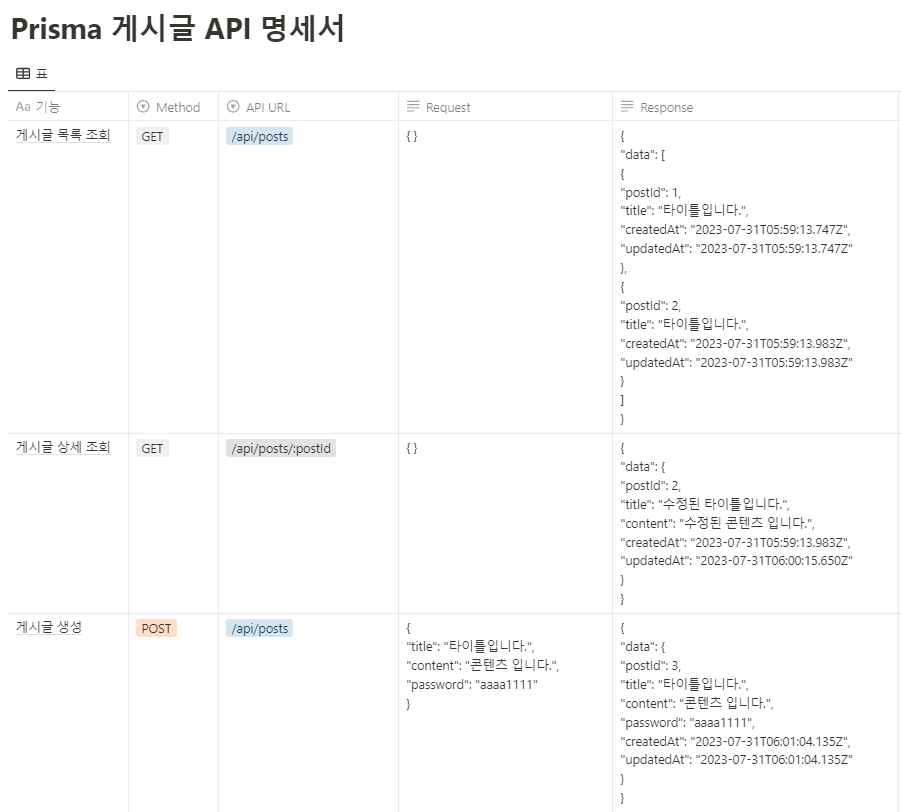

10-2. 게시글 생성
/** 게시글 생성 **/
//localhost:3017/api/posts POST
router.post('/posts', async (req, res, next) => {
  const { title, content, password } = req.body;
?
  const posts = await prisma.posts.create({
    data: { title, content, password } //create, update는 data로 해줘야한다.
  })

  return res.status(201).json({ posts });
});
---


#### 10-3. 게시글 목록 조회

```javascript
/** 게시글 목록조회 **/
//localhost:3017/api/posts GET
router.get('/posts', async (req, res, next) => {
  const posts = await prisma.posts.findMany({
    select: {
      postId: true,
      title: true,
      createdAt: true,
      updatedAt: true
    }
  });
  return res.status(200).json({ data: posts })
});
10-4. 게시글 상세 조회
/** 게시글 상세 조회 **/
//localhost:3017/api/posts/:postId GET
router.get('/posts/:postId', async (req, res, next) => {
  const { postId } = req.params;
  const posts = await prisma.posts.findFirst({
    where: {
      postId: +postId
    },
    select: {
      postId: true,
      title: true,
      content: true,
      createdAt: true,
      updatedAt: true
    }
  });
  return res.status(200).json({ data: posts })
});
10-5. 게시글 수정
/** 게시글 수정 **/
//localhost:3017/api/posts/:postId PUT
router.put('/posts/:postId', async (req, res, next) => {
  const { title, content, password } = req.body;
  const { postId } = req.params;

  const posts = await prisma.posts.findUnique({
    where: { postId: +postId }
  });

  if (!posts) {
    return res.status(401).json({ message: '게시글이 존재하지 않습니다.' })
  } else if (posts.password !== password) {
    return res.status(401).json({ message: '비밀번호가 일치하지 않습니다.' })
  }

  await prisma.posts.update({ //create, update는 data로 해줘야한다.
    data: { title, content },
    where: {
      postId: +postId,
      password
    }
  });
  return res.status(200).json({ message: '게시글이 수정되었습니다. ' })
});
10-6. 게시글 삭제
/** 게시글 삭제 **/
//localhost:3017/api/posts/:postId DELETE
router.delete('/posts/:postId', async (req, res, next) => {
  const { password } = req.body;
  const { postId } = req.params;

  const posts = await prisma.posts.findFirst({
    where: { postId: +postId }
  });

  if (!posts) {
    return res.status(401).json({ message: '게시글이 존재하지 않습니다.' })
  } else if (posts.password !== password) {
    return res.status(401).json({ message: '비밀번호가 일치하지 않습니다.' })
  }

  await prisma.posts.delete({ where : { postId : +postId }});

  return res.status(200).json({ data: '게시글이 삭제되었습니다.' });
});
👊💥트러블슈팅
Error: ER_PARSE_ERROR
아래와 같은 요구사항을 가지는 N:M 테이블 구현하는 코드를 만들었다
❓ N:M 테이블 요구사항
아이돌(Idol) 테이블
1. 이름(name) 컬럼을 가집니다.
2. 나이(age) 컬럼을 가집니다.
3. 성별(gender) 컬럼을 가집니다.
소속사(production) 테이블
1. 회사명(productionName) 컬럼을 가집니다.
2. 주소(address) 컬럼을 가집니다.
소속사 멤버(ProductionMember) 테이블
1. 아이돌과 소속사를 연결해줍니다.
2. 아이돌의 소속사 데뷔 날짜(debutDate) 컬럼을 가집니다.
이외 요구사항
- 아이돌은 소속사를 가지지 않거나, 여러개를 가질 수 있습니다.
- 아이돌의 이름은 중복될 수 없습니다.
- 소속사는 아이돌을 가지지 않거나, 여러명을 소속시킬 수 있습니다.
- 소속사의 회사명은 중복될 수 없습니다.
- 소속사의 주소는 중복될 수 없습니다.
CREATE TABLE Idol
(
  idolId  int(11)        NOT NULL AUTO_INCREMENT PRIMARY KEY,
  name    varchar(225)   NOT NULL UNIQUE,
  age     init(11)       NULL,
  gender  enum('M','F') NOT NULL
);

CREATE TABLE Production
(
  productionId   int(11)      NOT NULL AUTO_INCREMENT PRIMARY KEY,
  productionName varchar(225) NOT NULL UNIQUE,
  address        varchar(225) NOT NULL UNIQUE
);

CREATE TABLE ProductionMember
(
  productionMemberId  int(11) NOT NULL AUTO_INCREMENT PRIMARY KEY,
  IdolId              int(11) NOT NULL,
  ProductionId        int(11) NOT NULL,
  debutDate           date    NOT NULL,
  FOREIGN KEY (IdolId)       REFERENCES Idol       (idolId),
  FOREIGN KEY (ProductionId) REFERENCES Production (productionId)
);
위와 같이 만들었는데 근데 자꾸 이런 에러가 떴다

찾아보니 아래와 같은 이유로 ER_PARSE_ERROR 가 뜬다고 한다.
- type 이 다를때
- , 가 빠졌을 때
- 문자열에 ''이 빠졌을 때
- 구문상의 오류 (예 , from 이 빠졌다, where가 빠졌다, update 문에 set 없다 등등)
...그러다가 발견한 어이없는 실수.

아놔 int인데 init라고 하니까 자꾸 문제라고 떴지! 에러메시지에 떡하니 있었는데 그걸 모르고 아휴아휴~!
