
1. Framework vs Library
(1) Framework
- '뼈대나 근간'을 이루는 코드들의 묶음
- 프로그램의 기본 흐름이나 구조를 정하고, 이 구조에 자신의 코드를 추가하는 방식으로 개발할 수 있도록 하는 프로그래밍의 기본 틀을 의미
- 개발에 필요한 구조가 제공되고, 여기에 필요한 부분을 조립하는 형태로 개발이 진행된다.
(2) Library
- 자주 사용되는 로직을 재사용하기 편리하도록 잘 정리한 일련의 코드들의 집합
(3) Framework vs Library
- 프레임워크는 자동차의 프레임, 즉 기본적으로 구성하고 있는 뼈대 -> 바꿀 수 없음
- 라이브러리는 자동차의 기능을 하는 부품을 의미
-> 쉽게 바꿀 수 있음 - 스프링 프레임워크 : 이미 여러 라이브러리들이 장착돼 있음
2. Spring
(1) 스프링 프레임워크
-
스프링 프레임워크는 자바 플랫폼을 위한 오픈소스 애플리케이션 프레임워크
-
동적인 웹 사이트를 개발하기 위한 여러가지 서비스를 제공
(2) 스프링 사용하기
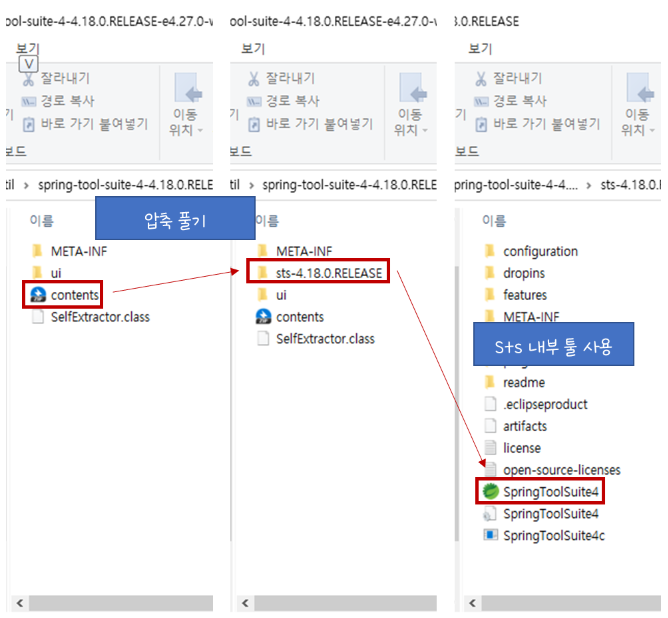
(1) sts 다운받기
- sts : spring-tool-suite
- sts 다운
- 압축파일 풀어서 툴 사용하기
(2) spring 프로젝트 만들기
-
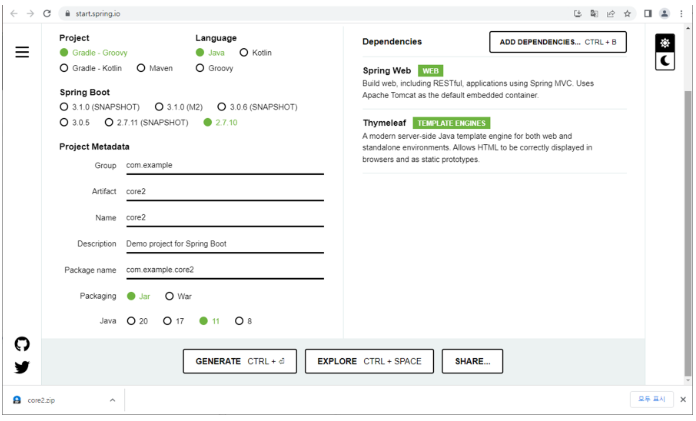
스프링 프로젝트 만들기
프로젝트 옵션 -
Project : 빌드 툴 (프로젝트에 필요한 의존성을 관리하는 툴) 선택
과거에는 Maven
- xml 방식으로 작성
- depency 태그로 라이브러리 복붙
- 매번 정확한 버전을 입력해줘야 함
최근에는 Gradle
- 주소 복붙으로 가능
- 매번 정확한 버전을 입력해줄 필요 없음
- 더 직관적
-
Spring Boot : 사용할 버전 선택
- SNAPshot : 개발중인 버전
- M2 : 베타버전 ( 버그테스트 중) -
Group : 회사의 identity
-
artifact : 프로젝트 이름
-
Packaging : 스프링부트는 웬만하면 jar로 배포
-
Dependencies : 프로젝트 생성과 동시에 사용할 라이브러리
- spring web : 별도 설치 없이 톰캣, 서블릿 사용 가능 - thymeleaf : jsp 대신 사용할 라이브러리 -
generate로 프로젝트 생성
-
사용할 workplace에서 프로젝트 zip 풀기
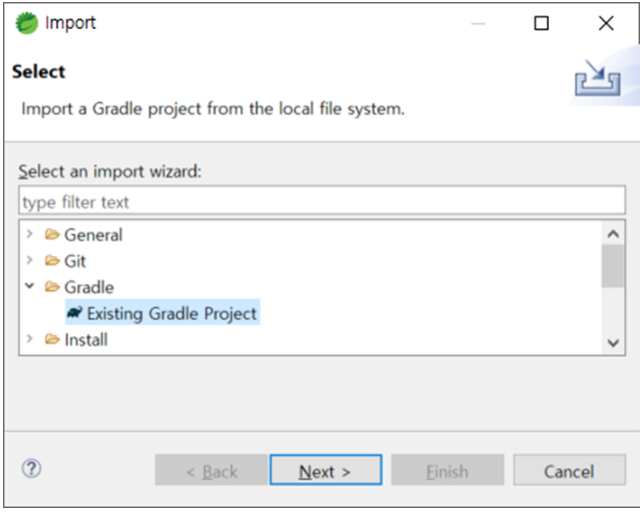
(3) eclipse에서 프로젝트 사용
① import 하기
② html 파일 불러올 수 있는 환경 만들기
-
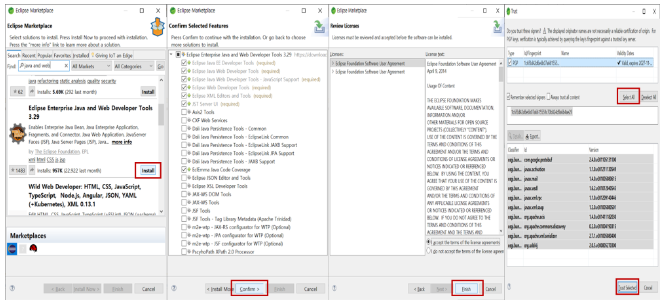
eclipse marketplace 들어가기
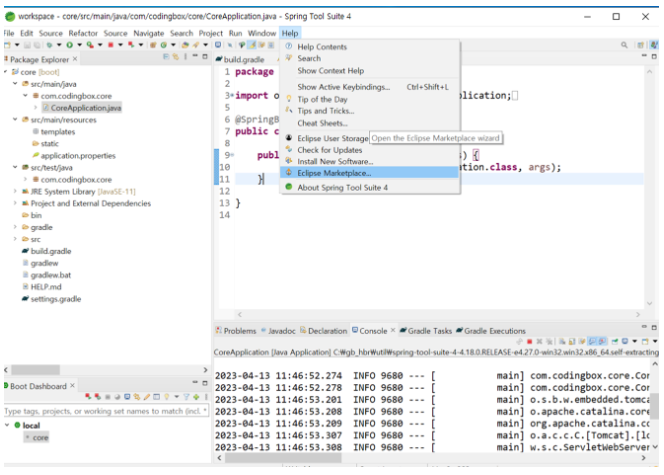
-
순서대로 눌러주기
③ application.properties 사용해서 환경설정하기 -
src/main/resources의 application.properties에서 환경설정 가능함
-
port 수정
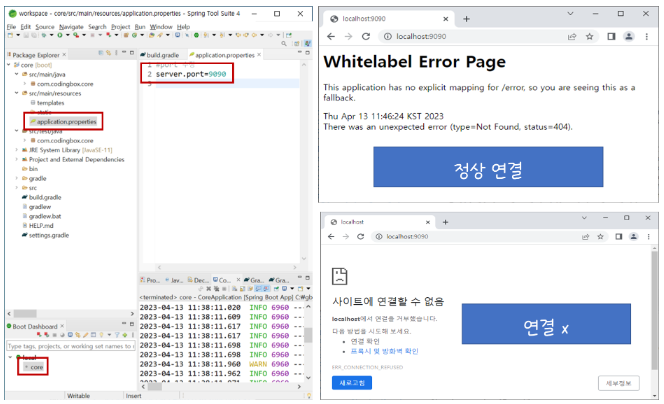
server.port=9090
- 한글에 대한 기본 세팅
spring.http.encoding.charset=UTF-8
spring.http.encoding.enabled=true
spring.http.encoding.force=true- 타임리프 설정
spring.thymeleaf.cache=false
// 새로고침으로 타임리프 변경사항 웹에서 확인 가능
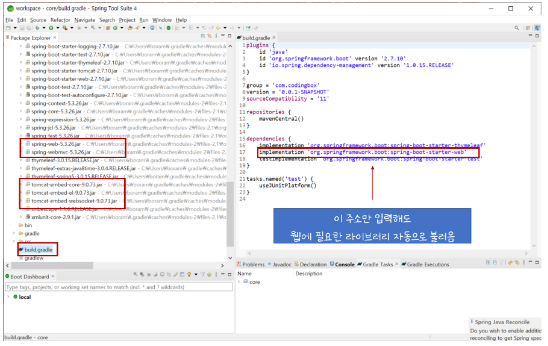
④ build.gradle 이용하면 원하는 라이브러리 추가 생략 가능
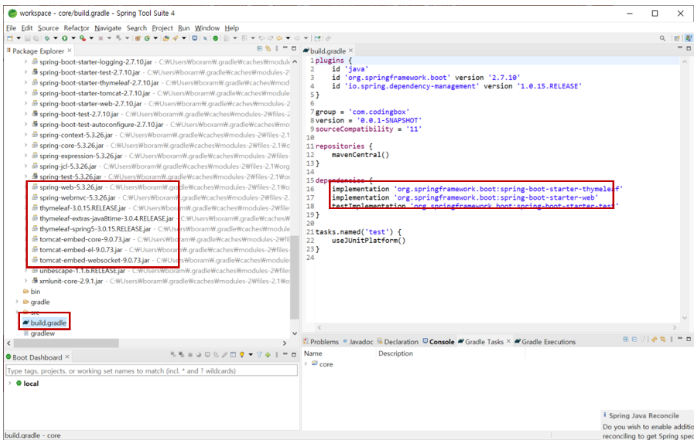
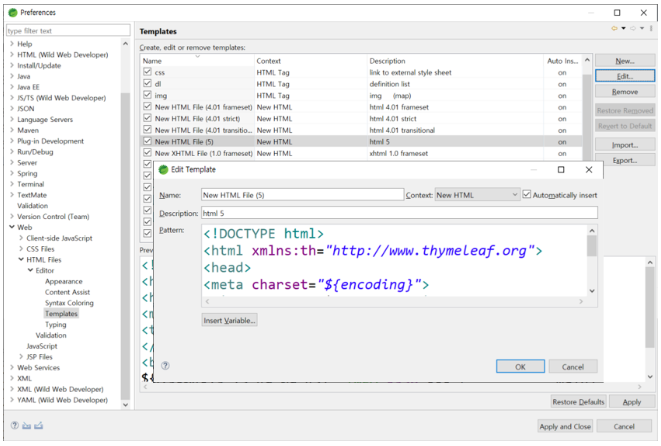
⑤ 타임리프 템플릿 추가
- 앞으로 사용할 html에 타임리프를 계속 사용하기 때문에 매번 선언해주는 번거로움 방지
(3) 주요 어노테이션과 기능
(1) 주요 어노테이션
① 스프링 시작점
- @SpringBootApplication
- 스프링 부트의 자동 설정 읽기와 생성이 모두 자동으로 설정
- src/main/java > CoreApplication.java 파일 내에 자동 위치
② Spring MVC - @Controller : 해당 url mapping을 찾는 역할
- @GetMapping/@PostMapping : url get방식/post방식 요청 매핑
- @RequestMapping : 방식에 상관없이 요청 매핑
③ 파라미터 값 받는 어노테이션 - @RequestParam
- @RequestParam("name") : 기본 name이라는 key값을 파싱, 옵션 추가 가능
- required : 파라미터 값 필수 여부
- true -> 필수(default) , false -> 필수 x
- defaultValue : 파라미터 값이 없을 경우, 기본으로 들어갈 값
💡 예시
<<Controller.java>>

@GetMapping("/hello-mvc")
public String helloMvc(@RequestParam(value = "name", required = false, defaultValue = "required value") String name, Model model) {
	model.addAttribute("name", name);
	return "hello-template";
}<<hello-template.html>>
<!DOCTYPE html>
<html xmlns:th="http://www.thymeleaf.org">
<head>
<meta charset="UTF-8">
<title>Insert title here</title>
</head>
<body>
<p th:text="'hello ' + ${name}">Hello empty</p>
</body>
</html>🙆♀️ 알아두기
- 컨트롤러에서 리턴값으로 문자를 반환하면
resources/templates/ + {viewName} + .html
-> 뷰 리졸버(viewResolver)
💡 예시
<HomeController.java>

@Controller
public class HomeContoller {

	// localhost:9090으로 호출하면 home() 호출
	@GetMapping("/")
	public String home() {
		return "home";
	}
}
<src/main/resources/templates/home.html>
<!DOCTYPE html>
<html xmlns:th="http://www.thymeleaf.org">
<head>
<meta charset="UTF-8">
<title>Insert title here</title>
</head>
<body>
home 출력 테스트
</body>
</html>👍 결과
localhost:9090으로 호출하면 home.html 파일 출력
(2) 주요 기능
① ViewResolver (뷰 리졸버)
- 실행할 뷰를 찾음
- 페이지 컨트롤러가 리턴한 뷰 이름에 해당하는 뷰 객체를 매핑하는 역할
② DispatcherServlet
- 스프링 MVC도 프론트 컨트롤러 패턴으로 구현되어 있다.
- 스프링 MVC의 프론트 컨트롤러가 바로 디스패처 서블릿이다.
- DispatcherServlet -> FrameworkServlet -> HttpServletBean -> HttpServlet 상속받고 있음
Model
(1) Model
- Controller에서의 데이터를 Model에 담음
- View는 Model에 담겨 있는 데이터만 쏙쏙 골라서 화면에 바인딩
- HashMap의 형태를 갖고 있고, Key와 value값을 저장
- servlet에서 request.setAttribute()와 비슷한 역할
💡 예시
@Controller
public class MemberController {

	// member url mapping
	@RequestMapping("member")
	public String getMember(Model model) {

		MemberDTO member = new MemberDTO( 1, "자바학생", "01012345678");
		model.addAttribute("member",member);
		return "thymeleaf/member";
		// templates 파일 밑에 thymeleaf 밑에 member.html
	}
}
(2) ModelAndView
- model에서 view의 영역이 좀 더 확장
- Model과 View를 동시에 설정이 가능하려면 컨트롤러는 ModelAndView객체만 리턴하지만 Model과 View가 모두 리턴 가능
- addObject(key, value) : 데이터 설정
- setViewName("경로") : 뷰 설정