✏️ Array
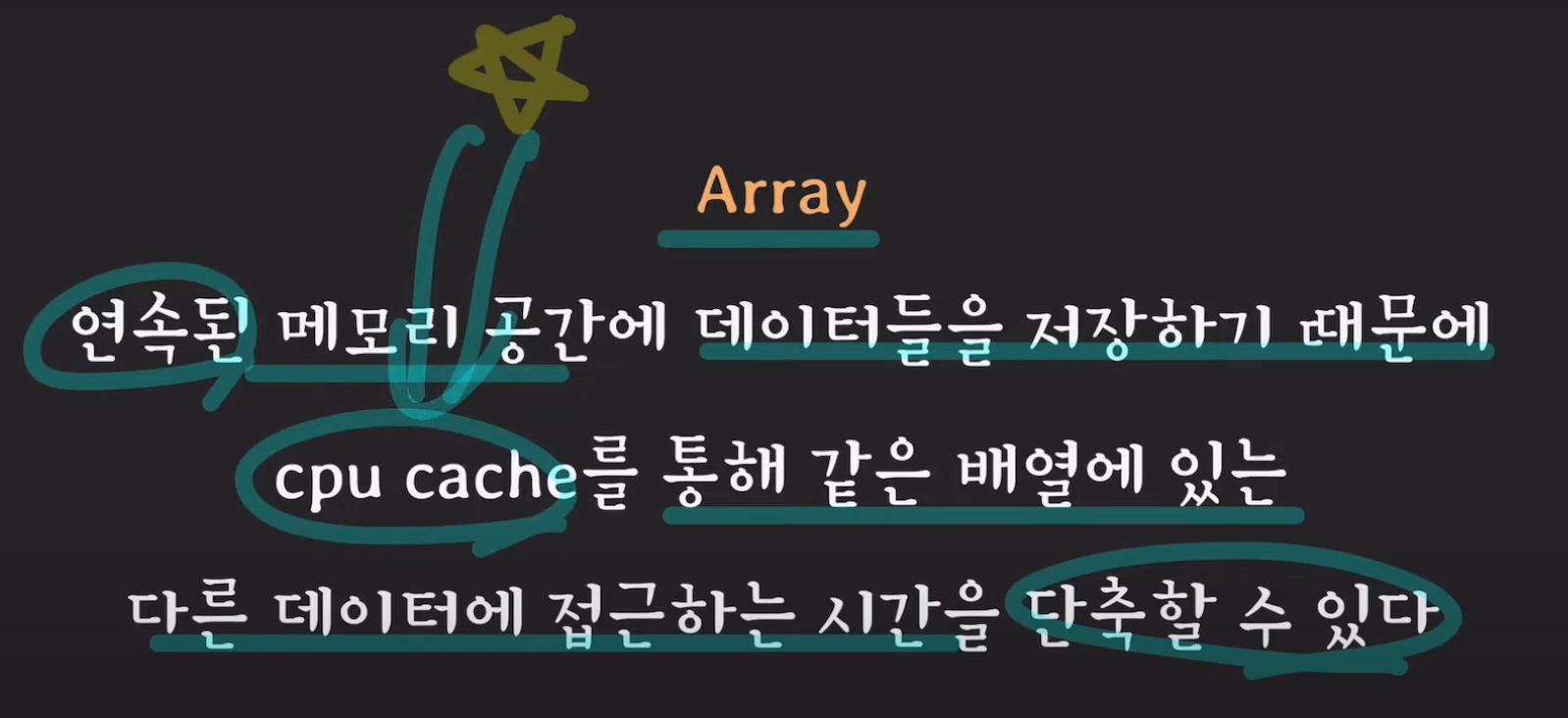
배열을 이해하기 위해서는 배열이 메모리에서 어떤 모습을 하고 있는지 알아야 합니다.
일반적으로 프로그래밍 언어에서는 배열을 선언할 때 배열의 크기를 알려줍니다. (int[] arr = new int[10])
이런식으로 배열을 선언했다면 운영체제는 메모리에서 숫자 10개가 들어갈 수 있는 연속된 빈 공간을 찾아서 순서대로 1,2,3,4,5를 할당합니다. 할당하지 않은 부분은 쓰레기 값이 저장되어 있습니다.

운영체제는 배열의 시작 주소, 즉 숫자 1이 들어간 주소만 기억합니다.
프로그래머가 배열의 세번째 원소에 접근하고 싶다면 arr[2] 이렇게 인덱스로 한버너에 접근합니다. 운영체제는 배열의 시작 주소를 알고 있기 때문에 배열의 시작 주소부터 두번째 떨어진 주소에서 데이터를 가져옵니다.
배열의 인덱스 참조는 길이에 상관없이 한번에 가져오기 때문에 O(1)의 성능을 가집니다.
이렇기 때문에 배열은 읽기, 쓰기 즉 참조에서 좋은 성능을 보입니다. 하지만 데이터의 삽입, 삭제 성능은 좋지 않습니다. 그 이유를 알아볼까요?
앞서 배열을 선언했다면 프로그래머의 요청한 크기만큼 메모리에서 연속된 공간을 할당한다고 했습니다.
프로그래머가 크기가 10인 배열에 1~15까지 담아서 배열의 크기를 넘어서 할당한다고 가정해봅시다.
이제 문제가 발생합니다. 운영체제는 처음에 프로그래머한테 크기가 10인 메모리 공간을 요청받았고 그에 맞게 연속된 메모리 공간을 찾아서 할당했었습니다. 배열의 끝에는 다른 중요한 데이터가 있어서 더 확장할 수 없는 상황입니다. 그렇기 때문에 운영체제는 크기가 15인 연속된 공간의 메모리를 다시 찾아서 할당해야 합니다. 더하여 기존에 저장되어 있던 1부터 10까지의 데이터를 전부 새로운 공간에 복사해야 합니다.
그럼 애초에 이런 일이 발생하지 않도록 배열의 크기를 1000처럼 미리 넉넉하게 만들어 놓으면 어떻게 될까요??
문제는 일시적으로 해결할 넋처럼 보이지만 사용자가 1000보다 더 큰 배열을 원한다면 어떻게 될까요?
처음부터 엄청 크게 만들면 되지 않을까요??
하지만 이렇게 처음부터 크게 공간을 할당하게 되면 배열 하나가 차지하는 메모리가 엄청나게 클 것 입니다. 또한 사용하지 않는 부분은 낭비되는 공간이 됩니다.
배열은 이처럼 데이터를 추가, 제거하려면 내부적으로 필요한 단계가 많이 들기 때문에 성능이 별로 좋지 않습니다.
| 배열의 장점 | 배열의 단점 |
|---|---|
읽기, 쓰기와 같은 참조에는 O(1)의 성능을 가진다. | 크기 예측이 힘들기 때문에 메모리 낭비가 발생할 수 있다. 데이터 삽입, 삭제가 비효율적이다. |
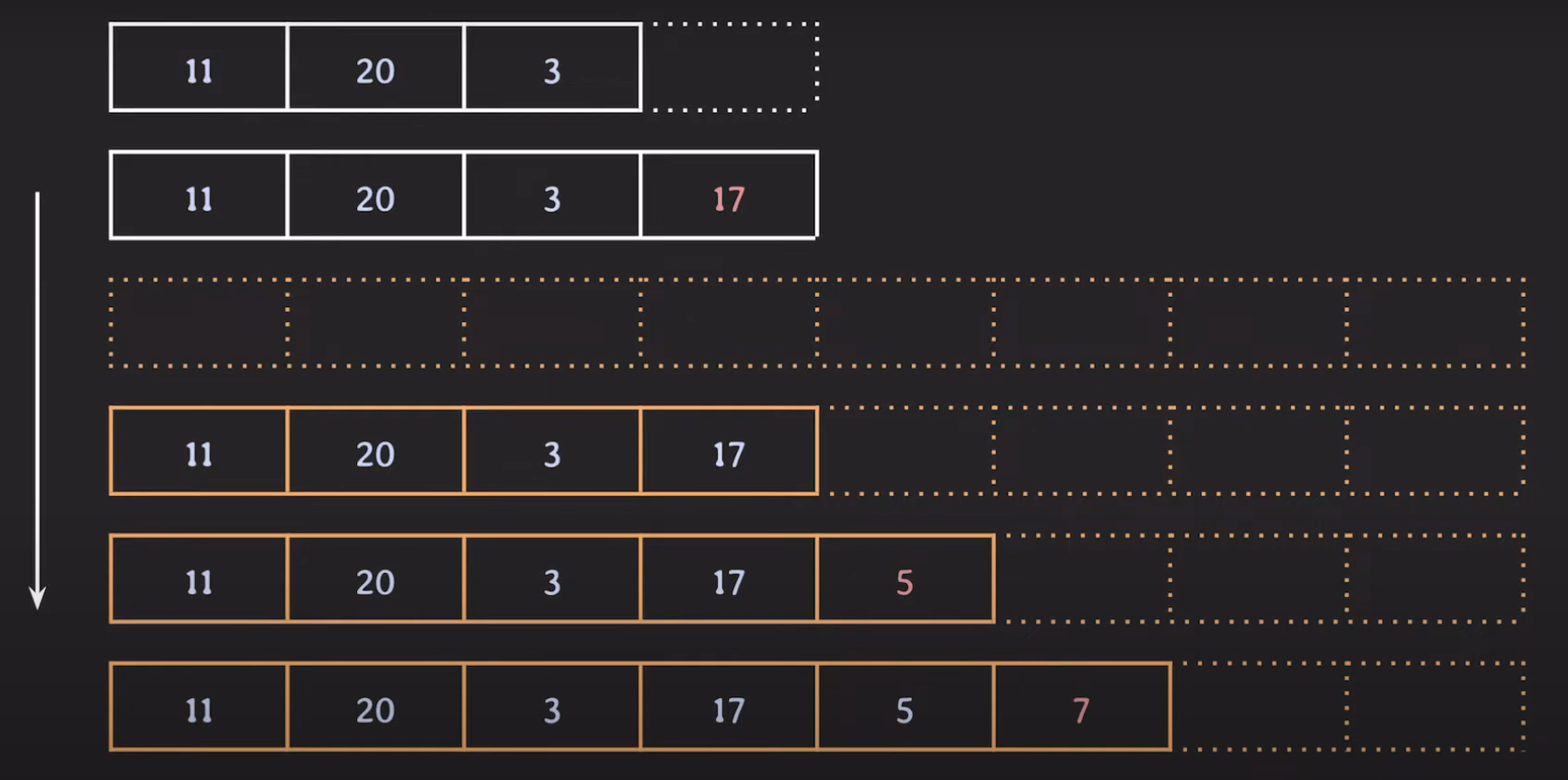
배열의 크기가 부족하면 배열의 크기를 두 배로 늘리고 데이터를 삽입합니다.
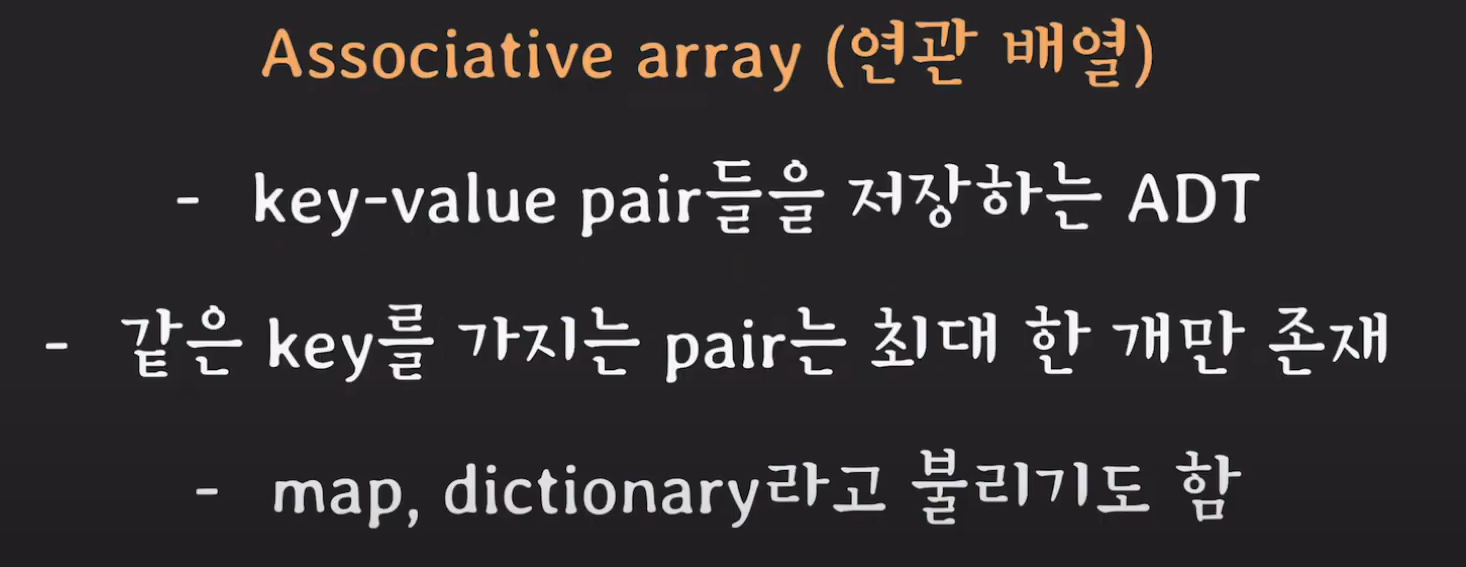
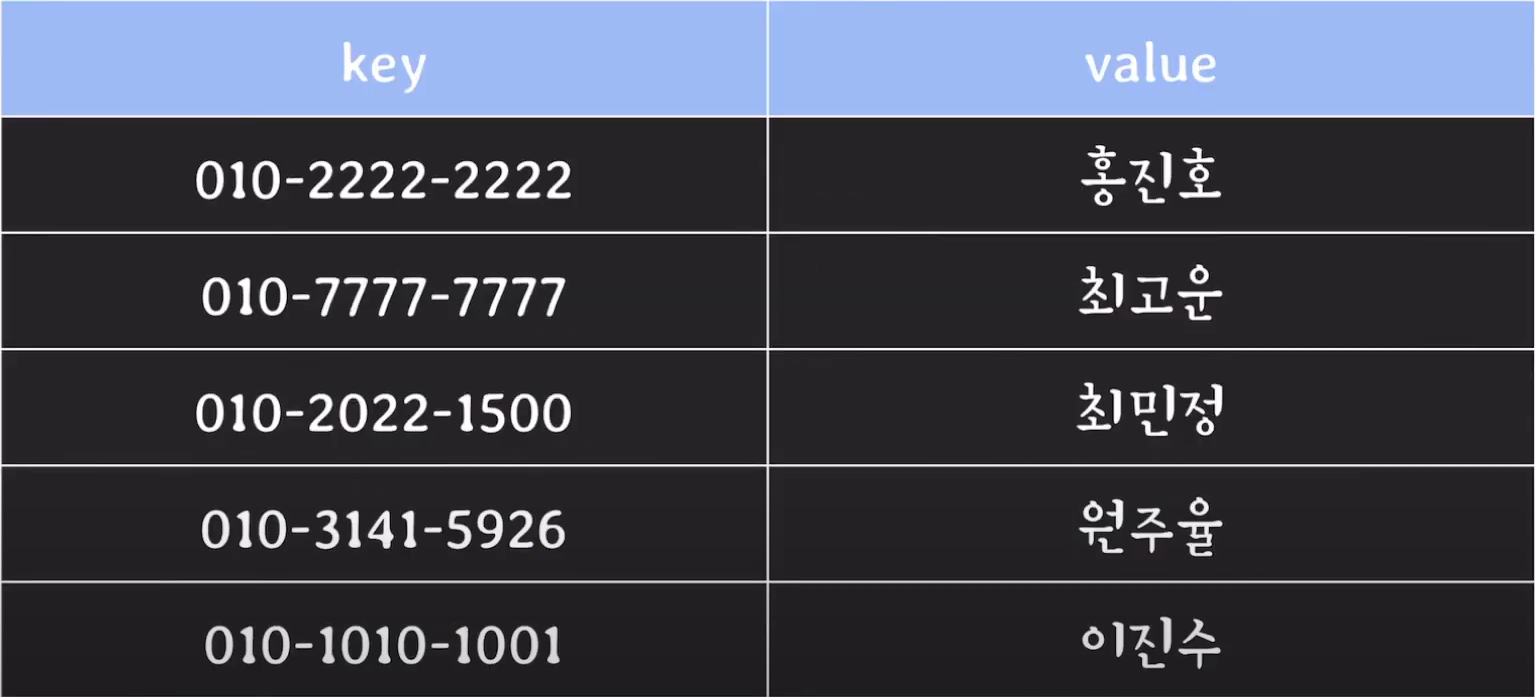
ADT : 구현은 나타내지 않고 기능만 나타는 것
✏️ List
ADT 관점에서 List는 다음과 같이 설명할 수 있습니다.
- 값(value)들을 저장하는 추상자료형(ADT)
- 순서가 있음
- 중복을 허용
그 구현체로는 크게 ArrayList, LinkedList가 존재합니다.
1. ArrayList
기존 배열만으로는 자료를 담고 관리하는데 약간 불편함이 있어서 나온것이 ArrayList 입니다.
ArrayList 특징
- 연속적인 데이터의 리스트 (데이터는 연속적으로 리스트에 들어있어야 하며 중간에 빈공간이 있으면 안된다)
- ArrayList 클래스는 내부적으로 배열을 이용하여 요소를 저장합니다.
- 배열을 이용하기 때문에 인덱스를 이용해 요소에 빠르게 접근할 수 있습니다.
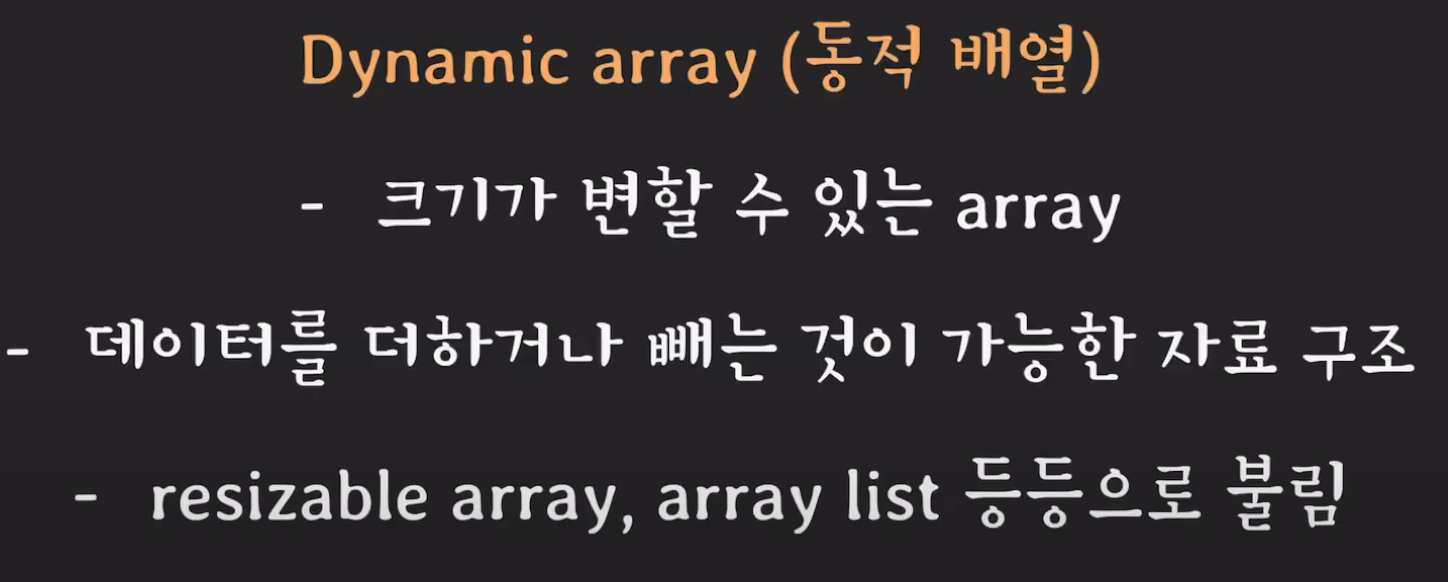
- 크기가 고정되어있는 배열과 달리 데이터 적재량에 따라 가변적으로 공간을 늘리거나 줄입니다.
- 그러나 배열 공간이 꽉 찰때 마다 배열을 copy하는 방식으로 늘리므로 이 과정에서 지연이 발생하게 됩니다.
- 데이터를 리스트 중간에 삽입/삭제 할 경우, 중간에 빈 공간이 생기지 않도록 요소들의 위치를 앞뒤로 자동으로 이동시키기 때문에 삽입/삭제 동작은 느립니다.
- 따라서 조회를 많이 하는 경우에 사용하는 것이 좋습니다.
ArrayList vs Array
Array(배열) 장단점
- 처음 선언한 배열의 크기(길이)는 변경할 수 없다. 이를 정적 할당(static allocation)이라고 합니다.
- 데이터 크기가 정해져있을 경우 메모리 관리가 편리합니다.
- 메모리에 연속적으로 나열되어 할당하기 때문에 index를 통한 색인(접근)속도가 빠릅니다.
- index에 위치한 하나의 데이터(element)를 삭제하더라도 해당 index에는 빈공간으로 계속 남습니다.
- 배열의 크기를 변경할 수 없기 때문에, 처음에 너무 큰 크기로 설정해주었을 경우 메모리 낭비가 될수 있고, 반대로 너무 작은 크기로 설정해주었을 경우 공간이 부족해지는 경우가 발생 할 수 있습니다.
Number[] r = new Number[5]; // 정적 할당(static allocation)
r[0] = 10;
r[1] = 20;
r[2] = 30;
r[3] = 40;
r[4] = 50;

r[3] = null; // 배열은 삭제 메서드가 없어서 null을 이용해 객체 요소를 삭제
System.out.println(Arrays.toString(r)); // [10, 20, 30, null, 50]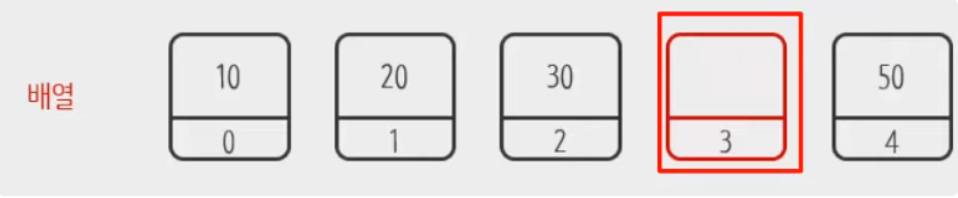
ArrayList 장단점
- 리스트의 길이가 가변적이다. 이를 동적 할당(dynamic allocation)이라고 합니다.
- 배열과 달리 메모리에 연속적으로 나열되어있지 않고 주소로 연결되어있는 형태이기 때문에 index를 통한 색인(접근)속도가 배열보다는 느립니다.
- 데이터(element) 사이에 빈 공간을 허용하지 않는다.
객체로 데이터를 다루기 때문에 적은양의 데이터만 쓸 경우 배열에 비해 차지하는 메모리가 커집니다.
Tip
primitive type인 int 타입일 경우 크기는 4Byte 이다.반면에 Wrapper 클래스인 Integer는 32bit JVM 환경에서는, 객체의 헤더(8Byte), 원시 필드(4Byte), 패딩(4Byte)으로 '최소 16Byte 크기를 차지한다. 또한 이러한 객체 데이터들을 다시 주소로 연결하기 때문에 16 + α (Byte) 가 된다.
List<Number> l = new ArrayList<>(); // 동적 할당(dynamic allocation)
l.add(10);
l.add(20);
l.add(30);
l.add(40);
l.add(50);

l.remove(3);
System.out.println(l); // [10, 20, 30, 50]
ArrayList 요소 추가
- ArrayList에 요소를 추가할때 제네릭 타입 파라미터로 명시된 타입의 데이터만 추가가 가능합니다.
- 그리고 ArrayList를 처음 접할때 용량(capacity)과 크기(size)에 대한 용어 차이가 모호할 수 있는데, capacity는 리스트의 공간 용량라고 보면되고, size는 리스트 안에 들어있는 요소들의 총 갯수라고 이해하면 됩니다.

ArrayList<String> list = new ArrayList<>(10); // 용량(capacity)를 10으로 설정

list.add("A");
list.add("B");
list.add("C");
list.add("D");
list.add("E");
list.add("F");

list.size(); // 크기(size)는 6 (들어있는 요소의 총 개수)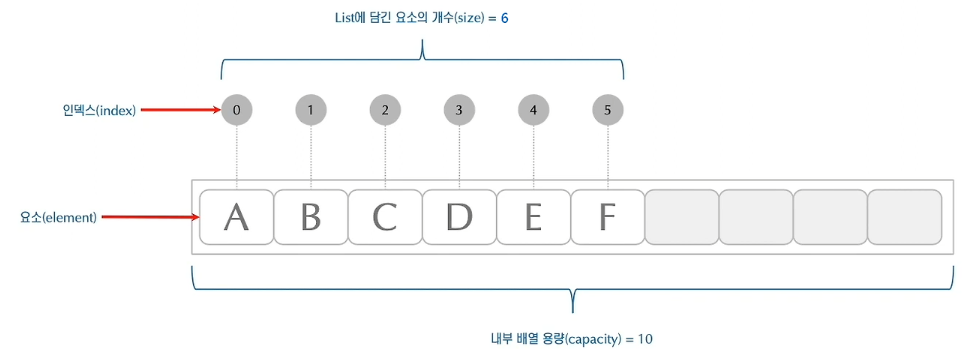
또한 addAll() 메서드를 통해 일일이 요소를 추가하는게 아닌 컬렉션 자체를 그대로 받아와 추가도 가능하다.
ArrayList<String> list1 = new ArrayList<>();
list1.add("1");
list1.add("2");

ArrayList<String> list2 = new ArrayList<>();
list2.add("3");
list2.add("4");

list1.addAll(list2); // list1에 list2의 내용을 추가한다.

System.out.println(list1); // [1, 2, 3, 4]
ArrayList 요소 삽입
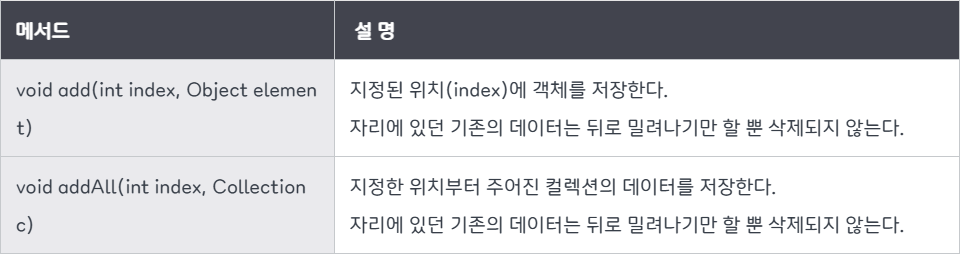
- 리스트에 데이터를 추가하되 추가되는 위치를 지정하여 삽입할 수 있습니다.
- 이때 지정된 위치에 요소를 넣을수 있게 기존의 요소들이 한칸씩 뒤로 이동되면서 빈공간을 만들어줍니다. 유의할점은 한칸씩 데이터들을 뒤로 밀어내는 동작은 꽤나 비용이 크기 때문에 ArrayList의 사이즈가 커질 수록 비효율적입니다. (이는 ArrayList 컬렉션의 단점이기도 하다)
ArrayList<String> list = new ArrayList<>(8);

list.add("1");
list.add("2");
list.add("3");
list.add("4");
list.add("5");

// 3번째 인덱스 자리에 요소 삽입
list.add(3, "A");

System.out.println(list); // [1, 2, 3, A, 4, 5]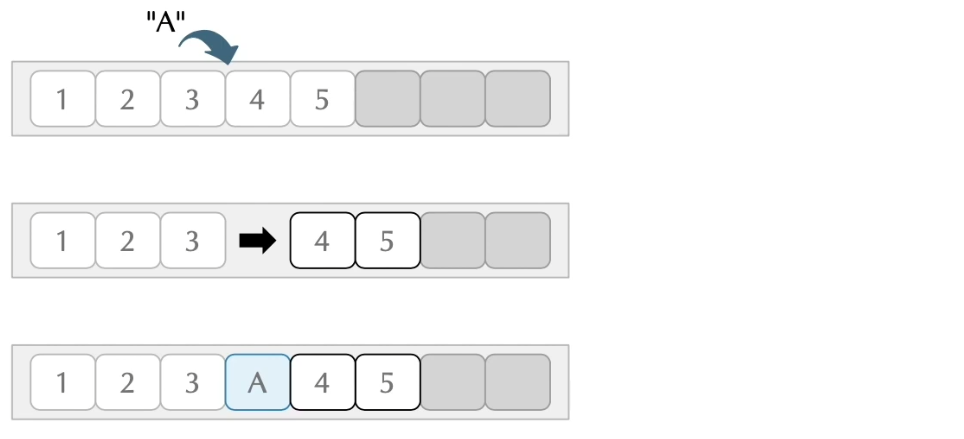
ArrayList 삽입 주의점
위치를 지정하여 삽입할때 인덱스가 리스트의 capacity를 넘지 않도록 조절이 필요합니다.
만일 다음과 같이 썡뚱맞게 100번째 인덱스 위치에 요소를 넣으려고 한다면 IndexOutOfBoundsException 예외가 발생하게 됩니다.
list.add(100, "OMG");당연히 리스트의 용량 보다 넘어선 인덱스로 삽입하게 되면 에러가 나는 것 쯤은 쉽게 이해가 가능합니다.
하지만 리스트의 용량에 맞춰서도 적재된 요소의 마지막 위치(size 값)에서 벗어나도 IndexOutOfBoundsException이 발생합니다.
예를 들어 다음 그림과 같이 리스트 용량에 맞춰서 인덱스를 지정했지만, 추가되는 위치를 요소 5 바로 다음이 아닌 건너뛰어 추가되는 상황을 들 수 있습니다.
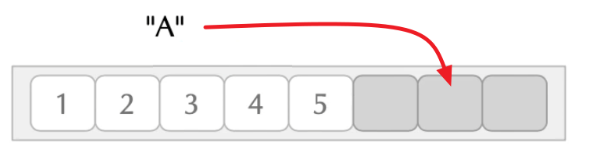
용량에 맞춰 삽입하는데 무슨 문제가 있느냐 싶겠지만, 위에서 ArrayList의 특징에 대해 다뤘듯이 ArrayList는 데이터가 연속된 자료구조 라는 규칙이 정해져 있기 때문에 이러한 행위는 불가능합니다.
즉, 리스트의 물리적인 공간의 크기(capacity)는 8이므로 충분하더라도 논리적인 공간(size)은 5이기 때문에 7번째 공간에 값 삽입은 논리적인 공간(size)을 넘을 수 없어 불가능다는 해석이 됩니다. 따라서 논리적인 공간을 넘어 접근할 경우 IndexOutOfBoundsException이 발생합니다.
ArrayList 요소 삭제
요소의 삭제 역시 중간에 위치한 요소를 제거할경우, 나머지 요소들이 빈 공간을 채우려 앞쪽으로 이동되게 됩니다.
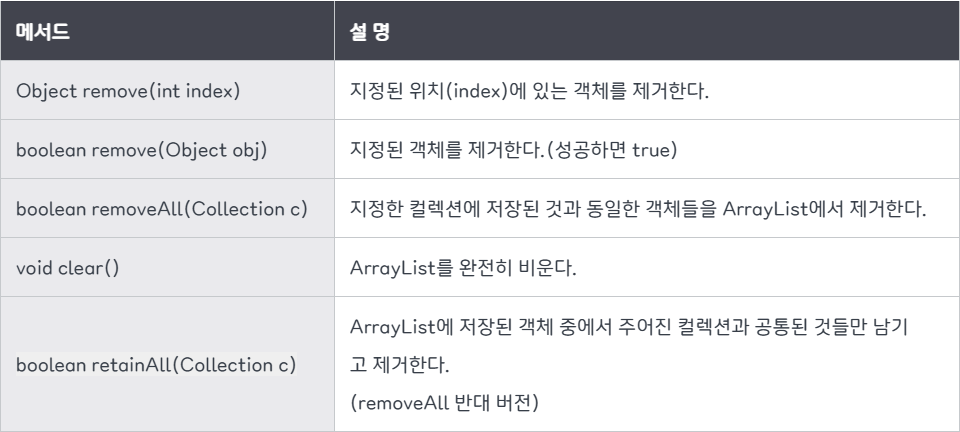
ArrayList<String> list = new ArrayList<>(8);

list.add("1");
list.add("2");
list.add("3");
list.add("4");
list.add("5");

// 2번째 인덱스 자리의 요소 삭제
list.remove(2);

System.out.println(list); // [1, 2, 4, 5]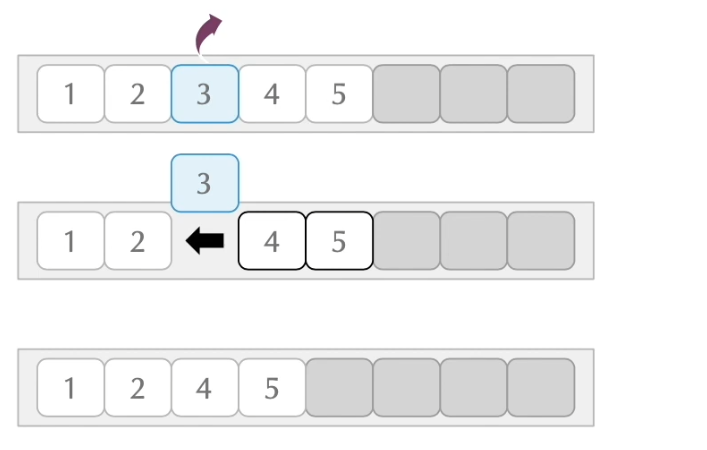
ArrayList 요소 검색
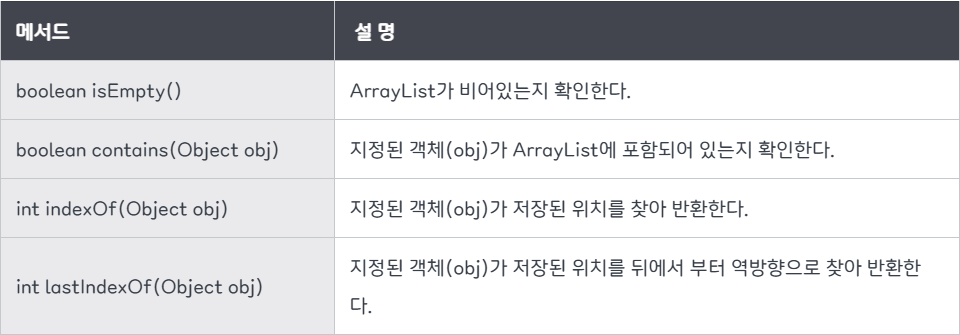
ArrayList<String> list1 = new ArrayList<>();
list1.add("A");
list1.add("B");
list1.add("C");
list1.add("A");

// list에 A가 있는지 검색 : true
list1.contains("A");

// list에 D가 있는지 순차적으로 검색하고 index를 반환 (만일 없으면 -1)
list1.indexOf("A"); // 0

// list에 D가 있는지 연순으로 검색하고 index를 반환 (만일 없으면 -1)
list1.lastIndexOf("A"); // 3
ArrayList 요소 얻기
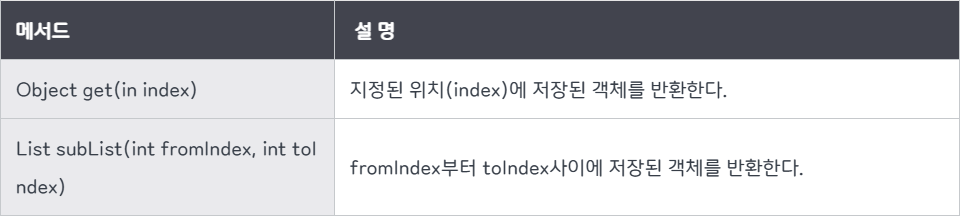
개별 단일 요소를 얻고자 하면 get 메서드로 얻어올 수 있습니다.
ArrayList<String> list = new ArrayList<>(18);

list.add("1");
list.add("2");
list.add("3");
list.add("4");
list.add("5");

list.get(0); // "1"
list.get(3); // "4"
만약 범위 요소를 얻고자 하면 List subList(int fromIndex, int toIndex) 메서드로 가져올 수 있습니다. 이 메서드는 fromIndex 부터 toIndex - 1 사이에 저장된 객체를 반환합니다.
ArrayList<String> list = new ArrayList<>(18);

list.add("P");
list.add("r");
list.add("o");
list.add("g");
list.add("r");
list.add("a");
list.add("m");

// list[0] ~ list[6] 범위 반환
list.subList(0, 7); // [P, r, o, g, r, a, m]

// list[3] ~ list[6] 범위 반환
list.subList(3, 7); // [g, r, a, m]

// list[3] ~ list[5] 범위 반환
list.subList(3, 6); // [g, r, a]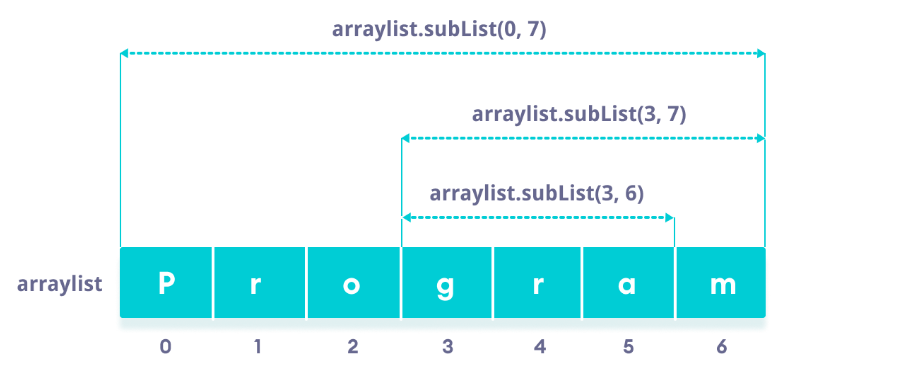
ArrayList 구현
from abc import ABC, abstractmethod

class MyList(ABC):

    @abstractmethod
    def add_value(self, value):
        """요소를 맨 뒤에 추가"""
        pass

    @abstractmethod
    def add_at_index(self, index, value):
        """특정 위치에 요소를 추가"""
        pass

    @abstractmethod
    def index_of(self, value):
        """해당 객체가 처음으로 등장하는 인덱스 반환 (없으면 -1)"""
        pass

    @abstractmethod
    def last_index_of(self, value):
        """해당 객체가 마지막으로 등장하는 인덱스 반환 (없으면 -1)"""
        pass

    @abstractmethod
    def remove_at_index(self, index):
        """특정 인덱스의 요소를 제거하고, 제거된 요소를 반환"""
        pass

    @abstractmethod
    def remove_value(self, value):
        """해당 객체와 동일한 요소를 찾아 제거. 성공 여부 반환"""
        pass

    @abstractmethod
    def get(self, index):
        """인덱스 위치의 요소를 반환"""
        pass

    @abstractmethod
    def clear(self):
        """리스트 내 모든 요소 제거"""
        pass
from MyList import MyList
class MyArrayList(MyList):
DEFAULT_CAPACITY = 5
EMPTY_ELEMENTDATA = []
def __init__(self, capacity=None):
if capacity is None:
# 파라미터가 없으면 기본 용량으로 초기화
self.elementData = [None] * MyArrayList.DEFAULT_CAPACITY
self.size = 0
else:
if capacity > 0:
self.elementData = [None] * capacity
self.size = 0
elif capacity == 0:
self.elementData = [None] * MyArrayList.DEFAULT_CAPACITY
self.size = 0
else:
raise RuntimeError("리스트 용량을 잘못 설정하였습니다.")
def add_value(self, value):
self.resize()
self.elementData[self.size] = value
self.size += 1
return True
def add_at_index(self, index, value):
if index < 0 or index > self.size:
raise IndexError("Index out of bounds")
if index == self.size:
# 맨 끝에 추가
self.add_value(value)
else:
self.resize()
# 뒤에서부터 한 칸씩 밀기
for i in range(self.size, index, -1):
self.elementData[i] = self.elementData[i - 1]
self.elementData[index] = value
self.size += 1
def index_of(self, value):
if value is None:
for i in range(self.size):
if self.elementData[i] is None:
return i
else:
for i in range(self.size):
if self.elementData[i] == value:
return i
return -1
def last_index_of(self, value):
if value is None:
for i in range(self.size - 1, -1, -1):
if self.elementData[i] is None:
return i
else:
for i in range(self.size - 1, -1, -1):
if self.elementData[i] == value:
return i
return -1
def remove_at_index(self, index):
if index < 0 or index >= self.size:
raise IndexError("Index out of bounds")
# 제거할 요소 백업
element = self.elementData[index]
# 해당 자리를 None 처리
self.elementData[index] = None
# 뒤 요소들을 한 칸씩 당겨옴
for i in range(index, self.size - 1):
self.elementData[i] = self.elementData[i + 1]
self.elementData[i + 1] = None
self.size -= 1
self.resize()
return element
def remove_value(self, value):
idx = self.index_of(value)
if idx == -1:
return False
self.remove_at_index(idx)
return True
def get(self, index):
if index < 0 or index >= self.size:
raise IndexError("Index out of bounds")
return self.elementData[index]
def clear(self):
self.elementData = [None] * MyArrayList.DEFAULT_CAPACITY
self.size = 0
def resize(self):
element_capacity = len(self.elementData)
if self.size == element_capacity:
new_capacity = element_capacity * 2
new_array = [None] * new_capacity
for i in range(self.size):
new_array[i] = self.elementData[i]
self.elementData = new_array
return
if (element_capacity // 2) > self.size :
half_capacity = element_capacity // 2
new_array = [None] * half_capacity
for i in range(self.size):
new_array[i] = self.elementData[i]
self.elementData = new_array
return
if self.elementData == MyArrayList.EMPTY_ELEMENTDATA:
self.elementData = [None] * MyArrayList.DEFAULT_CAPACITY
def __str__(self):
return str(self.elementData)
# test.py
from MyArrayList import MyArrayList

def main():
    list_ = MyArrayList()  # 초기 capacity = 5

    list_.add_value(1)
    list_.add_value(2)
    list_.add_value(2)
    list_.add_value(3)
    list_.add_value(4)

    # list.add(1, 1.5);
    list_.add_at_index(1, 1.5)

    print(list_)

    print(list_.index_of(2))       # 2
    print(list_.last_index_of(2))  # 3

    print(list_.remove_at_index(0))  # remove(0) => 1
    print(list_.remove_at_index(2))  # remove(2) => 2
    print(list_)  # 리스트 축소 확인

    # 파이썬에선 remove_value(1) 호출
    print(list_.remove_value(1))   # False
    print(list_.remove_value(2))   # True
    print(list_)

    list_.clear()
    print(list_)

if __name__ == '__main__':
    main()
결과
[1, 1.5, 2, 2, 3, 4, None, None]
2
3
1
2
[1.5, 2, 3, 4, None, None, None, None]
False
True
[1.5, 3, 4, None]
[None, None, None, None, None]
2. LinkedList
Array의 단점으로는 배열을 사용하기 때문에 연속된 메모리 공간이 필요하며 초기의 배열의 크기를 모르면 메모리가 낭비될 수 있다는 점입니다.
배열의 단점을 해결하기 위해선 어떻게 해야 할까요?
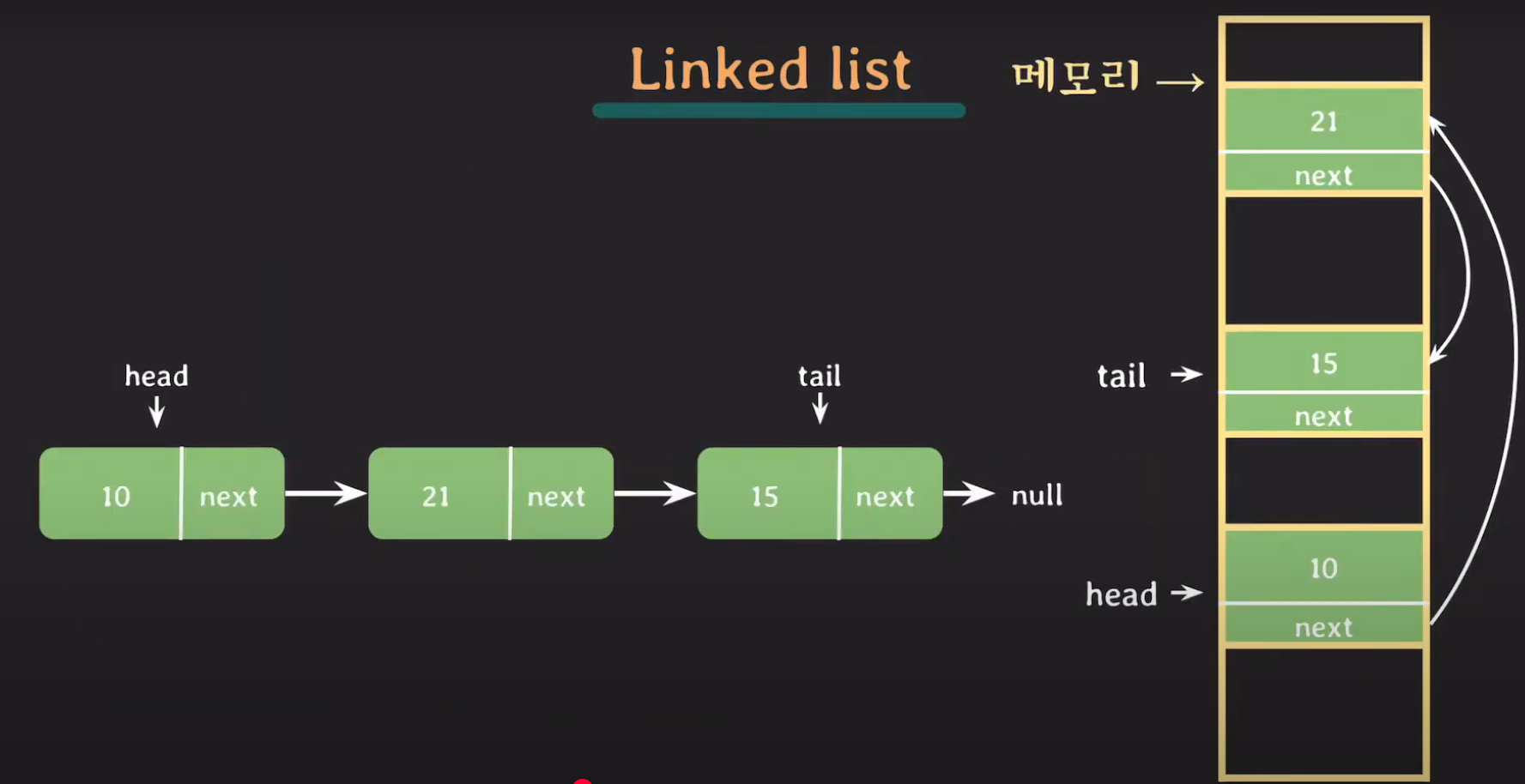
저장하려는 데이터들을 메모리 공간의 분산에 할당하고 이 데이터들을 서로 연결해주면 됩니다.
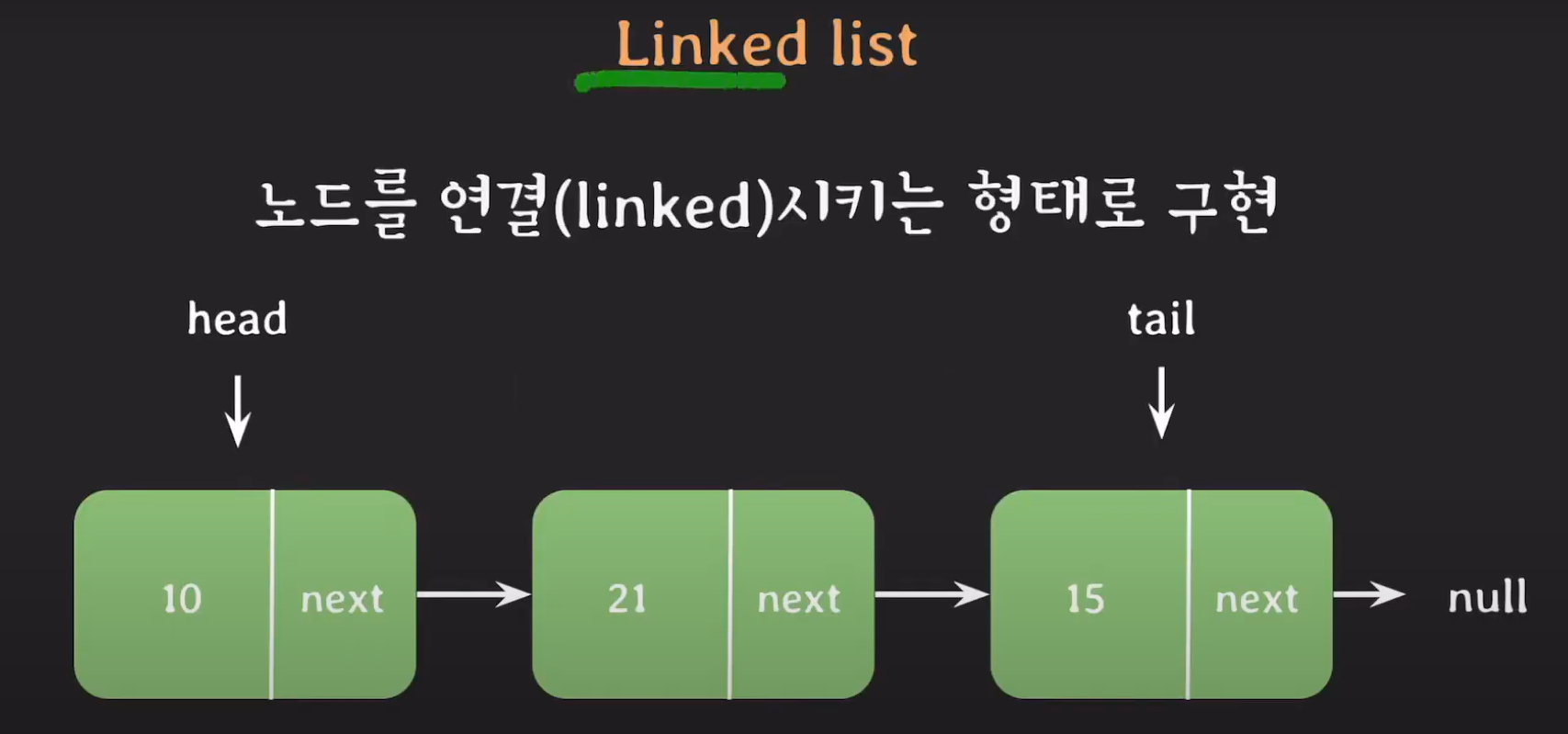
이때 노드라는 것을 만들어서 수행하는데 노드의 구조는 단순합니다.
노드는 데이터를 담는 변수 하나와 다음 노드를 가리키는 변수 하나를 가지고 있습니다. 데이터가 필요하다면 필요한 데이터만큼 노드를 만들어 데이터를 저장하고 다른 노드를 가리켜 연결합니다. 이런 구조 때문에 연결리스트(LinkedList) 라고 부릅니다.
연결 리스트의 장점
- 데이터를 추가할 경우 빈 메모리 공간 아무곳에 데이터를 생성하고 연결만 해주면 되기 때문에 배열에서 초기 크기를 알아야 하는 단점이 연결리스트에는 없습니다.
-> 배열은 중간에 데이터를 삽입하면 그 뒤에 있는 데이터들은 모두 뒤로 밀려나기 때문에 오버헤드가 많이 듭니다. - 중간에 데이터를 삽입하면 다음 가리키는 노드만 바꿔주면 됩니다. 삭제도 마찬가지입니다.
연결 리스트의 단점
- 데이터들이 전부 떨어져 있기 때문에 바로 접근 할 수 없습니다. 네번째 데이터에 접근하고 싶다면 첫번째 노드에서 다음 노드를 찾고 또 다음 노드를 찾고 다음 노드를 찾아서 데이터를 참조 합니다. 즉, 연결리스트에서 데이터 참조는 O(n)의 성능을 가집니다.
-> 배열은 메모리의 연속된 공간에 할당되어 있어서 시작 주소만 알면 뒤에 있는 데이터 접근이 굉장히 쉽습니다. ( O(1)의 성능을 가집니다.)
ArrayList vs LinkedList 비교
| 구분 | ArrayList | LinkedList |
|---|---|---|
| 구현 | 배열(Array) 사용 | 노드를 연결(Linked) |
| 주소 | 연속 | 불연속 |
| 크기 | 고정 | 동적 |
| 데이터 접근 시간 | 모든 데이터 상수 시간 접근 → O(1) | 위치에 따라 이동 시간 발생 → O(n) |
| 삽입/삭제 시간 |
삽입/삭제 자체는 상수 시간 → O(1) 삽입/삭제 시 데이터 시프트가 필요한 경우 추가 시간 발생 → O(n) |
삽입/삭제 자체는 상수 시간 → O(1) 삽입/삭제 위치에 따라 그 위치까지 이동하는 시간 발생 → O(n) |
| 리스트 크기 확장 | 배열 확장이 필요한 경우 새로운 배열에 복사하는 추가 시간 발생 | - |
| 검색 | 최악의 경우 리스트에 있는 아이템 수만큼 확인 → O(n) | 최악의 경우 리스트에 있는 아이템 수만큼 확인 → O(n) |
| CPU Cache | CPU Cache 이점을 활용 | - |
| 구현 예 | Java의 ArrayList, CPython의 list | Java의 LinkedList |
따라서 데이터 참조를 많이 하는 상황이라면 ArrayList를 사용하는 것이 유리하고 삽입/삭제인 경우 똑같은 O(n)이라면 메모리를 절약할 수 있는 LinkedList를 선택하는 것이 유리합니다.

tip
자바의 경우 ArrayList에서 데이터 시프트가 O(n)이 아니라 최적화되어 있기 때문에 ArrayList를 사용하는 것이 유리하다고 합니다.
tip
FIFO 구조에서 LinkedList가 더 유리할 수 있다고 생각하는데 이때는 ArrayDeque가 더 좋은 성능을 보인다고 합니다.
LinkedList 구현
from abc import ABC, abstractmethod

class MyList(ABC):

    @abstractmethod
    def add_value(self, value):
        """요소를 맨 뒤에 추가"""
        pass

    @abstractmethod
    def add_at_index(self, index, value):
        """특정 위치에 요소를 추가"""
        pass

    @abstractmethod
    def index_of(self, value):
        """해당 객체가 처음으로 등장하는 인덱스 반환 (없으면 -1)"""
        pass

    @abstractmethod
    def last_index_of(self, value):
        """해당 객체가 마지막으로 등장하는 인덱스 반환 (없으면 -1)"""
        pass

    @abstractmethod
    def remove_at_index(self, index):
        """특정 인덱스의 요소를 제거하고, 제거된 요소를 반환"""
        pass

    @abstractmethod
    def remove_value(self, value):
        """해당 객체와 동일한 요소를 찾아 제거. 성공 여부 반환"""
        pass

    @abstractmethod
    def get(self, index):
        """인덱스 위치의 요소를 반환"""
        pass

    @abstractmethod
    def clear(self):
        """리스트 내 모든 요소 제거"""
        pass
from MyList import MyList
class Node:
def __init__(self, value, next_node=None):
self.value = value
self.next = next_node
class MyLinkedList(MyList):
def __init__(self):
self.head = None
self.size = 0
def add_value(self, value):
"""요소를 맨 뒤에 추가"""
self.add_at_index(self.size, value)
def add_at_index(self, index, value):
"""특정 위치에 요소를 추가"""
if index < 0 or index > self.size:
raise IndexError("Index out of bounds")
new_node = Node(value)
if index == 0:
new_node.next = self.head
self.head = new_node
else:
current_node = self.head
for _ in range(index - 1):
current_node = current_node.next
new_node.next = current_node.next
current_node.next = new_node
self.size += 1
def index_of(self, value):
"""해당 객체가 처음으로 등장하는 인덱스 반환 (없으면 -1)"""
idx = 0
current_node = self.head
while current_node is not None:
if current_node.value == value:
return idx
current_node = current_node.next
idx += 1
return -1
# 생략
def last_index_of(self, value):
return 0
def remove_at_index(self, index):
"""특정 인덱스의 요소를 제거하고, 제거된 요소를 반환"""
if index < 0 or index >= self.size:
raise IndexError("Index out of bounds")
current_node = self.head
if index == 0:
removed_value = current_node.value
self.head = self.head.next
else:
for _ in range(index - 1):
current_node = current_node.next
removed_value = current_node.next.value
current_node.next = current_node.next.next
self.size -= 1
return removed_value
def remove_value(self, value):
"""해당 객체와 동일한 요소를 찾아 제거. 성공 여부 반환"""
index = self.index_of(value)
if index == -1:
return False
self.remove_at_index(index)
return True
def get(self, index):
"""인덱스 위치의 요소를 반환"""
if index < 0 or index >= self.size:
raise IndexError("Index out of bounds")
current_node = self.head
for _ in range(index):
current_node = current_node.next
return current_node.value
def clear(self):
"""리스트 내 모든 요소 제거"""
self.head = None
self.size = 0
def print_all(self):
"""리스트 내 모든 요소를 출력"""
result = []
current_node = self.head
while current_node is not None:
result.append(current_node.value)
current_node = current_node.next
print(result)from MyLinkedList import MyLinkedList
if __name__ == "__main__":
# LinkedList 클래스 테스트
my_list = MyLinkedList()
print("===== add_value() 다섯 번 호출 =====")
my_list.add_value(0)
my_list.add_value(1)
my_list.add_value(2)
my_list.add_value(3)
my_list.add_value(4)
my_list.print_all() # Expected: [0, 1, 2, 3, 4]
print("===== add_at_index() 호출 =====")
my_list.add_at_index(0, 100) # 리스트 맨 앞에 추가
my_list.add_at_index(3, 200) # 리스트 중간에 추가
my_list.print_all() # Expected: [100, 0, 1, 200, 2, 3, 4]
print("===== index_of() 호출 =====")
print(my_list.index_of(200)) # Expected: 3
print(my_list.index_of(999)) # Expected: -1
print("===== remove_at_index() 호출 =====")
my_list.remove_at_index(0) # 첫 번째 요소 제거
my_list.print_all() # Expected: [0, 1, 200, 2, 3, 4]
my_list.remove_at_index(2) # 중간 요소 제거
my_list.print_all() # Expected: [0, 1, 2, 3, 4]
print("===== remove_value() 호출 =====")
my_list.remove_value(3) # 값 3 제거
my_list.print_all() # Expected: [0, 1, 2, 4]
print(my_list.remove_value(999)) # 값 999 제거 시도 (없음), Expected: False
print("===== get(2) 호출 =====")
my_list.print_all()
print(my_list.get(2)) # Expected: 2
print("===== clear() 호출 =====")
my_list.clear()
my_list.print_all() # Expected: []
결과
[0, 1, 2, 3, 4]
===== add_at_index() 호출 =====
[100, 0, 1, 200, 2, 3, 4]
===== index_of() 호출 =====
3
-1
===== remove_at_index() 호출 =====
[0, 1, 200, 2, 3, 4]
[0, 1, 2, 3, 4]
===== remove_value() 호출 =====
[0, 1, 2, 4]
False
===== get(2) 호출 =====
[0, 1, 2, 4]
2
===== clear() 호출 =====
[]