지난 포스팅에서는 Naver CLOVA API를 연결하는 방법에 관해서 설명했다. 오늘은 그 뒤를 이어서 실제로 어떠한 로직으로 영수증 정보를 가져왔는지에 관해 포스팅할 것이다. 밑에 링크는 OCR API를 연동하는 방법에 관한 블로그이다.
1. 영수증 정보는 왜?
그렇다면 어떤 로직에서 영수증 정보를 가져와서 사용하려고 하는 것일까? 이것에 설명하기 위해 현재 진행하고 있는 프로젝트를 잠시 설명하려고 한다.
1-1. 인사 관리 시스템 (HR)
우서 내가 현재 개발하고 있는 프로젝트는 인사 관리 시스템이다.
인사 관리 시스템이란 기업의 인적 자원을 효율적으로 관리하고 운영하기 위한 시스템이다.
특히 우리 시스템은 인재 유출을 방지하다는 취지를 가지고 프로젝트를 진행했다.
1-2. 결재 기능
이번 프로젝트에서 나는 결재 관리 기능을 담당했다.
결재 기능은 기업 내에서 이루어지는 다양한 요청 사항(휴가 신청, 비용 처리, 품의 등)에 대해 승인 흐름을 체계적으로 관리할 수 있도록 도와주는 핵심 기능이다.
📌 비용 처리
비용 처리는 영수증 사진과 함께 내역을 증빙해서 제출하는 경우가 많다.
이 과정에서 "영수증 사진을 넣으면 상호명/주소/가격/사용 날짜의 정보가 자동으로 채워지게 하면 어떨까?" 라고 생각했다. 이러한 생각으로 Naver OCR API를 도입하게 됐다.
2. 코드 들여다 보기
2-1. 응답 객체
✅ 우선 내가 받은 응답 객체이다. 이 부분은 네이버에서 오는 응답을 바탕으로 내가 원하는 값만 얻기 위해서 사용한 것이다.
이름은 Naver OCR API에서 제공해주는 응답과 동일하게 맞췄다.
@Builder
@Getter
@Schema(description = "영수증 OCR API 사용 response")
public class ReceiptOcrResultResponse {

    @Schema(description = "가게 이름")
    private String storeName;

    @Schema(description = "총 금액")
    private Integer amount;

    @Schema(description = "가게 주소")
    private String address;

    @Schema(description = "사용 날짜")
    private LocalDate usedAt;

}
2-2. Service
✅ 영수증 이미지 파일로부터 매장명, 주소, 날짜, 금액 정보를 추출해서 가공된 응답 객체(ReceiptOcrResultResponse)로 반환하는 서비스 클래스이다.
@Service
@RequiredArgsConstructor
@Slf4j
public class OcrServiceImpl implements OcrService{

    private final NaverOcrApi naverOcrApi;

    /* 영수증 처리 결과를 받는 메서드 */
    @Transactional(readOnly = true)
    public ReceiptOcrResultResponse extractReceiptData(MultipartFile multipartFile) {
        try {
            // 파일 이름 얻기
            String originalFilename = multipartFile.getOriginalFilename();

            // 확장자 얻기
            String ext = getExtension(originalFilename);

            // 파일로 변환하기
            File file = convertToFile(multipartFile, ext);

            log.info("영수증 분석 요청");
            log.info("파일명: {}, 확장자: {}", originalFilename, ext);

            String result =  naverOcrApi.requestOcrApi(file, originalFilename, ext);

            log.info("OCR 원본 응답: {}", result);

            return parseToReceiptOcrResult(result);

        } catch (IOException e) {
            log.info("파일 처리 중 오류 발생", e);
            throw new RuntimeException("파일 처리 실패", e);
        }
    }

    /* 파일을 변환 해주는 메서드 */
    private File convertToFile(MultipartFile multipartFile, String ext) throws IOException {
        File convFile = File.createTempFile("ocr-", "." + ext);
        try (FileOutputStream fos = new FileOutputStream(convFile)) {
            fos.write(multipartFile.getBytes());
        }
        return convFile;
    }

    /* 파일의 확장자를 얻기 위한 메서드 */
    private String getExtension(String filename) {
        // 파일 확장자가 없는 경우 예외 처리
        if (filename == null || !filename.contains(".")) {
            throw new IllegalArgumentException("파일 확장자가 없습니다.");
        }

        // 파일의 확장자는 마지막에 '.'뒤에 붙어 있기 때문에 설정
        return filename.substring(filename.lastIndexOf('.') + 1).toLowerCase();
    }

    /* 원하는 결과값만 없기 위한 메서드 : 매장명, 사용일시, 금액 */
    public ReceiptOcrResultResponse parseToReceiptOcrResult(String json) {
        try {
            // 문자를 json 형태로 받기
            ObjectMapper objectMapper = new ObjectMapper();
            // 트리 형태로 파싱 한 다음에 사용하려고 함
            JsonNode root = objectMapper.readTree(json);
            JsonNode receipt = root.path("images").get(0).path("receipt").path("result");

            // 가게명
            String name = receipt.path("storeInfo").path("name").path("text").asText();
            String subName = receipt.path("storeInfo").path("subName").path("text").asText();
            String storeName = name + " " + subName;

            // 가게 주소
            String address = extractAddresses(receipt);

            // 날짜 : 날짜 정보 포맷 변경하기
            String dateText = receipt.path("paymentInfo").path("date").path("text").asText();
            LocalDate usedAt = parseDate(dateText);

            // 총 금액
            String strAmount = receipt.path("totalPrice").path("price").path("text").asText();
            strAmount = strAmount.replace(",", "");
            Integer amount = Integer.parseInt(strAmount);

            log.info("영수증 분석 결과");
            log.info("가게명: {}, 가게 주소: {}, 날짜: {}, 금액: {}", storeName, address, usedAt, amount);

            return ReceiptOcrResultResponse.builder()
                    .storeName(storeName)
                    .amount(amount)
                    .usedAt(usedAt)
                    .address(address)
                    .build();

        } catch (Exception e) {
            log.warn("OCR 처리 실패: {}", e.getMessage());

            return ReceiptOcrResultResponse.builder()
                    .storeName(null)
                    .amount(null)
                    .usedAt(null)
                    .address(null)
                    .build();
        }
    }

    /* 날짜 정보를 추출하는 메서드 */
    private LocalDate parseDate(String rawDate) {
        // 영수증 포맷이 여러 개 있기 때문에 이렇게 넣음
        List<DateTimeFormatter> formatters = List.of(
                DateTimeFormatter.ofPattern("yyyyMMdd"),
                DateTimeFormatter.ofPattern("yyyy-MM-dd"),
                DateTimeFormatter.ofPattern("yyyy.MM.dd")
        );

        for (DateTimeFormatter formatter : formatters) {
            try {
                return LocalDate.parse(rawDate, formatter);
            } catch (Exception e) {
                // 실패하는 경우에는 그냥 무시 (사용자가 입력하게 작성할 예정)
            }
        }

        return null;
    }

    /* 주소 정보를 추출하는 메서드 */
    private String extractAddresses(JsonNode receipt) {
        JsonNode addressArray = receipt.path("storeInfo").path("addresses");
        if (!addressArray.isArray()) return "";

        List<String> addressTexts = new ArrayList<>();
        for (JsonNode address : addressArray) {
            String text = address.path("text").asText();
            if (!text.isBlank()) addressTexts.add(text);
        }

        return String.join(", ", addressTexts);
    }

}
2-4. Controller
@RestController
@RequiredArgsConstructor
@RequestMapping("/approval")
@Tag(name = "결재 작성 하기", description = "결재 작성 API")
public class ApproveCommandController {

    private final OcrService ocrService;
    private final ApproveCommandService approveCommandService;
    private final ApprovalDecisionCommandService approvalDecisionCommandService;

    @PostMapping("/ocr/receipt")
    @Operation(summary = "영수증 내용 추출하기", description = "ocr api를 이용해 영수증 내용을 추출합니다.")
    public ResponseEntity<ApiResponse<ReceiptOcrResultResponse>> extractReceiptText (
            @RequestParam("file") MultipartFile file
    ) {
        ReceiptOcrResultResponse result = ocrService.extractReceiptData(file);

        return ResponseEntity.ok(ApiResponse.success(result));
    }
}
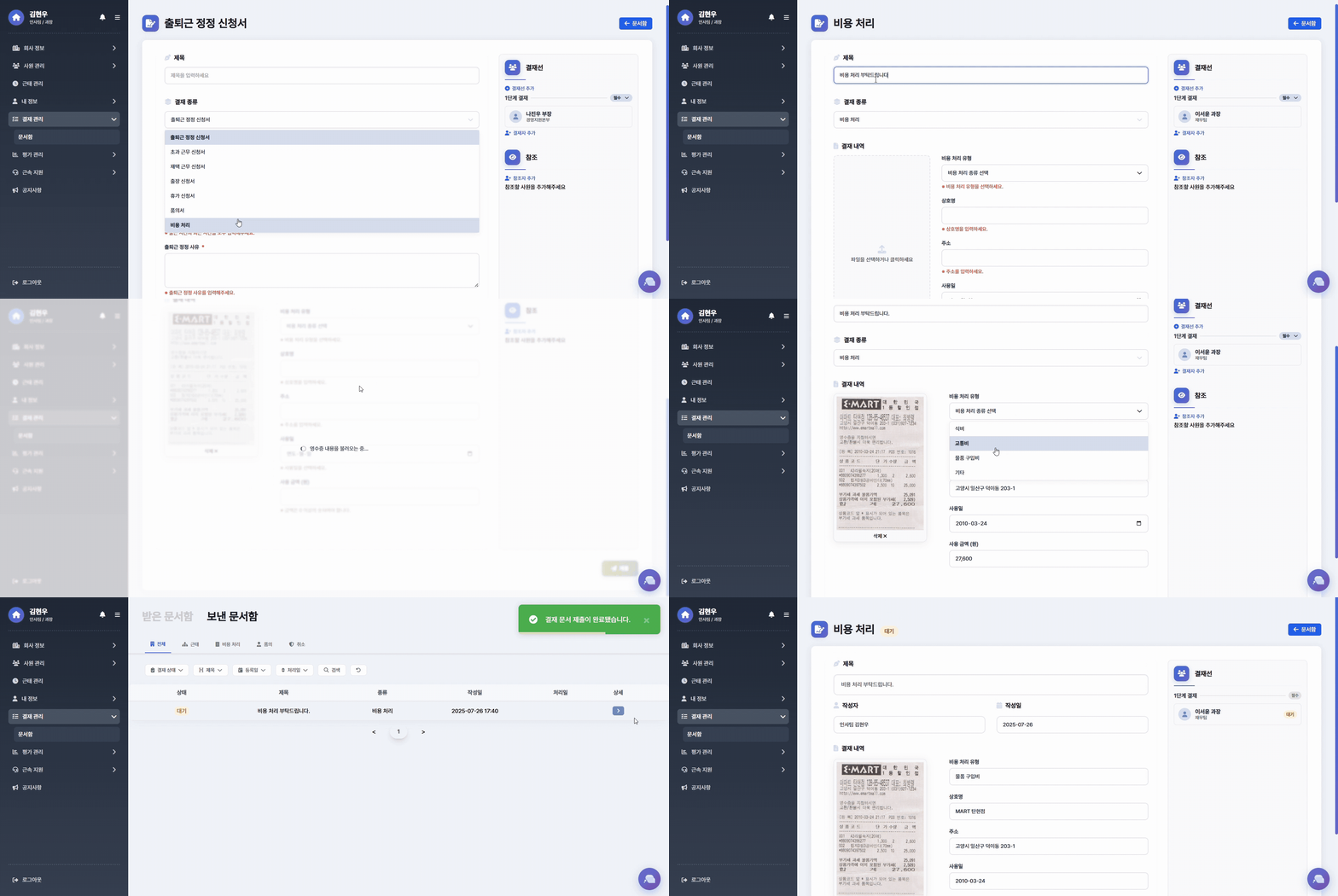
마지막으로 우리 시스템에서 OCR API를 이용해 비용처리 결재를 하는 과정을 보여주는 화면이다.
영수증 사진을 등록하면 자동으로 상호명, 주소, 사용일, 사용 금액이 입력되는 것을 확인할 수 있다.