import React from "react"
const styles = {
    wrapper: {
        margin: 8,
        padding: 8,
        display: "flex",
        flexDirection: "row",
        border: "1px solid grey",
        borderRadius: 16,
    },
    imageContainer: {},
    image: {
        width: 50,
        height: 50,
        borderRadius: 25,
    },
    contentContainer: {
        marginLeft: 8,
        display: "flex",
        flexDirection: "column",
        justifyContent: "center",
    },
    nameText: {
        color: "black",
        fontSize: 16,
        fontWeight: "bold",
    },
    commentText: {
        color: "black",
        fontSize: 16,
    },
};
function Comment(props) {
    return (        <div style={styles.wrapper}>
            <div style={styles.imageContainer}>
                <img
                    src="https://upload.wikimedia.org/wikipedia/commons/8/89/Portrait_Placeholder.png"
                    style={styles.image}
                />
            </div>
            <div style={styles.contentContainer}>
                <span style={styles.nameText}>{props.name}</span>
                <span style={styles.commentText}>{props.comment}</span>
            </div>
        </div>
    );
}
export default Comment;
import React from "react";
import Comment from "./Comment";

const comments = [
    {
        name: "이인제",
        comment: "안녕하세요, 소플입니다.",
    },
    {
        name: "유재석",
        comment: "리액트 재미있어요~!",
    },
    {
        name: "강민경",
        comment: "저도 리액트 배워보고 싶어요!!",
    },
];

function CommentList(props){
    return(
        <div>
            {comments.map((comment)=>{
                return(
                    <Comment name={comment.name} comment={comment.comment}/>
                );
            })}
        </div>
    );
}

export default CommentList;
import React from 'react';
import ReactDOM from 'react-dom/client';
import './index.css';
import App from './App';
import reportWebVitals from './reportWebVitals';
import Library from './chapter_03/Library';
import Clock from './chapter_04/Clock';
import CommentList from './chapter_05/CommentList';
const root = ReactDOM.createRoot(document.getElementById('root'));
root.render(
<React.StrictMode>
<CommentList/>
</React.StrictMode>
);
reportWebVitals();
오늘의 React 공부 요약
1. React에서 컴포넌트 스타일링
React에서는 CSS 스타일을 객체로 정의해 직접 적용할 수 있다.
camelCase로 작성된 스타일 속성을 사용하며, HTML 스타일과 약간의 차이가 있다.
-
단일 댓글 컴포넌트 (Comment)
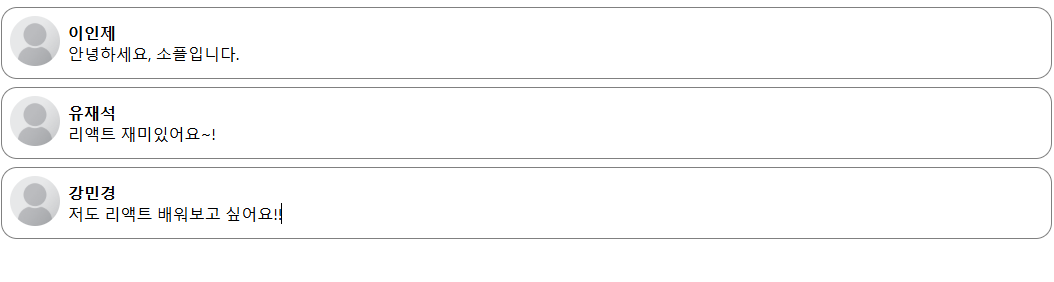
단일 댓글을 렌더링하는 컴포넌트를 작성했다.
props를 사용해 이름과 댓글 내용을 동적으로 전달받고 렌더링했다.
기본 프로필 이미지를 추가하여 사용자 인터페이스를 시각적으로 개선했다. -
댓글 리스트 컴포넌트 (CommentList)
여러 댓글 데이터를 배열로 관리하고 map()을 사용해 각 댓글을 반복적으로 렌더링했다.
배열 데이터를 컴포넌트로 변환하는 방식과 리스트 렌더링의 기초를 학습했다. -
ReactDOM 렌더링
React 18 기준으로 ReactDOM.createRoot를 사용해 DOM 요소와 React 컴포넌트를 연결했다.
root.render를 통해 CommentList 컴포넌트를 DOM에 렌더링했다. -
배운 React 개념
컴포넌트 기반 설계: 재사용 가능한 컴포넌트를 설계하고 조합하여 동적인 UI를 구성.
props 활용: 부모 컴포넌트에서 데이터를 자식 컴포넌트로 전달.
리스트 렌더링: map() 메서드를 사용해 배열 데이터를 반복적으로 렌더링.
ReactDOM.createRoot: React 18에서 DOM 요소와 React를 연결하는 최신 방식.
느낀 점
React의 컴포넌트 구조와 데이터 전달 방식은 직관적이며, 특히 리스트 렌더링에서 배열 데이터를 처리하는 방법이 유용했다.
스타일링을 객체로 관리하는 방식이 기존 CSS 파일 방식과는 다르지만 코드의 가독성을 높일 수 있었다.

Most clicker games get repetitive, but Chill Guy Clicker keeps throwing new challenges at you, it never feels boring!