💙 System 클래스
운영체제의 일부 기능을 자바 코드로 이용하는 클래스이다.(프로그램 종료, 키보드로부터 입력, 모니터로 출력 등)
System 클래스의 모든 필드와 메소드는 정적(static) 필드와 정적(static) 메소드로 구성되어 있다.
프로그램 종료 : System.exit() → 정상종료일경우 exit(0)
현재 시각 읽기 : System.currentTimeMillis(), System.nanoTime() → 컴퓨터의 시계로부터 현재 시간을 읽어 long값을 리턴
💙 String
배열 전체(byte[])를 String 객체로 생성
String str = new String(byte[] bytes);
지정한 문자셋(charsetName)으로 디코딩
String str = new String(byte[] bytes, String charsetName);
배열의 offset 인덱스 위치로부터 length만큼 String 객체로 생성
String str = new String(byte[] bytes, int offset, int length);
지정한 문자셋으로 디코딩
String str = new String(byte[] bytes, int offset, int length, String charsetName);
💙 Random 클래스
Math.random() : 0.0 ~ 1 사이의 double 난수를 얻는데 사용한다
Random 클래스는 boolean, int, long, float, double 난수를 얻는데 사용한다
종자값(seed) 사용 가능
종자값 : 난수를 만드는 알고리즘에 사용되는 값으로 종자값이 같으면 같은 난수를 얻는다
객체 생성 방법
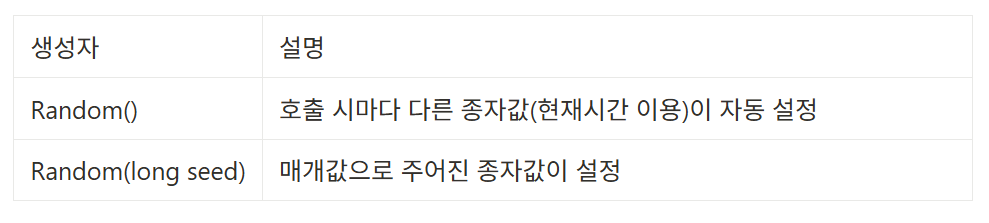
Random 클래스의 메소드
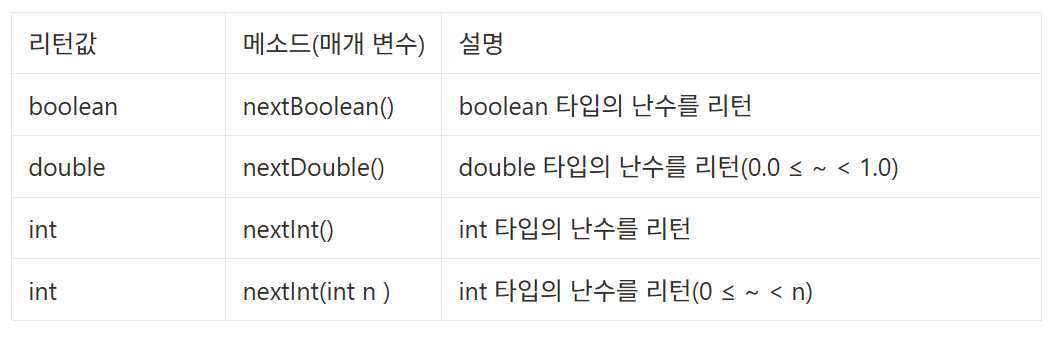
Randomd2 rd = new Random(3);
Random rd2 = new Random(5);
int i = rd.nextInt(10) + 1; // 1부터 10까지 난수
int j = rd2.nextInt(10) + 1;

// rd 와 rd2는 종자값이 다름. 같다면 같은 난수 출력
// i와 j는 난수라서 같을 수 도 있고 다를 수도 있다.
💙 Date 클래스
날짜를 표현하는 클래스이다. 주로 컴퓨터의 현재 날짜를 읽어 Date 객체로 만든다.
Date now = new Date()
// 현재 날자를 문자열로 얻는다.
String strNow = now.toString();

// 특정 문자열 포맷으로 얻기
SimpleDateFormat sdf = new SimpleDateFormat("yyyy년 MM월 dd일 hh시 mm분 ss초:);
Strng strNow2 = sdf.format(now);
💙 Calendar 클래스
달력을 표현한 클래스이다. 추상(abstract) 클래스이므로 new 연산자를 사용해서 인스턴스를 생성할 수 없다. 날짜와 시간을 계산하는 방법이 지역과 문화, 나라에 따라 다르기 때문이다.
주로 정적 메소드 getInstance() 메소드를 이용하여 현재 운영체제에 설정되어 있는 시간대(TimeZone)을 기준으로 한 Calendar 하위 객체를 얻는다.
Calendar now = Calendar.getInstance();

int year   = now.get(Calendar.YEAR);
int month  = now.get(Calendar.MONTH) + 1;
int day    = now.get(Calendar.DAY_OF_MONTH);
다른 시간대에 해당하는 날짜와 시간을 출력하기
→ 오버로딩된 다른 getInstance() 메소드 사용
TimeZone timeZone = TimeZone.getTimeZone("America/Los_Angeles"); // 알고싶은 시간대의 Timezone 객체 얻기
Calendar now = Calendar.getInstance(timeZone);

// TimeZone.getAvailableIDs() 사용하면 시간대 문자열 목록 얻을 수 있다
// "America/Los_Angeles" 는 그중 하나
💙 Format 클래스 (형식 클래스)
DecimalFormat : 숫자 형식
DecimalFormat df = new DecimalFormat("#,###.0");
String result = df.format(1234567.89);
SimpleDateFormat : 날짜 형식
날짜를 원하는 형식으로 표현
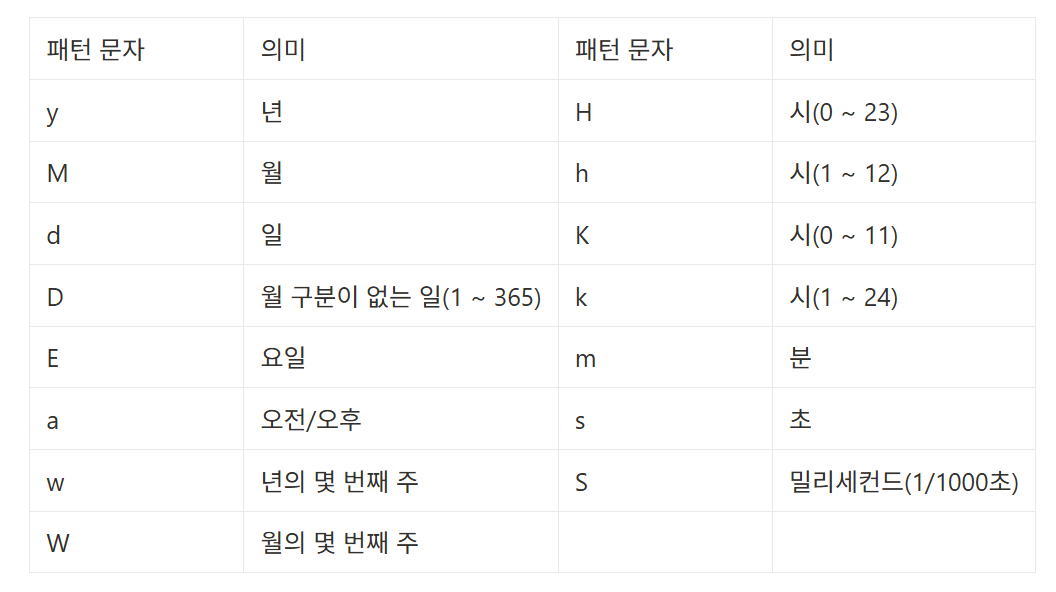
SimpleDateFomat sdf = new SimpleDateFormat("yyyy년 MM월 dd일");
SimpleDateFomat sdf2 = new SimpleDateFormat("yyyy-MM-dd");
String strDate = sdf.format(new Date()); // 2024년 2월 19일
String strDate2 = sdf2.format(new Date()); // 2024-02-19
MessageFormat : 매개 변수화된 문자열 형식
SQL문 작성, 데이터를 파일에 저장, 네트워크 전송할 때 등 사용
문자열에 데이터가 들어갈 자리를 표시해 두고, 프로그램이 실행하면서 동적으로 데이터를 삽입해 문자열을 완성한다.
// MessageFormat 사용 안할때
String result = "회원 ID : " + id + "\n회원 이름 : " + name + "\n회원 전화:"
								+ tel;

// MessageFormat 사용
String message = "회원 ID:{0} \n회원 이름:{1} \n회원 전화:{2}";
String result = MessageFormat.format(message, id, name, tel);

// 배열 사용 가능
String text = "회원 ID: {0} \n회원 이름: {1} \n회원 전화: (2}";
Object[] arguments = { id, name, tel };
String result = MessageFormat.format(text, arguments);

// SQL문 예시
String sql = "insert into member values({0}, {1}, {2});
Object[] arguments = {"'java'", "'짱구'", "'010-1234-1234'"};
String result = MessageFormat.format(sql, arguments);