[Spring Batch] Listener
Listener
Spring Batch는 대용량 데이터를 안정적으로 처리하기 위한 프레임워크입니다. 이 과정에서 작업의 시작/종료 시점 혹은 예외 발생 시점에 후처리나 로깅, 알림 등의 기능이 필요할 수 있습니다.
이러한 작업을 도와주는 것이 바로 Listener입니다.
Listener는 왜 필요한가요?
Spring Batch의 리스너는 Job, Step, Chunk 또는 Item 처리 과정의 특정 시점에 개입할 수 있게 해주는 확장 포인트입니다. 일반적으로 다음과 같은 목적에 사용됩니다:
- 로깅 (처리 시작/종료 시간, 처리 결과 등)
- 에러 핸들링 (예외 발생 시 사용자 정의 처리)
- 리소스 초기화/정리 (DB 연결, 파일 스트림 등)
- 상태 저장 또는 메트릭 수집
- Slack, Email, SMS 등 알림 발송
언제 Listener를 사용하는가?
- Job/Step 시작 또는 종료 시 로그를 남기고 싶을 때
- 예외 발생 시 커스텀 메시지 전송이나 리소스 정리를 하고 싶을 때
- 성공/실패에 따라 후속 작업을 다르게 처리하고 싶을 때
- 데이터를 처리하기 전/후에 유효성 검사나 필터링을 하고 싶을 때
Listener의 종류
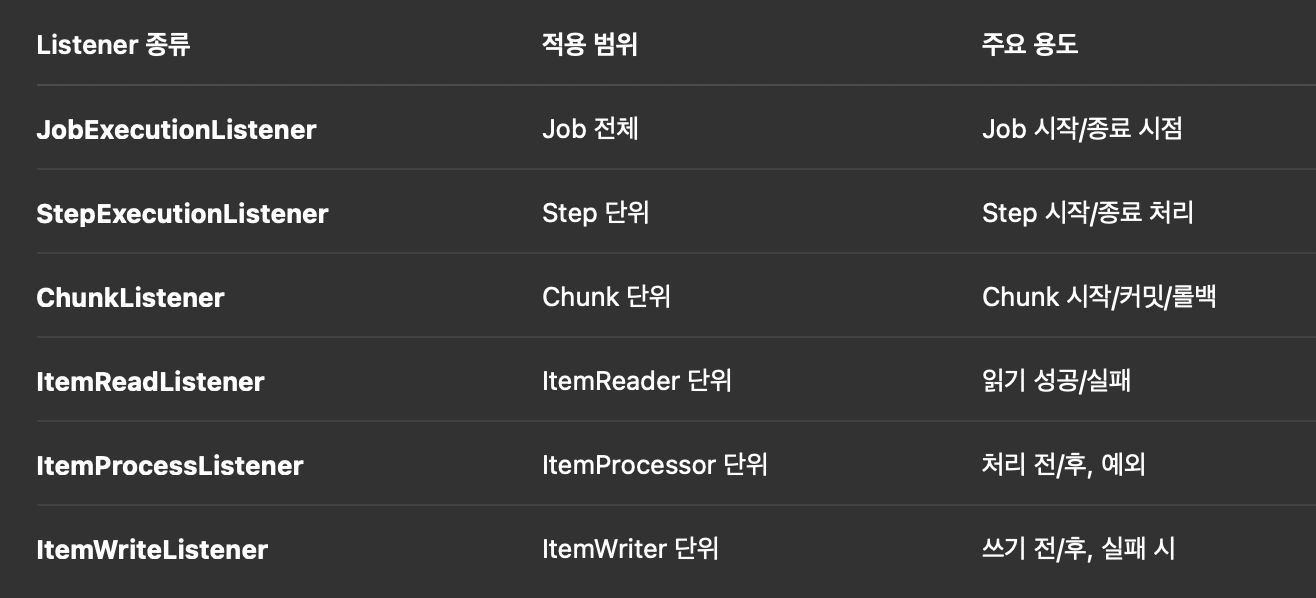
주요 Listener 인터페이스 설명
- JobExecutionListener
public interface JobExecutionListener {
    void beforeJob(JobExecution jobExecution);
    void afterJob(JobExecution jobExecution);
}- StepExecutionListener
public interface StepExecutionListener {
    void beforeStep(StepExecution stepExecution);
    ExitStatus afterStep(StepExecution stepExecution);
}- Step 시작 전/후 처리
- 예: 리소스 초기화, 처리 결과 검증
- ChunkListener
public interface ChunkListener {
    void beforeChunk(ChunkContext context);
    void afterChunk(ChunkContext context);
    void afterChunkError(ChunkContext context);
}- ItemReadListener, ItemProcessListener, ItemWriteListener
public interface ItemReadListener<T> {
    void beforeRead();
    void afterRead(T item);
    void onReadError(Exception ex);
}

public interface ItemProcessListener<I, O> {
    void beforeProcess(I item);
    void afterProcess(I item, O result);
    void onProcessError(I item, Exception e);
}

public interface ItemWriteListener<T> {
    void beforeWrite(List<? extends T> items);
    void afterWrite(List<? extends T> items);
    void onWriteError(Exception e, List<? extends T> items);
}- 각각의 Item 처리 전/후 혹은 예외 발생 시 동작
- 예: 처리 실패 데이터 로그로 저장, 필터된 데이터 확인
Listener 구현 방법
방법 1: 인터페이스 기반 구현
@Component
public class LoggingJobListener implements JobExecutionListener {
    @Override
    public void beforeJob(JobExecution jobExecution) {
        System.out.println(">>> Job 시작!");
    }

    @Override
    public void afterJob(JobExecution jobExecution) {
        System.out.println(">>> Job 종료: 상태 = " + jobExecution.getStatus());
    }
}
Job 또는 Step에 등록:
@Bean
public Job myJob() {
    return jobBuilderFactory.get("myJob")
        .listener(loggingJobListener)
        .start(myStep())
        .build();
}
방법 2: 어노테이션 기반 구현 (@Before, @After 등)
Spring Batch는 @BeforeStep, @AfterStep, @BeforeJob, @AfterJob 등 어노테이션도 제공합니다.
@Component
public class AnnotationBasedStepListener {

    @BeforeStep
    public void beforeStep(StepExecution stepExecution) {
        System.out.println(">> Step 시작 전 실행");
    }

    @AfterStep
    public ExitStatus afterStep(StepExecution stepExecution) {
        System.out.println(">> Step 종료 후 실행");
        return stepExecution.getExitStatus();
    }
}
개발 블로그