URLConnection / HttpURLConnection
URL을 통해 서버와 통신하기 위해서는 자바에서 제공하는 URLConnection / HttpURLConnection 클래스를 사용할 수있다. (활용 : 파일, 웹 페이지 업로드 및 다운로드, http 요청 및 응답 전송 등)
- URLConnection : URL 연결 관련 슈퍼클래스. 일반적인 API 제공
- HttpURLConnection : URLConnection의 서브 클래스. HTTP 고유 기능에 대한 추가 지원 제공
URL을 통해 서버와 통신할 때의 단계
- URL 객체 만들기
- URL에서 URLConnection 객체 얻기
- URL 연결 설정 세팅
- 헤더 필드 읽기
- 입력 스트림 가져오기 및 데이터 읽기
- 출력 스트림 가져오기 및 데이터 읽기
- 연결 닫기
1. URL 객체 만들기
URL url = new("http://www.google.com");2. URL에서 URLConnection 객체 얻기
URLConnection urlCon = url.openConnection();- 프로토콜이 http:// 인 경우 반환된 객체를 HttpURLConnection 객체로 캐스팅할 수 있다.
URLConnection urlCon = (HttpURLConnection)url.openConnection();- openConnection() 메서드를 통해 네트워크 연결이 이루어지는 것이 아니다. 단지 인스턴스 반환!
네트워크 연결은 언제 되는가?
- 명시적으로 connect() 메서드가 호출될 때
- 암시적으로 헤더 필드를 읽거나 입력스트림/출력스트림을 가져올 때
3. URL 연결 설정 세팅
실제로 연결을 설정하기 전에 타임아웃, 캐시, HTTP 요청 방법 등과 같이 클라이언트와 서버 간의 다양한 옵션을 설정한다.
- setConnectTimeout(int timeout) : 연결 타임아웃 값 설정
- setReadTimeout(int timeout) : 읽기 타임아웃 값 설정
- setDefaultUseCaches(boolean default) : 캐시 사용을 기본적으로 할 것인지. 기본 값은 true
- setUseCaches(boolean useCaches) : 연결이 캐시를 사용하는지. 기본 값은 true
- setDoInput(boolean doInput) : URLConnection을 서버에서 콘텐츠를 읽는 데 사용할 수 있는지 여부를 설정. 기본 값은 true
- setDoOutput(boolean doOutput) : URLConnection이 서버에 데이터를 보내는데 사용할 수 있는지 여부를 설정. 기본 값은 false
- setRequestProperty(String key, String value) : key:value 쌍으로 일반 요청 속성을 설정. 키가 있는 속성이 이미 있을 경우 이전 값을 새 값으로 적용함
- 등등
4. 헤더 필드 읽기
요청 <-> URL <-> 응답
요청이 이루어지면 서버는 URL 요청 처리 후 메타데이터와 응답을 보낸다.
메타데이터는 헤더 필드(키:값)이다.
헤더 필더는 서버에 대한 정보, 상태 코드, 프로토콜 정보 등을 표현한다.
5. 입력 스트림 가져오기 및 데이터 읽기
요청 내용을 읽으려면 InputStream 인스턴스를 얻은 다음 read() 메서드를 사용하여 데이터를 읽는다.
- 데이터를 바이트 배열로 받는 경우
  InputStream ipstm = urlCon.getInputStream();
  byte[] data = new byte[1024];
ipstm.read(data);- 문자열로 읽기
  InputStream ipstm = urlCon.getInputStream();
  InputStreamReader reader = new InputStreamReader(ipstm);

  int char = reader.read(); //단일 문자
  char[] buffer = new char[4096];
  reader.read(buffer);  //문자열 배열

  BufferReader reader = new BufferReader(new inputStreamReader(ipstm));
  String line = reader.readLine();
6. 출력 스트림 가져오기 및 데이터 쓰기
서버에 데이터를 보내려면 연결에서 출력을 활성화 해야 한다.
urlCon.setDoOutPut(true);연결 관련 OutPutStream 객체를 가져온 다음 writer() 메서드를 사용하여 데이터를 쓴다.
OutPutStream outstm = urlCon.getOutPutStream();
byte[] data = new byte[1024];
outstm.writer(data);- 문자 데이터 쓰기
  OutputStreamWriter writer = new OutputStreamWriter(outputStream);
  int character = 'a';
  writer.write(character); // writes a single character
  char[] buffer = new char[4096];
  writer.write(buffer); // writes an array of characters

  PrintWriter writer = new PrintWriter(outstm);
  String line = "This is String";
  writer.print(line);
7. 연결 종료
InputStream, OutPutStream 객체에서 close() 메서드를 호출한다.
URLConnection 인스턴스와 연결된 네트워크 리소스가 해지된다.
예제 코드
import java.io.BufferedReader;
import java.io.IOException;
import java.io.InputStreamReader;
import java.io.OutputStream;
import java.net.HttpURLConnection;
import java.net.URL;
import java.nio.charset.StandardCharsets;

public class HttpUrlConnectionExample {

    public static void main(String[] args) {
        try {
            // 서버 URL 설정
            URL url = new URL("http://your-server-url.com/your-endpoint");

            // 연결 설정
            HttpURLConnection connection = (HttpURLConnection) url.openConnection();
            connection.setRequestMethod("GET");

            // 파라미터 설정
            String param = "your_parameter=" + java.net.URLEncoder.encode("보내고 싶은 파라미터", StandardCharsets.UTF_8);

            // 파라미터 전송
            connection.setDoOutput(true);
            try (OutputStream os = connection.getOutputStream()) {
                byte[] input = param.getBytes(StandardCharsets.UTF_8);
                os.write(input, 0, input.length);
            }

            // 응답 받기
            int responseCode = connection.getResponseCode();
            if (responseCode == HttpURLConnection.HTTP_OK) {
                try (BufferedReader in = new BufferedReader(new InputStreamReader(connection.getInputStream()))) {
                    String response = in.readLine();
                    System.out.println("서버 응답: " + response);
                }
            } else {
                System.out.println("서버 요청 실패. 응답 코드: " + responseCode);
            }

            // 연결 닫기
            connection.disconnect();
        } catch (IOException e) {
            e.printStackTrace();
        }
    }
}
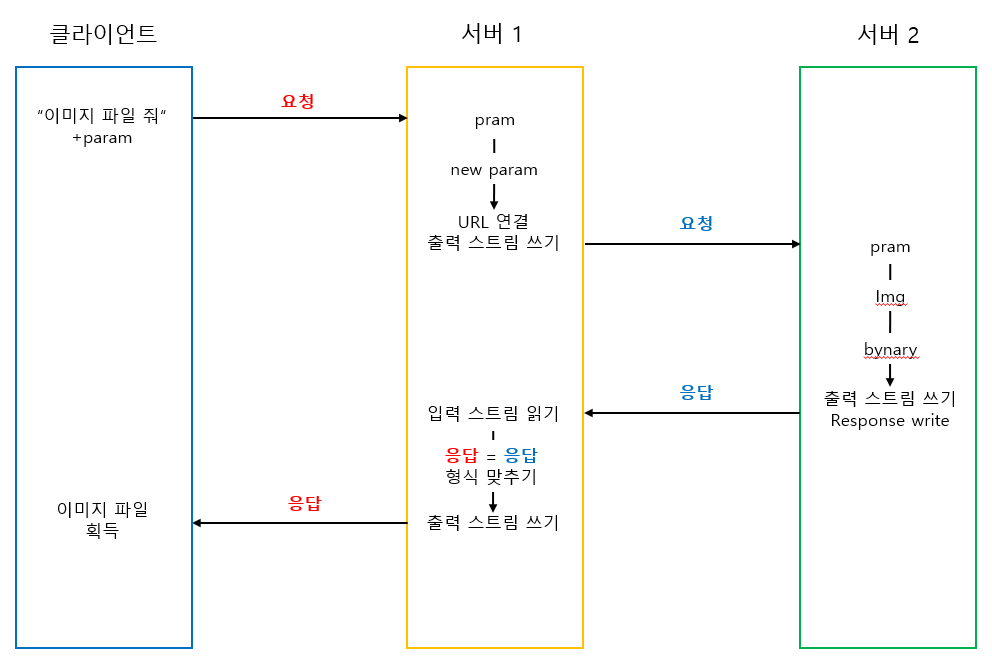
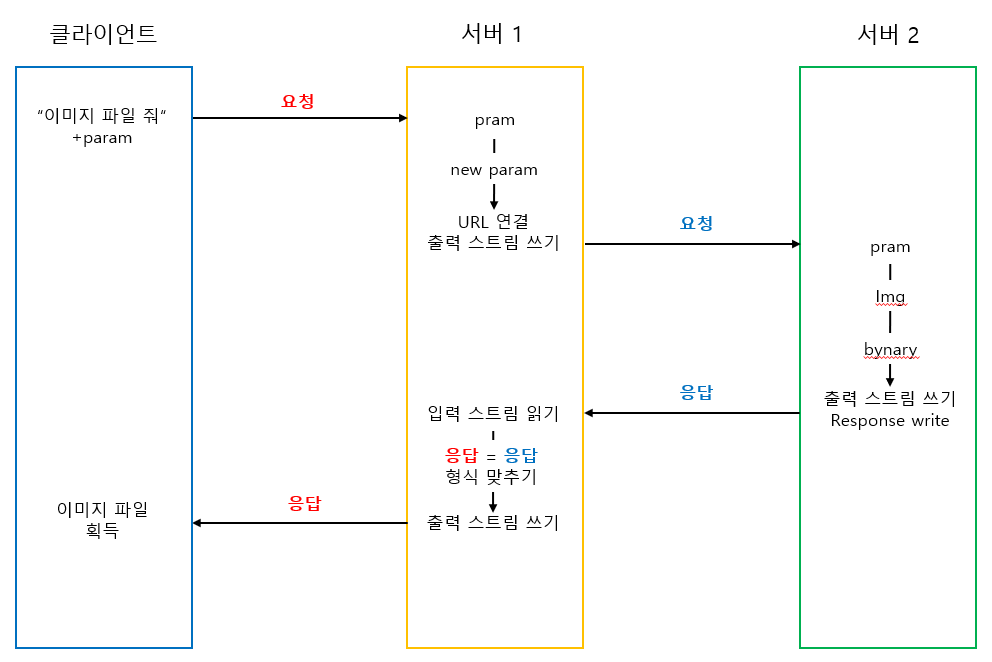
클라이언트-서버-서버 통신 과정

낭만감자