파일 업로드 시 미리보기 기능 추가하기
우리가 게시판에 파일을 업로드하면 업로드 전에 어떤 파일이 등록되었는지 미리보기를 제공하는 경우가 있다.
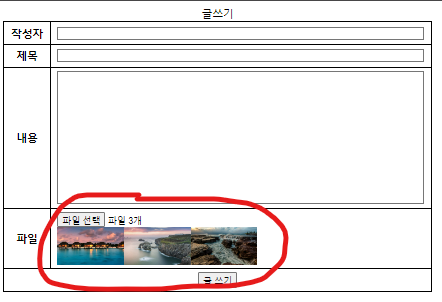
위 사진과 같은 기능을 구현해보자!
❗ 이 기능은 AJAX 와 관계 없이 활용 가능하다!
🔽 html / java script
html
<body>
	<form>
		<table>
			<caption>글쓰기</caption>
			<tr>
				<th>작성자</th>
				<td><input type="text" name="user_name"/></td>
			</tr>
			<tr>
				<th>제목</th>
				<td><input type="text" name="subject"/></td>
			</tr>
			<tr>
				<th>내용</th>
				<td><textarea name="content"></textarea></td>
			</tr>
			<tr>
				<th>파일</th>
				<td><input type="file" name="files" multiple="multiple" onchange="readFile(this)"/>
				<div id="img_list"></div></td>
			</tr>
			<tr>
				<th colspan = "2">
				  <input type="button" value="글 쓰기" onclick="save()"/>
				</th>
			</tr>
		</table>
	</form>
</body>
input type="file"에onchange가 발생하면readFile()함수가 실행되고, 그 내용이<div>에 표시된다.
java script
function readFile(input){
	var reader;
  $('#img_list').empty();

  for(var file of input.files){
  	reader = new FileReader();
    reader.readAsDataURL(file);
    reader.onload = function(e){
    	$('#img_list').append('<img class="preview" src="'+e.target.result+'"/>');
    }
  }
}.files: 파일에 대한 정보를 알 수 있다. (이름, type, size .. ).empty(): 비워주기 (이미지를 다시 업로드할 경우 기존 이미지는 삭제되도록 기능 설정)forof: file 이 여러개이기 때문에 for문으로 하나씩 써내준다.FileReader(): 파일리더객체는 파일객체로부터 바이너리를 읽어올 수 있는 객체이다..readAsDataURL(): 파일 객체로부터 DATA-URL 형태로 바이너리를 읽어온다..onload = function(){}: 파일 리더가 파일을 다 읽으면 이후 내용을 함수의 기능으로 넣어준다.

개발자가 되어보자