Dynamic SQL - 실시간 데이터 변경 / 조회
데이터를 입력하면 저장 버튼을 누르지 않아도 실시간으로 데이터가 저장되는 사이트들을 볼 수 있을 것이다.
Restful 은 url 을 경로로 활용하여 데이터를 가져오는 방식으로 url 경로 자체를 파라미터처럼 변수화 시켜서 보낼 수 있다.
/list/20/1 vs list?cnt=20%page=1
먼저 실시간으로 데이터가 변경되는 페이지를 만들기 위해 데이터베이스 테이블을 만들어준다.
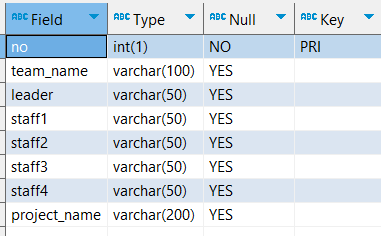
🔽 view
html
<body>
	<h3>조별 명단 및 프로젝트</h3>
	<hr/>
	<table>
		<thead>
			<tr>
				<th>no</th>
				<th>팀이름</th>
				<th>팀장</th>
				<th>팀원1</th>
				<th>팀원2</th>
				<th>팀원3</th>
				<th>팀원4</th>
				<th>프로젝트 주제</th>
			</tr>
		</thead>
		<tbody id="list">

		</tbody>
	</table>
</body>
javascript
<script>
	listCall(); // 서버 실행 시 함수 실행

	function listCall(){
    	$.ajax({
        	type: 'GET',
          	url: 'list.ajax',
          	data: {}, // 넘길 파라미터가 없기 때문에 공백으로 넘긴다.
          	dataType: 'JSON',
          	success: function(){
            	printList(data.list); // 성공 시 해당 함수 실행 (list 표현)
            }, error: function(e){
            	console.log(e);
            }
        })
    }

	function printList(list){
    	var content = '';

      	list.forEach(function(item,idx){
			content += '<tr>';
			content += '<td id="no">'+item.no+'</td>';
			content += '<td><input type="text" name="team_name" value="'+item.team_name+'"/></td>';
			content += '<td><input type="text" name="leader" value="'+item.leader+'"/></td>';
			content += '<td><input type="text" name="staff1" value="'+item.staff1+'"/></td>';
			content += '<td><input type="text" name="staff2" value="'+item.staff2+'"/></td>';
			content += '<td><input type="text" name="staff3" value="'+item.staff3+'"/></td>';
			content += '<td><input type="text" name="staff4" value="'+item.staff4+'"/></td>';
			content += '<td><input type="text" name="project_name" value="'+item.project_name+'"/></td>';
			content += '</tr>';
		})

		$('#list').html(content);

		$('input[type="text"]').focusin(function(e){
			$(this).css({'background-color':'white'});
		});

	// focusout 이벤트가 발생했을 때 기존값과 현재값이 다른 속성의 값을 변수에 담아준다.
      $('input[type="text"]').focusout(function(e){
			$(this).css({'background-color':'lightgray'});
			console.log(e);
			if(e.currentTarget.defaultValue != e.currentTarget.value){

				var col = $(this).attr('name'); // 컬럼명
				var val = $(this).val(); // 변경된 값
				var no = $(this).closest('tr').find('td').eq(0).html(); // pk (where 조건에 사용)

              // url 형태(restfull)
				location.href= 'update/'+col+'/'+val+'/'+no+'.ajax';
			}
		});
	}
</script>list: 배열 형태로 가져오기 때문에foreach사용$('list'): 객체 형식으로 가져오기 때문에 each 사용
▶ 객체로 가져오기 때문에 for in 사용 가능하다.
currentTarget.defaultValue: 이벤트 객체의 기본값e.currentTarget.value: 이벤트 객체의 현재값(변경된 값)
❌ 제너릭 형태(=>) 는 this를 사용할 수 없기 때문에 currentTarget 을 사용해줘야 한다.
- pk 인 no 값과 컬럼명, 변경된 값을 변수에 담아 url 형태로 파라미터를 넘겨준다.
🔽 controller
@GetMapping(value="/list.ajax")
@ResponseBody
public Map<String, Object> list(){

	Map<String, Object> map = new HashMap<String, Object>();
	map.put("list", team_service.list());
	return map;
}

@RequestMapping(value="/update/{col}/{val}/{no}.ajax")
public String update(@PathVariable Map<String, String> params) {

	team_service.update(params);
	return "redirect:/";
}
@PathVariable Map<String, String> params은 ▶
@PathVariable String col, @PathVariable String val, @PathVariable String no형태로도 가져올 수 있다.
❌ Map 형태로 가져올 경우 데이터를 한번에 확인할 수 있다는 장점이 있다.
🔽 service / dto
service
public List<TeamVO> list() {
	return team_mapper.list();
}


public void update(Map<String, String> params) {
	int row = team_mapper.update(params);
	logger.info("row : " + row);
}
🔽 mapper (DB)
<mapper namespace="kr.co.gudi.mapper.TeamMapper">

	<select id="list" resultType="kr.co.gudi.vo.TeamVO">
		SELECT * FROM team_project
	</select>

  	<update id="update" parameterType="map">
		UPDATE team_project
		<set>
			<if test="col != null and col.equals('team_name')">
				team_name = #{val},
			</if>
			<if test="col != null and col.equals('leader')">
				leader = #{val},
			</if>
			<if test="col != null and col.equals('staff1')">
				staff1 = #{val},
			</if>
			<if test="col != null and col.equals('staff2')">
				staff2 = #{val},
			</if>
			<if test="col != null and col.equals('staff3')">
				staff3 = #{val},
			</if>
			<if test="col != null and col.equals('staff4')">
				staff4 = #{val},
			</if>
			<if test="col != null and col.equals('project_name')">
				project_name = #{val}
			</if>
		</set>
		WHERE no = #{no}
	</update>
</mapper>- 실시간으로 DB에 입력될 것이기 때문에 들어온 컬럼명(col)과 DB에 컬럼명이 같고, null 이 아닌 경우 if 문을 실행한다.
다른 방법으로도 사용이 가능하지만 권고하지 않는 방식이다.
 	<update id="update" parameterType="map">
 		UPDATE team_project SET ${col} = #{val} WHERE no = #{no}
</update>-
#을 사용하면 컬럼이'싱클쿼터로 감싸져 문자열로 들어가 에러가 발생한다.
▶ 'team_name' = '1조' WHERE no = '1' -
$을 사용하면 문자열로 취급하지 않기 때문에 에러가 발생하지 않는다. -
$를 사용하면 내가 보여주고 싶은 컬럼만 지정할 수 있는데, 이건 사용자가 마음을 먹으면 바꿀 수 있기 때문에 보안성 이 떨어진다.
❌ 개인정보를 다 볼 수 있다. -
if 문은 if 문을 없애버리면 들어오는 값을 막을 수 있지만
$는 할 수 없기 때문에 권고하지 않는 방식이다.

개발자가 되어보자