
📋 Clipboard: writeText() 이슈 정리
❗️이슈
사파리(Safari) 환경에서 링크 복사 시 clipboard.writeText() 가 제대로 동작하지 않음.
📌 기존 코드
<button class="btn-link-copy"
        ng-click="$ctrl.copyAndIpCheck($ctrl.type)"
        clipboard="{{ $ctrl.shoppingCopyLink }}">
  링크복사
</button>copyAndIpCheck(vender: string) {
if (this.isLoggedIn) {
// ip 값을 주는 api 호출
this.IpService.setHistory(vender)
.then((res: any) => {
const urlWithIP = new URL(this.shoppingCopyLink);
urlWithIP.searchParams.append('ip', res.ip);
// 클립보드 복사
navigator.clipboard.writeText(urlWithIP.toString());
this.ModalService.open({
size: "sm-custom",
template: "<alert-modal></alert-modal>",
data: { message: "복사 되었습니다." }
});
});
} else {
this.AuthService.errorHandler(this.HttpStatusCodeService.UNAUTHORIZED);
}
}✅ 원인
Safari 브라우저는 보안 정책상 navigator.clipboard.writeText() 를
사용자의 직접적인 상호작용이 있는 함수 안에서만 허용함.
즉, API 호출과 함께 복사를 수행하면 동작하지 않음.
🙅♂️ 상호작용 중 clipboard.writeText()만 있어야 동작!
✅ 대안: window.prompt() 사용
API 호출이 필요한 상황이여서 자동 복사 대신
수동 복사 방식으로 우회하기로 하였다. (사파리의 경우에만)
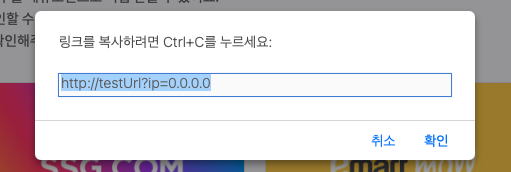
📌 개선된 코드
copyAndIpCheck(vender: string) {
  if (this.isLoggedIn) {
    this.IpService.setHistory(vender)
      .then((res: any) => {
        const urlWithIP = new URL(this.shoppingCopyLink);
        urlWithIP.searchParams.set('ip', res.ip);
        const textToCopy = urlWithIP.toString();

        const isSafari = /^((?!chrome|android).)*safari/i.test(navigator.userAgent);

        if (isSafari) {
          // Safari - 수동 복사 방식
          const promptText = '링크를 복사하려면 Ctrl+C를 누르세요:';
          window.prompt(promptText, textToCopy);
        } else {
          // 기타 브라우저 - 자동 복사
          navigator.clipboard.writeText(textToCopy)
            .then(() => {
              this.ModalService.open({
                size: "sm-custom",
                template: "<alert-modal></alert-modal>",
                data: { message: "복사 되었습니다." }
              });
            })
            .catch((error) => {
              console.error('Failed to copy text: ', error);
              this.ModalService.open({
                size: "sm-custom",
                template: "<alert-modal></alert-modal>",
                data: { message: "복사에 실패했습니다." }
              });
            });
        }
      });
  } else {
    this.AuthService.errorHandler(this.HttpStatusCodeService.UNAUTHORIZED);
  }
}
💬 요약
- Safari에서는 clipboard.writeText()가 사용자 직접 상호작용 내에서만 동작함.
- API 호출 → 복사 형태는 Safari에서 실패함.따라서 Safari 감지 후 window.prompt() 방식으로 복사 유도.
- 사용자 경험은 조금 번거로울 수 있지만, 브라우저별 이슈 대응으로 안정성 확보 가능.

Frontend Developer