Python 기반 주요 이미지 라이브러리

OpenCV 이미지 로딩
imread()를 이용한 이미지 로딩
OpenCV에서 이미지 로딩은 imread('파일명')을 이용. imread('파일명')은 파일을 읽어 넘파이 array로 변환 -> (x, y, z) 세로,가로,채널
- OpenCV가 이미지를 RGB 형태가 아닌 BGR 형태로 로딩하기 때문에 색감이 원본 이미지와 다르게 나타남
import cv2
import matplotlib.pyplot as plt

img_array = cv2.imread('파일명')
plt.imshow(img_array)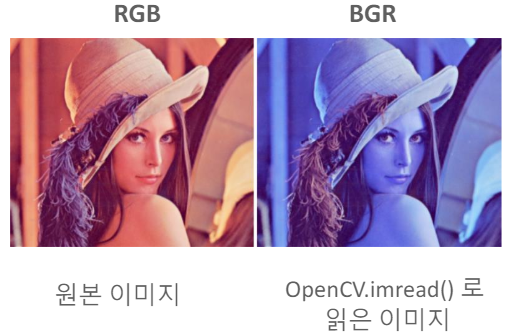
OpenCV 이미지 로딩 시 BGR을 RGB로 변환
cvtColor(이미지 배열, cv2.COLOR_BGR2RGB)를 이용하여 BGR을 RGB로 변환
import cv2
import matplotlib.pyplot as plt

bgr_img_array = cv2.imread('파일명')
rgb_img_array = cv2.cvtColor(bgr_img_array, cv2.COLOR_BGR2RGB)
plt.imshow(rgb_img_array)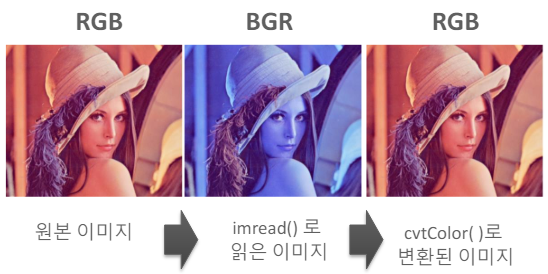
OpenCV 이미지 배열을 파일에 쓰기
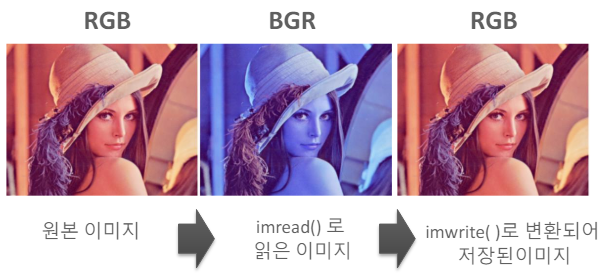
imwrite('출력파일명', 이미지배열)을 이용함. imread()로 인해 BGR 형태로 되어 있는 이미지 배열을 다시 RGB 형태로 변환하여 저장함.
-> imread()로 읽고 imwrite()로 출력하면서 이미지 파일은 다시 RGB 형태로 저장됨
import cv2
import matplotlib.pyplot as plt

img_array = cv2.imread('파일명')
cv2.imwrite('출력파일명', img_array)
cv.imshow(이미지 array)는 이미지 배열을 window frame에 보여줌
cv2.waitKey()는 키보드 입력이 있을 때까지 무한 대기함
cv2.destroyAllWindows()는 화면의 윈도우 프레임 모두 종료함
OpenCV 영상 처리 개요
VideoCapture 클래스는 동양상을 개별 frame으로 하나씩 읽어들이는 기능을 제공함
cap = cv2.VideoCapture(video_input_path)
vid_writer = cv2.VidoWriter(video_output_path, ...)

while True:
	hasFrame, img_frame = cap.read()
    if not hasFrame:
    print('더 이상 처리할 frame이 없습니다.')
    break

    vid_writer.write(img_frame)
VideoCapture 개요
VideoCapture 객체는 생성 인자로 입력 video 파일 위치를 받아 생성
cap = cv2.VideoCapture(video_input_path)
VideoCapture 객체는 입력 video 파일의 다양한 속성을 가져올 수 있음
영상 frame 너비: cap.get(cv.CAP_PROP_FRAME_WIDTH)
영상 frame 높이: cap.get(cv2.CAP_PROP_FRAME_HEIGHT)
영상 FPS: cap.get(cv2.CAP_PROP_FPS)
VideoCapture 객체의 read()는 마지막 frame까지 차례로 frame을 읽음
VideoWriter 개요
VideoWriter 객체는 write할 동영상 파일 위치, encoding 코덱 유형, write fps 수치, frame 크기를 생성자로 입력 받아 이들 값에 따른 동영상 write 수행
cap = cv2.VideoCapture(video_input_path)

codec  cv2.VideoWriter_fourcc(*'XVID')

vid_size = (round(cap.get(cv2.CAP_PROP_FRAME_WIDTH)), round(cap.get(cv2.CAP_PROP_FRAME_HEIGHT)))
vid_fps = cap.get(cv2.CAP_PROP_FPS)

vid_writer = cv2.VideoWriter(video_output_path, codec, vid_fps, vid_size)